


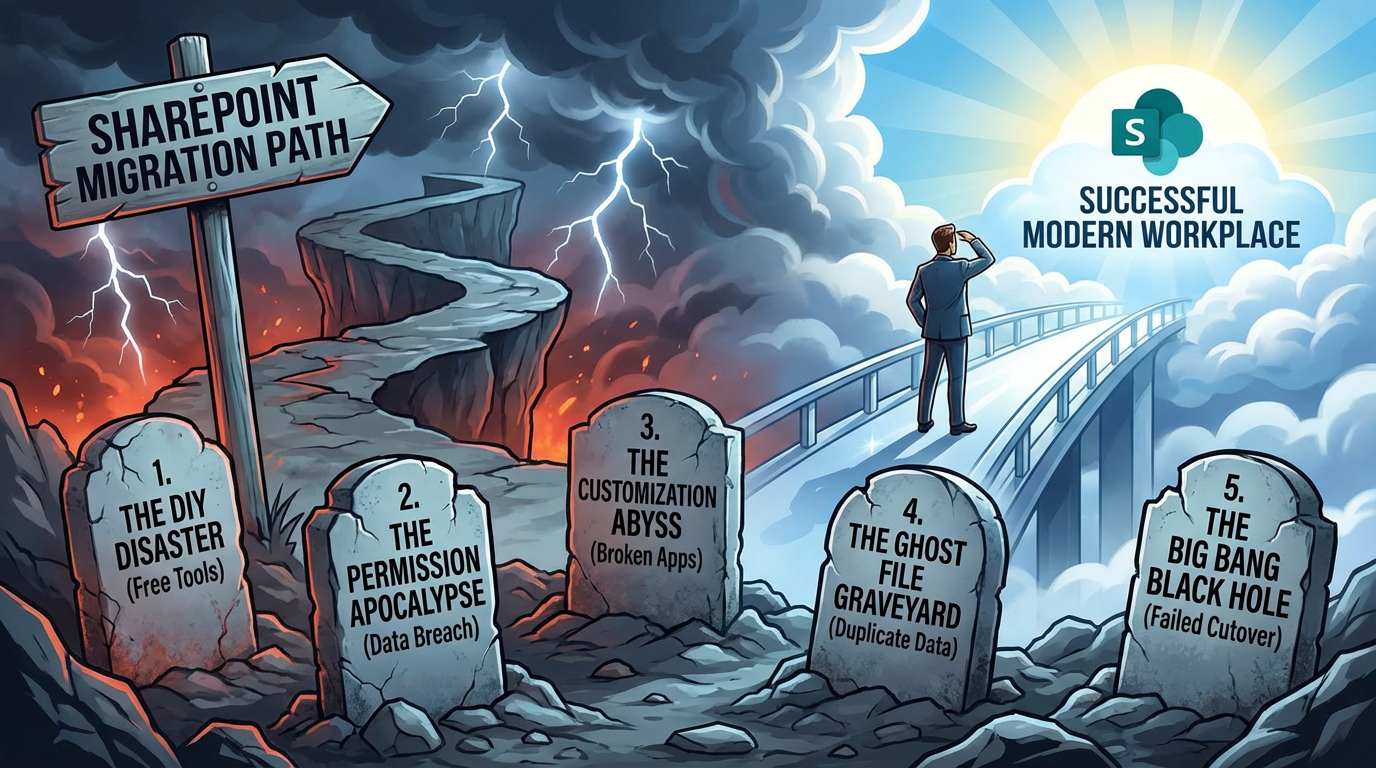

5 SharePoint Migration Failures That Cost Enterprises Millions (And How to Avoid Them)
An enterprise SharePoint migration is one of the most complex and high-stakes projects an IT leader will oversee. The goal is clear: move the organization's critical data and collaborative workflows to a modern, secure, and scalable cloud platform. Yet, the path is littered with catastrophic failures—projects that spiral over budget, disrupt the business for months, and in the worst cases, end in a full rollback, leaving the organization in a weaker position than when it started.
These multi-million dollar failures rarely stem from a lack of technical skill. Your IT team is smart. The failures are almost always strategic. They are born from a fundamental underestimation of complexity, a reliance on inadequate tools, and a critical failure to treat the migration as a business transformation project rather than a simple file-copying task. This analysis will dissect five of the most common and costly failures we have seen in the field, supported by real-world case studies, to provide a strategic blueprint for ensuring your migration delivers value, not chaos.
Failure #1: The DIY Disaster - Relying on "Free" Tools for an Enterprise Job
The temptation is immense. Your budget is under scrutiny, and Microsoft provides the SharePoint Migration Tool (SPMT) for free. The business case seems to write itself: leverage our capable internal team, use the free tool, and save hundreds of thousands on consulting fees and third-party software. This thinking is the first and most common step toward a migration disaster.
Case Study: An Energy Firm's $2 Million Mistake
An 8,000-user energy firm with over 80TB of critical project data and intellectual property decided to pursue a DIY migration from SharePoint 2013 to SharePoint Online. The initial project budget was set at $500,000, allocated primarily to the salaries of the internal IT team for a projected six-month timeline. By Month 3, the project was already in deep trouble. The team found that SPMT could not handle their hundreds of custom InfoPath forms and SharePoint Designer workflows, bringing a critical portion of the migration to a halt. By Month 5, they were battling constant throttling from the SharePoint Online service, drastically slowing their data transfer rates. After nine months, with the project only 30% complete and the business demanding access to the new platform, the CIO made the painful decision to engage a specialized partner to rescue the project. The rescue operation took another six months and cost $1.1 million in consulting fees and third-party tool licenses. Including the fully-loaded salary cost of the internal team for the now 15-month ordeal, the total cost exceeded $2.5 million—five times the original budget.
The Technical Trap: A Utility Van for a Corporate Relocation
The SharePoint Migration Tool is a capable product for its intended purpose: small, simple migrations with low complexity. It’s like a utility van—perfect for moving the contents of a small apartment. An enterprise migration, however, is a corporate headquarters relocation. It requires a fleet of specialized vehicles, a logistics team, detailed manifests, and military-grade orchestration.
SPMT and other basic tools lack the essential features required for an enterprise-scale project:
- Orchestration and Scheduling: You cannot centrally manage migration waves, schedule jobs to run automatically outside business hours to minimize network impact, or intelligently balance workloads across multiple migration servers. This leads to a massive manual effort of "babysitting" jobs around the clock.
- Forensic-Level Auditing: When an auditor asks for proof that a specific file's version history and metadata were preserved during migration, a basic log file from SPMT is insufficient. Enterprise tools like ShareGate, AvePoint, or Quest provide granular, object-level reporting that proves chain of custody for compliance.
- Intelligent Throttling Management: Throttling is a protective feature of the cloud, not a bug. Enterprise tools are designed to work with it, automatically backing off when they receive a "429 - Too Many Requests" response and retrying later. They can manage multiple migration jobs in parallel to maximize throughput without being completely shut down.
- Complex Scenario Handling: These tools cannot handle complex permission transformations or on-the-fly metadata corrections, which are standard requirements in any large-scale migration.
Lesson Learned
The true cost of a "free" tool is the immense manual effort required to fill its feature gaps and the unquantifiable business risk of its unpredictability. For any migration over a few terabytes or a few hundred users, investing in an enterprise-grade, third-party migration platform is the single best decision you can make to ensure a predictable timeline and a successful outcome.
Failure #2: The Permission Apocalypse - When "Lift and Shift" Creates a Data Breach
One of the most insidious failures is a seemingly successful migration that hides a security catastrophe. The data is moved, the sites are online, but the permissions are a tangled mess, granting wide access to sensitive information.
Case Study: A Pharma Company's Compliance Nightmare
A global pharmaceutical company was migrating a legacy file server containing decades of R&D data to SharePoint Online. The file server had a deeply nested folder structure with a complex web of permissions applied at every level. The migration team, under pressure to complete the project quickly, performed a "lift and shift," attempting to map the existing permissions directly to the new SharePoint environment. On Day 1, the helpdesk was flooded with calls. But the bigger problem was discovered by the compliance team: due to broken inheritance and misapplied permissions, a broad group of users in the manufacturing division now had access to highly confidential clinical trial data and drug patent information. The discovery triggered a frantic, all-hands-on-deck effort to lock down dozens of sites, leading to a major internal investigation and a reportable compliance incident.
The Technical Trap: Forcing a Legacy Model onto a Modern Architecture
This failure stems from a misunderstanding of a fundamental architectural shift.
- The Legacy Model: On-premises file servers and older SharePoint versions encourage a "waterfall" of permissions. You set permissions at a high level, then break them at sub-folders, then break them again at the individual file level. This leads to a chaotic state of explicit permissions and broken inheritance that is impossible to audit or manage at scale. It also runs into hard platform limits, like the 50,000 unique permissions scope limit in a SharePoint library, which can cause libraries to become locked and inaccessible.
- The Modern M365 Model: SharePoint Online security is designed around the simplicity of Microsoft 365 Groups. A Group is a single identity that grants membership to a team, a SharePoint site, a Planner plan, and more. The model is flatter, simpler, and vastly more secure. The goal is to manage access at the site level, not at the individual document level.
Trying to replicate the granular, broken legacy model in the cloud is like trying to fit a square peg in a round hole. It’s a recipe for both over-permissive access (data breaches) and under-permissive access (lost productivity).
Lesson Learned
A Permissions Audit and Modernization Strategy must be a mandatory, distinct workstream that is completed before the migration begins. This is not just an IT task; it requires engaging with business data owners to understand who should have access, not just who used to have access. The goal is to use the migration as an opportunity to pay down your "permission debt" and implement a clean, auditable, and sustainable governance model.
Failure #3: The Customization Abyss - Breaking the Business by Moving the Files
In many established enterprises, SharePoint is more than a file repository; it's a critical application platform. A decade of business processes—for quality control, capital expenditure requests, employee onboarding—have been built using now-deprecated technologies. A migration plan that treats these as an afterthought is a plan for business disruption.
Case Study: A Manufacturing Plant Grinds to a Halt
A large automotive parts manufacturer had their entire factory floor quality control (QC) process built on a complex web of over 200 SharePoint Designer workflows and InfoPath forms. When a QC issue was identified on the production line, an operator would fill out an InfoPath form, which would trigger a multi-stage review and remediation workflow. The migration team, focused on the terabytes of document data, treated these customizations as a "Phase 2" problem. They migrated all the document libraries successfully. On Monday morning, the business came to a standstill. Operators could no longer submit QC reports because the InfoPath forms would not render in SharePoint Online. The entire process for managing production quality was broken, directly impacting the manufacturing output.
The Technical Trap: Assuming Compatibility with Deprecated Technology
The architecture of SharePoint Online is fundamentally different from on-premises versions. The following legacy customizations are not just unsupported; they are actively blocked for security and stability reasons:
- InfoPath Forms: The InfoPath service does not exist in SharePoint Online. There is no migration path; they simply will not work.
- SharePoint Designer Workflows: While some may function in a limited capacity, they have been officially deprecated since 2020. They are a ticking time bomb in your new environment.
- Full Trust Code (Farm Solutions): These server-side DLLs are strictly forbidden in the multi-tenant cloud.
- Sandboxed Solutions: Even the code-based versions of these "safer" solutions are deprecated and will not function.
Lesson Learned
A Customization Audit is one of the first and most critical steps in any migration plan. You must identify every legacy solution and map it to the business process it enables. The migration then becomes a parallel project: a data migration stream and an application modernization stream, focused on rebuilding critical processes using the modern, supported, and far more powerful Power Platform (Power Apps and Power Automate).
Failure #4: The "Ghost File" Graveyard - A Fast Cutover Creates a Dirty Destination
In the final days of a migration, the pressure is immense to minimize the cutover weekend's downtime. The quickest way to do this is to run one final "incremental" sync, which only copies files that have changed recently. This shortcut can turn your pristine new SharePoint environment into a digital graveyard of "ghost files," duplicates, and outdated information.
Case Study: A Law Firm's Costly Contract Confusion
A prominent law firm, migrating its case files, prioritized a fast cutover to minimize disruption to its lawyers. They used an incremental-only strategy for the final sync. Months later, strange issues began to surface. A paralegal referenced an outdated version of a contract because the newly renamed "Final Executed Version" was present alongside the old draft, which should have been deleted. The system was littered with duplicates and ghosts—files deleted from the source that were never removed from the destination. The IT team lost credibility, and users lost trust in the new system, with some resorting to saving critical files to their local desktops, creating a new "shadow IT" problem.
The Technical Trap: The Blind Spot of "Last Modified"
Simple incremental migration tools work by asking a single question: "Has this file's 'Last Modified' date changed?" If yes, it copies the file. If no, it skips it. This creates major blind spots:
- Renames: When a user renames
Proposal_v1.docxtoProposal_Final.docx, a simple sync sees a "new" file (Proposal_Final) and copies it over. It doesn't know thatProposal_v1was replaced, so it leaves the old file in the destination. - Moves: Moving a file to a new folder is often registered as a "delete" and an "add." The file is copied to the new location, but the original is left behind in the destination.
- Deletions: Most importantly, if a file is deleted at the source, an incremental sync has no knowledge of this and will never delete it from the destination.
Migration StrategyProsConsBest forIncremental SyncVery fast, minimal downtime window."Dirty" destination with duplicates and ghosts; data integrity issues.Small, non-critical datasets; collaboration sites.Full / "Dry Run" Sync100% data fidelity; destination is a perfect mirror.Slower; requires a longer, planned cutover window.Large, sensitive datasets; regulated data (legal, finance).
Lesson Learned
For any data where accuracy and integrity are paramount, you must prioritize a "clean" destination over a "fast" one. The professional strategy involves performing a final, full synchronization to a clean target during the cutover window. This guarantees that the destination is a perfect, 1:1 mirror of the source at the time of the switch, eliminating the risk of ghost files and ensuring user trust from Day 1.
Failure #5: The "Big Bang" Black Hole - Underestimating the Physics of Data
This is a failure born of hubris. An IT team, armed with a high-speed internet connection, believes they can defy the "physics of data" and move terabytes of information in a single weekend. They plan a "big bang" cutover, only to watch it collapse in real-time.
Case Study: A Global Conglomerate's Weekend of Chaos
A 10,000-user global company with a distributed workforce attempted to migrate 50TB of data from SharePoint 2016 in a single "go-live" weekend. Their project plan assumed their 1Gbps internet connection would allow for a swift transfer. The migration started Friday evening. By Saturday morning, the team was in a panic. The migration speed was a fraction of what they had calculated. They were being heavily throttled by the SharePoint service. By Sunday afternoon, it was clear that less than 20% of the data would be moved by Monday morning. After a series of high-pressure calls with executive leadership, the gut-wrenching decision was made to roll back the entire effort, leaving users in a state of confusion and the IT team facing a complete loss of confidence.
The Technical Trap: Bandwidth vs. Throughput
Microsoft's cloud is a shared service. To ensure stability and performance for all customers, they implement protective throttling on all incoming data. As their own migration performance guidance makes clear, your raw internet bandwidth is not the determining factor. The service limits the number of requests and the amount of data you can push in a given timeframe. You simply cannot move 50TB in 48 hours. The physics of data transfer, combined with protective throttling, makes it impossible.
Lesson Learned
An enterprise migration must be a phased, wave-based project that runs for weeks or months, not a single weekend. A successful strategy is built on the principle of coexistence, allowing the business to operate without interruption while the data is moved in the background. This is accomplished through:
- Reliable, continuous delta synchronizations to keep the destination data fresh.
- A clear communication plan and wave schedule so users know when their sites will be switched.
- A hypercare support model to assist users as they transition to the new environment.
Conclusion: Your SharePoint Migration Readiness Checklist
These five failures, while technically distinct, all share a common root: a failure of strategy. They are the result of choosing the easy path over the right one, underestimating the inherent complexity of an enterprise environment, and prioritizing short-term speed over long-term stability and security.
A successful SharePoint migration is a landmark achievement that can unlock immense productivity and innovation. An unsuccessful one can set a business back for years. The difference lies in acknowledging the complexity upfront and planning for it meticulously. Don't learn these lessons the hard way.
Call to Action: To de-risk your project, it is essential to perform the necessary pre-flight checks. Download our free Migration Readiness Checklist to guide you through the critical planning stages, including performing a comprehensive customization audit, designing a modern permission and governance model, selecting the right tools, and building a realistic, phased timeline for success.
References
- Microsoft Learn: Introducing the SharePoint Migration Tool (SPMT)
- Microsoft Learn: SharePoint Online software boundaries and limits
- Microsoft Learn: General migration performance guidance
- Microsoft Learn: What's deprecated or removed from SharePoint Server 2019 (re: Workflows)
- Microsoft Learn: Introduction to the Power Platform

















