



If your first question is about the SharePoint migration cost per gigabyte, you're already on track for a project disaster. This cost-per-GB mindset is the most common mistake we see. It’s how a project that starts with a €20,000 "simple migration" quote spirals into a €90,000 recovery engagement after the initial attempt fails.
The real cost isn’t in moving data. It's in neutralizing the technical debt buried in your legacy systems.
The Reality of Your SharePoint Migration Cost
Stop asking for a price per terabyte. That question tells an experienced architect that you’re focused on a metric that barely matters. The volume of your data is almost trivial. The complexity of it is what will detonate your budget.
Your file servers, old SharePoint farms, and legacy tenants are not clean archives. Let's be honest. They are digital minefields of broken permission inheritance, abandoned workflows, undocumented customizations, and compliance gaps. Each one is a hidden IED ready to blow up your timeline.
Think of your migration cost like an iceberg. The data volume is the visible 10%. The submerged 90% is the chaotic mess of technical debt you’ve inherited. This is where your project will sink if you don't map the minefield from day one.
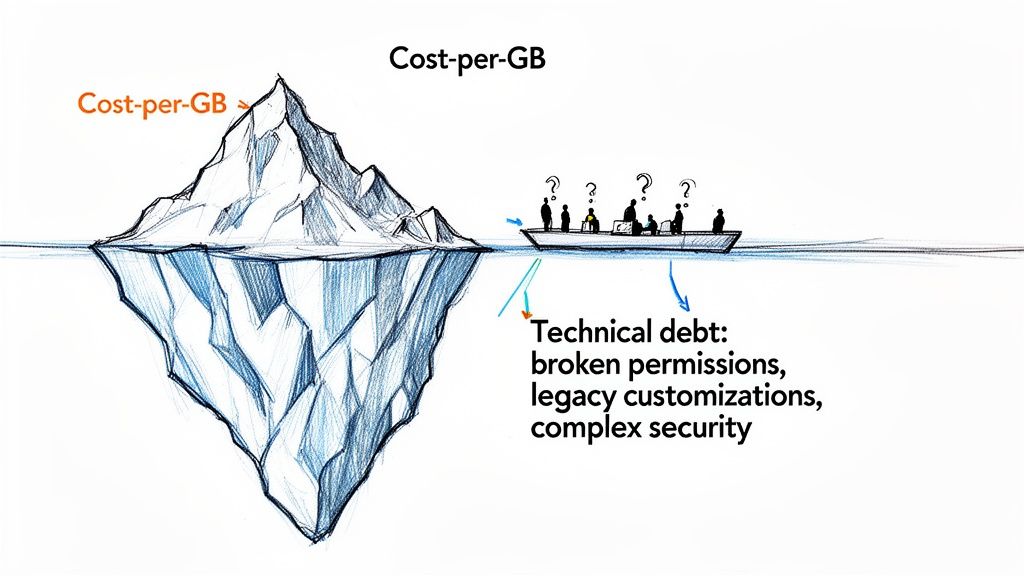
The Real Cost Drivers You Must Address
We often see clients fail when they budget for a tool license and their internal team's time. This approach ignores the specialist work required to navigate the technical realities of a high-stakes migration. The true cost drivers are never about moving files; they are about de-risking the entire process.
Your budget absolutely must account for the real-world complexities that standard tools cannot handle:
- Permissions Remediation: Your current environment is riddled with broken permission inheritance. Just lifting and shifting this mess doesn't just replicate a problem—it creates a critical security and compliance failure in Microsoft 365. Fixing this isn't optional; it's a prerequisite for a secure tenancy. Missing this step doesn't just fail the migration; it breaks legal compliance.
- Legacy Customisations: Those old web parts, SharePoint Designer workflows, and InfoPath forms your business relies on? They are dead in Modern SharePoint. Each one needs to be forensically identified, assessed, and rebuilt on the Power Platform, which demands specialist development skills your team likely doesn't have.
- Data Governance and Security: Are you moving data into a hardened environment? A migration is the only logical time to implement a Zero-Trust security model in Entra ID. Ignoring this means you're just moving sensitive data into a vulnerable new home, waiting for a breach.
The most expensive migration is the one you have to do twice. The cost of a failed project isn't just the money; it's the operational chaos, the security exposure, and the permanent loss of trust from the business.
Before you ask for a quote, your first step must be a deep architectural analysis of what you actually have. An upfront investment in a proper assessment is the only way to avoid the disastrous cost overruns that cripple unprepared organizations.
For a clearer picture of how these factors influence project budgets, you can review our high-level pricing guide.
Why Standard Migration Tools Will Fail Your Enterprise Project
Your team has looked at Microsoft’s SharePoint Migration Tool (SPMT) and third-party options like ShareGate. Their marketing makes migration sound like a simple, push-button process.
Let me be direct: for any serious enterprise project, relying solely on these tools is the first and most critical point of failure.
This isn't theory. We are routinely engaged to rescue projects where a "tool-only" strategy has gone catastrophically wrong. The tools aren't the problem; the dangerous assumption that they can navigate the undocumented reality of your legacy environment is. They can't.
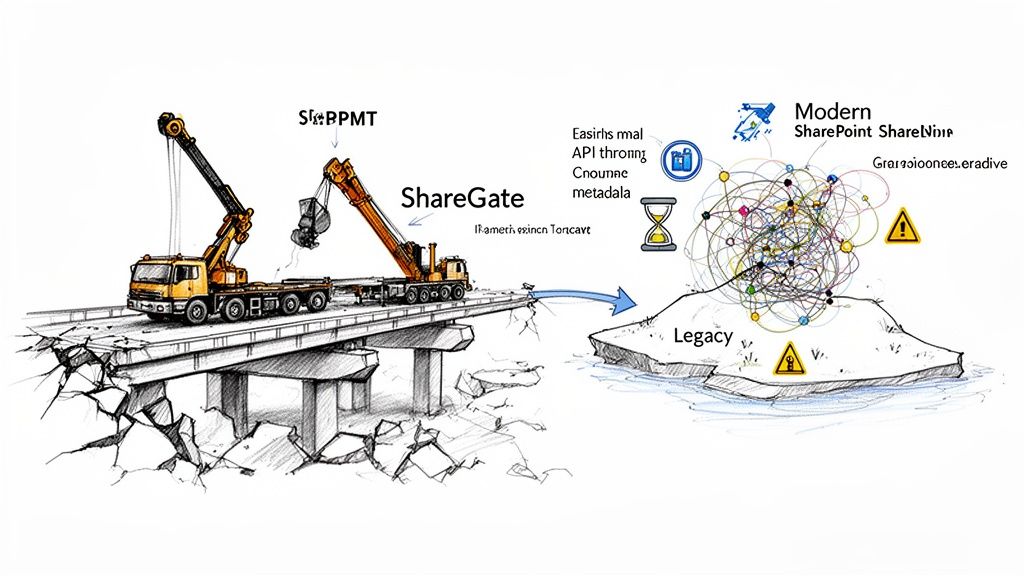
The SharePoint Migration Tool (SPMT) Breaking Point
SPMT is a basic utility for a simple task: moving a few hundred gigabytes from a clean file share into a new SharePoint site. We use it for that. But it was never designed for the complexity of a real enterprise migration.
We often see clients get into trouble when they try to push SPMT beyond its fundamental limits. It simply chokes on enterprise complexity.
- Complex Permissions: It cannot handle broken inheritance or nuanced permission structures. It will either fail outright or, worse, migrate your data with default, wide-open permissions, creating an immediate and massive compliance gap.
- Metadata and Content Types: SPMT has no meaningful capability for mapping complex metadata. This doesn't just create a messy destination; it breaks the findability and governance of your data from day one.
- Scale and Throttling: The moment you attempt to move multiple terabytes, SPMT hits a brick wall. It is subject to severe API throttling from Microsoft, turning a week-long transfer into a months-long nightmare of failed jobs and timeouts.
The Ollo Verdict: Use SPMT for a single file share migration under 50GB with simple permissions. For anything else, you are deliberately accepting the risk of data loss and security breaches. It's a utility, not an enterprise solution. For anything else, you need custom scripting.
Where ShareGate Still Requires Expert Intervention
ShareGate is a far more capable tool, and it’s a core component of our toolkit. But it is not a "set it and forget it" platform. Believing so is a costly mistake.
ShareGate gives an expert the controls they need, but it does not remove the need for the expert.
The documentation says one thing, but in reality:
- API Throttling Management: ShareGate has settings to manage throttling, but it can't predict Microsoft’s dynamic limits. An architect must actively monitor the migration, using custom PowerShell scripts to adjust workloads and manage agent distribution, or your project will grind to a halt. The tool is reactive; an expert is proactive.
- Post-Migration Validation: The tool reports a "successful" transfer, but it cannot validate correct permissions application at scale. This requires custom PnP PowerShell scripting to crawl thousands of sites post-migration and compare source and destination permissions—a non-negotiable step for any regulated business.
- Identity Mapping: In a tenant-to-tenant migration, mapping user identities is fraught with peril. ShareGate provides a mapping utility, but it can't resolve complex GUID conflicts or inconsistencies between Entra ID environments. A mistake here doesn't just block a user; it can grant the wrong user access to highly sensitive data.
This gap between a tool's capability and a project's reality is precisely where budgets get destroyed.
Enterprise SharePoint migrations in the IE region for mid-size companies in regulated sectors like energy, finance, and healthcare typically cost €25,000-€75,000. Full-scale tenant-to-tenant consolidations can easily run €75,000-€300,000 or more, as we've seen firsthand at Ollo handling these high-stakes projects.
We often see IT directors in Dublin and Cork underestimate this by 70%, attempting a DIY approach with basic tools like SPMT. They then watch their budgets balloon due to overlooked realities like Microsoft's API throttling limits. You can discover more insights about how Microsoft's own documentation confirms these performance bottlenecks on Ollo.ie.
A "tool-only" approach is a gamble with your data, your budget, and your professional credibility. These tools are necessary instruments, but they are dangerously insufficient without an expert craftsman to wield them. Explore our detailed guide on the SharePoint Migration Tool to understand its specific limitations in more depth.
Uncovering the Hidden Costs That Will Inflate Your Budget
The initial quote for a migration tool is the most misleading number in your cost analysis. We see DIY projects go off the rails not because of the tool, but because of thousands of unplanned hours spent fixing technical gremlins that have lurked in the shadows for years.
Make no mistake, your legacy systems are not pristine. They are a living history of past architectural decisions and quick fixes. A migration tool doesn't understand that history; it just moves data from A to B, acting as a massive amplifier for every existing flaw.
These are not theories. These are the war stories from projects we’ve rescued, where one underestimated technical issue snowballed into a catastrophic business risk.
The Broken Permissions Nightmare
The most common point of failure we see is broken permissions inheritance. Your team sees a logical folder structure, but underneath, years of ad-hoc sharing have created a tangled, insecure mess.
Standard migration tools will either replicate these broken permissions faithfully or, worse, reset them to a wide-open default.
This doesn't just cause the migration to fail; it creates a serious legal and compliance breach. We've seen projects where this exact oversight exposed sensitive HR and financial data to entire departments post-migration, triggering a full-blown data breach investigation. The cost of forensic analysis and legal fallout dwarfed any savings from the DIY approach.
Fixing permissions isn't a tick-box exercise. It demands custom scripts to crawl the source, map the broken inheritance, and then rebuild a secure, logical permissions model in the new system before a single file is moved. This is a meticulous, expert-led process that out-of-the-box tools are completely blind to. To fully grasp the financial impact of getting this wrong, explore our insights on the hidden costs of poor data governance.
The Technical Traps That Halt Your Project
Beyond permissions, a host of well-documented—but consistently ignored—technical limits lie in wait. These are not edge cases; they are guaranteed problems in any legacy enterprise environment.
- The 5,000-Item List View Threshold: Microsoft’s own documentation warns about this hard limit. The documentation says this is a problem, but in reality, if your team migrates a large list, the moment it tips over 5,000 items, views break, searches fail, and the site becomes unusable. The "fix" involves re-architecting the data with indexing and filtered views—work that must happen before your users report the system is down.
- Long Path and Invalid Character Limits: Your old file server happily allowed file paths and characters that are forbidden in SharePoint Online. A migration tool flags these as "failed items." Your team is then left with the soul-crushing task of manually identifying, renaming, and re-queueing thousands of files, adding weeks of unplanned labor.
- GUID Conflicts in Tenant-to-Tenant Migrations: This one is particularly nasty. When merging tenants, you will inevitably have conflicts with the hidden object identifiers (GUIDs) that SharePoint uses. A tool might not even flag this, but the result is that content appears to migrate successfully while workflows and permissions are silently broken. Untangling this requires deep PowerShell expertise to script the remapping of these IDs—something no out-of-the-box tool can do.
Beyond the direct costs of the migration itself, unchecked software spending can significantly inflate your overall IT budget. Exploring effective software license management tools can help you uncover and control these other hidden expenses.
The cost of expert pre-migration analysis is a rounding error compared to the astronomical cost of post-migration emergency remediation. Your SharePoint migration cost isn't defined by the tools you buy, but by the disasters you avoid.
Calculating the True Cost of Your Migration Strategy
Let’s shift from technical talk to a hard commercial decision. You're at a fork in the road with two paths, each with a wildly different Total Cost of Ownership (TCO). This isn’t about picking a tool; it's about choosing a strategy and owning its financial consequences.
Path one is the DIY migration. This looks cheaper on the initial quote. You have a capable internal IT team, you’ve bought a tool license, and you believe you can handle this in-house.
Path two is engaging a specialist partner. This comes with a clear, upfront cost that looks higher on paper. Your choice here will define your real SharePoint migration cost more than any other factor.
Quantifying the Cost of a DIY Failure
If you’re leaning towards the DIY route, be brutally honest about the costs you’re signing up for. The tool license is trivial. The real invoice is paid in business disruption, emergency cleanup, and your team’s lost focus.
Your TCO calculation for a DIY project must include line items for:
- Lost Team Productivity: Every hour your senior tech team spends wrestling with API throttling or fixing long path name errors is an hour they aren't spending on critical business projects. What’s the cost of delaying your core initiatives by three months?
- Business Disruption from a Failed Cutover: What’s the financial hit of a failed migration weekend that spills into Monday morning? Calculate the cost of two days of lost productivity for a 50-person department that can’t access its files.
- Emergency Data Remediation: When you find a permissions breach post-migration, what’s the cost of calling in an emergency forensic team to assess the damage and a specialist team like ours to fix it? Reactive work costs double what proactive prevention does.
- Compliance Penalties: For any regulated business, a data breach is a legal nightmare. A single misconfigured library exposing client data can trigger GDPR fines that make your entire migration budget look like a rounding error. This risk needs a financial value attached.
This decision tree shows exactly how the risks branch out when you choose between a DIY migration and a specialist partner.
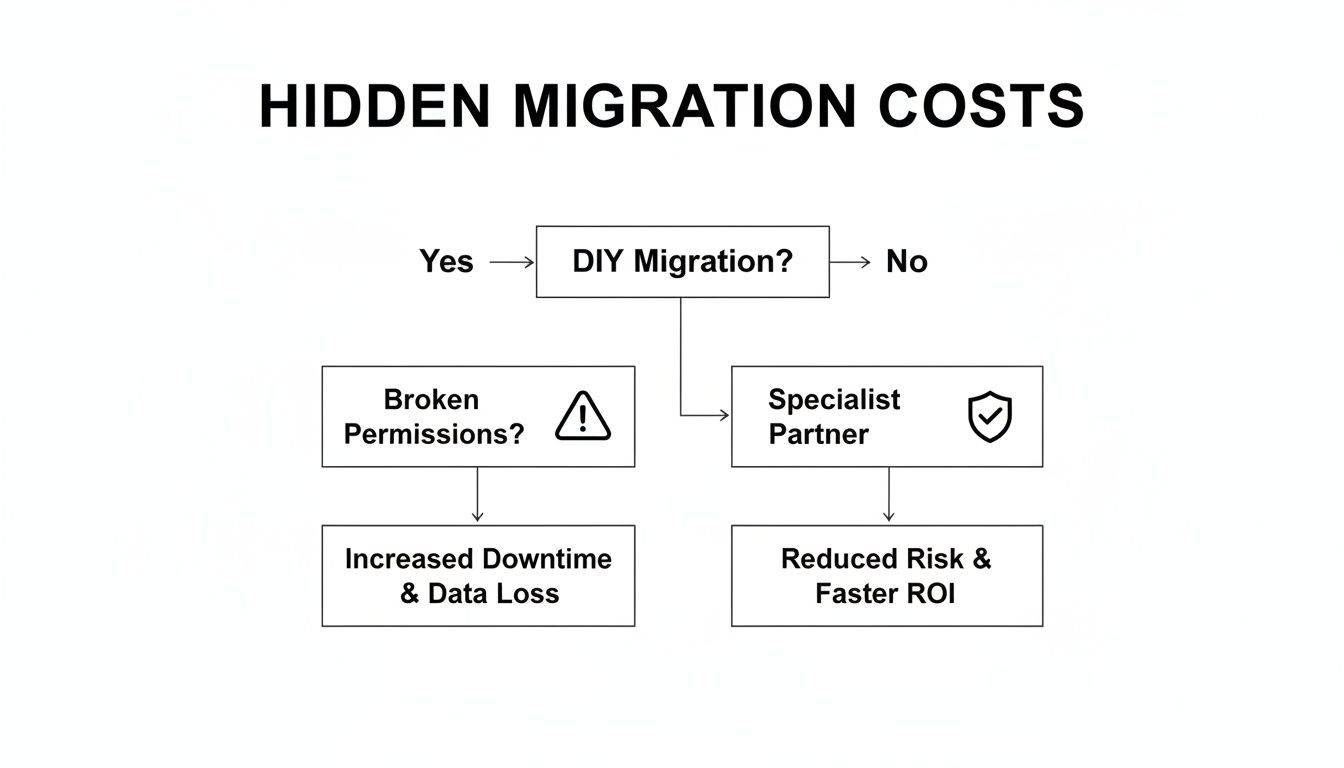
The graphic is clear: the moment you choose "DIY," you open multiple paths to catastrophic failure, each with its own significant, hidden price tag.
The Specialist Partner as a Fixed-Cost Insurance Policy
Now, let's look at the specialist-led path. Our fee isn't just a project line item. Think of it as a fixed-cost insurance policy against every DIY risk we just listed. We take on the risk of API throttling. We guarantee permissions integrity. We commit to a successful cutover on a fixed timeline.
Your SharePoint migration costs in the IE region climb dramatically with data complexity. A small job under 100 GB might run €3,000-€10,000. But a terabyte-scale project with custom permissions in a regulated sector like healthcare? That can easily soar to €30,000-€100,000+.
Here's the critical part: we see 70% of DIY attempts in these complex firms blow past their budget by double because of unaddressed technical debt. Microsoft’s own documentation warns about API throttling and the 5k item limit. They say to plan for 4-6 weeks per terabyte, but the reality with legacy file servers, broken inheritance, and file name conflicts pushes that to 3-6 months. We saw one Irish bank’s €40,000 project implode when 20% of its critical workflows broke post-migration.
This has nothing to do with how smart your team is. It’s about battle-hardened experience. We’ve seen every failure mode imaginable and built a process to neutralize these threats before they become problems. Your team can't learn that from a manual during a live, high-stakes project.
The Ollo Verdict: Choosing a specialist partner isn't an expense; it is a calculated business decision to de-risk a critical infrastructure project. The TCO of a successful, expert-led migration is always lower than the final, inflated cost of a failed DIY attempt.
A detailed pre-migration assessment is the first step in getting this right. To see what that involves, you should read our guide on the SharePoint migration assessment. It’s the foundation for building a realistic budget and avoiding the financial disasters that plague unprepared organisations.
The Ollo Blueprint for Reducing Migration Risk
A blueprint is a plan for success, not a sales pitch. This is our strategic methodology, born from decades of rescuing failed projects. It’s the polar opposite of the high-risk, tool-first approach that leads to budget overruns and lost data.
Your SharePoint migration cost should be an investment in risk reduction, not a gamble.
Our process starts where others finish: security. Before we move a single file, we conduct a rigorous Zero-Trust security model review of your Entra ID environment. We don't just lift and shift your data into a new tenant; we ensure that tenant is a fortress, not just a new container for your old problems. This neutralizes the risk of a post-migration security breach before it happens.
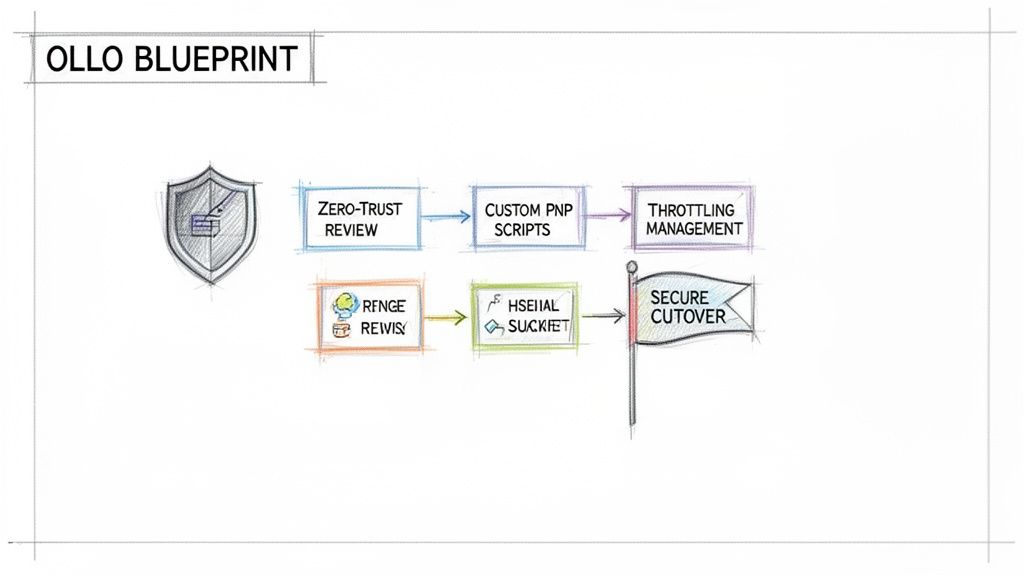
Custom Scripts Over Out-of-the-Box Limitations
This is where our approach diverges sharply from the standard DIY path. We don’t run a tool and hope for the best. We command the migration using a combination of industry-leading software and our own library of battle-tested PowerShell PnP scripts.
Your project will hit technical roadblocks. It’s inevitable. The difference is how those roadblocks are handled.
- Throttling Management: When Microsoft’s APIs inevitably throttle your data transfer, our scripts dynamically adjust workloads and manage migration agents. We don’t react to the slowdown; we actively manage the data flow to maintain velocity without triggering hard stops.
- Permissions Reconstruction: We don’t flag broken permissions inheritance; we methodically rebuild it. Our scripts analyze the source, define a new, secure permissions model based on your governance rules, and apply it flawlessly in the destination. This is a complete security architecture redesign.
- Validation at Scale: After the data has landed, our post-migration validation scripts crawl every site and library, comparing source and destination permissions. This provides an auditable report proving your data is not just moved but correctly secured—a step that is non-negotiable for compliance.
The Ollo Verdict: Engaging Ollo isn't outsourcing a task. It's about embedding a specialist team into your project to actively manage risk and guarantee an outcome, on time and on budget. Your team brings the business context; we bring the specialized, battle-hardened migration expertise you can't learn from documentation during a crisis.
The choice is a simple commercial calculation. You can gamble with your data, your timeline, and your budget by hoping a general-purpose tool can handle your specific complexities. Or you can secure your project’s success with a proven, risk-averse methodology. To see the full scope of what we do, you can learn more about our specialist migration services.
We Get These Questions All The Time
Can My Internal SharePoint Admin Handle The Migration To Save Money?
It’s tempting. Your admin knows your environment, and they’re brilliant at day-to-day operations. But migration is not an operational task; it's high-stakes, one-off project execution.
Think of it like this: your family doctor is fantastic for check-ups, but you wouldn’t ask them to perform open-heart surgery. A migration requires a surgical skillset: identity mapping across tenants, managing API throttling, scripting solutions for the 5k list view threshold, and knowing precisely what to do when—not if—something breaks at 2 AM during cutover.
The real cost of a DIY attempt isn’t just your admin’s time. It's the critical daily tasks that get ignored while they are consumed by the migration. We’ve been called in to rescue failed DIY projects where the cost of the cleanup and business disruption was triple what our initial proposal would have been.
How Much Does A Typical Tenant-to-Tenant Migration Cost?
For the regulated, mid-size Irish enterprises we serve, a tenant-to-tenant migration is a significant undertaking. A realistic starting point is €75,000, and for complex scenarios involving multiple legacy systems, it can climb north of €300,000.
Anyone who gives you a cost-per-user or cost-per-GB number is dangerously oversimplifying the problem. The true cost drivers are the messy details: merging two different security models, remediating years of Entra ID technical debt, resolving GUID conflicts, and untangling custom permissions without creating security holes. It’s about securely merging two distinct corporate worlds into one.
Why Can’t We Just Rely On Microsoft FastTrack?
Microsoft FastTrack is a valuable resource, and we often work alongside them. But understand their role: they provide high-level guidance, not hands-on migration. They are the architects who give you the blueprints; your team (or your partner) is still the builder who has to pour the concrete.
FastTrack will point you in the right direction, but they won't be writing the custom PowerShell scripts needed to fix your permissions or handling the inevitable exceptions that pop up at 2 AM. For any business with legacy customizations, strict compliance needs, or a complex security setup, FastTrack is the starting point, not the complete journey. We execute the complex technical work that is well outside their scope.
A successful migration isn't built on hope. It's built on a battle-tested strategy that anticipates failure points and neutralizes them before they impact your business.
If you're ready to de-risk your project and get a realistic handle on your SharePoint migration costs, let's talk.

















