


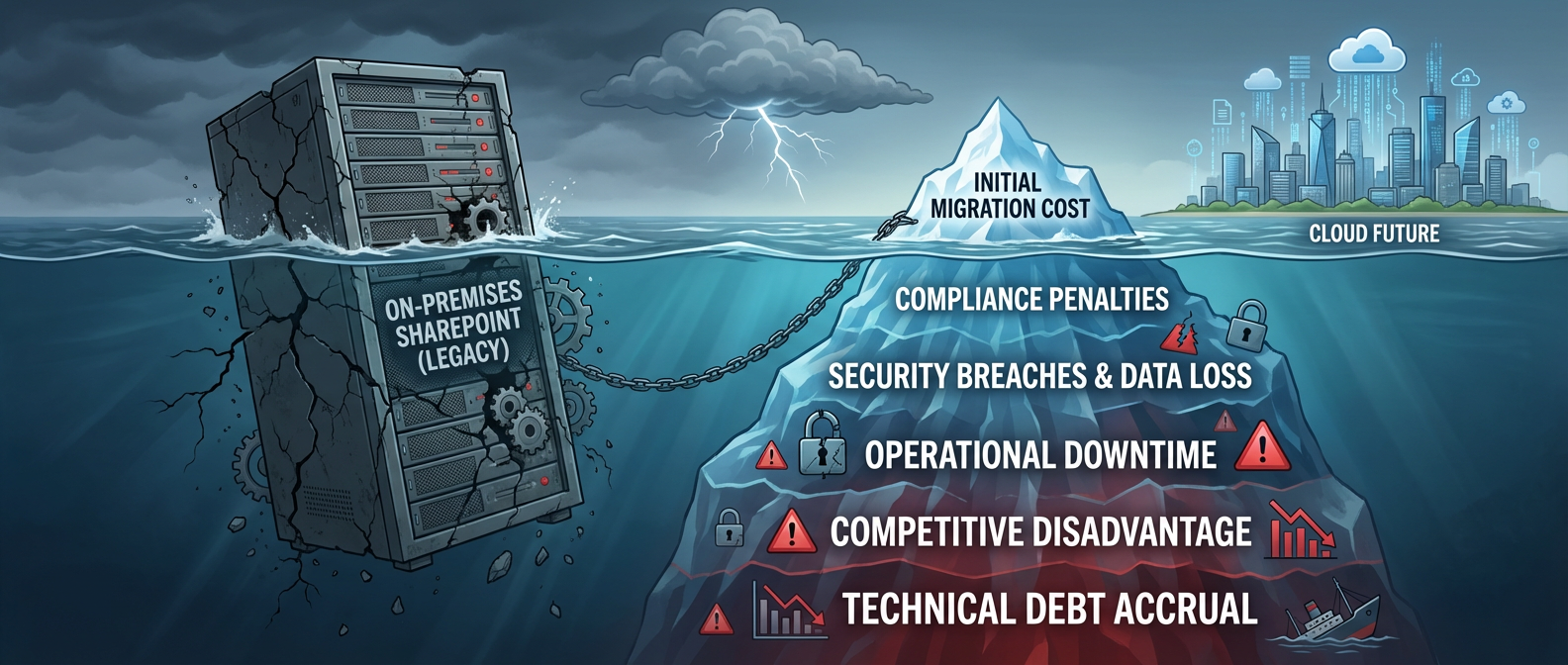

The Hidden Costs of Delayed SharePoint Migration: A Finance Sector Analysis
For the Chief Financial Officer or Chief Technology Officer of a financial institution, few decisions are as fraught with perceived risk and expense as a full-scale enterprise migration. The multi-million dollar price tag for moving from an on-premises SharePoint environment to the cloud seems like a monumental cost to incur for what many view as an "IT infrastructure project." The temptation is to delay, to sweat the assets, to push the decision off to the next fiscal year. This is a critical, and potentially catastrophic, miscalculation.
Delaying your SharePoint migration isn't a cost-saving measure; it's the quiet accrual of a massive, multi-faceted debt. It’s a debt paid not in predictable budget line items, but in the catastrophic currency of compliance failures, security breaches, operational paralysis, and a growing competitive disadvantage. This analysis moves beyond the surface-level IT discussion to build a comprehensive business case for finance leaders.
We will deconstruct the true, fully-loaded costs of inaction and present a strategic framework for transforming a mandatory technical upgrade into a powerful engine for business modernization and resilience.
Part 1: The Hard Deadline & The Illusion of Control
The primary driver for this conversation is a non-negotiable event. According to the Microsoft Product Lifecycle Policy, extended support for SharePoint Server 2019—the last major on-premises version for many—ends permanently on July 14, 2026.
This isn't a soft deadline. To understand its gravity, we must differentiate between the two phases of support:
- Mainstream Support (Ended January 9, 2024): This was the phase where Microsoft provided new features, design changes, and non-security updates. As of early 2024, your on-premises platform is already feature-frozen, a technological relic in an era of rapid cloud innovation.
- Extended Support (Ends July 14, 2026): This is the final life-support phase. Microsoft provides only critical security patches. After this date, no new patches for any newly discovered vulnerabilities will be released. Ever.
Operating a mission-critical financial system on software that is no longer receiving security updates is the equivalent of running your bank’s armored car fleet knowing there are fundamental, unfixable flaws in the vehicles' armor. It's not a matter of if a vulnerability will be exploited, but when.
The Myth of the "On-Premises Fortress"
A common objection we encounter is the belief in the "on-premises fortress"—the idea that because you own the physical servers, they are inherently more secure. This is a dangerous fallacy in today's interconnected world. Your on-premises environment is a complex ecosystem with a vast attack surface:
- The Underlying OS: Your SharePoint farm runs on Windows Server and connects to SQL Server. These platforms have their own lifecycle and vulnerabilities. An unpatched SharePoint instance running on an unpatched Windows Server is a security nightmare squared.
- Network Misconfigurations: A single misconfigured firewall rule or an overlooked network port can expose your entire internal infrastructure to the outside world.
- The Insider Threat: As a 2023 report from Verizon highlights, the human element remains a key factor in breaches. A disgruntled employee or a user who falls victim to a phishing attack can provide a threat actor with a foothold inside your "secure" perimeter. From there, they can move laterally to exploit the now-unpatchable EOL software.
- Physical Security vs. Digital Security: While you may have excellent physical security for your data center, the most sophisticated attacks today are digital. Microsoft invests over $1 billion annually in cybersecurity, employing thousands of experts to defend its cloud infrastructure—a scale no individual financial firm can hope to match.
The illusion of on-premises control is just that—an illusion. In reality, it’s a delegation of immense security responsibility entirely onto your internal team, who are left to defend a platform the manufacturer has abandoned.
Part 2: The Compounding Financial Penalties of Inaction
If the security argument isn't compelling enough, the direct financial consequences should be. These costs manifest in three primary domains: compliance penalties, security remediation, and the hidden TCO of your legacy systems.
The Audit Failure: From Theoretical Risk to Inevitable Penalty
For a financial institution, an audit is not a periodic inconvenience; it's a license to operate. Running EOL software is a direct challenge to the authority of auditors and regulators.
Consider the Sarbanes-Oxley Act (SOX). Sections 302 and 404 mandate that executives certify the accuracy of financial reports and the effectiveness of internal controls. It is virtually impossible to argue that your internal controls are effective when a core system for storing financial documents and collaborative data is verifiably insecure and unsupported. An auditor who discovers an EOL SharePoint farm has no choice but to report a significant deficiency or material weakness.
The consequences extend to litigation and eDiscovery. Imagine your firm is facing a lawsuit that requires you to produce all communications and documents related to a specific trade or client over a five-year period.
- On-Premises Nightmare: Your legal team must engage a forensic IT team to manually search across siloed servers, aggregate disparate logs to prove chain of custody, and deal with corrupted data and missing files. The process is slow, astronomically expensive, and often incomplete, exposing the firm to legal sanctions for failure to produce evidence.
- The Cloud Solution: In Microsoft 365, this process is handled by Microsoft Purview eDiscovery (Premium). A compliance officer can create a case, place custodians on legal hold, and use advanced search and analytics to find relevant content across SharePoint, Teams, and Exchange in a fraction of the time, with a fully auditable process.
The verdict from regulatory bodies like the SEC and FINRA is clear: cybersecurity is a primary focus. Operating on EOL software is no longer a forgiveable IT lapse; it is evidence of systemic negligence.
The True Cost of Ownership (TCO) Lie
One of the most persistent myths is that sticking with paid-for hardware is cheaper. This ignores the massive, ongoing operational expenditures required to keep an on-premises environment running. A realistic TCO analysis reveals a different story.
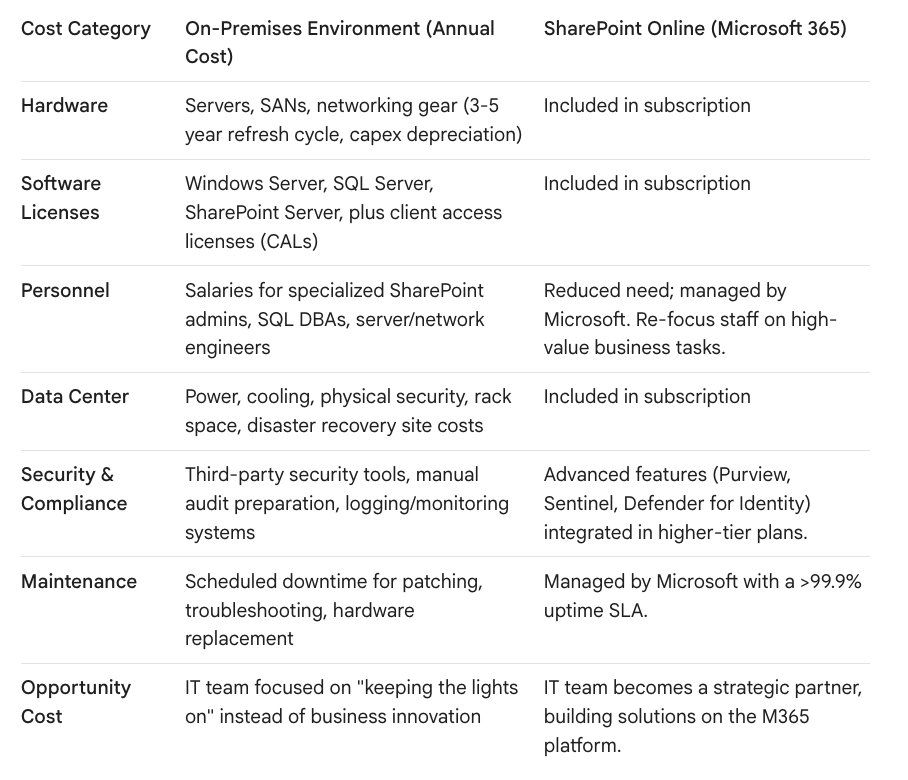
When you honestly calculate the fully-loaded cost, the perpetual OPEX of an on-premises farm is almost always higher than a predictable Microsoft 365 subscription, which also includes a vast array of additional services.
Part 3: The Widening Competitive Disadvantage
Beyond the defensive arguments of risk and cost, there is a powerful offensive argument: by remaining on a legacy platform, your firm is actively falling behind its competitors.
The Operational Drag: A Brake on Productivity and Insight
Modern finance moves at the speed of data. A legacy SharePoint environment creates a "data latency" that directly impacts the quality and speed of decision-making.
- The Disconnected Analyst: Your competitors are building real-time risk exposure and performance dashboards in Power BI that pull data directly from SharePoint Online lists. Your analysts are still waiting for end-of-day data exports to be dropped into a folder, then manually manipulating them in Excel. This delay can mean the difference between capitalizing on a market opportunity and reacting to it a day late.
- The Automation Gap: Consider a loan origination or trade approval process. On-prem, this is often a chain of emails and manually signed-off PDFs—a slow, opaque, and unauditable process. In the cloud, this can be rebuilt as a robust Power Automate workflow. The request is submitted via a Power App on a mobile device, routed through multiple stages of approval in Microsoft Teams with full logging, and the final document is stored in a compliant SharePoint site with appropriate metadata and retention policies applied automatically. This is not just an efficiency gain; it is a compliance and risk management upgrade.
- The Collaboration Black Hole: M&A due diligence requires a secure data room. On-premises, this is a nightmare of creating temporary AD accounts or using clunky, insecure third-party systems. In Microsoft 365, you can create a dedicated Microsoft Team, invite external guests via Azure B2B, and have a single, secure, auditable container for all files, conversations, and meetings related to the deal.
The Innovation Wall: Barricading Your Firm from the AI Revolution
The most significant competitive disadvantage is forward-looking. The next wave of productivity is being driven by Artificial Intelligence, specifically large language models like Microsoft Copilot for Microsoft 365.
Copilot's power comes from its ability to reason over your entire universe of business data—your emails, chats, calendar, and, most importantly, your files. This is enabled by the Microsoft Graph, the underlying API that maps the relationships between people and data across your tenant.
Your on-premises data is invisible to the Microsoft Graph.
This means that while your competitor's analyst can ask Copilot, "Summarize the key risks and opportunities from our last five earnings calls and cross-reference them with the latest market sentiment reports in the 'Research' SharePoint site," your analyst is still manually opening files and searching for keywords. This isn't a minor feature gap; it's a fundamental divergence in analytical capability. By staying on-premises, you are choosing to make your organization's most valuable intellectual property inaccessible to the most powerful productivity tools ever developed.
Part 4: The Path to Modernization: A Strategic Blueprint
A migration for a financial institution is not a "lift and shift" IT project. It is a business transformation program that must be approached with the rigor of a major portfolio investment. The goal is not just to move files; it is to enhance security, ensure compliance, and unlock productivity, all with zero business disruption.
Step 1: The Pre-Flight Audit
As SharePoint expert and Microsoft MVP Gregory Zelfond often emphasizes, you cannot migrate what you don't understand. The first phase is a comprehensive audit that produces several key deliverables:
- Content & ROT Analysis: Identify Redundant, Obsolete, and Trivial data that shouldn't be migrated. It's not uncommon to reduce migration volume by 30-40%, saving significant time and cost.
- Customization Inventory: Document every InfoPath form, SharePoint Designer workflow, and custom solution. Each must be mapped to a business process and a modernization path (e.g., rebuild in Power Platform).
- Permissions Model Report: Analyze the complex web of legacy permissions and design a new, simplified, and more secure governance model based on Microsoft 365 Groups.
Step 2: The Phased, Zero-Disruption Rollout
A "big bang" cutover is not an option. The migration must be executed in managed waves over several months, using sophisticated third-party tools that can keep the source and destination in sync.
- Coexistence is Key: During the migration, the old and new environments run in parallel. Smart links and hybrid configurations ensure users can continue to work seamlessly, regardless of whether their specific site has been migrated yet.
- A Finance-Specific Wave Plan: Don't start with the trading floor. A typical plan might look like this:
- Pilot Wave: A tech-savvy, low-risk group like IT or Marketing.
- Wave 1: Corporate functions like HR and Legal.
- Wave 2: Back-office finance and accounting departments.
- Wave 3: The most complex business units, like research analysts or portfolio managers, after the process has been perfected.
Step 3: Addressing the Data Sovereignty Question
Financial firms often cite data residency as a reason to stay on-premises. This is a largely outdated concern. Microsoft provides extensive data residency commitments and offers Multi-Geo Capabilities for global firms. Microsoft's cloud has also achieved a vast array of compliance certifications, including attestations specific to the financial services industry, that far exceed what most individual firms can achieve in their own data centers.
Conclusion: From Mandatory Expense to Strategic Investment
The 2026 deadline for SharePoint is not a distant threat; it is a catalyst for a critical business decision. The evidence is overwhelming: continuing to invest in a decaying, on-premises ecosystem is a strategy of diminishing returns and escalating risks.
The question for finance leaders is not "What is the cost of migrating?" but rather, "What is the compounding cost of not migrating?" When you factor in the inevitable compliance penalties, the ever-present security vulnerabilities, the hidden TCO, and the profound competitive disadvantage of being cut off from modern collaboration and AI tools, the cost of inaction is untenable.
A strategic, well-executed migration to SharePoint Online is not an IT expense. It is a direct investment in your firm's operational resilience, analytical agility, and future-readiness. It transforms your information architecture from a costly liability into a strategic asset.
Call to Action: The time to build your business case is now. Don't let the 2026 deadline become a crisis. Contact Ollo for a Free Migration Audit. We will help you quantify your specific risks and map out a strategic, budget-conscious roadmap for a successful and transformative journey to the cloud.
References
- Microsoft Learn: SharePoint Server 2019 Product Lifecycle
- Verizon: 2023 Data Breach Investigations Report (DBIR)
- Microsoft Security: Microsoft's Annual Cybersecurity Investment
- Microsoft Purview: eDiscovery (Premium) Overview
- Microsoft Power BI: Integration with SharePoint Online
- Microsoft Power Automate: Getting Started with Power Automate
- Microsoft Learn: Overview of Microsoft Copilot for Microsoft 365
- Microsoft 365: Data Residency and Geo-Specific Locations
- Microsoft Trust Center: Compliance Offerings for Financial Services

















