



7 Things That Go Wrong in Enterprise SharePoint Migrations (and How to Prevent Them)
An enterprise SharePoint migration is a strategic imperative, not just a technical project. Yet, many organizations stumble, turning a modernization opportunity into a costly ordeal marked by budget overruns, business disruption, and broken processes. The most common SharePoint migration problems stem from a fundamental misunderrehension of the task: it's not about moving files, but about re-architecting your organization's digital workplace.
In our experience architecting complex migrations for enterprise clients, the failures are rarely a surprise. They are the predictable result of overlooking critical complexities that hide beneath the surface of a seemingly straightforward "lift-and-shift." Success requires a strategic, engineering-led approach that anticipates these challenges before they derail your project. This is the architect's guide to the seven most common SharePoint migration failures and, more importantly, how to prevent them.
1. The $2M Mistake: Underestimating Costs and Relying on "Free" Tools
The most common trap is believing a DIY migration using native tools like the SharePoint Migration Tool (SPMT) will be cheaper. While the software is free, the true cost is hidden in the massive amount of manual effort, troubleshooting, and risk your internal team must absorb. Enterprise migrations are not the simple moves SPMT was designed for.
The reality we find is that native tools lack the enterprise-grade features for orchestration, detailed auditing, and complex permission transformation. This leads to the "$2M Mistake," where the initial "savings" are erased by extended timelines, productivity loss, and the eventual cost of a rescue project.
How to Prevent It:
- Perform a Real Cost Assessment: Calculate the fully-loaded cost of a DIY approach. Factor in your team's salaries for a timeline that is often 2-3x longer than estimated, the cost of business disruption, and the risk of a data breach from misconfigured permissions.
- Invest in Enterprise-Grade Tooling: Specialized third-party tools (like ShareGate, AvePoint, etc.) are not a luxury; they are a necessity. They provide the robust scheduling, reporting, and delta-sync capabilities required for a large-scale project.
- Transfer Risk: Engaging an experienced migration partner shifts the risk from your balance sheet to a specialist who can provide a predictable timeline and outcome, backed by a Statement of Work.

2. The Customization Blind Spot: Forgetting About Workflows and Apps
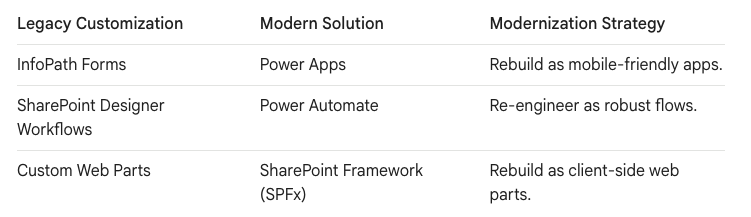
The second catastrophic failure is focusing only on the files and forgetting the business processes built on top of them. A decade of InfoPath forms, SharePoint Designer workflows, and custom web parts are not just features; they are your business. Simply moving the data will leave these critical processes behind, breaking everything from expense approvals to factory floor quality control.
These legacy customizations are fundamentally incompatible with SharePoint Online's modern architecture. They won't "just work"—they won't work at all.
How to Prevent It:
- Conduct a Customization Audit: Before migration, perform a deep inventory of every InfoPath form, SharePoint Designer workflow, and custom solution in your environment.
- Prioritize Based on Business Impact: Work with department heads to determine which processes are mission-critical, which are obsolete, and which can be retired. This triage is essential for managing project scope.
- Plan for Modernization: Create a parallel project track to re-engineer critical processes using the Power Platform. This isn't just a technical task; it's a business process improvement project that often takes 3-6 months on its own.
3. The "One-Size-Fits-All" Fallacy: Treating All Source Platforms the Same
Assuming a migration from Box or Dropbox is the same as from an on-premise file server is a critical error. Each cloud platform has a unique architecture and user behavior that must be reverse-engineered. Ignoring these platform-specific nuances is the quickest way to break your project.
In our experience, these "Cloud-to-Cloud" moves introduce specific, recurring issues.
- The Box Challenge ("Waterfall Permissions"): Box allows deep, item-level sharing that, when mapped directly, can shatter SharePoint's 50,000 unique permission scope limit.
- The Dropbox Challenge ("The Link Illusion"): Dropbox users live by sharing links. Migration breaks every single one of these links, severing connections with external vendors.
- The Google Challenge ("Ghost Owners"): Files in Google Workspace are owned by individuals. If an employee leaves and their account is deleted, their files can become "orphans" that disappear during migration.
How to Prevent It:
- Flatten the Architecture: For Box, audit for deep permission knots and flatten the structure by breaking nested folders into separate SharePoint Sites.
- Convert Links to Guests: For Dropbox, treat the migration as a change management project. Extract reports of all external shares and convert fragile anonymous links into managed Guest Accounts in Microsoft 365.
- Map Orphaned Files: For Google, audit for "Ghost Owners" and define a strategy to map their files to a dedicated service account in Azure AD to ensure intellectual property is preserved.
4. The Spreadsheet of Doom: A Flawed Data Governance & Cleansing Strategy
One of the biggest bottlenecks in any migration is the user review process. The standard approach—exporting a CSV of 50,000 files and asking a department head to review it—is what we call the "Spreadsheet of Doom." It overwhelms the user, stalls the project, and often results in migrating everything "just in case," turning your new environment into a digital swamp.
A migration is a golden opportunity to pay down your technical debt, not move it to a more expensive neighborhood.
How to Prevent It:
- Replace the Spreadsheet with an AI-Ready Catalog: Instead of a raw file list, move content to a secure "Staging Library." Use modern tools to automatically tag files with metadata based on their source location and content.
- Provide a "Menu," Not a List: Present the content to business users in an intelligent catalog they can filter and sort by context (e.g., Client, Year, Status), not just filename. This empowers them to make fast, informed decisions about what to keep, archive, or delete.
- Automate Cleansing: Before migration begins, use analytics tools to identify ROT (Redundant, Obsolete, Trivial) data. Deleting or archiving this content pre-migration saves time, money, and storage.
5. Believing the "Zero-Downtime" Myth
The idea that you can move terabytes of data and thousands of users with literally zero user impact is a myth. The physics of data transfer and identity management make it impossible. However, achieving "near-zero downtime" or, more accurately, zero loss of business continuity, is a reality—but it's a feat of engineering, not a marketing slogan.
The trap is believing a "big bang" cutover is possible. It's not. You cannot pause a global business for weeks.
How to Prevent It:
- Embrace a Phased, Coexistence Architecture: Run the old and new environments in parallel. Migrate users and content in managed waves, using a hybrid access model (like SSO and smart links) so users can access content regardless of its location.
- Master the Delta Sync: The heart of this strategy is the delta migration. After an initial bulk copy, run frequent incremental syncs to keep the destination updated. This ensures the final cutover is incredibly short.
- Plan the Final Cutover Meticulously: The only true "downtime" is the final switch. This is a planned weekend event where the source is set to read-only, one final delta sync is run, and permissions are finalized. Have a documented rollback plan in case of any issues.
6. Choosing Speed Over Fidelity
When the pressure is on to finish a cutover, the temptation is to run a standard incremental migration, which only copies files with a changed "Last Modified" date. This is fast, but it creates a "dirty" destination. If a user renames or moves a file, an incremental sync sees it as a "new" file and copies it over, leaving the original behind.
The result is a destination cluttered with duplicates, "ghost" files (files deleted at the source but still in the destination), and out-of-date information, compromising data integrity.
How to Prevent It:
- Prioritize Data Integrity for Critical Content: For sensitive data where version control is paramount (e.g., legal, finance), speed is secondary to accuracy.
- Use a "Clean Cutover" Strategy: For high-fidelity migrations, perform a final, full copy to a clean destination during the cutover window. This means deleting the staging site and performing one last, complete sync to a new, empty site collection. This guarantees the destination is a perfect mirror of the source.
- Calculate Your "Time to Cutover": Before you start, run a Proof of Concept (PoC) to get a realistic estimate of how long a final full copy will take. This allows you to make an informed decision and book an appropriate cutover window.
7. A Disconnected Identity and Permissions Strategy
This is the most catastrophic technical failure point. On-premises permissions are a complex web of nested groups and direct access. Cloud permissions use a modern model based on Microsoft 365 Groups. A native tool cannot intelligently translate between them. The result is either massive over-sharing of sensitive data or thousands of users losing access on Day 1.
Furthermore, in tenant-to-tenant migrations, you are merging two entire corporate identities. Failing to reconcile duplicate user accounts (jane.doe@acquirer.com vs. jane.doe@acquiree.com) before the migration begins is a recipe for chaos.
How to Prevent It:
- Map Identities First: Before any data is moved, perform a meticulous mapping of every user, Active Directory group, and SharePoint group from the source to its target in the new environment.
- Design a Cloud-Native Permissions Model: Don't just lift-and-shift legacy permissions. Use the migration as a chance to implement a simplified, more secure model based on Microsoft 365 Groups.
- Proactively Audit Post-Migration: The project isn't over at cutover. Run automated audits to validate that permissions were applied correctly and ensure there are no data leaks.
A successful SharePoint migration is an act of pragmatic architecture. It acknowledges complexity, prioritizes business continuity, and uses the event as a catalyst to build a more secure, organized, and AI-ready foundation for the future.
Would you like a deeper dive into any of these specific migration risks?

















