



Google Drive to SharePoint: A Practical Migration Guide for IT Teams
A Google Drive to SharePoint migration is the process of moving an organization's files, permissions, and collaborative structures from Google Workspace to Microsoft 365. For IT teams, this is far more than a "copy-paste" task; it's a strategic platform shift that requires translating Google's user-centric model into SharePoint's architecturally robust, governance-first framework.
In our experience, the biggest mistake IT leaders make is underestimating the architectural differences between these two platforms. They are built on fundamentally different philosophies. Google Drive is designed for individual ease of use and fluid sharing, often at the expense of central control. SharePoint is built for enterprise-grade information architecture, security, and lifecycle management.
Treating this like a simple file transfer is the quickest path to a failed project. A successful migration requires a plan that acknowledges and engineers around the unique challenges of Google Workspace, transforming a messy "digital attic" into a secure, AI-ready knowledge base in Microsoft 365.
The Architectural Traps: Why Google is Different
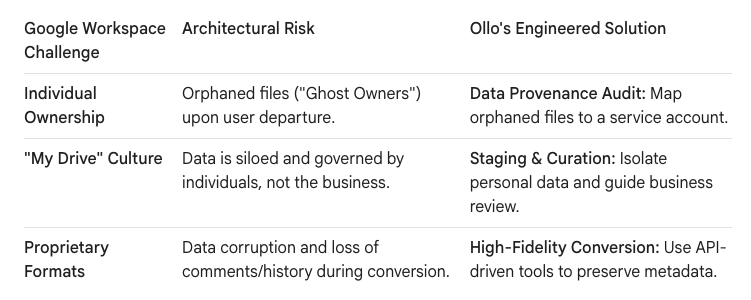
Migrating from an on-premises file server is straightforward. Migrating from a cloud competitor like Google Workspace introduces unique complexities that native tools like the SharePoint Migration Tool (SPMT) are not designed to handle. You must plan for three specific architectural traps.
1. The "Ghost Owner" and Data Provenance Risk
In Google Workspace, files are owned by individuals. If an employee creates critical files in a shared folder and then leaves the company, their account is often deleted. This action can lead to "orphaned" files with no clear owner.
- The Trap: When migrating, these orphaned files can either be skipped by the migration tool or moved without clear ownership, effectively disappearing into the digital ether. This represents a significant risk to intellectual property and data continuity.
- The Ollo Protocol: Before migration, we conduct a "Data Provenance Audit." We run scripts to identify all files owned by disabled or non-existent accounts. These files are then mapped to a designated "Digital Archive" service account in Microsoft 365. This guarantees that every piece of corporate data is preserved and lands safely in SharePoint with a clear line of ownership for future governance.
2. The Illusion of "My Drive" vs. Shared Drives
Google's structure creates a fundamental user behavior problem. Users are conditioned to store corporate data in their personal "My Drive" and share it out, rather than using centrally-governed Shared Drives.
- The Trap: A direct "lift-and-shift" of "My Drive" folders perpetuates this siloed structure, turning SharePoint into a collection of disconnected personal folders instead of a collaborative intranet. It also creates a permissions nightmare, trying to replicate thousands of one-off sharing links.
- The Ollo Protocol: We treat "My Drive" content as a "Grey Zone" that must be curated, not just moved. Our process involves:
- Staging: Migrating "My Drive" content to a secure, non-discoverable staging area in SharePoint.
- Attribution: Automatically tagging files with their original owner.
- User-Led Curation: Providing business users with an AI-powered "menu" to decide what to keep, archive, or delete, preventing the pollution of the new environment.
3. The Proprietary File Format Challenge
Google Docs, Sheets, and Slides are not files in the traditional sense; they are proprietary web-based formats.
- The Trap: A naive migration simply downloads these as
.docx,.xlsx, and.pptxfiles. However, this process can break complex formatting, lose comment history, and sever embedded links, corrupting the integrity of the information. - The Ollo Protocol: We use specialized migration tooling that leverages APIs to perform a high-fidelity conversion. This ensures that comments, suggested changes, and version history are preserved as closely as possible within the Microsoft Office format. For highly complex or critical files, we flag them for manual remediation to guarantee 100% data integrity.
The Blueprint for a Pragmatic Google to M365 Migration
A successful migration is not a single event but a phased program. This approach minimizes business disruption, manages risk, and ensures the final destination is clean, governed, and ready for modern tools like Microsoft Copilot.
Phase 1: The Architectural & Governance Plan (Months 1-2)
This is the most critical phase. We don't start by moving data; we start by designing the destination.
- Discovery: We audit the source Google environment, identifying Shared Drives, user permissions, external sharing, and high-risk "My Drive" data.
- Destination Design: We work with business leaders to design the new SharePoint information architecture—defining Hub Sites, Communication Sites, and Team Sites.
- Governance Rules: We establish the rules for the new world: Who can create sites? What is our external sharing policy? How will we use sensitivity labels?
Phase 2: The Pilot and Remediation (Month 3)
We never migrate an entire organization in one go. We select a tech-savvy department of 100-200 users for a pilot.
- Test the Process: We execute an end-to-end migration for this pilot group. This validates our tooling, scripts, and communication plan.
- Find the "Gotchas": The pilot will uncover unexpected issues—a specific type of Google Sheet that doesn't convert well, or a complex folder permission that needs re-architecting.
- Refine the Plan: We use the lessons from the pilot to refine the master migration plan before moving to the broader organization.
Phase 3: The Wave-Based Migration (Months 4-9)
With a tested plan, we execute the migration in logical waves, typically by department or region.
- The Staging Sync: For each wave, we perform the initial bulk copy of data to a secure staging area in SharePoint Online. Users continue to work in Google Drive, uninterrupted.
- Delta Syncs: We run scheduled incremental ("delta") syncs to keep the staging area up-to-date with any changes made in Google Drive.
- The Cutover Event: During a planned weekend window, we perform the final delta sync, set the source Google Drive folders to read-only, and switch user access to the new SharePoint environment. This is the only moment of real downtime, and it's confined to a few hours.
Phase 4: Post-Migration Hypercare (Months 10-12)
The project isn't over at cutover.
- Validation: We work with business users to validate that their data is present and their permissions are correct.
- Decommissioning: After a validation period (typically 30-60 days), we securely decommission the source Google Workspace environment.
Your Data as the Constant, The Platform as the Variable
Migrating from Google Drive to SharePoint is not about choosing a "better" platform; it's a strategic decision to consolidate on an integrated ecosystem built for the enterprise. By taking a structured, architectural approach, you do more than just move files. You tame digital sprawl, upgrade your security posture, and build a clean, consistent data foundation. This allows you to maximize your investment in the entire Microsoft 365 stack, from Teams collaboration to Power Platform automation and, most importantly, prepare your organization's most valuable asset—its data—for the age of AI.

















