



SharePoint 2016 End of Life: What Your Business Needs to Do Before the Clock Runs Out
For any enterprise running on SharePoint Server 2016, July 14, 2026, is not just another date on the calendar. It is the final deadline. This is the moment SharePoint 2016 reaches its definitive End of Life (EOL), a point at which Microsoft ceases all support, including critical security patches. For an IT Director or CTO, this isn't a minor technical sunset; it is a significant, time-sensitive business risk that demands a strategic response now.
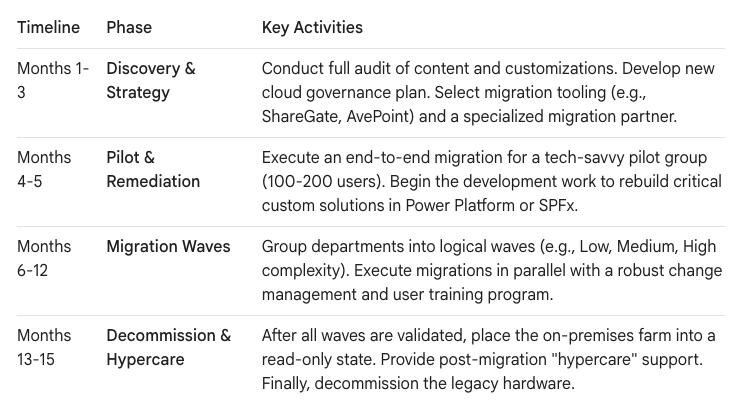
In our experience, a successful enterprise-scale migration from a deeply embedded platform like SharePoint 2016 requires a runway of at least 18-24 months. Delaying action transforms a manageable strategic project into a high-risk, high-cost emergency. This roadmap is for leaders who need to move beyond the "why" and focus on the "how"—transforming a mandatory technical update into a fundamental modernization of their digital workplace.
The EOL Timeline: Understanding the Two Final Deadlines
The End of Life for SharePoint 2016 is a process with two critical milestones, one of which has already passed.
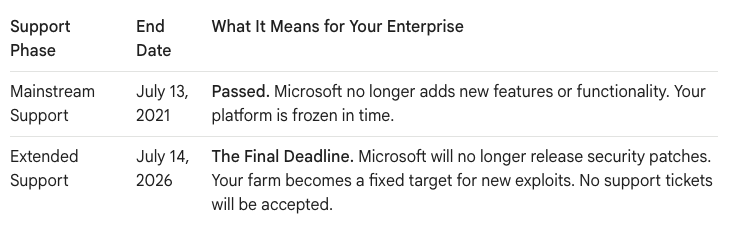
Running an enterprise platform on unsupported software is an act of significant corporate risk. After the EOL date, every new vulnerability discovered becomes a permanent, unfixable gap in your security posture. For any organization subject to compliance standards like GDPR, HIPAA, or SOX, operating on unsupported software is a direct and easily identifiable audit failure.
The Hidden Costs of Delaying Your SharePoint 2016 Migration
Waiting until the deadline nears is a strategy that compounds risk and cost. The price of procrastination is paid in security vulnerabilities, compliance penalties, and operational drag.
- Accumulating Security Debt: Malicious actors actively target EOL software. They know that any discovered vulnerability is a permanent backdoor. The cost of a single data breach almost always eclipses the entire cost of a well-planned migration.
- The Innovation Deficit: While your team is focused on keeping a legacy system alive, your competitors are leveraging the integrated power of the modern cloud. SharePoint Online is the foundation of a collaborative ecosystem including Microsoft Teams, the Power Platform, and Microsoft Purview. By staying on-premises, you are forfeiting the tools that drive modern automation, business intelligence, and productivity.
- The Support Black Hole: When a critical failure occurs post-EOL—and it will—your organization is entirely on its own. There is no escalation path to Microsoft. This reactive, high-stress operational model is an unacceptable liability for any serious enterprise.
Migration vs. Upgrade: Why SharePoint Online is the Strategic Choice
You have two paths forward: an on-premises upgrade to SharePoint Server Subscription Edition (SE) or a full migration to SharePoint Online.
- The Upgrade Path (SharePoint Server SE): This feels like the safer choice, keeping your data within your own data center. However, it is a tactical, not strategic, move. You remain responsible for all hardware, patching, and maintenance, and the Total Cost of Ownership (TCO) is demonstrably higher. You are merely kicking the can down the road.
- The Migration Path (SharePoint Online): For over 95% of enterprises, this is the definitive, forward-looking path. A migration to the cloud transforms SharePoint from a capital expense and maintenance burden into a scalable, secure, and constantly innovating operational expense. It requires a greater initial effort but delivers exponentially higher long-term business value.
The debate is settled. Migration to SharePoint Online is the accepted best practice for modern enterprises. The remainder of this guide focuses on that path.
The Customization Challenge: InfoPath, Designer, and Full Trust Code
The single biggest hurdle in a SharePoint 2016 migration is not the files; it’s the decade of embedded business processes built on now-deprecated technology. These customizations will not "just work" in SharePoint Online.
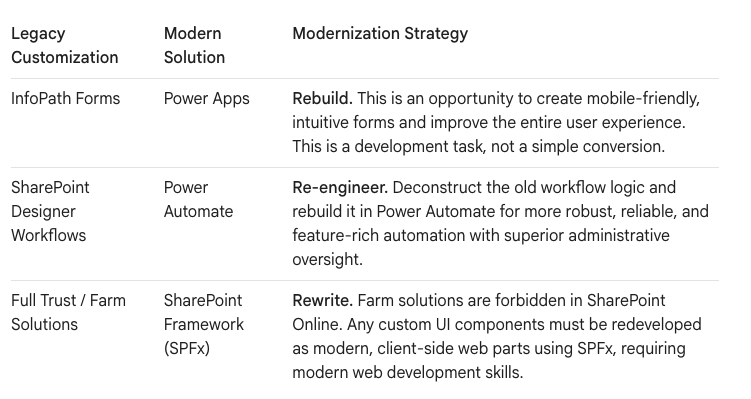
A comprehensive audit of your customizations is the mandatory first step of any migration plan. You cannot migrate what you do not understand.
Planning Your Enterprise Migration: A Phased Approach
A "big bang" migration for an enterprise is a recipe for failure. A phased, wave-based approach is essential for managing risk and ensuring user adoption.
Budgeting for Reality: The True Cost of an Enterprise Migration
A realistic migration budget extends far beyond software licenses. A common mistake is underestimating the need for specialized expertise to handle the complex realities of an enterprise environment.

As the provided data on DIY migration failures reveals, attempting to save money on specialized expertise often leads to catastrophic budget overruns and project failure. The investment in a partner with a proven track record is your best insurance policy.
The SharePoint 2016 end of life is an unavoidable inflection point. It is your organization's single best opportunity to shed a decade of technical debt, pay down governance deficits, and reposition your digital workplace as a modern, secure, and intelligent platform for growth.
Planning a migration of this scale is a significant undertaking. Is your organization ready to start the clock on your 18-month migration plan?

















