



Configuring SPF, DKIM, and DMARC in Microsoft 365: The Architect's Guide
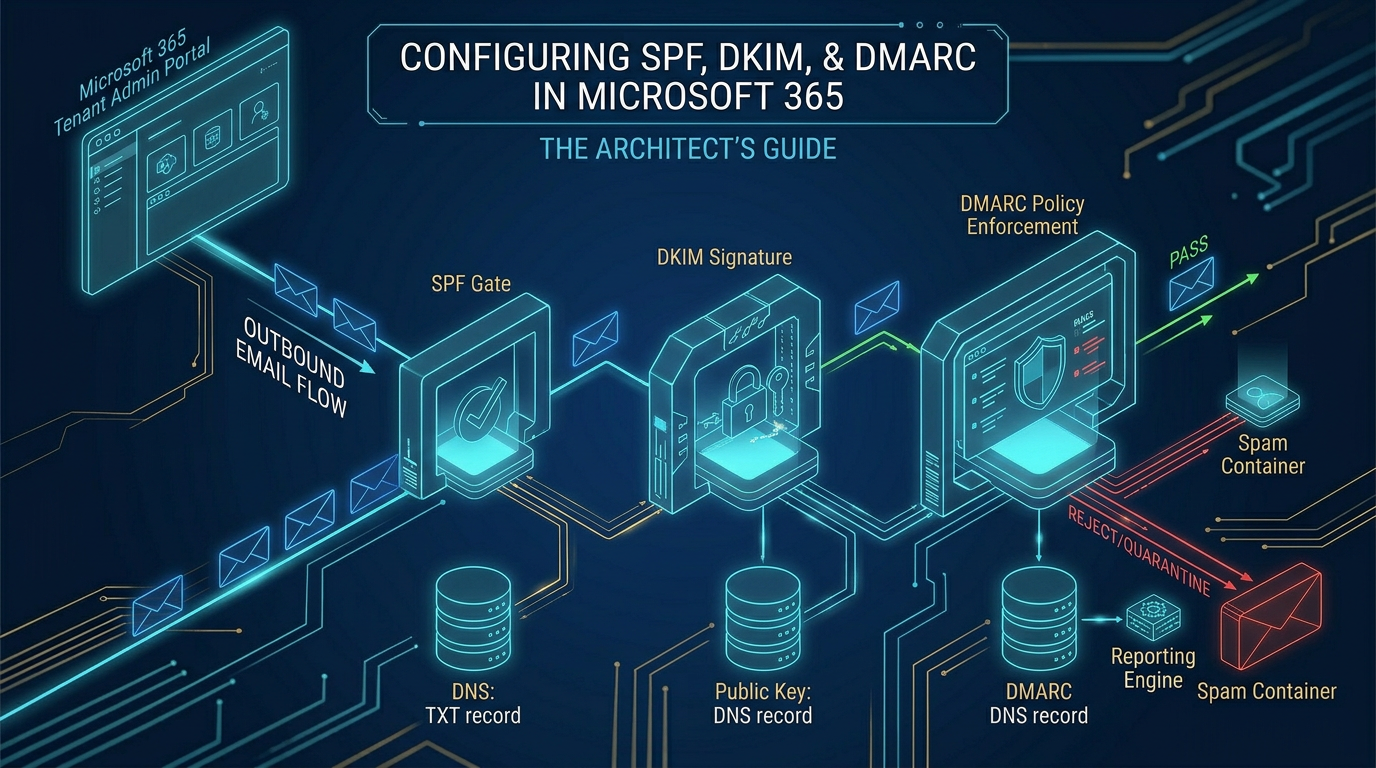
Implementing spf dkim dmarc microsoft 365 is a mandatory architectural requirement to validate email authenticity and prevent domain spoofing. SPF authorizes sending IP addresses, DKIM provides cryptographic message integrity, and DMARC enforces strict delivery policies. Without this structural trio, your enterprise email is inherently untrusted.
The trap most Architects fall into is treating microsoft 365 email authentication as a simple DNS checklist. In reality, it is a complex governance project. If you deploy strict policies without auditing shadow IT, you will instantly break critical business workflows like marketing automation or third-party billing systems.
The Technical Truth of SPF and DKIM
Setting up your office 365 spf dkim setup is the foundational baseline. SPF (Sender Policy Framework) acts as a strict IP whitelist. But the technical truth is that SPF is fragile. You are strictly bound to a 10 DNS lookup limit.
In the "Grey Zone" of enterprise business, marketing adds HubSpot, finance adds Workday, and IT adds ServiceNow. Suddenly, your SPF record breaches the lookup limit and fails completely. We must use engineering strategies like SPF flattening to survive this hard limit.
DKIM (DomainKeys Identified Mail) is non-negotiable. It attaches a cryptographic signature to the header of your emails. Unlike SPF, DKIM survives when an email is forwarded. You must explicitly enable and rotate DKIM signing keys within the Microsoft Defender portal for every accepted domain.
DMARC: The Architectural Enforcer
SPF and DKIM are useless if receiving servers do not know what to do when they fail. A proper dmarc office 365 configuration is the enforcement mechanism. It links the protocols and tells the internet: "If an email fails SPF or DKIM alignment, reject it."
However, deploying a strict DMARC reject policy immediately is reckless. Business units frequently spin up unauthorized SaaS tools that send email on behalf of your domain without telling IT. A blind reject policy will block legitimate company communications.
"Dark Mode" Deployment: Reaching p=reject
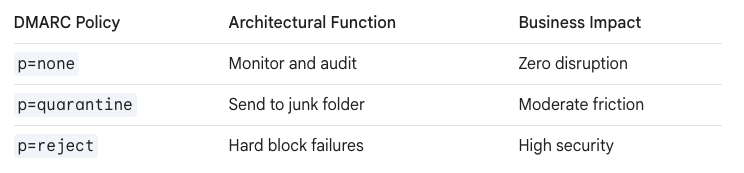
We never deploy a p=reject policy directly to production. The "Ollo Methodology" dictates a strict "Dark Mode" deployment. We publish a p=none DMARC record to act as an analytical blast shield.
During this phase, we ingest the XML aggregate reports. We analyze every IP sending as your domain. This exposes the shadow IT. We spend weeks structurally adding DKIM keys and SPF includes for authorized third-party vendors before tightening the policy. For complex cross-tenant routing issues discovered during this phase, we regularly reference community troubleshooting on SharePains.
Only when the failure rate of legitimate traffic hits zero do we shift the policy to p=quarantine, and finally, the ultimate goal of p=reject.
Maintaining the Authenticity Lifecycle
Enterprise microsoft 365 email authentication is not a one-time project. It is a continuous lifecycle. As vendors change and departments adopt new tools, your DNS architecture must adapt alongside them.
By treating these protocols as critical infrastructure, you lock down your digital boundaries. You protect your brand identity, ensure high deliverability, and structurally eliminate the threat of domain spoofing from your digital workplace.

















