



Monday, 8:15 a.m. The CFO cannot find the signed contract the auditors want, Legal is locked out of a library nobody admits owning, and your migration partner is still calling it a successful cutover because the files technically arrived. That is how SharePoint document management projects fail. Not with a dramatic outage. With a slow operational collapse that starts the week after go-live.
I have seen this pattern too many times. Somebody treats SharePoint like a bigger file server, copies years of unmanaged content into Microsoft 365, and assumes search, permissions, and compliance will sort themselves out later. They do not. They break in predictable ways, and the cleanup costs more than doing the design work properly in the first place.
Microsoft's guidance helps, but it does not save a badly structured estate. SharePoint can support large libraries, yet Microsoft also notes that list and library views hit a 5,000-item threshold even though total capacity can scale far beyond that, including libraries with very large item counts in supported scenarios, as explained in this Microsoft Learn discussion of large SharePoint libraries and limits. View design, metadata, and permission sprawl decide whether your environment works at all.
That is the part too many teams miss.
The failed projects all sound similar. “Just migrate first.” “We'll tidy metadata later.” “Keep the old folder structure so users feel comfortable.” Those are rescue-job phrases. If you want to avoid one, start with metadata planning before migration in SharePoint, because once bad structure, broken inheritance, and inconsistent schemas are live, every retention rule, search result, and access review becomes harder.
This guide is built from projects that went wrong before they were fixed. Miss these practices and you do not get minor user complaints. You get unreliable search, weak audit trails, permission drift, and a compliance problem your internal team will struggle to unwind without specialist help.
1. Implement Hierarchical Metadata and Taxonomy Before Migration
If your first instinct is to recreate the old folder tree in SharePoint, stop. That's how bad migrations begin. Microsoft's modern guidance recommends a flat architecture with one site per discrete topic, task, or unit of work, using navigation, search, taxonomy, and security instead of burying content in nested folders.
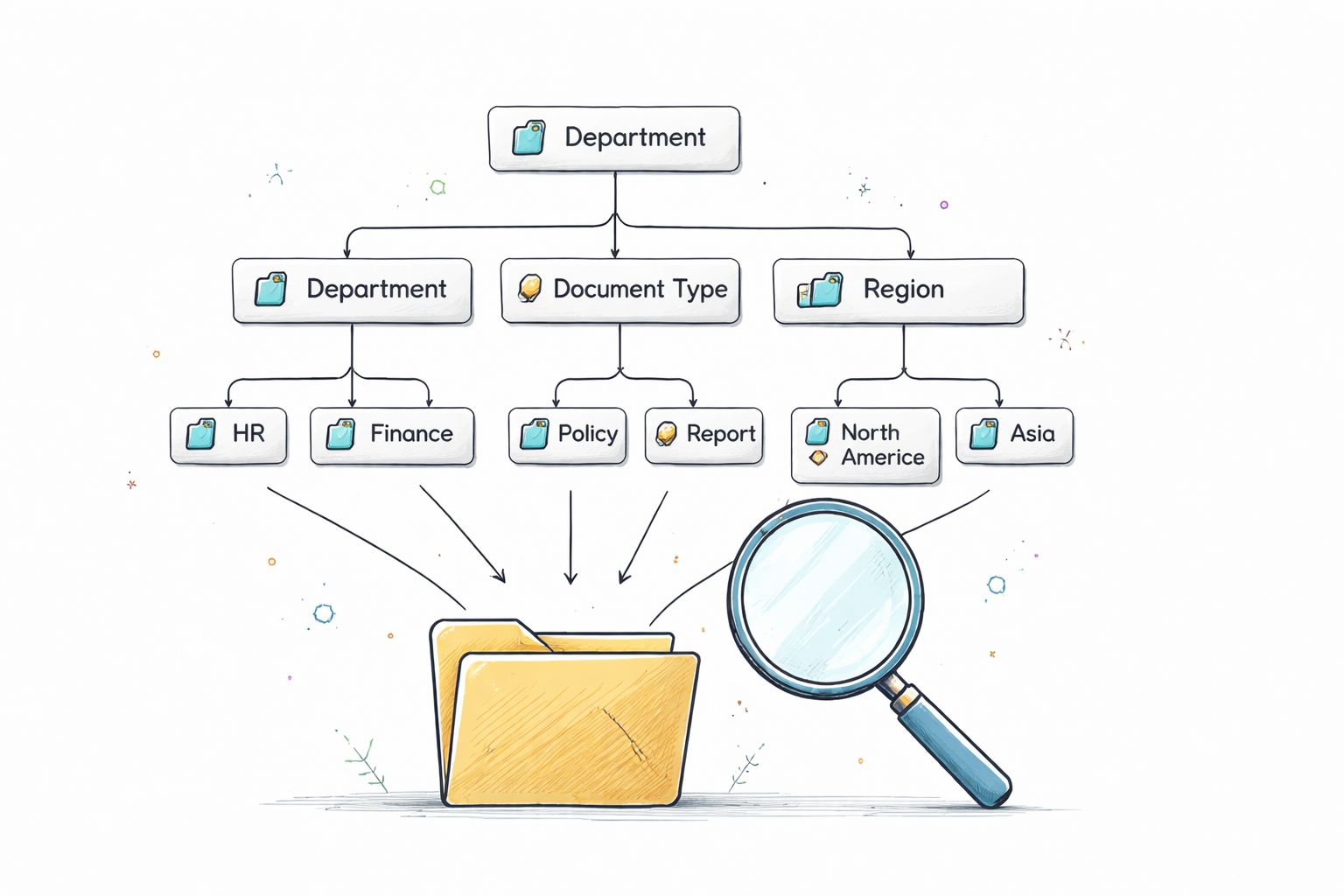
That point matters more in regulated environments than many organizations acknowledge. Users rarely fail because SharePoint ran out of room. They fail because they can't find the correct document, can't trust the metadata, or can't understand why two files that look identical follow different rules.
Build taxonomy around how the business works
Design metadata around business retrieval patterns, not IT department charts. Ask legal what they search by. Ask finance what determines retention. Ask operations which attributes drive handoffs, approvals, and reporting. Then encode that logic into content types, managed metadata, naming rules, and library views.
We often see clients fail when they migrate content first and “clean up metadata later”. That almost never happens cleanly. The bad structure hardens, users create workarounds, and your reporting and compliance logic starts from bad data.
Practical rule: If a user can only find a document by remembering the folder path, your information architecture is already weak.
Use Ollo's metadata migration guidance when you map source folders and file attributes into a controlled SharePoint taxonomy. The point isn't elegance. It's operational survival after cutover.
Keep folders secondary, not primary
Folders still have a place, but they shouldn't carry the full governance model. Colligo's guidance aligns with what experienced migration teams already know: metadata tagging, custom views, and clear naming conventions do more for findability than deep hierarchies. In enterprise estates, broken inheritance, GUID conflicts, and messy metadata mapping do far more damage than most project plans account for.
A quick visual example helps when you're trying to reset entrenched folder habits.
Your team doesn't need another folder tree. Your team needs a classification model that search, retention, and security can all use without contradiction.
2. Enforce Version Control and Document Lifecycle Management
Unlimited versioning looks safe until storage, confusion, and audit noise start piling up. Then nobody knows which draft matters, users restore the wrong file, and legal asks why the same document has a trail of half-finished edits stretching back for years. Good sharepoint document management best practices don't mean “turn versioning on and hope for the best”. They mean deciding what deserves a full history and what deserves a short leash.
The documentation says document management should plan where documents live, how access is controlled, and how content moves through its lifecycle across stages and locations. In reality, versioning fails when teams treat all content the same. Policies for contracts, working drafts, policies, and reference documents shouldn't be identical.
Set limits that match document risk
Draft-heavy collaboration spaces need tighter controls than signed records libraries. If your business keeps every micro-edit forever, you aren't preserving knowledge. You're preserving noise. Separate working content from controlled records. Use major and minor versions where the process justifies it. Use check-in and check-out where a regulated approval trail matters more than frictionless co-authoring.
A finance team reviewing board papers needs one model. A clinical policy library needs another. An energy operations team managing active procedures needs a third. SharePoint can support all of them, but only if you define the lifecycle before users fill the library.
- Set version caps deliberately: Don't leave libraries on broad defaults just because nobody wants the argument.
- Tie versioning to content type: Contracts, policies, forms, and transient drafts shouldn't inherit the same behaviour.
- Prune old history in a controlled window: Bulk cleanup during busy hours creates avoidable load and user complaints.
Too many migrations preserve every historical flaw. Good governance means deciding what's worth carrying forward.
Use Ollo's version control architecture guidance if your current estate already suffers from uncontrolled version growth. For a broader outside view on effective document management strategies, the same pattern appears repeatedly: version history only helps when it follows business intent.
Treat lifecycle as governance, not housekeeping
Retention labels, document status, approval state, and version policy need to work together. If they don't, users keep stale drafts forever and records teams inherit a mess. Missing this step doesn't just clutter the library. It weakens legal defensibility because nobody can clearly explain why one version remained and another disappeared.
3. Design Permission Models with Zero-Trust Principles and Inheritance Control
Monday morning. A department head insists a sensitive folder was private. By Tuesday, security finds half the wrong people had access for months, nobody can explain why, and the migration team is stuck reverse-engineering a permission mess from broken inheritance and one-off exceptions. I have seen this pattern repeatedly. It is one of the fastest ways to turn a SharePoint rollout into an audit problem.
Permissions break SharePoint document management long before storage does. The root cause is usually bad discipline, not bad tooling. A team grants direct user access to solve a "temporary" problem. Another team breaks inheritance on a folder because the site structure was never designed around real control boundaries. Then the exceptions spread. Support cannot maintain it. Security cannot defend it. Migration exposes all of it.

Build access around roles, not people
Use Entra ID groups that map to business roles and operating units. Finance operations. Clinical governance. Legal review. Procurement approvers. That is how you keep access explainable when staff move, leave, or inherit temporary duties.
Direct user assignment is lazy administration. It feels quick in the moment and expensive for years after. Every named-user exception adds another hidden dependency that somebody else has to find during an incident, an access review, or a migration cutover.
Field lesson: once unique permissions start spreading across folders and items, performance concerns are only part of the problem. The bigger issue is operational blindness. Your team stops being able to answer a basic control question: who has access to what, and why?
Treat inheritance breaks as control boundaries
Break inheritance only where the business can defend a clear security boundary, usually at site or library level. Confidential HR content, legal matter repositories, board papers, regulated case files. Those are valid reasons. "One manager asked for a private subfolder" is not.
Item-level and folder-level exceptions are where failing projects hide. They create permission islands that nobody remembers until search results leak the wrong content, a records review stalls, or a migration tool starts surfacing edge cases your old estate was tolerating. If your security model depends on dozens of local exceptions, you do not have a model. You have accumulated risk.
Field lesson: broken inheritance rarely looks dangerous during delivery. It becomes dangerous when you need to audit, migrate, or prove control under pressure.
Use Ollo's SharePoint permissions best practices if your estate already shows permission drift. Then align that work with your wider compliance controls, especially if retention and access decisions are still being handled manually. Microsoft Purview compared with manual compliance processes shows why that combination fails under audit.
When an IT Director tells me their permissions are "mostly standard", I assume there are undocumented breaks, overshared libraries, and stale memberships until proven otherwise. That assumption has saved more projects than trust ever did.
4. Establish Automated Retention and Disposition Workflows Using Microsoft Purview
Retention that depends on user judgement will fail. Not always loudly. Often, the failure is subtle, which is worse. Someone uploads a record to the wrong library, somebody else renames it, the business assumes compliance is in place, and the organisation discovers the gap when an auditor or legal hold exposes it.
Microsoft's document management guidance makes the principle plain: an effective solution must plan where documents live, how access is controlled, and how content moves during its lifecycle. That includes deletion and disposition, not just storage. If your SharePoint build stores documents indefinitely because nobody wanted to define retention rules, you haven't solved document management. You've deferred a records problem.
Automate what users consistently get wrong
Use Microsoft Purview to bind retention logic to content type, metadata, and location. Don't rely on staff to remember whether something should stay, archive, or disappear. In regulated sectors, that approach creates audit gaps and inconsistent enforcement.
We often see clients fail when they merge or split repositories during consolidation without redesigning retention at the same time. The structure changes. Access changes. Pathing changes. Workflows break. Yet the old assumptions about disposal stay in place as if nothing moved.
A practical model looks like this:
- Apply labels where classification is stable: Policy libraries and controlled records areas usually support this well.
- Use metadata-driven triggers where lifecycle events matter: Expiry, closure, approval, or termination often define disposition better than created date.
- Add disposition review for sensitive material: Deletion should be controlled when the risk profile justifies a checkpoint.
Retention isn't a filing issue. It's a legal and operational control.
Use Ollo's Purview compliance guidance if your current model still depends on manual classification or inconsistent policy application. Missing this step doesn't just make libraries untidy. It can expose restricted records, preserve content you should have deleted, or remove material you needed to keep.
Treat consolidation as a governance event
Tenant-to-tenant consolidation, archive roll-ins, and cross-site remapping create retention risk that generic best-practice articles barely touch. The problem isn't whether SharePoint can hold the files. The problem is whether governance still means the same thing after content moves.
5. Implement Content Type Governance and Prevent Schema Drift
Schema drift is the slow poison in SharePoint estates. It starts with harmless local tweaks. One site owner adds a field. Another clones a content type because the original looked “too complicated”. A third renames a column for local convenience. After that, reporting breaks, search loses consistency, and integrations start behaving like they were built by strangers.
Many document management projects become impossible to govern at scale. A content type isn't just a form with fields. It is the contract between classification, permissions, search, retention, and downstream automation. If that contract changes in every site, your tenant stops behaving like a platform and starts behaving like a patchwork.
Centralise the schema before users improvise
Define enterprise content types centrally. Keep field definitions consistent. Control changes through review, not by letting site owners invent local substitutes. A “Contract” content type should mean the same thing everywhere that matters. The same goes for policy, record, procedure, case file, or client document.
We often see clients fail when they let delivery teams customise the model during migration. Every shortcut feels small at the time. Later, nobody can explain why two “identical” libraries produce different results in search, retention, or reporting.
Consider the common breakpoints:
- Column mismatch: Same business field, different internal names, broken mappings.
- Local content type cloning: A quick workaround that becomes permanent technical debt.
- Validation drift: Required in one library, optional in another, ignored by automation.
Design for control, not for novelty
Keep the schema understandable enough that business owners can follow it, but strict enough that governance tools can trust it. Use required fields sparingly, but use them where the absence of data breaks compliance or retrieval. If a field matters to retention, security, or audit, it can't be optional because somebody feared user pushback.
Your users don't need endless flexibility. They need a model that behaves consistently every time they save, search, approve, or export a document. That consistency is one of the least glamorous and most valuable parts of sharepoint document management best practices.
6. Perform Pre- and Post-Migration Data Quality Audits with Automated Remediation
A migration without audit is just hope with a project plan attached. If you don't inspect source data before cutover and validate the destination after cutover, you won't know what you broke until users find it for you.
Basic tooling shows its limits. SPMT has a place for smaller, simpler jobs. It does not give you the control you need when the source estate contains naming violations, path problems, orphaned structures, mismatched permissions, and messy metadata. For large or regulated environments, you need audit scripts, remediation logic, and repeatable validation. Not just a transfer engine.
Audit before you touch production data
Check naming standards, unsupported characters, path complexity, empty folders, stale permissions, missing metadata, and duplicate structures before migration starts. If you leave those issues in place, SharePoint won't magically fix them. It will preserve them in a more expensive environment.
We often see clients fail when they schedule remediation too late. Governance teams need time to resolve bad records. Business owners need time to confirm mappings. Engineers need time to test fixes at scale. If your plan starts validation after migration, your plan is already late.
Use Ollo's testing approach for migration validation when you need structured proof that content, metadata, and permissions arrived correctly. The point is to catch exceptions while the migration team still has context and rollback options.
Validate the destination like you expect failure
Post-migration checks should confirm far more than file presence. Validate metadata mapping, library placement, inherited and broken permissions, document versions where required, and whether users can find content through the intended views and search paths.
The fastest way to lose business confidence is to declare success before users test the edge cases that matter.
The Ollo verdict on tools is blunt. Use SPMT for small, low-risk moves. For anything with governance complexity, cross-site restructuring, or regulated content, use ShareGate plus custom PnP PowerShell and a proper audit framework. Anything less is a gamble with your data.
7. Enable Search Configuration and Result Optimisation for User Discoverability
A badly configured SharePoint search experience drives the same destructive behaviour every time. Users stop trusting the platform, save local copies, rebuild documents from scratch, or keep asking colleagues for “the latest version”. That isn't a user adoption problem. It's an architecture problem.
Search quality depends on the groundwork you've already done. Metadata, content types, naming conventions, and site structure all feed discoverability. If those controls are weak, no amount of search tinkering will save you. But if they're sound, tuned search becomes the difference between a library people tolerate and a system they rely on.
Promote business retrieval, not generic keyword luck
Map managed properties to the fields users think in. Contract type. Policy owner. Department. Review date. Case reference. Region. Status. Then give people result refiners and views that reflect those terms. Search should narrow the field fast, not force staff into a guessing game.
Microsoft's flat architecture recommendation matters here as much as it does in migration design. Navigation, search, taxonomy, and security should do the heavy lifting. Deep folder trees don't improve findability. They hide weak information architecture behind familiar clutter.
A practical search model usually includes:
- Managed properties mapped to key metadata: So users can filter on meaningful attributes.
- Promoted results for high-value destinations: Policies, forms, and canonical repositories should be obvious.
- Ongoing review of failed or ambiguous searches: Bad queries expose architecture flaws quickly.
Test with real users, not just admins
Admins search differently from operations teams, clinicians, legal users, and finance staff. Test common search patterns with the people who rely on them daily. If they can't find the right controlled document quickly, they will create side channels and duplicate content. Once that starts, governance weakens across the board.
Search isn't the shiny add-on at the end. It's the proof that your classification model works under pressure.
8. Design Scalable Site and Hub Architecture to Support Growth Without Fragmentation
Most SharePoint estates don't collapse in one dramatic failure. They fragment slowly. New sites appear without governance. Teams create local structures that ignore enterprise standards. Hubs become vague signposts instead of control surfaces. After that, every migration, audit, and restructuring effort costs more than it should.
Microsoft Learn recommends the modern SharePoint model as a flat architecture, one site per discrete topic, task, or unit of work, with navigation and taxonomy doing the organising. That guidance is right. The trap is assuming a flat model means loose governance. It doesn't. It requires more discipline, not less.

Build boundaries that survive change
Design hubs and sites around durable business domains, not temporary project names or individual preferences. Communication sites should broadcast controlled information. Team sites should support active collaboration. Sensitive repositories should sit behind clear security boundaries. If your structure depends on remembering which owner set up what three years ago, it won't survive organisational change.
We often see clients fail when they create a single giant site to avoid planning. That feels efficient for a few weeks. Then permissions sprawl, navigation turns incoherent, and every attempt to segment content later becomes a restructuring project.
Make provisioning a governed event
Site creation should follow standards for naming, ownership, classification, retention, and lifecycle. If users can spin up sites without control, they will. Then your tenant fills with orphaned spaces and duplicated repositories.
A better pattern is simple:
- Require a business owner: Every site needs accountable ownership.
- Define purpose at creation: Team collaboration, controlled records, project workspace, or broadcast content.
- Plan archive or closure from day one: Sites shouldn't live forever by accident.
SharePoint can scale. Bad architecture can't. If you want a document management environment that still works after growth, reorganisation, or consolidation, hub and site design must be intentional from the start.
SharePoint Document Management: 8 Best Practices Compared
| Item | Implementation Complexity 🔄 | Resource Requirements ⚡ | Expected Outcomes 📊 | Ideal Use Cases 💡 | Key Advantages ⭐ |
|---|---|---|---|---|---|
| Implement Hierarchical Metadata and Taxonomy Before Migration | High, extensive upfront IA, taxonomy design and testing | High, metadata architects, Purview, automation tooling | Better search recall, consistent classification, reduced post-migration governance | Regulated sectors, tenant consolidations, audit-sensitive projects | Automates compliance, improves findability, provides audit trails |
| Enforce Version Control and Document Lifecycle Management | Medium–High, policy design + cleanup scripts and governance | Moderate, admins, PnP/Power Automate scripts, change management | Reduced storage, deterministic retention, simpler audits | Repositories with heavy versioning (finance, legal, engineering) | Cuts storage costs, prevents overwrite, enables rollback |
| Design Permission Models with Zero-Trust Principles and Inheritance Control | High, identity design, conditional access, controlled inheritance | High, Entra ID governance, auditing scripts, training | Eliminates permission creep, auditable access, scalable control | Sensitive data environments, multi-tenant consolidations | Reduces insider risk, enforces role-based access, supports audits |
| Establish Automated Retention and Disposition Workflows Using Microsoft Purview | Medium, retention rules, event-based triggers, disposition flows | Moderate–High, Purview licensing, compliance reviewers, metadata accuracy | Deterministic deletion/archive, storage savings, regulatory compliance | Organizations with defined retention obligations (GDPR/HIPAA/SOX) | Removes manual purge errors, supports eDiscovery, scales to millions |
| Implement Content Type Governance and Prevent Schema Drift | Medium–High, hub content types, change control and enforcement | Moderate, governance team, PnP audits, form integrations (Power Apps) | Consistent metadata, fewer integration/reporting failures | Enterprises using Power Platform, federated reporting needs | Ensures consistency, simplifies compliance, reduces support burden |
| Perform Pre- and Post-Migration Data Quality Audits with Automated Remediation | Medium, scanning, remediation scripting, rolling audits | Moderate–High, tools (ShareGate), scripting expertise, time (weeks) | Fewer post-migration issues, validated migrations, lower support tickets | All migrations, especially large or regulated cutovers | Prevents corrupted content, provides objective validation and audit evidence |
| Enable Search Configuration and Result Optimization for User Discoverability | Medium, managed properties, query rules, analytics tuning | Moderate, search specialists, testing, ongoing tuning | Higher content reuse, reduced duplicates, improved user adoption | Knowledge-heavy orgs, high-volume content repositories, Copilot integration | Improves findability, supports Copilot, yields actionable analytics |
| Design Scalable Site and Hub Architecture to Support Growth Without Fragmentation | Medium, hub/site planning, lifecycle and provisioning governance | Moderate, governance, delegated admins, provisioning automation | Prevents sprawl, enables delegated governance, better navigation | Growing/multi-regional organizations, long-term scale projects | Supports scale, enforces lifecycle policies, improves discoverability |
The Ollo Verdict From Checklist to Execution
Monday morning, your IT Director gets three calls in an hour. Legal cannot prove retention is working. Finance cannot find the signed contract they need for an audit. A department head has locked down a library with one-off permissions, and nobody can explain who still has access. That is how bad SharePoint projects show up. Not at cutover. Months later, when the design shortcuts finally collect interest.
The failure pattern is boring because it repeats. Teams recreate legacy folder structures in SharePoint and call it migration. Project leads allow permission exceptions because the business is "special." Migration tools move files successfully, so everyone assumes governance came across too. Then the estate buckles in familiar places. Views fail under poor library design. Metadata drifts. Broken inheritance spreads. Search becomes unreliable. Compliance reviews expose controls that existed only in workshop slides and governance PDFs.
As noted earlier, the platform itself tells you that architecture matters more than raw capacity. SharePoint can hold a huge volume of content. Poorly designed libraries still fall apart long before storage becomes the issue. That is the trap. Teams hear "it scales" and ignore the conditions attached to that statement.
DIY projects usually optimise for movement, not control. That mistake is survivable in a small, low-risk library with simple access rules. It is expensive in regulated environments, tenant consolidations, complex document sets, or estates already damaged by schema drift and permission sprawl. Skip the discipline in the sections above and you do not get a minor delay. You get weak audit trails, poor findability, inconsistent retention, and a support queue full of avoidable mess.
Here is the recommendation. Use native tools for contained jobs where failure stays contained. Bring in specialist design and controlled automation for restructures, regulated content, complex permissions, or cross-tenant migration. That means ShareGate where it fits, PnP PowerShell where native tooling stops short, and post-migration validation run by people who have already had to clean up failed cutovers.
Ollo is one option if you need that level of support. The value is not a promise that SharePoint migrations are easy. They are not. The value is knowing where standard approaches break, designing around those breakpoints, and proving the controls work before users and auditors do the testing for you.
If your team has already been burned by a SharePoint project, talk to Ollo. We handle regulated Microsoft 365 migrations, tenant-to-tenant consolidations, permission redesign, and rescue work where generic tooling and generic advice have already failed.

















