


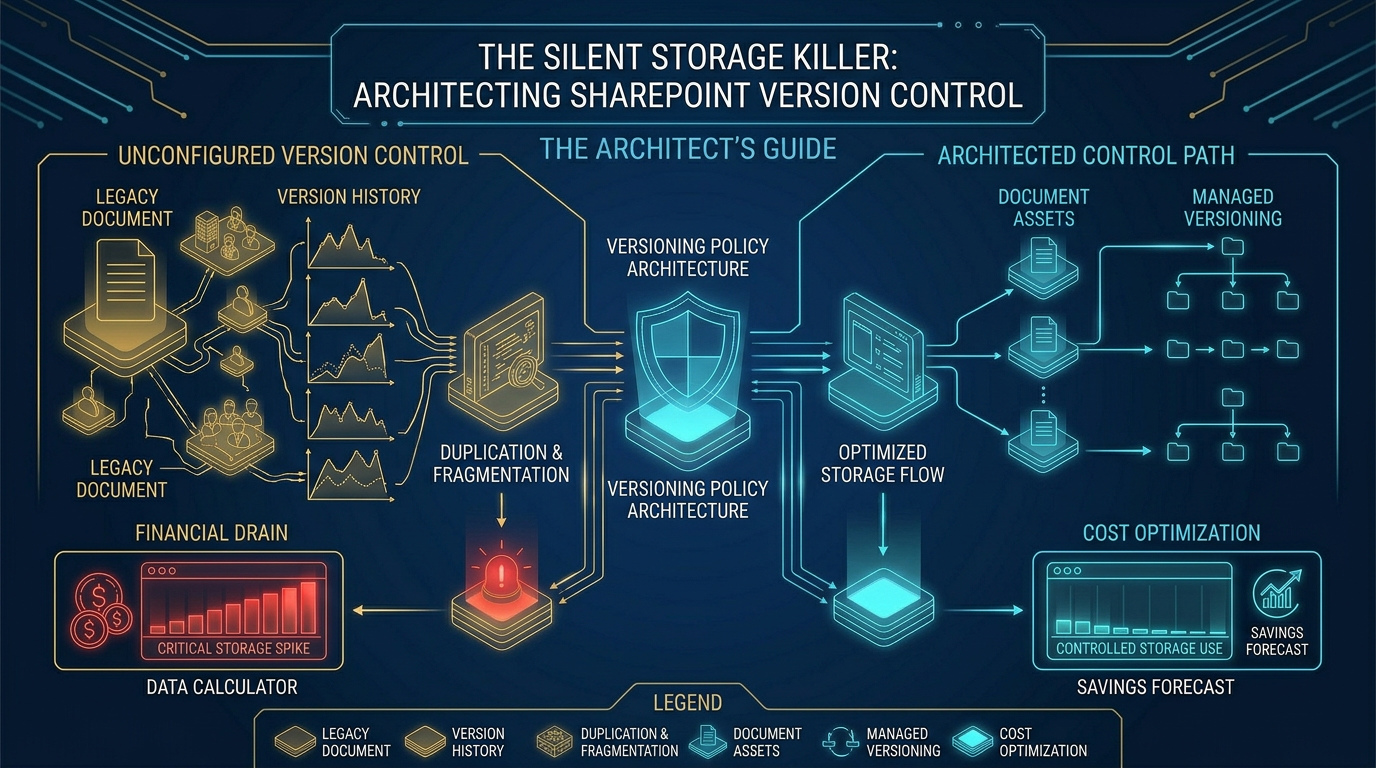

The Silent Storage Killer: Architecting SharePoint Version Control to Stop Financial Drain
SharePoint version control is an architectural feature designed to capture document iterations. However, without strict governance during migrations, default settings cause severe storage bloat. A single file with hundreds of unchecked versions exponentially devours quotas, creating a massive, silent financial drain on your Microsoft 365 tenant.
Let’s cut the nonsense. Version history bloat isn't a minor administrative quirk. It is a structural failure. When companies migrate to SharePoint, treating version history as an afterthought is a fast track to bankrupting your storage.
The reality we found is that default versioning settings act like a storage parasite. You migrate a single department, and suddenly a basic document library is consuming 100GB of your quota.
Why does this happen? Because a 5GB design file with 500 versions doesn't just sit there. It exponentially devours your site collection storage. This is not a user error; it is an architectural flaw.
The Reality We Found: The Management Disconnect
In our experience, the root cause is a profound disconnect between management and IT. During migration planning, managers are asked about version retention. Reflexively, they say they want to keep everything.
They do this to avoid making a hard decision. IT admins, heavily focused on keeping the lights on rather than managing the Microsoft invoices, simply comply. This passive compliance is the trap most Architects fall into.
The trap we avoid at Ollo is letting this lack of governance dictate the architecture. Left unchecked, your site collection rapidly hits its SharePoint storage limits. Storage costs spike, and the tenant becomes an unmanageable swamp.
Every gigabyte over your allocated quota is a premium charge. Microsoft is happy to sell you more storage, but buying your way out of bad architecture is a fool's errand. You must fix the structure.
The Pre-Migration Audit: Data Over Feelings
We do not ask users how many versions they "feel" they need. Feelings do not pay the Azure bill. Nor do we hand them a CSV "Spreadsheet of Doom" to manually review 10,000 files.
Instead, we rely entirely on hard data. We use x64 PowerShell paired with modern PnP to execute Standard Reporting across the source environment. We isolate the storage anomalies immediately.
We look for the massive files burdened with hundreds of iterations. If we hit legacy databases, like ancient Access files masquerading as active documents, we drop back to x86 PowerShell.
We use legacy ODBC drivers to pull exactly what we need. We separate the objective engineering facts, like file size and version count, from the ambiguous human elements.
Navigating the Grey Zone: Death to the Spreadsheet
This brings us to the "Grey Zone." These are the files that require human context, but we refuse to manage them manually. For these, we deploy AI Agents to build a contextual menu.
These AI tools curate actionable dashboards for decision-makers. We present them with data on redundant versions and staging costs. We force the architectural decision through clarity, not through overwhelming spreadsheets.
When a department head sees that keeping 500 versions of a 2018 slide deck will cost the company thousands of dollars annually, the "keep everything" mentality vanishes. Data drives the protocol.
The "Dark Mode" Pruning Strategy
You cannot afford to migrate ten years of garbage versions into a live SharePoint environment. Doing so compromises both your budget and your data security.
We execute a Dark Mode Migration. This is a mandatory blast shield. Before any end-user gets access, all data is moved into a secure Staging Library, effectively putting the data in Quarantine.
Within this secure boundary, we enforce strict, automated version limits. We typically cap major versions at 50 or 100, depending on the compliance baseline. We mercilessly strip out the historical dead weight.
This Dark Mode protocol does more than just reclaim hundreds of gigabytes of storage before you are billed for it. It fundamentally secures your enterprise data from internal exposure.
Preventing the Search Bar Leak
By wiping outdated, potentially sensitive versions in quarantine, we prevent "Search Bar leaks." This is when a user queries the Microsoft Search index and accidentally surfaces a deprecated draft.
These drafts often contain outdated financial projections or unredacted PII. If you do not prune in Dark Mode, your migration process becomes a massive security vulnerability.
An unpruned environment is a liability. When Copilot indexes your tenant, it reads the versions. If your architecture is flawed, the AI will surface flawed, outdated data to your end-users.
Architectural Comparison: Legacy vs. Native
Here is how the legacy mindset fails when applied to modern cloud architecture.
Architectural FocusLegacy File ShareModern SharePointStorage ProtocolSingle file overwriteIncremental version stackingQuota ImpactStatic disk capacityExponential quota drainAdmin FocusHardware disk limitsLicensing and billingUser VisibilityCurrent state onlyFull historical access
When engineers fail to understand this paradigm shift, migrations fail. You are no longer managing physical hard drives; you are managing a living, breathing database governed by strict API limits.
Automating the Governance Protocol
To manage this effectively, you must understand the underlying platform limits. You cannot simply script your way out of bad governance.
We heavily utilize resources from MVP experts at SharePains to build resilient PowerShell automation that trims versions at scale while navigating API throttling limitations.
However, scripts are just tools. The actual strategy is setting the retention policy at the tenant level. We lock down the version limits before the very first byte of data moves across the wire.
By defining the site design scripts correctly, every new site collection inherits a logical, restrictive versioning policy. We make the right architectural choice the default choice for the entire lifecycle.
Sustainable Guardrails Post-Migration
The migration is only day zero. The true test of your architecture is how it holds up six months later when users return to their old habits.
We implement sustainable guardrails. We configure the tenant so that users cannot unilaterally override the version limits. We remove the temptation to hoard data by removing the capability to do so.
If a specific legal or compliance department requires infinite versioning, we isolate them. We build a specific, highly governed site collection for that use case, rather than applying a massive limit to the entire tenant.
We design around the platform limits, protecting the user from their own bad habits. This ensures the environment remains lean, fast, and economically viable long after the migration team leaves.
The Strategic Takeaway
Whether we are flattening Waterfall Permissions in Box, converting dead sharing links in Dropbox, or migrating an ancient on-premise file share, the underlying philosophy remains absolute.
Migration is an architectural reset. It is never a simple copy-paste job. Treating your data lifecycle and version history as an afterthought guarantees failure.
Your architecture should always dictate your storage footprint, not the other way around. Implement the Dark Mode deployment, prune the Grey Zone, and secure your tenant.

















