



Stop reading generic Microsoft docs and blog checklists if your environment already carries years of permission debt. Most guidance on sharepoint permissions best practices assumes a clean tenant, tidy ownership, and users who follow rules. Your reality is older, messier, and regulated. You have legacy file shares, old SharePoint sites, ad hoc sharing, broken inheritance, and a migration window that won't tolerate mistakes.
This isn't about neat administration. It's about avoiding a breach, an audit failure, or a migration write-off. In the UK public sector and similar regulated environments, Microsoft's own guidance ties governance to formal records and retention controls, pushes least privilege, recommends standard groups such as Members, Visitors, and Owners, and tells site owners to separate sensitive content into a different site or library instead of scattering unique permissions through a broad library, as set out in Microsoft's site governance guidance.
The documentation says the platform supports granular exceptions everywhere. In reality, that flexibility is what blows up enterprise estates. We often see clients fail when they try to preserve every folder ACL from a file server, let users share around the model, and then attempt to clean it all up during migration cutover. By then, your team isn't doing design. It's doing damage control.
If you're responsible for a high-stakes Microsoft 365 estate, the rules below are the ones that prevent failure.
1. Implement Principle of Least Privilege with Regular Access Reviews
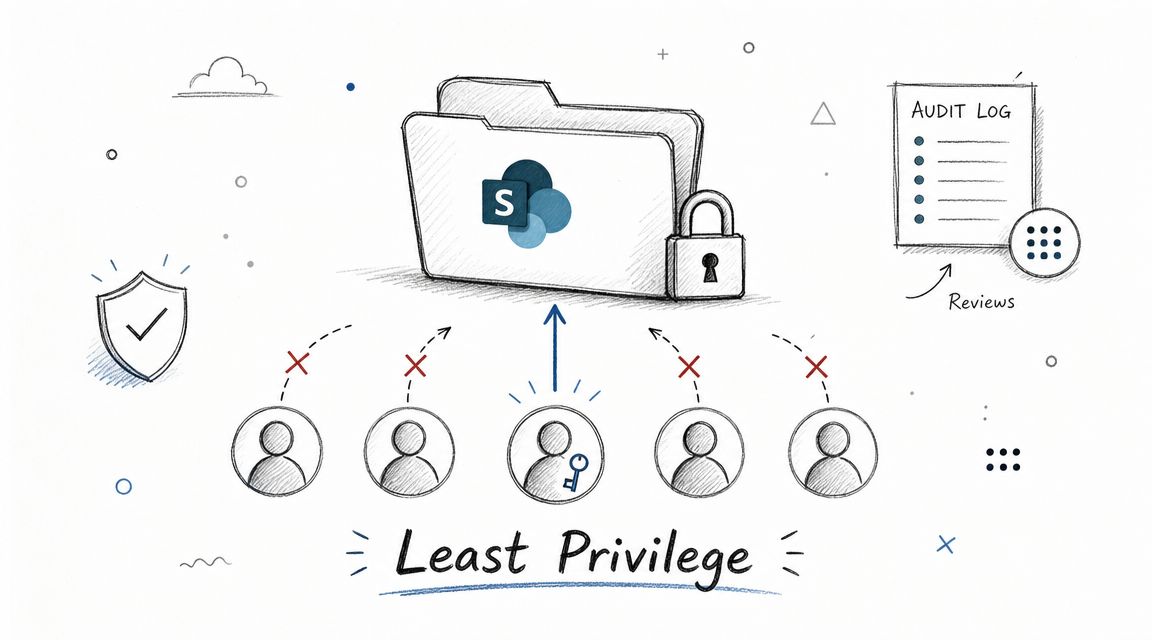
Least privilege sounds obvious until you watch a project team hand out Member or Owner access just to stop complaints. That shortcut creates a security problem and a migration problem. Once users accumulate broad rights, nobody can prove what they need, and your recertification exercise turns into guesswork.
Microsoft's governance guidance is explicit. Follow least privilege, use standard groups, and avoid individual permissions where possible, as described in Microsoft's SharePoint governance recommendations. That's the baseline, not the advanced option.
What least privilege looks like in practice
Map access to business roles, not personalities. Engineers get engineering libraries. Finance gets finance sites. Compliance gets read or review access where required. Nobody gets Owner because they asked nicely in Teams.
In healthcare, this means clinicians access the library that supports patient care, not the entire departmental site. In finance, portfolio teams shouldn't inherit rights into audit material. In energy, contractors should never land in the same permission scope as proprietary operational data.
Practical rule: If you can't explain why a person has access in one sentence tied to their role, remove it.
Use Entra ID governance and access reviews if you have it. If you don't, build a disciplined review cycle anyway. Manager attestation beats inbox archaeology. Permission decisions need an owner, a reason, and a review date.
A smaller attack surface matters outside SharePoint too. Ollo's guidance on Privileged Identity Management in Microsoft 365 fits directly here. Keep standing privilege low, grant higher access only when required, and stop treating admin rights as a convenience.
The failure pattern we keep seeing
We often see clients fail when they run access reviews by emailing site owners a spreadsheet and hoping for replies. That isn't governance. That's theatre. Site owners change jobs, ignore the request, or approve everything to end the thread.
Your team needs an evidence trail. Capture who approved access, why they approved it, and when they reviewed it. Missing this step doesn't just weaken security. It undermines audit defensibility.
2. Use Security Groups and Dynamic Group Membership for Permission Assignment
Direct user permissions are where SharePoint estates go to die. They feel quick. They are not. Every direct assignment creates another exception to track during joiners, movers, leavers, investigations, and migrations.
Microsoft's permission model has allowed direct assignment for years, but Microsoft also states that the recommended model is access through standard groups such as Members, Visitors, and Owners, and that the default permission granted when inviting people is Edit unless you change it, as documented in Microsoft's guidance on customising list and library permissions. That default catches DIY teams all the time.
Put Entra ID at the centre
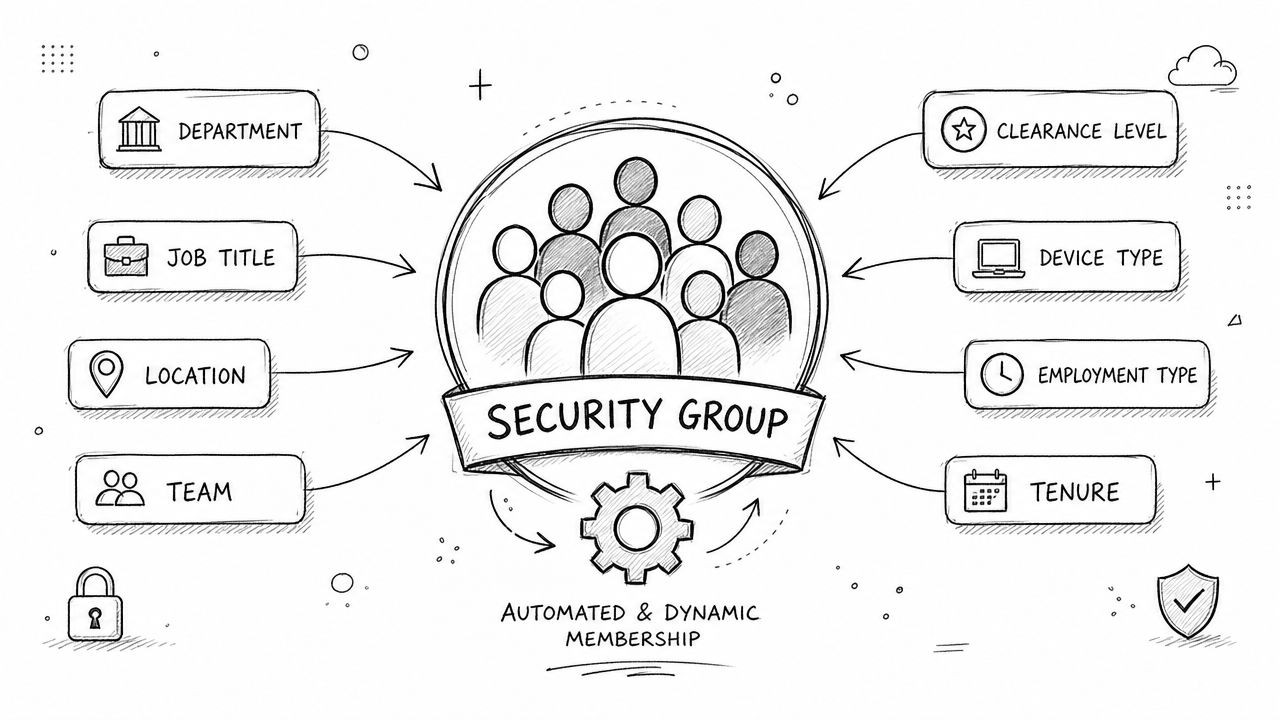
Store authorisation logic in Entra ID security groups. Let HR attributes, department codes, employment status, and contractor flags drive membership. SharePoint should consume identity decisions, not invent them.
A finance tenant might use a group for sales operations contributors and another for finance readers. A hospital can separate active clinical staff from administrative reviewers. An energy company can remove contractor access cleanly when the identity record changes.
Use dynamic membership where it's mature and understood in your environment. Test it in non-production first. A bad rule won't fail politely. It will grant access at scale.
- Use role groups: Build groups around stable business roles such as Finance Readers or Compliance Reviewers.
- Separate static from dynamic: Don't mix hand-added exceptions into a dynamic group. You'll destroy audit clarity.
- Name for operations: Use names that tell an auditor what the group is for without tribal knowledge.
The documentation says group-based access is simpler. In reality, it's also the only model that stays reviewable after a merger, a divestment, or a tenant consolidation.
The Ollo view
We often see clients inherit a site where half the permissions come from SharePoint groups, a chunk come from Microsoft 365 groups, and the rest are direct grants to individuals. That hybrid mess doesn't just slow reviews. It breaks migration validation because nobody can reconcile effective access quickly.
Ollo Verdict. Use Entra ID as the source of truth for who should have access. Let SharePoint inherit that decision through groups. If your permissions depend on remembering who asked for a one-off exception last year, your model is already broken.
3. Enforce Broken Inheritance and Explicit Permission Models
Regarding permissions, most generic advice gets dangerously soft. SharePoint supports inheritance at the site, library, folder, and item level. Technically, you can break inheritance almost anywhere. Operationally, that's how you create an un-auditable estate.
The University of Cambridge guidance says not to set permissions at folder or file level in a document library and to keep the hierarchy as simple as possible, as stated in Cambridge's SharePoint permissions best practices. That advice aligns with what works in enterprise environments.
Break inheritance rarely and deliberately
The safe pattern is simple. Keep inheritance intact at the root. If sensitive content needs different access, create a separate library or a separate site. Break inheritance at library level only when the business case is real and documented.
Do not use file-level or folder-level permissions as a lazy patch for a bad information architecture. That shortcut becomes technical debt the moment someone migrates the content, changes ownership, or tries to audit who can see what.
We often see clients fail when they preserve old file share logic inside one broad SharePoint site. A confidential folder gets unique permissions. Then a subfolder gets another exception. Then a user shares a document link. By cutover, nobody trusts the model.
For migration-specific remediation, Ollo has written directly about SharePoint permission migration. The lesson from the trenches is consistent. Rebuild the model before go-live. Don't forklift permission chaos into a new tenant.
Keep the scope high
Break at the library if you must. Avoid item-level exceptions. They create hidden paths, “Limited Access” clutter, and review pain.
"If you need different security, you usually need a different container."
That rule will save your team more often than any fancy reporting tool.
4. Implement Zero-Trust Entra ID Conditional Access for SharePoint
SharePoint permissions alone won't protect your data. If a compromised account lands valid access, the platform will serve the data exactly as configured. That's why static roles are only half the model. The other half is context.
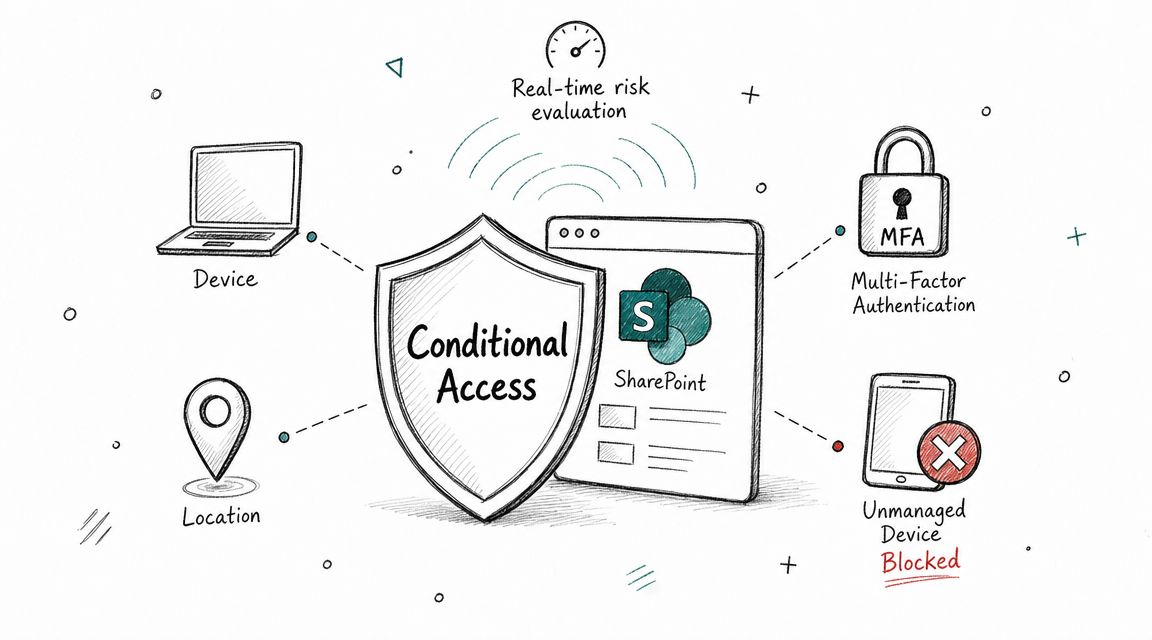
Conditional Access lets you enforce that context. Require managed devices for sensitive sites. Require MFA for privileged access. Restrict risky sign-ins. Block guest access paths that don't meet your standard.
Permissions without context are incomplete
A user with read access from a compliant managed device is not the same risk as the same user on an unmanaged personal laptop. Yet many tenants still treat them the same. That's a design failure.
In regulated sectors, tie SharePoint access to identity assurance and device trust. Finance teams handling sensitive deal material shouldn't browse it from random endpoints. Healthcare teams handling restricted data shouldn't rely on password-only access. Energy firms collaborating with contractors need stronger controls around where content can be opened and downloaded.
Ollo has covered this directly in its work on SharePoint zero-trust architecture. The key point is blunt. SharePoint groups answer who. Conditional Access answers under what conditions.
Roll out with discipline
Start in report-only mode. Review the impact. Fix device compliance gaps before you hard-block everyone. Document exceptions and time-box them.
The documentation says policies are straightforward to deploy. In reality, badly sequenced Conditional Access can lock out legitimate users or leave back doors open through exception groups nobody revisits.
This video gives useful context for the operational side of the model:
We often see clients fail when they deploy Conditional Access after the migration, not before it. That reverses the order of control. Build your access conditions first, then land the sensitive data.
5. Perform Data Classification and Sensitivity Label-Based Access Control
Permissions are a weak control if your tenant doesn't understand data sensitivity. You can't protect “important stuff” as a category. You need labels, rules, and enforcement tied to business risk.
Start simple. Public, Internal, Confidential, Restricted. That's enough for most estates to begin. The mistake isn't starting with too few labels. It's building a taxonomy nobody uses.
Classify before you over-engineer access
A finance team may need tighter control over board papers and transaction documents than over departmental working files. A hospital needs a clearer boundary around patient-related data than around generic communications. An energy operator may need stronger restrictions on site plans, well data, or regulatory records than on project updates.
Use Purview sensitivity labels where they fit your licensing and control model. Pair them with Conditional Access and DLP so the label changes the enforcement posture. Otherwise, classification becomes decorative.
The wider discipline matters too. This external guide to data security methods is useful for thinking beyond raw permissions into encryption, governance, and control layers.
Manual labelling doesn't scale
We often see clients fail when they launch a labelling programme that relies on users to tag content perfectly. They won't. They're busy, inconsistent, and often unsure what the labels mean.
Use auto-labelling where possible, pilot it with a controlled business unit, and review false positives before broad rollout. Ollo's perspective on the manual labeling myth is practical. If your model depends on millions of manual clicks, it won't survive first contact with production.
Operational warning: Classification that doesn't trigger access decisions, sharing restrictions, or DLP actions is just metadata with good intentions.
6. Establish Audit Logging and Permission Change Tracking
If you can't reconstruct who granted access, when they granted it, and what path they used, you don't have control. You have assumptions. That's not enough in a regulated estate.
Many organisations often only discover permission flaws after an incident. By then, your team is trying to rebuild a timeline from fragmented logs, stale ownership, and manually shared content.
Audit the paths that actually matter
Track permission grants, sharing events, group membership changes, and unusual access behaviour. Don't limit yourself to site-level changes. Folder shares, file shares, and link-based access often create significant exposure.
Static permission reviews fall short. A site can look compliant on paper while users create ad hoc sharing paths around it. Your logging strategy needs to expose that behaviour.
Use Purview audit for evidence and incident response. Use PowerShell or export workflows if the UI slows your team down. Build alerts around external sharing, unusual permission changes, and access by high-risk accounts.
Why this matters now
The Irish Data Protection Commission reported 6,991 personal data breach notifications in 2023, up from 5,892 in 2022. That doesn't prove every breach came from SharePoint. It does prove the compliance environment is unforgiving, and governance failures become reportable incidents.
We often see clients fail when they treat audit logging as a forensic tool only. It's also a design feedback loop. If one site keeps generating risky sharing events, the architecture is wrong, the ownership model is weak, or both.
You don't need more dashboards. You need a repeatable way to detect and remove risky access before an auditor or regulator finds it first.
7. Manage External Sharing and Guest Access with Granular Controls
External sharing is where “good enough” permissioning usually collapses. Internal teams design a sensible access model, then one project manager shares a folder with a partner, someone forwards a link, and suddenly your clean structure has a shadow permission layer nobody planned.
Microsoft's guidance warns that permissions can be widened through sharing, unique permissions, and link-based access unless sharing settings are actively controlled. This fact is frequently overlooked by most static role-based guides.
Default to distrust
Set your baseline tightly. Existing guests only is safer than broad invitation behaviour. Approved domains are safer than open-ended sharing. Specific people links are safer than broad links. Time-bounded access is safer than “we'll remember to remove it later”.
In finance, restrict collaboration to vetted partner organisations and keep guest rights low. In healthcare, keep external sharing off by default and enable it only for approved research or operational scenarios. In energy, scope contractor access to the project site or library and remove it at the end of the engagement.
Use Entra ID B2B deliberately. Ollo's guidance on external identity architecture for B2B and B2C migration is relevant here because external identity design and SharePoint permissions are inseparable in practice.
Sharing control is not optional
We often see clients fail when they secure the site but ignore the sharing defaults. Users don't think in terms of inheritance and unique scopes. They think, “I just need to send this file.” SharePoint will help them do that unless you constrain the options.
- Require accountable sharing: Make users justify guest access through approval where sensitivity warrants it.
- Expire guest access: Temporary collaboration should have a hard end date.
- Review guest groups: A guest who no longer needs access is still a live risk path.
The documentation says least privilege. Reality says people create exceptions. Your governance has to assume they will.
8. Use Permission Levels and Custom Roles Instead of Full Site Control
Most end users don't need Full Control. Many don't even need Edit. Yet in DIY estates, Full Control spreads because it's the quickest answer to every support ticket. That's how users end up with the ability to alter site structure, change permissions, or remove content they should never have been able to touch.
Varonis and other practice guidance support the simple three-role model in most cases: Owners, Members, Visitors. For regulated Microsoft 365 estates, the safest operating model remains site-level permissioning with default roles and group-based assignment, not ad hoc file and folder grants, as summarised in Varonis guidance on SharePoint permissioning best practices.
Keep Owners small and controlled
Microsoft's own guidance says keep the Owners group small. That advice exists for a reason. Owners can change the rules. If too many people can change the rules, nobody can trust the controls.
Use custom permission levels carefully where the defaults are too broad. A reviewer role may need read and comment without delete capability. An approver may need workflow-related rights without ownership of the site. Build around a small number of stable patterns and document them.
Don't create a custom-role museum
We often see clients replace permission chaos with custom-role chaos. Twenty slightly different permission levels are not governance. They're confusion with labels.
Use a short catalogue of roles your operations team can explain and support. Keep Full Control for SharePoint administrators and a very small number of trusted owners. Everyone else should live inside constrained, documented capabilities.
The documentation says customisation is possible. Reality says every extra role increases support burden, training burden, and review burden. If your custom role model requires a workshop to understand, cut it back.
SharePoint Permissions: 8 Best Practices Comparison
| Approach | Implementation Complexity 🔄 | Resource Requirements ⚡ | Expected Outcomes ⭐📊 | Ideal Use Cases | Key Advantages 💡 |
|---|---|---|---|---|---|
| Implement Principle of Least Privilege (PoLP) with Regular Access Reviews | High, granular permissions + recurring reviews; inheritance complexity | High, governance team, Entra ID Governance, audit logging, mapping effort | ⭐ High security & compliance; 📊 reduces insider lateral movement and permission creep | Regulated sectors (Finance, Healthcare), sensitive libraries/sites | Minimizes overpermissioning, provides forensic accountability, strong audit evidence |
| Use Security Groups and Dynamic Group Membership for Permission Assignment | Moderate, rule authoring and testing; debugging brittle rules | Moderate, Entra ID Premium, HR sync, testing & monitoring | ⭐ Scalable automation; 📊 fewer manual errors and faster onboarding/offboarding | Large enterprises with frequent hires/transfers, centralized HR attributes | Automates lifecycle, reduces per-user management, ties access to attributes |
| Enforce Broken Inheritance and Explicit Permission Models | High, audit, document, and remediate inheritance chains | High, PowerShell/PnP or ShareGate, governance and ongoing reviews | ⭐ Prevents accidental cascades; 📊 enables microsegmentation and auditable breaks | Sites with mixed sensitivity within same site, compliance-critical libraries | Stops unintended parent-to-child permission propagation; enables targeted restrictions |
| Implement Zero-Trust Entra ID Conditional Access for SharePoint | High, complex policy design, pilot and tuning required | High, Entra ID P1/P2, Intune, Defender signals, device management | ⭐ Real-time risk-based blocking; 📊 reduces access from compromised/unmanaged endpoints | Remote workforce, high-risk data, regulated organizations requiring zero-trust | Blocks compromised identities, enforces device posture and MFA with minimal friction for compliant users |
| Perform Data Classification and Sensitivity Label-Based Access Control | High, taxonomy design and auto-label tuning | High, Microsoft Purview/AIP licensing, change management, labeling tooling | ⭐ Aligns protection to data risk; 📊 consistent cross-platform controls and DLP integration | Organizations with PII/PHI, intellectual property, long-lived content stores | Ensures protections follow data, enables label-triggered CA/DLP, reduces broad permissions |
| Establish Audit Logging and Permission Change Tracking | Moderate, enable logs, define alerts, integrate SIEM | Moderate, Purview Audit, storage/retention, PowerShell/SIEM expertise | ⭐ Forensic evidence for incidents; 📊 detects unauthorized grants and supports compliance | All regulated orgs, security/IR teams, compliance reporting needs | Provides accountability, incident detection, and auditable permission history |
| Manage External Sharing and Guest Access with Granular Controls | Moderate, policy configuration + approval/renewal workflows | Moderate, Conditional Access, Power Automate, guest lifecycle processes | ⭐ Controlled external collaboration; 📊 reduces guest-based risk and stale accounts | Partner projects, contractors, B2B collaborations | Domain allowlists, auto-expiry, MFA for guests, auditable guest lifecycle |
| Use Permission Levels and Custom Roles Instead of Full Site Control | Moderate, role design and site-scoped deployment | Low–Moderate, PowerShell for bulk assignment, documentation effort | ⭐ Reduces over-privilege; 📊 clearer separation of duties and simpler audits | Teams needing fine-grained capabilities without full admin rights | Prevents destructive actions, maps roles to business tasks, simplifies delegated authority |
The Ollo Verdict Your Next Move
These eight rules aren't hygiene tips. They're what separates a manageable SharePoint estate from one that turns into a compliance incident during migration, restructuring, or audit. The through-line is simple. Default behaviour is too permissive, ad hoc exceptions spread fast, and DIY clean-up always costs more than disciplined design at the start.
Microsoft gives you a powerful permission model. It also gives you enough rope to build an inheritance maze nobody can explain six months later. The platform supports site, library, folder, and item-level permissions. That doesn't mean you should use them freely. The docs say granular control is available. In reality, regulated estates survive by reducing variation, not by celebrating it.
Your team should keep access at the highest practical level, use groups instead of individuals, minimise Owners, constrain sharing, and treat Conditional Access and classification as part of the permission model, not adjacent projects. If you're migrating legacy data, this matters even more. Old ACLs, broken inheritance, and user-created shares don't magically become clean when they land in Microsoft 365. They usually become harder to explain because the blast radius grows.
This is also where standard tooling breaks down. Native methods and manual scripting can help with simple tasks, but they won't rescue a tenant full of inherited exceptions, post-migration permission sprawl, or cross-tenant clean-up without serious design discipline. We often see clients fail when they assume the migration tool is the strategy. It isn't. The strategy is the permission model, the remediation plan, the review process, and the control of sharing paths before cutover.
Ollo's view is blunt because the stakes are blunt. If your SharePoint estate supports regulated data, your permissions model is part of your compliance posture. Missing this doesn't just create admin pain. It can create reportable exposure, failed recertification, and a project rescue scenario your leadership team didn't budget for.
If you need to rebuild permissions during a tenant-to-tenant migration, lock down external sharing, redesign zero-trust controls, or unwind years of broken inheritance, get specialist help before go-live. Ollo is one option for that kind of work, particularly where ShareGate analysis and PnP remediation scripts are required to reduce risk in complex Microsoft 365 estates.
If your team is staring at broken inheritance, uncontrolled sharing, or a risky migration deadline, talk to Ollo. We help regulated organisations assess permission debt, redesign access properly, and remediate the mess before it becomes a breach investigation or a rescue project.

















