



A SharePoint permission migration isn't a simple data move; it's a security operation on the live, beating heart of your organization's data. Get it wrong, and you're not dealing with broken links. You're facing catastrophic data breaches, regulatory fines, and operational paralysis. We see teams walk into this unprepared, and the default outcome is chaos. This guide is built from the scar tissue of projects where things went horribly wrong.
The High Stakes of Permission Migration
Vendor marketing promises a "seamless transition." The reality is high-stakes surgery on your security fabric. I've seen migrations in finance and energy sectors grind to a halt because the team treated it like a file copy. Your worst fears—data exposure, compliance breaches, operational gridlock—are the most likely outcomes if you underestimate the technical complexity.

This isn't a support document. This is a battle plan, built from in-the-trenches experience. We will confront the technical realities the official documentation conveniently ignores.
Your Current Permissions Are a Liability
Let's be blunt: your legacy permissions aren't a pristine blueprint. They are a minefield, decayed over years into a tangled mess of:
- Broken Inheritance: Countless sites and libraries with unique, undocumented access levels. Migrating this as-is doesn't just move a problem; it weaponizes your security risk in a new system.
- Orphaned SIDs: Security Identifiers (SIDs) for employees who left years ago still linger. These aren't just clutter; they are abusable security holes waiting for an exploit.
- Deeply Nested Groups: Your Active Directory is likely a labyrinth of groups within groups, creating circular logic that bloats access tokens and makes it impossible to prove who really has access to what.
The most dangerous assumption is that your existing permissions are correct. They aren't. Migrating them as-is doesn't just put the project at risk; it actively makes your new environment non-compliant from day one. Missing this step doesn't just fail the migration; it breaks legal compliance.
This migration is your one chance to incinerate this inherited technical debt. Failing to seize it guarantees your governance problems multiply. The complexity of untangling this mess is precisely why effective SharePoint data governance isn't an afterthought—it's a non-negotiable prerequisite.
Conducting a Forensic Pre-Migration Audit
Before you move a single byte, you must confront the chaos in your current permissions. This is where most migrations fail. We often see clients fail when they treat the pre-migration audit as a box-ticking exercise. They migrate a mess, only to create a more dangerous one. This isn't about 'clutter'; it's about active security threats and GDPR compliance failures waiting to detonate.
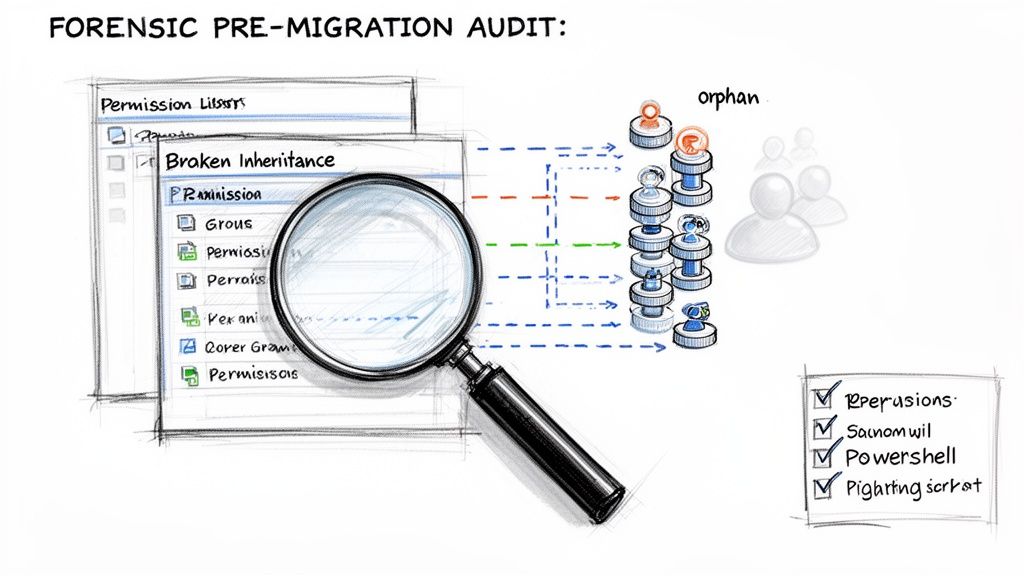
A proper, forensic-level audit is non-negotiable. Your team must hunt down and neutralize the risks hiding beneath the surface of your legacy system.
Uncovering Skeletons in the Digital Closet
The official documentation won't warn you about the years of accumulated technical debt you're about to inherit. Your audit has to go deeper. Following essential audit trail best practices is invaluable for this and all future governance.
Here’s what your team needs to be hunting for:
- Broken Inheritance Chains: Your number one enemy. We've audited environments where over 40% of site collections had unique, item-level permissions, shattering the security model.
- Circular Entra ID Group Nesting: The classic scenario where Group A is a member of Group B, which is a member of Group A. This doesn't just confuse admins; it bloats user access tokens to the point of causing authentication failures across Microsoft 365.
- Orphaned SIDs (Security Identifiers): Ghosts in the machine—permissions assigned to users who left years ago. These are active vulnerabilities that must be purged, not migrated.
- External/Guest User Sprawl: Do you really know every external user with access to your sensitive data? An audit uncovers forgotten guest accounts, a direct violation of most data protection regulations.
The Limitations of Standard Auditing Tools
Your first instinct might be to run a script and trust the output. This is a critical mistake. Standard tools are built for simple environments and will give you a false sense of security while missing the enterprise-grade problems that will derail your project. A script might find orphaned SIDs but won't map their effective permissions, leaving you blind to the risk. This deeper dive is why a formal migration assessment is non-negotiable.
The real risk isn't just migrating bad permissions; it's the false sense of security a superficial audit provides. You proceed believing you've done your due diligence, only to find your most sensitive financial data is accessible to the entire company post-launch.
From Audit Findings to an Actionable Strategy
An audit is useless without a remediation plan. Every issue must be categorized by risk and mapped to a pre-migration action. Broken inheritance must be re-architected. Orphaned SIDs must be scripturally removed. Circular groups must be untangled.
This analysis forms the bedrock of a phased migration strategy. The documentation says to migrate everything, but in reality, that's how you hit API throttling walls that turn what should take days into weeks. The forensic audit isn't a step you can skip to save time. It is the migration. Get it wrong, and your project is doomed.
Choosing Your Migration Tools Wisely
Microsoft will point you to their free SharePoint Migration Tool (SPMT), and vendors will sell you "one-click" solutions. Here’s the unfiltered reality: choosing a tool is about knowing its specific breaking points before they cripple your project.
Your team will be tempted by the free option. SPMT is functional for a handful of sites under 50GB with simple permissions. The documentation says it works, but in reality, it collapses under enterprise complexity. It is notorious for failing silently on long file paths, choking on the 5,000-item list view threshold, and outright ignoring complex permission structures. Your team won’t get a clear error report. They'll just discover post-migration that entire libraries are missing or have wide-open permissions.
The Seductive Promise of Commercial Tools
This leads IT Directors to powerful tools like ShareGate. They are vastly superior to SPMT, but they are not a silver bullet. We often see clients fail when they hand these tools to a team without specialist experience. Without expert configuration, your team will slam headfirst into API throttling, bringing the entire migration to a dead standstill for days. The tool's dashboard will show cryptic errors, leaving your team scrambling while the project timeline evaporates.
The Ollo Verdict: Use SPMT for a lab test or a single, non-critical sub-50GB site. For anything else, the risk of data loss and security misconfiguration is unacceptably high. A commercial tool is the minimum baseline, but it's only as good as the expert driving it.
The Non-Negotiable Role of Custom Scripting
Even the best commercial tools have blind spots, especially with bespoke security models. The documentation implies tooling should handle custom permission levels, but the reality is they often skip them entirely or misapply them, forcing a manual rebuild that creates gaping security holes.
This is where combining a commercial tool with custom PowerShell PnP scripting becomes the only viable path.
- Pre-Processing: Scripts are essential for cleanup. Think programmatically removing orphaned SIDs or flattening nested security groups that tools can't untangle.
- Delta Sync Logic: A script can run highly specific delta comparisons, catching permission changes that occurred mid-migration—a common scenario that tools miss.
- Post-Migration Validation: You cannot trust a tool's "success" report. Custom scripts must query the new environment to validate that permissions were applied exactly as intended, providing an auditable proof of success.
A SharePoint permission migration isn't a single-tool job. A wise strategy includes evaluating broader cloud infrastructure automation tools to streamline the lifecycle. A successful outcome depends on an orchestrated approach. You can explore a deeper analysis in our complete guide to the SharePoint Migration Tool and its enterprise limitations.
Executing a Phased and Strategic Migration
The single biggest mistake is attempting a "weekend cutover." It’s a strategy born from misplaced optimism that almost always ends in operational chaos and emergency rollbacks. Attempting to migrate everything at once is a guaranteed way to trigger every possible failure point simultaneously. For any enterprise migration, a phased execution isn't just best practice—it's the only defensible methodology.
The Pilot Phase as a Controlled Explosion
Your first move isn't a mass data transfer. It’s a pilot phase, best thought of as a controlled explosion. The point is to intentionally expose the breaking points of your plan on a small, representative, but non-critical dataset. This is a full dress rehearsal for disaster recovery.
Your pilot must include:
- A complex site: A site with broken inheritance, unique permissions, and orphaned SIDs. You need to see exactly how your tools fail to handle these real-world problems.
- A large list or library: Find something that pushes Microsoft's 5,000-item list view threshold. This is how you safely test your tool's ability to manage large datasets.
- Active, but forgiving, users: Bring in a small group to provide immediate feedback on access issues. Their input is invaluable for refining your plan.
I had a client in the financial sector who skipped the pilot to "save time." They kicked off their bulk migration on a Friday night. By Monday, throttling had brought it to a crawl, and critical financial reports were inaccessible to the executive teams. They didn't save a weekend; they lost an entire week of productivity and credibility.
This pilot is where you validate your mappings and safely discover the throttling limits of your tenant without bringing the business to a halt.
This flow chart illustrates how complexity escalates and why specialized tooling becomes non-negotiable.

It clarifies that while simple wizards might work for small jobs, enterprise complexity demands expert-driven, scripted solutions.
Navigating Microsoft API Throttling
Let's be blunt: Microsoft's SharePoint APIs are aggressively governed. Ignoring these limits is the fastest way to get your migration throttled into oblivion. A plan that should take 48 hours can easily turn into a multi-week nightmare. This is a hard technical constraint, not a suggestion.
The documentation says one thing, but in the real world, throttling is often more aggressive, especially during peak EU business hours. We've seen API throttling derail 75% of DIY SharePoint migrations. Your entire execution plan must be built around this reality:
- Schedule for Off-Peak Hours: High-intensity jobs must be scheduled for evenings and weekends.
- Run Incremental Copies: After the initial bulk sync, run multiple smaller, incremental copies. This minimizes business disruption and reduces API load.
- Use Intelligent Tooling: Your migration tool must be configured with back-off-and-retry logic to automatically pause when it detects throttling, preventing outright job failure.
This phased, incremental approach is fundamental to a successful project. To see how these principles fit into a larger framework, review our guide on building a complete SharePoint migration strategy. This methodical process isn't a technical preference; it's a non-negotiable requirement for a defensible and auditable migration.
Implementing Post-Migration Governance and Security
Getting your data across the finish line is not the end of the mission. We often see clients breathe a sigh of relief here, but frankly, this is the most dangerous moment. Your job isn’t done until the new environment is fundamentally more secure and governable than the chaos you just left. Your SharePoint permission migration is a security project. It is your single best opportunity to tear out archaic access models and implement a genuine Zero Trust architecture rooted in Entra ID. If you don't, you’ve just moved old vulnerabilities into a more expensive system.
From Legacy Groups to Zero Trust Principles
The old model of wide-open "contributor" groups is a compliance disaster waiting to happen. The goal now is to enforce the principle of least privilege. This is a mandatory step for any organization serious about protecting its data. This means replacing sprawling, legacy SharePoint groups with modern, auditable security constructs in Entra ID.
The documentation might present this as a simple permissions swap, but you are re-architecting your security posture. Missing this step doesn’t just fail the migration; it directly breaks legal compliance under regulations like GDPR and ISO 27001, where the cost of failure is measured in severe regulatory fines.
Activating Your Defences with Conditional Access
Once your new Entra ID groups are in place, you can finally switch on real security controls. This starts with Conditional Access policies. These are the non-negotiable rules of engagement for your tenant. Your team must configure policies that enforce strict conditions for accessing sensitive data. This is not optional.
- Enforce MFA for All Admins: Any user with elevated privileges must use Multi-Factor Authentication. There are zero exceptions. Period.
- Block High-Risk Sign-ins: Automatically block access attempts from anonymous IP addresses or non-compliant devices.
- Location-Based Restrictions: If your data should only be accessed from Ireland, your policies must block logins from outside the country. It's that simple.
Building an Auditable and Compliant Environment
The final piece is an unbreakable audit trail. You must be able to answer, with certainty, who accessed what data, from where, and when. This is a core requirement for proving compliance. Configuring detailed audit logging in the Microsoft Purview compliance portal is essential. You need to capture every file access, permission change, and sharing event. Our detailed guide on post-migration security hardening covers the specific Entra ID configurations required to achieve this.
This shift to a modern, governable security model is the ultimate goal. Anything less is just moving old problems into a new home.
Why Your Migration Demands a Specialist
We’ve laid out the technical minefield your team faces: API throttling, broken inheritance, GUID conflicts, and compliance failures. These aren't edge cases. They are the standard challenges in any enterprise project.
The choice isn't between saving money with an in-house attempt versus paying for a specialist. The choice is between accepting a high probability of project failure, or investing in a guaranteed outcome. Your team is skilled, but they haven't spent years dissecting the undocumented breaking points of Microsoft's migration APIs. We have.
The Ollo Verdict: When the cost of failure is a GDPR breach or a week of crippling downtime, the risk of a DIY migration is unacceptable. You don't need a generalist with a tool; you need a specialist with a battle-tested methodology.
We've built our reputation navigating these exact complexities for clients in heavily regulated sectors. In finance, energy, and healthcare, data integrity and security aren’t just IT goals—they are non-negotiable legal requirements. This process is about safeguarding your organization’s most critical asset. When the stakes are this high, your SharePoint permission migration doesn’t just benefit from an expert—it fundamentally demands one.
Common Questions from the Trenches
When we sit down with IT Directors, the same tough questions come up. Here are the straight answers.
Can We Migrate Permissions Without Migrating Content?
Technically, yes. In reality, it's a high-wire act that almost always ends badly. SharePoint permissions are tied to unique object GUIDs, not file names. When you apply an old permission set to existing content, the GUIDs won't match. This creates a catastrophic failure, leaving data either completely locked down or, worse, wide open. The only way to attempt this is with highly specialized, custom scripting to re-map every permission—a complex, risky process standard tools cannot handle.
How Does API Throttling Actually Impact Our Migration?
Throttling doesn't just slow your project; it brings it to a grinding halt. Microsoft enforces strict API limits. A complex permission structure generates thousands of calls per minute, and you'll hit those limits faster than you expect. Without a strategy to manage this, your jobs will fail repeatedly. You need intelligent batching, phased scheduling, and scripts with "back-off-and-retry" logic. Otherwise, your 48-hour project spirals into a multi-week ordeal of failed batches and late-night firefighting.
What Is the Single Biggest Mistake You See Teams Make?
Trusting the tool out of the box. Teams buy a powerful migration tool assuming it will magically handle their environment's complexity. It absolutely will not.
The biggest mistake is failing to perform a deep, forensic pre-migration audit. Teams skip the hard work of fixing broken inheritance, circular group nesting, and orphaned accounts. The tool then faithfully migrates that broken structure, creating a security and administrative nightmare in the new environment that is ten times harder to fix after the fact.
Your SharePoint permission migration is too critical to get wrong. At Ollo, we've built our entire practice on navigating these high-stakes projects for some of Ireland's most regulated industries. Don't risk your data and compliance on a generic approach. Contact us to ensure a secure, successful outcome.

















