



The Watchtower and the Lock: Architecting Proactive Copilot Security with Microsoft Sentinel
The Microsoft 365 Copilot connector for Microsoft Sentinel is an architectural bridge that transforms AI auditing from a reactive forensic task into a proactive security operation. It ingests Copilot interaction events in near real-time, allowing Security Operations Centers (SOC) to monitor, analyze, and automate responses to risky user prompts immediately, rather than waiting for a post-mortem legal review.
For the last year, the number one question we have received from CTOs is simple: "If my employee asks Copilot for the CEO's salary, will I know?" Until recently, the answer was a complicated "Yes, but..." involving CSV exports and long wait times. With the release of the new Sentinel Connector for Microsoft 365, the answer has shifted to a definitive "Yes, and we can alert you in seconds."
This is not just a feature update; it is a fundamental shift in how we architect AI governance. In our experience, too many organizations treat AI security as an afterthought. We are moving from a world of Forensics (cleaning up the mess) to one of proactive Monitoring (watching the shop).
The "Old World": Reactive Forensics in the Audit Log Trap
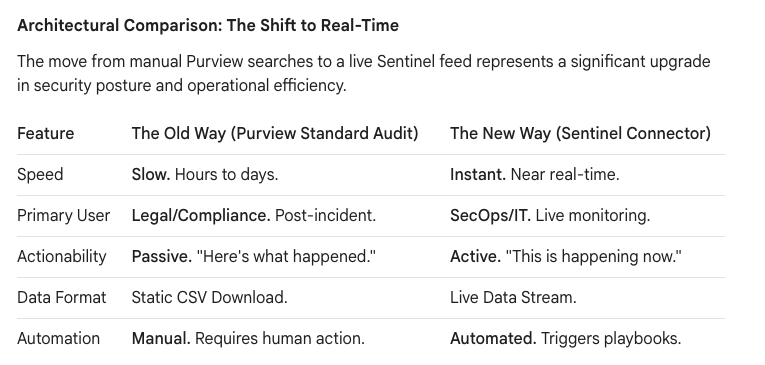
Before this update, auditing Copilot was a "pull" mechanism designed for legal teams, not security engineers. If you suspected a user was fishing for executive compensation data, the workflow was painfully manual and slow—a classic "rearview mirror" approach that is excellent for legal discovery but useless for stopping a data leak in progress.
The process typically looked like this:
- The Trigger: You usually found out about a potential data exposure after the fact, often when a rumor had already started.
- The Grind: A Compliance Officer had to log into the Microsoft Purview compliance portal, construct a specific "Audit Log Search," and wait—often for hours—for the search job to complete.
- The Output: The result was a static, unwieldy CSV file that required manual filtering and analysis to find the needle in the haystack.
This reactive model puts security teams on the back foot, forcing them to investigate incidents that have already occurred instead of preventing them from escalating.
The "New World": Proactive Operations with the Sentinel Feed
The new architecture pipes these logs directly into Microsoft Sentinel, your organization’s central security nervous system. This changes the physics of the investigation, providing the real-time visibility that a modern SOC requires to effectively monitor AI interactions.
- Real-Time Ingestion: The moment a user interacts with Copilot, the event flows into the
CopilotActivitytable in your Sentinel workspace. There is no more waiting for a manual export. - Automated Response: We can now write KQL queries as Analytic Rules that trigger automated Logic App playbooks instantly. If a user triggers a high-severity alert (e.g., by asking for "passwords" or "SSN"), Sentinel can post a message to a private SOC Teams channel or even temporarily disable the user's Copilot license via a script.
Architectural Comparison: The Shift to Real-Time
The move from manual Purview searches to a live Sentinel feed represents a significant upgrade in security posture and operational efficiency.
The Privacy Paradox: The "Grey Zone" of AI Auditing
This brings us to the "Grey Zone"—the area where technology meets HR policy. The direct question is, "Can we see the exact words the user typed into the prompt?" The technical answer is Yes, but it comes with a massive asterisk.
Microsoft operates with a strong emphasis on user privacy. By default, many logs scrub the verbatim prompt text. The log might simply state Actor: John.Smith | Action: Copilot Interaction | App: Teams, which is useful but incomplete. To see the specific string "CEO Salary," your environment requires advanced auditing configurations to be enabled within Microsoft Purview.
In our experience, however, the metadata is often enough. Knowing that a user’s Copilot session accessed Executive_Bonus_Plan_2025.xlsx is usually sufficient probable cause for a security investigation, even without seeing the exact question that was asked.
The Architecture of Control: The Camera vs. The Lock
A common "Architectural Trap" we see clients fall into is assuming Sentinel can block the user from asking a risky question. It cannot. Understanding the roles of the different tools in the Microsoft security ecosystem is critical.
- Microsoft Sentinel is the Camera: It records the event and alerts the guards.
- Microsoft Purview is the Lock: It prevents the door from opening in the first place.
A robust Copilot security strategy requires architecting a multi-layered defense that uses the right tool for the right job.

True governance is achieved when the "Camera" (Sentinel) is set up to watch the "Locks" (Purview).
The Ollo Strategy: The "Copilot Readiness" Audit
For our clients preparing to deploy Copilot at scale, we recommend a "Dark Mode" deployment. Do not turn on the engine without first installing the brakes and the dashboard. This "Copilot Readiness Audit" frames security not as a cost, but as a compliance and safety enabler.
- Define "Toxic" Terms: We work with HR and Legal stakeholders to define the top 20-30 high-risk keywords and phrases specific to their business (e.g., "Layoffs," "Acquisition," "Project Titan").
- Build the Watchtower: We configure Sentinel analytic rules to use this keyword list, creating high-fidelity incidents when a prompt matches a "toxic" term. This is not about boiling the ocean; it's about watching for specific, predefined risks.
- Architect the Playbook: We design an automated response using Logic Apps. The process starts with simple alerts to a private SOC channel and can mature to include actions like notifying a user's manager or integrating with an IT service management system.
We are moving from a world where we hoped users wouldn't ask dangerous questions, to a world where we can architect the environment to handle them safely. This connector is the missing link that finally allows Security Operations to sit at the table with AI adoption, transforming AI anxiety into architectural assurance.

















