



Friday at 6:30 p.m. looks clean. The migration dashboard says complete. Cutover gets signed off. By Monday morning, the illusion is gone. Finance is chasing broken spreadsheet links, Legal is asking why retention labels did not follow the content, and department heads are sending screenshots of access failures your pre-production test never exposed. Then the flow failures start because nobody tested real load against Microsoft 365 throttling limits.
That is the pattern we see in rescue work. The files move. The business breaks.
Testing during a migration is not a documentation exercise. It is the only control system standing between a controlled cutover and an expensive rollback. IT Directors who treat testing as a box-ticking phase usually discover the same faults too late: broken permissions inheritance, corrupted metadata, workflow failures, search issues, list threshold problems, and compliance gaps that trigger audit risk.
Irish organisations get hit harder because regulated Microsoft 365 estates carry less tolerance for sloppy execution. SharePoint and Microsoft 365 are now standard operational platforms across public sector, finance, legal, and energy environments, and Microsoft documents the tenant limits, throttling behaviour, and governance constraints that punish weak migration planning in production. In that setting, a migration fails long before users call the service desk. It fails when the test plan never challenged the conditions that matter.
You do not need another generic checklist. You need a triage plan based on where real migrations break, especially when native methods and DIY tooling start lying to you with green status reports. We have been hired to clean up enough failed cutovers to say this plainly. If your team has not tested business acceptance, data integrity, security, performance, integrations, regression, recovery, smoke checks, and compatibility with production realism, you are carrying avoidable risk into go-live.
Ollo approaches testing as risk reduction, not ceremony. That means finding the breaking point early, proving what survives, and knowing the exact moment to stop forcing a shaky in-house approach and bring in specialist help.
This guide covers the nine testing types that prevent migration failures, and the warning signs that tell you your current plan is not strong enough.
1. User Acceptance Testing
Monday, 8:47 a.m. The migration dashboard says green. Then finance cannot open the month-end pack, legal sees the wrong matter workspace, and an approval flow stalls because the service account lost the permission it had in the source estate. That is the moment IT Directors discover a brutal truth. A technically completed migration can still be a business failure.
User Acceptance Testing decides whether the business can work after cutover. If UAT is weak, every earlier test result is inflated. We see this constantly in rescue engagements. Internal teams prove that content moved, admins can log in, and a few sample files open. None of that proves that the people who run payroll, contracts, casework, or board reporting can do their jobs under real permissions.
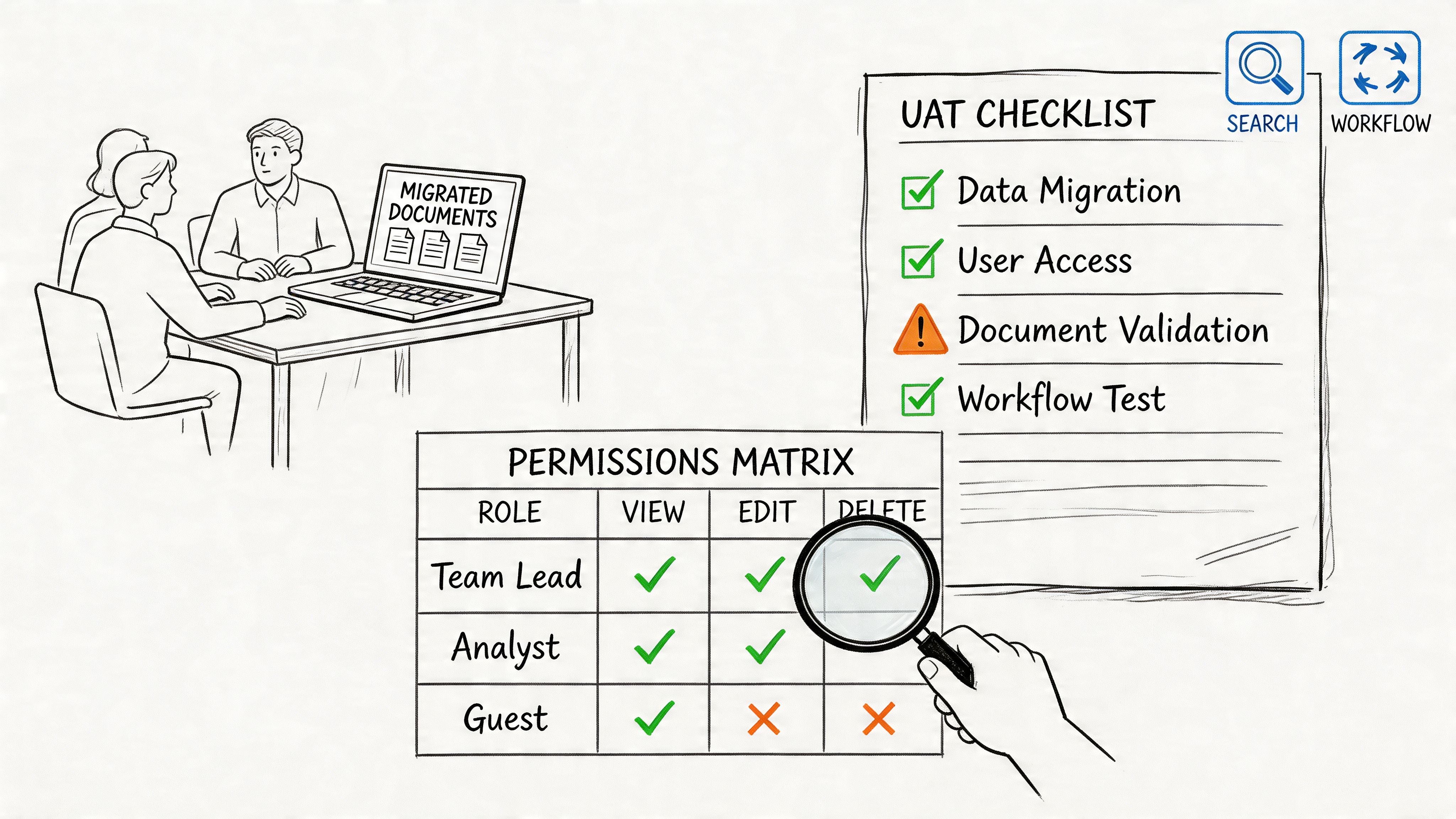
The usual failure is simple. IT writes UAT scripts around system checks instead of business workflows. "Open file, tick box, looks fine" wastes everybody's time. Your finance lead needs to complete month-end pack access. Legal needs to validate restricted matter libraries. Operations needs to trigger the Power Automate flows that run the business, not the ones built for a demo tenant.
One more hard rule. Do not run UAT with broad admin accounts and call it realistic. That masks the exact failures that hit production first.
What UAT must actually prove
If your UAT scripts do not mirror daily work, you are staging theatre.
- Use business journeys: Test invoice approval, restricted board pack access, engineering document search, records retrieval, and external sharing exceptions.
- Force permission edge cases: Test broken inheritance, unique permissions, guest access, and negative access cases. If an unauthorised user can see the folder, your access model is already broken.
- Use real identities: Run tests with actual user roles and mapped groups, not catch-all admin accounts.
- Trigger dependent processes: Validate live approval chains, retention labels, alerts, and flows connected to migrated libraries and lists.
- Document deviations: Record every accepted exception with an owner, impact, and remediation date. Verbal sign-off is worthless in a regulated estate.
UAT should expose the migration plan while there is still time to fix it.
A common rescue pattern looks like this. The migration completed, users could sign in, and the project team declared success. Two hours later the CFO's team could not access a records library because a source group mapped incorrectly during tenant consolidation. Nobody caught it because the test account had tenant-wide rights. That is not bad luck. It is failed test design.
Ollo's recommendation is blunt. Build UAT from business risk, not from the migration tool's success log. Use production-like content, real users, and role-correct permissions. Make business owners sign off against evidence. If your governance model is still unclear at this stage, fix that first. Our guide to SharePoint data governance and control design shows the controls that should already be reflected in UAT.
The Ollo verdict is simple. If IT is running UAT alone, the result is compromised. Scenario-based UAT with permission verification is required for any serious Microsoft 365 migration. If your team cannot stage that properly, stop before cutover and bring in specialist help.
2. Data Integrity and Validation Testing
Monday morning after cutover, the dashboard says the migration finished cleanly. By Tuesday, Legal cannot find required metadata on contract files, Finance discovers version history gaps, and a records manager spots folders with inheritance stripped out. The files moved. The evidence did not.
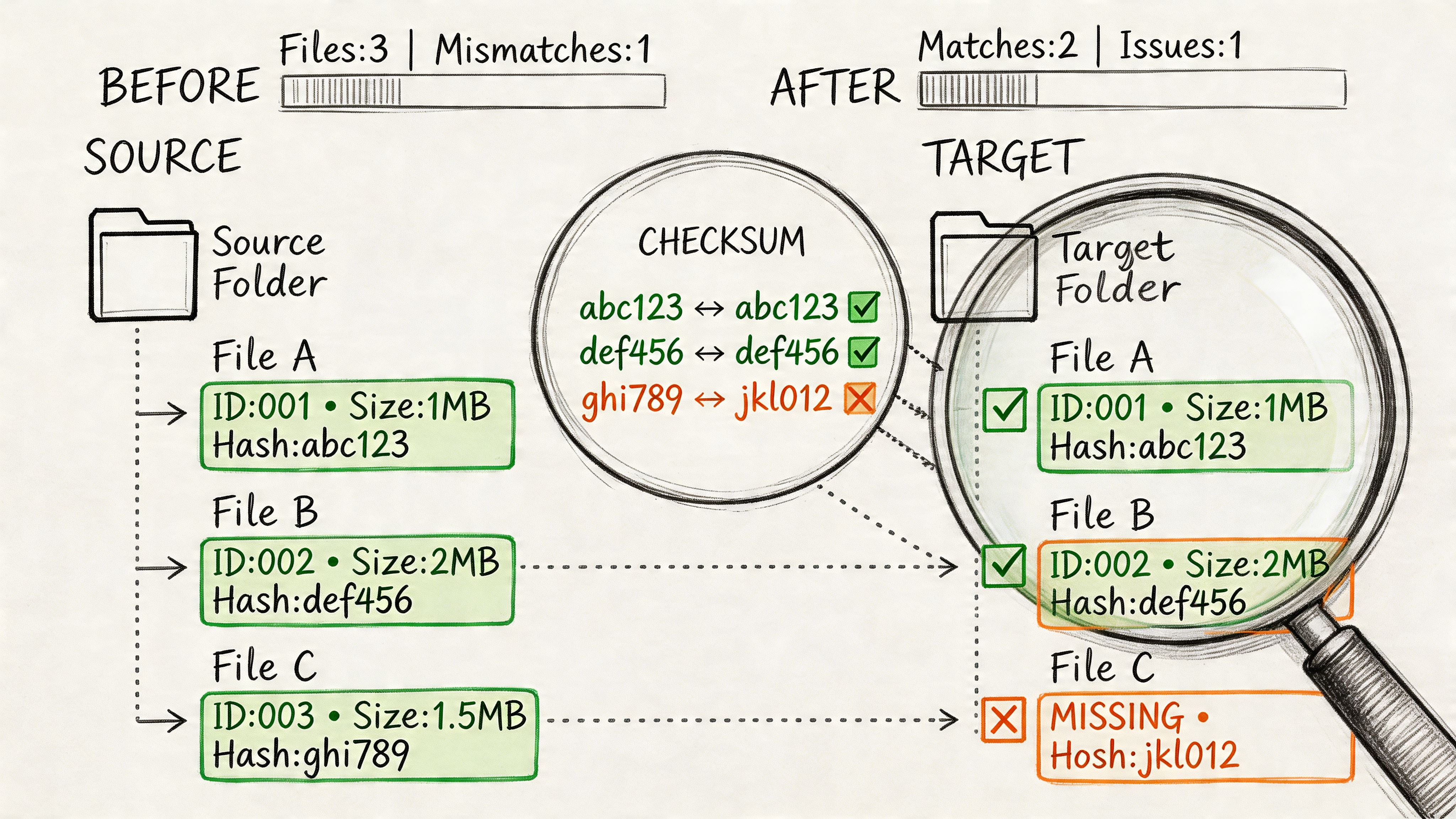
Data integrity and validation testing decides whether your migration is defensible or just cosmetically complete. File counts and green tool logs do not answer the questions that matter. Did the target preserve metadata exactly as designed. Did permissions survive at item, folder, library, and site level. Did links, versions, and content types behave the same after the move.
This is the phase where DIY migrations usually start to unravel. Microsoft's own guidance documents the service-side constraints that break naive assumptions, including throttling behaviour in SharePoint Online and the 5,000-item list view threshold in large lists and libraries. Those limits do not just slow a migration. They distort what gets validated unless your team scripts around them and checks exceptions aggressively.
What experienced teams miss is simple. Migration tools copy content. They do not prove business fidelity.
We get called in after the same failure pattern again and again. Content lands in SharePoint. Custom columns are blank on a subset of files, managed metadata maps inconsistently, document IDs change, old links die, or unique permissions collapse into inherited access. Nobody notices during the cutover window because the project team only checked counts, spot-opened a few files, and trusted the export report.
Use a governance lens when you validate. Ollo has written before about why SharePoint data governance has to be checked at object, metadata, and permission level, not just storage level. The same discipline applies to SharePoint migration security controls and validation checkpoints, especially where regulated records and restricted libraries are involved.
Your validation plan should cover:
- Metadata mapping accuracy: Compare transformed fields against the target schema, field by field. Check required columns, term sets, content types, created and modified values, and any business-critical custom metadata.
- Permission fidelity: Test source versus target access as a matrix, not a screenshot. Unique permissions, broken inheritance, sharing links, M365 group membership, and exception libraries need explicit comparison.
- Version and link preservation: Count versions, inspect major and minor history where used, and test internal references, embedded links, and document URLs that business processes still depend on.
- Exception reporting: Log every mismatch by object, scope, owner, and business impact. A vague failure summary is useless in an audit and worthless in a rescue.
Practical rule: If your validation output cannot identify which records changed, which permissions drifted, and which metadata failed mapping, it cannot protect your cutover decision.
Ollo's recommendation is blunt. Validate in waves, starting with regulated content, high-access libraries, workflow-bound records, and anything with complex metadata or unique permissions. Use native reports for rough visibility only. For serious tenant-to-tenant or legacy SharePoint migrations, run scripted validation across metadata, permissions, versions, and exceptions before sign-off. If your team cannot produce that evidence, stop treating the migration as under control and bring in specialists before the defects harden into production risk.
3. Security and Compliance Testing
Friday night cutover looks clean. By Monday morning, a contractor can open records they should never see, a retention policy is no longer binding on migrated content, and your compliance lead cannot prove who accessed what during the move. That is how an IT Director turns a migration project into an incident response exercise.
Security and compliance testing decides whether your target estate is controlled or exposed. This work is about access, policy enforcement, auditability, and legal defensibility after the move. DIY migration tools are weak here. They can copy files and report success while leaving inheritance, labels, exclusions, and logging in a dangerous state.
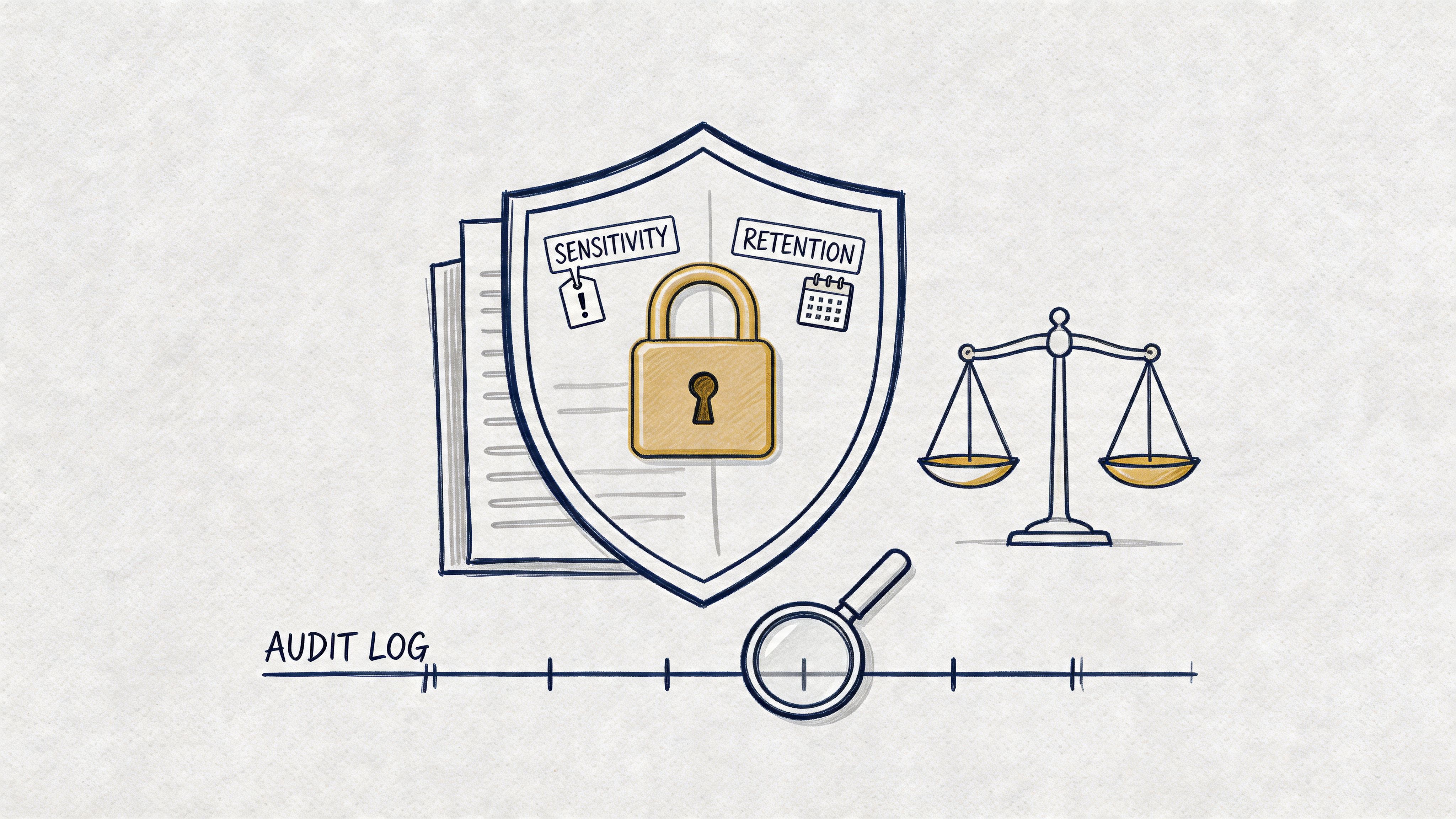
The first failure point is policy mismatch. Teams confirm that sensitivity and retention labels exist in the target, then stop. That is amateur-hour testing. You need proof that policies still apply to migrated content, that exceptions are still intentional, and that users, guests, service accounts, and apps hit the controls you expect.
Test these areas hard:
- Access control and exposure: Verify real outcomes for internal users, guests, privileged admins, and blocked users. Test site membership, private channel content, shared links, broken inheritance, and external sharing boundaries.
- Retention and record handling: Confirm retention labels, retention policies, record declarations, and deletion restrictions still apply to regulated samples after migration.
- Audit and investigation readiness: Check that Unified Audit Log events, alerting, case holds, and eDiscovery collection still work on migrated content and identities.
- DLP and conditional access behaviour: Test whether DLP rules trigger on the migrated files and whether session, device, and sign-in controls still restrict access as designed.
For migration-specific failure patterns, review SharePoint migration performance issues that usually surface after poor pre-cutover testing and SharePoint migration security before you touch production.
One rule matters here. Test enforcement, not configuration.
Ollo's recommendation is blunt. Run security and compliance testing against live regulated samples, not dummy content. Put Zero Trust controls in audit mode first, then verify the actual decision path. Make legal, compliance, and data owners sign off on named exceptions before cutover. If your team cannot show who can access migrated records, which policies still bind, and what audit evidence survived the move, stop the migration and bring in specialists. That is the point where "good enough" becomes reportable risk.
4. Performance and Load Testing
Friday cutover looks clean. By Monday 9:15, search is timing out, approval flows are backing up, sync clients are choking on oversized libraries, and the helpdesk is flooded. That is the true test. A pilot proves very little if it never faced production traffic, identity lookups, workflow bursts, and competing user activity at the same time.
Performance and load testing exists to break your migration plan before users do. If your team only tests whether content lands in the target, you are testing the easy part. The hard part is whether the target still behaves under pressure.
Microsoft documents service protection limits and throttling across Microsoft 365 workloads. Those limits hit hard during bulk migration windows, especially when teams run migration jobs, indexing, sync, and automation in parallel. Read Ollo's guidance on SharePoint and Azure integration failure points during migration if your target environment depends on identity, automation, or cloud service chaining.
The failure points that surface first
We keep getting called into the same messes.
Power Automate hits concurrency limits during finance close. Bulk migration activity collides with normal user traffic and drags page response down. Search crawls and query performance degrade just after cutover, so users assume data is missing when it is only slow or poorly indexed. OneDrive sync explodes after profile redirection and broad library sync policies hit real devices.
These are normal production conditions, not edge cases.
Test to answer the questions that matter:
- Can workflows survive peak demand: Run approval bursts, scheduled jobs, and user-triggered flows at the same time.
- Will sync stay stable on real endpoints: Test large libraries, long file paths, and aggressive sync scope on standard user devices and networks.
- Will search and page loads stay usable: Measure first-load time, query response, indexing lag, and document open performance under live concurrency.
- Will throttling break your run plan: Push migration batches alongside business-hour activity and watch where Microsoft 365 starts pushing back.
For a practical view of the bottlenecks that usually show up after weak pre-cutover testing, review Ollo's guidance on SharePoint migration performance issues.
Ollo's recommendation
Load test against production-shaped conditions. Use real identity paths, real workflow patterns, realistic file volumes, and realistic network latency. Then push past expected peak. That is how you find the break point before the business finds it for you.
Native tools do not fix bad throughput planning. They just fail with nicer progress screens.
Ollo's view is blunt because we have had to rescue too many failed cutovers. Use SPMT for small, low-risk moves. Stop pretending it is enough for enterprise migrations with automation, sync sprawl, and tight cutover windows. If your test plan does not show batch sequencing, concurrency control, throttle handling, rollback criteria, and clear performance thresholds, stop. Bring in migration specialists before your first business-hour run turns into an outage.
5. Integration Testing
Friday evening looks clean. Files are across, sites open, and the dashboard says the migration completed. Monday morning says otherwise. Approval flows stop, archive exports miss records, a line-of-business app cannot find the list IDs it expects, and your support desk gets hit before anyone can explain what changed.
Integration testing catches the failures that content counts never will. SharePoint sits inside a stack of identity services, Power Platform components, retention controls, reporting jobs, custom scripts, and old business systems that nobody retired properly. If those links break, the migration failed, even if every document copied successfully.
We get called in after the same pattern again and again. A team tests whether content lands in the target tenant. They do not test whether the target tenant still supports the business process wrapped around that content. That is how you end up with imported Power Automate flows pointing at the wrong environment, service principals blocked by conditional access changes, or downstream SQL and API connectors failing because secrets, permissions, or object references changed during the move.
Another common failure is policy mismatch. Labels, retention settings, DLP rules, and audit expectations exist in the target, but they no longer line up with the migrated information architecture. The result is ugly. Records are stored in the wrong places, controls fire on the wrong content, and compliance teams get a false sense of coverage.
Test these areas on purpose:
- Identity and connector paths: Service principals, managed identities, connector secrets, token issuance, conditional access, and delegated versus app permissions.
- Object references and dependencies: List IDs, site URLs, group membership, environment variables, webhook targets, and anything hard-coded into flows, scripts, or apps.
- Control interactions: DLP, retention, audit logging, eDiscovery exposure, external sharing, sensitivity labels, and encryption behaviour after migration.
- Downstream systems: Archives, BI refreshes, scheduled exports, custom middleware, finance tools, HR systems, and legacy applications still reading SharePoint data.
Ollo's advice is blunt. Dependency mapping has to happen before migration, not during the outage call. Our guidance on SharePoint and Azure integration architecture shows the sort of cross-system links that DIY plans routinely miss.
Ollo's recommendation
Interview the people who own the apps, flows, archives, and reporting jobs. Infrastructure teams rarely know every hidden dependency, and migration tools certainly do not. Build a dependency register, test each integration in the target with real identities and realistic data, then record who signed off and what failure looks like.
Stop trusting a successful copy log as proof that integration risk is under control. ShareGate and native Microsoft tools can move content. They do not repair broken references, redesign auth flows, or tell you which downstream process will fail on day one. If your estate includes Power Platform, Azure components, custom integrations, or regulated records, this is the point to stop improvising and bring in migration specialists. That is the difference between a controlled cutover and a rescue project.
6. Regression Testing
Regression testing protects the business from the phrase everyone hates hearing after cutover. "That used to work."
This isn't glamorous testing. It's disciplined repetition against the workflows and edge cases your organisation already depends on. Skip it, and stable processes fail without warning because a connector changed, an ID shifted, or a policy in the target tenant behaves differently.
We often see clients fail when they only test the obvious happy path. A workflow triggers manually in UAT, so the team signs off. Then the month-end variant runs against a larger dataset, trips throttling, and nobody notices until downstream reporting is incomplete.
What good regression testing looks like
You need a catalogue of existing automations, custom scripts, app dependencies, scheduled jobs, and exception paths. Not the ideal estate. The actual one.
That means testing historical oddities too. Legacy CSOM scripts. Old service accounts. Archive purge jobs. Approval flows nobody has touched in years but everyone assumes will keep working.
- Retest known critical workflows: Finance close, onboarding, procurement approvals, contract retention, and operational alerts.
- Include old edge cases: Historical data, unusual metadata values, archived content, and exception-routing logic.
- Automate where possible: Manual regression on a broad estate doesn't scale and people skip steps under time pressure.
Regression testing isn't about proving the new platform works. It's about proving your old business hasn't been quietly broken.
Ollo's recommendation
Build regression packs before migration design finishes. If you wait until cutover prep, you'll miss dependencies and compress the schedule into guesswork. Keep evidence of pass and fail states, because when executives ask what changed, "we think it's fine" won't survive the meeting.
The Ollo verdict. If your tenant holds years of accumulated workflows, regression testing isn't optional. Native tool success means content moved. It does not mean business logic survived.
7. Disaster Recovery and Business Continuity Testing
Most migration plans talk confidently about rollback and recovery. Very few prove either one. That's the problem.
Disaster recovery testing forces your team to show that backup, restore, failover, and support runbooks work in the target tenant under pressure. If you can't restore what you migrated, your project only looks controlled until the first incident.
Many post-cutover assumptions prove false. Backup tools point to the wrong tenant. Recovery scopes don't match the new information architecture. Support staff have no idea how to restore a Teams site, a OneDrive account, or a mailbox within the expected window.
Recovery promises need evidence
A useful migration DR exercise doesn't stop at tool screenshots. It restores into an isolated environment, checks data fidelity, confirms permissions, and times the process with the actual support team who'll handle the ticket at 07:30 on a Tuesday.
For planning around these scenarios, see Ollo's approach to SharePoint disaster recovery migration and compare your internal process against this Disaster Recovery Testing Checklist.
- Test whole-service recovery: Site, library, Teams, OneDrive, mailbox.
- Test granular recovery: Single file, version, permission state, user object.
- Measure actual response: Recovery Time Objective on paper means nothing until you run it.
Ollo's recommendation
Run DR tests after major migration waves and again before final cutover. Validate backup scope, retention configuration, and operator runbooks in the target environment. Make your service desk execute at least part of the recovery process, because architects won't be on every support call.
Recovery plans fail for ordinary reasons. Wrong tenant, wrong scope, wrong permissions, wrong operator.
The Ollo verdict. If no one has restored real data from the target tenant before go-live, you don't have a DR strategy. You have optimism.
8. Smoke Testing
Smoke testing is the first blunt sanity check after cutover. It happens fast, and it should be ruthless. The goal isn't broad assurance. The goal is deciding whether your business should be allowed into the new environment at all.
Through this approach, disciplined teams avoid public failure. If authentication, access, sync, search, or a critical integration breaks in the first hours, smoke testing catches it before full user traffic floods the problem.
What belongs in a real smoke pack
Keep it short, business-critical, and executable under pressure. We usually focus on sign-in, top-priority libraries, key Teams spaces, high-risk OneDrive access, and at least one live test for each critical integration path.
Do not dilute the pack with non-essential checks. Smoke testing isn't a second UAT cycle. It's a gate.
A solid pack usually includes:
- Core identity checks: Can the right users sign in and inherit expected access.
- Critical content checks: Can business owners open, edit, and search priority records.
- Immediate integration checks: Do top-tier flows, labels, sync, and alerts still function.
Ollo's recommendation
Prepare smoke tests before migration starts and assign named owners for each scenario. Execute them immediately after cutover and before broad access opens. If one critical scenario fails, halt expansion and move to incident response. Don't negotiate with a failing smoke pack.
We often see clients fail when they treat smoke testing as a ceremonial exercise after the all-clear has already gone out. That's backwards. Smoke testing decides whether you earn the all-clear.
The Ollo verdict. A migration without a hard smoke gate is an uncontrolled release. If leadership wants confidence on Monday morning, that is the starting point.
9. Compatibility Testing
Monday 9:05 a.m. cutover looks finished. Then the tickets start. Finance cannot run the Excel add-in that closes month end. A clinical team gets blocked by browser policy on a line-of-business app. Remote staff on VPN hit endless authentication prompts. The migration did not fail in the data centre. It failed on the endpoint.
Compatibility testing exists to catch those failures before users do. Skip it and you hand production testing to the people running payroll, care delivery, and operations.
The trap is always the same. Internal teams test on clean devices, current browsers, and friendly networks. Real estates are messier. Old Office builds, unmanaged plugins, full-tunnel VPN, conditional access edge cases, proxy inspection, and niche business apps break after cutover. DIY migration tools do not solve that. They expose it.
What a real compatibility test matrix covers
Build the matrix around business risk, device reality, and network path. Start with the groups that create the fastest operational damage when their setup fails. Finance controllers. Clinicians. Contact centre teams. Executives. Field staff. Remote users behind restrictive security controls.
Then test the combinations that usually explode:
- Office client behaviour: file rendering, macros, COM add-ins, desktop versus web app behaviour, and protected view prompts
- Browser-dependent workloads: Power Apps, embedded forms, SSO prompts, download handling, session timeouts, and pop-up restrictions
- Identity and policy interaction: modern auth, conditional access, MFA prompts, device compliance checks, and token refresh behaviour
- Network conditions: office LAN, full-tunnel VPN, split-tunnel VPN, proxy inspection, low-bandwidth links, and mobile access
- Legacy edge cases: old plugins, hard-coded paths, mapped drives, unsupported browser dependencies, and print workflows
Do not chase every possible permutation. Triage the estate. Test the combinations tied to revenue, compliance, or patient and customer service first.
Where programmes usually break
The ugly failures rarely show up in vendor demos. They appear in inherited environments with years of exceptions and local workarounds. A browser extension blocks authentication. A finance macro calls a retired path. A security policy strips the session a legacy app needs. An add-in that "worked fine before" collapses under modern authentication.
Weak migration planning gets exposed fast. If your team cannot map business-critical apps to device types, Office versions, browser versions, and network routes, you are not ready for cutover.
Ollo's recommendation
Run compatibility testing early enough to force decisions. Upgrade the client, replace the add-in, change the policy, isolate the user group, or delay that workload. Pick one. Hoping the problem disappears at cutover is amateur hour.
Ollo treats compatibility testing as a rescue filter. If we find repeated failures across legacy clients, brittle add-ins, or locked-down network paths, we tell leadership to stop expanding the migration and fix the estate first. That is the point where DIY tools stop being a cost saver and start being a liability.
The Ollo verdict. Compatibility testing proves whether your migration can survive contact with your actual environment. If your plan assumes standard clients and clean networks, your users will be the test team, and your service desk will pay the price.
9 Testing Types Comparison
| Testing Type | 🔄 Implementation Complexity | ⚡ Resource Requirements & Time | ⭐ Expected Outcomes | 📊 Ideal Use Cases | 💡 Key Advantages |
|---|---|---|---|---|---|
| User Acceptance Testing (UAT) | High, cross‑team coordination and realistic scenario setup | Medium‑High, significant end‑user time and production‑scale environment; typically weeks | ⭐⭐⭐, exposes showstoppers, permission and workflow issues | Tenant consolidations, business‑critical workflow validation | Validates real user workflows; builds stakeholder confidence |
| Data Integrity & Validation Testing | High, requires scripting, baselines and checksum comparisons | High, compute‑intensive full validation or targeted heavy sampling; weeks | ⭐⭐⭐, quantitative evidence of data fidelity for audits | Compliance audits, version/history sensitive migrations | Detects data loss/truncation and schema mismatches; audit ready metrics |
| Security & Compliance Testing | High, needs regulatory expertise and policy mapping | High, specialist staff and long windows (5–8+ weeks for regulated sectors) | ⭐⭐⭐, prevents regulatory violations and audit failures | Healthcare, finance, regulated tenant migrations | Ensures access controls, labels, audit logs and retention function post‑cutover |
| Performance & Load Testing | High, realistic load simulation and tooling expertise required | High, production‑scale test environments and 4–6 weeks typical | ⭐⭐, reveals API throttling, latency and capacity gaps | High concurrency workloads, month‑end/batch processes | Identifies throttling and infrastructure bottlenecks for capacity planning |
| Integration Testing | High, deep knowledge of app dependencies and auth flows | Medium‑High, coordination with app owners and connector testing; weeks | ⭐⭐, validates authentication, connectors and data pipelines | Power Platform, legacy systems, hybrid coexistence | Prevents data leakage and integration breakage; validates end‑to‑end auth |
| Regression Testing | Medium‑High, requires mapping of existing workflows and edge cases | Medium, automated suites need upfront investment; ongoing maintenance | ⭐⭐, ensures existing workflows continue to function | Environments with extensive automations and scheduled jobs | Protects business processes from silent regressions and policy changes |
| Disaster Recovery & Business Continuity Testing | Medium‑High, runbooks, isolated restores and coordination | High, production‑scale restores, possible downtime; time‑consuming | ⭐⭐, confirms RTO/RPO and backup integrity | Organisations with strict continuity or regulatory recovery needs | Validates recoverability and backup configuration before cutover |
| Smoke Testing | Low, rapid, high‑level sanity checks immediately post‑cutover | Low, quick execution (4–8 hours); ⚡ very fast to run | ⭐, quickly detects critical failures but is superficial | Immediate post‑cutover go/no‑go checks | Fast go/no‑go decision, low cost, rapid remediation window |
| Compatibility Testing | Medium, large client/device/browser matrix, risk‑based selection | Medium, device/browser matrix and targeted scenarios; weeks | ⭐⭐, prevents client‑specific failures and degraded UX | BYOD fleets, diverse OS/browser environments, legacy plugins | Reduces user impact and service desk load by validating critical clients |
Stop Ticking Boxes. Start Reducing Risk.
A successful Microsoft 365 migration isn't measured by terabytes moved or by a green completion bar. It's measured by whether your business still functions, whether your controls still hold, and whether your compliance position stayed intact. That's why these types of testing don't sit in separate silos. They work together as one risk-reduction system.
User Acceptance Testing tells you whether the business can operate. Data integrity testing tells you whether the content is trustworthy. Security and compliance testing tells you whether the migration created exposure. Performance and load testing tell you whether the target environment can survive normal pressure. Integration and regression testing tell you whether hidden dependencies and old workflows still function. Disaster recovery, smoke, and compatibility testing tell you whether you're ready to let the organisation in.
Miss one, and another test category ends up carrying a burden it was never meant to carry. Teams do this all the time. They expect UAT to find data loss. They expect smoke testing to catch deep integration faults. They expect user complaints to reveal compatibility issues. That's not strategy. That's failure deferred.
The platform itself gives you enough warning signs if you know where to look. Microsoft Learn confirms list view threshold behaviour, API throttling, and other constraints. The documentation says tools can handle scale. In reality, scale with regulated data, inherited permissions, legacy structures, and tenant-to-tenant complexity is where projects break. That's why DIY approaches keep running into the same walls. Broken inheritance. GUID conflicts. Long paths. Authentication drift. Partial migration success that looks acceptable until legal, finance, or operations start using the data.
That's also why comparing tools without comparing testing discipline is a waste of time. SPMT has its place. ShareGate has its place. Neither tool substitutes for adversarial validation. A migration tool moves objects. It does not think like an auditor, a service owner, or a hostile incident investigator. Your team can run tests. That doesn't mean your team is testing the right failure modes.
A hard truth from the field. Most rescue engagements start after a team trusted apparent completion over evidence. The files moved. The dashboards looked good. The project report said success. Then permissions failed, flows stalled, audit gaps surfaced, or users discovered that the target tenant behaved differently under real load. At that point, the cheapest fix is already gone.
If you're planning a regulated or complex migration, use end-to-end testing thinking across the whole estate, but don't stop there. End-to-end checks are valuable. They are not enough on their own. You still need targeted validation for permissions, metadata, compliance, throttling, recovery, and client behaviour.
Ollo is one option if you need specialist support for tenant-to-tenant consolidations, SharePoint migrations, and recovery work in regulated environments. The value isn't in running more tests for the sake of it. The value is knowing which tests expose real failure, which tools break under enterprise conditions, and where to stop the project before it becomes an incident.
Your migration doesn't need more optimism. It needs proof.
If your team is planning a Microsoft 365 or SharePoint migration and you don't want to discover GUID conflicts, broken inheritance, throttling, or compliance gaps after cutover, talk to Ollo. We'll assess the failure points in your migration plan, tell you where the actual risk sits, and define the testing needed before your users and auditors do it for you.

















