



The worst advice about Microsoft Power Pages is also the most common. People call it a low-code website builder, then hand it to an internal team as if they're launching a microsite. That framing is how regulated organisations walk into security incidents, brittle integrations, and governance debt they can't unwind later.
If you're an IT Director, stop thinking “website”. Start thinking “public-facing access layer into business data”. Microsoft's own documentation describes Power Pages as an external-facing, enterprise-grade SaaS platform inside Power Platform, with authenticated external access, Dataverse underneath, and platform-level administration through the Power Platform admin centre and security controls like authentication keys in the operating model, not bolted on afterwards (Microsoft Learn Power Pages).
That changes the risk profile completely. Your team isn't choosing a page designer. They're defining who on the public internet can see, submit, or infer data tied to your Microsoft stack. Get it right and you have a governed external service. Get it wrong and you've built a neat-looking route into systems your auditors care about.
Forget the Marketing Hype
Microsoft Power Pages gets marketed like convenience software. Drag, drop, publish, done. That message is dangerous for enterprise buyers because it hides the part that matters: Power Pages sits in your governance boundary, not outside it.
The vendor story focuses on speed. The operational story is about control failure. We often see clients fail when they approve a “simple partner portal” without first asking which records external users should see, what identity paths are allowed, how permissions inherit through Dataverse relationships, and who owns the lifecycle when authentication controls expire or break.
Why the low-code framing misleads
Low-code doesn't remove architecture. It just makes it easier for people to skip it.
A brochure site can tolerate loose thinking. Power Pages can't. Once your portal touches business data, every shortcut becomes a security decision. Every table permission becomes part of the perimeter. Every identity setting becomes an access policy. Every environment choice becomes a governance choice.
Practical rule: If someone in your organisation describes Power Pages as “just a website”, they haven't understood the risk.
Microsoft's own material makes the point, if you read beyond the shiny headlines. Power Pages is built for people outside your organisation to sign in with a wide variety of identities, and Microsoft documents administration through platform controls, including website authentication-key lifecycle handling. That matters because platforms that document key expiry, renewal, retries, failure handling, and support escalation are telling you something bluntly: this is an operational service with moving parts, not a static publishing tool.
What sceptical buyers should ask first
Before your team opens the designer, ask these:
- What data sits behind the portal: If it lives in Dataverse, your portal design and data model are inseparable.
- Who authenticates and how: External identity isn't a cosmetic setting. It's your front door.
- What breaks under load: Low-code doesn't exempt you from platform limits or service boundaries.
- Who will audit permissions: “It worked in test” means nothing if inheritance or column exposure was misread.
- Who owns recovery: When keys, permissions, or service calls fail, your team needs an operating model, not optimism.
That's the core starting point for Microsoft Power Pages. Not templates. Not colours. Not page layouts. Risk.
What Power Pages Actually Is
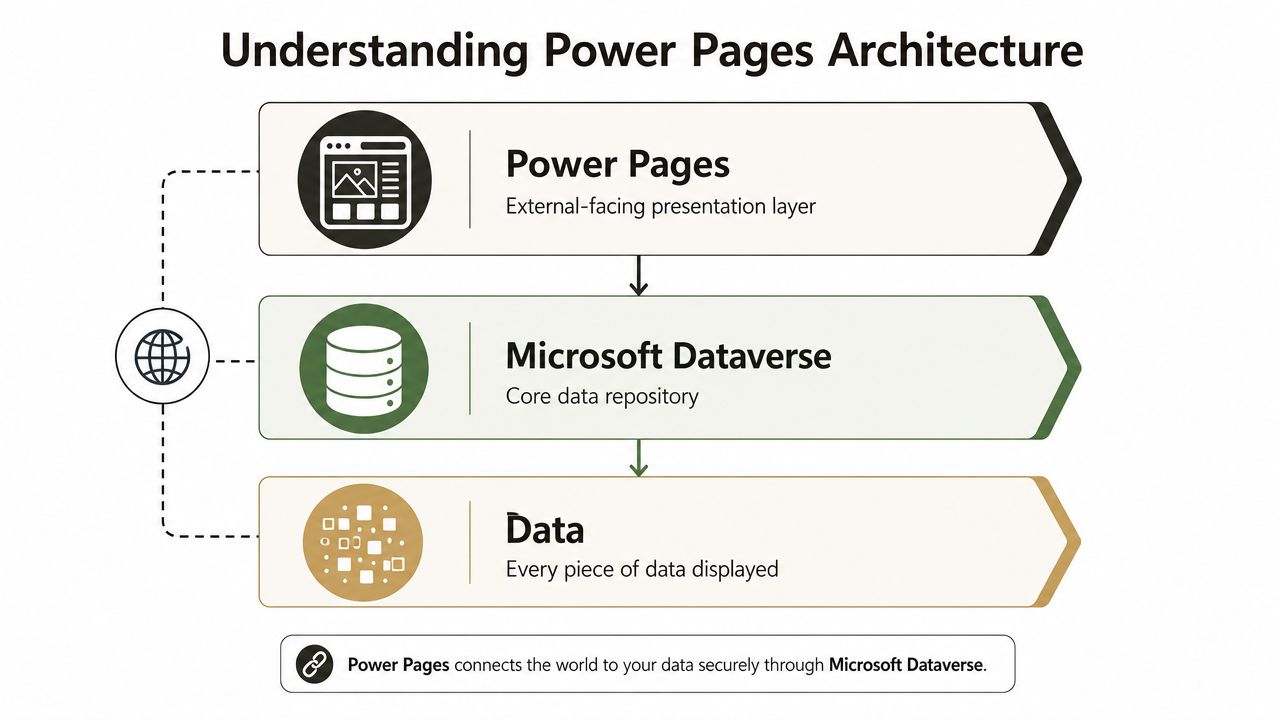
Power Pages is Microsoft's dedicated external-site layer on top of Dataverse, not a generic website builder. Microsoft Learn describes it as a secure, enterprise-grade SaaS platform that uses the same shared business data stored in Dataverse as other Power Platform components (Microsoft Learn introduction to Power Pages).
That means your portal is only as sound as the Dataverse architecture beneath it.
It's a presentation layer, not an island
Treating Microsoft Power Pages like WordPress is the first major design mistake. It isn't a self-contained content system with a database tucked away in the background. It is a public-facing layer over Dataverse. The same data estate that supports apps, workflows, analytics, and broader Power Platform workloads can sit behind your portal.
That creates a serious architectural consequence. A “website change” can be a data model change. A “small access request” can be a privilege design problem. A “new form” can trigger relationship and permission complexity that your web team never expected to own.
If your internal debate is still Dataverse versus simpler data stores, read Ollo's take on Dataverse vs SharePoint Lists and the architecture of free vs the architecture of scale. That decision sits upstream of Power Pages and determines how much pain you inherit later.
Your security boundary lives in Dataverse
Here's the part DIY teams underestimate. In practice, table permissions, relationships, web roles, and authentication paths define the security boundary. Not the page you publish.
We often see clients fail when they prototype the user journey first and the security model second. That's backwards. External users rarely need broad access. They need narrow, conditional, relationship-aware access to subsets of records. That's where broken inheritance and authorisation complexity show up.
A helpful way to understand this is:
| Assumption from the business | Architectural reality |
|---|---|
| “We just need a secure portal” | You need a full external access model tied to Dataverse |
| “The page should show customer records” | Someone must define exactly which records, columns, and relationships are visible |
| “Our Power Apps team can handle it” | Internal app skills don't automatically translate to public-facing security design |
The right order of decisions
Don't start with page mock-ups. Start with this sequence:
Classify the data
Know what external users must see, submit, or never touch.Model the relationships
If access depends on account, case, location, or subsidiary relationships, design those explicitly.Define permissions before content
If permissions feel fiddly in planning, they'll be dangerous in production.Map identity to authorisation
Signing in is only half the job. The harder part is constraining what signed-in users can do.
Most failed Power Pages projects don't fail because the pages looked bad. They fail because nobody respected the data model early enough.
Where Integration Becomes Disintegration
The Microsoft pitch says Power Pages integrates neatly with the wider stack. The technical reality is harsher. Integration works until your design collides with a platform boundary that someone ignored in the workshop.
Microsoft Learn documents hard failure points relevant to Power Pages operations, including list-view thresholds around 5,000 items, path-length constraints, and service throttling patterns (Microsoft Learn capabilities for Power Pages). Those aren't academic details. They're the cracks your production rollout falls into.
SharePoint looks nearby until it isn't
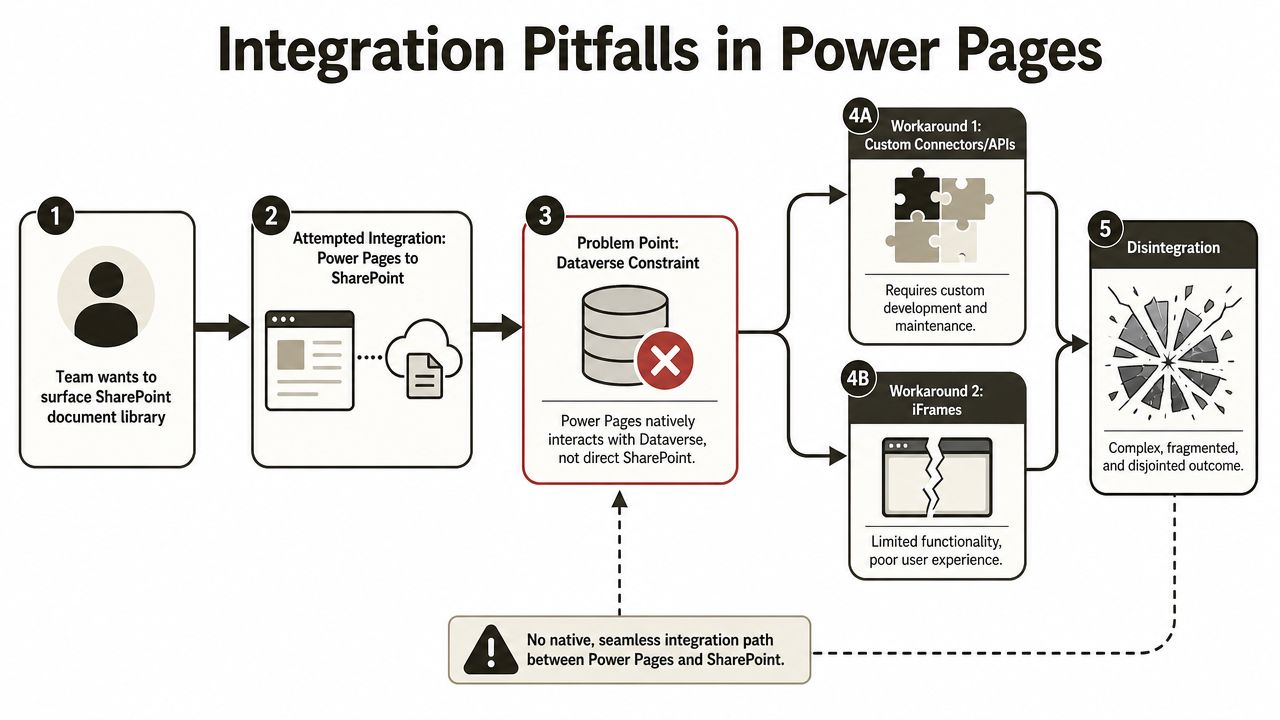
A classic mistake goes like this. The business already stores documents in SharePoint. Someone assumes the portal can surface those libraries cleanly. Then the team discovers that Power Pages is built around Dataverse interactions, while SharePoint exposure often ends up needing workarounds, compromises, or custom plumbing.
That's where “integration” starts turning into disintegration.
Common failure patterns include:
- Document-heavy scenarios: Teams try to surface SharePoint-held content in a portal journey that really wants clean Dataverse-backed metadata and permissions.
- List scale assumptions: They forget Microsoft documents list-view thresholds around 5,000 items, then wonder why previously tidy demos become unreliable under real content volume.
- Path and structure sprawl: Libraries inherited from legacy estates often carry naming and nesting habits that become operational friction fast.
If your organisation is already mixing collaboration and portal ambitions, Ollo's view on SharePoint and Teams integration is worth reading before you let separate admin teams create separate messes.
Throttling punishes poor design, not ambition
The documentation says low-code reduces build time. In reality, performance still depends on data model hygiene, caching strategy, and careful request shaping. Portal reads and writes still move across Microsoft service boundaries. That means ugly patterns show up the moment usage becomes real.
We often see clients fail when they build custom forms and workflows first, then only discover service throttling after go-live. At that point, the problem isn't cosmetic. Users can't submit, records don't resolve predictably, and support desks get flooded with “intermittent” failures that are entirely predictable in hindsight.
The cloud doesn't remove hard limits. It moves them somewhere your developers only notice after launch.
The enterprise breaking points
The recurring traps are boring, repeatable, and expensive:
| Integration area | What teams assume | What actually breaks |
|---|---|---|
| SharePoint content | “We'll just expose the library” | Thresholds, poor user journeys, awkward security handoffs |
| Dataverse forms | “Low-code will handle complexity” | Request volume, relationship logic, and throttling pressure |
| Migration into portal-backed data | “Data is data” | GUID mismatches, relationship failures, and permission chaos |
| Permissions | “Roles are configured” | Inheritance and authorisation gaps appear under real user scenarios |
The ugly part is that all of this is usually discoverable before build if someone with platform scar tissue reviews the design critically.
What I'd recommend instead
Use Power Pages where the external journey maps cleanly to Dataverse-backed processes and controlled datasets. Don't use it as a lazy front end for every document repository, legacy structure, and line-of-business shortcut your teams couldn't rationalise internally.
The Ollo verdict: if your portal depends on broad SharePoint exposure, complex record-level external access, and untested workflow chains, stop pretending the low-code designer is the project. The project is architecture review, permission modelling, and failure-path testing.
The Anatomy of a Power Pages Data Breach
This is the section most buyers skip. It's also the one that matters most.
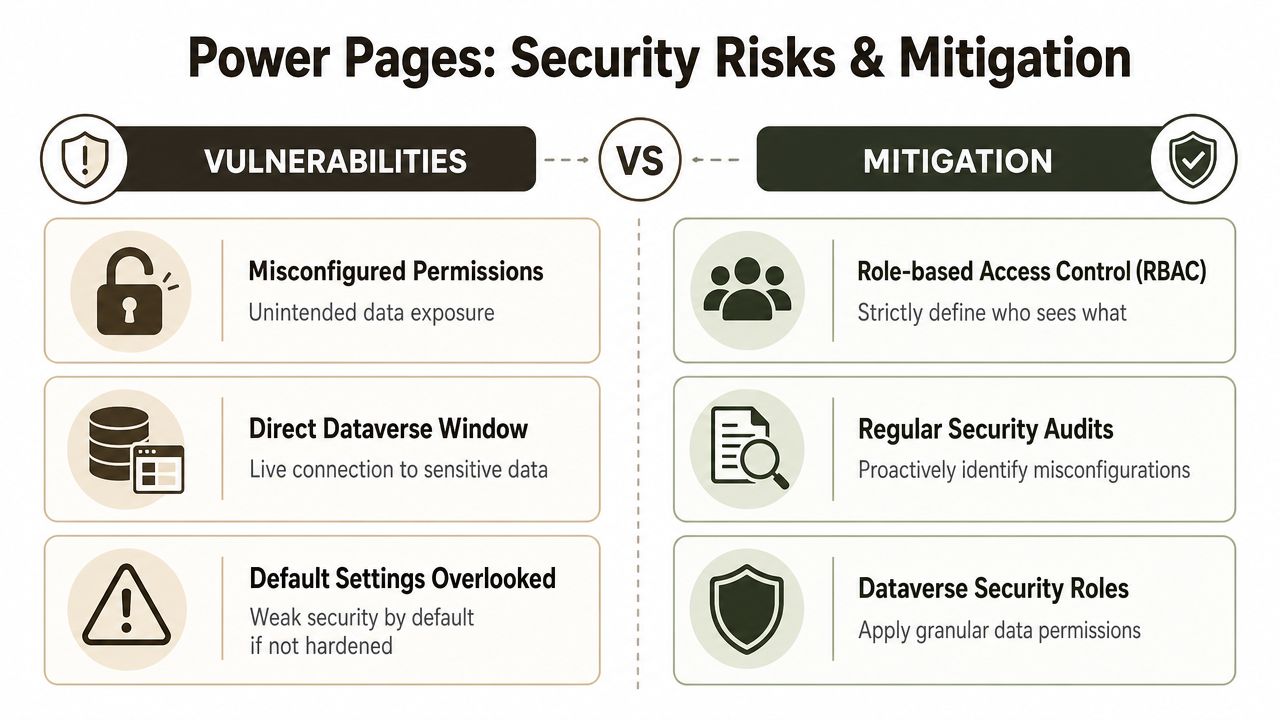
Power Pages can become a data exposure surface when teams misconfigure permissions and assume the platform will save them from sloppy design. Public-facing access over business data is unforgiving. One bad role assignment or one misunderstood table permission can create exposure your governance team won't spot until someone else does.
Security researchers have documented that attackers can enumerate exposed Dataverse columns through the /_api/<object_name> endpoint using ?$select, and that this can turn a low-code portal into a data-leak surface if column security and web roles are misconfigured (AppOmni analysis of Microsoft Power Pages data exposure).
How exposure actually happens
The breach pattern is rarely dramatic inside the project team. Nobody says, “let's expose regulated data.” What happens instead is more familiar:
- A developer creates a useful external table view.
- Another developer broadens access so testing becomes easier.
- A business owner asks for one more field.
- Nobody revisits column security properly.
- The portal goes live.
- An attacker probes the API surface and learns more than they should.
That sequence is ordinary. That's why it's dangerous.
The AppOmni write-up matters because it cuts through the marketing fog. It notes that requests to the relevant API pattern do not require cookies, and that schema discovery can be performed by trial and error with $select. If your team has misconfigured data access, the platform won't protect you from your own bad assumptions.
Why regulated sectors should care more than everyone else
If you work in finance, healthcare, energy, or any environment with strong compliance duties, this isn't a website issue. It's a control issue. Your external portal sits close enough to your governed data estate that a portal mistake can become a reportable event, a legal event, or both.
This video is worth reviewing with your security lead before anyone signs off a public rollout.
If your organisation hasn't already built external application testing into delivery, Ollo's page on penetration test services is the kind of operational discipline this platform needs around it.
Security reality: In Power Pages, “authenticated” does not mean “safe”. It only means someone got through the first gate.
The controls that deserve paranoia
Your team should treat these as essential review areas:
- Table permissions: If these are broad, your blast radius is broad.
- Column exposure: External users rarely need every attribute attached to a record.
- Web roles: Convenience-driven role design causes ugly surprises later.
- Anonymous paths: If a path doesn't require sign-in, assume it will be tested by people you didn't invite.
- API discoverability: If the schema can be inferred, mistakes become easier to exploit.
The cost of being casual
Missing one of these controls doesn't just create a defect. It can create a disclosure event tied directly to your governance posture. That's why I'm cynical about “citizen developer” enthusiasm around public-facing Power Platform workloads. Internal automation mistakes are one thing. External data exposure is a different category of failure.
The practical recommendation is simple. Don't let the same team that built the portal mark its own security homework. Separate build from review. Assume misconfiguration is likely. Test for it aggressively.
Decoding Licensing and Performance Traps
Licensing conversations around Microsoft Power Pages usually start too late and with the wrong people in the room. Finance sees a Microsoft product. Delivery sees a portal. Nobody models usage, identity mix, data capacity implications, or the operational cost of poor design until the service is already live.
That's how projects drift into budget shock.
The pricing problem isn't just price
I'm not going to invent numbers or pretend a pricing calculator tells the truth about your eventual operating model. What matters is the pattern. Power Pages licensing and surrounding platform consumption can be misunderstood badly if your team treats the portal as a fixed-cost website instead of a usage-shaped service tied to authenticated access, anonymous access, and data estate decisions.
We often see clients fail when they estimate the portal as a front-end project and ignore what sits behind it. Dataverse architecture, file handling, identity patterns, and environment discipline all shape cost. If those decisions are sloppy, your bill won't be the only problem. Your support burden will rise at the same time.
Performance debt arrives before cost clarity
The nastier trap is performance. Teams obsess over licensing because it's visible. They ignore query design, caching behaviour, form complexity, and client-side bloat because those feel like implementation details.
They aren't.
Poorly shaped requests and overcomplicated user journeys push you straight into the kind of service friction Microsoft documents elsewhere in the platform. Slow pages, intermittent saves, and odd behaviour under normal business usage are usually signs of architectural laziness, not platform betrayal.
A simple decision table helps:
| Design choice | Short-term appeal | Long-term consequence |
|---|---|---|
| Minimal data modelling upfront | Faster prototype | More rework when permissions and performance collide |
| Heavy client-side logic | Quicker front-end iteration | Harder support and unpredictable runtime behaviour |
| Broad record retrieval | Easier build | More throttling pressure and slower user journeys |
| No caching strategy | Less planning | Higher dependency on live service behaviour |
What prudent buyers should do
Run Power Pages planning like an operations exercise, not a design sprint.
- Model worst-case usage: If your traffic, partner access, or citizen access varies, assume your nice average-case estimate is fiction.
- Design for constrained access: Tight permissions help security and reduce wasteful data retrieval.
- Review every form journey: Complex writes across related tables look elegant in demos and behave badly when edge cases appear.
- Budget for monitoring and remediation: If nobody owns post-launch behaviour, the portal will teach your team the hard way.
A portal that stays online but performs badly still fails the business. Users don't care whether the root cause was licensing assumptions, request design, or poor governance. They just see an unreliable service.
The Ollo verdict: model your costs and performance against failure conditions, not the happy path Microsoft demos. If the business case only works when usage is predictable and every query is polite, you don't have a business case. You have wishful thinking.
A Governance-First Rollout Strategy
A competent Power Pages rollout starts with governance. Not design. Not branding. Not page templates.
Microsoft's own documentation already tells you the platform is a governed SaaS surface for external users, with platform-level security administration and lifecycle concerns such as authentication-key management built into normal operations. That alone should kill the fantasy that your team can improvise this safely after a few workshops.
Build-and-pray versus governance-first
Most internal teams follow the build-and-pray model:
- Spin up a site.
- Build forms.
- Make demo users happy.
- Bolt on permissions.
- Panic during security review.
- Go live anyway because deadlines don't move.
That model creates technical debt before day one.
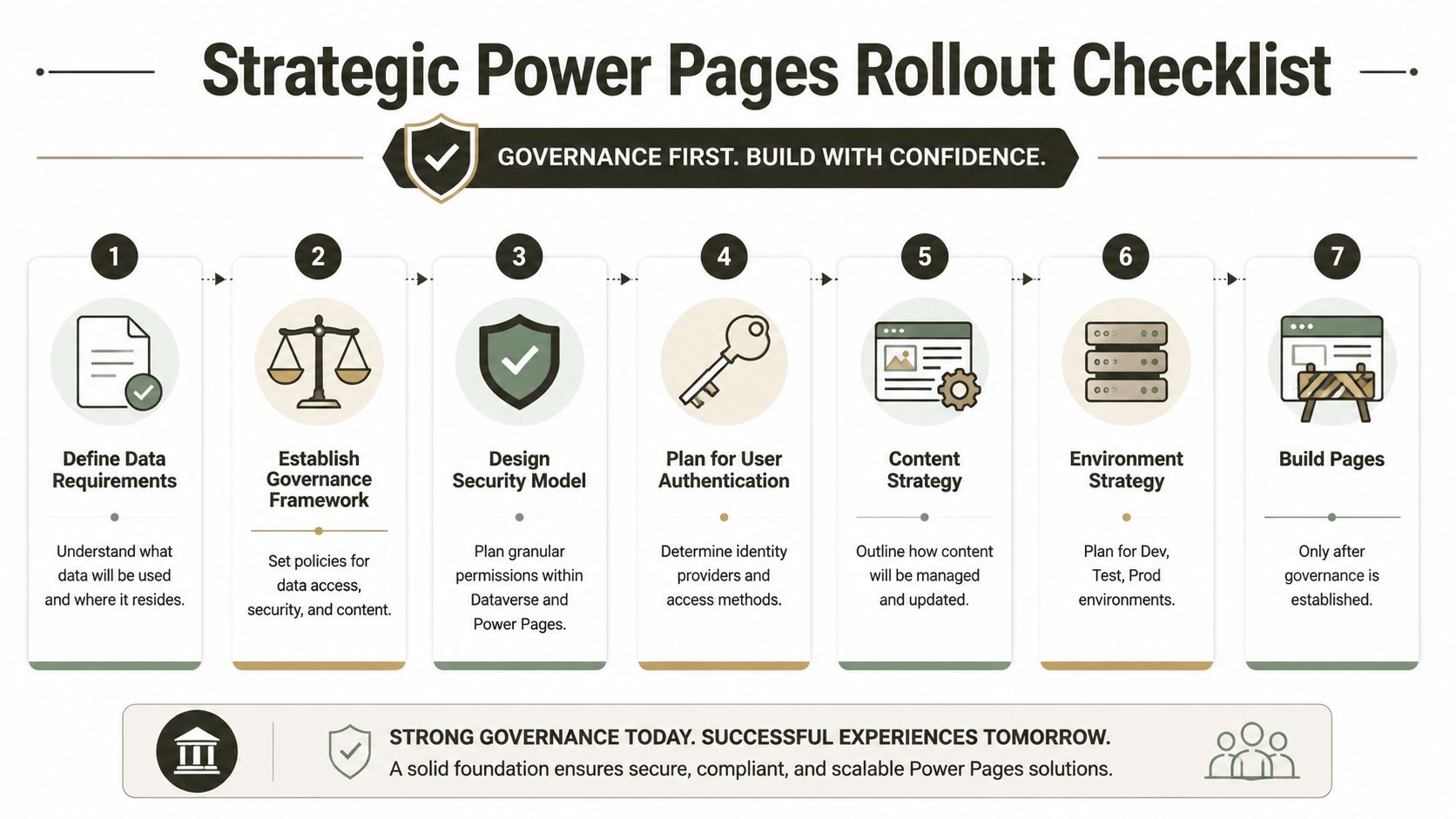
A governance-first model works differently. You define data classification, external identity strategy, role design, table access, environment segregation, and change control before anybody publishes a page. That feels slower in the first sprint and massively reduces rework later.
The checklist that should exist before page one
Use this sequence instead:
- Define data requirements early: Know exactly what the portal may expose and what remains internal-only.
- Establish governance policies: Decide who approves schema changes, permission changes, and production releases.
- Design the security model first: Web roles and table permissions are core architecture, not admin tidying.
- Plan authentication pathways: External identities need ownership and support processes.
- Control content operations: Someone must own updates, retention implications, and publishing discipline.
- Separate environments: Development and production should never blur.
- Build pages last: The UI sits on top of decisions already locked down.
For wider organisational maturity, Ollo's guide to Power Platform governance is the conversation many firms should have before they approve any external-facing low-code workload.
Governance also supports commercial outcomes
There's another reason to take this seriously. Good governance doesn't just reduce risk. It improves the quality of the business process behind the portal.
If your external forms collect regulated or operationally important information, poor design creates bad submissions, weak auditability, and inconsistent follow-up. That's why teams looking at intake journeys should also think about how to turn compliance into a lead engine. The useful idea there isn't marketing. It's that structured, well-governed data capture can serve both compliance and business operations when designed deliberately.
Governance isn't bureaucracy. It's the only thing stopping an external portal from becoming a permanent exception to your own standards.
What delivery should look like in practice
A serious rollout usually needs a small, senior group covering platform architecture, security review, identity, and data governance. Tooling matters too, but tools are not the answer by themselves. Ollo provides Microsoft-focused delivery for organisations that need that operational discipline around cloud workloads, especially where external access and regulated data intersect.
That's the right mindset. Not “who can build it fastest?” but “who can stop this becoming an incident?”
The Ollo Verdict Risk Mitigation Is Not a DIY Job
Microsoft Power Pages is powerful. That's exactly why it's risky.
You aren't deploying a harmless website builder. You're exposing business processes and data through a governed Microsoft SaaS surface that depends on Dataverse design, identity controls, permission accuracy, lifecycle management, and performance discipline. Every one of those areas can fail unnoticed during delivery and loudly after go-live.
We often see clients fail when they assume internal Power Platform familiarity is enough. It isn't. Public-facing systems require a different level of paranoia. The team that can automate an approval flow inside the business is not automatically the team that should design an external data boundary.
Here's the blunt assessment:
| Decision | Likely outcome |
|---|---|
| DIY portal with light governance | Faster start, slower collapse |
| Portal led by web designers without Dataverse depth | Attractive interface, dangerous access model |
| Portal led by app builders without external security review | Functional prototype, fragile production service |
| Portal with senior architecture and independent security scrutiny | Slower approval, safer operation |
If you're in a regulated environment, the cost of getting this wrong doesn't stop at user frustration. It affects compliance, incident response, operational trust, and your reputation with the board. Missing the architecture step doesn't just break the portal. It can break your control narrative.
My recommendation is simple. Don't approve Microsoft Power Pages on the strength of a demo. Approve it only after someone has pressure-tested the data model, external identity pattern, permissions, operational support model, and failure conditions. If your current team hasn't done that before, assume they'll learn by hurting production.
That's avoidable. Start with an independent review before anyone commits to build. If you need a practical place to begin, request an Ollo free audit and have the architecture challenged before the risk becomes yours to explain.
If your organisation is weighing Microsoft Power Pages for a customer, partner, supplier, or citizen-facing service, talk to Ollo. We help IT leaders assess the architecture, governance, and security exposure before a low-code portal turns into a public-facing problem.

















