



You're probably already in the danger zone.
A department built a “quick” approval app in the Default environment. Someone else added a flow that touches SharePoint, Outlook, Teams, and a connector nobody in IT approved. A manager now treats it as business-critical. The maker has changed role, left the company, or forgotten how half of it works. Security has no clean inventory. Audit wants evidence. Your team has naming conventions in a spreadsheet and optimism in a Teams channel.
That isn't a Power Platform strategy. That's deferred failure.
I've been pulled into enough broken Microsoft 365 estates to say this plainly. Power Platform governance is not administrative hygiene. It's a disaster-avoidance framework. In regulated organisations, the difference matters. If your governance model is weak, your low-code estate doesn't just get messy. It creates uncontrolled data paths, unsupported operational dependencies, and compliance exposure your board will only hear about after something breaks.
Governance Is Not a Feature It Is a Survival Mechanism
A compliance officer asks for a clean answer after an incident. Which apps handle regulated data, which flows move it outside approved systems, who owns them, and what controls block misuse. Your team cannot answer in one meeting. That is the moment Power Platform stops looking like productivity and starts looking like evidence for a governance failure.
Microsoft describes Power Platform governance in tidy administrative terms. Ignore the tidy framing. In regulated organisations, governance is the control layer that stops a low-code estate from becoming a breach path, an audit finding, or a production dependency nobody can support.
I see the same pattern in failed rollouts. A business unit starts with a harmless app. Another team copies it. Flows spread across the Default environment. Dataverse for Teams gets used as if it were a safe sandbox. Nobody puts hard boundaries around connectors, ownership, or promotion to production. Six months later, IT inherits a tenant full of undocumented automations tied to regulated processes and service accounts nobody trusts.
That mess does not happen because people are careless. It happens because informal control is fiction at scale.
A naming guide in SharePoint is not governance. A monthly review meeting is not governance. An email telling makers to “check with IT first” is not governance. Platform rules, enforced identity boundaries, controlled environments, and auditable deployment paths are governance. Everything else is wishful thinking.
If you are still debating whether Power Platform should be treated like a serious delivery platform, read this guide on Power Apps vs custom development. The wrong answer is what causes many governance failures in the first place. Teams classify business-critical apps as “just low-code,” then skip the controls they would never skip for custom software.
Why informal control fails under regulation
Regulated tenants break in predictable ways.
Ownership fails first. The original maker changes role, loses a licence, or leaves. Then environment discipline fails because everything was allowed to grow in shared spaces. After that, DLP policy becomes a political argument instead of a technical control. Auditability dies last, because by then nobody can prove which app version was deployed, who approved it, or whether sensitive data ever crossed an unapproved connector boundary.
That sequence is not bad luck. It is what happens when governance depends on memory, goodwill, and tribal knowledge.
Rule: If the platform does not enforce the control, assume the control will fail.
Governance is a risk control system
Too many leadership teams treat governance as admin overhead that can wait until adoption “matures.” That logic belongs in post-incident review packs. By the time adoption is widespread, weak controls are already embedded in live processes, operational reporting, and regulated data handling.
Governance decides whether a tenant can survive staff turnover, internal audit, a DLP investigation, or a regulator asking for evidence. That is why the right frame is not convenience. It is containment.
If you want the wider risk model behind that thinking, Building a proactive GRC program is useful context. The same rule applies here. Organisations that wait for visible damage before formalising control usually end up formalising it during an incident.
The hard requirements are straightforward:
- Environment control limits blast radius and stops regulated workloads from living beside experimental apps.
- Connector control blocks data from moving into services legal, security, or compliance never approved.
- Inventory and telemetry give operations and audit a usable record of what exists, who owns it, and what changed.
- An operating model defines who can build, who can approve, who can deploy, and who gets called at 2 a.m. when a flow stops a finance process.
Treat governance as a survival mechanism, because that is what it is. In regulated industries, weak Power Platform governance does not create minor admin pain. It creates unauthorised data movement, unsupported business processes, failed audits, and expensive cleanup after the damage is already on record.
The Real Risks of Ungoverned Power Platform Adoption
Low-code doesn't mean low-risk. It means your developers are now business users, project managers, analysts, and whoever had enough permissions to click “Create”.
That's exactly why ungoverned adoption fails so hard.
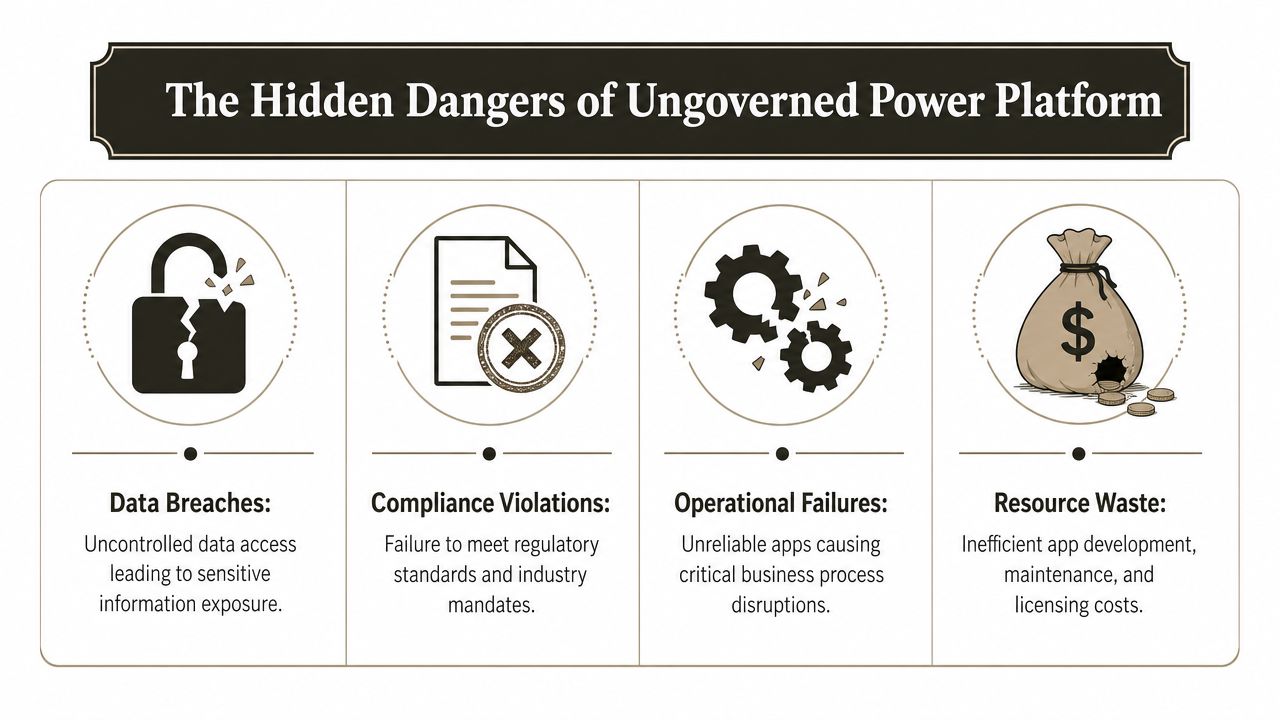
The failure modes we keep seeing
Microsoft is clear that governance requires hard controls around environment roles, resource permissions, and Dataverse security roles, with data policies controlling which connectors can be combined as Business Data only or No Business Data allowed. It also exposes activity logging, connector usage, and error reporting, as described in Microsoft's governance considerations.
That sounds theoretical until you see what happens without it.
- Data exfiltration through “quick apps”. A harmless-looking app or flow becomes a leakage path because someone can combine business data with the wrong connector.
- Orphaned automations. A maker leaves, their account changes, connections fail, and a finance or operations process stops unnoticed.
- Broken permission boundaries. Teams build apps on top of data sources with messy SharePoint permissions, broken inheritance, and unclear ownership. The app doesn't fix the mess. It amplifies it.
- Operational dependency on amateur design. Multiple flows hit the same system, nobody rationalises them, and troubleshooting turns into archaeology.
The myth that “it's only low-code”
The most dangerous sentence in this space is, “It's just a small app.”
No. If it reads regulated data, updates a business record, sends an approval, or triggers an external action, it's part of your control estate. Treating it as informal because the maker used drag-and-drop tooling is how teams end up with production systems nobody can support.
That's also why technology choice matters earlier than people think. If you're still deciding whether a requirement belongs in Power Apps or in conventional development, this guide to Power Apps vs custom development is worth reading before another department builds a workaround you later have to govern.
A connector is not a convenience feature. It is a data pathway with compliance consequences.
What failure costs you
Ungoverned Power Platform adoption doesn't usually explode on day one. It degrades your control posture over time.
| Risk area | What your team sees | What's actually happening |
|---|---|---|
| Data handling | A useful integration | An unreviewed data path |
| Ownership | A productive maker | A single point of failure |
| Security | Permissions seem fine | Resource access is inconsistent |
| Audit | Policies exist on paper | Enforcement evidence is weak |
The pattern is consistent. Teams assume low-code speeds up delivery. It can. But if your tenant lacks enforceable controls, all you've really done is accelerate the creation of technical debt in a more user-friendly interface.
Forging Your Environment and Tenant Strategy
Monday morning. Compliance is asking why an employee built a Power App in the Default environment that writes customer data to an unapproved connector, sends approval emails from a shared account, and has no named production owner. Nobody can answer. That is how regulated organisations drift into reportable incidents. Not through a dramatic breach. Through lazy tenant design that let the wrong thing reach production.
Most rescue work starts with the same confession. “We built nearly everything in the Default environment.”
That decision contaminates the rest of the tenant.
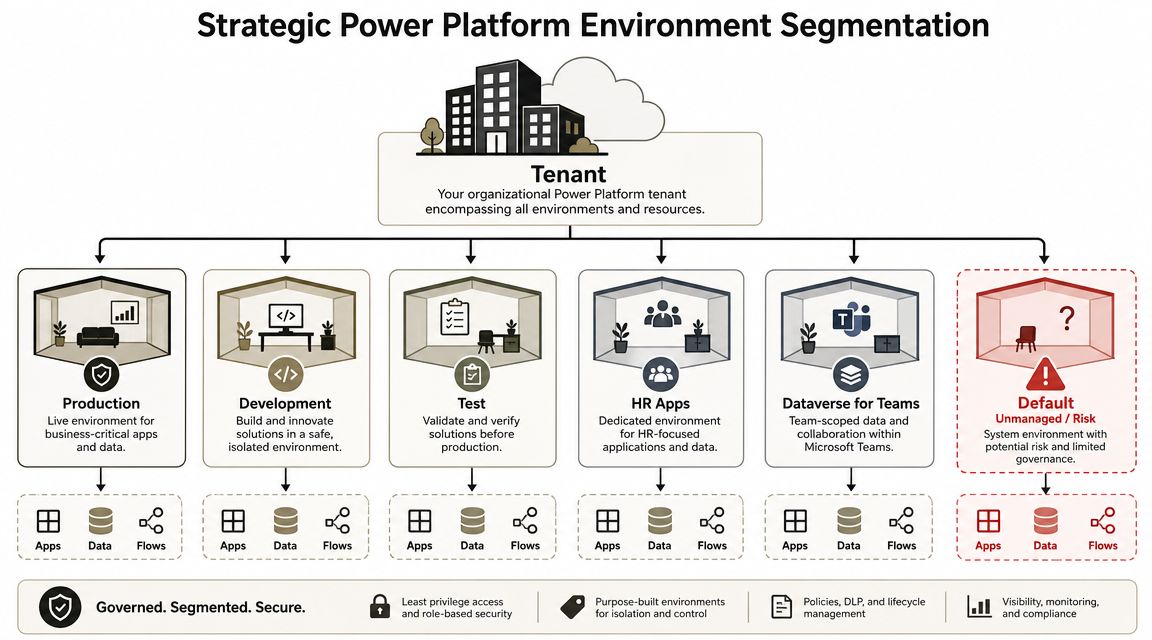
An environment strategy is not admin tidiness. It is the control boundary that decides whether a DLP policy is enforceable, whether production changes are traceable, and whether one department's bad decision becomes everyone's incident.
Treat the Default environment as hostile terrain
The Default environment exists for convenience. Convenience is exactly why it becomes dangerous. Makers build there because it is visible and available. Security teams ignore it because they assume serious systems live somewhere else. Six months later, finance approvals, HR forms, or case updates are running from a place nobody meant to use for regulated workloads.
Set the rule and enforce it. In regulated estates, the Default environment should be limited to personal productivity and low-risk experimentation. Anything that touches regulated data, updates a system of record, or supports an operational process belongs elsewhere. If an app would create an ugly conversation with audit, legal, or the DPO, it has no business living in Default.
Identity control has to be tightened at the same time. Loose role assignment and sloppy group design turn environment boundaries into fiction. If your tenant still treats access as an afterthought, fix the foundation first with a clear Microsoft Entra ID governance model.
Build for risk, lifecycle, and ownership
You do not need a sprawling mess of environments. You need an environment model that answers three questions without debate. What data is allowed here. Who is allowed to build here. How does change reach production.
A baseline structure usually includes:
- Development for build work, prototypes, and connector testing that should never touch live operations.
- Test or UAT for validation, approval flows, security checks, and business sign-off under controlled conditions.
- Production for approved solutions with named owners, support paths, and documented dependencies.
- Dedicated regulated environments for departments or workloads that need stricter separation because of data sensitivity, retention rules, or audit scope.
- Dataverse for Teams boundaries that are actively governed instead of left to sprawl unchecked.
This is the blunt test. If a maker can build in the morning and push straight into Production by lunch, your controls are fake. If a business unit cannot tell you which environment a solution belongs in, your tenant design is unfinished.
This walkthrough is useful if your team needs a visual reset on environment design:
Segmentation prevents compliance fallout
Internal platform teams often resist segmentation because they think it slows delivery. That argument usually comes from people who have never had to explain a DLP breach, reconstruct an undocumented production flow, or prove who approved a change that altered regulated data handling.
Every environment should have a declared purpose, a defined data policy, a named admin boundary, and a controlled release path. Skip any one of those and the failure mode is predictable. DLP policies become inconsistent. Service accounts get reused in the wrong places. Connectors appear where they should be blocked. Production changes happen by convenience, not by approval.
The result is operational chaos with a compliance wrapper on top. One tenant becomes one shared blast radius. A proper environment and tenant strategy stops that before the incident review starts.
Building a CoE and ALM That Actually Works
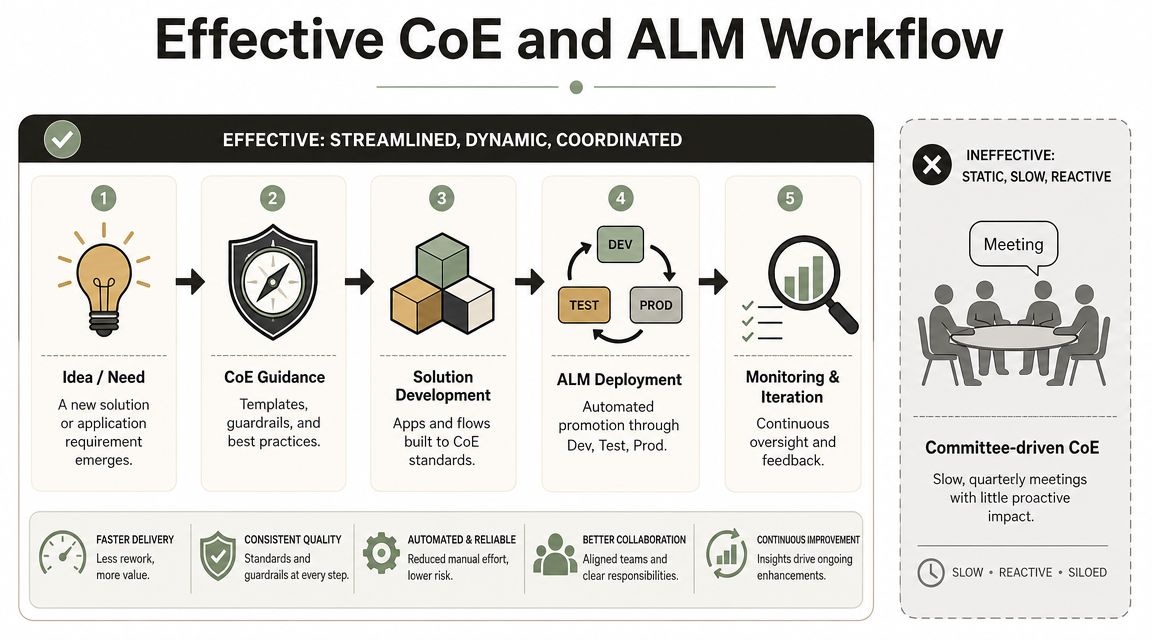
A Center of Excellence is often where organisations waste the most time pretending to govern. They create a committee, schedule a quarterly meeting, write a standards document, and congratulate themselves while makers keep building around them.
That isn't a CoE. That's theatre.
What a real CoE does
A functional CoE is small, technical, and authorized. It owns standards, templates, review gates, inventory visibility, and maker enablement. It doesn't try to approve every idea by committee. It creates guardrails that make decent behaviour the default.
The Microsoft CoE Starter Kit can help with inventory and visibility. It gives teams a starting point. But visibility isn't enforcement. A dashboard that tells you chaos exists is still chaos.
If you're moving from older forms and workflow tooling into Power Platform, the same issue appears during transition. The platform will happily let teams recreate old mistakes in a newer interface. This is why migration planning and governance planning have to meet early, especially in projects like InfoPath migration to Power Apps.
ALM is where DIY programmes crack
The documentation talks about solutions, and yes, you should use solutions. But manual export and import is not enterprise ALM. It's an administrative ritual that falls apart once multiple developers, environments, dependencies, and release windows enter the picture.
A serious ALM model needs:
- Source control in Azure DevOps or GitHub.
- Automated promotion from Dev to Test to Prod.
- Connection reference discipline so deployments don't rely on personal accounts.
- Environment variable management so apps don't hardcode environment-specific values.
- Release accountability with a clear owner and rollback decision path.
Teams often ask whether ShareGate or similar tooling can help here because they already use it elsewhere in Microsoft 365. ShareGate is useful for content migration. It is not an ALM engine for Power Platform. Different problem. Different tooling.
The moment your team says “we'll just export the solution manually this time,” you've already started building a release process that won't survive scale.
Tooling comparison from the trenches
| Option | Useful for | Where it breaks |
|---|---|---|
| CoE Starter Kit | Inventory, analytics, visibility | Doesn't enforce enough on its own |
| Manual solution moves | Tiny estates, temporary testing | Fails under repeatable enterprise change control |
| ShareGate | SharePoint and M365 content migration | Not designed for Power Platform ALM |
| Custom scripting and pipeline automation | Repeatable deployments and control | Requires specialist design and discipline |
The only body mention I'll make here is factual. Ollo provides environment strategy review and automation governance work alongside broader Microsoft 365 migration and control projects. That kind of specialist input matters because most internal teams don't fail on theory. They fail on implementation detail.
The Ollo Verdict: Use the CoE Starter Kit for visibility. Use solutions as the packaging baseline. For auditable ALM, manual exports are a dead end. You need automated pipelines, source control, and usually custom scripting.
Integrating Monitoring Auditing and Zero Trust
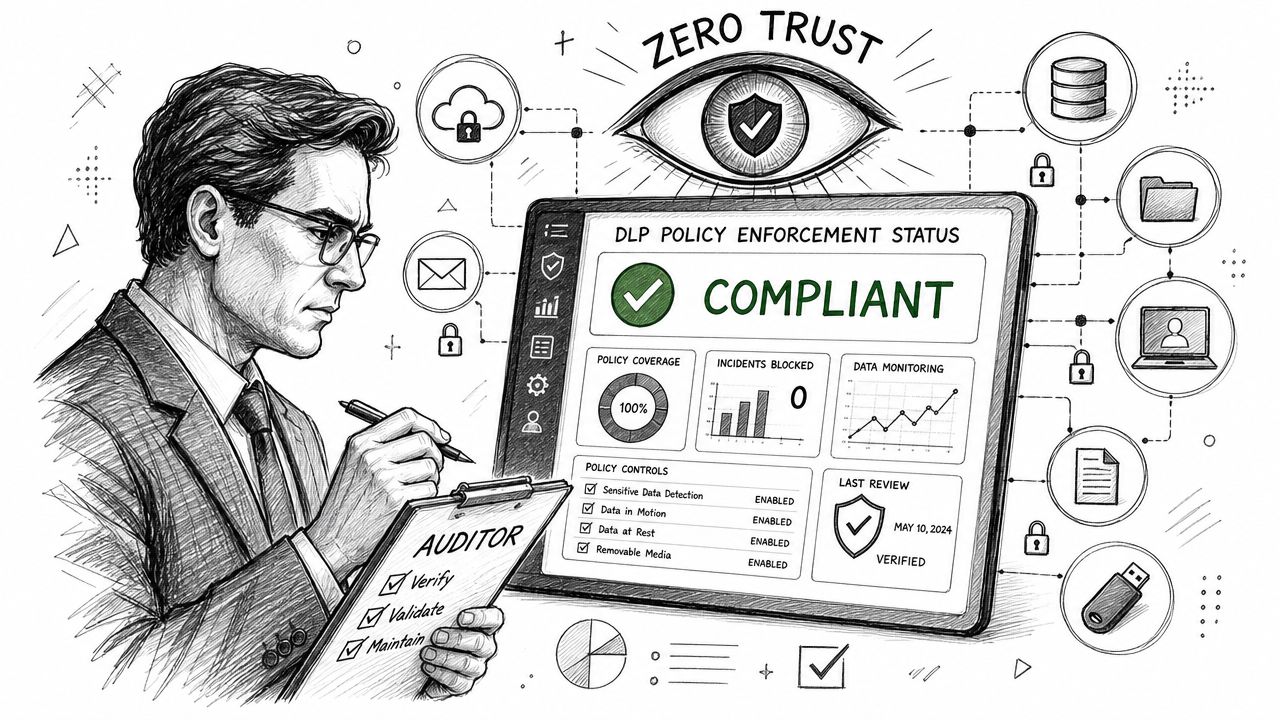
A policy you can't verify is just wishful thinking.
That's the part many governance plans avoid. They define DLP, roles, and naming standards, but they never answer the only question auditors and incident responders care about. Show me proof.
Monitoring has to become operational
Microsoft exposes activity logging, connector usage, and error telemetry through the admin and compliance layers. That matters because governance isn't only about setting controls. It's about detecting drift, tracing failures, and proving enforcement over time.
In AI and Copilot-era estates, the problem gets sharper. The challenge for regulated Irish and UK organisations is proving that AI-assisted automations don't create shadow data flows, and that requires continuous monitoring and layered controls, not a one-time policy decision, as discussed in this Power Platform governance framework view.
Your monitoring model should answer practical questions fast:
- Which apps and flows touch regulated data
- Which connectors are used, where, and by whom
- Which automations are failing repeatedly
- Which artefacts rely on personal connections or unsupported owners
- Which environments show suspicious growth or policy exceptions
Zero Trust has to include low-code
Many tenants enforce stronger rules for traditional enterprise apps than they do for Power Apps and Power Automate. That makes no sense. If a Power App exposes regulated records, access to that app should face the same conditional scrutiny as any other business application.
That means linking platform governance to device trust, sign-in conditions, and identity posture. If your team is still treating Zero Trust as a separate security workstream, fix that. This Zero Trust implementation guide for Microsoft 365 is a useful reference point because the same principles apply here. Low-code doesn't deserve a security exception.
Audit test: If someone asks for evidence that a DLP rule, access condition, or ownership model is actually working, your team should be able to produce it without improvising.
Compliance proof is broader than platform logs
This sounds unrelated until an auditor asks awkward cross-functional questions. The organisations that handle those conversations well usually run checks across adjacent control areas, not just the app itself. That can include items like a website accessibility audit when digital services form part of a regulated customer journey. Different control domain, same governance mindset. Evidence beats assumption.
A mature Power Platform governance model doesn't stop at “we configured the setting.” It extends to “we monitor it, we can prove it, and we can trace exceptions without guesswork.”
The Anatomy of a Power Platform Rescue Mission
Rescue projects are miserable because you're not implementing clean control. You're performing technical surgery on a live estate that grew without discipline.
The first discovery phase usually turns up the same mess. Hardcoded environment variables. User-specific connections. Solutions moved by hand. Production apps with no clear owner. Flows that depend on accounts nobody should still be relying on.
What the post-mortem usually shows
We often see clients fail when they treat migration between environments as a clerical task. It isn't. Ungoverned estates accumulate dependency problems that don't reveal themselves until you try to move, secure, or standardise them.
Common rescue issues include:
- GUID conflicts between components promoted inconsistently across environments
- Solution layering problems where unmanaged changes collide with intended structure
- Broken connections tied to personal identities instead of service-backed patterns
- Orphaned apps and flows left behind by former employees
- Security drift where access no longer matches the business purpose of the app
None of this is fixed by another workshop.
Why off-the-shelf fixes usually fail
The documentation tells you how things should work in a healthy estate. Rescue work starts after that standard has already been broken. You have to remap connection references, reset environment variables, clean up ownership, rationalise permissions, and untangle dependency chains manually and with scripting.
That's also why generic platform confidence tends to collapse at this stage. Teams realise they don't just need someone who understands Power Platform. They need someone who understands tenant hygiene, identity, release engineering, and migration failure patterns across Microsoft 365.
If your estate already looks like this, start with an independent assessment before another internal team member makes it worse. Ollo offers a free audit for organisations trying to understand what's governable, what's recoverable, and what needs controlled remediation.
The ugly truth is simple. Rescue work costs more because you're paying to remove chaos before you can build control.
The Ollo Verdict for Enterprise-Grade Governance
Here's the direct answer.
If you operate in finance, healthcare, energy, or any environment where data handling and auditability matter, DIY Power Platform governance is a false economy. Internal teams usually underestimate the technical depth, overestimate the reliability of informal controls, and discover the full complexity only after apps become operational dependencies.
The pattern is predictable. They leave the Default environment too open. They confuse visibility with control. They rely on manual ALM. They postpone monitoring. Then they call for help when a business-critical flow fails, an ownership gap appears, or audit asks for evidence nobody prepared.
The cost of getting this wrong isn't abstract. It shows up as broken processes, unsupported apps, untraceable data movement, and compliance exposure your team can't explain cleanly. Missing this doesn't just create admin pain. It weakens legal defensibility and operational resilience.
The Ollo Verdict: Use internal capability for governed delivery inside a properly designed operating model. Do not ask that same team to invent the operating model by trial and error in a regulated tenant. That approach creates the rescue project you'll eventually have to fund.
Specialist support isn't an optional add-on here. It is the risk-reduction move. You bring in battle-tested patterns early, lock down the dangerous parts before they sprawl, and build a governance model that your security team, operations team, and auditors can all interrogate without panic.
That is what enterprise-grade Power Platform governance looks like. Not a policy deck. Not a committee. An enforceable system that keeps your low-code estate inside the bounds of reality.
If your team already suspects the tenant is drifting out of control, talk to Ollo. We handle complex Microsoft 365 governance, migration, and rescue work for regulated organisations that can't afford to discover the hard way where DIY Power Platform governance breaks.

















