



Let's be blunt: moving off InfoPath isn't a simple "lift-and-shift" operation. It's a complete, ground-up rebuild of your business processes. The biggest hurdle is that there’s no magic button, no direct migration tool to do the heavy lifting for you. You're facing a manual redesign project, all while the clock ticks down to Microsoft's non-negotiable July 2026 support deadline.
Confronting the Reality of Your InfoPath Migration
This isn't another marketing article promising a "seamless transition." This is a playbook for avoiding disaster, written from the trenches of projects we've been called in to rescue after they’ve gone off the rails. Your InfoPath migration is a high-stakes rebuild, not a simple upgrade. Treating it as anything less is the first step toward catastrophic failure.
The clock is ticking. Microsoft's July 2026 end-of-support date is a hard stop. After that, your forms become unsupported security risks, ticking time bombs in your IT environment. Yet, a surprising number of organisations are dangerously unprepared.
The Misleading Simplicity of Migration Tools
Your technical teams might look at tools like the SharePoint Migration Tool (SPMT) or even third-party solutions and assume they've found an easy path forward. They are mistaken. We often see clients fail when they assume these tools can untangle the years of complexity baked into their enterprise forms.
Here's the hard truth the official documentation often glosses over:
- SPMT is for files, not forms. The documentation says it moves content. In reality, it was designed to move documents from A to B. It will absolutely choke when it encounters InfoPath’s underlying XML data structures, unable to parse the business logic and translate it into a structured SharePoint list.
- API throttling will bring you to a halt. If your team attempts large-scale, scripted data extractions, you will hit Microsoft's API limits. This isn't a possibility; it's a certainty. Your migration will grind to a dead stop for hours or even days, jeopardizing your project timeline.
- The 5,000-item limit is a brick wall. SharePoint's infamous list view threshold isn't just a performance suggestion; it's a hard barrier that breaks data queries and renders forms useless. We’ve seen entire projects derailed because the migration plan didn't account for this fundamental architectural constraint, a detail often buried in the documentation.
The Ollo Verdict: SPMT is a complete non-starter for any serious InfoPath migration. While some third-party tools might help with the initial analysis, none can script the complex data transformations required to handle GUID conflicts or broken permission inheritance. Your team will need to use custom PowerShell scripting. Anything less is professional negligence.
Why Your Data Is the Real Minefield
The most critical failures we witness stem from a deep underestimation of the data itself. In Ireland and the UK, a staggering 70% of regulated enterprises in the energy and finance sectors are still running on legacy InfoPath forms as of Q4 2025. They're all staring down Microsoft's July 14, 2026, extended support cutoff.
The real danger lies with library-based InfoPath forms, where data is trapped inside individual XML files within SharePoint document libraries. Even Microsoft's own documentation explicitly warns that these require manual conversion to list items, as features like repeating tables simply don't map to standard SharePoint lists. According to a report by FlowForma, many businesses are still behind in tackling this challenge.
Missing this step doesn't just corrupt your data; it shatters your audit trail. For regulated industries, this isn't a simple technical problem—it's a multi-million-euro compliance violation waiting to happen. Missing this step doesn't just fail the migration; it breaks legal compliance.
Before you even think about rebuilding a single form, you must have a battle-tested strategy for extracting, transforming, and validating every last record. This requires a forensic level of detail most IT teams aren't equipped for. Understanding your existing environment is the first critical step, which is why we've detailed how to conduct a proper SharePoint migration assessment in a previous guide. This isn't just another IT project; it's a critical risk-reduction exercise for your entire business.
Executing the Audit and Triage Framework
Before your team writes a single line of Power Fx code, the groundwork for your migration’s success or failure is laid. We see it constantly: projects implode because they skip the most critical phase—a forensic audit and brutal triage of every single InfoPath form in your environment.
Nearly every failed migration we've seen started with a flawed or non-existent inventory.
Your first directive must be to discover and categorise every form, not by department or name, but by its raw technical complexity and business criticality. This isn’t negotiable. Without it, you’re flying blind straight into a minefield of technical debt, long path limits, and broken inheritance.
Distinguishing Hidden Threats
The immediate challenge is that your InfoPath estate is probably split into two camps. You have simpler, list-based forms and the far more dangerous library-based forms. These library-based forms are often the hidden project killers, with their data trapped in individual XML files inside SharePoint document libraries.
- List-Based Forms: Data is stored directly in SharePoint list columns. These are your most straightforward candidates for a rebuild, but don't mistake "straightforward" for "easy."
- Library-Based Forms: The form template (.xsn file) lives in a library, and each submission is its own separate XML file. Extracting and structuring this data is where most DIY scripts fail catastrophically.
Ignoring this distinction is a rookie mistake that will derail your project timelines and budget before you even begin. Your team has to identify and tag every library-based form as high-risk from day one.
As you start this audit, you'll need to thoroughly document the business processes behind your existing forms. There is various software to document processes that can help, but the key is that this documentation becomes the blueprint for your rebuild and a critical piece of evidence for stakeholder discussions.
The decision tree below simplifies that initial fork in the road every InfoPath form audit presents, guiding whether a simple upgrade path is even viable or if a complete rebuild is the only realistic option.
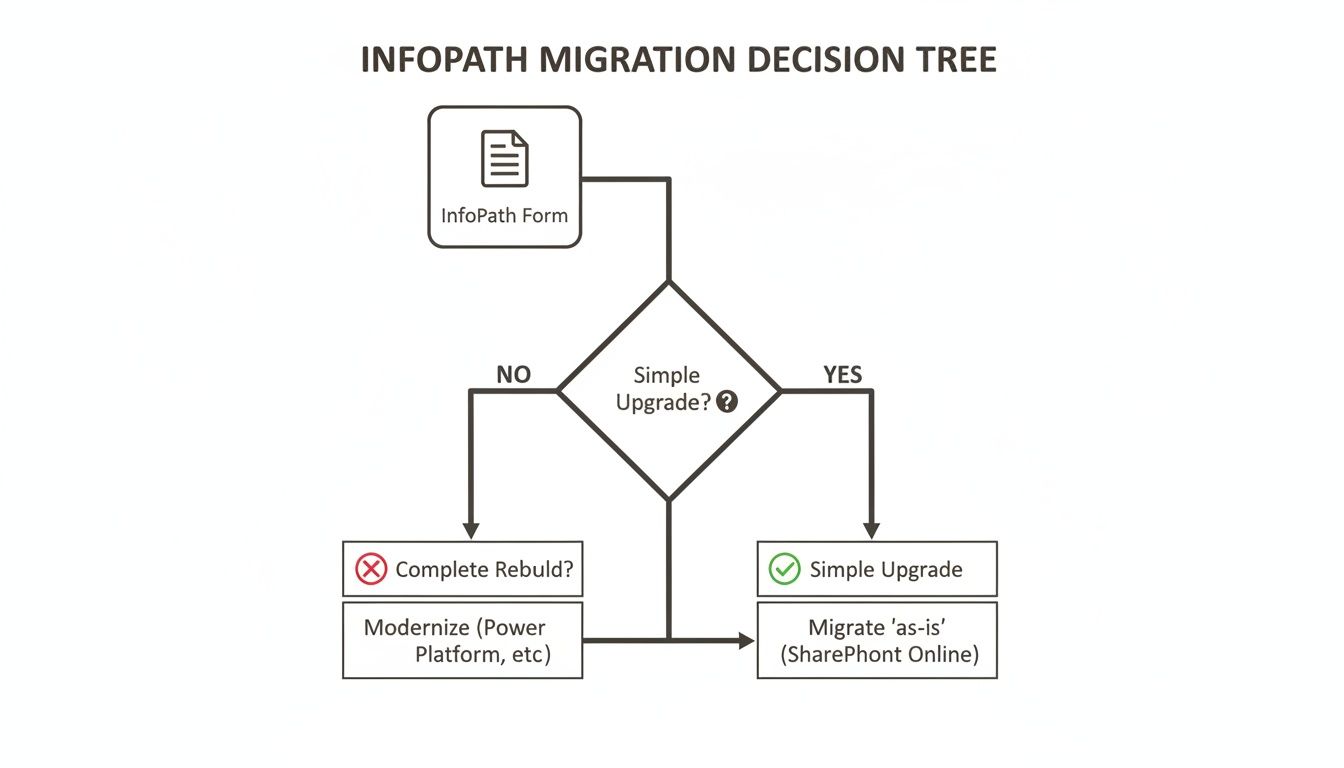
This visualisation starkly illustrates that most enterprise-grade forms, with their embedded logic and complex data structures, will inevitably require a complete rebuild. That reality makes the audit phase absolutely paramount.
The Triage Decision: Rebuild, Re-Platform, or Retire?
Once you have a complete inventory, you must triage each form into one of three buckets. This isn't a suggestion; it's a mandate to prevent your team from wasting months rebuilding a form that provides zero business value and should have been decommissioned years ago.
You need a structured way to make these calls. The simple matrix below is a framework we use to categorise forms and decide their fate, forcing a conversation about value versus effort.
InfoPath Form Triage Matrix Rebuild vs Re-Platform vs Retire
This matrix helps prevent the common trap of defaulting to "rebuild everything." A proper, ruthless triage is your single biggest opportunity for cost savings in the entire project.
Rebuild in Power Apps is for your active, business-critical forms where the functionality is absolutely still required. But be warned: the documentation might say this is a simple replacement, but in reality, it's a full-scale development project, especially for forms with complex features.
Re-Platform Elsewhere is the right call when you realise some InfoPath forms were tortured into performing tasks they were never designed for. A complex workflow solution with multi-stage approvals might be better served by a dedicated engine or custom solution, not a canvas app. Forcing everything into Power Apps is a common and costly architectural error.
Retire and Archive is the most overlooked and most valuable category. A significant percentage of your InfoPath forms are likely obsolete, unused, or redundant. Be ruthless. Every form you can retire is a direct saving of time, money, and risk.
The Ollo Verdict: We often see clients fixate on rebuilding everything. A successful audit should result in at least 30% of your forms being retired. If your final inventory doesn't hit that number, your analysis isn't aggressive enough. You're preserving waste, not modernising a process.
Exposing Hidden Complexity
The final piece of the audit is to hunt down the specific InfoPath features that escalate a project's complexity from weeks to months. These are the red flags that your project managers need to see immediately.
- Code-Behind (C#/VB.NET): Any form with managed code is an instant, major red flag. This logic cannot be migrated and must be completely re-engineered, often using Power Automate flows or even Azure Functions. This isn't a translation; it's a complete architectural redesign.
- Complex Repeating Sections: While Power Apps has galleries, they do not cleanly map to InfoPath's nested repeating sections. This often forces a move to a relational backend like Dataverse, adding significant licensing costs and technical complexity.
- Multiple Data Connections: Forms pulling data from SQL, web services, and multiple SharePoint lists simultaneously require careful re-architecting to avoid crippling performance bottlenecks in Power Apps.
- Cascading Dropdowns & Advanced Rules: Replicating deep, dependent logic can lead to convoluted and unmaintainable Power Fx formulas if not planned correctly from the start.
Completing this rigorous audit and triage provides a definitive, risk-assessed inventory. It's the only way to build a realistic roadmap and budget for your InfoPath migration to Power Apps. For organisations unsure where to begin, a professional assessment can provide this clarity. Learn more about how we structure this with our free audit methodology.
From InfoPath to Power Platform: Navigating the Technical Minefield
Official Microsoft documentation will tell you Power Apps is the successor to InfoPath. While technically true, this framing is dangerously misleading. It suggests there’s a simple upgrade path, but the reality is your team is facing a brutal translation exercise. A direct, one-to-one mapping of features is a complete fantasy.
This is the stage where most do-it-yourself InfoPath migration projects completely implode. They get crushed under the weight of unforeseen architectural complexity that was never mentioned in the marketing materials.
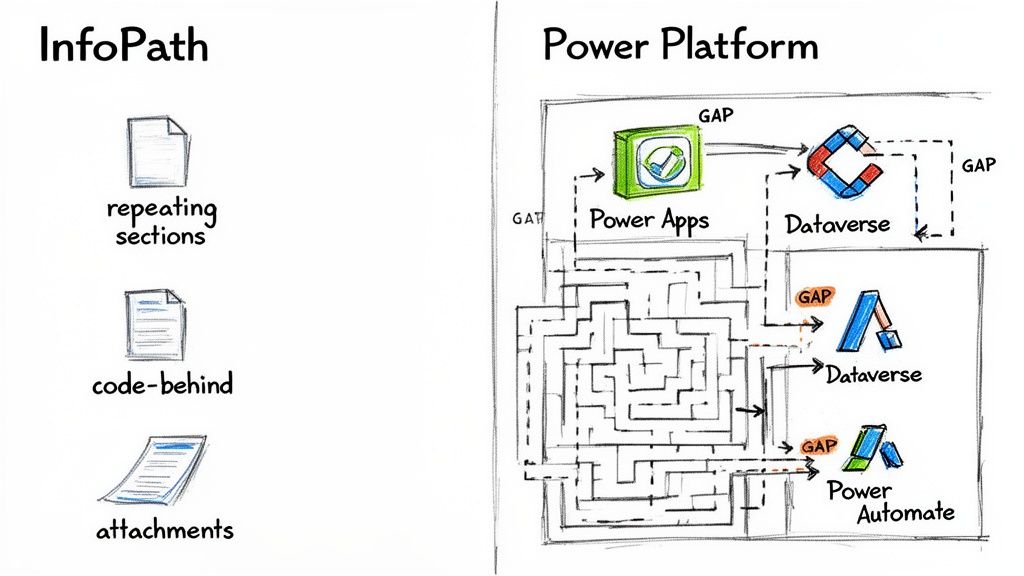
Let's get real about the technical details. This isn't about slightly different features; it's about fundamental architectural gaps that turn what looks like a simple form rebuild into a major re-engineering project.
The Repeating Section Myth
The single most common point of failure we see is the assumption that InfoPath's repeating sections map cleanly to Power Apps galleries. They absolutely do not. This is probably the biggest technical lie-by-omission in the entire migration story.
- InfoPath's Way: Repeating data was neatly handled within a single, self-contained XML file. Simple to manage, but a nightmare to query or report on.
- The Power Apps Reality: A gallery in Power Apps is designed to show records from a flat data source, like a single SharePoint list. To replicate a parent-child relationship (think an expense report with multiple line items), your team is forced to split the data into at least two separate SharePoint lists and then manually build the relational logic in the app.
This isn’t just an inconvenience; it’s a performance and maintenance disaster waiting to happen. We’ve seen teams build monstrously complex Patch() functions to try and simulate this relationship, only to end up with apps that are slow, brittle, and constantly hitting SharePoint's delegation limits.
The Ollo Verdict: For any form with more than a single, simple repeating section, SharePoint is the wrong backend. You absolutely must re-platform the data model to Dataverse. This gives you true relational capabilities, but it also introduces a significant architectural shift and premium licensing costs that your initial budget almost certainly ignored.
Code-Behind Logic Doesn't Translate to Power Fx
Another critical failure point is InfoPath's code-behind (VSTA). Your developers might have written years of complex business logic in C# or VB.NET that runs right inside the form. There is zero migration path for this code. None.
Trying to cram complex, procedural code directly into Power Fx formulas is a recipe for disaster. Power Fx is a declarative, Excel-like language, not a procedural one. Shoving thousands of lines of logic into a button's OnSelect property creates an unreadable, unsupportable mess that will break the second a key developer leaves your organisation.
The correct architectural pattern is to pull this logic out into Power Automate flows. However, this opens up its own minefield:
- Premium Connectors: The moment you need to connect to SQL Server, use Dataverse, or make custom HTTP calls, you’re in premium licensing territory. This can easily multiply your project's ongoing operational cost.
- Run History and Throttling: Power Automate has its own API limits and execution constraints. A "chatty" app can quickly burn through your daily API call allowance, bringing critical business processes to a grinding halt.
- Delegation Warnings: Just like in Power Apps, if your flow tries to query a large data set in a non-delegable way, it will only process the first batch of records (usually 500-2,000). It will then silently fail to process the rest, leading to insidious data corruption you might not discover for months.
The Hidden Complexities of Data and Identity
Beyond the big architectural shifts, a host of smaller "gotchas" consistently derail migration timelines. These are the details that separate a successful, well-planned project from a failed one.
- Attachments: InfoPath stored attachments right inside the form's XML. In Power Apps, they are linked to a SharePoint list item. Your migration script has to do more than just move data; it must detach every single file, upload it to a SharePoint library, and then perfectly link it back to the newly created list item. It’s a fragile, multi-step process that’s easy to get wrong.
- User Lookups: Replicating InfoPath's simple user-picker controls requires careful use of the Office 365 Users connector. If it's implemented poorly, it can cripple app performance by making too many calls to fetch user profiles every time the screen loads.
- Data Connections: An old InfoPath form could have numerous secondary data connections pulling in information. In Power Apps, each of these adds to the app's startup time and overall complexity, demanding a much more thoughtful approach to how and when data is retrieved.
Successfully navigating this transition also hinges on understanding and implementing effective change management process steps to prepare your users for these new applications. Ignoring the human element is just as risky as ignoring the technical details.
This intricate mapping exercise shows exactly why a simple "rebuild" mentality is destined to fail. For deeper insights into designing robust solutions, explore our guide on building powerful Power Apps integrations. Each decision point—from data storage to business logic—requires a deliberate architectural choice, not a blind attempt to copy a twenty-year-old design.
Implementing a Battle-Tested Migration Playbook
Execution is about mitigating inevitable failures, not avoiding them. Theory is cheap, but a failed data migration can cost your organisation millions in recovery and compliance penalties. This playbook isn't a gentle guide; it's a field manual for navigating the high-stakes reality of an InfoPath to Power Apps migration.
The first casualty in any poorly planned migration is stakeholder confidence. To counter this, your initial move must be surgical and political. Don't start with your most complex, mission-critical form. That's a rookie mistake that burns goodwill when you hit your first inevitable roadblock.
Instead, you need to secure early buy-in with a calculated victory.
Phase 1: Secure Stakeholder Buy-In with a Prototype
Identify a form that sits at the intersection of high business impact and low technical complexity. This is your prototype candidate. The goal here isn't a perfect technical specimen; it's a tangible demonstration of value to the people who control your budget and resources.
This prototype serves two critical functions:
- It exposes the real-world complexities of the Power Platform to your team in a controlled, low-risk environment.
- It provides a functional, modern app you can put in front of stakeholders, transforming abstract technical challenges into a visible business improvement.
We've seen projects gain unstoppable momentum from a well-chosen prototype. Conversely, we've rescued projects that died on the vine because the team spent six months trying to boil the ocean with their most complicated form first, delivering nothing but missed deadlines.
Phase 2: The Brutal Reality of Data Migration
Once you have buy-in, the real war begins. Rebuilding the Power App interface is time-consuming but straightforward. The part that will break your project, corrupt your data, and cause catastrophic failure is the migration of the underlying InfoPath data. This is where generic advice fails and battle-hardened experience becomes the only thing that matters.
Your team will be tempted to write a "simple" PowerShell script to iterate through the old form library, parse the XML files, and write the data into a new SharePoint list. This approach is guaranteed to fail.
We are called in to rescue projects crippled by catastrophic errors born from this naive approach. The documentation says to extract the XML, but in reality, your team will immediately collide with issues that render your data completely unusable.
- GUID Conflicts and Lookup Hell: Your scripts will fail to correctly re-map lookup column IDs (GUIDs) between the old environment and the new one. This doesn't just break a few records; it systematically corrupts the relational integrity of your entire dataset.
- Broken Permission Inheritance: Migrating data often shatters finely-tuned, item-level permissions. A script that just moves data without meticulously reapplying access control isn't just a technical failure; it's a security incident that can breach legal compliance.
The Ollo Verdict: Any data migration plan that doesn't have a specific, tested strategy for handling GUID re-mapping and permission inheritance is not a plan—it's a recipe for disaster. This isn't a minor detail; it's the core of the entire technical challenge.
Phase 3: Navigating SharePoint's Architectural Traps
Even with a perfect script, your execution will be throttled by SharePoint's own built-in limitations. These aren't bugs; they are hard architectural limits that will bring your migration to a dead stop if you don't actively engineer around them.
The two biggest project killers are:
- The 5,000-Item List View Threshold: As your script populates the new SharePoint list, the moment you cross 5,000 items, any view that tries to filter or sort on a non-indexed column will break. Your Power App will become unresponsive, and your data will be inaccessible. Your PnP PowerShell scripts must be structured to pre-emptively create indexed columns before the data migration begins.
- API Throttling: If your migration script makes too many calls too quickly, Microsoft 365 will throttle you. This is non-negotiable and confirmed in official Microsoft documentation. Your script must include sophisticated error handling with exponential backoff and retry logic to gracefully handle being told to "slow down."
A robust migration script isn't just about moving data. It's about navigating a hostile environment designed to protect the service, not to make your life easy. For a deeper look into the broader challenges, our guide on planning a successful Microsoft 365 migration provides critical context.
Phase 4: Rigorous Testing and a Viable Rollback Plan
Your testing protocol must be ruthless. It needs to go far beyond simple "does the button work" checks. Your test plan must validate functionality, security, and performance under load.
Crucially, you must have a viable rollback plan. This is the single most common element missing from every failed project we've rescued. What happens when you discover a critical data corruption issue two days after go-live? If the answer is "we'll figure it out," you've already failed.
A viable rollback plan means:
- Keeping the old InfoPath form read-only for a defined period (e.g., 30 days).
- Having a tested script ready to revert any changes made in the new system.
- A clear communication plan to inform users that you are executing the rollback.
Without this, you're not performing a professional migration; you're gambling with your business-critical data.
Establishing Post-Migration Governance and Control
The project isn't over when the last InfoPath form is migrated. In fact, that's precisely when the real operational risk begins.
Your team has just dismantled a centrally controlled, predictable InfoPath environment and replaced it with the decentralised, ‘citizen developer’ world of the Power Platform. Without immediate and assertive governance, you are actively inviting app sprawl, security vulnerabilities, and compliance breaches.
Ignoring this phase doesn't just create technical debt; it completely undermines the entire investment in your modernisation effort. This is the shift from a one-time project to a continuous operational discipline.
From Centralised Control to Managed Chaos
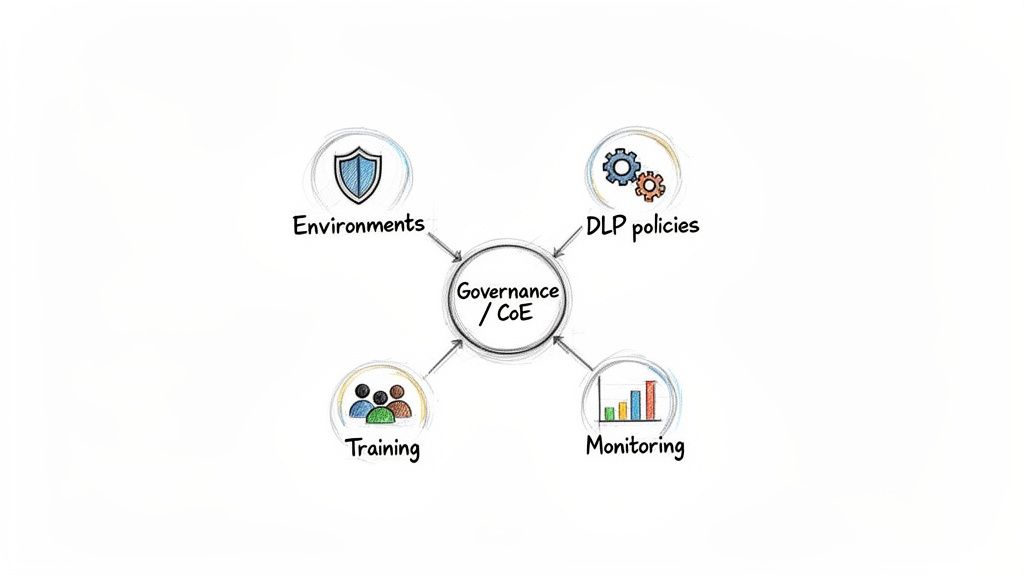
In the InfoPath world, IT held the keys. Now, any user with a licence can potentially create an app that connects to business-critical data. Your first action must be to establish a robust governance framework that prevents this newfound freedom from becoming your next major security incident.
This framework must include:
- A Defined Environment Strategy: Do not let your developers build production apps in the 'Default' environment. You need separate, locked-down environments for development, testing, and production, each with its own set of security controls and permissions.
- Strict Data Loss Prevention (DLP) Policies: Configure DLP policies to control which connectors can be used together. For example, you must block scenarios where a user could build an app that sends SharePoint data to their personal Dropbox. This isn't an optional setting; it's a mandatory control.
- A Centre of Excellence (CoE) Framework: This isn't a team; it's a function. The CoE provides the guardrails, best practices, and reusable components that guide your citizen developers, ensuring they build secure, performant, and maintainable applications.
The Ollo Verdict: If you allow makers to build in the default environment, you've already lost control. A multi-tiered environment strategy isn't a "best practice"—it's the absolute minimum requirement for any enterprise operating the Power Platform.
Confronting User Friction and Change Management
Beyond technical controls, you face a significant human challenge. Users grew accustomed to their old InfoPath forms, warts and all. The shift to modern Power Apps, even if technically superior, will inevitably create friction.
We see this repeatedly in failed DIY migrations. According to regional user group data, a staggering 62% of 2025 pilot projects in Ireland fail validation—not on technical grounds, but on user rejection. This is compounded by the fact that many organisations underestimate the challenge. 45% of Irish healthcare organisations report that form abandonment rates doubled after an InfoPath to Power Apps migration due to user experience issues and browser compatibility problems that didn't exist in the old Internet Explorer-centric world. You can find more details about these migration challenges from Apps4Rent's analysis.
Your change management plan must be proactive, not reactive. You need targeted training that goes beyond just showing people where to click. It has to explain why the process has changed and demonstrate the direct benefits to their workflow.
Ignoring the human element of this transition is every bit as dangerous as ignoring the technical one. For more strategies on this, you might be interested in our guide on implementing effective SharePoint data governance.
The Hard Questions About InfoPath Migration
Every IT Director we talk to about moving off InfoPath eventually asks the same tough questions. They’ve heard the horror stories. They’re worried about the hidden costs and the potential for a project to go completely off the rails. Here are the direct, no-nonsense answers we give them, based on years of pulling these projects out of the fire.
Can We Just Use Microsoft’s Standard Tools Like SPMT For This?
No. Let me be blunt: trying to use the SharePoint Migration Tool (SPMT) for an enterprise-scale InfoPath migration is a recipe for disaster.
SPMT is built for one thing: lifting and shifting files and basic documents. It has absolutely zero capability to handle the core challenge of an InfoPath migration, which is cracking open the business-critical XML data inside your forms and restructuring it into usable SharePoint list items or a Dataverse table.
It cannot parse repeating sections, it can’t re-map complex lookups, and it will choke on any form with embedded logic. We’ve seen it time and again—relying on SPMT is one of the top reasons migration projects fail catastrophically and we get called in to rescue them.
The Ollo Verdict: Use SPMT for a <50GB fileshare migration. For anything else, especially complex data transformation like InfoPath XML, you need custom scripting. Some third-party GUI tools might give you a decent initial analysis, but they fall short when it comes to the complex, environment-specific data transformations every real-world migration requires. For the data migration itself, your only viable path is meticulously engineered, custom PowerShell scripting built to handle your unique data structures.
What’s a Realistic Timeline for an InfoPath Migration Project?
Anyone who gives you a simple number without seeing your forms is dangerously inexperienced. The real timeline is dictated entirely by what you uncover during the forensic audit and triage phase.
There’s a massive difference in effort between forms. A simple, list-based form might only take a few days to rebuild in Power Apps. But a complex, code-heavy form that lives in a library and has multiple data connections? That could easily take 4-6 weeks for a single form.
When you’re looking at a portfolio of 100+ forms, a phased migration programme typically spans 6 to 18 months. The final duration hinges completely on the complexity of your forms and whether you have skilled resources ready to tackle the work.
What’s the Biggest Hidden Cost in an InfoPath to Power Apps Migration?
The single biggest hidden cost isn’t technical—it’s business analysis and User Acceptance Testing (UAT).
Think about it. The original business logic baked into your InfoPath forms from ten years ago is almost certainly undocumented. The person who built it is long gone, and the nuanced rules are now just forgotten tribal knowledge.
Your team will spend an enormous amount of time with business users simply rediscovering "how things are supposed to work" before a single line of code can be written or a Power App can be built. This investigative work can easily eat up 30-40% of the total project budget if you don’t plan for it from day one.
An InfoPath migration is a high-risk, high-reward project, and not something to be taken lightly. Don't gamble with your critical business processes. Ollo provides the battle-tested expertise to de-risk your migration and ensure it succeeds where others fail. Schedule a consultation with our migration architects today.

















