



Your team is probably staring at a migration plan that looks tidy in PowerPoint and rotten everywhere else. The file shares look manageable. The SharePoint estates look messy but survivable. Someone says duplicate content is “mostly an SEO issue” or “something Microsoft search will handle.” That's the point where projects start sliding towards rework, throttling, and compliance trouble.
In real Microsoft 365 migrations, duplicate content detection isn't a content hygiene task. It's a risk control. If your discovery phase doesn't identify exact duplicates, near-duplicates, stale versions, path collisions, and metadata clones before cutover, your team won't just migrate rubbish. You'll migrate technical debt into a platform that enforces hard limits and punishes sloppy assumptions.
We often see clients fail when they import web-style thinking into SharePoint, Teams, and OneDrive programmes. SEO tools look for similarity. Enterprise migration work has to account for GUID conflicts, broken inheritance, list view thresholds, path length violations, and version history that can turn an innocent cleanup into an audit nightmare.
Why Standard Detection Fails in M365 Migrations
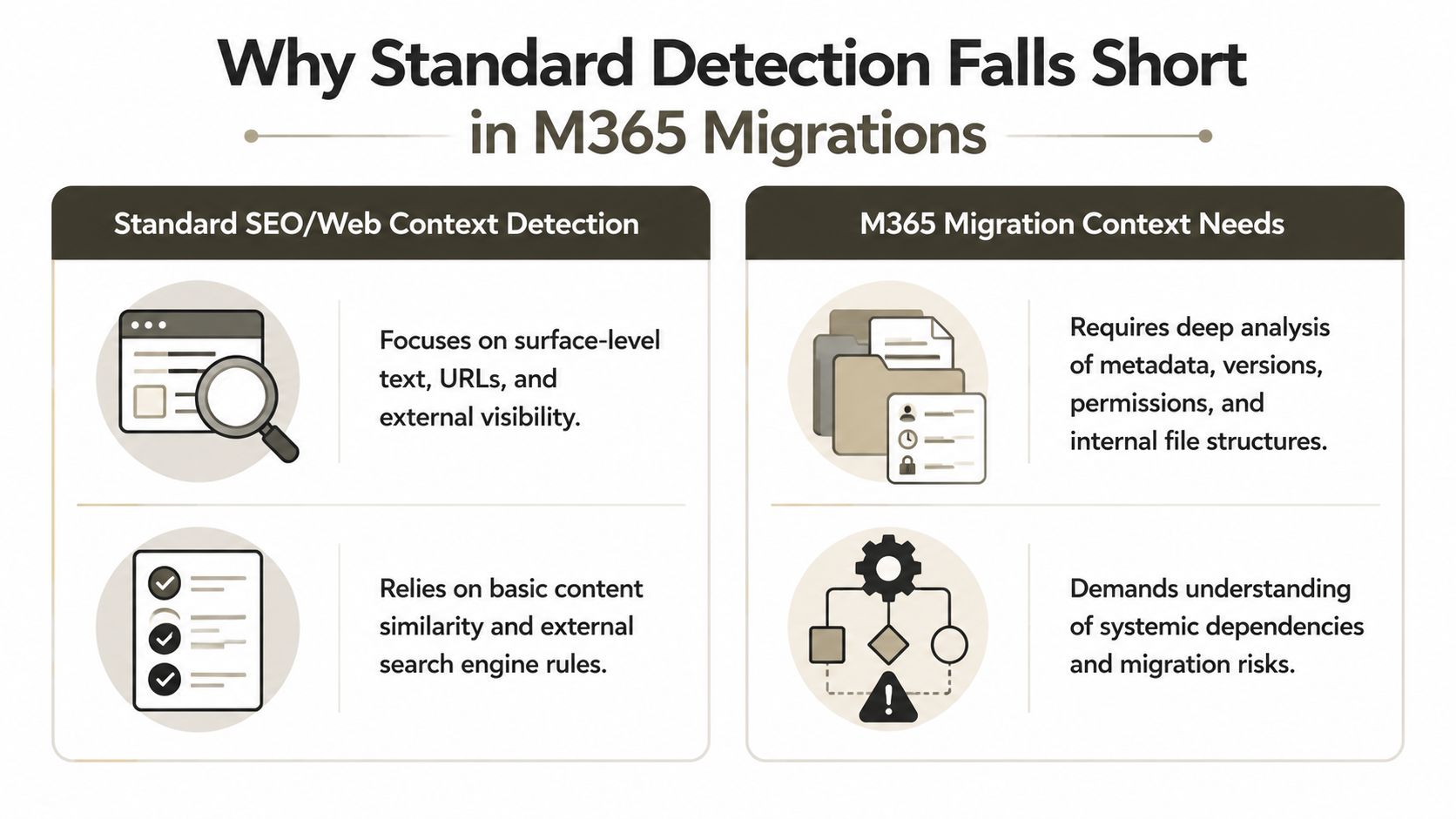
Teams often begin with an incorrect mental model. They assume duplicate content detection means finding pages or files that look very similar. That works badly on websites. It works even worse in SharePoint migrations.
Google has explicitly said “there is no number” for measuring duplication, and the mechanism relies on checksum-based representation rather than a simple overlap percentage, as covered in Search Engine Journal's explanation of Google duplicate content thresholds. In migration work, that matters because checksums don't understand business context. They don't understand that two files can be operationally dangerous duplicates even when small structural changes alter the signature. They also don't protect you from identical hash signatures surfacing after tenant moves where file identities, paths, and references create conflicts.
The 85 percent trap
A lot of teams lean on SEO tooling because it's available and familiar. That's lazy engineering. Commercial site audit tools often use an 85% identical rule for duplicate page flags, but that's a vendor heuristic, not a Microsoft control and not a Google standard. In SharePoint, a contract with minor metadata edits, a revised policy PDF, or a migrated library item under a different path can sit below that threshold and still create legal, operational, and search problems.
The documentation says one thing. In reality, your migration estate doesn't behave like a public website.
A tenant-to-tenant consolidation contains more moving parts:
- Metadata duplication can be a significant problem, even when body content differs.
- Version drift can make records look unique when they're just variants of the same document lifecycle.
- GUID conflicts can create technical collisions even when filenames look harmless.
- Long path issues can break jobs before your “duplicate checker” even reports cleanly.
Practical rule: If your duplicate content detection approach can't evaluate files, metadata, paths, versions, and permissions together, it isn't fit for M365 migration work.
Why standard crawlers miss the damage
SEO tools inspect rendered content and URLs. Migration architects need a content manifest. That means inventorying libraries, versions, IDs, labels, ownership, and path structures before a single cutover batch starts. Basic crawlers don't do that. Native migration tooling doesn't do that either.
That's why serious programmes start with a proper SharePoint migration assessment tool, not a surface scan and crossed fingers. Your team needs pre-migration evidence, not a dashboard that looks reassuring while duplicate records slip through under alternate paths and inherited permissions.
We often see clients fail when they trust checksum outputs without testing what happens after identity mapping, folder restructuring, and library flattening. Duplicate content detection in M365 isn't about resemblance. It's about whether your target environment can absorb the data set without breaking under it.
The True Costs of Unchecked Content Duplication
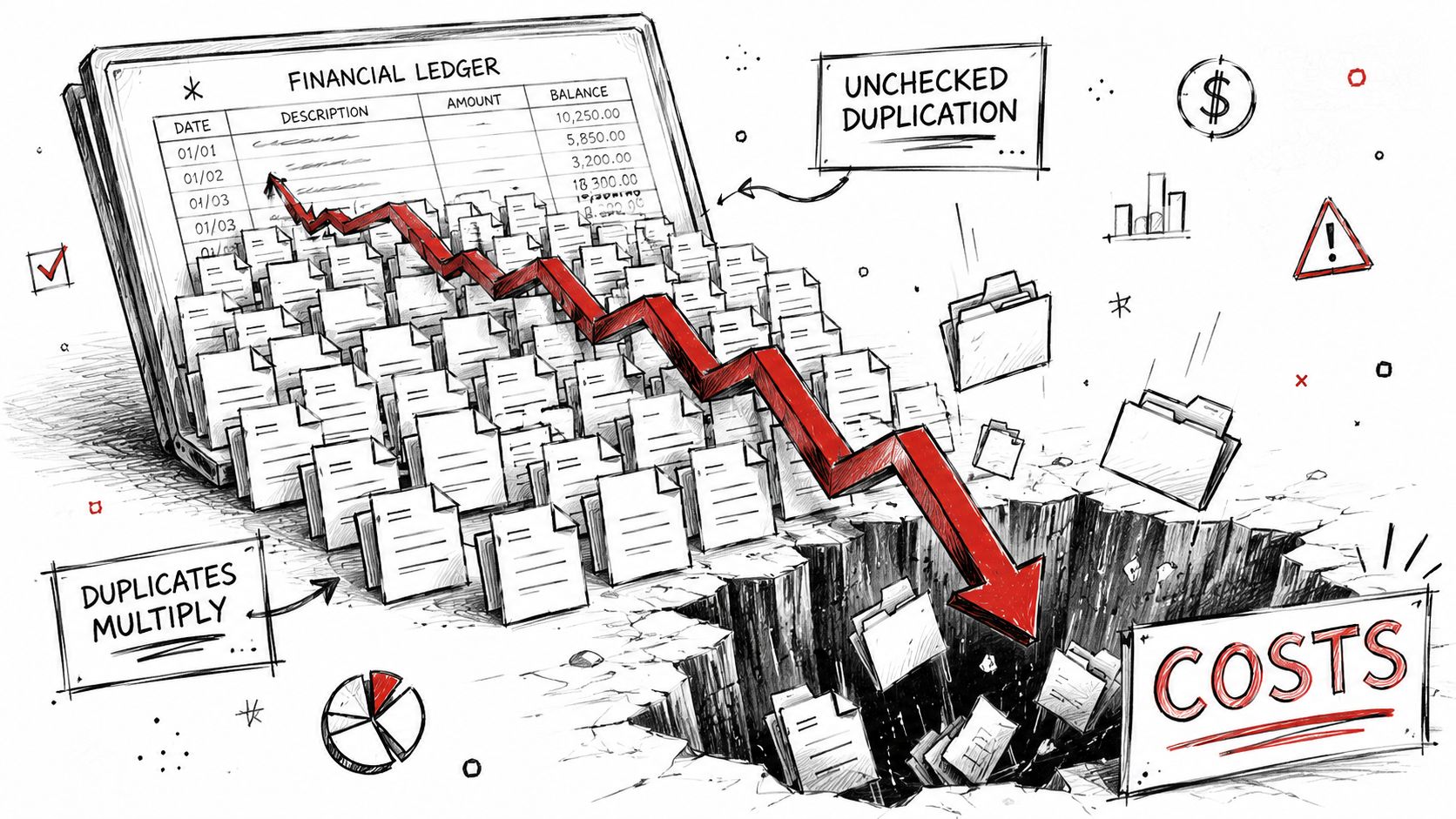
Unchecked duplication doesn't create a tidy little cleanup backlog. It poisons the migration itself. Every redundant file, stale copy, and replicated folder inflates item counts, drags jobs through API throttling, and pushes libraries towards Microsoft's documented 5,000-item list view threshold, a limit called out in Get SharePoint's write-up on migration mistakes.
Discovery failures become project failures
In the IE region, 84% of SharePoint migration projects fail due to inadequate pre-migration discovery that excludes duplicate content auditing, and Microsoft officially recommends spending 20–25% of total project time on discovery, according to this SharePoint migration webinar deck on project failure rates. If your team treats duplicate analysis as optional cleanup after testing, you're already off the rails.
The ugly part is that failure doesn't always show up as a red status in a tool. Sometimes the job “succeeds” and you inherit the mess later:
- Help desk noise rises because users find multiple versions of the same record in different locations.
- Permissions audits get harder because duplicated content often carries broken inheritance into the target.
- Retention and legal review become harder because no one trusts which copy is authoritative.
- Search quality degrades because the index now has multiple candidates for the same business document.
Doc rot is part of the same disease
If you want a useful parallel outside migration tooling, look at GitDocAI insights on doc rot. The pattern is familiar. Teams keep old copies alive, lose trust in the source of truth, and then waste hours validating documents that should have been retired. SharePoint migrations amplify that problem because they preserve and replicate bad habits at scale.
Missing duplicate content detection doesn't just make the destination messy. It changes what your users trust, what your auditors can defend, and what your administrators have to support.
The budget story nobody likes to tell
IT leaders often ask about licensing and migration tooling costs. Fine. That matters. But the main financial hit comes from bad discovery, repeated test waves, and post-cutover remediation. If you want the broader budgeting view, the real SharePoint migration cost isn't the line item for the tool. It's the compounded cost of migrating data you should've classified, challenged, archived, or killed before it hit the target.
DIY teams usually focus on move speed. Mature teams focus on move quality. In regulated estates, failure isn't just technical. It can break legal compliance because duplicated records inflate retention scope and muddy the chain of custody around business-critical content.
A Scalable Framework for Detection and Triage
The first hard truth is simple. SharePoint Online does not perform automatic de-duplication during migration, and Microsoft's official tools lack built-in duplicate detection, so 100% of duplicate files persist unless you add third-party tooling or custom scripting, as stated in Microsoft Answers on SharePoint de-duplication during migration. If your runbook assumes the platform will clean this up for you, bin the runbook.
Stage one and two
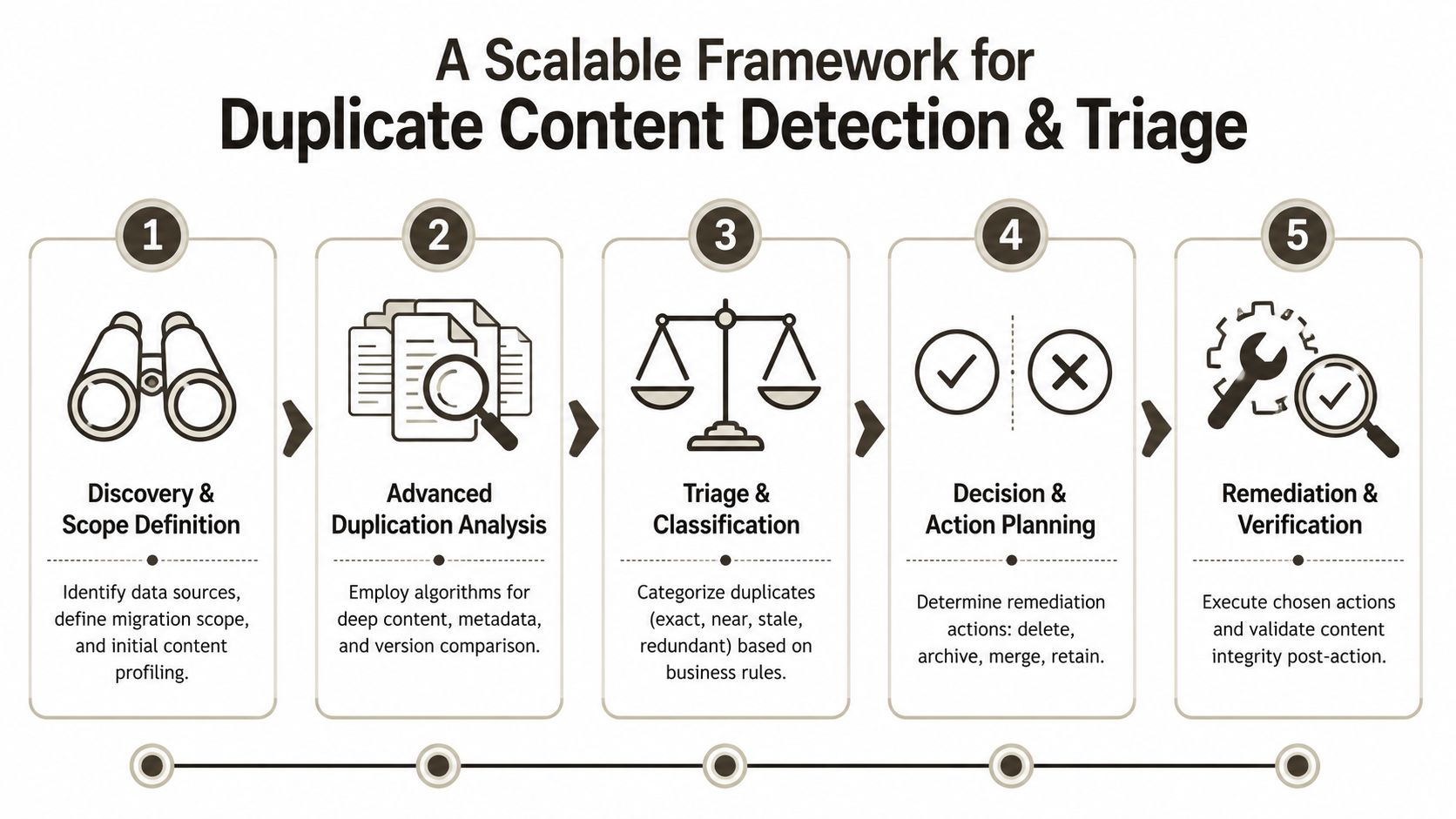
Start by building an offline content manifest. Don't hammer the live tenant with ad hoc searches and half-tested reports. Pull the inventory out with PowerShell PnP, then analyse it outside production.
- Scope the estate first. Identify site collections, Teams-connected sites, OneDrive populations, archive shares, and high-risk regulated libraries. Don't pretend everything needs the same treatment.
- Capture the fields that matter. File name, path, relative URL, content type, modified date, author, version count, unique permissions, labels, IDs, and any business key that distinguishes one record from another.
- Hash content for exact-match detection. Exact duplicates matter, but they're only the first pass.
- Add metadata and path heuristics. A file under a different folder with the same title, same business identifier, and conflicting labels can be more dangerous than a byte-for-byte duplicate.
- Separate records from rubbish. Regulated content needs a higher burden of proof before deletion.
A lot of teams find it useful to borrow anomaly review methods from finance operations. This practical guide for IT & Finance is useful because it reinforces the discipline of flagging suspicious patterns before acting on them. That's the correct mindset for duplicate content detection in enterprise migrations.
Stage three with version awareness
At this stage, most DIY efforts become dangerous. Your team finds “duplicates” and starts deleting. Then legal asks why version evidence disappeared.
The version history check has to come before remediation. In regulated environments, some apparent duplicates are version variants, working copies, approved copies, or retained records that only look redundant from the outside. You need a triage matrix that distinguishes:
| Category | What it usually means | Action bias |
|---|---|---|
| Exact duplicate | Same file content, same business purpose | Consolidate after version review |
| Near-duplicate | Minor drift in content or metadata | Escalate for business review |
| Superseded copy | Older operational copy replaced by approved record | Archive or remove under policy |
| Metadata clone | Similar titles, tags, or descriptions with different file bodies | Investigate governance issue |
| Path collision risk | Same or similar item likely to break naming or mapping | Resolve before migration batch |
Your team shouldn't ask, “Can we delete this?” They should ask, “Can we defend this deletion to audit, legal, and the business owner?”
Stage four and five
Once you've triaged, execute remediation in controlled waves. Don't clean the whole estate in one mad burst.
Use a staged pattern:
- Review exact duplicates first. These give you the safest wins.
- Quarantine near-duplicates. Put them into a review queue by business function.
- Resolve mapping conflicts before migration. Filenames, paths, and identities need a deterministic target.
- Re-run manifest checks after each wave. Never assume the first pass caught everything.
- Tie decisions to classification. If a file has legal, financial, or healthcare relevance, route it through named approvers.
That cleaned inventory becomes the foundation for data classification in Microsoft 365. Without classification, duplicate content detection remains a technical exercise. With classification, it becomes a defensible governance control.
The frameworks that survive scrutiny are boring on purpose. They produce logs, approvals, manifests, and repeatable outcomes. That's what you want when the migration hits a regulator, an internal audit, or a board-level post-mortem.
Choosing Your Weapon ShareGate Versus PowerShell
Tools matter, but not in the way vendors want you to think. The key question isn't which product has the prettiest interface. It's which approach gives your team enough control to survive the ugly edge cases.

Where ShareGate earns its place
ShareGate is useful. It gives administrators visibility, packaged workflows, and a decent operational layer for structured projects. For straightforward moves, that matters. It's also far more realistic than pretending SPMT can carry enterprise complexity by itself.
But ShareGate still operates inside a product boundary. If your duplicate content detection logic depends on custom business identifiers, cross-library relationship checks, or specialised handling for regulated record variants, a vendor workflow starts to feel narrow.
Where PowerShell gets surgical
Custom PowerShell PnP scripts using DocumentSignature achieve 92–96% success rates in detecting exact duplicates in SharePoint, according to the cited technical walkthrough on custom duplicate detection with DocumentSignature and related tooling. That's strong for exact-match work. It also demonstrates the inherent value of scripting. You can decide what counts as a duplicate in your environment instead of accepting someone else's assumptions.
Here's the trade-off in plain terms:
- ShareGate gives speed, operator friendliness, and packaged migration workflows.
- PowerShell PnP gives flexibility, custom logic, and the ability to interrogate content the way your governance model requires.
- Cheap dedupe tools often create more risk than value because they need heavy manual setup and can push users towards deletion before proper review.
The documentation says a wizard can fix duplicates. In reality, wizards don't carry legal accountability. Your team does.
A practical comparison
| Approach | Best use case | Breaking point |
|---|---|---|
| ShareGate | Structured migrations with known rules and disciplined governance | Complex edge cases where business logic needs custom detection |
| PowerShell PnP | Enterprise estates with custom triage, reporting, and compliance review | Teams without scripting discipline or test controls |
| SPMT | Small, clean, low-risk data sets | Anything with duplicate risk, path issues, or governance complexity |
If your team is still choosing tools, this SharePoint migration tool comparison is the right conversation to have before procurement, not after your first failed test wave.
The Ollo Verdict
Use ShareGate when the environment is well-governed, the rules are clear, and the exceptions are limited. Use custom PowerShell when the estate is large, regulated, dirty, or politically sensitive.
Use SPMT only when the data is small and clean. Anything else is a gamble dressed up as pragmatism.
Remediation and Post-Migration Governance
Most migration teams stop paying attention after cutover. That's how duplicate estates regenerate. If your remediation decisions don't feed governance, you haven't solved anything. You've just delayed the next mess.
Turn the cleanup into policy
The manifest you built during detection should become operational governance data. Use it to define authoritative repositories, approved content types, and ownership rules. If several departments maintain near-identical records, fix the operating model instead of hoping users will self-correct.
Use your cleaned inventory to support retention labels, review workflows, and structured libraries. Native Microsoft 365 controls can help, but only if the underlying content has already been rationalised. If the source estate was chaotic, copying that chaos into Purview-backed governance just gives you more organised confusion.
Stop users from recreating the problem
A few controls matter more than fancy dashboards:
- Content types and term store discipline reduce random structure and naming drift.
- Library design should reflect business process, not historical folder habits.
- Permission simplification cuts the spread of broken inheritance and hidden duplicate work areas.
- Owner accountability keeps records from multiplying across Teams, OneDrive, and SharePoint.
Governance starts where duplicate content detection ends. If you don't change user behaviour and information architecture, the duplicates come back.
That's why day-two planning matters. A proper SharePoint data governance model turns migration remediation into a durable control set. Without it, your target tenant becomes a cleaner-looking version of the same failure.
The Ollo Verdict When DIY Becomes a Career Risk
If you run a small migration with a clean data set, limited business risk, and no regulatory baggage, you can get away with a basic approach. That window is narrow. The moment your programme includes tenant-to-tenant moves, regulated records, old file shares, Teams sprawl, or ugly SharePoint customisation history, DIY duplicate content detection stops being brave and starts being reckless.
Enterprise-scale migrations in Ireland with 10,000+ users require 4–8 months of planning, and missing duplicate content detection is identified as the #1 cause of delays because it forces re-migration of corrupted libraries and increases network bandwidth consumption by 30–50%, according to this enterprise Office 365 migration guide. The same source gives the blunt rule that matters most. Use SPMT only for <50GB clean datasets.
That's the line. Below it, you may decide the risk is tolerable. Above it, you're not running a migration project. You're managing exposure.
Your board won't care that a native tool was free. Your compliance team won't care that a wizard looked convincing. Your career won't benefit from explaining why duplicate records, path conflicts, and broken governance were “unexpected.”
The only sane approach is specialist-led detection, triage, and remediation before the move, not after the damage.
If your team is staring at a messy Microsoft 365 estate and trying to decide whether duplicate content detection is worth the effort, it is. If the migration involves regulated data, tenant consolidation, or years of unmanaged SharePoint growth, get specialist help before you cut over. Talk to Ollo when you need a migration partner that treats duplicate content as a technical and compliance risk, not a cosmetic tidy-up.

















