



Your team has probably already had the upbeat migration presentation. The one with the tidy arrows, the licensing slide, and the promise that once the files land in Microsoft 365 the hard part is over.
That's the lie that causes the clean-up project.
We've seen the same pattern too many times. A migration gets marked complete. Users can open files. Search works well enough for a week. Then legal, compliance, or an external auditor asks a simple question: prove this record was retained correctly, prove it wasn't altered outside policy, and prove disposition happened when it should have. That's when a “successful” move to SharePoint turns into a records management failure.
Your M365 Migration Is a Compliance Minefield
The worst projects don't fail on day one. They fail months later, when someone needs evidence.
We've seen clients discover that the file made it across, but the retention logic didn't. The document exists, yet nobody can prove its lifecycle. The folder structure looks familiar, but it contains records with conflicting retention periods, no defensible disposal path, and no reliable audit story. Your team thinks it migrated content. The regulator sees unmanaged records.
A completed migration can still be a failed records system
That distinction matters because the financial exposure is not theoretical. The average cost of a data breach attributable to record management failures reached $4.88 million in 2024, and record-keeping fines totalled $238.5 million in 2025 according to this records management analysis. Missing this step doesn't just fail the migration. It breaks legal compliance.
A lot of teams still approach the cloud move as an infrastructure task. That's backwards. Records management is a governance and risk problem first, and a migration problem second. If your project plan starts with “move the data” instead of “define the record”, it's already pointed at the ditch.
Practical rule: If you can't explain how a record is classified, retained, retrieved, and disposed of before migration starts, your team isn't ready to migrate it.
The false comfort of visible files
SharePoint is very good at making moved content look intact. That visual reassurance fools people. Users see folders. Executives see progress. Project managers see green status. None of that proves the records are defensible.
The documentation says a migration is about transfer. In reality, regulated environments need traceability, retention alignment, access control, and a disposal model that survives audit. That's why basic “lift and shift” programmes age badly. They create a cloud-shaped archive with on-premises chaos inside it.
If your current plan still treats compliance as a post-migration tidy-up, stop. Read this closer look at Microsoft 365 migration risk and pressure-test your assumptions now, not after your first escalation call.
Rethinking Records vs Content in a Regulated World
Most Microsoft 365 projects use the words content, document, and record as if they're interchangeable. They aren't. That confusion is one of the main reasons migrations collapse under audit.
A working file is not the same thing as a regulated record. A versioned document sitting in SharePoint is not automatically a defensible record. And a retention label on its own doesn't magically create legal integrity.
A record without context is barely a record
The National Archives of Ireland clearly outlines the central problem. It emphasises that capturing structural and contextual information is essential so a record's meaning is preserved when retrieved in the future, and warns that failing to migrate this contextual information leaves records technically present but legally unusable in compliance audits, as outlined in this National Archives-aligned guidance.
That's the part most migration teams miss. They move files and congratulate themselves. They don't preserve the “who created it, when, and why” layer with enough discipline. Then six months later your compliance lead opens a file that exists physically but has lost the metadata needed to prove its status.
The file is there. The evidence isn't.
Why default classification models break down
Content types help organise information. They don't solve records management on their own. They depend heavily on human behaviour, and human behaviour is exactly what fails under pressure. Users pick the wrong type, skip metadata, dump regulated material into convenience folders, or file email exports with no meaningful context at all.
That's why we're cynical about “we'll train users to classify better” as the main control. Training matters, but your architecture must assume that users will take shortcuts.
A better design starts with enforced metadata, controlled libraries, and retention logic tied to the business meaning of the record, not just the file extension or where someone dragged it. If your team is still debating whether labels alone are enough, it needs a stronger classification model. This guide to data classification strategy is a better place to start than another naming convention workshop.
The real divide
Here's the distinction your team needs to hold firmly:
| Item | What it is | Why it fails under audit |
|---|---|---|
| Working document | Content in progress | It may not represent a final business decision |
| Stored file | A binary object in SharePoint | Presence alone doesn't prove governance |
| Managed record | Content plus context, retention, control, and traceability | This is what regulated teams actually need |
If your migration design doesn't preserve intellectual control over the record, your team hasn't modernised records management. It has just changed storage platforms.
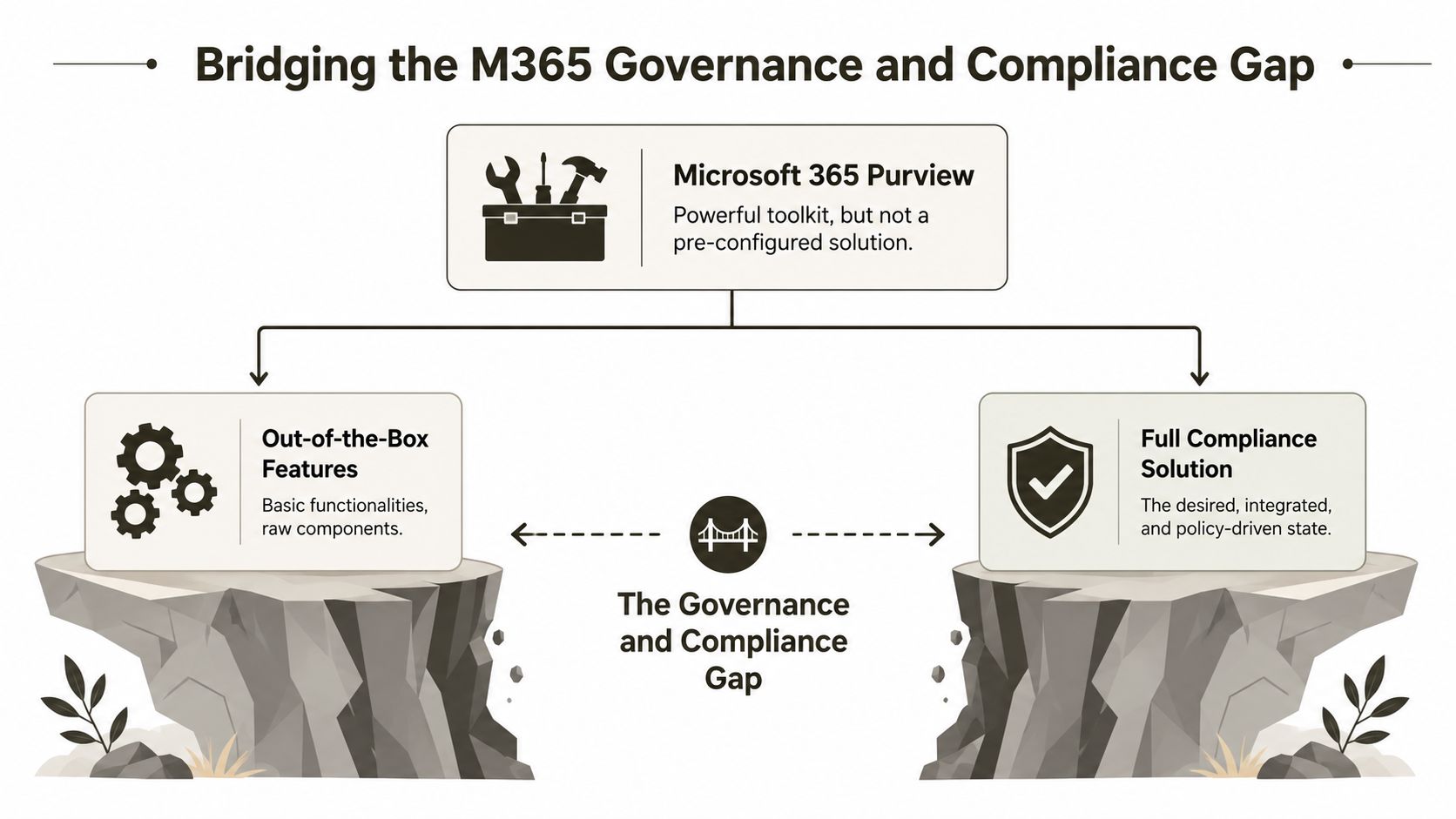
Bridging the M365 Governance and Compliance Gap
Microsoft 365 Purview is useful. It is not a finished compliance architecture.
That's where many enterprise programmes go wrong. The licence creates false confidence. The admin centre exposes a stack of features. Someone enables labels, retention policies, and a few sensitivity controls. Then the organisation assumes the governance problem is solved. It isn't. You still have a gap between available features and enforceable records management.
The Irish requirement most teams ignore
The Irish Government's Better Public Services framework mandates that public sector organisations align retention schedules directly with their filing systems and build new digital systems using an archive by design approach to guarantee accessibility from creation, as set out in the Government's records management guidance.
That requirement is more demanding than most out-of-the-box Microsoft 365 deployments. It means you don't bolt records management on after migration. You build it into the target structure before the first record lands.
What breaks in the real world
We often see clients fail when they migrate departmental shares straight into broad SharePoint libraries and keep the old convenience folders. That approach carries over the exact mess that caused the governance issue in the first place.
Common failures look like this:
- Mixed retention in one folder: Teams store contracts, drafts, approvals, and correspondence together. Disposal becomes difficult to action because the folder does not mirror the retention schedule.
- User-led classification: People decide record status manually. They get it wrong, skip fields, or prioritise speed over policy.
- Late governance design: The migration finishes before naming, metadata, and retention are settled. That forces rework inside a live tenant.
- Weak access structure: Permissions sprawl creates broken inheritance and makes audit reviews painful.
Zero-trust for data, not just identity
Most IT leaders now understand zero-trust identity. Fewer apply the same discipline to information architecture. They should.
Your team needs automated enforcement around record class, retention outcome, and access boundaries. If your governance model relies on users remembering what belongs where, it's fragile. If your records management model allows freeform storage with optional metadata, it's fragile. If your disposal workflow can't act cleanly because different lifecycles sit in the same location, it's already compromised.
Architecture test: If disposal depends on someone manually inspecting folders, your design has already lost control.
For a sharper governance benchmark, review these Microsoft 365 governance audit checks. Most tenants fail more of them than their owners realise.
SharePoint's Technical Breaking Points Exposed
Monday morning after cutover, your legal team opens a migrated library, filters for a case file, and gets errors, blank views, or inconsistent results. Audit asks for a defensible record trail. Your admins insist the migration completed successfully. We've seen that scene too many times. The files arrived. The records architecture did not.
SharePoint Online rewards disciplined design and punishes shortcuts. In regulated estates, the breaking points are predictable: bad column strategy, unworkable views, unstable indexing, weak identifier models, permission mess, and migration patterns that copy legacy defects straight into Microsoft 365. If your team treats SharePoint like a bigger file share, it will fail exactly like one.

Thresholds break trust before they break the platform
The problem is not a single hard limit. It is what happens when libraries, views, filters, and metadata were never designed for records use at scale.
We've seen teams migrate decades of content into a handful of oversized libraries, preserve old folder paths, then act surprised when common user actions start failing or slowing down. Users stop trusting search. They stop trusting metadata. They export copies, save local versions, and create shadow repositories. At that point, your records control model is already degrading.
Default M365 setup makes this worse. Out of the box, it does not force your team to design views around retrieval, disposal, and audit behaviour. It lets weak structures survive long enough to become expensive.
Folders carry legacy chaos into a modern service
Folders do not solve scale. They hide bad design until users hit it in production.
A folder-heavy migration usually preserves the wrong thing: the visual comfort of the old file share instead of the control model your records estate needs. Large libraries still depend on sensible indexing, predictable metadata, and views that match how users retrieve records. If your team recreates deep nested structures, you get fragile navigation, inconsistent classification, and more places for retention logic to become opaque.
We've also seen automatic indexing treated like a rescue plan. It is not. At scale, delayed or missing indexes turn normal user filtering into operational noise, support tickets, and audit risk. You cannot fix that with post-migration cleanup scripts and a few admin tweaks. You fix it by redesigning the information architecture before content lands.
SharePoint IDs are not records identifiers
This is one of the fastest ways regulated projects drift into non-compliance.
SharePoint gives every item a platform identity. That does not mean it gives you a records identifier that satisfies sector-specific traceability rules, legal naming requirements, or numbering schemes with year logic and controlled sequencing. We've seen teams discover this after migration, then bolt on manual registers, Excel trackers, or Power Automate workarounds that no auditor should trust.
The European Commission's implementing rules make the gap obvious. Some environments require a unique identifier structure that SharePoint does not generate by default, as specified in the Commission's implementing rules.
If your compliance position depends on saying “SharePoint already has an ID field,” your team is answering the wrong question.
The hidden failure points are usually the expensive ones
The worst migration failures are rarely dramatic on day one. They show up as partial integrity loss and operational drift:
- API throttling and retry chaos: jobs slow down, skip awkward items, or complete with exceptions your team reviews too late.
- Permission reconstruction: inherited access arrives in a form nobody can govern cleanly, especially where legal, HR, and operational records were mixed.
- Metadata drift: content moves, but required values arrive inconsistently, managed terms break, or record categories no longer support disposal action.
- Large-file edge cases: one department's media, engineering, or evidence files expose limits and behaviours that standard test batches never covered.
- Search and retrieval distortion: crawled content exists, but users cannot find the authoritative version reliably enough to defend process or audit outcomes.
Kogifi's SharePoint migration insights line up with what we see in rescue engagements. Performance and structure problems are rarely isolated. They usually sit on top of weak planning, weak testing, and overconfidence in default tooling.
For a closer look at the operational symptoms, read our analysis of SharePoint migration performance issues in complex environments.
Here is the blunt conclusion. Standard SharePoint and default Microsoft 365 configuration can store regulated records. They do not, by themselves, produce a controlled, auditable, migration-safe records platform. In high-risk estates, expert intervention is not optional cleanup. It is the control layer that stops technical limits from turning into legal exposure.
Why Standard Migration Tools Fail at Enterprise Scale
Your team starts with a confident plan. Run SPMT or ShareGate, map a few columns, move the files, switch users over. Then the first regulated library lands in SharePoint Online and the job changes. Views choke, metadata arrives half-valid, retention dependencies break, and nobody can prove the migrated record is the same object your auditors expect. We've seen this pattern in rescue after rescue. The tool ran. The migration still failed.

SPMT fails the moment the estate has rules
SPMT is a transfer utility. Treating it as a records migration strategy is how regulated programmes drift into legal exposure.
It can move files from A to B. It does not redesign information architecture, enforce a defensible records model, or protect your team from SharePoint Online constraints that still apply after the copy completes. Large libraries still need indexed views and disciplined structure. Record-heavy repositories still need controlled content types, validated metadata, and predictable exception handling. SPMT does none of that.
Ollo verdict: use SPMT for low-risk lifts of simple content. Do not use it as the primary control layer for regulated records.
ShareGate gives operators more control. It does not solve compliance design
ShareGate is better than SPMT for serious migration work. It gives experienced admins better mapping, packaging, reporting, and operational control. We use serious tools ourselves. We also know exactly where they stop helping.
ShareGate does not decide what qualifies as a record in your target estate. It does not build retention architecture that matches legal schedules across business units and jurisdictions. It does not repair broken source taxonomy, resolve contradictory disposal rules, or create the custom validation logic needed when a migration has to preserve chain of custody, event triggers, or evidential metadata. Your team still has to design those controls, test them, and prove they work under load.
Here is the practical split:
| Tool | Good at | Fails when |
|---|---|---|
| SPMT | Straightforward transfers, small estates, low-governance moves | Record classification, metadata validation, exception-heavy migrations |
| ShareGate | Better operator control, broader mapping, stronger batch handling | Compliance-specific logic, custom governance enforcement, regulated tenant-to-tenant programmes |
The real gap is control outside the tool
Enterprise records migration lives or dies on what happens around the migration software. Pre-validation. Exception routing. Metadata normalization. Permission reconstruction. Post-migration evidence. Standard tools do not provide that full control model cleanly, and default M365 configuration does not close the gap.
That is why custom scripting and validation layers are necessary. PnP PowerShell, Graph-based checks, structured logging, and library-by-library remediation routines are not nice extras. They are the only way to catch failures before they become audit findings. If your migration partner cannot build those controls, they are operating a product, not managing risk.
If your team is still comparing vendors by feature checklist, start with this analysis of SharePoint migration software for complex Microsoft 365 estates. In regulated enterprise scenarios, the deciding factor is not which tool can copy content faster. It is who can stop standard tools and default M365 behaviour from breaking your records programme. Ollo does that because we've seen where these projects fail, and we build the control layer they are missing.
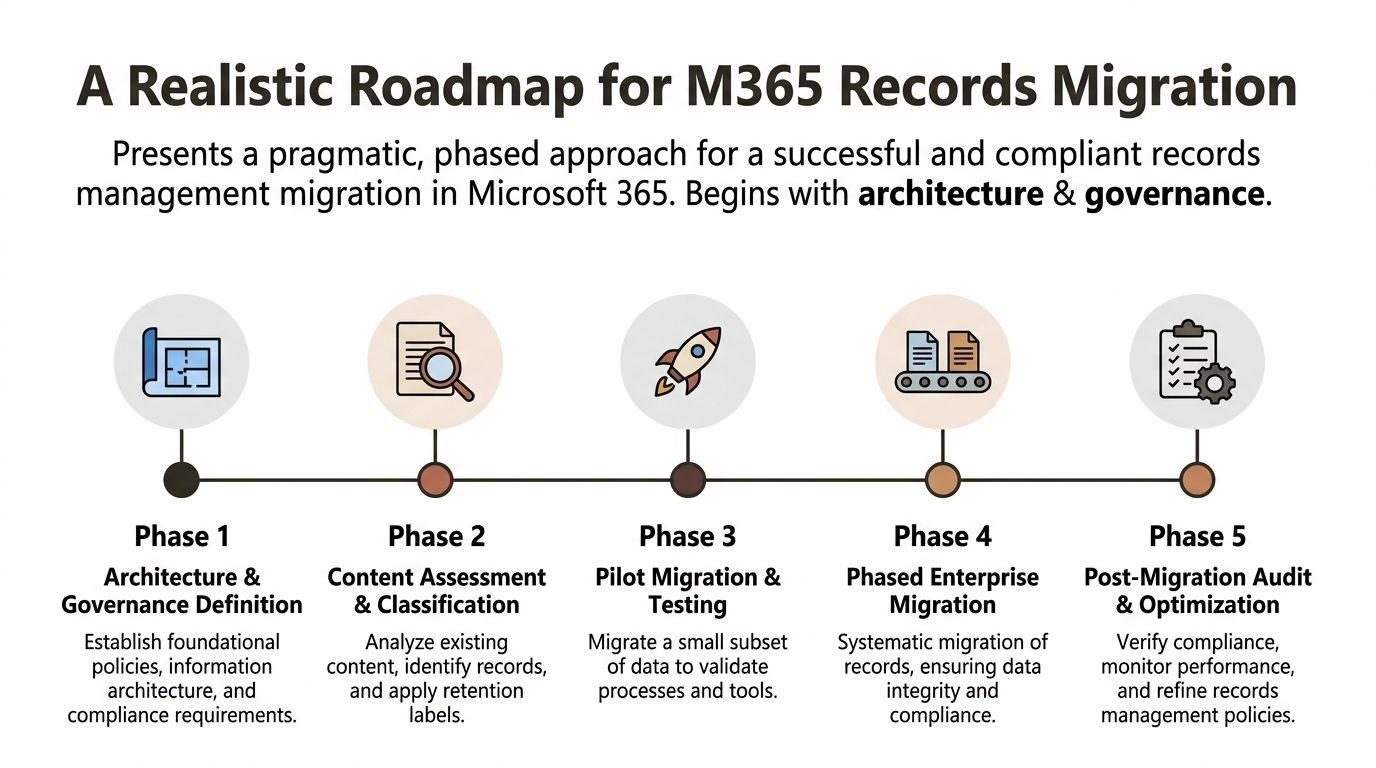
A Realistic Roadmap for M365 Records Migration
A records migration should start with design discipline, not a copy job. If your current plan jumps straight to transfer windows and destination sites, it's immature.
The safer approach is phased. Not because that sounds methodical, but because records management collapses when governance, structure, and technical controls are decided too late.
Here's the benchmark a serious programme should meet.
Start with governance before data
Architecture and governance definition
Define record classes, retention outcomes, metadata requirements, naming standards, and access boundaries before a single file moves. During this step, your team decides what a record is in operational terms, not just policy language.Content assessment and classification
Audit the source estate. Identify what is a record, what is duplicate, and what has no business moving at all. Most organisations discover that legacy shares contain a messy blend of active content, expired material, and compliance-sensitive records with poor context.Pilot migration and testing
Test a small subset that includes awkward cases. Bring over difficult metadata, permission edge cases, and high-risk libraries. Validate how views behave, how search behaves, and whether retention logic survives contact with reality.
Field note: The pilot should target the ugliest content you own, not the cleanest. Easy data proves nothing.
The video below gives a useful visual primer on migration planning. Watch it with a sceptical eye and measure it against your own governance gaps.
Scale carefully, then lock it down
Phased enterprise migration
Run the move in controlled waves. Use detailed logging, exception handling, and reconciliation steps. Don't let teams flood target libraries before indexing, permissions, and metadata behaviour are verified.Post-migration audit and optimisation
Validate that the target state is not just populated, but governable. Review access patterns, identify broken inheritance, confirm classification works in practice, and harden controls where users are bypassing the model.- No retention model up front: Your team plans to “apply labels later”.
- No source triage: Everything gets moved whether it deserves to or not.
- No pilot with difficult data: The test proves only that easy content is easy.
- No post-migration control phase: The project ends when files appear, not when governance is proven.
- You operate in a regulated sector: Finance, energy, and healthcare don't forgive vague audit trails or weak disposal controls.
- Your source data comes from multiple systems: Context and metadata drift get worse fast during consolidation.
- Your libraries are already large or structurally chaotic: Thresholds, indexing failures, and poor views will hurt you after cutover, not before.
- Your retention rules differ across departments or record types: Mixed lifecycles inside convenience folders will make disposal hard to defend.
- Your team can use migration tools but can't build custom enforcement around them: That gap matters more than people admit.
- Your plan still treats governance as a later workstream: That's the classic precursor to a rescue engagement.
A weak roadmap usually reveals itself quickly. Watch for these warning signs:
A proper records migration is less about speed than survivability. Your team doesn't need a faster copy job. It needs a target architecture that can withstand users, auditors, and scale at the same time.
The Verdict When to Abandon DIY and Call for Rescue
At some point, this stops being a build decision and becomes a risk decision.
Your team can handle a lot internally if the estate is clean, the regulatory pressure is light, and somebody understands SharePoint's technical and governance constraints. But most troubled programmes don't meet those conditions. They have messy source systems, mixed retention requirements, permission sprawl, and a project plan written as if records management were just a storage refresh.
Red flags that put your project in the danger zone
Use this as a hard test.
The real calculation
DIY looks cheaper until it creates legal exposure, operational confusion, and a second migration to fix the first one. That's what we've seen over and over. The expensive part isn't careful design. The expensive part is rebuilding trust after users, auditors, or regulators discover that the migrated records can't stand up to scrutiny.
If your team can't prove traceability, retention alignment, and controlled disposal, it hasn't finished the job, no matter what the project dashboard says.
The right moment to call for help is before the first major compromise gets baked into the target tenant. Rescue work is always harder than disciplined delivery.
If your Microsoft 365 records management project already feels heavier than your internal plan admits, talk to Ollo. We help IT leaders in regulated environments avoid failed migrations, recover troubled programmes, and build Microsoft 365 estates that stand up when audit, legal, and operational pressure hit at the same time.

















