



Power Apps vs. Custom Dev: The Architect's Guide to Choosing the Right Tool
Power Apps vs. Custom Development represents a critical strategic choice between a low-code platform designed for rapid application delivery and traditional coding for bespoke solutions. Power Apps excels at digitizing internal business processes with speed and cost-efficiency, while custom development offers unlimited flexibility and scalability for complex, mission-critical software.
In our experience as architects, the most costly mistake isn't choosing the "wrong" tool, but failing to understand the operational trade-offs of each. The decision between the speed of low-code and the power of custom code is not just technical; it's a strategic choice about where to invest your resources for the highest business impact. One path gets you a solution in a week; the other delivers a tailored competitive advantage that can define your business. Choosing correctly is paramount.
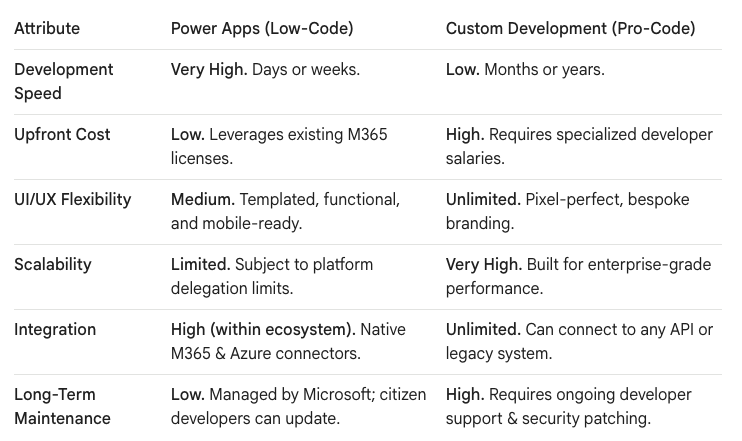
The Architect's View: A Pragmatic Comparison
The debate isn't about which tool is "better," but which is the right tool for the job. A CIO needs to see this choice through the lens of speed, cost, and long-term resilience. We've found the best way to frame this is by comparing their core strengths and inherent limitations.
When Power Apps is the Undisputed Winner (The 80% Use Case)
The reality we've found is that for a significant portion of internal business needs, Power Apps is not just a viable option—it's the superior one. It's built to solve the long tail of operational inefficiencies that are too small for a full-scale IT project but too painful to ignore.
Scenario 1: Digitizing the "Paper" Process
This is the quintessential use case for Power Apps. Think of any process currently managed via paper forms, spreadsheets, or email chains:
- Safety incident reports on a factory floor
- New equipment requests
- Project status updates
In these scenarios, the goal is structured data collection. Power Apps allows a "citizen developer" or a business analyst to build a mobile-friendly form in a matter of days, not months. The app automatically integrates with SharePoint or Dataverse, providing a single source of truth and instantly killing the "Spreadsheet of Doom." It’s a tactical, high-impact win that frees up professional developers for more complex challenges.
Scenario 2: The InfoPath Killer
As we've detailed in our migration articles, InfoPath is a dead technology. For the thousands of legacy InfoPath forms still lurking in on-premises SharePoint farms, Power Apps is the designated successor. The migration process provides a golden opportunity to not just replace, but to improve.
- The Trap: A 1:1 "lift and shift" of an old, clunky form.
- The Ollo Approach: We treat it as a business process re-engineering project. We use the transition to Power Apps to streamline the user experience, enforce better data validation, and connect it to Power Automate for robust, modern approval workflows. The outcome is not just a new form, but a better business process.
Scenario 3: Extending the Microsoft 365 Ecosystem
Power Apps shines brightest when it lives within its native habitat. If your goal is to create a simple interface that interacts with SharePoint data, triggers a Teams notification, and updates a Planner task, Power Apps is the path of least resistance. The rich library of pre-built connectors to the M365 suite means you are configuring, not coding, these integrations.
When Custom Development is Non-Negotiable
While Power Apps is a powerful tool, it has a clearly defined ceiling. Pushing it beyond its intended limits is a common trap that leads to brittle, unsupportable applications. For certain requirements, custom development is the only responsible architectural choice.
Scenario 1: Complex, Bespoke UI/UX
If your application is customer-facing or requires a pixel-perfect, highly branded user experience, Power Apps will frustrate you. It is designed for functional, internal-facing UIs. Custom development (using frameworks like React or Angular) gives you complete control over every element, interaction, and animation, which is essential for consumer-grade applications where user experience is a competitive differentiator.
Scenario 2: High-Volume, High-Scalability Needs
This is the most critical technical limitation of Power Apps: delegation. Power Apps can only process a limited number of records from a data source at a time (by default, 500, configurable up to 2,000). For operations that need to query, sort, or aggregate large datasets—think tens of thousands of records—the app will fail.
A custom-built application, on the other hand, can be architected for performance at scale. Developers can write efficient, server-side code and database queries that handle massive volumes of data without hitting an artificial platform limit. If your app is core to your business operations and needs to scale with user growth, custom dev is the only path.
Scenario 3: Complex Third-Party & Legacy Integrations
While Power Apps has many connectors, they are standardized. If you need to connect to a proprietary legacy system via a non-standard API, perform complex data transformations in-flight, or require intricate integration logic, you will quickly hit a wall. Custom development allows you to write the precise code needed to integrate with any system, no matter how old or obscure.
The Strategic Decision: Your Guiding Principles
As an IT leader, use this framework to guide your decision:
- Who is the audience? If it's internal employees, lean toward Power Apps. If it's paying customers, lean toward custom development.
- What is the data volume? If the app will handle thousands of records for its primary function, be extremely wary of Power Apps delegation limits. Prototype and test this first.
- Is the UI a feature? If a unique user experience is a core requirement, invest in custom development. If a clean, functional form is sufficient, Power Apps is your tool.
- What is the "blast radius"? For departmental solutions that digitize a single team's workflow, the low risk and high speed of Power Apps are ideal. For a line-of-business application that the entire company depends on, the robustness and scalability of custom development are a requirement.
Choosing between Power Apps and custom development is not a one-time decision but an ongoing architectural discipline. By understanding the pragmatic trade-offs of each, you can build a resilient, efficient, and cost-effective application portfolio that truly serves the needs of your business.

















