



You're probably already dealing with the same mess I see in rescue engagements. The warehouse says one thing, the ERP says another, and someone in finance still trusts a spreadsheet because the system “mostly works.” That's how an inventory control system turns from an operational tool into a liability, and once the auditor asks which version is true, “mostly” stops being good enough.
The documentation says inventory control is bookkeeping, but reality is harsher. A defensible system has to survive bad receipts, returns, waste, markdowns, transfer errors, and the inevitable human overrides that pile up over time. If your data can't prove who changed what, when, and why, then your system isn't authoritative, it's decorative. That's the same kind of false confidence that kills Microsoft 365 projects, and it's why a good inventory platform has to be treated like an event log problem, not a list problem.
If you want a useful contrast, look at live transport visibility for freight forwarders. The logic is the same. Once a movement is missed, delayed, or edited without traceability, every downstream decision starts from bad facts, which is why resources like live transport tracking for freight forwarders matter to anyone responsible for chain-of-custody and operational truth. The same discipline applies to SharePoint-based inventory systems, and the internal failure patterns are familiar enough that you can see them in our own note on SharePoint search not working.
When the Inventory System Quietly Stops Telling the Truth
A regulated Irish business rolls out what it calls an inventory control system on SharePoint. Six months later, the auditor arrives, asks for warehouse counts, and the numbers don't line up with what the system says. Nobody notices a single dramatic failure point, because there wasn't one, just a long chain of quiet mismatches that nobody reconciled properly.
We often see clients fail when they treat this as a reporting issue instead of an engineering issue. The warehouse team scanned items, the office team edited records, and the system kept accepting changes without a hard event trail that tied each movement back to a user and an action. That's how reconciliation drifts until the audit trail becomes a guessing game.
Risk isn't that the system exists. It's that the system tells a convincing lie. Once stock movements stop being time-stamped, immutable, and traceable, your reconciliation breaks down and your legal position weakens with it. That is exactly why inventory control has to be designed as a controlled record of events, not a static balance report.
The same mindset shows up in other operational systems too, especially where traceability matters. If you're already wrestling with the realities of SharePoint-based discovery and visibility, you'll recognise the pattern in SharePoint search not working: the tool isn't the issue, the missing discipline around structure and truth is. Inventory control fails the same way.
The article below covers the architecture that keeps a system defensible, and the migration landmines that turn a working setup into a compliance liability.
What an Inventory Control System Means in an Enterprise
An enterprise inventory control system serves two different purposes, and your IT team has to design for both. Asset inventory tracks the items the business owns and uses, like laptops, scanners, meters, and mobile devices. Stock inventory tracks consumables, parts, and regulated materials as they move through storage, issue, return, transfer, and write-off.
That split matters because one SharePoint list cannot handle both jobs well without deliberate schema design. Asset records need lifecycle fields, assignment data, and device ownership. Stock records need quantity, location, batch context, movement history, and exception handling. Flat lists look tidy, but they fail under audit scrutiny and leave the business with a model that satisfies nobody.
Why chain of custody matters in Ireland and the EU
In bonded and regulated environments, inventory control is not optional admin. U.S. customs-bonded inventory under 19 CFR Part 146 must maintain a formal inventory control and recordkeeping system, and Irish operations often mirror that control logic to prove chain of custody and survive audit sampling. If the system cannot show movement history cleanly, the stock position becomes harder to defend.
The documentation frames the problem as bookkeeping, but the technical requirements are stricter. Each stock movement needs to be time-stamped, tied to a user or action, and kept in a form that resists casual editing. When those properties are missing, reconciliation error compounds and the audit conversation gets ugly fast.
The practical model your team should use
Inventory control works best as an event log with referential integrity. That model is why flat lists break down when auditors ask who changed what, when they changed it, and what record that change affected. It also explains why teams that treat SharePoint as a simple ledger end up with manual spreadsheet joins, broken traceability, and arguments over whose number counts.
If your organisation also handles product master data poorly, the same discipline applies there. A clean control system depends on clean definitions, which is why a proper approach to Master Data Management products sits underneath every trustworthy inventory model.
Core Components and the Architecture That Survives Peak Load
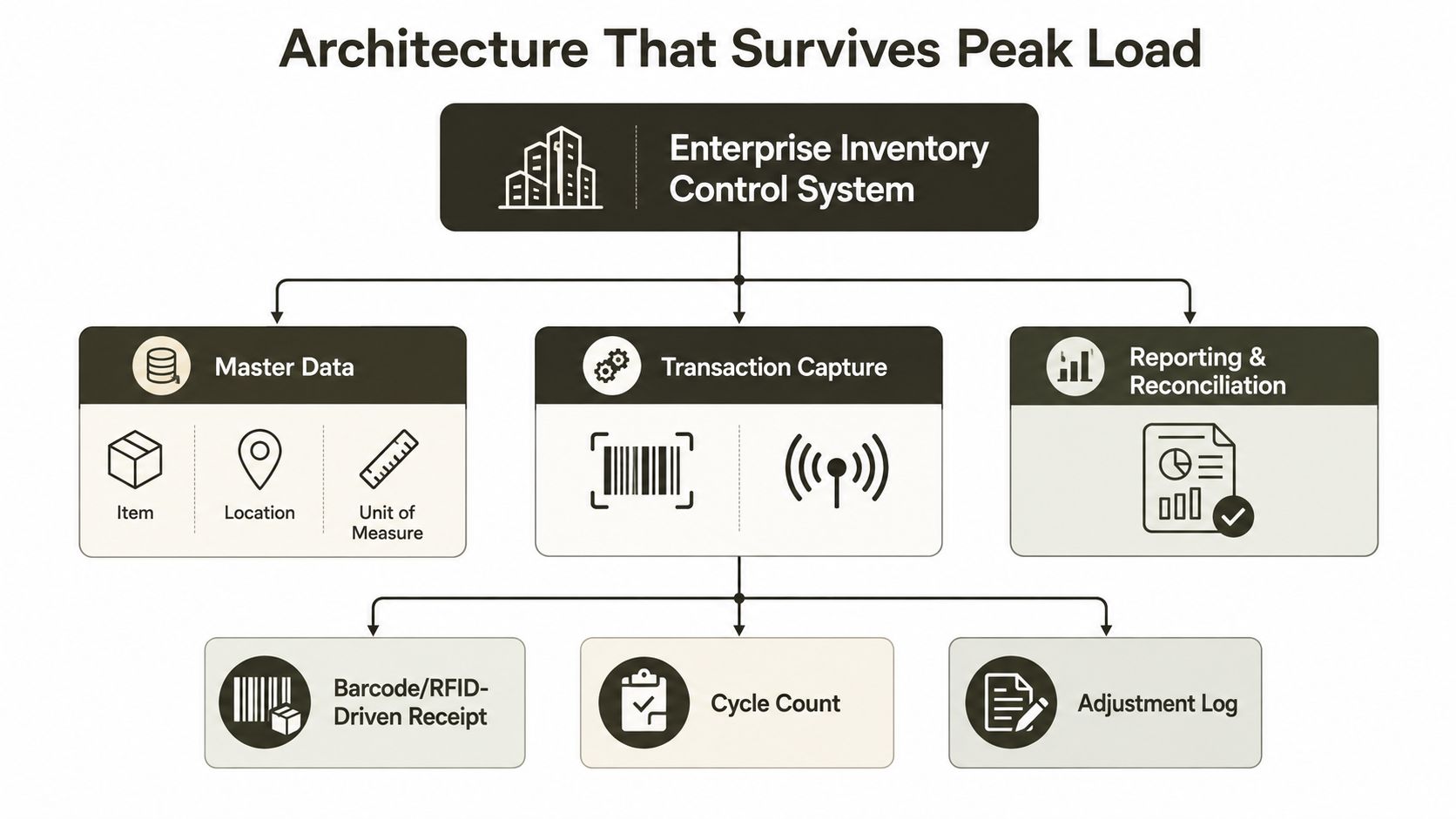
A serious inventory platform starts with master data, transaction capture, an event log, a reconciliation engine, and a reporting layer. Master data defines items, locations, and units of measure. Transaction capture records receipts, issues, transfers, adjustments, and counts as discrete events instead of overwriting yesterday's state.
The event log preserves the sequence of actions, the actor, the timestamp, and the reference to the affected item or location. That structure is what keeps the record defensible when auditors ask who changed what and when. Reconciliation then compares physical stock, ERP state, and transaction history so the business can spot drift before it turns into a compliance problem.
A government inventory-management specification gives a useful hardware benchmark for what this kind of system needs under pressure. It calls for dual Intel Xeon Gold 5120-class processors, 256 GB DDR4 RAM, 5.1 TB SSD storage, and 2 to 4 x 10GbE networking for a central inventory management system government inventory-management specification. That profile is a clue about the kind of system this demands.
Why the hardware matters more than the UI
Inventory systems fail under write contention long before they fail on screens. Barcode-driven receipt bursts, issue bursts, and transfer bursts create hot rows. If your platform lacks IOPS, memory headroom, and network capacity, latency spikes trigger duplicate posting, stale availability counts, and false replenishment signals.
Average daily throughput is the wrong sizing model. Peak storms are what break the system, and they hit hard when the warehouse floods it with writes while the office still expects clean numbers. Size for concurrency, or the platform will fall behind exactly when the business needs it most.
What strong architecture looks like in practice
The model should include:
- Master data discipline, so item, location, and unit definitions stay clean.
- Transaction capture at the point of work, so users record movement as it happens.
- Immutable event storage, so the history survives correction and review.
- A reconciliation engine, so physical and digital truth can be compared.
- A reporting layer, so operations and audit teams can see drift early.
For platform choice, the difference between Dataverse and SharePoint Lists matters because the wrong foundation makes peak-load failures more likely. Build for concurrent writes, not just storage volume, or the system will lie when you need it most.
Regulatory Stakes in Energy, Finance, and Healthcare
In energy, inventory often covers spare parts and controlled items tied to safety-critical operations. If a reconciliation step fails, you don't just create a messy report, you create a legal and operational exposure. The technical implication is simple, the control trail has to survive audit sampling, and the business needs evidence that the right part sat in the right place at the right time.
In finance, inventory usually means capital assets, consumables, and audited stock that must reconcile to the general ledger. Spreadsheet roll-ups won't survive serious sampling because they can't prove transaction-level immutability. That's why finance teams need event-level records and clean hand-offs between inventory, accounting, and approval workflows.
In healthcare, the consequences show up faster and more visibly. A peer-reviewed study of a large-volume long-term care pharmacy found that adding Six Sigma to inventory control reduced mean out-of-stock rates from 4.95% in a manual system to as low as 1.87% Six Sigma inventory control study. That's not a vanity metric, it's a reminder that inventory discipline affects service continuity and, in many settings, patient outcomes.
The sector-specific point is blunt. One system design can't satisfy all three risk profiles unless it captures movements cleanly and retains the proof. For Irish organisations in regulated sectors, that's where regulated industry SharePoint migration becomes a control problem, not a content move.
Practical rule: if the business can't prove the stock trail, it can't prove the stock position.
That's the line between a working operations system and something an auditor will challenge.
Integrating Inventory Control With Microsoft 365 and SharePoint
A mid-sized inventory control system can sit on Microsoft 365, but only if you choose the right control layer. SharePoint works for document-heavy reference material, approvals, and supporting records. For actual transaction handling, Dataverse is the better backbone, with Power Apps capturing barcode-driven receiving and issuing, Power Automate routing exceptions, and Entra ID tying every stock movement to a named person. That combination gives you an audit trail that stands up under scrutiny instead of a site full of loosely related lists.
The architecture choice matters more than the screen design. SharePoint is fine for controlled content and human workflow. It is a poor choice for high-churn transactional inventory if you expect clean relational behaviour, stable identity, and reliable traceability across systems. Dataverse handles those requirements better because it was built for structured records, not just collaboration content.
The failure point is usually governance, not software. A careless SharePoint rollout creates inconsistent permissions, uncontrolled ownership, and records that no one can prove are current. SharePoint data governance is what keeps retention, access, and accountability aligned so the inventory trail still means something when audit time arrives.
Power Apps belongs at the edge of the process, not at the centre of the data model. Use it for warehouse capture, mobile scans, issue requests, and exception handling. Keep the app thin and let Dataverse or a controlled SharePoint-backed process enforce the rules underneath. Power Automate should handle approvals, reminders, escalations, and reconciliation steps, not try to replace the system of record.
Entra ID matters because inventory control without identity is just decoration. Every action needs to resolve to a user, a role, and a permission path that survives staff changes and site reorganisation. If you cannot answer who received, edited, approved, or reversed a movement, you do not have control, you have a form.
The cleanest design is simple. Put master data, transaction history, and approval logic in the right place, then expose only the minimum users need to do their job. SharePoint can still play a useful role as the document layer for SOPs, certificates, and supporting evidence, but it should not pretend to be the transactional engine for the whole process.
A video walkthrough helps teams see how these controls fit together in Microsoft 365 environments.
Migration and Operational Failure Modes We Keep Seeing
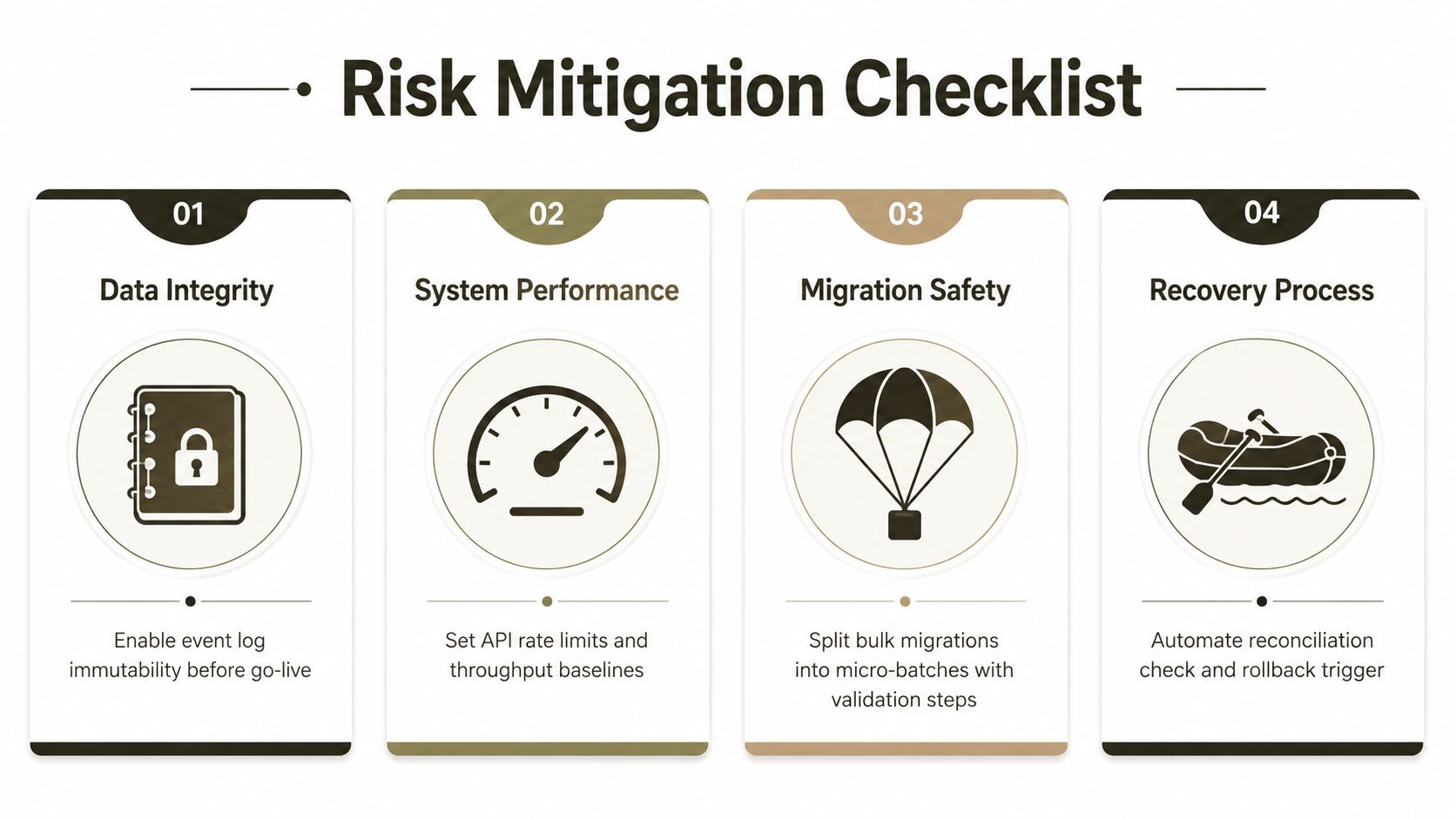
Bulk migration fails first through API throttling. Writes get delayed, dropped, or partially applied, and the reconciliation layer starts working from incomplete truth. That is how inventory corruption begins while every dashboard still looks calm.
SPMT is acceptable for small, tidy moves. It starts failing when content volume rises, metadata turns messy, or the inventory model depends on exact transactional fidelity. ShareGate handles standard moves better, but it still struggles with custom content types and managed metadata once teams force mappings beyond what they can safely represent.
The next failure is drift between systems. Physical stock, ERP data, and transaction history separate after returns, waste, markdowns, or transfer mistakes, and teams miss the mismatch because they never built a weekly variance baseline. That blind spot is where control disappears without a loud incident.
The bigger migration problem is control loss during cutover. If approvals, exception handling, and audit trails do not survive the move intact, the new tenant may hold the files while the old process model falls apart. That is not a data issue, it is an operating model failure.
A web-based inventory system study reported goods-search efficiency improved by 85.51%, goods registration by 90.31%, and annual goods report generation by 83.11% after implementation web-based inventory system study. Those gains show where weak systems usually break first, in finding stock, recording activity, and producing reports fast enough to stay trustworthy.
Practical rule: if your migration plan does not model write contention and exception handling, it is not a plan, it is hope.
Ollo verdict: use SPMT for under 50 GB. Use ShareGate for standard migrations. Use custom PowerShell PnP scripting for everything else, because that is where the control failures surface.
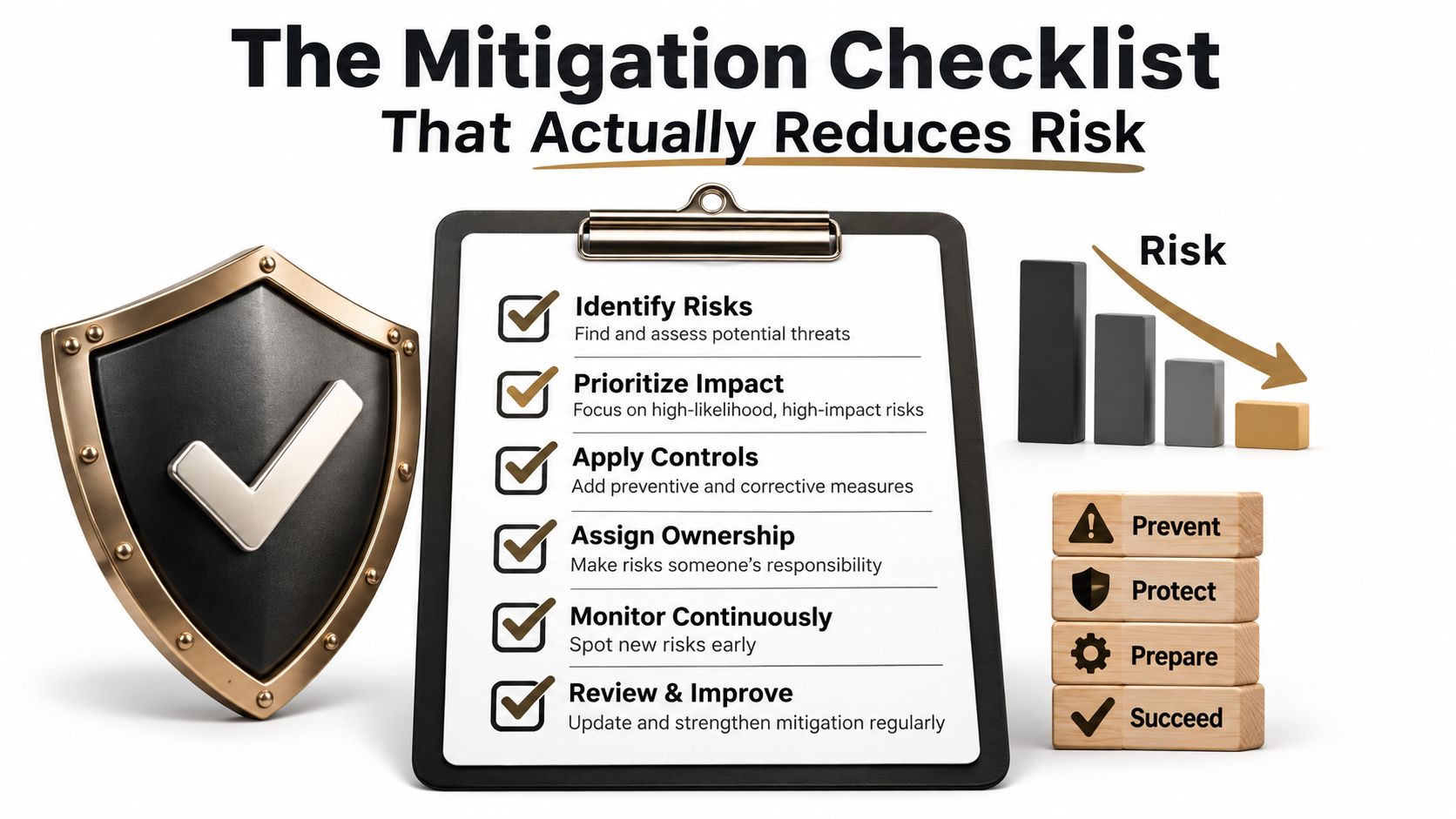
The Mitigation Checklist That Reduces Risk
A rescue project lives or dies on execution. If your inventory control system sits inside Microsoft 365, the checklist below is the one your project manager can enforce before the next audit, before the next count, and before another reconciliation failure becomes a legal problem.
Data integrity
- Make the event log immutable before go-live, so users cannot rewrite history when a count goes wrong.
- Record a user and action pair for every receipt, issue, adjustment, and transfer, because anonymous changes fail audits.
- Set a weekly variance baseline between physical stock, ERP data, and transaction data, so drift gets flagged early instead of at quarter end.
Microsoft 365 engineering
- Design around the 5,000-item threshold with indexed columns and sensible folder restructuring, because query failure will hit you sooner than you expect.
- Validate path length before migration, and flatten deep structures before they enter SharePoint.
- Test GUID uniqueness during tenant merges, because identity collisions create false confidence and bad reconciliation.
Infrastructure
- Provision for peak IOPS and 10GbE headroom, not average throughput, because barcode storms expose weak storage and network design.
- Cache for concurrent writes, not just read performance, because inventory systems spend their life taking bursts of change.
Governance
- Run access reviews on a schedule, so too many hands do not end up in the same stock records.
- Retain the audit trail for the required period, and make sure your retention model matches sector expectations.
- Map every control to the sector you operate in, because energy, finance, and healthcare do not share the same tolerance for failure.
Risk reduction is the difference between a system that survives audit and one that makes your name appear in the findings.
If you are still treating these checks as optional, the cost is not a delayed rollout. It is broken legal compliance and an audit finding, and that is exactly the kind of failure a specialist partner is brought in to stop. If you need one, Software for Government contracting is a useful reference point for specialist support in regulated environments.
Building, Buying, or Outsourcing Your Inventory Control System
IT directors usually face three choices. They can build on SharePoint with internal Power Platform resources, buy a packaged inventory product, or outsource the architecture and migration to a specialist. Each choice hides a different failure mode.
Building looks cheap until Microsoft 365 engineering traps appear, then your team owns the reconciliation gaps, the threshold problems, and the governance burden. Buying looks safer until the product won't fit your audit workflow, your custom content types, or your regulated retention model. Outsourcing only works if the partner hands over the event-log schema and doesn't leave you with a black box.
A useful reference point for the buy side is Software for Government contracting, because specialised products can help in narrow operational contexts. That said, they still don't remove the hard part, which is making the control trail defensible inside your own tenant, under your own compliance rules.
The strongest path is usually a SharePoint-native system with custom PnP scripting, ShareGate where it fits, and hard governance around the event log. That gives you control without pretending standard tools can solve non-standard risk.
We often see clients fail when they pick the cheapest path and then pay for it in audit pain, emergency rework, and lost trust. If your inventory system has to survive regulated operations, pick the option that protects the record, not the one that looks easiest in the demo.
If your inventory control system needs to survive audit, peak transaction storms, and Microsoft 365 migration risk, talk to Ollo before the next exception turns into a compliance problem. We build and rescue SharePoint and Microsoft 365 architectures for regulated teams that can't afford bad data, broken inheritance, or a weak audit trail. Visit Ollo and ask for a proper rescue plan, not another optimistic rollout.

















