



Most advice on Dataverse vs SharePoint Lists is wrong in the one place that matters. It treats the choice as a convenience decision. It isn't. It's an architectural risk decision that determines whether your app survives real use or collapses the first time the business depends on it.
IT teams get trapped by the same pattern. Someone prototypes fast on SharePoint Lists because it's already included, already familiar, and looks “good enough” in a pilot. Then usage grows, the data model stretches, reporting gets messier, security gets more granular, and the app starts behaving like a patched-together workaround because that's exactly what it is. The documentation says SharePoint Lists can support simple app scenarios. Reality is harsher. Enterprise apps rarely stay simple.
If your team is building a departmental tracker with a short lifespan, light usage, and no serious governance burden, SharePoint Lists can still do the job. If you're building something that users will rely on, audit, extend, automate, or hand to another team in a year, you need to think less like a maker and more like a recovery specialist cleaning up after failed assumptions.
The Choice That Can End Your Project Before It Starts
The most popular advice says this: use SharePoint for simple needs and Dataverse for complex ones.
That sounds sensible. It also causes expensive failures.
The problem is that “simple” usually describes the first workshop, not the finished system. A leave request app becomes a workflow app. A tracking list becomes an operational queue. A departmental tool becomes a reporting source for compliance. Then your team discovers that the original storage choice wasn't a minor implementation detail. It was the foundation.
Why the usual advice fails
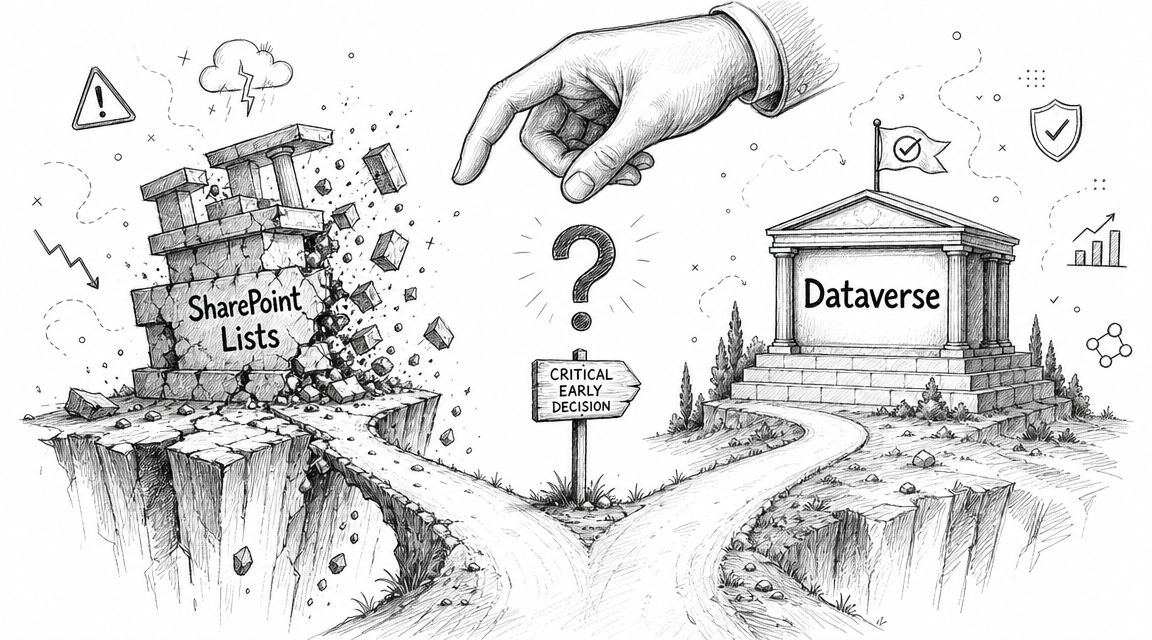
SharePoint Lists encourage false confidence. They're familiar. They look structured. They work well in pilots. That combination is dangerous because pilots hide the very things that break production systems. Low data volumes hide filtering problems. Small user groups hide concurrency pressure. Relaxed governance hides security weaknesses. Early success creates political momentum around the wrong architecture.
We often see clients fail when they choose the platform based on licensing convenience instead of operational risk. The decision looks cheap at the start and expensive at the rescue stage.
Practical rule: If your app matters enough that failure would trigger audit scrutiny, management escalation, or manual workarounds, treat the data layer as a strategic choice from day one.
What this choice really means
This isn't a feature checklist. It's a question of what kind of failure you're willing to tolerate.
| Decision area | SharePoint Lists | Dataverse |
|---|---|---|
| Best fit | Lightweight team tracking | Structured business applications |
| Data model | Flat list with workarounds | Relational foundation |
| Governance posture | Basic collaboration control | Enterprise control |
| Failure pattern | Gradual instability under growth | Built for app workloads |
| Recommendation | Use only when the app can stay small and disposable | Use when the app must survive success |
Your team doesn't need another brochure comparison. You need a blunt answer. If the app could grow, if the reporting could become regulated, or if users will ask for more than a simple tracker, start with Dataverse. Retrofitting architecture after the business adopts the app is where budgets go to die.
The Architectural DNA Relational Database vs Glorified Spreadsheet
The technical gap between Dataverse and SharePoint Lists isn't cosmetic. It's structural.
Independent technical comparison material describes Dataverse as a relational database with advanced security, relationships, and enterprise governance, while SharePoint Lists are a flat table optimised for lightweight team workflows and basic tracking, with predictable issues when teams stretch them into larger app workloads (technical comparison of Dataverse and SharePoint Lists). That single distinction explains most of the failure modes architects later blame on Power Apps, Power Automate, or “Microsoft limits”.
Dataverse stores business data like an application platform
Dataverse behaves like a system designed for applications. It expects structured entities, relationships, controlled access, and business logic that must hold up when the app stops being a prototype and starts becoming part of operations.
That matters because applications don't just store rows. They enforce meaning. A customer record relates to a case. A case relates to approvals. Approvals relate to users with specific responsibilities. Once your app depends on those relationships, you need a platform that treats data integrity as a first-class concern, not as a workaround assembled from lookup columns.
SharePoint Lists store business data like a collaboration tool
SharePoint Lists can look more capable than they are. Teams add columns, create lookups, build forms, and convince themselves they've created a proper data model. They haven't. They've created a list-centred approximation of one.
That's why so many SharePoint-backed apps feel fine until they don't. The underlying design intent was never enterprise application data management. It was lightweight tracking inside a collaboration platform. That's useful. It's just not the same thing.
If your stakeholders still see Lists as “basically a database”, point them to these signs your business has outgrown spreadsheets. The same thinking drives both mistakes. A familiar tool gets stretched past its design boundary because the first version worked.
The documentation may show you how to connect things. It does not turn a collaboration list into a robust relational platform.
Why the architecture decides the outcome
Once your team starts compensating for weak data structure in the app layer, technical debt accelerates. You get Power Fx formulas written to dodge delegation. Flows written to patch missing logic. Permissions managed through awkward inheritance patterns. Reporting that depends on brittle assumptions instead of reliable relationships.
That isn't innovation. It's rework deferred into the future.
Technical Breakdown Where SharePoint Lists Fail Under Pressure
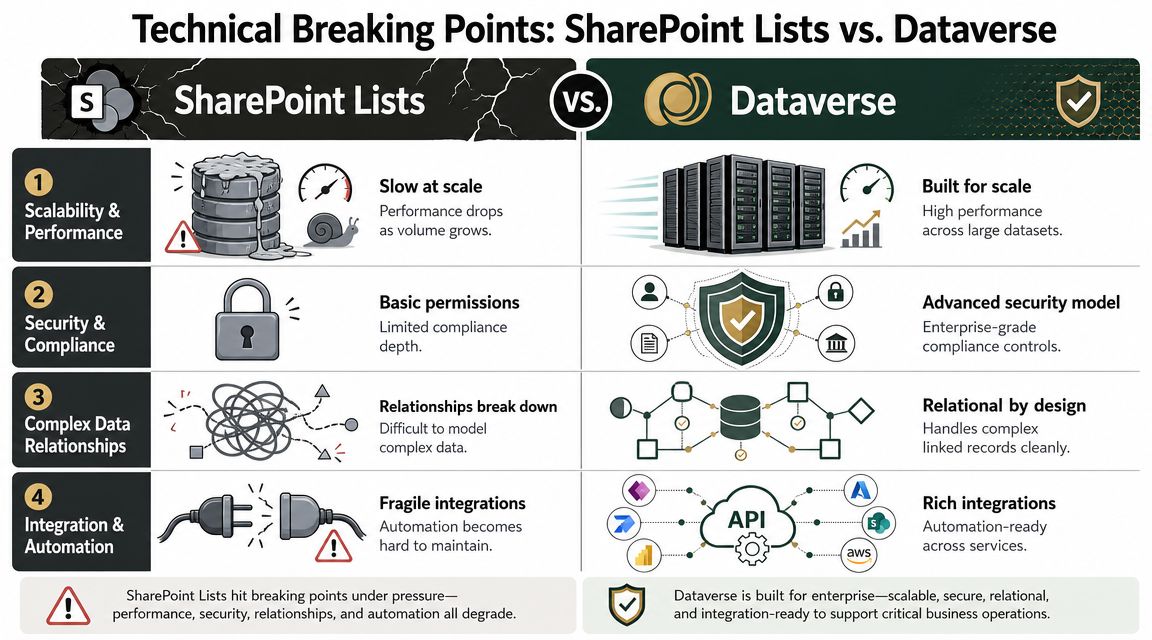
Microsoft's own guidance gives you the warning signs. For enterprise app design, Microsoft documents Dataverse as supporting up to 30 million rows in capacity planning, while it flags SharePoint Lists for special consideration beyond 100,000 items and confirms the 5,000-item list view threshold can affect performance and filtering behaviour (Microsoft Learn comparison of Power Platform data sources). If your architects ignore that, they're not being agile. They're gambling.
Scalability breaks first
SharePoint Lists can support small departmental tracking. That's the honest use case. The trouble starts when teams assume today's list is tomorrow's application database.
The list may keep accepting records. That does not mean the app stays healthy. As volumes grow, views, filters, and dependent automations become more fragile. In regulated environments, that fragility turns into operational risk because users stop trusting what they can't consistently retrieve, filter, or audit.
Dataverse exists for this exact problem. It was built for larger, more structured business applications. That's not a marketing slogan. It's the architectural boundary.
Ollo Verdict: If the app has any plausible growth path, SharePoint Lists are a short-term convenience and a long-term liability. Use Dataverse.
Performance fails before most teams notice
The dangerous part isn't that SharePoint-backed apps fail immediately. It's that they degrade unevenly. One view loads. Another times out. One user sees expected records. Another gets partial results because the formula isn't delegable. A flow works in test and stalls in production after larger batches.
That kind of failure burns time because the app appears alive while core behaviour becomes unreliable.
A lot of those issues get worse when teams use SharePoint permissions as if they were an application security model. Once broken inheritance spreads, operational complexity spikes. If you've seen that pattern before, this analysis of the 50,000 unique permissions wall in SharePoint will feel uncomfortably familiar.
Security and governance expose the wrong platform choice
In enterprise projects, data architecture and governance are inseparable. The app doesn't just need to store records. It needs to separate roles, protect sensitive data, survive audit scrutiny, and behave predictably when more teams get involved.
Dataverse aligns with that reality. SharePoint Lists don't. Teams can pile on controls, but they're still operating on the wrong substrate. That's why “it works” is such a poor test. Plenty of unstable systems work right up to the point where the business starts depending on them.
The failure mode is predictable. Teams keep extending SharePoint Lists past their intended scale, then act surprised when performance and governance collapse together.
A blunt side-by-side view
| Pressure point | SharePoint Lists | Dataverse | Ollo Verdict |
|---|---|---|---|
| Record growth | Risk increases as data expands | Designed for larger structured workloads | Dataverse |
| Filtering and views | Threshold behaviour becomes a trap | Better fit for app-style querying | Dataverse |
| Multi-table logic | Workarounds pile up quickly | Native relational design | Dataverse |
| Governance | Collaboration-first controls | Enterprise-first controls | Dataverse |
If your project sponsor says “we'll start on SharePoint and move later if needed”, assume they've just scheduled two projects and funded one.
War Stories from Failed SharePoint-Backed Apps
The rescue pattern is repetitive because the original mistake is repetitive.
A team builds a Power App on SharePoint Lists. UAT goes well. The business likes the speed. Leadership sees a quick win. Then production use starts exposing the things the pilot never tested. The app didn't fail because the team was careless. It failed because they chose a collaboration data store for an application workload.
The app that worked until users trusted it
One common example starts with a queue-style app. A service desk, field request tracker, case intake form, or logistics register. Early adoption looks healthy because there isn't much data yet and users search within narrow ranges.
Then the list grows, more filters get added, and users expect the app to behave like a proper system of record. It doesn't. Searches become inconsistent. Views return odd subsets. Staff start exporting to Excel because the app no longer feels authoritative. At that point, the technical problem becomes a governance problem. Once people bypass the app, you've lost control of the process.
The throttling problem nobody spots in design workshops
Throughput is where many DIY builds get ambushed. One industry comparison reports that SharePoint can handle 600 connector calls per minute, while Dataverse allows 6,000 calls in 5 minutes, a 10x higher short-window allowance through its connector model (connector throughput comparison for Dataverse and SharePoint). That matters because API throttling is one of the first breaking points when teams stack Power Apps and Power Automate on top of SharePoint Lists.
The documentation says the platform supports simple scenarios. In reality, bursty production workloads don't behave like tidy demos.
A fragile app rarely dies cleanly. It drops requests, delays flows, and creates manual reconciliation work that your team discovers too late.
The ugly part is reputational. The business doesn't see connector allowances and API throttling. It sees missed approvals, incomplete updates, and IT explanations that sound defensive. That's how confidence collapses.
The false economy of “we'll fix it later”
By the time help is called for, too much has already been built around the wrong backend. The forms assume SharePoint behaviour. The formulas compensate for SharePoint quirks. The flows patch around missing structure. Every workaround deepens dependency on the flawed design.
If you want a broader view of how these projects unravel under pressure, this write-up on SharePoint migration failures that cost enterprises dearly shows the same underlying pattern. Small technical shortcuts become enterprise-grade recovery programmes.
The Migration Tool Trap Why ShareGate Will Not Save You
When a SharePoint-backed app starts failing, the internal reaction is predictable. Someone says, “Fine, let's migrate it to Dataverse.”
That sentence hides a costly misunderstanding. Moving data is not the same as repairing architecture.
Tools move artefacts, not design mistakes
ShareGate is a strong tool in the right job. It's useful for SharePoint content migration, tenant moves, and operational transfer work. Skilled teams use it for exactly that. The problem starts when people expect a migration tool to solve an application design problem.
It can move list data. It cannot redesign the data model. It cannot untangle pseudo-relational lookup patterns masquerading as business logic. It cannot rewrite Power Fx formulas built around delegation compromises. It cannot decide which automations should die, which should be rebuilt, and which should move into a more robust pattern.
That's why “tool-led rescue” often creates a more expensive version of the same mess.
What a real rescue actually involves
A proper move from SharePoint Lists to Dataverse is usually a re-platforming exercise. You assess tables, flows, permissions, and dependencies. You design a clean relational model. You transform the data. You rebuild the app logic around the new platform. You test the security model. Then you cut over with controls in place.
That is not what off-the-shelf migration software does.
If your team is currently evaluating products as if a licence will replace architecture, read this guide on third-party SharePoint migration tools. The strongest tools still have boundaries. Serious architects respect those boundaries. Inexperienced teams ignore them and call the fallout “unexpected complexity”.
Good tools reduce effort inside a sound plan. They do not replace the plan.
The Ollo Verdict
Use migration tools for content migration and controlled transfer tasks. Don't use them as a fantasy substitute for data re-engineering. If your SharePoint-backed app has grown tangled, the safe path is a redesign with scripted migration and deliberate rebuild. Anything less preserves the failure.
Your Enterprise Decision Matrix Ask These Questions Before You Write a Line of Code
The typical question posed is the wrong one. It asks which platform is faster to start. You should ask which platform is safer to live with.
A frequently missed issue is whether SharePoint Lists can still hold up once the app crosses the 5,000-item list view threshold and starts relying on non-delegable filters. Microsoft Learn confirms the threshold, and independent Power Platform guidance notes that search and complex filtering in SharePoint Lists are often non-delegable, which is why an app can look fine in pilot and fail under real data volumes (guidance on SharePoint list thresholds and non-delegable filtering).
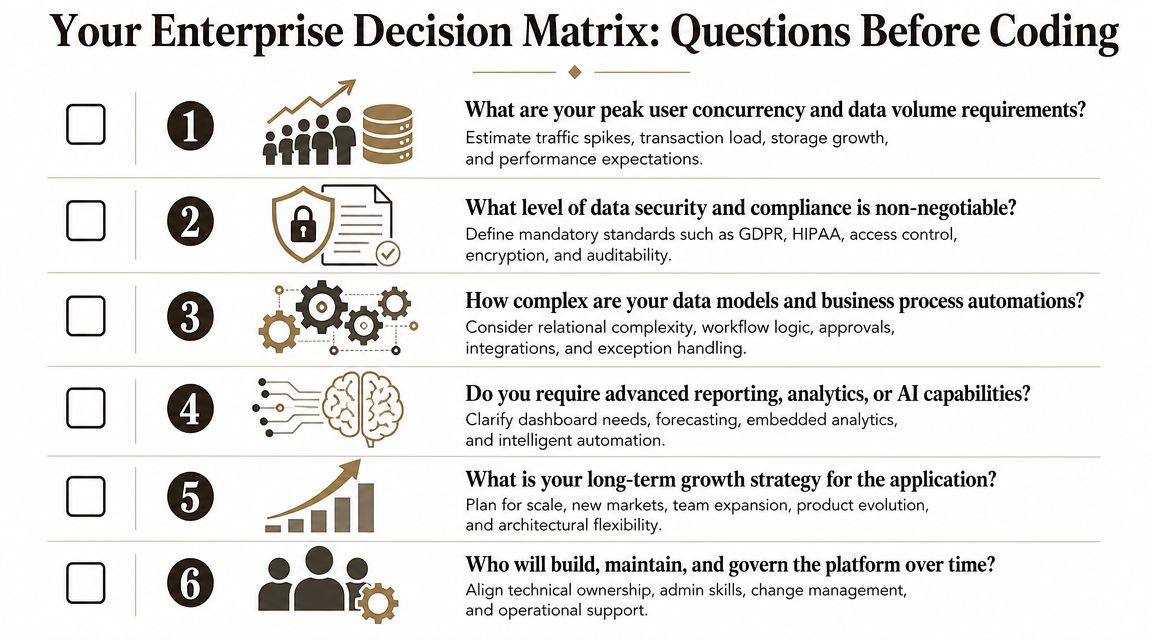
Five questions that expose bad assumptions
Ask your team these before they build anything:
Will users need broad search or complex filtering?
If yes, don't treat SharePoint as a safe default. This is one of the earliest places where pilot success lies to you.Will the app grow in data volume over time?
If the honest answer is “probably”, design for growth now. Rescue projects cost more than starting properly.Will more than one team depend on the same records?
Cross-team usage changes everything. Ownership, permissions, reporting, and process consistency all get harder fast.Will the app need real relationships between business entities?
If the data model includes linked records with operational meaning, you want a relational foundation, not list-based mimicry.Would failure create compliance, operational, or reputational damage?
If the answer is yes, you've already ruled out a casual backend choice.
How to interpret the answers
Don't score this like a friendly workshop exercise. Treat it as risk screening.
- All answers clearly no: SharePoint Lists may be acceptable for lightweight tracking.
- One answer yes: You need to pause and challenge the design.
- Two or more yes: This is a Dataverse project whether your licensing model likes it or not.
- Any answer uncertain: Assume growth. Uncertainty is not safety. It's deferred complexity.
The Ollo Verdict
If the app must scale, search well, support relationships, or stand up to governance, choose Dataverse. SharePoint Lists remain useful for simple team tracking. The mistake is pretending that “simple for now” is a serious architecture principle.
The Ollo Rescue Playbook A Structured Path from Chaos to Control
If you've already built on SharePoint Lists and you're recognising your own app in this article, don't ask your internal developer for a quick fix. You don't have a bug. You have a platform mismatch.
The safe response is structured intervention.
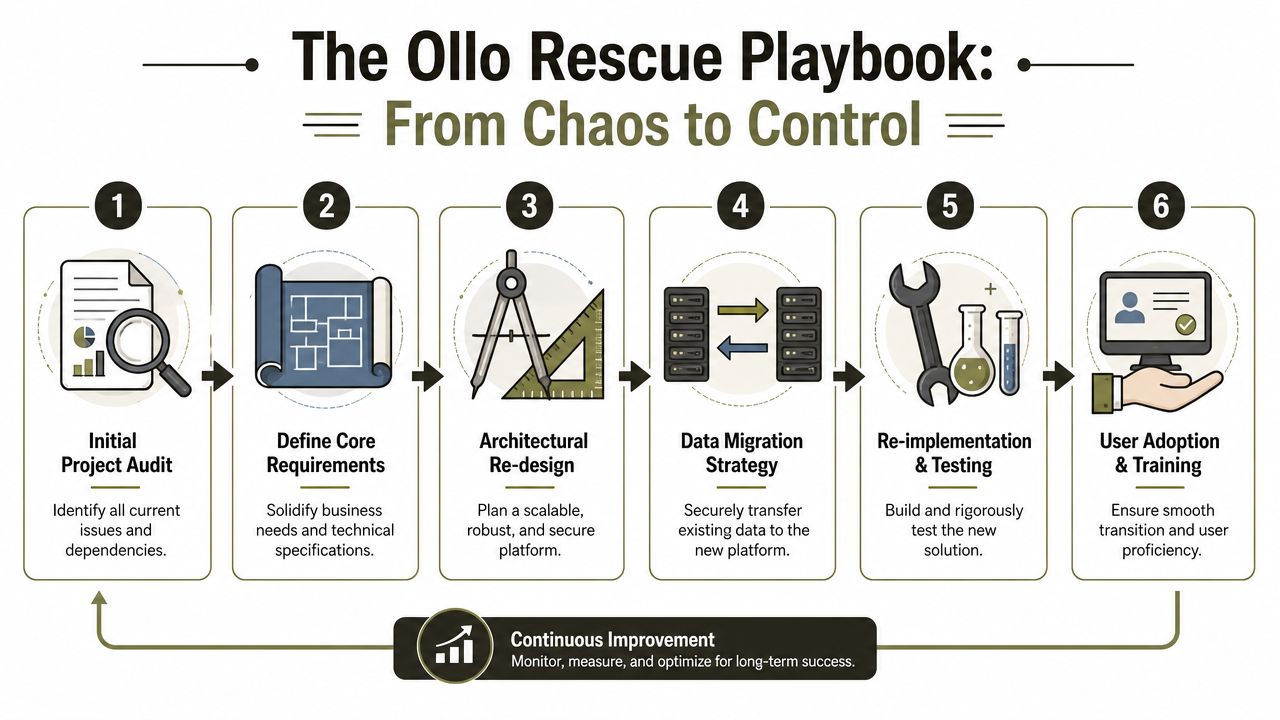
Phase one starts with ruthless discovery
Rescue work begins by identifying what currently exists, not what the original project team thinks exists. That means lists, lookup patterns, Power Apps screens, formulas, flows, dependencies, permissions, and reporting outputs. You need to know which logic belongs to the business and which logic merely compensates for SharePoint's limits.
Weak projects often reveal their flaws. Teams discover duplicate logic, hidden data dependencies, brittle automations, and user behaviours that never appeared in the documentation.
Phase two rebuilds the model, not just the records
The next step is architectural redesign. You define proper entities, relationships, ownership boundaries, and security logic in Dataverse. You stop modelling around list constraints and start modelling around the business process itself.
A lot of rescue projects fail because teams try to preserve every quirk of the old design. That instinct is understandable and wrong. If the old architecture created instability, preserving it just carries technical debt into a more expensive platform.
To understand how specialist migration work gets handled at enterprise level, review these Microsoft 365 migration services.
Before the rebuild, it helps to see the mindset in action:
Phase three uses controlled migration and rebuild
Then comes scripted migration, not drag-and-drop optimism. Data usually needs transformation before it can fit a sane relational model. IDs need mapping. Relationships need reconstruction. History needs careful handling. Flows need redesign. App screens need to stop compensating for SharePoint behaviour and start using Dataverse properly.
A competent rescue also includes:
- Controlled validation: Check data completeness, ownership logic, and critical business paths before cutover.
- Permission redesign: Remove ad hoc inheritance patterns and replace them with deliberate access rules.
- Operational handover: Document support boundaries so your team doesn't inherit another black box.
Rescue projects succeed when teams accept a hard truth. The old app doesn't need a lift-and-shift. It needs a controlled rebuild.
The Ollo Verdict
For enterprise apps, the only reliable path from failing SharePoint Lists to a durable Dataverse solution is structured re-platforming. Anything marketed as a quick fix usually means you're paying to move the problem, not solve it.
If your team is weighing Dataverse vs SharePoint Lists and the choice feels risky, that's because it is. Ollo helps regulated and enterprise organisations avoid the failure patterns that destroy Power Platform projects after launch. If you need a clear architecture decision, a rescue plan for a failing SharePoint-backed app, or a migration strategy that won't break governance, bring in specialists before your workaround becomes your platform.

















