



Your team is probably staring at a migration plan that looks tidy in Excel. Owners assigned. Batches named. Cutover weekend booked. Security signed off. On paper, it feels controlled.
Then reality arrives at 2 AM.
The dashboard slows, then stalls. SharePoint throws throttling errors. A library nobody profiled trips the 5,000-item List View Threshold that Microsoft documents and enforces in SharePoint Online, with no admin override available through tenant settings or configuration (Microsoft support on the List View Threshold). Permissions stop mapping cleanly. Your team starts re-running jobs blind. Nobody knows whether the issue is tool failure, identity drift, or that the plan never accounted for platform limits in the first place.
That isn't bad luck. It's bad resource allocation.
I've seen this pattern too many times in Irish enterprise environments. Leaders think resource allocation means licences, storage, and a project manager. It doesn't. In Microsoft 365 migration work, resource allocation means senior scripting time, recovery capacity, test windows, agent sizing, identity redesign effort, and enough technical depth to deal with throttling, broken inheritance, GUID conflicts, path issues, and the ugly edge cases that only show up under production load.
Your Migration Plan Is a Ticking Time Bomb
Most migration plans fail for a simple reason. They allocate for the planned move, not the probable rescue.
That distinction matters more than most directors realise. A rescue migration requires 3x more PowerShell PnP scripting resources and 2x more ShareGate licensing than a standard migration, which is confirmed in Microsoft best-practice guidance for complex tenant scenarios, as reflected in the field guidance cited above. If your plan only funds the “happy path”, your plan isn't lean. It's fragile.
What cutover failure actually looks like
We often see clients fail when they treat Microsoft throttling as a minor nuisance instead of a hard delivery constraint. They schedule aggressive parallel batches, trust default tooling behaviour, and assume that if a pilot worked, production will behave the same way.
It won't.
A pilot rarely carries the same concurrency, permission complexity, identity dependencies, or volume distribution. The documentation says throttling protects the service. In reality, throttling dictates your timeline. If your team hasn't pre-allocated engineering time to redesign batches, isolate problem libraries, and script around edge cases, cutover weekend becomes forensic work under pressure.
Practical rule: If your migration plan has no explicit recovery track, it isn't a migration plan. It's a gamble.
The more regulated your environment is, the worse this gets. Security controls add friction. Governance adds sequencing constraints. Legacy SharePoint customisation adds metadata anomalies. One misjudged workload can drag everything behind it.
Budget lines don't rescue data
A lot of internal plans still reduce resource allocation to commercial categories. Licence count. Vendor quote. Temporary staff. Storage growth. Those matter, but they don't rescue a throttled tenant or rebuild permission inheritance after a failed sync.
Your real allocation questions are uglier:
- Who owns scripting remediation: When ShareGate or SPMT can't fix an inheritance or metadata issue, who writes and validates the PowerShell PnP logic?
- Who owns batch surgery: When one oversized site poisons a shared wave, who isolates it and replans the sequence?
- Who owns evidence: When compliance asks what moved, what failed, what changed, and what retained permissions, who can prove it?
If your team can't answer those questions now, read this Microsoft 365 migration field guide and then challenge your current plan line by line.
The hard truth is simple. Most internal teams don't under-budget money first. They under-budget expertise, recovery time, and technical authority. That's the ticking part of the time bomb.
The Five Allocation Models You Are Ignoring
Your finance sheet probably says the migration is funded. That proves almost nothing.
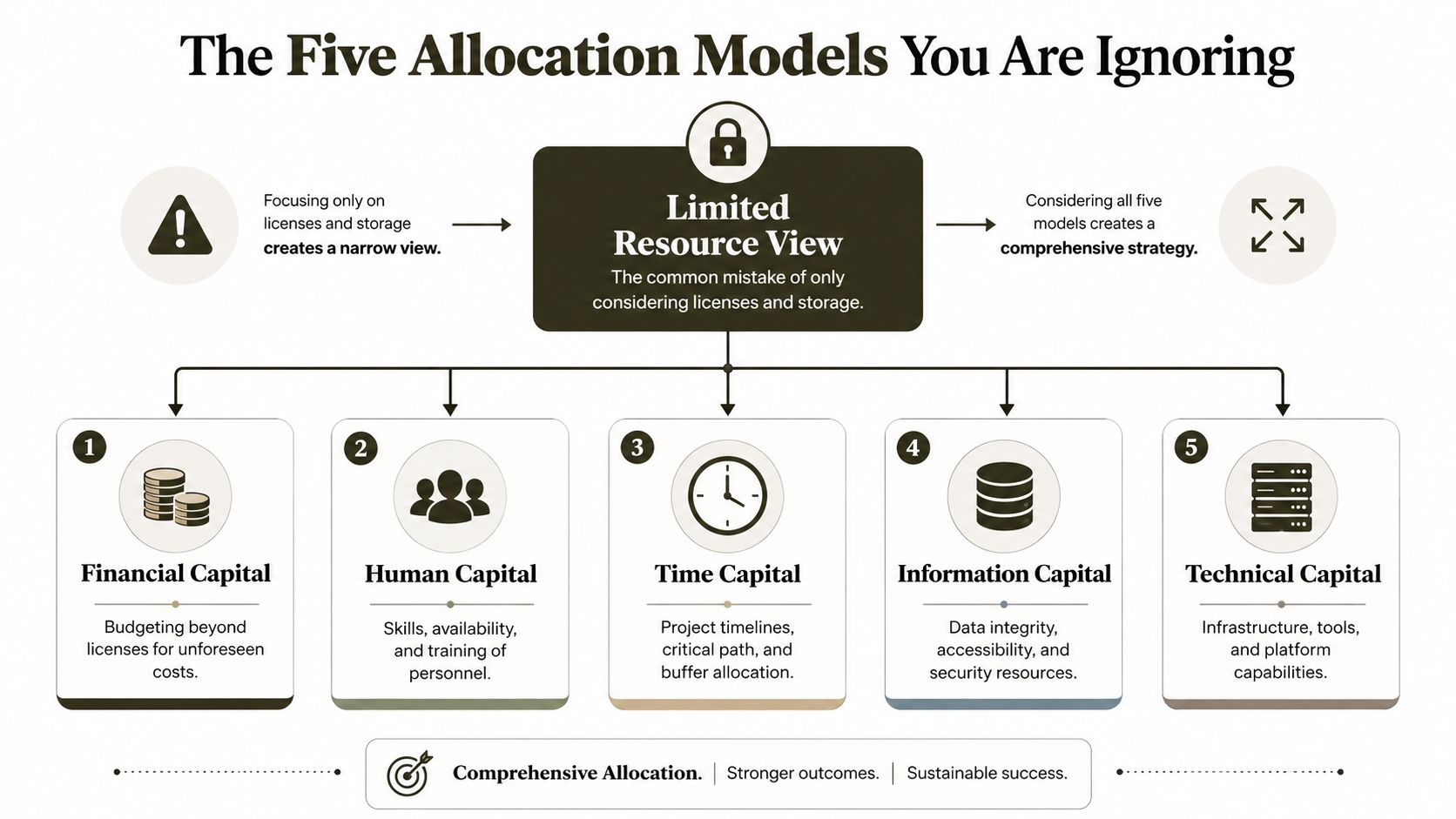
When many organizations discuss resource allocation, they're usually talking about licences and storage. That's the narrowest possible reading of the problem. Enterprise migration succeeds or fails across five separate allocation models, and each one can break the programme on its own.
Financial capital
Money is the obvious one, and teams still get it wrong. They budget for tooling and partner hours, then forget the cost of rework, retesting, rollback support, and post-cutover remediation.
In rescue scenarios, spend rises fast because every mistake now carries triage overhead. You don't just rerun a job. You diagnose metadata gaps, validate permissions, re-sequence batches, and often repeat user testing.
Human capital
DIY efforts usually crack at this juncture.
You need people who can handle identity, governance, content analysis, migration execution, and script-based remediation. A project manager won't fix a GUID conflict. A support engineer won't redesign an Entra ID trust model mid-project. A generalist M365 admin often knows enough to start, but not enough to recover cleanly when the platform pushes back.
We often see clients fail when they assign migration work to whoever “knows SharePoint”. That's like assigning structural engineering to whoever owns a drill.
Time capital
Time isn't just the project timeline. It's the availability of the right people at the right failure point.
A migration can sit idle while a specialist waits to join a war room, while a security approver reviews a changed design, or while a business owner validates a permissions exception. If you haven't reserved decision-making time as well as execution time, the schedule is fiction.
Planned time is the least important timeline on the project. Contingency time and rescue time decide whether the move survives contact with production.
Information capital
This model gets ignored until legal or compliance steps in. What do you know about your data before you move it? Which libraries are oversized? Which permissions are broken already? Which business units rely on bad legacy structures but don't know it?
Without that visibility, teams migrate blind. Blind migrations create dirty target environments.
Technical capital
This includes tooling, throughput, batch design, scripting, agent strategy, and tenant-specific constraints. It also includes recognising when your tools stop being enough.
A quick way to test whether your current resource allocation model is mature enough is to ask whether it explicitly covers all five areas:
| Allocation model | What a weak plan does | What a resilient plan does |
|---|---|---|
| Financial | Funds tools only | Funds tools, contingency, and rework |
| Human | Uses generalists | Reserves specialist migration and scripting expertise |
| Time | Builds one timeline | Builds planned, contingency, and rescue timelines |
| Information | Assumes source data is clean | Profiles content, permissions, and risk areas early |
| Technical | Trusts default tooling | Designs batches, tests limits, and scripts edge cases |
If your migration board still treats resource allocation as a procurement exercise, the plan is already behind reality.
Microsoft's Throttling Limits and Other Unspoken Truths
Friday night. The dashboard is green, the migration wave is live, and your team thinks the hard part is over. Then SharePoint starts throttling, Entra lookups slow to a crawl, conditional access adds friction to every operation, and by Saturday morning you have partial copies, stalled jobs, and no clean rollback story. I have seen this pattern too many times. It is what happens when a project plan treats platform limits as footnotes instead of hard engineering constraints.
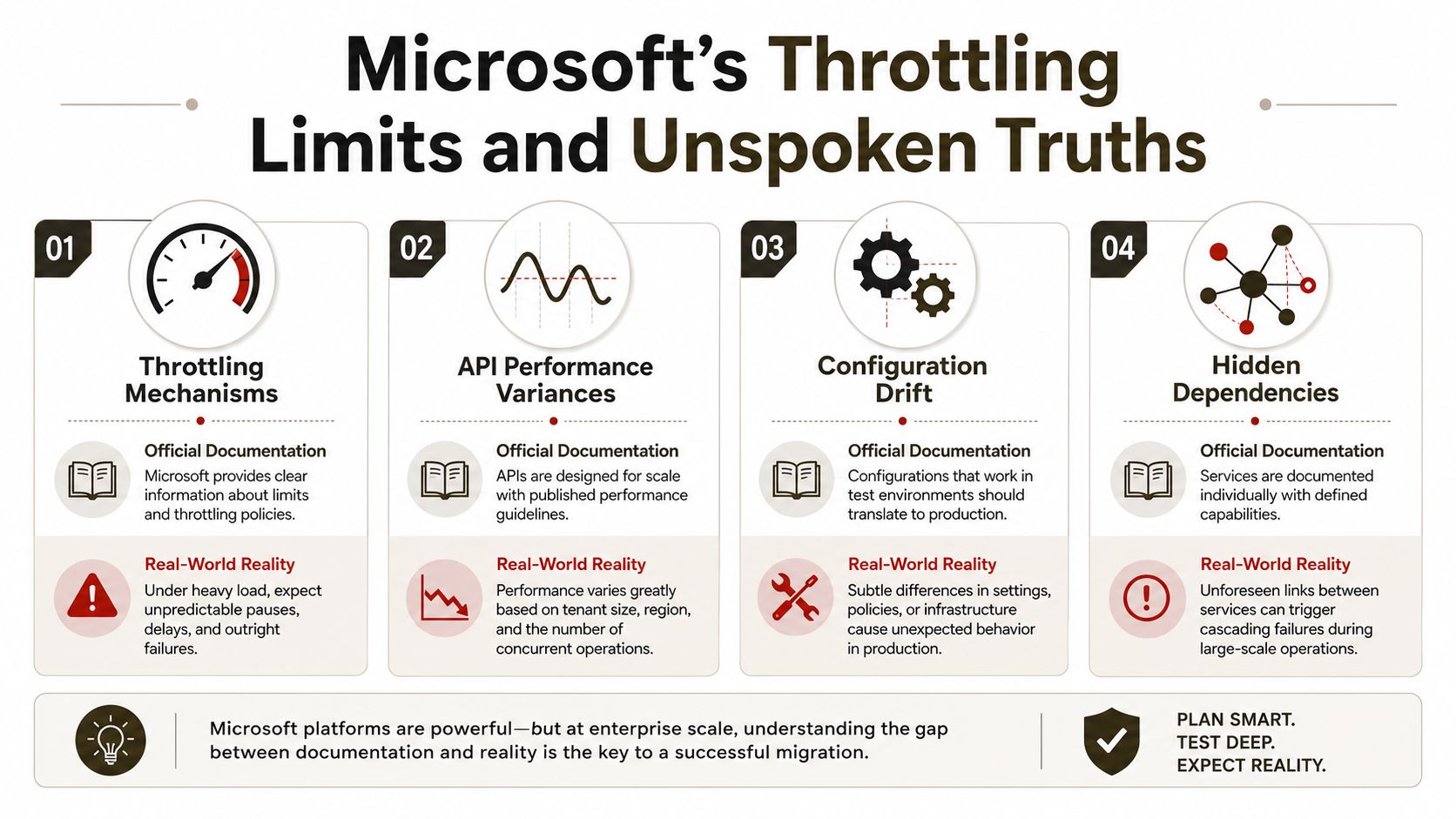
Microsoft documents the rules. It does not carry the consequences for your tenant, your security posture, or your broken estate. The gap between documented limits and production behaviour is where rescue migrations are born.
The 5,000-item limit is an operational constraint
SharePoint Online enforces the List View Threshold. You already know the headline. The mistake is assuming a large library only becomes a problem when users browse it manually.
Migration tools query structure, metadata, permissions, versions, and deltas. Post-migration validation does the same. Poorly indexed libraries, inherited messes, and views designed by accident trigger throttling long before a project board realises the library was dangerous. Folders do not rescue bad design. A tenant with years of unmanaged growth will hit this wall during discovery, during migration, or just after cutover when users open a view that looked harmless in testing.
That is why content preparation belongs in resource allocation, not in a nice-to-have governance workstream. If you need a sanity check on that point, this content governance perspective is closer to reality than another generic migration checklist.
Throttling gets worse under Zero Trust
Standard migration guides assume throughput degrades in a neat, predictable way. Enterprise tenants do not behave like that.
Zero Trust controls add policy evaluation, token handling, permission validation, device and session checks, and extra identity dependencies. Those checks are good security practice. They also impose non-linear costs on migrations. A batch that looks safe in a lab can collapse in production because every file move drags extra control-plane activity behind it. Retry behaviour increases. Validation takes longer. Error handling gets messy. Your tooling reports symptoms, but the root cause sits in the interaction between migration design and security design.
This is the resource allocation gap nobody budgets for properly. You do not solve it with more licenses or a bigger project plan. You solve it by assigning expert scripting time, tenant-specific batch engineering, and recovery time before the first wave starts.
Large sites contaminate shared waves
Very large SharePoint sites should be isolated. Mixing them into standard migration waves is amateur work.
We have walked into rescue projects where one oversized site slowed every smaller workload around it, flooded logs with misleading failures, and convinced the client that the tool was unstable. The tool was behaving exactly as expected. The batch design was reckless. Large sites consume bandwidth, trigger longer validation cycles, and keep competing tasks waiting behind them. Then teams waste hours investigating the wrong tasks because the dashboard shows failure everywhere.
Separate the heavy sites. Give them their own windows, their own monitoring, and their own rollback logic. If you cannot explain why a given workload belongs in a shared wave, it should not be there.
Compare partners by engineering depth, not branding
If you are evaluating outside help, ignore polished slide decks. Ask who will redesign batches after throttling starts, who will script around edge cases, who understands permission repair under live security controls, and who owns recovery when a wave leaves the target in an uncertain state. A broad market scan can help when you compare Azure consulting partners, but migration competence shows up in engineering decisions, not directory listings.
It's simple: Throttling is rarely the first failure. It is the first failure your team notices. The primary mistake happened earlier, when nobody allocated senior technical time for batch design, scripting, and rescue operations.
Why Your Migration Tool Will Fail You
A rescue migration usually starts the same way. The client says the tool worked in testing, security signed off, and the schedule looked reasonable. Then Zero Trust policies hit live traffic, identity lookups slow down, permission repairs start failing, and the team learns the ugly truth. The tool was never the plan. The missing engineering time was.
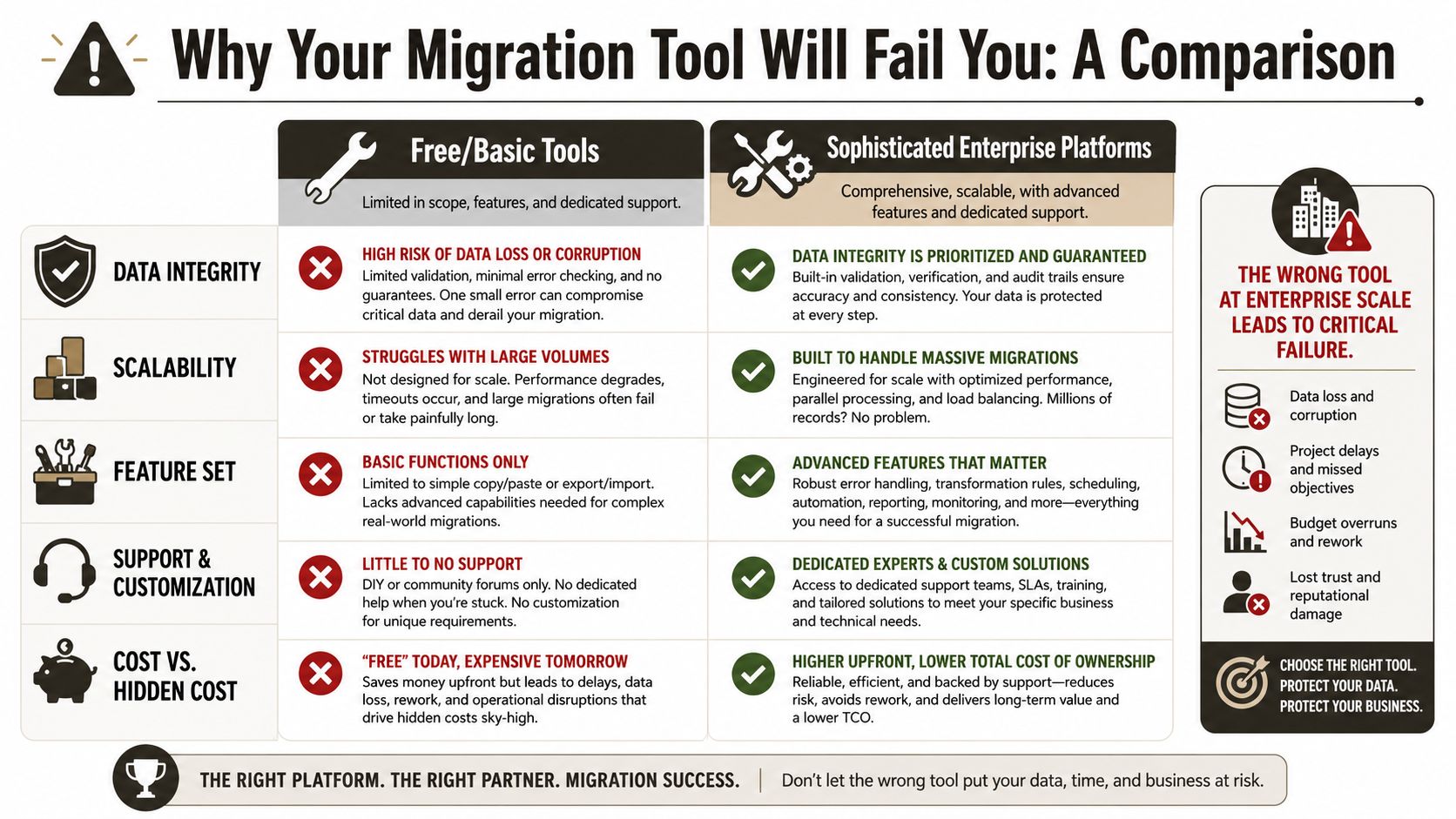
Tools do one job well. They execute the happy path someone else imagined. Enterprise migrations fail outside the happy path.
At Ollo, we see the same mistake in DIY programmes again and again. Leadership debates licences, throughput, and dashboard features. Nobody assigns senior scripting time for identity fixes, security exceptions, validation logic, or rollback cleanup. That is the resource allocation gap. It gets worse in rescue work because modern Zero Trust controls add non-linear cost. A small policy change can turn a routine batch into a slow, failure-heavy mess that needs manual intervention for hours.
SPMT is useful until the estate gets messy
Microsoft's SharePoint Migration Tool is fine for straightforward moves. Clean structure, limited permissions complexity, modest scale. Use it there.
Problems start when teams treat it like an enterprise recovery platform. It is not built for tenant consolidations with damaged inheritance, metadata inconsistencies, regulated controls, and ugly legacy permissions. We have inherited projects where SPMT completed enough items to create false confidence, then left the hard failures scattered across lists, libraries, and security boundaries. The client thought they were nearly done. They were halfway into a cleanup project.
If you are still comparing Microsoft's native option against broader tooling, read this SPMT comparison article before you commit.
ShareGate improves control, but it does not replace engineering
ShareGate is a better operational choice for many corporate migrations. Reporting is better. Control is better. Day-to-day handling is better.
It still does not fix bad source architecture, broken permission logic, or recovery design. It surfaces problems faster. That helps, but only if you have already allocated people who can script repairs and validate outcomes under active security controls.
War story. We stepped into a migration where ShareGate had been blamed for repeated failures on a regulated tenant. The core issue was conditional access and token expiry colliding with long-running remediation tasks. The internal team kept rerunning the same batches and getting the same result. They had bought a stronger tool and funded no recovery engineering. Predictable failure.
Custom scripting is where serious migrations are won
For enterprise migrations, custom PowerShell and PnP work is not an optional extra. It is the recovery layer.
You need scripting to pre-stage fixes, reconcile identities, repair permissions, validate post-move state, rerun partial failures, and clean up objects the tool leaves in limbo. Under Zero Trust, that effort expands fast because every identity check, token boundary, and approval gate adds friction that standard product guides ignore.
This is why budget conversations miss the point. The actual allocation decision is not licence cost. It is whether you assigned named expert hours for engineering and rework before the first batch runs. Teams that plan around data-driven resource prioritization make better decisions here, but the principle is simpler than the framework. Put senior technical time where failure will happen, not where procurement feels comfortable.
| Tool approach | Good at | Fails on |
|---|---|---|
| SPMT | Smaller, cleaner migrations | Complex identity, permissions repair, and controlled recovery |
| ShareGate | Standard corporate migrations with stronger reporting and control | Deep remediation, policy-heavy edge cases, and scripted recovery |
| PowerShell PnP scripting | Targeted repair, validation, and enterprise recovery control | Requires specialist engineers and disciplined runbooks |
The Ollo verdict: use SPMT for small, simple moves. Use ShareGate for standard corporate estates that still need operational control. For anything large, regulated, fragmented, or already in distress, assign expert scripting and recovery time from day one or prepare to pay for a rescue later.
A Battle-Tested Resource Allocation Framework
A migration plan that survives production doesn't run on one timeline. It runs on three.
The first is your ideal path. The second absorbs known friction. The third exists because enterprise systems don't care about your optimism.
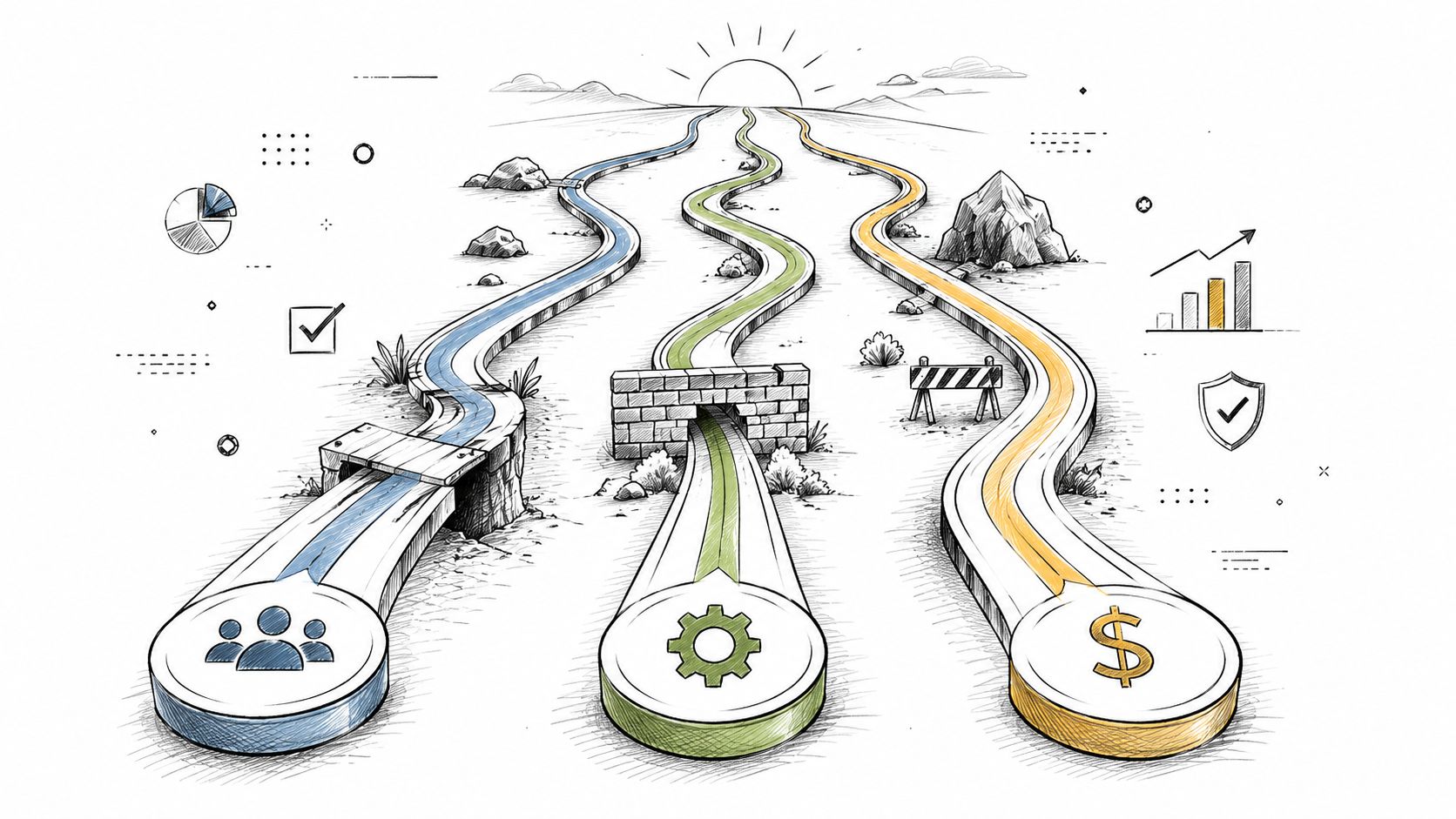
Blue Sky track
This is the version most internal programmes build. It assumes tested throughput holds, permissions map as expected, and stakeholders approve on time.
You still need it. It gives the board a target shape. But it cannot be your only operating model.
Contingency track
Serious teams separate themselves from spreadsheet management.
Allocate named engineering hours for throttling response, batch redesign, reruns, post-move validation, and permissions checks. Reserve decision-makers, not just technicians. If your security lead or compliance reviewer becomes a bottleneck, your engineers will sit idle while the timeline burns.
A useful planning discipline is to treat this as evidence-based rather than emotional. Teams that want a more structured lens on prioritisation often benefit from frameworks around data-driven resource prioritization, but the principle is simple. Put scarce expert time where failure would hurt most.
Rescue track
This is the part weak plans omit because it feels pessimistic. It isn't pessimistic. It's professional.
Your rescue track should define:
- Who joins first: Named senior engineers, not generic escalation groups.
- What gets paused: Non-critical waves that would worsen tenant pressure.
- How evidence is captured: Logs, reports, and validation checkpoints for compliance and rollback decisions.
- Which workloads isolate immediately: Anything structurally large, identity-sensitive, or already showing error concentration.
Don't wait for a failed cutover to decide who has authority to stop, isolate, reroute, or remediate. Decide that before the first batch starts.
Agent sizing must come from testing
One of the easiest ways to expose a guessed plan is to ask how the team sized Migration Manager agents. For tenant-to-tenant consolidations, the minimum number of agents must be calculated by running a test migration of 20 to 30 tasks with one agent to measure throughput, then scaling based on total task count and timeline. Failing to pre-validate universal account access leads to incomplete migrations (Microsoft Learn on setting up Migration Manager agents).
That guidance matters because guessed throughput creates fake confidence. One environment handles access differently. One file share breaks inheritance assumptions. One under-privileged account skips content unnoticed. Suddenly the migration is “complete” on paper and incomplete in reality.
A durable resource allocation model budgets for measured throughput, tested access, and visible rescue authority. Anything less is a plan built for status meetings, not live systems.
Common Failure Modes And Their Real Costs
Friday evening. The dashboard says the batch finished. By Monday morning, the service desk is flooded, permission inheritance is broken in finance, search cannot find regulated records, and security has started asking why Zero Trust policies are blocking the very remediation scripts the project now depends on.
I have seen this pattern too many times. Rescue migrations do not collapse because the budget line was too small. They collapse because nobody assigned expert scripting time, recovery capacity, and decision-making authority before production exposed the weak spots.
A Dublin financial services team consolidates tenants with an internal team and a mid-range tool. The first wave looks clean. Then partial retries create permission drift after object mapping conflicts. Their advisers stop trusting the target environment within hours. The technical defect turns into a business outage because no senior engineer was reserved for surgical repair before cutover.
A healthcare organisation hits threshold-sensitive library behaviour after migration and then learns the harder lesson. Under Zero Trust controls, the engineers cannot freely run the diagnostic and remediation steps they assumed would be available. Every fix needs extra approval, extra logging, and extra time. That is the resource allocation gap standard migration guides miss. Security policy turns simple recovery work into slow, specialist work.
What expensive failures actually share
The recurring pattern is boring, which is why it is dangerous.
- Pilot results were treated as production proof. A clean sample batch does not test the ugly edge cases, especially in regulated tenants with conditional access, sensitivity labels, and inherited permissions.
- Recovery time was never assigned to named experts. Internal teams were expected to “help if needed,” which means nobody owned the hard fixes when retries, remaps, and rollback decisions started piling up.
- Zero Trust overhead was ignored. Script approval, privileged access workflows, and evidence capture all add friction. Recovery stops being linear.
- Tool output was trusted over tenant reality. A green report is not the same thing as a usable, compliant target state.
- User validation came too late. The project team checked whether data moved, not whether people could work safely with it.
The financial impact is not theoretical. According to an Ollo analysis of Ireland Data Protection Commission incident data, a large share of reported data loss incidents in regulated sectors trace back to migration and change failures tied to poor preparation, weak controls, or inadequate remediation capacity. The actual cost shows up in breach handling, emergency engineering, legal review, and operational disruption.
Delay is usually the cheapest part
Boards fixate on timeline slippage because it is easy to measure. That is amateur thinking.
The true bill arrives as broken access models, user workarounds, duplicate clean-up effort, audit exceptions, and senior engineering hours burned under pressure. In rescue work, each blocked script, each failed retry, and each manual permission correction costs more than the previous one because modern security controls slow every step. Recovery is non-linear. The first 80 percent of a migration may move quickly. The last 20 percent can consume most of the specialist time.
One war story sticks with me. A client insisted the project was under control because 92 percent of content had already moved. The remaining 8 percent contained the regulated sites, custom permissions, and edge-case libraries their cheap plan had ignored. That final slice triggered weeks of rework, business complaints, and compliance review. Their cheapest option on paper became the most expensive part of the programme.
A migration failure ends only when users trust the target, auditors accept the evidence, and the recovery queue is empty.
If you are still judging the programme by licence cost or day-rate optics, revisit your real SharePoint migration cost assumptions. The expensive part is not the move. It is the rescue.
The Only Resource Allocation That Matters Risk Reduction
By this point, the pattern should be obvious. DIY migration doesn't usually fail because teams lack effort. It fails because they assign resources to the visible work and ignore the dangerous work.
That's why most “cost-saving” migration strategies aren't cost-saving at all. They push expert decisions onto internal teams that are already busy, force tooling beyond its intended use, and treat recovery as an optional line item. In regulated environments, that approach is reckless.
The resource allocation that matters most is the one that reduces risk before production punishes you for optimism.
Your team can learn Microsoft's real-world throttling behaviour the hard way. They can discover threshold failures after users lose access. They can find out during cutover that identity redesign work was larger than expected. Or they can allocate for proven migration expertise from the start and avoid turning a strategic programme into an incident response exercise.
If your leadership still sees migration as a one-off move rather than an operational risk event, they should also think about what happens after cutover. Data protection, rollback confidence, and recovery posture still matter, which is why your migration strategy should sit beside a serious Microsoft 365 backup approach, not apart from it.
If your migration carries compliance exposure, business-critical data, or zero-trust complexity, don't hand it to a generalist team and hope the tooling saves you. Talk to Ollo before your project becomes a rescue job.

















