



You're probably in the same position as most IT Directors we meet. The board wants Microsoft 365 standardised. Legal wants retention sorted. Security wants zero-trust controls. The business wants old file shares gone. Your team wants to believe the migration tool wizard will handle it.
It won't.
What usually sits behind the project plan is a mess of stale SharePoint sites, deep folder trees from file servers, permissions nobody understands, and content nobody owns. On paper, that looks like a migration. In reality, it's a governance failure waiting to become a cloud-hosted one.
Your Migration Is a Minefield Not a Checklist
We often see clients fail when they treat migration as transport. Copy the files. Recreate the sites. Tick the box. Move on. That works right up until the first compliance review, the first permissions incident, or the first executive who asks why search returns five versions of the same policy.
The documentation says governance should exist before content lands in Microsoft 365. In reality, teams under deadline push governance to “phase two”, then discover phase two is where legal exposure, access sprawl, and tenant-wide clean-up bills start.
A lot of internal teams already know this. That's why the gap matters. The underserved angle of DIY content governance failing at compliance enforcement is real. 82% of businesses feel they lack effective governance, yet the frameworks many teams rely on still don't address zero-trust redesigns or API throttling risks in enterprise tenants, as noted in this industry discussion on governance gaps.
Here's the pattern. An IT Director inherits a project with:
- Legacy SharePoint debt: Old site collections, broken owners, and permissions layered over years
- File share baggage: Long paths, duplicate content, and folder structures built for on-prem habits
- Shadow storage: Unapproved cloud repositories that nobody wants to admit are business-critical
- Audit pressure: Regulated data that now has to survive legal, security, and operational scrutiny
That's not a checklist job. That's a risk job.
This matters even more when your testing discipline is weak. If your team hasn't built proper validation into the project, you're guessing. A practical baseline is to treat migration validation as a formal workstream, not an afterthought. We've written before about the types of testing that catch migration defects before users do.
The video below gives useful context on why tenant migrations go wrong long before cutover:
The safest migration plan is the one that assumes your source environment is lying to you.
Your data isn't clean because the file share still works. Your permissions aren't correct because users haven't complained. Your governance isn't real because someone wrote a policy PDF three years ago.
A Governance Framework That Prevents Disaster
For a high-stakes migration, content governance isn't an admin exercise. It's the control system that stops you from moving chaos into a more expensive platform.
The model I trust is still simple. People, Process, Policy, Platform. The mistake is assuming those four words are strategic fluff. They aren't. Each one maps to a failure mode.
People and ownership
If nobody owns the content, nobody retires it, validates it, or fixes it. That sounds obvious until you inspect an enterprise tenant and find shared libraries with business-critical records but no accountable owner.
When global teams ignore regional differences, governance falls apart fast. 73% of content governance failures stem from unaddressed regulatory variations, and 89% of governance gaps in the IE region arise from missing regional process adaptations, according to Acrolinx's analysis of global writing team governance.
That's why role assignment has to be regional and operational, not generic. If your Irish finance team and your wider European operations team follow the same nominal policy but different practical workflows, governance fails where the hand-offs happen.
Process and review discipline
The process has to decide what gets reviewed, when it gets reviewed, and what happens when content no longer belongs in the target state. Most DIY projects skip this and call it pragmatism. It's usually just deferred failure.
A useful external reference is WebAbility's global compliance guidelines, because they help teams think beyond generic policy language and into jurisdiction-specific obligations that affect implementation.
Use a process that answers these questions clearly:
- What content moves: Don't migrate everything. Classify and reduce first.
- Who signs off: Legal, security, and business owners need explicit approval points.
- What gets retired: ROT content should die before migration, not after.
- How exceptions work: Every enterprise has exceptions. Govern them instead of pretending they don't exist.
Policy and platform enforcement
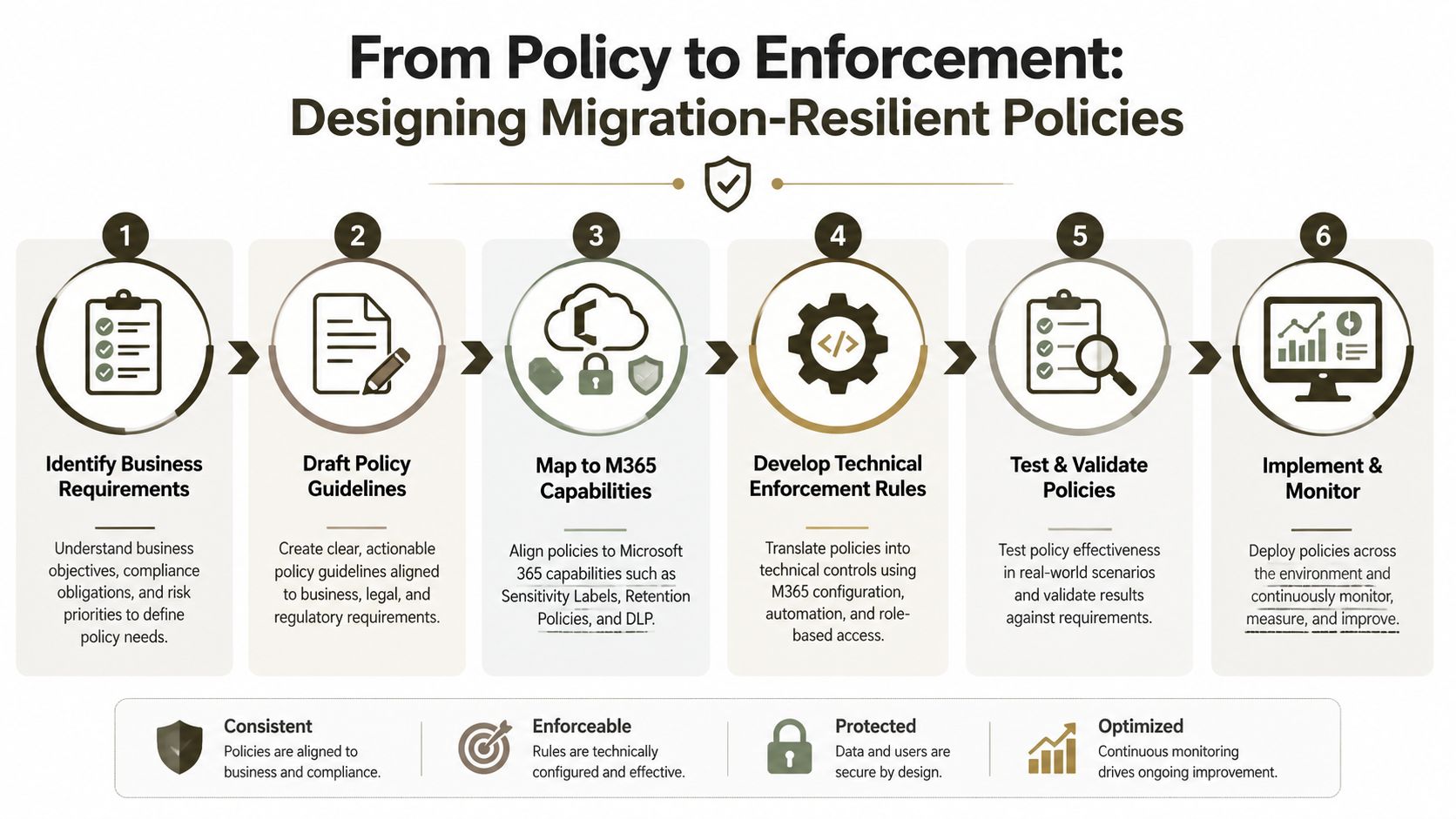
Policy without technical enforcement is theatre. If the platform can't apply the rule consistently, the rule doesn't exist.
Practical rule: If a control can't be enforced in Microsoft 365, rewrite the policy before migration starts.
Your governance audit should test that connection directly. We've covered the basics in this Microsoft 365 governance audit checklist for CTOs.
The whole point of content governance is simple. It should survive contact with production.
Designing Policies That Survive the Migration
A policy document can look sensible in a steering committee pack and still blow up the tenant once you implement it. This oversight frequently occurs. Policies are designed for approval, not for execution.
In Microsoft 365, every major control has side effects. Retention creates workload. Labels depend on information architecture. Access controls interact with inheritance. Metadata choices affect search, lifecycle, and legal hold behaviour. If you don't design those controls with the platform's limits in mind, your governance model becomes a support problem.
Retention and metadata
The official guidance is blunt on this point. In compliant Microsoft 365 governance, retention labels and metadata inheritance must map to documented business objectives, and unmanaged inheritance or orphaned metadata causes Broken Inheritance and GUID Conflicts that ShareGate and PnP PowerShell scripts must remediate during migration, according to governance guidance referenced here.
That's not abstract architecture. It becomes operational damage fast.
A common failure looks like this:
| Policy choice | What the team intended | What actually happens |
|---|---|---|
| Broad retention rules | Keep records safe | Massive policy scope with poor classification |
| Loose metadata mapping | Preserve source context | Orphaned columns and unusable filters |
| Inheritance ignored | Keep permissions “as is” | Access breaks or overexposes data |
| Site-by-site exceptions | Stay flexible | Governance fragments and auditability drops |
DLP and access controls
Data Loss Prevention and access policies fail when teams design them in legal language but implement them in technical shortcuts. “Restrict sensitive data” sounds fine in a policy workshop. It means nothing until you define identities, trusted devices, exception paths, and remediation behaviour.
The documentation says governance decisions must cascade from business objectives. In reality, teams often bolt security controls on at the end, which creates false positives, access friction, and local workarounds.
That's why I push teams to document policy logic in implementation language. Tools like DocuWriter.ai's compliance solution can help structure that policy documentation so technical teams aren't reverse-engineering legal intent from prose.
You also need governance at the data layer, not just the access layer. We've dealt with that in more depth in our guide to SharePoint data governance.
What survives production
Policies that survive migration usually share three traits:
- They map to actual Microsoft 365 controls: sensitivity labels, retention, DLP, conditional access
- They account for inherited mess: permissions history, metadata sprawl, and content duplication
- They can be tested before rollout: not in theory, but against a pilot scope and real workloads
If your policy requires manual discipline to work at scale, it won't work at scale.
That's the hard truth. Content governance only counts when the platform can enforce it under load.
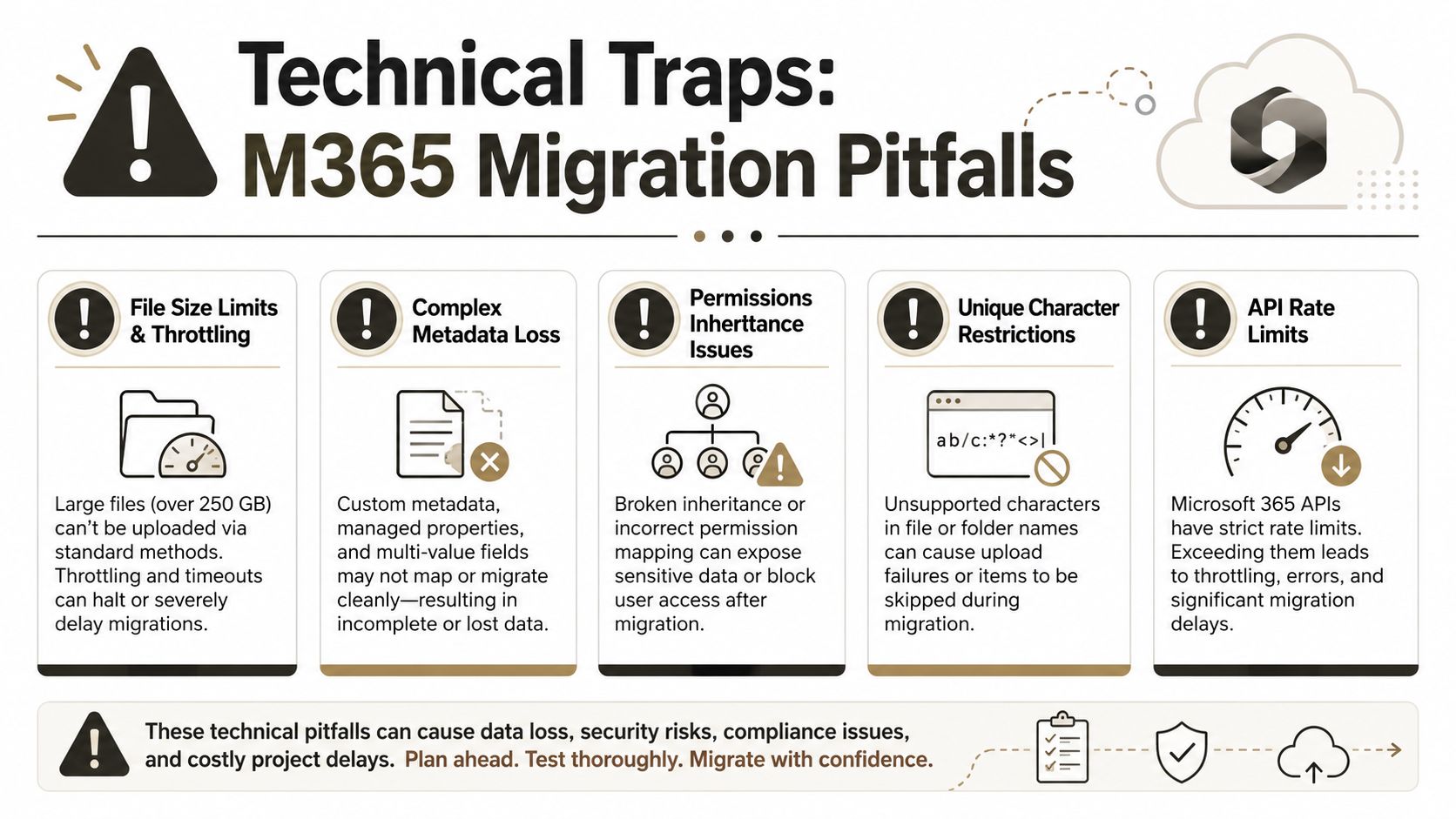
The Technical Traps That Wreck Migrations
Generic guidance breaks down. The platform has hard edges. Microsoft documents them. Internal teams still underestimate them. Then the project stalls and everyone acts surprised.
API throttling is a project killer
Microsoft enforces API throttling to protect the service. That's sensible for Microsoft. It's brutal for migration projects using naive patterns.
DIY migration attempts using Microsoft's native SPMT tool can suffer a 70% reduction in throughput due to severe API throttling, as documented in Ollo's write-up on enterprise SharePoint migration constraints. The documentation says the limit exists. In reality, it turns planned migration windows into fiction.
When this happens, teams usually respond badly. They retry more aggressively, launch more jobs in parallel, and make the throttling worse.
The 5k limit is not just a view problem
The list view threshold gets dismissed far too casually. People say, “That's only a display issue.” It isn't. At scale, the 5k limit affects queries, metadata operations, permissions handling, and remediation work.
If your source estate includes document libraries with years of organic growth, that threshold becomes a structural problem. You can't govern content properly if every operation against large libraries starts failing or timing out.
Here's where the trap usually sits:
- Large libraries: Libraries grew without indexing or archive discipline
- Flat structures: Users dumped everything into one working area
- Late classification: Metadata was added too late or not enforced
- Migration-day panic: Teams discover threshold behaviour during execution, not assessment
Broken inheritance and long paths
We often see clients fail when they assume old permissions can be copied over. Legacy SharePoint environments and file shares accumulate one-off access decisions over years. Some were justified at the time. Most were never reviewed.
Migrating that state without remediation creates two kinds of damage. First, you preserve broken access logic. Second, you make it auditable in a modern platform.
Long paths and invalid characters create a different kind of failure. Your source file server tolerated naming habits that SharePoint Online won't. Migration tools then skip, rename, flatten, or fail content in ways users discover only after go-live.
This is the same pattern teams see in old application estates. The code still runs, so leaders assume the risk is manageable, until hidden complexity starts charging interest. Faberwork's piece on the escalating legacy code problem captures that mindset well.
What the trenches teach you
The documentation says the limits are known. Reality is that most teams only respect them after they've wrecked a schedule.
The fix isn't optimism. It's pre-migration remediation, segmented execution, and custom handling where the platform's defaults fall short.
If your governance model doesn't explicitly account for throttling, 5k thresholds, path constraints, and permissions inheritance, then your migration plan is incomplete. Your DLP model will suffer too, because bad structure and bad inheritance make policy enforcement unreliable. That's why data loss prevention belongs in the migration conversation early, not after the content lands.
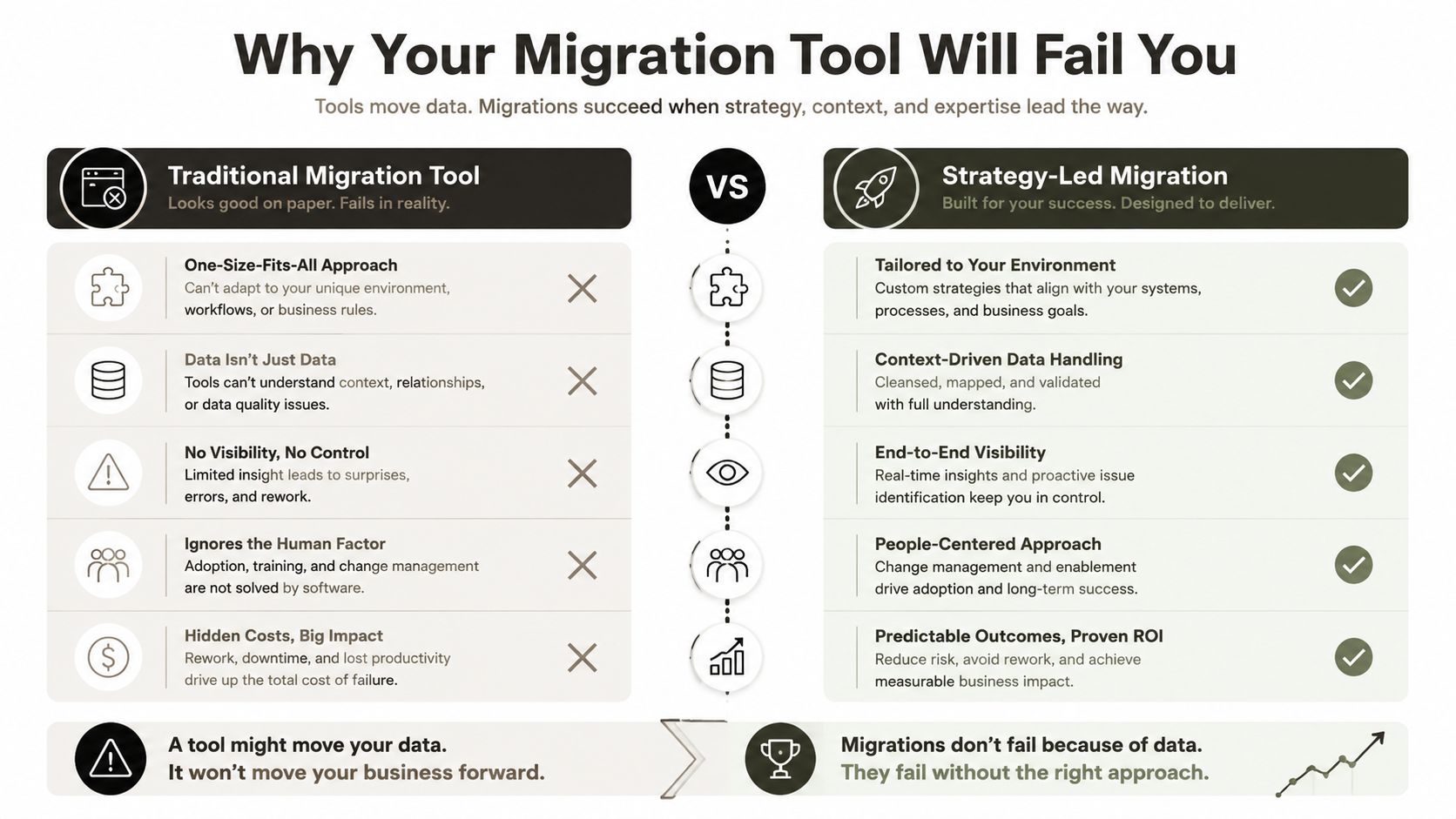
Why Your Migration Tool Will Fail You
Tools matter. Tool worship is the problem.
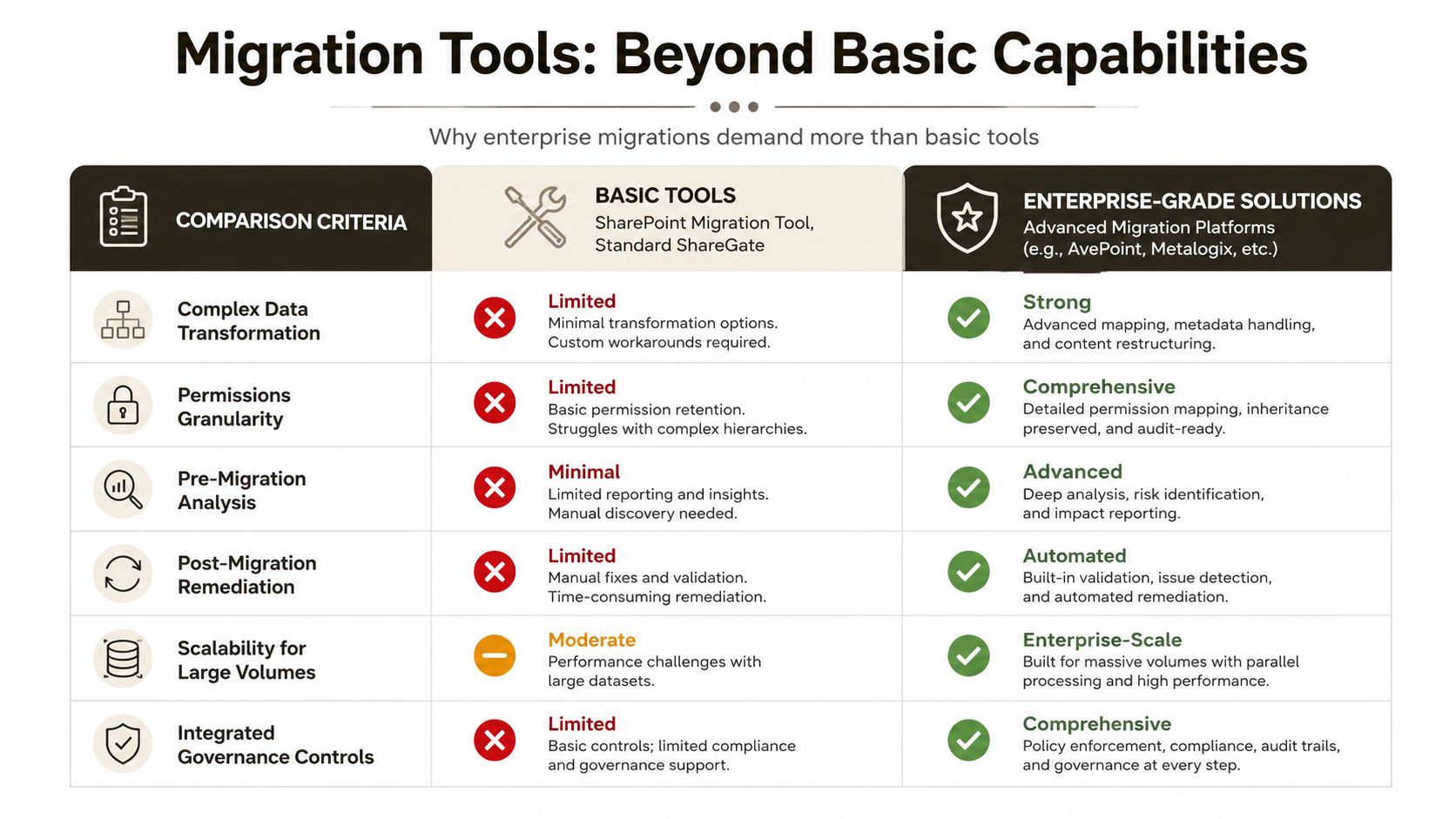
SPMT has a place. ShareGate has a place. Neither replaces migration engineering. If your team treats the tool as the strategy, you're betting the project on defaults built for simpler conditions than the ones you have.
SPMT versus ShareGate versus custom handling
Here's the honest comparison:
| Tool or approach | Where it helps | Where it breaks |
|---|---|---|
| SPMT | Small, straightforward moves | Limited remediation, weak enterprise control |
| ShareGate | Better visibility and operational control | Still needs expert scripting for hard cases |
| Custom PnP PowerShell | Handles edge cases and remediation | Requires specialist design and testing |
The hard evidence should concern you. 68% of DIY migrations fail to remediate 5k item limits and path-length violations, while 99.2% success has been reported for preserving Broken Inheritance and resolving GUID Conflicts when ShareGate is combined with custom PnP scripts, according to IE-sector audit benchmark data discussed here.
That doesn't mean ShareGate magically fixes enterprise mess. It doesn't. It means the tooling can support the job when an experienced team scripts around the platform's weak points.
The Ollo verdict
SPMT is acceptable for small, low-risk transfers.
ShareGate is useful when the team using it understands inheritance, metadata mapping, tenant behaviour, and remediation sequencing.
For enterprise jobs, especially in regulated sectors, the only safe pattern is tool plus scripting plus pre-migration analysis. One option in that category is Ollo's migration software perspective, which focuses on ShareGate combined with custom PowerShell PnP handling rather than native-tool dependency.
Use SPMT for simple moves. For anything with regulated data, inheritance complexity, or structural debt, you need custom scripting.
That's the verdict. Not because the tools are bad. Because your environment is worse than the demo.
Quantifying the Cost of a Failed Migration
A failed migration doesn't stay in the technical team. It lands on your desk as delay, audit risk, user anger, and budget damage.
In regulated sectors like Energy and Finance, DIY governance often fails when teams lack formal workflows, leading to 62% of mid-size enterprises encountering content chaos before governance maturity, according to Pantheon's analysis of content operations and governance.
Compliance damage
If you migrate broken permissions into Microsoft 365, you haven't fixed the risk. You've made it easier to inspect. That matters in Finance, Healthcare, and Energy, where access, retention, and defensible records handling aren't optional.
Missing this step doesn't just fail the migration. It breaks legal compliance.
Financial damage
The rescue phase is always more expensive than the assessment phase. Teams that skip proper pre-migration assessment consistently underestimate migration costs by 30–50%, which can push projects from $15,000 to over $500,000, according to this SharePoint migration cost guide.
That's before you account for business disruption, duplicate work, and emergency remediation.
Operational damage
The business usually experiences failure through trust collapse:
- Search becomes unreliable: Users stop trusting the new platform
- Permissions become unpredictable: Staff request exceptions and local workarounds
- Policy enforcement weakens: Governance exists on paper, not in usage
- Support queues rise: Your team starts firefighting instead of modernising
You don't need a dramatic outage for a migration to fail. A slow drip of access issues, stale content, and classification errors is enough. Once users lose confidence, adoption stalls and the supposed modern platform becomes another repository they work around.
The Pragmatic Path Forward with Ollo
The practical route isn't complicated. It's disciplined.
Start with a script-based assessment of the source environment. Find the long paths, the broken inheritance, the overgrown libraries, the duplicate content, and the unmanaged metadata before any bulk move begins. Then remediate what you can in place. Segment what you can't. Pilot with representative data, not the easiest data.
For zero-trust and governance-heavy environments, your implementation also has to respect platform controls. In IE-region enterprises, Microsoft Learn confirms that governance decisions must be embedded in the solution itself, and Conditional Access for blocking unmanaged devices requires the right licensing and design choices. If you're treating governance as a policy workshop rather than a technical build, you're already behind.
The actual migration should follow the estate, not the org chart. Move low-risk workloads first. Hold back problem libraries until permissions, metadata, and path issues are corrected. Use ShareGate where it helps. Use custom PnP PowerShell where the tooling runs out of road. Keep evidence. Keep logs. Keep a chain of custody for what moved, what changed, and what was intentionally left behind.
That's how you prevent disaster. Not with optimistic planning. With engineering discipline and content governance that holds up under production conditions.
If your team is staring at a Microsoft 365 migration and you already suspect the source estate is messier than anyone wants to admit, talk to Ollo. We help IT leaders reduce migration risk by assessing technical debt early, remediating governance failures before cutover, and handling the edge cases that basic tools and internal project plans usually miss.

















