



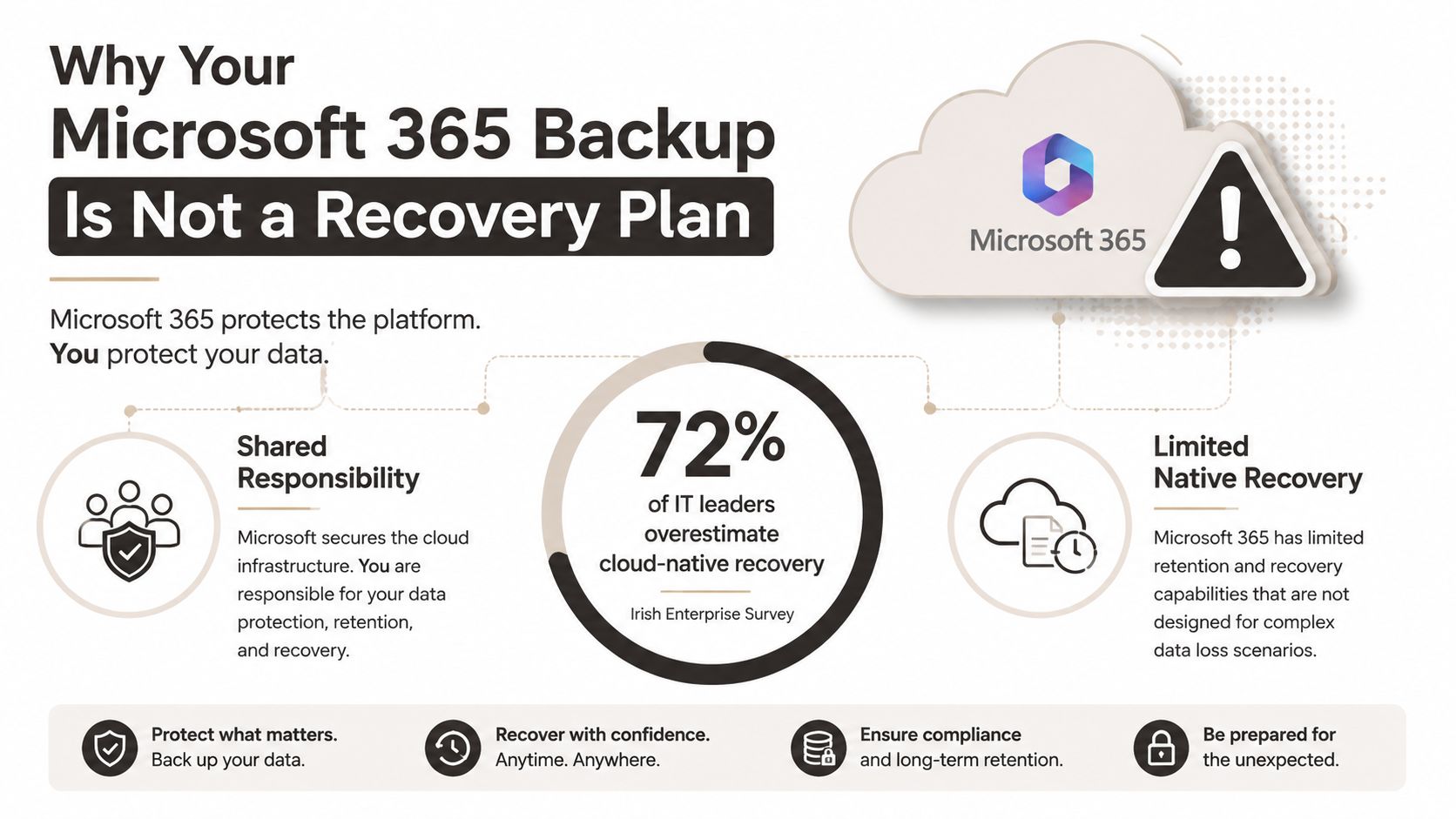
The most popular advice about Microsoft 365 backup is also the most dangerous: if your data lives in the cloud, recovery is already covered. That assumption confuses platform resilience with your organisation's ability to restore data, rebuild access, meet recovery objectives, and prove what happened during an incident.
A backup copy answers one question, can you retrieve data? Disaster recovery answers a harder question, can your business operate again under pressure? Those are different engineering problems, particularly when SharePoint Online contains complex permissions, long paths, large libraries, retention controls, shared mailboxes, and tenant-to-tenant dependencies.
Irish organisations have already seen the consequences of treating protection as a tick-box exercise. The evidence points to weak planning, untested restore paths, and insufficient recovery budgets. For an accessible overview of the wider cloud protection environment, IT services by Finchum Fixes IT offers useful background, but enterprise Microsoft 365 recovery requires much more than selecting a backup product.
Why Your Microsoft 365 Backup Is Not a Recovery Plan
Microsoft 365 gives you a resilient service. It doesn't automatically give you a recovery operation designed around your identities, permissions, governance model, or business processes. Your tenant can remain available while a malicious deletion, ransomware event, administrator error, failed migration, or retention mistake leaves critical information unusable.
Irish business data exposes the gap. One survey found that 51% of Irish businesses had no disaster recovery plan, 48% had no business continuity plan, and 41% had already experienced data recovery problems. The same reporting found that 44% said outage downtime exceeded their stated tolerance, while 62% had no disaster recovery budget. Those figures appear in Irish reporting on disaster recovery planning.
The failure usually starts with a false equivalence:
- Backup: A copy exists somewhere.
- Recovery: The copy can be located, restored, validated, secured, and used by the right people.
- Business continuity: The organisation can continue essential operations while recovery proceeds.
A SharePoint backup can contain files but still fail your recovery requirement. The restore may preserve content while losing permission inheritance. A tenant move may create GUID conflicts. A script may restore thousands of objects until Microsoft throttles requests and leaves a partial queue. A library may contain paths that exceed the platform's limit, so the job skips data without giving your board a useful answer about operational exposure.
The test your backup must pass
Ask your team to demonstrate a restore, not a dashboard showing successful backup jobs. The test should cover a representative SharePoint site, OneDrive content, permissions, version history, retention labels, shared mailboxes, and the identities that need access after recovery.
More recent Irish SME resilience data reinforces the problem. Only 26% of SMEs had an automated data backup process, 38% never tested their backups, 31% had backup coverage gaps, and 9% had unencrypted backups. The same report found that 64% had no business continuity plan. These figures come from Irish reporting on SME data backup weaknesses.
Practical rule: A successful backup job proves that a copy was created. A successful recovery exercise proves that your organisation can use it.
For regulated organisations, that distinction affects governance as much as technology. A recovery process dependent on undocumented scripts, individual knowledge, or an untested service account isn't evidence of control. It's an unexamined operational dependency.
RTO and RPO Realities in Microsoft 365
Recovery Point Objective, or RPO, defines how much recent data your organisation can afford to lose. Recovery Time Objective, or RTO, defines how long the business can operate without the affected service or dataset. Microsoft's native recovery capabilities provide useful platform windows, but those windows don't tell you how long your actual restore will take or whether the restored environment will function correctly.
Microsoft's 365 Backup documentation states that OneDrive and SharePoint receive a 10-minute RPO over the trailing two weeks, with restore points available out to 52 weeks. Microsoft's data-resiliency guidance also describes SharePoint using Azure SQL point-in-time recovery for up to 14 days, alongside 14 days of metadata backups. These are documented platform capabilities in Microsoft's Microsoft 365 Backup FAQ.
Those figures matter, but they don't constitute an operational recovery promise. They describe available recovery points and platform protection. Your team still needs to identify the correct restore point, confirm the affected scope, rebuild or validate access, manage conflicts, and establish whether restored content satisfies retention and investigation requirements.
Why the vendor window isn't your RTO
Suppose your business requires rapid access to a project library. A platform restore may return content, but your recovery team must still answer practical questions:
- Does the restored content sit in the correct site and hub structure?
- Do Entra ID identities still map to the intended users?
- Did permission inheritance remain intact?
- Do retention labels and legal holds behave as expected?
- Can users open links, versions, and shared documents?
- Did the restore create duplicate objects or cross-tenant conflicts?
Microsoft's service-level recovery mechanisms don't perform that complete operational validation for you. They also don't remove the need for documented ownership, escalation paths, communications, and evidence collection.
An RPO is therefore not the same as a promise that your organisation will lose only that amount of work. An RTO is not the same as the time required for a platform to expose a restore point. Your real objective includes the engineering and governance work between selecting the point and returning the business to a trusted operating state.
Recovery objectives must reflect the workload
A low RPO may be appropriate for a critical operational dataset, while a less urgent archive may tolerate a different recovery approach. Treating every SharePoint site, OneDrive account, and Exchange object as equally important creates unnecessary complexity, but treating everything as low priority creates unacceptable exposure.
The correct design starts with business processes, then maps those processes to data, identities, permissions, and dependencies. If your team can't run that exercise and prove the result through a restore test, the documented Microsoft recovery window remains only one component of your plan.
Five Failure Modes That Break Enterprise Restores
Enterprise restore failures rarely begin with a dramatic platform outage. They begin with a script that works in a small test and meets constraints it never encountered in production. We often see clients fail when they validate whether data can be copied, but not whether the whole estate can be restored with its structure, security, and governance intact.
Microsoft confirms the relevant platform constraints in its official SharePoint Online limits documentation and its guidance on large SharePoint lists and libraries.
| Failure Mode | Microsoft Limit | Real-World Symptom | Recovery Impact |
|---|---|---|---|
| API throttling | Microsoft documents a 3,000 requests per 5-minute user request limit, alongside per-app and per-tenant throughput ceilings | Jobs slow down, retry queues grow, and scripts receive throttling responses | The restore runs beyond its planned window and may finish partially |
| Long decoded file paths | The decoded SharePoint or OneDrive file path cannot exceed 400 characters | Files fail to copy or restore, often inside deeply nested folders | Your recovery set becomes incomplete unless remediation happens before the incident |
| List View Threshold | The default SharePoint threshold is 5,000 items | Queries, bulk actions, or site operations fail or become unavailable | Large libraries block restoration workflows and require controlled segmentation |
| GUID conflicts | Tenant moves can encounter duplicate or mismatched object identifiers | Objects map to the wrong target, duplicate, or fail to resolve | The team must reconcile identity and object relationships before users can trust the result |
| Broken inheritance | Permission structures may not survive a restore or consolidation as expected | Users gain access they shouldn't have, or lose access they need | Recovery becomes a security incident and demands manual permission remediation |
API throttling turns speed into a liability
A DIY script often increases concurrency when a restore falls behind. That can make the situation worse. Microsoft's controls cap throughput under load, so aggressive parallelism creates more retries, more queue contention, and less predictable completion.
The documentation says the service protects platform capacity. In reality, your recovery team experiences delayed operations, incomplete batches, and uncertain job state. Request pacing, retry handling, checkpointing, and resumable processing belong in the design before production recovery begins. SharePoint backup before migration is relevant when your team needs to validate the source estate before moving data into a recovery or consolidation workflow.
Paths and lists expose hidden data debt
The 400-character decoded path ceiling isn't a theoretical edge case in estates that grew through years of departmental folders and file-server migrations. A path audit must identify risk before the restore, then provide an approved remediation route.
The same applies to large lists and libraries. Microsoft states that SharePoint blocks operations that exceed the default 5,000-item List View Threshold, warns users when a list passes 3,000 items, and can restrict site-template creation where lists or libraries exceed the threshold. If your restore process expects to enumerate everything in one operation, it will eventually meet a boundary it can't ignore.
GUID conflicts and broken inheritance are trust failures
Content can appear present while object relationships remain wrong. Tenant-to-tenant work introduces conflicts between users, groups, sites, and application references. A successful copy count doesn't prove that the target tenant resolves those relationships correctly.
Broken inheritance creates a more serious problem because it can remain invisible until a user opens a sensitive document. Recovery testing must compare intended permissions with effective permissions, record exceptions, and retain evidence of remediation. The Ollo Verdict: don't approve an enterprise restore because a migration tool reports completion. Require object-level validation, permission testing, and a resumable recovery process designed around Microsoft's documented limits.
Compliance and Forensic Readiness for Regulated Sectors
Energy, finance, and healthcare organisations in Ireland can't treat backup and disaster recovery as a storage procurement exercise. Recovery architecture affects governance, personal-data exposure, incident response, and the evidence your organisation can provide after a failure.
The Data Protection Commission requires organisations to report personal-data breaches without undue delay and, where feasible, within 72 hours of becoming aware of the breach when the breach presents a risk to individuals. The requirement appears in the DPC's breach notification guidance.
A delayed restore can become part of the compliance incident. If a migration, cutover, or recovery operation exposes personal data, the controller may need to explain when it became aware of the breach, what it knew, which controls operated, and why notification did or did not occur within the required window. The technical failure therefore creates a governance problem when your team lacks clear logs and decision records.
Build an evidence trail, not just a copy
Forensic readiness starts before anyone presses restore. Your design should establish:
- Immutable protection: Keep a protected recovery copy that an attacker or administrator can't alter or delete.
- Chain of custody: Record who initiated recovery, which source was used, what data moved, and what transformations occurred.
- Access evidence: Preserve identity, permission, and administrative logs around the incident and restore.
- Validation records: Document checks for completeness, version history, retention labels, permissions, and user access.
- Decision ownership: Name the people responsible for declaring an incident, approving recovery, and assessing notification duties.
Irish cyber-resilience data shows why this matters. 89% of companies experienced financial loss or disruption from cyberattacks over five years, while only 34% had cyber recovery playbooks. Those figures come from the Ireland-specific reporting referenced in the Digital Decade 2025 Ireland country report.
The playbook must connect technical actions to legal and operational decisions. Your security team needs to know whether restored content is trustworthy. Your privacy team needs reliable facts about exposure. Your executive team needs a defensible estimate of service impact. A backup console alone cannot supply that context.
Governance must survive the recovery
Retention labels, legal holds, privileged access, and segregation of duties all complicate restore design. You may need to recover content without giving broad administrative access to the person running the job. You may also need to preserve original context while placing recovered content into a controlled investigation location.
Business continuity planning for Microsoft 365 should therefore sit alongside backup architecture, not in a separate policy folder. The Ollo Verdict: if your regulated organisation can't produce a tested runbook and an evidence package after a restore exercise, it doesn't have compliance-ready recovery.
Comparing Backup Architectures for Enterprise Tenants
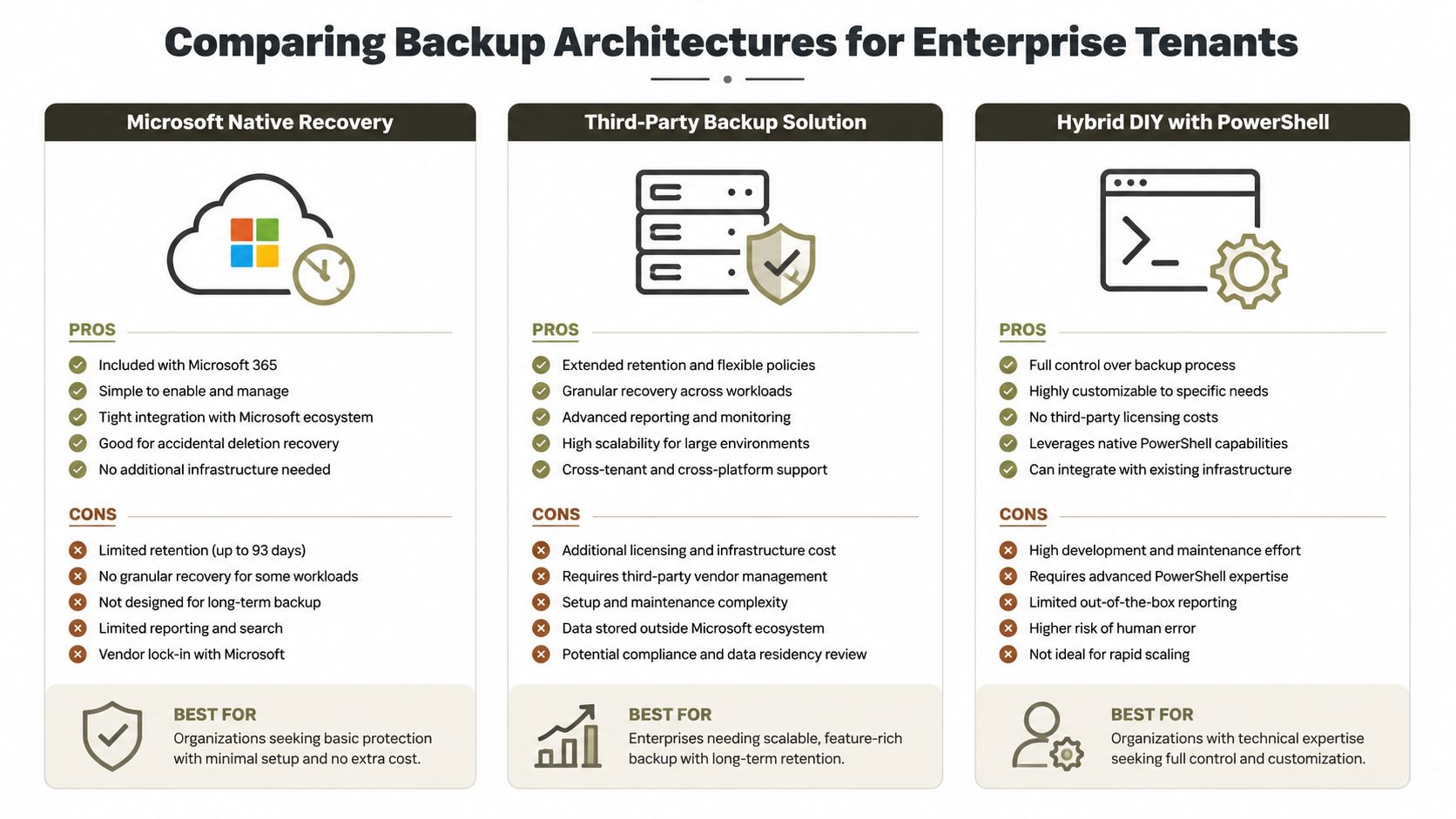
Three patterns appear repeatedly in Microsoft 365 estates. Each has a legitimate use case, but each fails when teams apply it beyond its design boundary.
Microsoft native recovery
Native Microsoft recovery gives you platform-integrated protection and reduces the number of external components your team must operate. It suits smaller tenants with straightforward data structures, limited customisation, and recovery requirements that align with the available platform windows.
It becomes inadequate when you need independent protection outside the tenant, detailed restore orchestration, cross-tenant mapping, or evidence that reflects your business process rather than Microsoft's service boundary. Native recovery also doesn't remove path, throttling, list-scale, identity, or permission constraints.
Ollo Verdict: Use native recovery for simple tenants with modest operational complexity. Don't present it as a complete enterprise disaster recovery design.
Third-party backup platforms
Third-party tools can add independent copies, centralised management, reporting, retention controls, and more convenient restore workflows. Products such as ShareGate can help with migration and administration when the data model fits the tool's supported operations. Resources covering laptop backup services in Sheffield also illustrate how managed backup services can support organisations that need operational help rather than another unmanaged console.
The breaking point arrives when the estate contains complex inheritance, large libraries, unusual paths, tenant identity differences, or substantial remediation debt. A product may report a completed job while leaving exceptions that require human analysis. You still need to understand API pacing, object mapping, validation, and audit evidence.
Ollo Verdict: Use a third-party platform for mid-scale environments where its restore model matches your data. Demand exception reporting and independent validation before relying on it for regulated recovery.
Hybrid scripting and specialist control
A hybrid design combines independent backup protection with controlled PowerShell PnP automation, validation tooling, and human-led remediation. It requires more engineering, but it gives your team control over request pacing, checkpoints, object mapping, permission comparison, and evidence generation.
Custom scripting doesn't magically remove platform limits. It makes those limits explicit and manageable. A well-designed process can pause, resume, record failures, isolate problematic objects, and prevent one oversized library from hiding broader recovery gaps. A poorly designed script fails more quickly and leaves less reliable evidence.
Review the implications of SharePoint multi-tenant architecture before you choose a target design, especially when your consolidation changes identity boundaries or governance ownership.
The Ollo Verdict: for regulated organisations with large, complex SharePoint estates, a hybrid architecture with specialist scripting is the defensible option. It costs more operational attention than native recovery, but it addresses the failure modes that generic tools conceal.
Deciding Between DIY Recovery and Specialist Engagement
DIY recovery makes sense only when your team can demonstrate control over the entire recovery chain. A licence, script, or successful backup report doesn't establish that control. Use the following tests to decide whether internal ownership represents a real capability or a gamble.
Start with the recovery objective
Can your team state the RTO and RPO for each critical workload, then demonstrate those objectives in a controlled exercise? If nobody owns the answer, your organisation can't measure failure. Missing this step doesn't just delay recovery. It can leave executives, customers, and regulators without a defensible account of what happened.
Do you have dedicated expertise in SharePoint, Entra ID, Exchange, API throttling, permissions, and PowerShell PnP? If one administrator holds the knowledge, your recovery plan has a key-person dependency. That dependency becomes a business continuity risk when the incident affects the same people, systems, or credentials needed to recover.
Test the estate, not the brochure
Check your environment against these decision points:
- Data complexity: Deep paths, large libraries, custom permissions, retention labels, version history, and shared mailboxes push DIY beyond a simple file restore.
- Tenant boundaries: A consolidation or rescue migration introduces GUID conflicts, identity mapping, and cross-tenant governance issues that require specialist design.
- Compliance exposure: Personal data, legal holds, and regulated records demand immutable protection, audit evidence, and controlled access during recovery.
- Restore testing: If your team hasn't restored representative content and validated user access, the backup remains an assumption.
- Operational cover: If nobody can monitor queues, manage retries, investigate exceptions, and communicate status, the runbook won't survive a live incident.
The Irish SME resilience report found that only 22% had a cyber incident response plan and only 32% tested backups more than once a year, as reported in the SME Cyber Resilience State of the Sector report. Your organisation may have stronger controls, but you should prove that distinction rather than assume it.
Read Microsoft 365 administrator versus consultant guidance when deciding whether your internal role has enough time and depth for recovery engineering.
Ollo Verdict: DIY is reasonable only where your team owns the expertise, testing schedule, evidence process, and incident authority. If any of those gaps remain, specialist engagement reduces risk because it replaces assumptions with assessment, controlled execution, and documented proof.
Remediation Playbook for Tenant Consolidations and Rescue Migrations
A rescue migration needs a recovery-first design. Don't begin by copying content. Begin by proving what you have, what you must preserve, and what the target tenant can safely accept.
Establish the source baseline
Inventory sites, libraries, OneDrive accounts, shared mailboxes, permissions, versions, retention controls, and identity relationships. Run path hygiene checks and identify libraries approaching Microsoft's documented scale constraints. Capture hashes, object identifiers, ownership, and exception categories so your team can distinguish missing data from data that requires remediation.
Engineer the transfer path
Set concurrency deliberately. Pace requests, implement exponential retry handling, checkpoint every batch, and make jobs resumable. Don't let a throttling response force a full restart. Isolate long paths, oversized libraries, unsupported objects, and permission anomalies into review queues with named owners.
Redesign identity and trust
A tenant consolidation isn't just a content move. Review Entra ID identity mappings, privileged roles, service accounts, application permissions, conditional access, and zero-trust controls. Restore access only after you validate who should receive it. Treat broken inheritance and GUID conflicts as security defects, not cosmetic migration exceptions.
Validate the target before sign-off
Perform controlled restores and compare source and target results. Check permissions, inheritance, version history, links, shared mailbox integrity, retention behaviour, search visibility, and user access. Record the evidence in a recovery pack that includes failed objects, remediation decisions, timestamps, approvers, and outstanding risk.
For a detailed operational reference, see tenant-to-tenant migration planning. The Ollo Verdict: a rescue migration is complete only when the target is usable, secure, governed, and demonstrably recoverable. Ollo handles complex Microsoft 365 consolidations, Entra ID redesigns, and rescue migrations with ShareGate and custom PowerShell PnP workflows built around those controls.
If your Microsoft 365 estate contains regulated data, complex SharePoint permissions, or a tenant consolidation risk, ask Ollo to assess your backup and recovery path before an incident exposes the gaps. We can map your RTO and RPO, test restoreability, identify throttling and GUID risks, and produce a controlled remediation plan for your next migration.

















