Your file server is probably still serving as the unofficial system of record. Finance relies on folder permissions, legal relies on restricted workspaces, and operations relies on paths nobody documented properly. Then someone proposes a SharePoint migration from file server storage as a copy exercise, sets a target date, and discovers during cut-over that the destination contains the files but not the controls that made those files defensible.
That approach fails because SharePoint migration is an information architecture and compliance project disguised as file transport. Microsoft confirms that SharePoint Online throttles migration workloads to protect service reliability, and that support can't disable or override this throttling. Microsoft also documents a 5,000-item list view threshold, a 250 GB maximum individual file size, and a 50,000 unique security scope limit. These aren't obscure edge cases. They're the boundaries your migration plan must respect.
The documentation says X, but reality is Y. A tool can copy files successfully while your organisation loses permission clarity, retention evidence, metadata quality, or a defensible audit trail. The following controls exist to stop your team from turning a production migration into a legal and operational incident.
Why File Server Migrations Break in Production
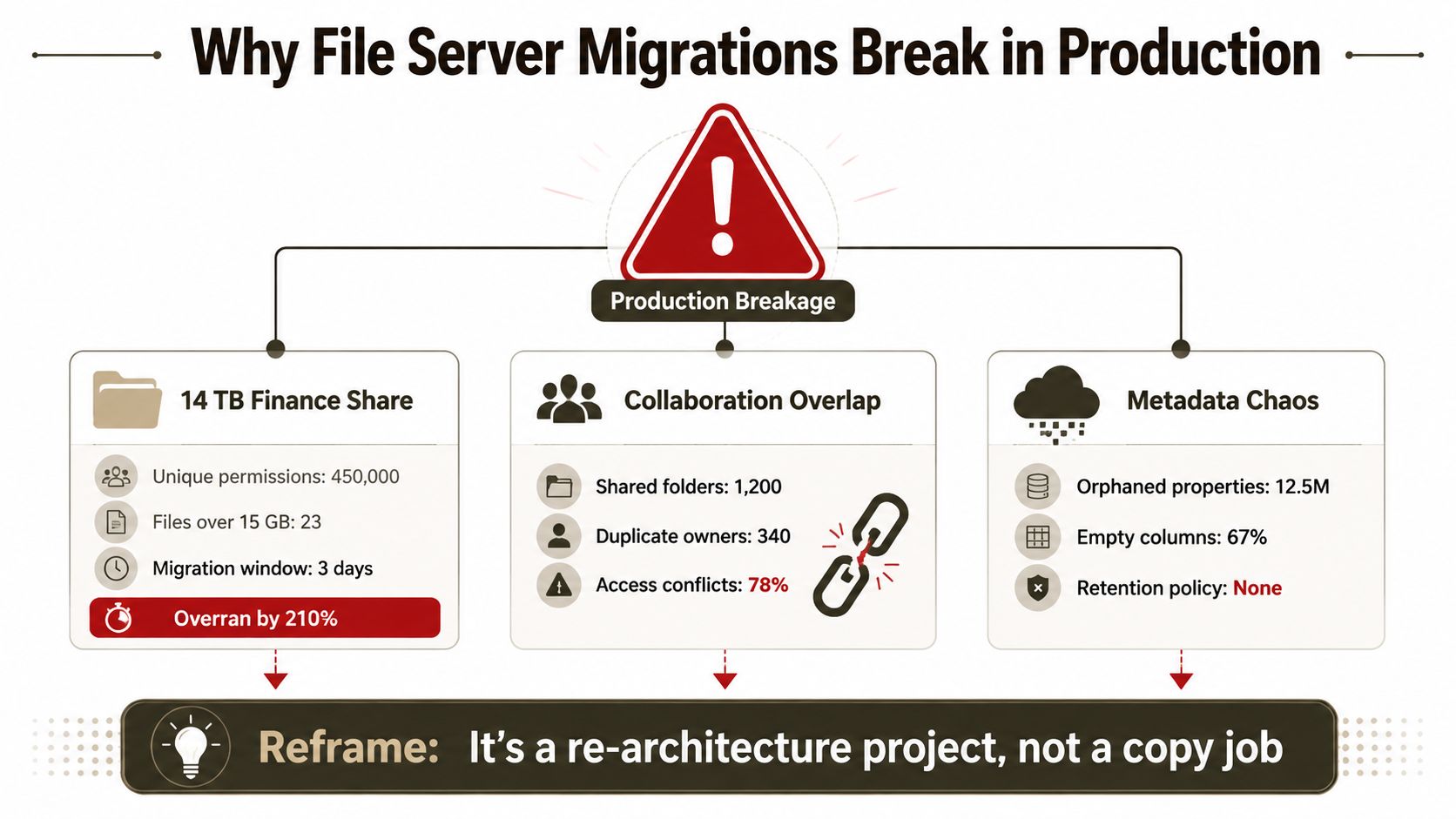
A finance share can move quickly and still arrive with an unusable permission model. A legal department can retain its folders while losing the classification context that restricted disclosure. A healthcare organisation can complete the copy and still fail to reconcile who had access, when access changed, and which migration event created the final state. Those are compliance failures, not merely technical defects.
The cloud is not the primary problem. Microsoft's migration guidance identifies network capacity, file size, migration timing, and throttling as factors that affect throughput, and warns teams not to overload the migration queue. The larger risk is architectural. Teams often treat an old NTFS structure as a finished access design, then reproduce its exceptions inside SharePoint without testing whether the result can be governed or defended.
Three failures that start before the copy
A finance migration can expose fragmented permissions across folders and files only during cut-over. If the destination cannot reproduce that structure, users either lose access or receive more access than policy allows. SharePoint libraries and lists cannot exceed 50,000 unique security scopes, according to Microsoft's permission migration guidance. Set a security-scope limit during design review, then redesign access before the target becomes an ungovernable library.
Legal content carries a different risk. NTFS permissions and local classification practices do not automatically become SharePoint metadata, sensitivity labels, or retention controls. If the inventory does not identify sensitive material and an accountable business owner, the destination can make records easier to search while weakening disclosure controls and retention evidence.
Healthcare migrations raise the audit burden further. If source access, destination permissions, and migration events cannot be reconciled, investigators may be unable to establish who could view records and when. The organisation then spends staff time reconstructing chain-of-custody evidence, while senior leaders answer for gaps that should have been prevented.
Queue discipline matters because uncontrolled retries and parallel jobs can obscure which changes completed, failed, or require validation. Treat each workload as a controlled release with ownership, sequencing, and an evidence record. The file server migration guidance from Ollo reflects that operational approach.
Architectural rule: Fund permission redesign, metadata mapping, validation, and evidence capture as migration work. Copy speed is only one workstream.
Before disabling the source, require validation gates for access, classification, retention, and audit evidence. The migration problem is permission re-architecture and disciplined queue management, not file transport. A specialist team can challenge the source design before production inherits its legal and operational weaknesses.
Discovery and Content Inventory That Survives Audit
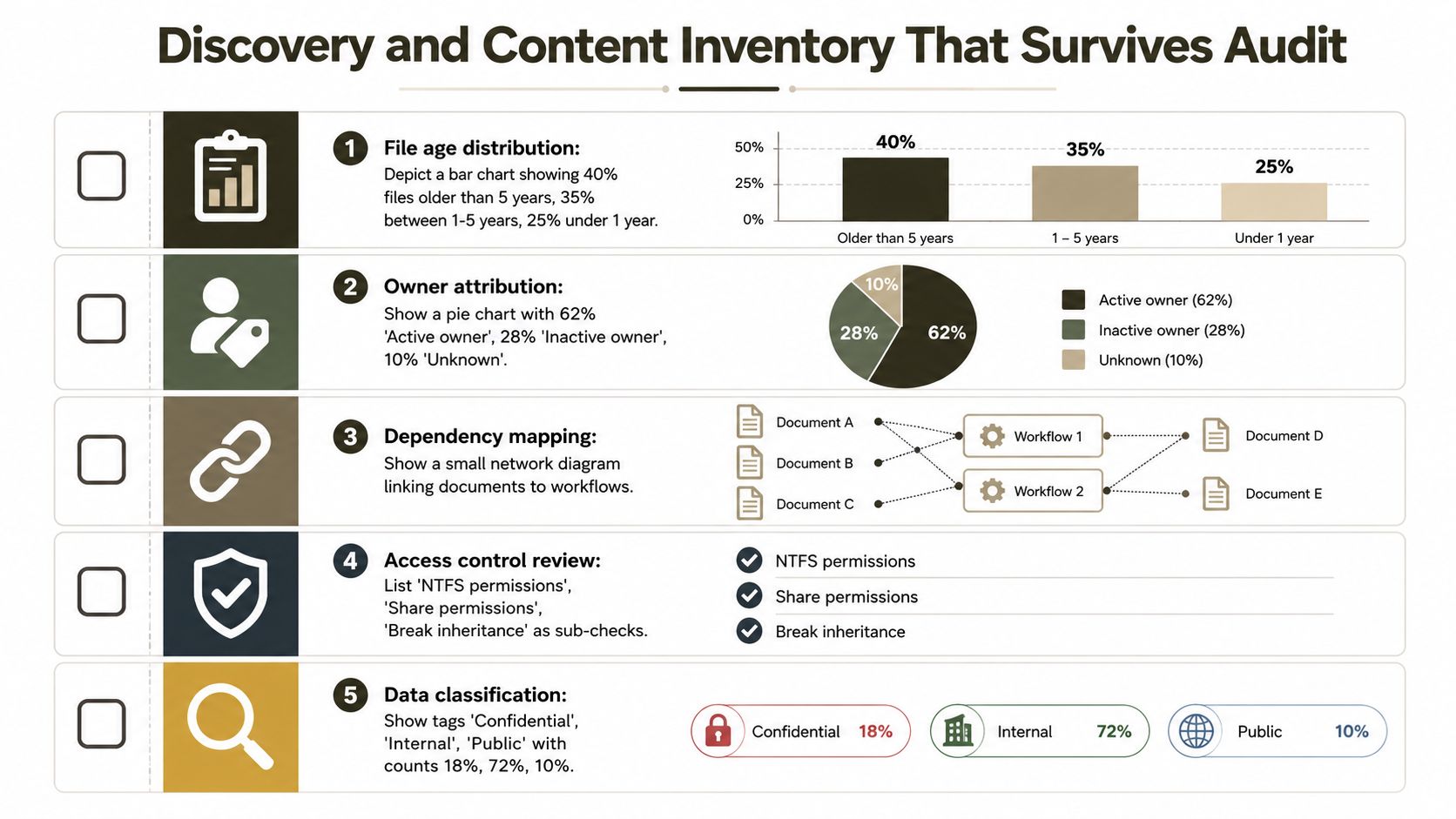
Discovery must produce evidence, not a colourful dashboard. Before your team makes a SharePoint API call, it needs a forensic inventory that explains what exists, who owns it, who can access it, and which content carries legal or operational significance.
Start with the file system, but don't stop at a folder tree export. Your inventory should capture:
- Age distribution: Identify stale, active, and recently changed content so business owners can decide what deserves migration.
- Owner attribution: Map folders and files to accountable people or groups, then flag inactive and unknown owners.
- Access heat maps: Record last-access patterns and distinguish used content from inherited clutter.
- Sensitivity markers: Identify confidential, regulated, legally held, or operationally critical material before it lands in a searchable cloud library.
- Custom file types: Flag engineering formats, application exports, archive objects, and other content that may need a special handling decision.
- ACL structure: Count explicit permissions, inherited permissions, broken inheritance, and orphaned accounts at folder level.
- Dependency evidence: Connect documents to workflows, scripts, applications, and reporting processes that still expect a file-server path.
Build an audit pack before migration
A regulated-sector audit will demand more than a screenshot of a migration console. Produce signed inventory reports, CSV manifests with hash values, and a documented sample of files flagged for legal hold. Record the collection method, the responsible reviewer, the time of extraction, and the rules used to classify exceptions.
Your discovery process must also surface GUID-bearing files, oversized objects, invalid names, deep paths, and URL-length offenders before they enter a live queue. Microsoft confirms that file-share migrations support individual files up to 250 GB and that queue management affects throughput. A file that fails late in a batch costs more than transfer time. It creates investigation, reruns, and uncertainty over whether the source or destination contains the authoritative version.
Pretty dashboards help people explore findings. They don't automatically create defensible evidence. Use tooling that exports reproducible manifests, preserves error detail, and allows reviewers to trace a decision from source object to destination outcome. A SharePoint migration assessment from Ollo should result in an exception register with named owners, not a generic readiness score.
Discovery also gives legal and compliance teams their last clean opportunity to decide what shouldn't move. If your team leaves classification until after migration, it has already expanded the search and access surface of the new environment. That turns a data-shaping decision into a post-go-live remediation programme.
Mapping NTFS Permissions and Broken Inheritance
A file copy can succeed while access control fails. NTFS ACLs contain local groups, system accounts, nested domain relationships, and explicit deny entries that SharePoint Online cannot reproduce in the same form. A user may see simple access on the file server while the underlying inheritance chain creates an ambiguous result after migration. Treat that ambiguity as a compliance defect, not an IT inconvenience.
Preserving every source permission does not preserve compliance. A chaotic permission tree creates excessive unique scopes, obscures ownership, and makes access reviews difficult to complete. SharePoint guidance sets a boundary of 50,000 unique security scopes per library or list, with a 100,000-item limit for updates or removals involved in creating a new security scope. Use its permission guidance to define the target design before any ACL is converted.
Translate the control, not the syntax
Build a permission matrix that records the source construct, target behaviour, owner, and compliance decision. The migration tool must execute that decision, never invent it. An unresolved principal or explicit deny requires an approved outcome before the file enters the migration queue.
| NTFS Construct | SharePoint Behaviour | Migration Risk |
|---|---|---|
| Inherited folder access | Maps to inherited site, library, or folder access where the target design permits it | A poorly chosen break in inheritance can multiply security scopes and complicate reviews |
| Explicit allow entry | Maps to a SharePoint user or group if the identity resolves | An unmapped identity can leave a user without access or create an unexplained exception |
| Explicit deny entry | Requires a deliberate redesign because SharePoint access control does not provide a direct equivalent for every NTFS deny pattern | Removing the deny without compensating controls can expose restricted content |
| Nested domain group | Requires identity mapping and validation in Entra ID or SharePoint groups | Group collapse can change effective access without an obvious file-copy error |
| Local computer group | Usually has no meaningful cloud identity equivalent | Claims may fail to resolve, leaving orphaned or overstated permissions |
| System account or Creator Owner entry | Needs a target-specific interpretation | Automated or ownership-related behaviour may disappear after migration |
Flatten groups where the business rule allows it. Replace deny-based designs with positive access groups and defined site or library boundaries. Document every principal mapping, including unresolved accounts, and pre-stage target groups before content moves. Validate identity relationships rather than trusting matching display names.
Broken inheritance requires a business decision. If a folder needs different access, move it into a separate library or controlled site structure when that reduces security fragmentation. If it does not, restore inheritance before migration. A wrong decision can produce unauthorised disclosure, an incomplete access review, or a failed legal hold process.
Queue discipline matters here. Do not release permission-heavy batches until identity mappings, exception owners, and approval evidence are complete. A late ACL failure can leave content copied but access unresolved, forcing reviewers to determine which version is authoritative and whether restricted material was exposed.
For complex estates, use the SharePoint permission migration service from Ollo to turn ACL translation into a documented control design. The destination should be easier to govern than the source. If it is not, the migration has transferred the compliance problem rather than solved it.
Choosing Between SPMT, ShareGate, and PowerShell PnP
Tools don't remove architectural risk. They expose different controls, and each one fails when your team applies it outside its safe operating range.
SPMT has a legitimate role. It's appropriate for a small pilot with flat permissions, ordinary files, and a clearly bounded destination. Microsoft's file-share guidance supports a pilot, incremental migration, and one controlled cut-over, which makes SPMT useful for proving connectivity and user behaviour. It doesn't turn nested NTFS permissions, custom metadata, or a damaged source estate into a safe enterprise design.
ShareGate gives migration teams stronger operational visibility and practical permission mapping. Its reporting, diagnostics, and rerun capabilities suit complex estates where your team needs to investigate warnings rather than declare success from a completion screen. The trade-off is licensing cost and the need for an architect who can configure the tool around your information model instead of dragging a folder tree into a library.
PowerShell PnP offers the greatest control. It's the right choice when you need custom content types, complex metadata rewrites, conditional permission flattening, or bespoke validation. It also creates an engineering responsibility. Your team must design queue depth, retry handling, idempotency, logging, authentication, and recovery. A script that works in a test folder can still fail when SharePoint applies back-pressure.
| Dimension | SPMT | ShareGate | PowerShell PnP |
|---|---|---|---|
| Best fit | Small, controlled pilots | Instrumented enterprise migrations | Bespoke taxonomies and transformation |
| Permission handling | Suitable for flat structures | Strong mapping and reporting options | Fully custom, but entirely your responsibility |
| Recovery | Limited by job design | Practical reruns and reporting | Requires deliberate state management |
| Metadata transformation | Basic scenarios | Configurable mappings | Maximum flexibility |
| Main failure point | Complex ACLs and exceptions | Poor architecture hidden behind good tooling | Queue, error, and identity logic written incorrectly |
| Ollo verdict | Use it for a pilot, not a regulated enterprise cut-over | Use it for complex, governed migration work | Use it when custom logic justifies engineering ownership |
If you're evaluating adjacent administration controls, this overview of SharePoint administration software provides useful context on management capabilities. Administration software doesn't replace migration design, permission mapping, or evidence collection.
The boundary is clear. Use SPMT for tiny pilots. Use ShareGate for complex regulated work. Use PnP for bespoke transformation, with an experienced team accountable for every retry and exception. DIY PnP becomes uninsurable when a tenant contains regulated healthcare, financial, or legal data across multiple regions and nobody independent owns the cut-over risk. The SharePoint migration tool guidance from Ollo follows that division rather than pretending one product solves every scenario.
API Throttling, Large Files, and the Hard Ceilings
Your migration queue is not a private pipe into SharePoint. SharePoint Online protects shared service reliability by throttling migration workloads, and Microsoft says support can't disable or override that behaviour. Background applications, including migration tools, receive limited throughput during weekday business hours, with better processing windows in evenings and weekends, according to Microsoft's SharePoint Online throttling guidance.
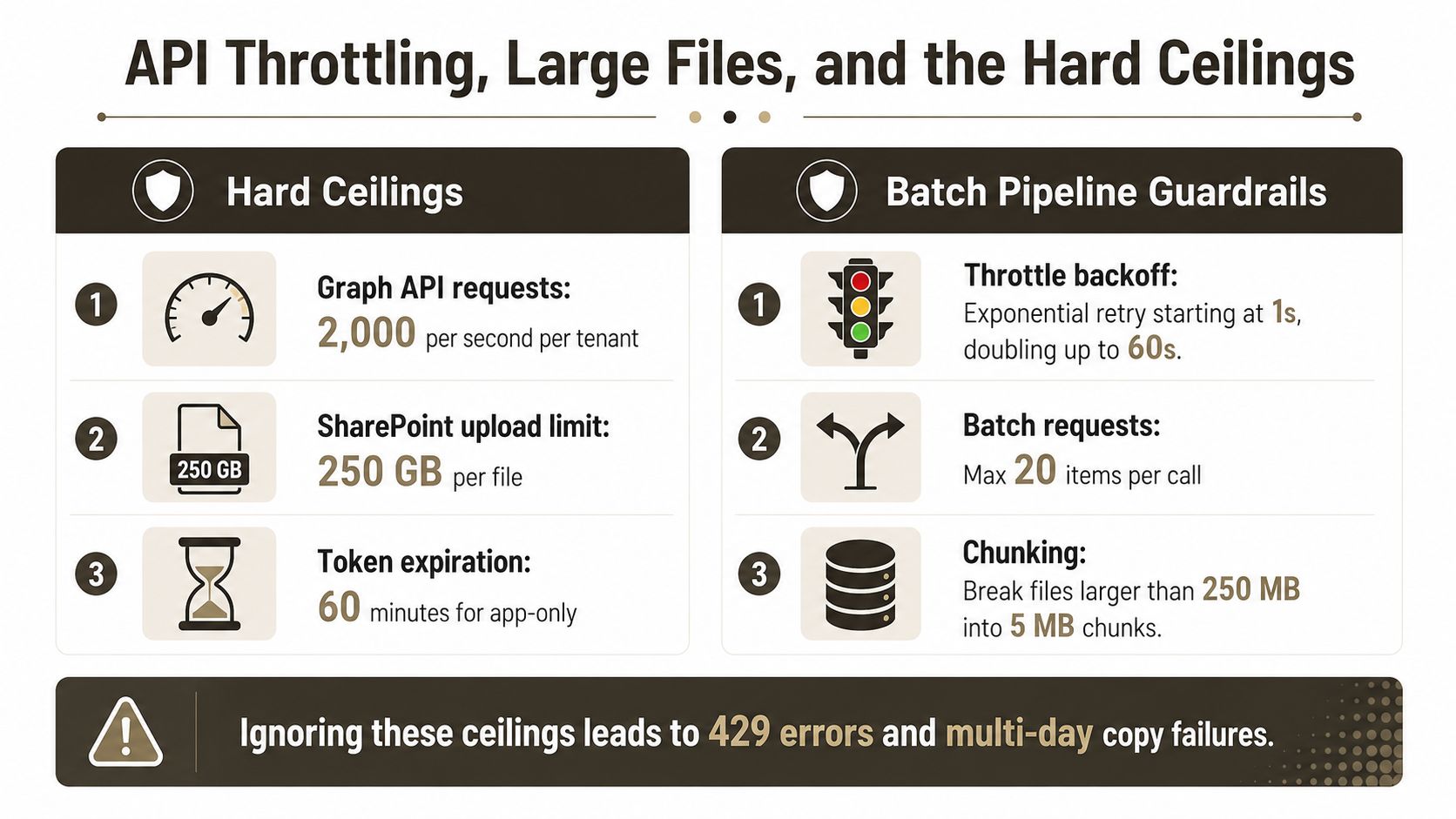
Microsoft also documents operational ceilings including 3,000 requests per user per five minutes, with tenant resource-unit caps that scale by licence count. The exact licensing profile doesn't guarantee unrestricted throughput. Your team can still trigger back-pressure by starting too many jobs, restarting failed work immediately, or allowing a queue to grow without control.
Run a controlled batch pipeline
Microsoft warns against submitting more than 5,000 migration jobs or requests at one time in its migration start guidance. Keep batches bounded, record their state, and let the service recover instead of treating every 429 or 503 response as a reason to restart the job.
Use these controls:
- Queue discipline: Keep work in controlled batches and avoid flooding the service.
- Retry behaviour: Honour back-off and retry responses. Don't launch duplicate work while the original request may still exist.
- Off-peak scheduling: Prefer evenings and weekends where the business can tolerate the window.
- File validation: Check every object against Microsoft's 250 GB supported file-size ceiling before scheduling it, as documented in the file-size limitations.
- Source diagnostics: Validate SMB 2.0 or higher, migration-host disk performance, local network capacity, and competing software before blaming SharePoint. Microsoft documents these constraints in its migration prerequisites.
- Path and name checks: Sanitise rejected characters and validate path depth before the queue receives the item. Don't rely on a late error report to discover structurally invalid content.
A library can contain more than 5,000 files, but Microsoft confirms that operations and views exceeding the 5,000-item list view threshold can be blocked in SharePoint Online, and that the threshold can't be changed. Index columns, design purposeful views, and split content where one library would become operationally unmanageable. Microsoft's large-list guidance makes the compliance implication clear: users and automation must be able to retrieve governed content predictably.
Use throttle-event logs as compliance evidence. They show that your team respected service controls, managed exceptions, and didn't conceal incomplete work behind a green progress bar.
Cut-Over, Delta Sync, and Rescue Procedures
A cut-over weekend should look more like a controlled change event than a copy marathon. Microsoft's file-share migration guidance recommends a small pilot, incremental migration, and one final cut-over. Before that final event, your team should make the source share read-only just before the final delta sync, so users can't keep changing files while the destination is being finalised.
Start with a written freeze decision. Notify owners, record the source state, stop writes, and run the delta pass against a stable source. The destination must not become authoritative until validation gates pass. A rollback plan should identify who can restore access to the source, how users will receive direction, and which evidence proves whether the target is safe to use.
Validate before redirecting users
Use a validation pack with three distinct tests:
- Content comparison: Compare hashes for a defined sample and investigate every mismatch rather than treating a transfer warning as harmless.
- Permission equivalence: Test representative users against the approved permission matrix, including restricted folders, inherited access, and former orphan accounts.
- Evidence capture: Export migration logs, exception decisions, owner approvals, and the final source freeze record into the audit binder.
Don't redirect users because the tool reports completion. Completion means the tool finished its instructions. It doesn't prove that the instructions matched your legal, operational, or information architecture requirements.
Rescue migrations require a different mindset. When a previous attempt has already created folders, GUIDs may collide, orphaned items may remain in recycle bins, and the target may contain a mixture of valid and invalid permissions. Run a side-by-side diff before writing more data. Detect duplicate GUIDs, classify existing objects, and choose deliberately between merge, overwrite, and quarantine.
Cloud migration planning resources, including these 2026 migration strategies and best practices from CloudCops GmbH, can help frame the broader change programme. They don't replace tenant-specific investigation after a failed attempt.
The safer answer may be a clean third migration. Choose it when the target's permissions no longer have a trustworthy baseline, when duplicate objects obscure authoritative versions, or when earlier scripts changed metadata without preserving a reliable log. Attempting to repair a contaminated tenant can cost more auditor time than rebuilding a clean destination with an approved design. The SharePoint migration rollback approach from Ollo treats rollback as an engineered control, not an emergency promise.
Why DIY Stops Working at Enterprise Scale
DIY stops being responsible when your team can't explain the blast radius of one failed ACL, one incomplete delta, or one queue that kept retrying after throttling. Large estates combine permission fragmentation, invalid paths, oversized files, stale ownership, and competing business deadlines. A generalist administrator can manage individual issues. They often can't manage their interaction during a production cut-over.
The pressure becomes acute for environments holding more than 5 TB, more than 50 million items, or any regulated legal, healthcare, or financial workload. Those figures define a risk boundary for this editorial recommendation, not a Microsoft service limit. The compliance threshold is simpler: if one broken permission can become an audit finding, your organisation needs independent migration architecture.
The three ceilings your team hits together
The first ceiling is security fragmentation. Microsoft's documented 50,000 unique security scope boundary means a source that relies heavily on broken inheritance needs redesign before migration. Preserving every exception can make access reviews harder and can prevent your team from proving that restricted content remains restricted.
The second is structural. Microsoft documents a 250 GB individual file ceiling, while its SharePoint guidance also confirms that large libraries must respect the 5,000-item view threshold. Deep paths, rejected characters, and oversized objects turn a supposedly complete copy into a list of exceptions that users discover after go-live. Those discoveries create service tickets, manual workarounds, and uncertainty over which version belongs in the legal record.
The third is queue control. Microsoft confirms that SharePoint Online throttles migration workloads and documents request and tenant resource limits. If one administrator starts 14 concurrent migration jobs, the number itself doesn't create a Microsoft-defined limit, but it creates an obvious operational risk: the administrator may lose the ability to distinguish source bottlenecks, throttle responses, duplicate work, and genuine data failures.
| Factor | DIY Internal Team | Specialist Consultancy |
|---|---|---|
| Discovery | Often limited to folder exports and dashboards | Produces manifests, ownership decisions, ACL analysis, and exception evidence |
| Permission design | Preserves source complexity by default | Redesigns access around target governance and reviewability |
| Queue management | Depends on one or two administrators | Uses controlled batches, retry state, and independent monitoring |
| Cut-over | Driven by date pressure | Governed by freeze, delta, validation, and rollback gates |
| Rescue work | Often starts with another copy attempt | Begins with target forensics and a merge, overwrite, quarantine, or rebuild decision |
| Failure cost | Overtime, rework, audit exposure, and retraining | A defined engagement with specialist ownership of migration risk |
The fixed-fee economics of specialist work aren't about making the copy cheaper. They're about assigning accountability before an incident forces the board, compliance team, and legal counsel into the same room. Regulated organisations shouldn't run a first production cut-over on live file servers without an external migration architect who has handled at least one rescue engagement.
Ollo assesses file estates, redesigns permissions, builds ShareGate and PowerShell PnP migration plans, controls cut-over, and handles rescue migrations where the target already contains conflicting objects. Visit Ollo to arrange a migration assessment focused on permissions, throttling, audit evidence, and a defensible route from your file server to SharePoint Online.