Your migration plan looks tidy in the steering-committee deck. The source inventory is complete, the target tenant exists, and someone has booked a weekend cutover. That does not mean your data, permissions, identities, or audit evidence will survive the move.
Irish enterprise data already shows the danger. In 2024, 40% of large-organisation IT decision-makers in the Republic of Ireland identified IT security risks as a main concern when adopting and managing cloud computing. 30% cited data loss or theft and ransomware or malware, 26% said current laws and regulations weren't sufficient to protect privacy, access, and confidentiality, and 24% believed their organisation lacked sufficient capability to manage cloud effectively. Worse, 36% of cloud users admitted to little or no visibility of workloads in the cloud. (ThinkBusiness)
I've spent 15 years cleaning up after migrations that looked successful until users, auditors, or legal teams tested them. The recurring lesson is blunt: cloud migration risks don't arrive as one dramatic failure. They stack small omissions until the cutover window carries more risk than your team can detect.
The Monday Morning Your Migration Breaks
A tenant-to-tenant migration went live on a Sunday. The project team had approved the change, closed the command centre, and treated the absence of overnight escalation as proof that the move had worked.
By Monday morning, it hadn't.
The help desk started receiving reports of inaccessible SharePoint sites and missing folders. Permission inheritance had broken across parts of the target structure. A finance folder had landed in a personal OneDrive account because an SPMT job failed near the end of its queue, and nobody watched the migration log closely enough to catch it.
The failure didn't begin at 08:30. It began with a chain of decisions that each looked survivable in isolation. The team accepted a Friday go-live pattern, an intern imported the CSV, the project skipped the final delta sync, and nobody verified whether the delta query captured changes made during the migration window. The team also treated job completion as a binary status instead of validating files, permissions, ownership, and destination paths.
War-room lesson: A green dashboard doesn't prove that regulated content, access boundaries, and audit evidence arrived intact.
That incident changed how we assess cloud migration risks. Prevention matters, but detection time matters more once production cutover begins. A missed file discovered during rehearsal gives your team options. The same file discovered by a finance user on Monday morning becomes a business incident, a records-management question, and potentially a compliance problem.
Microsoft's own SharePoint migration guidance documents throttling, service limits, path restrictions, and permission constraints. Your project doesn't fail because the documentation is unclear. It fails because nobody converts those constraints into pre-flight tests, owner decisions, monitored jobs, and rollback triggers.
The rest of this guide focuses on that gap. Your team needs to plan for the failure modes that appear after the copy starts, not just the tasks required to start it.
Why Cloud Migration Risk Is Really Three Risks Stacked
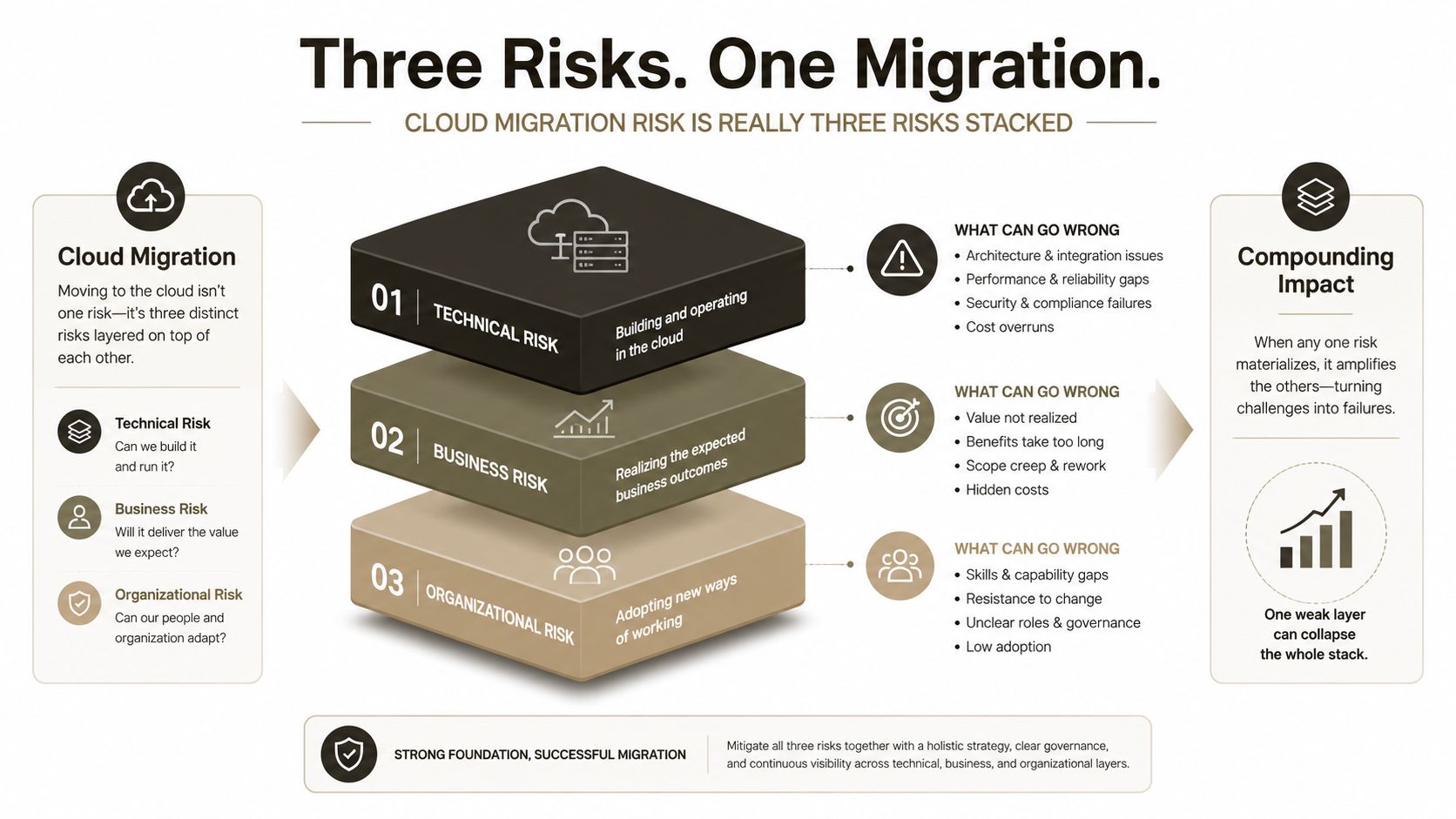
Cloud migration risk is three connected risks, and a cutover can trigger all of them at once.
Technical risk covers API throttling, list view thresholds, path length, item boundaries, permission-scope limits, and cross-tenant service rules. Security risk covers broken inheritance, overshared links, identity mapping, Entra ID group changes, and GUID conflicts. Compliance risk covers GDPR obligations, NIS2 accountability, residency controls, and the integrity of audit evidence while data is moving.
One operation can trigger all three
A permission update against a large SharePoint library shows the failure pattern clearly. The request can hit a technical throttle. If the update fails or only partly applies, users may receive incorrect access, creating a security exposure. If the library contains regulated records and the migration window has no defensible audit trail, the same event becomes a compliance issue.
That is one migration event, not three separate tickets. Infrastructure, security, and compliance owners must assess the same operation together.
Separate inventories create predictable gaps. Infrastructure records copied objects. Security records identities and access. Compliance records data categories and obligations. Without a shared relationship between those records, each team can approve a different version of “complete”.
The Irish cloud situation reflects this control problem. Concerns recorded by ThinkBusiness include security, data loss, legal sufficiency, capability, and workload visibility, as noted earlier. The organisation must prove what moved, who can access it, where it resides, and whether the target remains within its operating boundaries.
The 2026 cloud migration planning guide provides broader context for aligning business, technical, and governance decisions. That context is useful only when the runbook converts it into executable gates, named owners, validation checks, and rollback triggers.
Working definition: Unified migration risk is the probability that a technical constraint, security control failure, or compliance gap will affect the same workload during the migration window.
Treat that definition as an operating rule. For regulated estates, a specialist runbook is the only credible defence. Every workload needs a named owner, a tested control path, and an explicit response when the target platform rejects an operation. Each documented Microsoft limit must become a cutover-window test, not a footnote discovered during production transfer.
API Throttling Is Not a Nuisance, It Is a Cutover Risk
Your migration tool doesn't get an unlimited SharePoint API. Microsoft Online services enforce request budgets to protect service performance, and Microsoft Learn documents HTTP 429 and 503 responses, the need to honour Retry-After, and resource-unit limits. One documented set of limits includes 3,000 requests per container per minute and 12,000 resource units per app per tenant per minute. SharePoint Online guidance also gives examples such as 3,000 requests per five minutes per user, alongside tenant caps that scale by licence count. (Microsoft Learn)
| Service | Limit | Scope | Migration impact |
|---|---|---|---|
| SharePoint Online resource requests | 3,000 requests per container per minute | Container | High-concurrency jobs can trigger throttling |
| SharePoint Online resource units | 12,000 resource units per app per tenant per minute | App and tenant | A shared migration app can exhaust the tenant budget |
| SharePoint Online user requests | 3,000 requests per five minutes | User | Per-user activity can collide with migration traffic |
| Throttled responses | HTTP 429 and HTTP 503 | Service operation | Jobs need controlled retry behaviour and monitoring |
The important distinction is between retrying and backing off intelligently. A retry that immediately resubmits the same request adds pressure to an already constrained service. Your migration engine must honour Retry-After, reduce concurrency, preserve job state, and distinguish a temporary service response from a permanent content or permission failure.
Microsoft also states that throttling during background migration work is expected and cannot be turned off. Its guidance says support won't lift the limit because throttling protects service reliability and availability. (Microsoft migration guidance)
Throughput averages lie
A tenant that runs quickly for ten minutes, then sleeps for an hour, hasn't met a Saturday deadline. Raw copy speed tells you almost nothing if retries, queue starvation, failed batches, and business-hour contention dominate the window.
The documentation recommends off-peak scheduling, fewer concurrent requests, and app-based authentication. Reality is less forgiving. Large DIY jobs still get throttled when teams put everything into one oversized task or run the busiest operations while users remain active.
Operational rule: Design for the throttle, not around it.
Your runbook needs a throughput baseline, concurrency limits, retry states, queue segmentation, and an escalation path for jobs that repeatedly fail. It also needs a cutover decision based on validated completion, not the volume of requests submitted.
The Ollo performance optimisation guidance is relevant because limits, batching, permissions, and workload shape must be treated as one engineering problem. The Ollo verdict: use a migration tool only after you have measured the tenant's service behaviour. For regulated tenant moves, custom throttling controls and specialist monitoring belong in the runbook, not in a post-failure investigation.
The SharePoint Limits That Turn Into Data Loss
Microsoft's limits aren't trivia for an architecture appendix. They define what can arrive in the target tenant before your cutover window closes.
SharePoint Online enforces a List View Threshold of 5,000 items. Microsoft Support says database operations such as queries that exceed this limit can be blocked, and the limit can't be changed in SharePoint Online. (Microsoft Support) A production library may look fine during a narrow pilot and then fail when users run a view, a workflow queries records, or reporting reshapes the content.
The failure extends beyond a blocked view. Power Automate flows can time out, Power BI refreshes can return incomplete results, and users can lose the access pattern they relied on before cutover. If your team dumps everything into one library and promises to reorganise later, you've turned information architecture into an outage risk.
Four boundaries need owner decisions
| SharePoint limit | Technical value | Cutover failure mode | Required mitigation |
|---|---|---|---|
| List View Threshold | 5,000 items | Blocked queries, broken views, failed automation | Inventory large lists, index and redesign views, split libraries |
| Cloud storage path | 400 decoded characters | Files with long combined paths and names fail to upload or migrate | Shorten site, folder, and file names before the move |
| Cross-tenant site boundary | 5 TB or 1 million items | Large sites can time out and fail during cross-tenant movement | Split content, reduce scope, and test migration waves |
| Unique security scopes | 50,000 per library or list | Permission reconstruction can stall and return HTTP 429 | Remediate broken inheritance and redesign access before cutover |
Microsoft documents the 400-character limit for the entire decoded SharePoint or OneDrive file path, including the file name. (Microsoft path limits) Source systems often tolerate deep folders and long names. SharePoint Online doesn't promise the same tolerance. A file that fails to land can become a records-management, legal-hold, or business-process failure.
Microsoft Learn also documents the 50,000 unique security scope limit per library or list and a 100,000-item limit for permission updates or removals when creating a new security scope. Once the permission update hits the boundary, permission-modifying calls can return HTTP 429 and the update won't complete. (Cross-tenant SharePoint migration limits)
Cross-tenant sites must remain at or below 5 TB or 1 million items, or larger sites can time out and fail. The same Microsoft documentation confirms a 400-character post-migration path cap, so tenant renaming and identity redesign can create failures that generic tooling won't explain clearly.
Review SharePoint's 5,000-item limit as an information-architecture issue, not a support footnote. Every boundary needs an inventory query, an owner-signed decision tree, and a documented fallback. Default tools don't provide that governance out of the box.
SPMT, ShareGate, and Custom Scripts, The Honest Verdict
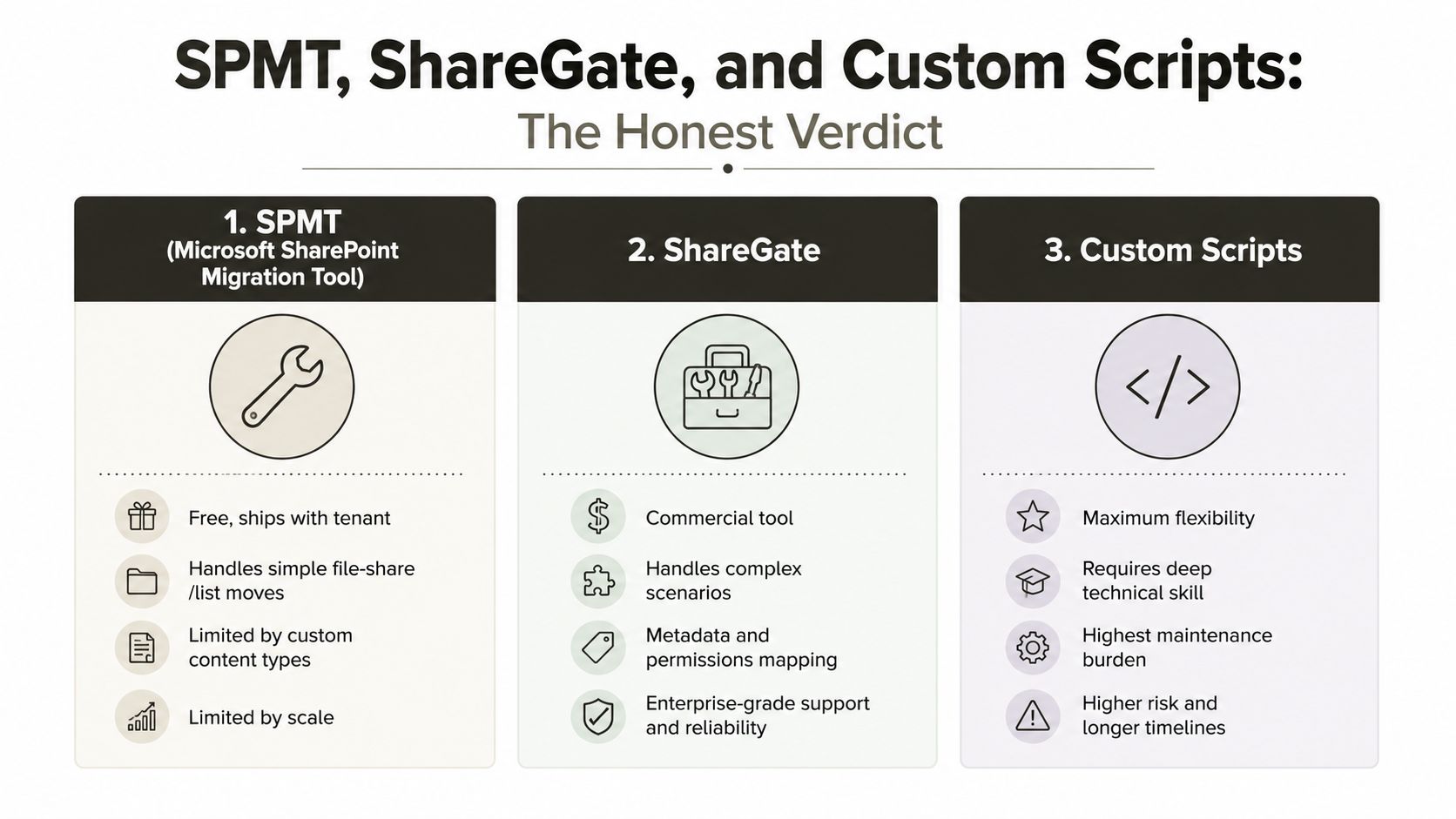
The Microsoft SharePoint Migration Tool has a legitimate place. It's free, ships with the tenant, and can handle straightforward file-share and list moves when the source has simple content, predictable permissions, and limited complexity.
That is where many teams stop thinking.
SPMT doesn't turn a complex SharePoint estate into a simple one. It doesn't redesign stale subsite hierarchies, resolve Entra ID identity mapping, preserve every downstream GUID dependency, or warn you that projected growth will push a list towards the 5,000-item threshold. It also won't give an owner a defensible answer to “what failed, what moved, what changed, and what remains unverified?” without disciplined operational handling.
ShareGate sits above SPMT for many mid-market scenarios. It offers stronger handling for metadata, content types, permissions mapping, and reporting. It still operates inside SharePoint Online service limits. No commercial interface overrides throttling, path limits, item boundaries, or permission-scope constraints.
Where scripting becomes mandatory
Custom PowerShell built on the PnP Framework gives a regulated estate the controls that a default toolchain lacks:
- Deterministic validation: Compare source and target inventories, metadata, permissions, owners, and content states.
- Controlled batching: Split work around list size, path length, security scopes, and service responses.
- Retry discipline: Honour
Retry-After, reduce concurrency, and preserve failed-job state. - Integrity checks: Use hash-verified file copies and explicit exception queues.
- Identity handling: Map users and groups deliberately instead of assuming a UPN substitution solves GUID dependencies.
The SPMT migration tool guidance helps clarify where Microsoft's tool fits. ShareGate can accelerate a carefully scoped move. PnP scripting can enforce the decisions your risk register requires.
The Ollo verdict: SPMT suits simple, low-risk moves. ShareGate suits controlled mid-market migrations with competent operators. For regulated estates, complex permissions, tenant consolidation, GUID dependencies, or rescue work, custom PowerShell PnP is mandatory. Tools buy you a head start. They don't buy you a defensible cutover.
Identity, GUIDs, and the Entra ID Trap
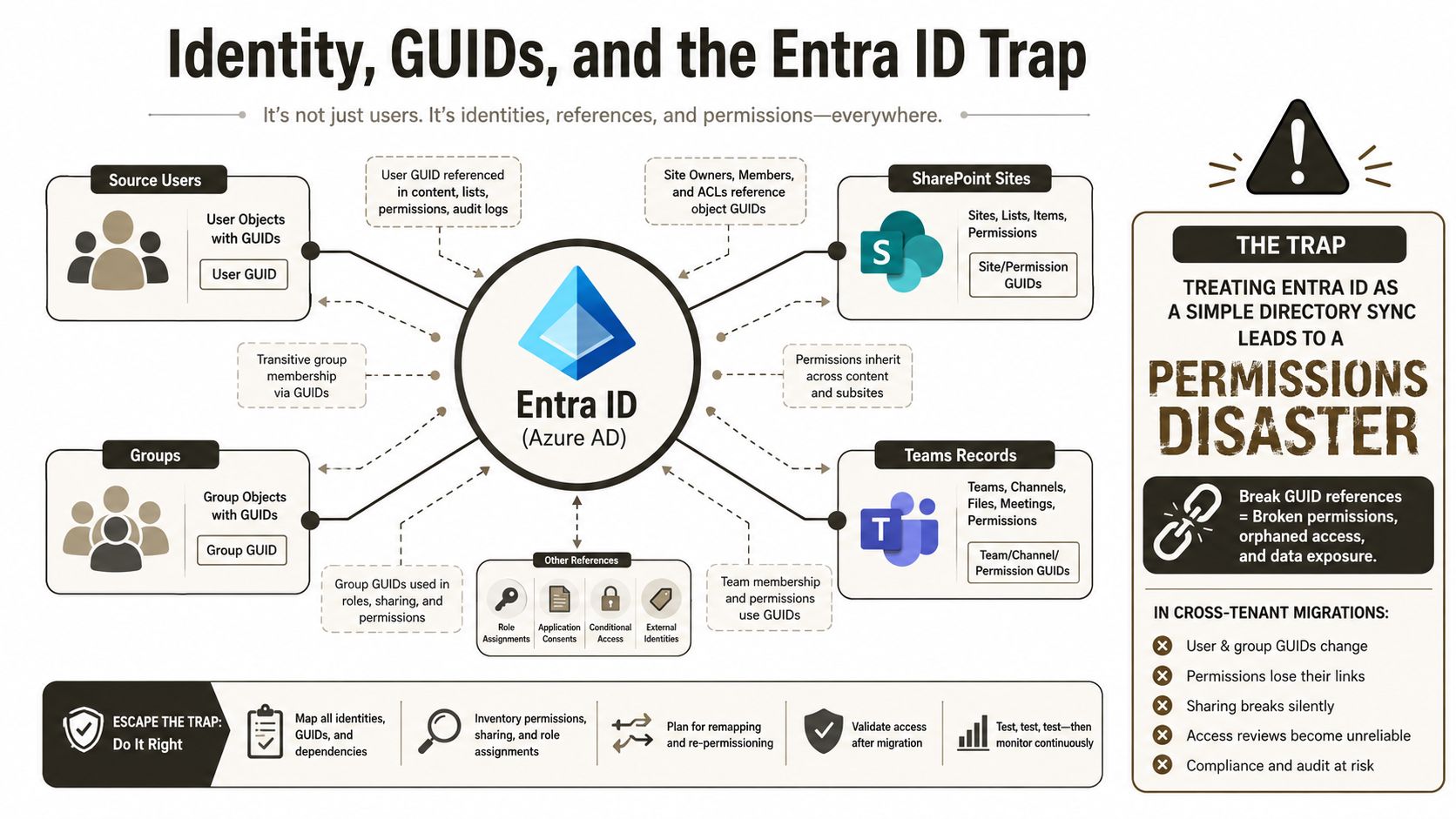
Treating Entra ID as a directory synchronisation exercise is how cross-tenant migrations produce permission disasters.
Your users, groups, SharePoint sites, and Teams records carry unique identifiers. Downstream systems can depend on those identifiers, including Power Platform solutions, Dataverse, third-party SaaS connectors, retention policies, and automation flows. A naive SID-to-UPN remap may make names look correct while leaving references orphaned or pointing at the wrong object.
The failure often appears later. A flow stops firing. An audit record loses its actor. A finance automation points at an orphaned site. A retention policy no longer targets the intended group. The migration dashboard can still show a technically completed copy.
Identity needs several passes
A safe identity design covers more than user matching. Your team needs to reconcile groups, flatten or redesign nested access where necessary, handle external guest re-consent, and re-baseline Conditional Access under a Zero Trust model.
External identities in another tenant also need a deliberate authentication path. An Entra B2B trust or pass-through identity provider may be necessary, depending on the target design. Treating external access as a post-cutover support task guarantees that users will discover the problem before your project team does.
The identity map must freeze before final validation. Otherwise, your permission comparison changes while your team is trying to prove that permissions match.
Watch the identity failure mode in context:
A specialist runbook should map source objects, target objects, immutable identifiers, permissions, ownership, application references, and exception handling. The identity consolidation guidance is useful background, but your project still needs a signed identity decision record for every object class that affects access or automation.
The Ollo verdict: if your team only maps UPNs, it isn't performing identity migration. It is renaming accounts and hoping the platform repairs the rest.
Compliance Is Not an Audit Problem, It Is a Migration Problem
Compliance controls don't become relevant after your data lands. They apply while your data moves.
A migration can expose personal data to an unintended region, weaken a permission boundary, interrupt audit evidence, or fail to carry protection labels into the target tenant. GDPR obligations, NIS2 accountability, Schrems II residency concerns, and Irish regulatory expectations therefore belong inside the runbook, not in a post-migration sign-off pack.
The Irish Government's 2025 Cloud Computing Advice Note places public-sector cloud adoption within a stronger governance framework. That direction matters to regulated organisations because migration mistakes can become compliance incidents rather than ordinary IT rework.
Encode the controls
Your project should define and test:
- Residency pinning: Confirm the permitted data location before replication begins.
- Label rehydration: Verify that Microsoft Purview and protection labels exist and apply correctly in the target.
- Audit preservation: Retain the evidence needed to establish who changed, accessed, or moved content.
- DLP re-baselining: Recreate and validate controls against the target tenant's identities and locations.
- Accountability: Assign an owner to each control and record the evidence required for sign-off.
A destructive overwrite can remove evidence that an auditor later needs. An orphaned encryption key can leave protected content inaccessible. A transfer that crosses a residency boundary can create a problem before the target tenant reaches production.
The regulatory compliance framework provides useful context for structuring controls, but don't confuse a framework with execution. Your runbook must show which control runs, when it runs, who reviews it, and what happens when it fails.
Compliance rule: If a control only exists in the audit checklist, it doesn't protect the migration window.
Your Pre-Flight Checklist Before You Sign the Cutover Window
Don't sign the change record until an accountable owner closes each gate.
- Throughput baseline: Validate tenant behaviour against Microsoft's throttling guidance, including concurrency, retry handling, off-peak scheduling, and monitored failure states.
- Content inventory: Identify every site and library that breaches the 5,000-item view threshold or the 400-character path limit. Record the remediation decision and owner.
- Permission audit: Find broken inheritance, dense security scopes, overshared links, and unresolved ownership. Remediate before the final copy.
- Identity map: Freeze source-to-target user and group mappings. Resolve GUID collisions and test downstream Power Platform, Dataverse, Teams, and retention dependencies.
- Compliance controls: Confirm residency, Purview label rehydration, DLP policies, encryption behaviour, and audit-log preservation in the target tenant.
- Rollback proof: Test the rollback path with real operational steps. “We can restore it” isn't a rollback plan.
- Named accountability: Assign one person to each technical, security, and compliance control. Shared ownership usually means no ownership.
A practical secure cloud migration planning guide from Blowfish Technology can help frame the wider planning conversation. Your cutover decision still needs evidence from your tenant, your data, and your controls.
A specialist rescue-migration team brings a battle-tested runbook for each gate. A DIY team usually rediscovers the limits at 2 a.m. on go-live night, when the only remaining options are delay, emergency remediation, or an incident report.
Ollo handles complex Microsoft 365 and SharePoint tenant consolidations, Entra ID redesigns, validation, and rescue migrations using ShareGate and custom PowerShell PnP runbooks. If your migration includes regulated data, broken inheritance, GUID dependencies, or an unforgiving cutover window, visit Ollo to discuss the risk before your team discovers it in production.