



You've got a compliance policy approved by the board, a migration plan signed off by infrastructure, and a tenant that still can't prove who accessed what, when, or under which control. That gap is where regulated Microsoft 365 projects fail. The destination may be Microsoft's cloud, but your accountability remains with your organisation.
Ireland's enforcement environment leaves little room for informal governance. The Data Protection Commission received 16,160 new cases in 2025, up from 11,091 in 2024, and concluded 11,734 cases, according to the DPC annual report findings. It imposed more than €530 million in administrative fines in 2025, taking the cumulative total since May 2018 to €4.04 billion. Your Microsoft 365 migration therefore needs to preserve evidence, not merely move files.
The Audit That Passed the Policy Review and Failed the Tenant
A Dublin-based payment services firm passed its written compliance review in March. Its policies covered retention, access control, incident response and legal holds. Senior management approved the documents, the compliance team filed them, and the migration programme continued.
By November, an on-site auditor opened the Purview audit logs and found that a finance SharePoint site had remained anonymously shared for six weeks. The policy said external sharing required approval. The tenant configuration said something else.
The auditor then pulled three more artefacts:
- A Conditional Access gap: A contractor account accessed regulated material without the control baseline applied to equivalent internal accounts.
- A failed retention deployment: A retention label never propagated to document libraries created during migration.
- An incomplete eDiscovery hold: The hold excluded mailboxes still hosted on the legacy Exchange server.
The firm hadn't failed because its policy language lacked polish. It failed because nobody had tested whether the tenant implemented the policy across the actual data estate. Policy approval and tenant configuration represent two completely different audit events.
The audit question that matters: Can your team produce reliable evidence from the tenant today, without reconstructing events from spreadsheets and administrator recollection?
That's why a proper audit for SaaS security and growth must examine live identity, sharing, retention, logging and recovery controls rather than stopping at policy review. A regulator doesn't assess your intentions. They assess what your systems allowed and what your records can prove.
The remediation plan starts with the tenant, not the policy binder. You need to map each obligation to an owner, a configured control, an evidence artefact and a repeatable test. If migrated content sits outside retention scope, if a privileged account bypasses access policy, or if an eDiscovery case misses a repository, your organisation has a compliance gap regardless of how thorough the governing document looks.
What a Regulatory Compliance Framework Means
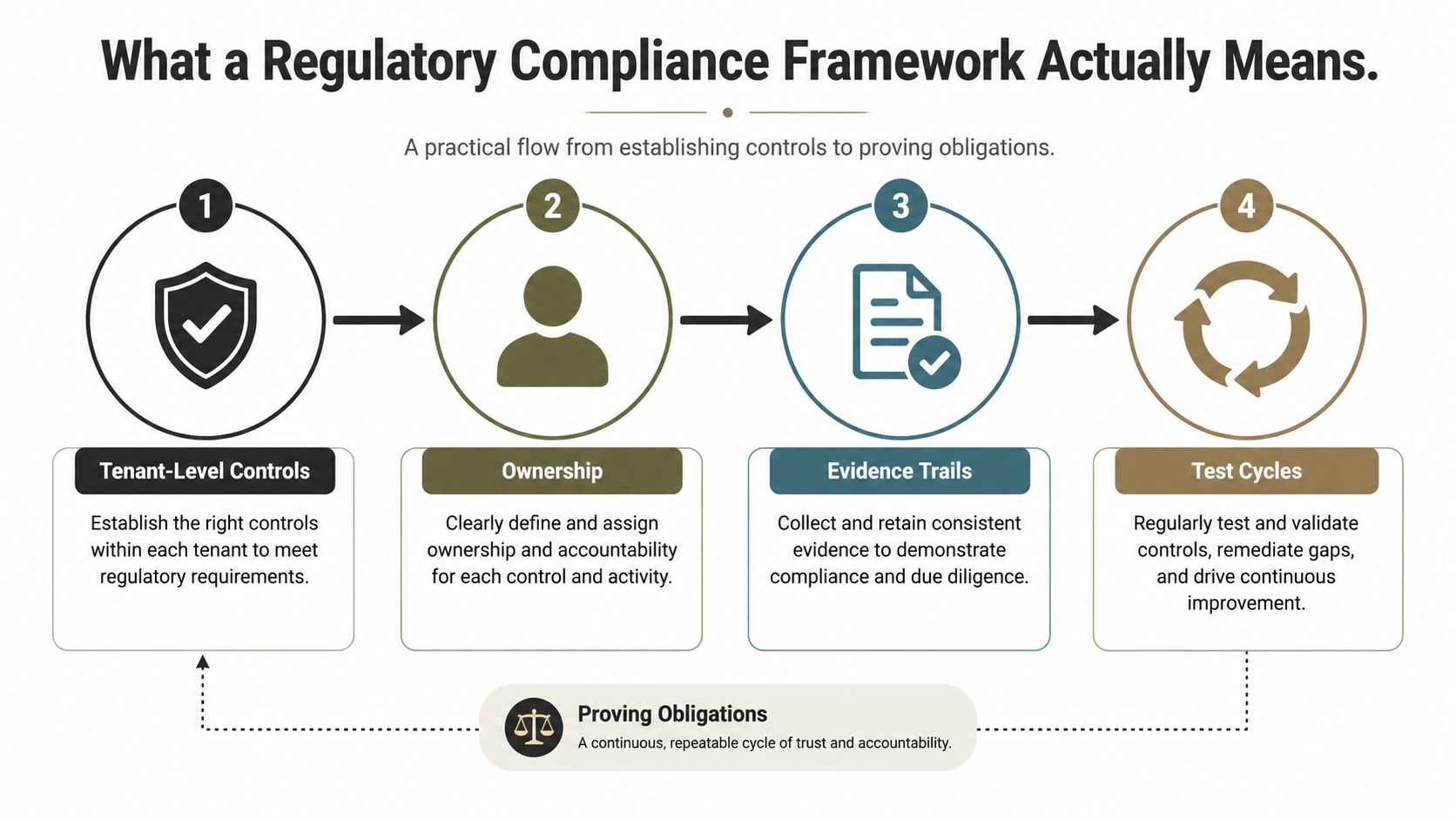
A regulatory compliance framework is the operating model that connects obligations to configured Microsoft 365 controls, accountable owners, evidence and repeatable tests. It must survive a regulator's visit to the tenant, not merely a review of approved policy text. In Ireland's high-enforcement environment, build the framework from controls that can be demonstrated in the live data estate.
Four layers make that model workable.
Governance
Governance assigns ownership and defines how workloads, data locations, sites and teams are approved and retired. Entra ID groups, administrative role assignments, SharePoint architecture and lifecycle processes must enforce those decisions.
The control design should answer direct questions. Who approves a finance site? Who reviews guest access? Which team owns a retention exception? Who can release or modify a legal hold? If the answers exist only in a policy document, the tenant has no reliable control behind them.
Protection
Protection covers identity, access, device posture, sharing, encryption and data loss prevention. Entra ID Conditional Access must enforce the conditions your policy requires. SharePoint and OneDrive sharing settings must match the sensitivity of the records they host. Purview sensitivity labels and DLP policies must act on data, not merely display a classification badge.
Preservation
Preservation keeps records available, traceable and defensible. Purview retention policies require precise scope across SharePoint sites, OneDrive accounts and Exchange mailboxes. eDiscovery cases need custodians, holds and permissions aligned with the legal or regulatory requirement.
Retention also needs controlled disposition. Keeping everything indefinitely does not create defensible governance. It can leave obsolete or excessive data available when deletion should have occurred.
Proof
Proof is the evidence layer. The Unified Audit Log, access reviews, configuration exports, eDiscovery exports, alert history and exception registers should show how controls operated. A framework that cannot produce evidence on demand remains an assurance claim, not an assurance system.
The Lighthouse Consultants governance framework guidance helps separate governance responsibilities from operational controls. That distinction matters in Microsoft 365. The board may approve the objective, while Entra ID, Purview, SharePoint and Exchange Online enforce it.
For a closer explanation of records, accountability and control ownership, review what information governance means in practice.
Separate control design from control operation. Design asks whether the right policy exists and targets the right scope. Operation asks whether the policy applied, generated evidence and stayed effective after a migration, licence change, site creation or identity update.
Microsoft 365 distributes implementation across several admin centres. A change in one surface can invalidate an assumption in another. Treat the framework as a tested control system, with owners, evidence and test cycles, rather than a static compliance document.
Mapping GDPR HIPAA SOC 2 and DORA to Microsoft 365
Different regimes use different language, but your Microsoft 365 design should map each obligation to the same practical questions. What data exists? Who can access it? How do you preserve it? Which evidence proves that the control operated?
GDPR and Ireland's Data Protection Act 2018 form the core personal-data framework enforced by the Data Protection Commission. The DPC also supervises ePrivacy and Law Enforcement Directive matters, so privacy cannot remain a policy exercise. For data subject access and investigation work, your team needs discoverable content, controlled search permissions and exportable results through Purview Content Search and eDiscovery.
HIPAA is relevant to organisations handling protected health information under applicable US obligations. Its safeguards translate into Entra ID Conditional Access, device compliance, controlled sharing, encryption and Exchange Online auditing. The important point is operational rather than geographical. If your team places sensitive health information in Teams, SharePoint or OneDrive, your access and evidence model must match the obligation.
SOC 2 focuses on trust services criteria and control effectiveness. Entra ID sign-in logs, access reviews, privileged role assignments, the Unified Audit Log and documented remediation provide the evidence trail. A screenshot of a setting won't prove ongoing operation. Your assessor needs to see that the control applies to the right users and produces reviewable records.
DORA introduces ICT risk, resilience, incident management, testing and third-party oversight requirements for in-scope financial entities. Microsoft Sentinel connectors can centralise security signals, while immutable audit retention and a controlled third-party risk register in SharePoint support investigation and oversight. You still need a documented ownership model for incidents, vendors, evidence and escalation.
CRR III creates a frequently missed recordkeeping issue for EU banking tenants. Your Exchange Online design must account for journaling and retention where the firm's obligations require those records. A mailbox migration that moves messages but loses journal rules doesn't preserve the control. It removes the evidence path.
| Regulation | Microsoft 365 Control | Evidence Source |
|---|---|---|
| GDPR and Data Protection Act 2018 | Purview discovery, retention, DLP, sensitivity labels and access governance | Search results, eDiscovery exports, retention configuration and audit records |
| HIPAA | Conditional Access, compliant devices, encryption and mailbox auditing | Sign-in logs, device compliance records, audit events and policy reports |
| SOC 2 | Entra ID access reviews, privileged access controls and Unified Audit Log monitoring | Review outcomes, role history, sign-in records and alert investigations |
| DORA | Sentinel integration, resilient audit retention and third-party risk governance | Incident records, audit exports, control tests and vendor registers |
| CRR III | Exchange journaling and retention controls | Journal configuration, mailbox records and retention evidence |
You can find a practical companion to the healthcare control problem in HIPAA compliance requirements for Microsoft 365 environments. The unified approach matters because one well-designed control can support several regimes. Conditional Access, for example, can strengthen GDPR access governance, HIPAA safeguards and SOC 2 evidence at the same time.
Ireland's financial services obligations now require firms to align GDPR, the Data Protection Act 2018, DORA and CRR III simultaneously, rather than treating them as sequential projects. The regulatory timeline includes DORA implementing regulations signed in February 2025 and CRR III applying from 1 January 2025, while new Consumer Protection Regulations replace the Consumer Protection Code from March 2026, as outlined in Ireland's DORA implementation guidance. Your framework should therefore map controls across legal, ICT and records systems before migration begins.
The Microsoft 365 Controls That Produce Audit Evidence
An auditor checks tenant configuration, not policy binders. The controls below produce evidence that another person can inspect, reproduce and connect to a regulatory obligation. In Ireland's high-enforcement environment, design the framework from this evidence backwards.
Retention and disposition
Start with Purview retention policies scoped to the correct SharePoint sites, Exchange mailboxes and OneDrive accounts. Map each retention trigger to the record type. Where deletion requires human assessment, configure disposition reviews and assign accountable reviewers. Apply immutable evidence labels to records that require stronger preservation.
Scope validation belongs in the migration plan. Libraries can sit outside a policy, new sites can inherit the wrong configuration, and labels can exist without reaching target content. Test representative records in every workload after cutover, then retain the test results as evidence.
eDiscovery and legal holds
Purview eDiscovery Premium should record the case, custodians, legal holds, review permissions and export history. Legal teams need a named review of administrators who can create, change or release holds. Migration teams must confirm that legacy Exchange mailboxes and other repositories remain inside the investigation boundary.
A hold that excludes an old repository is a control failure, even if the new tenant is configured correctly.
Encryption and sensitivity
Encryption at rest establishes a baseline. Sensitive workloads may require customer key controls or Double Key Encryption. Sensitivity labels must enforce protection, not merely display a classification. Configure controls for co-authoring, copying, access and sharing wherever the workload requires them.
Test labelled content with internal users, external guests and administrators. Record the resulting permissions and restrictions so the configuration can be demonstrated during review.
Conditional Access
Entra ID Conditional Access should enforce MFA, device compliance, trusted network conditions and session controls according to risk. Review contractors, administrators, service accounts and emergency access accounts separately. Employee coverage does not close a contractor or service-account access path.
Keep policy assignments, exclusions and sign-in results together. An auditor needs to see who was covered, which exception applied and whether the control operated during the review period.
Audit and alerting
Configure the Unified Audit Log for the retention period required by your obligations. Connect alert policies to external sharing, unusual access and mass-download events, and keep mailbox auditing enabled. Each alert needs an owner, triage record, investigation outcome and documented closure.
| Compliance Obligation | Microsoft 365 Control | Evidence Artefact |
|---|---|---|
| Restrict unauthorised access | Entra ID Conditional Access and device compliance | Policy assignments, sign-in logs and device compliance records |
| Preserve regulated records | Purview retention policies and evidence labels | Policy scope, label activity and disposition review records |
| Support investigations | eDiscovery Premium cases and custodian holds | Hold reports, case permissions, searches and exports |
| Protect sensitive information | Sensitivity labels, DLP and encryption controls | Label policy configuration, DLP alerts and encryption settings |
| Detect suspicious activity | Unified Audit Log and alert policies | Audit queries, alert history and investigation records |
| Govern mail records | Exchange Online retention and journaling | Mailbox configuration, journal records and retention evidence |
Microsoft's GDPR overview for Microsoft 365 in Ireland directs organisations to the Microsoft 365 compliance centre. Your team must convert those commitments into configured controls, assigned owners and retained evidence.
The Microsoft Purview versus manual compliance analysis reinforces the operational risk of manual collection. Individual administrators create inconsistent records, miss exceptions and leave weak audit trails. Automation improves consistency only after a specialist has defined scope, ownership and the exception process.
Evidence rule: If an auditor can't reproduce the result from a system record, treat the control as unproven.
Where Migrations Quietly Break Compliance
A mid-sized EU financial services firm moved 14TB of M-files and on-premises SharePoint content into Microsoft 365. The target architecture looked correct on paper. The migration still damaged the firm's compliance posture because the transfer process treated content as payload instead of regulated records.
The first failure involved permission inheritance. The migration recreated folder structures in a flatter pattern, and millions of files inherited access from groups that the source never used for those records. A finance document can arrive intact, retain its filename and still become accessible to the wrong audience.
The second failure appeared when libraries approached SharePoint's list view threshold. Microsoft's official SharePoint large lists and libraries documentation confirms that queries exceeding 5,000 items can be blocked in SharePoint Online, and that warnings may appear when a list exceeds 3,000 items. Teams responding to instability often restrict access to administrators, create workarounds or duplicate content. Each workaround introduces a new exposure or records-management path.
Long paths caused another class of error. Microsoft's official SharePoint Online limits documentation sets the decoded combined file path and filename limit at 400 characters, while Windows retains a default 260-character path limit. A file that looks valid in SharePoint can still fail through the client or synchronisation layer, and a truncated or misfiled regulatory record can fall outside the intended retention scope.
Migration failure is a compliance failure: A record in the wrong library, with the wrong permissions or without its journal history, may no longer satisfy the obligation your policy describes.
The firm also carried unmanaged external sharing into the new tenant. Anonymous links from the legacy platform became SharePoint guest links without expiry, leaving the target tenant with a sharing model nobody had approved. API throttling slowed remediation, while GUID conflicts made it harder to reconcile source identities and target objects cleanly.
Finally, mailbox journal rules disappeared during the move. Messages arrived, but the recordkeeping control did not. The firm had migrated data while losing the evidence that established how financial communications should be preserved.
Your migration team must test permissions row by row, validate path and character handling, reconcile identities, inspect external links and confirm retention and journaling after cutover. The Microsoft 365 tenant migration service approach should include those assurance activities, not just a content-copy run.
Why Off the Shelf Migration Tools Are Not Enough
ShareGate and Microsoft's SharePoint Migration Tool have legitimate uses. They can move content, metadata and supported structures efficiently when the source estate is controlled and the target design is already sound. They don't, however, make the design decisions that determine whether the migration preserves compliance.
SPMT won't redesign a permissions model. ShareGate won't decide whether a finance site should inherit from a corporate group or use a dedicated access boundary. Neither tool will tell you that a file has inherited access from a Domain Users group created years ago, or that an old Everyone permission conflicts with your current least-privilege policy.
The tools also won't classify a large legacy estate against your sensitivity-label taxonomy. They can transport metadata, but they can't reliably infer the regulatory meaning of every document, decide its retention trigger or determine whether a duplicate record should remain discoverable.
The wrapper your project needs
Before the tool runs, your team needs an information architecture that defines sites, hubs, libraries, ownership and access boundaries. During the run, custom PowerShell and PnP scripting can enforce mappings, record exceptions, detect GUID conflicts and handle cases that the standard interface can't interpret.
After the run, reconciliation must compare source and destination permissions, metadata, timestamps, sharing links, retention scope and record counts. API throttling also needs monitoring and scheduling, because a migration that overloads service endpoints can leave partial results that look complete until an auditor requests a missing item.
Ollo verdict: Use SPMT or ShareGate for controlled content movement. For regulated enterprise estates, wrap the tool with specialist architecture, custom scripting and evidence-based reconciliation. A migration utility is a content pump, not a compliance instrument.
Ollo provides Microsoft 365 migration and tenant restructuring work that combines ShareGate with custom PowerShell and PnP scripting. That approach doesn't transfer accountability to the tool vendor. It gives your team a controlled design, an exception record and a defensible sign-off path.
Your Pre Migration Compliance Checklist
Give your migration architect this checklist before anyone moves regulated content:
- Classify records: Record the regulation, business owner, location, retention trigger, deletion date, legal hold status and sensitivity for each record class.
- Validate tenant controls: Confirm Purview retention and disposition policies, eDiscovery permissions, sensitivity labels, DLP, encryption, audit logging, Conditional Access, administrative roles and Microsoft 365 residency commitments.
- Test mappings: Reconcile source libraries, sites, mailboxes, identities, metadata and dates against target locations before the transfer.
- Block uncontrolled sharing: Identify anonymous links, guest access, external domains and inherited permissions, then document every approved exception.
- Preserve evidence: Export configuration baselines and retain approvals, mapping decisions, test results and remediation records.
- Verify after cutover: Run sample legal holds, retention tests, audit searches, eDiscovery exports, access reviews and permission comparisons. Don't accept a migration sign-off because users can open files.
- Assign ownership: Name the people responsible for exceptions, evidence production, incident escalation and recurring control tests.
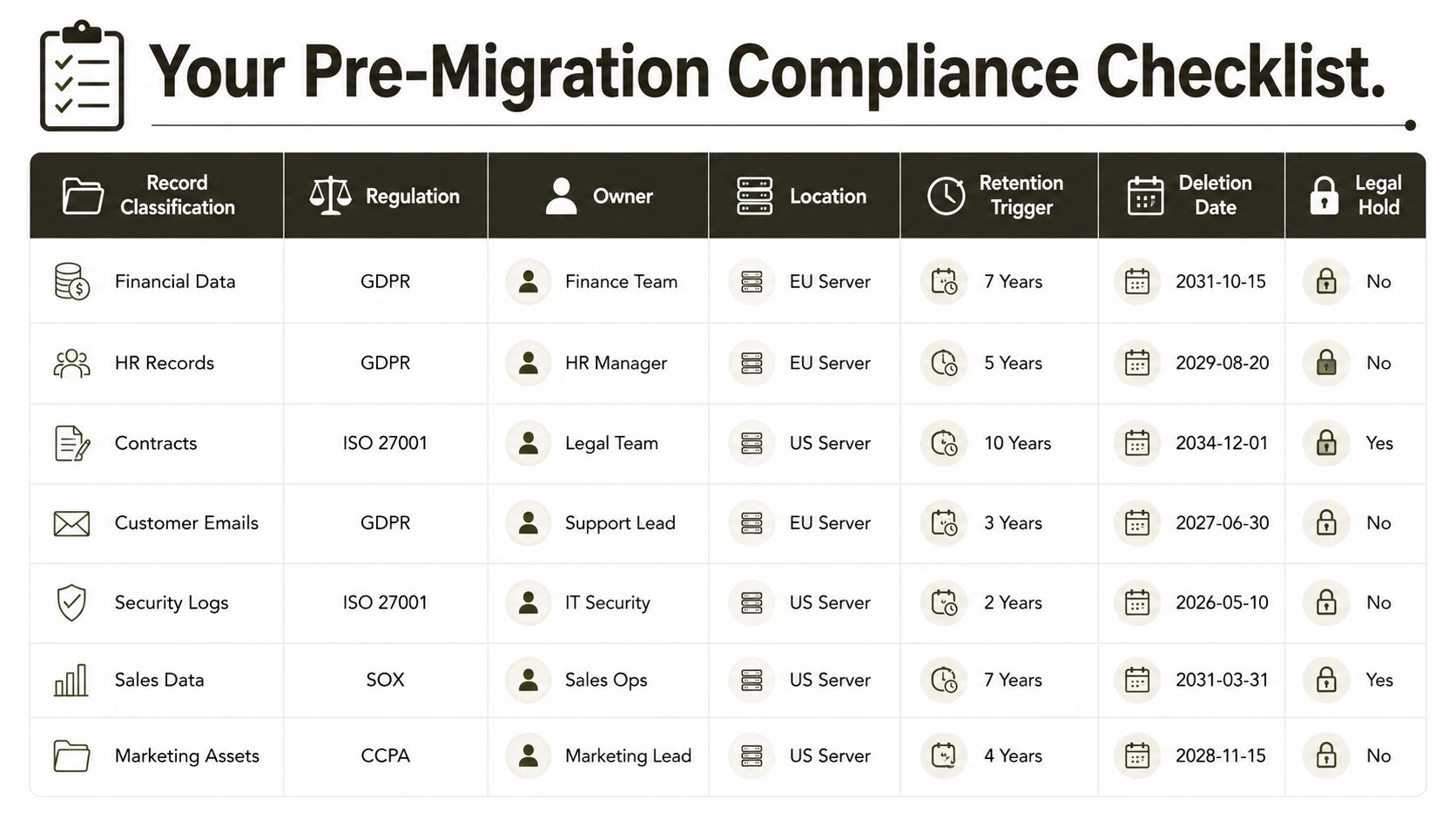
The SharePoint migration checklist gives your team a practical starting point, but regulated estates need more than a generic task list. Your evidence tests should reflect the records, legal holds and access boundaries that your regulator will examine.
DIY is acceptable only when the estate has low-risk content, tested controls, clear ownership and uncomplicated retention. If your project involves regulated data, complex legal holds, cross-border transfers, tenant consolidation or previous audit findings, specialist migration assurance is the risk-reduction choice. Missing one of these controls doesn't just delay the migration. It can break legal compliance, compromise evidence and leave your organisation defending a tenant it never properly tested.
Ollo can assess your Microsoft 365 estate, design the regulatory control model, remediate permissions and retention scope, and execute a migration with source-to-target evidence reconciliation. Visit Ollo to discuss a compliance-sensitive migration before your team commits regulated data to a tenant it can't prove is controlled.

















