



A Microsoft 365 tenant migration is the process of moving everything—emails, files, SharePoint sites, user accounts—from one Microsoft 365 environment to another. This usually comes up during a merger, acquisition, or when a part of the business is sold off.
But calling it a "data transfer" is dangerously misleading. It's a high-stakes technical operation where a single overlooked detail can lead to catastrophic failure.
Why Your Microsoft 365 Migration Plan Is Built to Fail
Let's be direct. Most tenant migration plans are based on vendor marketing, not battlefield reality. We see this firsthand when we get the call to rescue a project that's sinking under the weight of its own complexity.
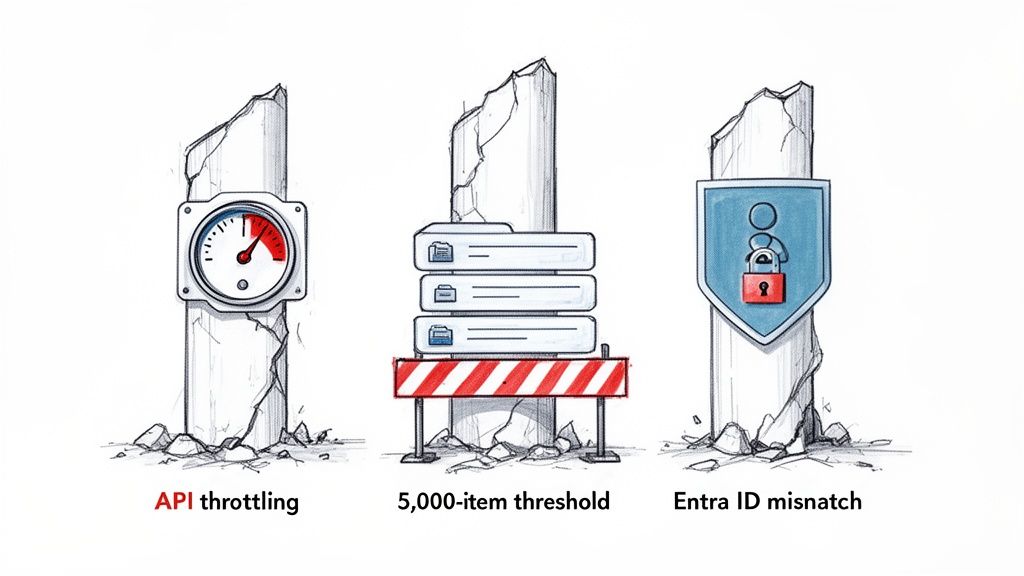
Your plan probably ignores the trifecta of project killers that turn a three-month project into a year-long disaster. These aren't just possibilities; they are the predictable failures we see happen when terabytes of real-world business data are on the line.
This isn't theory. This is what breaks for companies every single week.
The Predictable Points of Failure
The documentation from Microsoft and third-party tool vendors paints a sanitised picture. In practice, your data has quirks and undocumented dependencies that will snap standard migration processes in half. We often find ourselves stepping in after a client’s internal team underestimates these specific technical hurdles.
Your team will run headfirst into these issues:
API Throttling That Freezes Your Data: To protect service health, Microsoft actively throttles its APIs. Standard migration tools hit these limits and just stop. This doesn’t just slow your migration; it can halt it completely for 24-48 hours, throwing your entire cutover schedule into chaos. This isn't a bug; it's a feature you can't turn off.
The 5,000-Item List View Threshold: This is a classic SharePoint breaking point. If your team tries to migrate a list or document library with over 5,000 items without the right strategy, it will fail. Even worse, it will break views, lookups, and workflows tied to that list, crippling business-critical applications once you go live.
Entra ID (Azure AD) Mismatches: Identity is the foundation of everything. If your team fails to correctly map user identities, GUIDs, and UPNs between tenants, users will be locked out after the cutover. This is not a simple password reset issue; it breaks access to everything from email to Teams to critical files, creating a Day One crisis for your service desk.
Tooling Is a Crutch, Not a Strategy
Your migration plan is likely centred around a tool like ShareGate or MigrationWiz. While these are powerful for simple lift-and-shift jobs, relying on them as your entire strategy is a catastrophic mistake.
The tool vendors sell you a drag-and-drop dream. The reality is that for any enterprise migration, these tools are merely the engine. They require a specialist driver who knows how to script around their limitations, navigate throttling, and fix the inevitable data fidelity errors.
The documentation says a tool can handle complex permissions. In reality, we consistently see it fail on broken inheritance chains, leaving sensitive data exposed. You cannot click a button to fix this; it requires custom PowerShell PnP scripting and a deep understanding of the SharePoint object model.
To truly understand why these projects fail, you must look past the marketing. Following general data migration best practices is a start, but a tenant-to-tenant migration has its own unique set of traps. This isn't just about moving files; it's about rebuilding a functional, secure, and compliant digital workspace.
Ignoring that reality is the most expensive mistake you can make.
The Pre-Migration Audit That Prevents Catastrophe
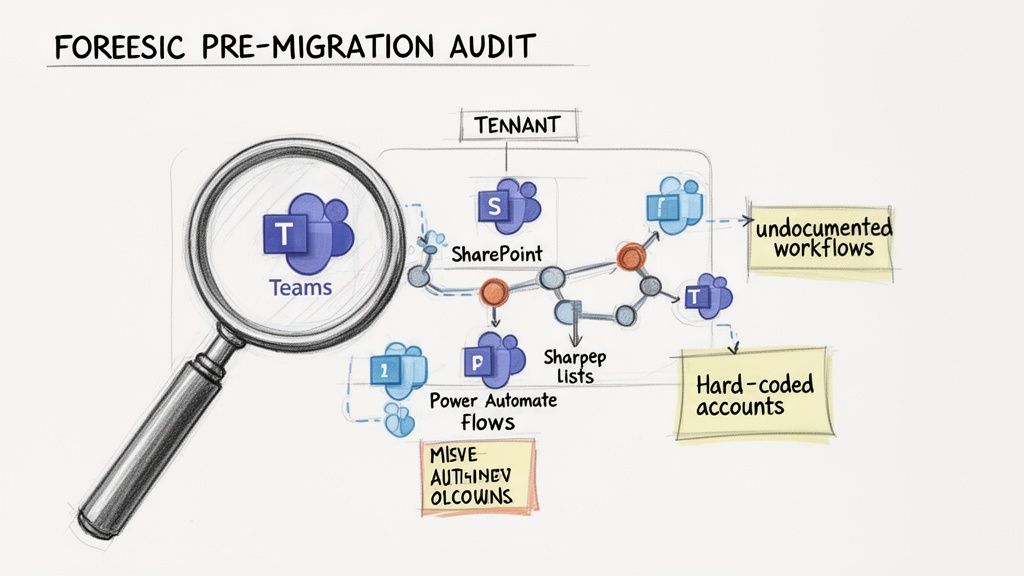
The success or failure of your Microsoft 365 tenant migration is decided long before you move a single byte. We often see clients get into trouble when they treat the pre-migration audit as a simple inventory check. This isn't about just counting mailboxes and SharePoint sites; it's a forensic investigation into the hidden complexities of your source tenant.
A superficial audit is a guarantee for failure. It’s how you walk blindly into a cutover weekend only to discover a mission-critical Power App—hard-coded to a specific user account—now fails for everyone.
Uncovering What Standard Tools Miss
Standard migration tools are designed to handle the straightforward 80% of your data. They will happily count your files and folders, but they are completely blind to the critical 20% that represents your biggest risk. Your internal team, armed with a tool like ShareGate, won't see the disaster until it's far too late.
A proper, forensic-level audit involves running targeted PowerShell scripts to map the true landscape of your data. We don't just count sites; we analyse them.
You have to identify:
- Undocumented Workflows: Rogue Power Automate flows triggered by specific email subjects that no one on your project team knows about.
- Labyrinthine Permissions: SharePoint sites with thousands of uniquely permissioned items and broken inheritance chains that no off-the-shelf tool can correctly replicate.
- Sprawling Teams Architectures: Teams with dozens of private channels, each with its own separate SharePoint site collection that must be discovered and mapped individually.
- Long Path Violations: File paths that will inevitably exceed the 256-character limit once moved to the new SharePoint URL structure, causing data to be orphaned during migration.
Missing this step doesn't just risk a failed migration; it breaks legal compliance. A crucial part of preventing catastrophes is ensuring your migration adheres to stringent information security standards. Understanding what is required for an ISO 27001 certification can guide your audit process, ensuring data integrity and security are at the core of your planning.
War Stories From the Audit Trenches
The official documentation says you can simply inventory your SharePoint sites. In reality, without a deep dive, you have no idea what's really inside them. For a closer look at this process, check out our guide on conducting a comprehensive SharePoint migration assessment.
We were once called in to rescue a financial services migration where the internal team missed a network of over 200 interconnected SharePoint lists, all crippled by the 5,000-item view threshold. The migration tool reported "success," but the core business process was completely broken. It took our team three weeks of intensive scripting to fix what a proper audit would have caught in three days.
This intelligence-gathering phase is what separates a predictable, engineered success from a costly recovery operation. Your choice isn't between doing an audit or not; it's between a superficial checklist and a forensic investigation that actively de-risks the entire project.
Choosing Your Weapon: Migration Tooling Is Not a Strategy
Your team is probably looking at tools like ShareGate, MigrationWiz, or Microsoft’s own SharePoint Migration Tool (SPMT). That's a reasonable start, but believing the tool is the strategy is a classic rookie mistake. In a Microsoft 365 tenant migration, it’s a mistake that costs millions in remediation and lost productivity.
Every single one of these tools has a breaking point. We’re often brought in to rescue projects after a client's team discovers these limits mid-flight, when timelines are already shattered and the budget is blown. The vendors' marketing promises a simple, push-button path, but they conveniently omit the messy reality of complex enterprise data.
A "tool-first" approach is fundamentally flawed. Your strategy—built on that deep, forensic audit we talked about—must dictate the tools you use, not the other way around.
The SharePoint Migration Tool (SPMT): The Free Tool Trap
Microsoft provides SPMT for free, which makes it incredibly tempting. The hard truth? SPMT is completely unsuitable for any complex tenant-to-tenant migration.
We see projects fail when teams try to use SPMT for anything beyond a tiny team's file share. It consistently breaks down when faced with real-world, enterprise-grade challenges:
- Metadata Destruction: SPMT often strips or corrupts critical metadata like "Created By" and "Modified Date." This isn't just an inconvenience; it can torpedo legal compliance and destroy your data's integrity.
- Permission Nightmares: It has almost zero capability to handle complex, item-level permissions or broken inheritance chains. This leads to massive data security risks post-migration.
- Throttling Intolerance: SPMT handles API throttling very poorly. When Microsoft’s servers inevitably push back, it often fails jobs outright instead of intelligently backing off and retrying.
The Ollo Verdict: Use SPMT for a simple file share migration under 50GB with basic permissions. For anything else, especially a tenant migration involving SharePoint sites with any level of customisation, using SPMT is an act of professional negligence.
ShareGate: The Power and the Pitfalls
ShareGate is a powerful and respected tool; we use it ourselves. It excels at moving the bulk of SharePoint content and provides robust reporting. However, treating it as a "set it and forget it" solution is a direct path to failure. Its strength lies in handling standard site structures, but it absolutely hits a wall with the inevitable customisations and sheer scale of an enterprise environment. If you're curious about native Microsoft tooling, our breakdown of Migration Manager for Microsoft 365 provides more context.
We frequently have to augment ShareGate with custom PowerShell PnP scripting to manage scenarios the tool simply cannot handle:
- Massive Document Libraries: When dealing with libraries containing hundreds of thousands of documents, attempting to preserve full version history can cause the tool to time out. Custom scripts are required to batch the process effectively.
- Mismatched User Principal Names (UPNs): In a merger, user UPNs rarely match. ShareGate's user mapping is good, but it struggles with complex exceptions, requiring PowerShell to remap users and permissions correctly at scale.
- Reconstructing Complex Solutions: The tool cannot migrate Power Platform solutions, intricate workflows, or custom list forms. These must be manually re-engineered or scripted.
Let's get practical. Here is our battle-hardened take on the tools most people consider.
Migration Tooling: The Ollo Verdict
Your data is not standard. Therefore, your strategy cannot be to just rely on a standard tool. The tool is an accelerator for the 80% of your data that is simple; the success of your project depends on how you plan for the 20% that is not. This requires specialist knowledge to script around a tool's breaking points.
Executing the Migration: Taming Throttling and Ensuring Data Fidelity
Welcome to the trench warfare phase of your Microsoft 365 tenant migration. Theory is over; this is all about execution, and the stakes are high. Forget the generic "best practices" you read in a manual. These are the survival tactics we’ve learned from being in the thick of it, often rescuing projects on the verge of collapse.
Executing a migration isn't about pushing a big green button. It's a relentless game of control, anticipation, and aggressive risk mitigation. The documentation might suggest you just start the migration jobs, but Microsoft’s own service protection mechanisms will bring your project to a grinding halt if you don't know how to navigate them.
The Throttling Myth: Believing You Can Just Wait It Out
We often see teams fail in how they handle API throttling. They treat it like a temporary slowdown. But Microsoft’s documentation is clear: throttling is a permanent feature. Your team cannot wait it out, and most standard tools handle it poorly, often failing jobs outright.
This isn’t a speed bump; it's a brick wall that can stop your migration cold for 24-48 hours. Imagine that happening during your cutover weekend. It’s a complete disaster. Active management is non-negotiable.
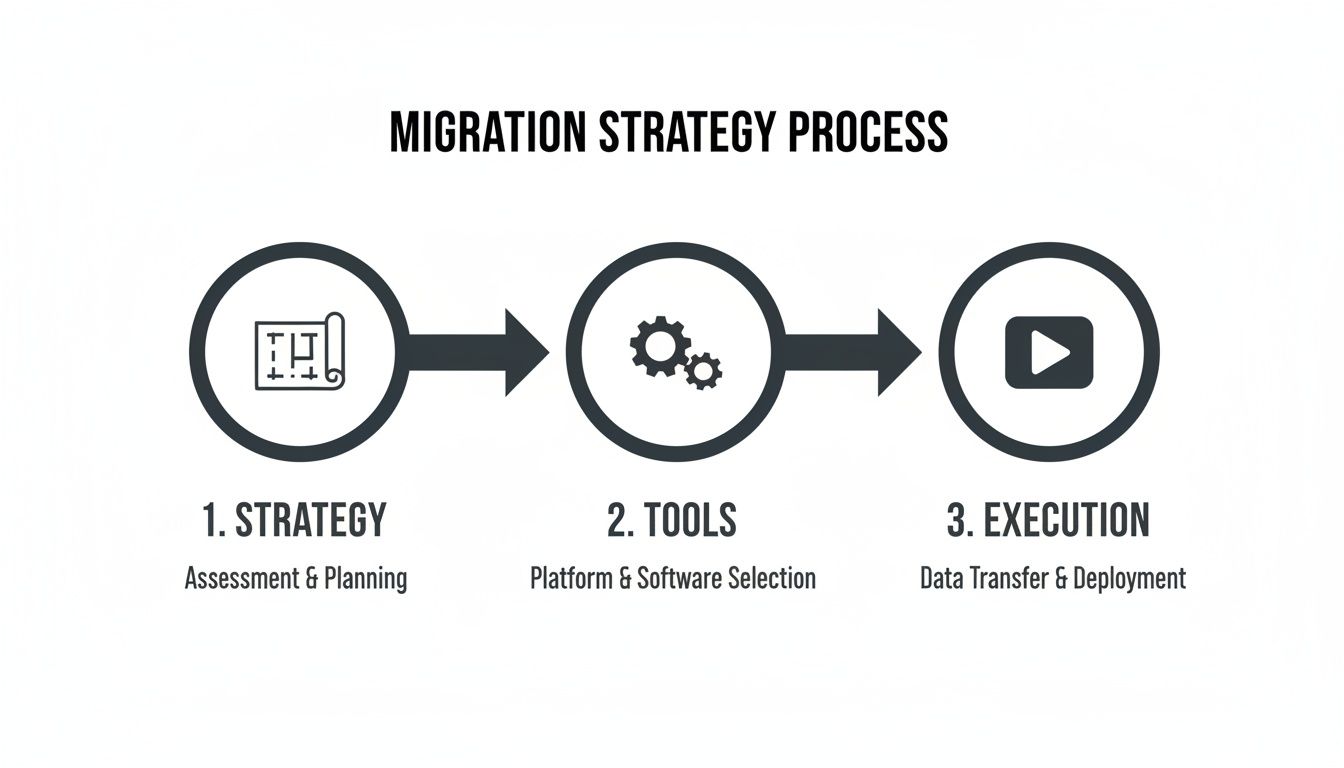
To succeed, you have to proactively fight throttling, not just react to it. This means your execution plan must include specific tactics:
- Staggered Scheduling: Never run all your migration jobs at once. We script migrations to run in orchestrated waves, often during off-peak hours, specifically to stay under throttling thresholds.
- Payload Management: Instead of trying to move a massive 1TB site in one go—a recipe for failure—our scripts break it down into smaller, manageable chunks. This dramatically reduces the load on the APIs.
- Leveraging Underutilised APIs: Not all Microsoft APIs are throttled equally. We know which specific API endpoints have higher limits and strategically use them for the right data types to maximise throughput.
War Stories: The SharePoint 5k Limit Strikes Again
One of the most predictable—yet common—disasters is SharePoint's infamous 5,000-item list view threshold. It's been documented for years, but nearly every third-party tool misinterprets how to handle it, leading to failures that only surface after cutover.
We were called in to rescue a migration for a logistics company. Their internal team used a popular tool that reported "100% success." On Monday morning, nobody could access any inventory data. The tool had moved the list items but shattered all indexed columns because the primary list exceeded the 5k limit. It took our team 72 hours of non-stop PnP PowerShell scripting to rebuild the list architecture and restore their business operations.
This isn't just a failed data transfer; it's a complete business process outage. For a deeper dive, our guide to a large-scale SharePoint migration provides more battle-tested insights.
Remediating Data Fidelity in Real Time
Execution is also about maintaining data integrity. During the transfer, you will encounter the problems your audit flagged. This is where you actively fix them.
Broken Permission Inheritance
When a migration tool hits a folder with thousands of uniquely permissioned files, it often just gives up, creating a security breach or failing the job.
- Our Approach: We run pre-flight and post-flight PowerShell scripts. The first exports the source permission structure. We execute the migration. Finally, a post-flight script re-applies the correct permissions, bypassing tool limitations and ensuring a 1:1 fidelity match.
GUID and UPN Conflicts
In a merger, a user in the source tenant might have a UPN that already exists in the target. A standard tool will fail or create a duplicate account, causing GUID conflicts that break everything.
- Our Approach: Our identity mapping scripts detect these conflicts before any job runs. We then automate cleaning up the conflicting object, running the migration for that user, and restoring group memberships. It’s a surgical operation.
This level of control isn't a "nice-to-have." It is the fundamental difference between a controlled engineering exercise and a chaotic, high-risk gamble with your company's data.
The Cutover Plan and Post-Migration Reality Check
After months of planning, the final cutover isn’t the finish line; it’s the moment of truth. I’ve seen teams breathe a sigh of relief as the cutover date approaches, thinking the hard part is over. That’s a catastrophic mistake.
A cutover isn't about flipping a switch. It’s a precisely controlled, minute-by-minute sequence. A single missed step doesn't just cause a small delay; it can create data divergence between tenants, leading to permanent data loss.
Building a Cutover Plan That Withstands Reality
A “go/no-go” decision must be driven by data. Your cutover plan should be a detailed script, not a checklist. In a high-stakes Microsoft 365 tenant migration, you only get one shot.
Your plan absolutely must include:
- Final Delta Syncs: This involves multiple, targeted delta syncs for different workloads—final mailbox changes, last-minute SharePoint uploads, and recent Teams chats. These must be staggered to avoid throttling.
- DNS Propagation and TTLs: We often see projects stumble because the team forgets to lower the Time-To-Live (TTL) values on crucial DNS records days in advance. If you don't, some users will be sending emails to the old tenant while others use the new one.
- Phased User Onboarding: Don't tell thousands of users to log in all at once. Your cutover plan must define clear onboarding waves, starting with a pilot group. This lets your support team manage issues in a controlled way.
The most dangerous assumption is that a successful data migration equals a successful user cutover. Your users' experience on Day One will define the project's success or failure in the eyes of the business.
The First 72 Hours: The Hyper-Care Phase
Most migration guides stop at the cutover. For us, this is where the real work begins. The first 72 hours—the "hyper-care" phase—is when hidden problems surface.
What happens when your Head of Sales discovers a critical Power Automate flow is broken because its connections were hard-coded to the old tenant? For a broader perspective, our article on on-premise to cloud migration offers valuable strategic context.
Your hyper-care plan must be proactive, not reactive.
- Run Validation Scripts Immediately: The moment the cutover is complete, execute a battery of validation scripts. These don't just check if data is present; they verify its integrity, confirming file versions, permissions, and critical metadata.
- Redesign Governance for the New Reality: The governance policies from your old tenant are now obsolete. You must immediately re-establish Zero Trust principles with a new, stronger set of Conditional Access policies for the consolidated environment.
- Prepare for Advanced Workloads: A new tenant is a clean slate. This is your opportunity to properly prepare the environment for advanced capabilities like Microsoft Copilot. That means ensuring your data labelling and permissions are correctly configured from Day One.
Failing to plan for this post-migration reality check is how a technical success becomes a business failure.
Frequently Asked Questions From the Trenches
As a Senior Cloud Migration Architect, I spend my days on calls with IT Directors and Enterprise Architects who need straight answers to hard questions.
Here are the questions I get asked most, and the unfiltered truth from the trenches.
How Long Does a Complex Tenant to Tenant Migration Really Take?
Let's be blunt. For an enterprise-scale Microsoft 365 tenant migration involving more than 10TB of data and over 1,000 users, you must budget 6-9 months. Anyone promising a 3-month timeline is either inexperienced or selling you a future disaster.
The first 2-3 months are just for the forensic-level discovery and planning phase. The actual data transfer speed is rarely the choke point. Your project's real timeline will be dictated by Microsoft's API throttling and the time needed to fix all the unexpected issues your audit uncovers.
Can We Handle the Migration Internally with Tools Like ShareGate?
You can handle parts of it. ShareGate is an excellent tool for straightforward SharePoint content moves. However, it is not a complete strategy.
It won’t manage complex Entra ID identity mapping. It won’t reconstruct Teams private channels. It won’t migrate your Power Platform solutions on its own.
Relying solely on a tool means your team is unprepared for the 30% of your environment that is inevitably custom, broken, or non-standard. That’s where projects fail.
The Ollo Verdict: Using a tool like ShareGate without a team that can build custom PnP PowerShell scripts to handle its limitations is like owning a race car without a driver. You have the engine, but you lack the skill to navigate the track's dangerous corners.
What's the Single Biggest Risk Factor in Failed Migrations?
An inadequate pre-migration audit. Full stop. We constantly see teams rush into moving data without a forensic understanding of their source tenant. This is the root cause of almost every migration disaster we're called in to rescue.
They miss hidden dependencies in Power Automate, undocumented SharePoint customisations, and broken permission structures. This leads directly to catastrophic failures during cutover, data loss, and significant business disruption.
The risk isn't the migration itself; it's migrating what you don't understand.
Is It Possible to Migrate Without Any User Downtime?
No. The goal should be "minimal, planned disruption," not the marketing myth of "zero downtime." Chasing zero downtime sets unrealistic expectations and leads to poor planning.
There will be a cutover weekend where services are either read-only or entirely unavailable. A well-executed plan focuses on precisely defining this window and communicating it clearly.
Promising zero downtime is a recipe for breaking trust with your users and business leadership when reality hits.
A successful Microsoft 365 tenant migration isn't about having the right tools; it's about having the right expertise to navigate the inevitable failures. If your organisation can't afford the risk of a failed project, talk to the specialists. Contact Ollo at https://www.ollo.ie to de-risk your migration.

















