



Moving your company's data from on-premise servers to Microsoft 365 is a monumental task. Let me be blunt: for any complex business, this is never a simple "lift and shift" operation. It’s a high-stakes project where overlooking a single technical detail like a GUID conflict or a broken permission inheritance chain leads to catastrophic failure, data loss, and crippling business disruption. You've been burned by failed projects before; this guide is about how to avoid another one.
Why Most On-Premise to Cloud Migrations Fail

Let's be direct. Your peers celebrate their cloud successes, but they keep quiet about the projects that go completely off the rails. They won't tell you about the frantic, weekend-long rollbacks, the compliance breaches from broken permissions, or the career-limiting downtime that follows a botched cutover.
This isn't another marketing pitch promising a 'seamless transition.' It’s a frank discussion, straight from the trenches, about why the average on-premise to cloud migration is set up for failure from day one. Your team is under pressure to modernise, but you've seen enough failed IT projects to be sceptical of vendor promises. And you're right to be.
The "Lift and Shift" Fallacy
The most dangerous assumption we see is treating a migration like a simple data copy. It isn't.
Your legacy file servers and on-premise SharePoint installations are fundamentally not cloud-ready. They are brittle ecosystems, packed with undocumented customisations, long path limits, and riddled with years of technical debt that will absolutely trigger cascading failures in Microsoft 365.
Moving terabytes of legacy data without a deep architectural redesign will expose every hidden flaw in your environment. We often see clients fail when they use a generic cloud migration assessment checklist and assume they're covered. That checklist won't save you from the harsh technical realities of the platform itself.
The documentation says SharePoint Online can handle 30 million items, but in reality, the 5,000-item list view threshold will break your critical business views and workflows. This isn't a bug; it's a hard design constraint that will derail your project if you don't plan for it. Missing this step doesn't just fail the migration; it breaks legal compliance when critical auditable records become inaccessible.
Your Toolkit Is Not Enterprise-Ready
The allure of "free" or "easy" tooling is a significant trap. Eurostat data from 2023 shows that while over half of EU enterprises use cloud services, most are stuck on basic email and file storage. The data tells a clear story: complex migrations stall because internal teams are unprepared for the architectural redesign required and use tools that can't handle real-world complexity.
Time and again, we see well-meaning IT directors attempt a DIY migration with Microsoft's own SharePoint Migration Tool (SPMT), only to hit the documented 400-character path length limit and crippling API throttling, grinding the entire project to a halt. These aren't edge cases; they are guaranteed failure points in any mature on-premise environment.
You can explore our detailed breakdown of SharePoint migration best practices to see just how deep these challenges run.
When your in-house team tries to navigate this minefield alone, the risks multiply. Here’s a look at the common pitfalls we see versus how a specialist team tackles them head-on.
DIY Migration Risks vs Professional Intervention
Ultimately, these platform limitations are precisely why hiring a specialist isn't just a good idea—it's an essential risk-reduction strategy. Your migration isn't merely a technical task; it's a critical business operation that demands a battle-tested approach to succeed.
Auditing Your Migration Toolkit for Failure Points
Let's be brutally honest about the tools your team is considering for this on-prem to cloud migration. The vendor presentations look great, but they conveniently leave out the field-tested failure points that can bring your project to its knees.
This isn't just a feature comparison; it's a damage report from the front lines.
The instinct is often to start with Microsoft's own SharePoint Migration Tool (SPMT). It's free, which is its primary selling point and, frankly, its greatest weakness. Free tools are built for simple scenarios, not the complex, multi-terabyte environments with broken inheritance and long path limits we see every day.
The Inevitable Failure of SPMT
SPMT is a blunt instrument. It will move files, sure, but it will choke on the kind of complexity that defines a legacy environment. The official documentation even confirms these limitations, but you have to know where to look.
Here's a breakdown from Microsoft's own guidance on just some of the hard limits your team will hit.
This screenshot confirms the 400-character path limit, a project-killer for any organisation with deep, nested file structures. It also highlights file size limits that fail to account for the cumulative impact of thousands of files hitting the API at once, triggering throttling that the tool simply cannot handle gracefully.
The real disaster strikes when SPMT hits one of these walls. There’s no sophisticated error handling, no intelligent retry logic, and certainly no recourse for untangling the permissions mess it leaves behind. It just fails, leaving your team to manually sift through thousands of error logs to figure out what data was left behind. Missing this step doesn't just delay the project; it creates a compliance nightmare when sensitive files are unaccounted for.
For a deeper dive, we have a full analysis on where the SharePoint Migration Tool falls short in enterprise scenarios.
Where ShareGate Bends but Doesn't Break
This brings us to ShareGate. It's a powerful, professional-grade tool, and it's a core component of our toolkit. But it is not a "set it and forget it" solution. Believing so is a critical mistake.
ShareGate is far more resilient than SPMT, offering much better throttling management and path-length handling. However, in large-scale enterprise migrations, its own limits become apparent.
We consistently see it struggle with rectifying deeply broken permission inheritance across tens of thousands of sites and files. The tool can report on the issue, but the cleanup still requires significant manual intervention or, more effectively, custom scripting.
Furthermore, complex metadata transformations—mapping your legacy file properties to a new SharePoint content type architecture—are not automated. Your team will spend hundreds of hours manually preparing and validating this data, a process ripe for human error that can render your new environment's search and governance features useless.
The Ollo Verdict: SPMT is acceptable for small, non-critical data sets under 50GB with simple permissions and flat folder structures. It is fundamentally unsuitable for any serious business migration. For anything beyond this, you must adopt a hybrid approach. ShareGate provides the core engine, but it absolutely requires a layer of custom PowerShell PnP scripting to navigate the inevitable landmines of API throttling, permission remediation, and complex metadata mapping. Relying on any single tool, out of the box, is a direct path to failure.
Uncovering Hidden Horrors in Your On-Premise Environment

This is where most on-premise to cloud migrations fail spectacularly. Your team runs a scanner, gets a tidy report on data volumes, and calls it a plan. I’ve seen this happen time and again, and that superficial assessment is a direct recipe for disaster.
A real, battle-ready discovery process goes much deeper than just counting terabytes. It’s an archaeological dig into a decade of undocumented changes, forgotten dependencies, and brittle customisations that are guaranteed to snap the moment they touch the cloud. Your standard assessment will miss the project-killing details that force a painful, and very public, rollback.
The Landmines Hiding in Your Data
Your file servers and SharePoint on-premise farms aren't just storage buckets; they're active, and often chaotic, ecosystems. Part of uncovering these horrors is making sure the physical health of your storage is sound. Using an effective HDD Diagnostic Tool can help spot failing hardware that could compromise your data before it even begins its journey to the cloud.
But the real complexity is buried in the data structure itself. Here are the specific time bombs we search for during every single engagement:
- Legacy Workflow Engines: That critical HR onboarding process everyone relies on? We often find it's running on a SharePoint 2010 or 2013 workflow engine, neither of which is supported in Microsoft 365. These don't just fail gracefully; they vanish, leaving a critical business function dead on arrival.
- InfoPath and Custom Forms: These XML-based forms were officially deprecated years ago, yet they are absolutely everywhere in older environments. Migrating the data they hold without a clear strategy to rebuild them in Power Apps means your business processes will grind to a halt on day one.
- Massive Lists and Libraries: We hunt for any list or library creeping up on the hard 5,000-item list view threshold. Your migration tools will move the data, sure, but your users won't be able to sort, filter, or even view it, rendering the information useless and flooding your helpdesk with tickets.
Exposing Toxic Permissions and Dependencies
Beyond the data itself, the real horror show often lies in the access and dependency structures that have been layered on top of each other for years. A surface-level scan will never reveal these risks.
The documentation might show a clean, simple permission structure. In reality, your environment is likely riddled with undocumented service accounts and broken inheritance. We regularly see clients fail when they migrate permissions as-is, inadvertently exposing sensitive financial or HR data to the entire organisation because of a single misconfigured group.
The most dangerous thing we find is what I call the "god-mode" service account. It's an account created years ago for a now-decommissioned application, yet it still has full administrative rights over everything. Migrating this account without a full audit isn't a security risk; it's an act of negligence.
Our SharePoint Migration Assessment is built on the hard-won experience of identifying these specific failure points before they can derail your entire project.
https://ollo.ie/blog-posts/share-point-migration-assessment
The Ollo Verdict
A standard assessment that only measures data volume is worse than useless—it creates a false sense of security. You must actively hunt for the specific technical landmines that will detonate during your on-premise to cloud migration. These issues—from unsupported workflows to toxic permissions—aren't edge cases. They are guaranteed to exist in any mature on-premise environment. Finding them isn't about ensuring a smooth migration; it's about preventing a complete and public failure.
Building Your Zero Trust Architecture in Entra ID
Moving your data to the cloud without rebuilding your identity model is like moving into a new fortress but leaving the old keys under the doormat. It’s a mistake we see all too often: companies treat identity as an afterthought, simply syncing their on-premise Active Directory using Entra ID Connect and calling it a day. In 2026, this isn't just lazy; it’s negligent.
Your on-prem AD is a decade-old digital attic, crammed with forgotten user accounts, tangled group policies, and permissions left over from projects that finished years ago. Lifting and shifting this mess to the cloud doesn't just transfer technical debt—it weaponises it. Attackers actively hunt for these legacy setups because they know they’re the weakest link.
Conditional Access Is Your New Perimeter
The days of hiding behind a corporate firewall are long gone. In a cloud-first world, your identity is the perimeter. This means building a proper Zero Trust architecture in Microsoft Entra ID isn’t just a nice-to-have; it's a non-negotiable part of any on-premise to cloud migration. It all starts with Conditional Access policies that actually do their job.
A real security posture needs smarter, more granular controls:
- Location-Based Access: Block sign-in attempts from high-risk or entirely irrelevant countries. If your accounts only operate in Ireland, why are they suddenly trying to log in from Eastern Europe at 3 AM? Block it.
- Device Compliance: Only allow access from corporate-managed and healthy devices. If a laptop isn’t patched and compliant with your Intune policies, it gets zero access to company data. Period.
- Risk-Based Sign-In: Use Entra ID Identity Protection to automatically block or demand a password reset for any sign-in that looks dodgy, like someone using an anonymising proxy or credentials that just showed up in a data breach.
War Story: We were called in to rescue a financial services firm after their "successful" migration. Their internal team had moved all the data but only switched on a basic MFA policy. A misconfiguration in their old permissions, faithfully replicated to the cloud, allowed a junior marketing account to access the entire HR SharePoint site. The breach was only spotted when sensitive salary data was accidentally shared in a company-wide Teams channel.
Enforce Phishing-Resistant MFA
Here’s a hard truth: not all MFA is created equal. The Microsoft documentation talks up the security of MFA, but in reality, SMS codes and simple authenticator app push notifications are wide open to sophisticated MFA fatigue attacks. This is where attackers spam a user with push requests until they give in and hit 'approve'.
Real security requires phishing-resistant MFA methods. This means pushing your organisation towards options like FIDO2 security keys (think YubiKey) or Certificate-Based Authentication. These methods require a physical device or a cryptographic key, making it virtually impossible for an attacker to get in with just a stolen password. This isn’t a best practice; it's fast becoming a hard requirement for cyber insurance.
Cleanse Your Directory Before You Migrate
You absolutely must clean out all the junk from your directory before a single byte of data moves. Every dormant user account and unused service principal is a potential backdoor just waiting for an attacker to find it.
Your pre-migration audit needs to be aggressive:
- Stale User Accounts: Any account that hasn’t been logged into for more than 90 days must be disabled. No exceptions.
- Orphaned Service Principals: These are applications registered in Entra ID that nobody is using anymore. They’re ticking time bombs.
- Over-Privileged Roles: Find every account sitting in a powerful role like Global Administrator that isn't actively managed and monitored through Privileged Identity Management (PIM).
This sanitation work is tedious, which is exactly why so many teams skip it. Skipping it is a catastrophic error. It’s why our dedicated SharePoint migration services integrate this deep identity audit as a mandatory first step. Regulations like GDPR and standards like ISO 27001 demand strict controls over who can access what data. Getting this wrong isn't just a technical failure—it's a legal and financial liability that will cost you far more than the migration project itself.
Designing a Migration Runbook That Anticipates Failure
A successful on-prem to cloud migration isn't a single event. It's a controlled, military-style operation, executed from a battle-tested runbook. Your standard project plan is useless here. We’re talking about a living document that assumes things will break and details the exact sequence of actions, rollback procedures, and communication trees for when they inevitably do.
I’ve seen too many clients fail because they treat the cutover as a simple "go-live" checkbox. They build a rosy plan for success, not a gritty runbook for failure. This approach isn't just naive; it's dangerous. It guarantees that one minor hiccup will escalate into a full-blown crisis, forcing you into a panicked, weekend firefight.
Phased Migrations and Pilot Groups
The only sane way to approach a large-scale migration is in phases. Never attempt a "big bang" cutover of all your data at once. Your entire runbook must be built around a series of small, controlled waves, starting with low-risk pilot groups to stress-test your process in a live environment.
Your pilot group should be a handful of technically savvy users from a non-critical business unit. Their data will make the journey first, letting you validate your tooling, scripts, and remediation plans against real-world complexity without jeopardising a core business function. Think of it less as a test and more as a full dress rehearsal for disaster recovery.
Building for Inevitable Throttling
Let me be crystal clear: API throttling from Microsoft is not a possibility; it's a certainty. The official documentation confirms it, and anyone who tells you otherwise has never managed a migration of any significant scale. Standard tools like ShareGate handle throttling reasonably well, but they can still get overwhelmed during massive data transfers, leading to unexplained failures.
Your runbook can't just have a footnote saying "throttling might occur." It must have resilience baked directly into the execution plan.
- Scripted Throttling Logic: Any custom PowerShell PnP scripts you use must include "if-throttled-then-wait" logic. This means automatically pausing and retrying operations with an exponential backoff, preventing your migration account from getting locked out and ensuring a steady, predictable pace.
- Scheduled Migration Windows: Plan your largest data transfers for off-peak hours—evenings and weekends—when Microsoft's servers are under less strain. This isn't just about minimising user impact; it's a direct strategy to reduce the likelihood of hitting those throttling thresholds in the first place.
This process flow illustrates the core security principles that must be validated both before and after each migration wave you execute.
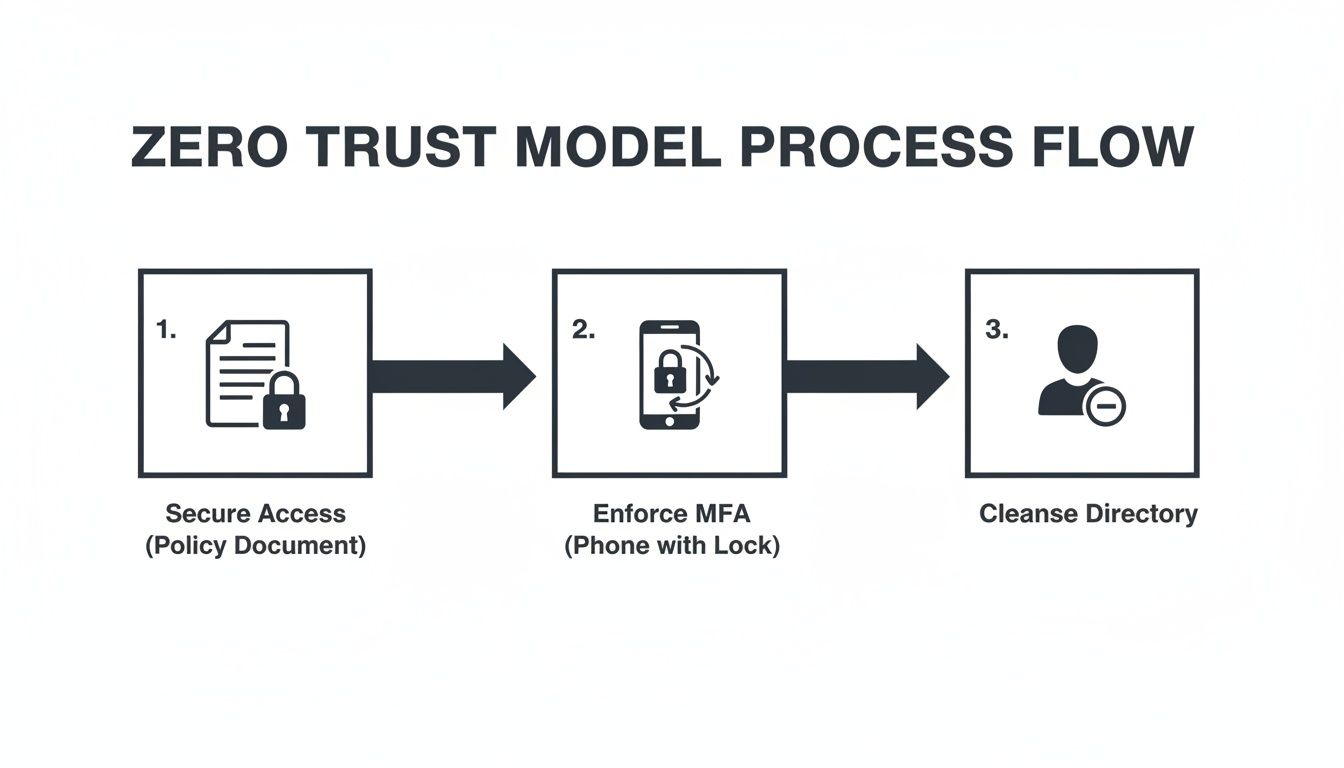
Think of this as a continuous security loop. Securing access, enforcing modern authentication, and cleansing your directory aren't one-time tasks; they're checks that are integral to every single step in your migration runbook.
Pre-Flight Checks and Validation Protocols
Each migration wave defined in your runbook needs its own set of strict go/no-go criteria. A "pre-flight check" before kicking off each batch is non-negotiable. This isn’t just about checking if the destination site exists. It’s a deep, script-driven validation that confirms permissions are staged, metadata columns are created, and compliance policies have been applied before a single file gets moved.
Post-migration validation has to go far beyond a simple file and folder count. A successful count means absolutely nothing if permissions are broken or critical metadata has been stripped away.
Your success criteria must include User Acceptance Testing (UAT) with the actual business users from that wave. Can they find and open their files? Do their custom views still work? Have critical metadata tags survived the journey? If the answer to any of these is "no," then that migration wave was a failure, no matter what your tool's dashboard says.
Getting this wrong doesn't just botch the migration; it can break legal compliance. Imagine discovering months later that sensitive financial documents have had their "Confidential" metadata tag stripped, making them visible in searches to the entire company. A simple file count will never catch that.
Finally, your runbook must contain a clear cutover communication plan. This is not a fluffy "welcome to the cloud" email. It's a precise, role-based communication strategy that tells users exactly what is happening, when it's happening, what to expect, and who to contact—preventing the helpdesk chaos that always signals a poorly managed project.
Moving from Migration to Modernisation
Getting your data into the cloud isn't the finish line. Any Senior Architect who tells you it is should be walked out of the building. The brutal truth is, a successful data move just gets you to the starting line of the real work—and introduces an entirely new set of risks.
Your on-premises to cloud migration is only complete when you’ve pulled the plug on the legacy systems you left behind. This is a common failure point. We often see clients leave old file servers running in a "read-only" state, which inevitably creates data fragmentation and user confusion. Shutting them down is non-negotiable. It's the only way to stop your clean new environment from being polluted with outdated information.
This is your first step from migration to modernisation. The goal isn’t just to be "in the cloud"; it's to operate like a cloud-native organisation.
Establishing Modern Governance
Your next immediate priority has to be establishing a modern governance framework. The official Microsoft documentation might suggest you can let users create their own Microsoft Teams and SharePoint sites. In the real world, doing this without guardrails leads to uncontrollable sprawl within months.
You'll quickly find yourself in a security and management nightmare that's even worse than the on-premises mess you just escaped.
You absolutely must implement a controlled provisioning process. This means:
- Templated Site Creation: Use scripted solutions or third-party tools to make sure every new site is created with the correct security settings, metadata, and lifecycle policies from day one.
- Data Lifecycle Management: Implement Microsoft Purview retention policies to automatically archive or delete data based on its age or classification. This isn't just good housekeeping; it’s a legal requirement for compliance with regulations like GDPR.
Skipping this step doesn't just create clutter; it can break legal compliance and undo all the painful work of your migration.
Replacing Legacy Workflows with Caution
Your migration undoubtedly broke dozens of old SharePoint 2013 workflows and InfoPath forms. The obvious replacement is the Power Platform, and while it's an incredibly powerful toolset, it's also a significant risk if you don't manage it properly.
Unchecked "citizen development" is a fast track to chaos. Your team needs to build a Power Platform Centre of Excellence (CoE) to provide governance and oversight. Without it, business users will build mission-critical apps with no error handling, no security reviews, and no understanding of API limits. You'll end up with a new generation of unsupported, brittle applications. Your job is to enable them, not let them run wild.
The real value of a well-executed migration is unlocking advanced capabilities. But their effectiveness is entirely dependent on the clean, well-governed data foundation you just built. A poorly architected data move will cripple these tools before you even turn them on.
Preparing for an AI-Ready Future
This brings us to the ultimate goal of modernisation: using advanced tools like Microsoft Purview for automated data classification and, of course, Copilot for Microsoft 365. The commercial promise of these AI tools is immense, but there's a hard dependency the salespeople never mention.
AI is useless on bad data.
Copilot’s effectiveness is directly proportional to the quality and organisation of your information architecture. If your permissions are a mess, Copilot will surface confidential data to the wrong users. If your metadata is non-existent, its answers will be irrelevant and untrustworthy.
Building an AI-ready posture is critical, and it starts with your data. You can learn more about how to architect your data for a world of variable AI in our guide.
Your on-premises to cloud migration isn't the end goal. It is the critical, foundational first step to building a secure, intelligent, and truly modern workplace.
Your on-premise environment is a minefield of project-killing risks. At Ollo, we don't just migrate your data; we re-architect your environment for security, governance, and future growth. Talk to an expert architect today and turn your high-stakes migration into a strategic advantage. https://www.ollo.ie

















