



Seamless Migration Myth: A Pragmatic Guide to Zero Business Disruption
C-level executives and IT Directors share a common, daunting directive: "Migrate our data to the cloud. Make it seamless. We can't afford any downtime."
The request is reasonable. In a 24/7 global economy, productivity is paramount. No one wants a stalled project, a flooded helpdesk, or angry users who can't find their files. The pursuit of a "seamless" migration is the pursuit of business continuity.
At Ollo, we believe in that goal. From years in the trenches of complex enterprise migrations, we know "seamless" is a myth, but "zero loss of business continuity" is an achievable reality. This isn't accomplished with a marketing slogan or a magic software button. It’s a feat of engineering, architectural foresight, and radical honesty.
The word "seamless" creates a dangerous illusion—that migration is a simple "copy-paste." It implies terabytes of data, tangled permissions, and custom applications can be lifted from one ecosystem and dropped into another without a ripple.
This is the quickest path to project failure.
This article is for leaders who must look past the illusion to understand what it takes to move a modern enterprise to the cloud. We are pulling back the curtain on the hidden complexities we navigate daily. Being pragmatic and realistic isn’t about scaring clients; it’s about architecting a plan that accounts for reality and delivers success because of it.
Chapter 1: The Physics of Data and The Reality of "Downtime"
To architect a solution, we must agree on the laws of physics. You cannot instantly teleport 500TB of data from a local server to a Microsoft data center on another continent.
With a dedicated 1Gbps connection, the theoretical transfer time is over 50 days. In reality, it’s much longer. This isn’t due to slow internet; it’s because of a protective feature called API Throttling. To ensure service stability, Microsoft limits the speed any single tenant can push data into the cloud. Every migration architect must master this concept, detailed in Microsoft's documentation on avoiding throttling in SharePoint Online.
This physical constraint makes a "big bang" migration—shutting off on Friday and hoping it’s moved by Monday—an impossible fantasy for large enterprises. We cannot pause the business for three months.
Therefore, the business must operate during the migration. This leads to our first dose of pragmatic honesty. We must redefine "zero-downtime" from an impossible absolute to an achievable engineering target. In an enterprise context, it means:
- Continuous User Access: Throughout the project, no user can be blocked from content on either the old or new system.
- Uninterrupted Collaboration: Business processes spanning both platforms must continue to function.
- Data Currency: The new environment must stay in near-real-time sync with the source, preventing it from becoming stale.
- Minimal Cutover Impact: The final "switch" must be short, measured in hours during a planned weekend, not weeks of chaos.
Achieving this requires a phased migration architecture where old and new environments run in parallel. This coexistence is the heart of a zero-disruption strategy. It involves an initial bulk sync followed by ongoing "delta" synchronizations copying only changes. The only true "downtime" is an orchestrated weekend cutover where the source is set to read-only for a few hours to capture every change before the final switch.
This isn't a marketing pitch; it's an architectural fact. Acknowledging this reality is the first step toward success.
Chapter 2: The "Copy-Paste" Illusion: Why Cloud-to-Cloud is a Translation Project
The myth of a simple data move is most pervasive in "Cloud-to-Cloud" migrations. Moving from Box, Dropbox, or Google Workspace to Microsoft 365 sounds easy.
Wrong. These platforms are not just hard drives; they are complex ecosystems with proprietary rules, permission models, and user behaviors. Treating this move like a file copy is the quickest way to break a project. The project is less about moving files and more about translating business logic. Microsoft provides specific tooling for this, like the SharePoint Migration Tool (SPMT) with cloud migration support and the Mover.io service.
Here are the architectural challenges we solve daily.
The Box Challenge: The "Wild West" of Waterfall Permissions
We consistently see a specific issue with Box: its granular, chaotic permission structure. Box allows users to share a sub-sub-folder with a vendor, who then shares a file with another vendor. This creates a "waterfall" of unique, item-level permissions.
The Architectural Trap: Mapping this structure directly to SharePoint Online hits a non-negotiable wall: the 50,000 Unique Permission Scope Limit. SharePoint is designed for inherited, site-based security. This is a hard limit documented in the official SharePoint Online software boundaries. Breaching this limit can lock up the entire library, making it slow, unmanageable, and impossible to permission.
How We Engineer Around It: We don't just lift and shift. Our process starts with a deep permission audit. When we see these "heavy" knots of permissions, our strategy is to "Flatten the Architecture." We advise breaking complex folder structures into separate SharePoint Sites. A "Project Alpha" folder with broken permissions becomes a clean, secure "Project Alpha" SharePoint Site. The data moves, and the new library doesn't self-destruct.
The Dropbox Challenge: The "Link Illusion" and User Behavior
We are currently architecting a Dropbox migration where the biggest hurdle isn't data—it's user behavior. For a decade, their users have lived by "Sharing Links," assuming the URLs are permanent.
The Hard Reality: Migration breaks links. The moment a file moves to SharePoint, it gets a new URL. Every external link will die, resulting in a nightmare of "404 Not Found" errors and angry client calls.
Our Mitigation Strategy: We treat this as a Change Management project.
- Audit: We extract reports of all active external sharing links before the move.
- Translate: We work with the business to identify who these anonymous links point to.
- Upgrade: Our goal is converting these "Anonymous Link" users into actual Guest Accounts in Microsoft 365. This leverages the power of Microsoft Entra (Azure AD) B2B collaboration for secure, auditable sharing.
This is more work upfront, but it transforms a "broken link" complaint into a massive security and governance upgrade.
The Google Workspace Trap: The "Ghost Owner" Risk
We also watch for the specific risks of Google Drive—namely, data provenance.
The Risk We Audit For: In Google Workspace, individuals own files. If an employee creates a critical document, then leaves the company and their account is deleted, the file can become an "Orphan." Depending on the tool, that orphaned file might not be migrated. It disappears.
The Ollo Approach: Our audits always check for "Ghost Owners." We define a strategy to map orphaned files to a dedicated "Digital Archive" service account in Microsoft 365. This ensures intellectual property lands safely in SharePoint, even if the creator is gone.
Chapter 3: More Than Files: Migrating the Business Itself
If migrating files is a translation project, migrating an on-premises SharePoint farm is like transplanting a central nervous system. The files are easy. The real challenge, where timelines and budgets break, is the ecosystem of customizations built over a decade.
The InfoPath form, the SharePoint Designer workflow, the custom web part—these aren't "features." They are critical business processes.
"Lifting and shifting" the data leaves these processes behind, breaking your business. A successful migration requires a solution architect's mindset, not just a data mover's.
Why Your Customizations Won't "Just Work"
SharePoint Online's architecture is fundamentally different from on-premises. Old customization models are deprecated or blocked for security and stability:
- Full Trust Code / Farm Solutions: Strictly forbidden.
- Sandboxed Solutions: Deprecated and non-functional.
- InfoPath Forms: The InfoPath service doesn't exist. Forms will not render.
- SharePoint Designer Workflows: Deprecated, unsupported, and a ticking time bomb.
The Ollo Process: From Autopsy to Modernization
You cannot migrate what you don't understand. Our process is forensic.
- The Customization Audit: We conduct a deep audit to identify and categorize every customization.
- The Business Process Impact Analysis: In workshops with business heads, we ask: What process does this enable? How critical is it? What is the impact if it's unavailable?
- Building the Modern Equivalent: With priorities set, we create a modernization plan, turning a necessity into a business upgrade.

This modernization is a project itself. As a case study with a client's 200+ workflows proved, rebuilding these processes in Power Platform before user cutover was the only reason for success.
We are honest with clients: heavy customization adds 3-6 months to your timeline. Ignoring this is the number one reason for project failure.
Chapter 4: The Ollo Way: From Risky Shortcuts to Engineered Success
Understanding challenges is one thing; having a methodology to solve them is another. We've developed an approach that counters the most common pitfalls. We don't take shortcuts. We choose the path that guarantees data integrity.
The "Dirty Destination" Problem and Our "Clean Cutover" Solution
There is immense pressure to minimize the final cutover. The tempting shortcut is a final "Incremental Migration." This sync is fast because it only asks, "Has this file's 'Last Modified' date changed?"
The Trap: This approach has a blind spot. If a user renames Proposal_v1.docx to Proposal_Final.docx, the tool sees a "new" file. It copies the new file but leaves the old one. If a file is deleted at the source, the tool doesn't remove it from the destination. The result is a "dirty" destination with duplicates and "ghost" files.
Our Solution: We advocate for the Duplicate (or Full) Migration strategy for the final cutover.
- We perform the bulk copy and incremental syncs to a secure staging area. Users work uninterrupted.
- During the planned weekend cutover, we run one last incremental sync.
- Then, we perform one last, final full copy from the source to the final, clean production destination.
The upside is 100% data fidelity. The destination is a pixel-perfect mirror. The downside is it takes longer. We accept this "heat" on time because accuracy is more important than speed. Data integrity is non-negotiable.
The "Spreadsheet of Doom" and Our AI Agent Solution
The most dreaded migration moment is the "user review." IT exports a CSV of 20,000 files and asks a department head, "tell us what to keep." The user sees the list, gets overwhelmed, and closes it. The migration stalls.
At Ollo, the "Excel Review" is dead. We replace the spreadsheet with an Intelligent, Pre-Configured Catalog using AI Agents. This aligns with services like Microsoft SharePoint Premium, which use AI to process and classify content.
Our method is a practical application of this principle:
- Staging the "Grey Zone": We move messy data into a secure Staging Library.
- Priming the Agent (Our Secret Sauce): We "Prime" the AI with the client's business language, teaching it to recognize tags like Client Name or Project Code.
- The AI "Menu": The user now gets a contextual report from the Agent, not a spreadsheet. A process that took days now takes minutes.
Conclusion: Choosing a Strategic Partner Over a Data Mover
When faced with a migration, the temptation to use an internal team or the cheapest vendor is strong. This is a "Penny Wise, Pound Foolish" approach.
"Free" tools like the SharePoint Migration Tool (SPMT) are capable for simple jobs but lack enterprise-grade features for complex projects.
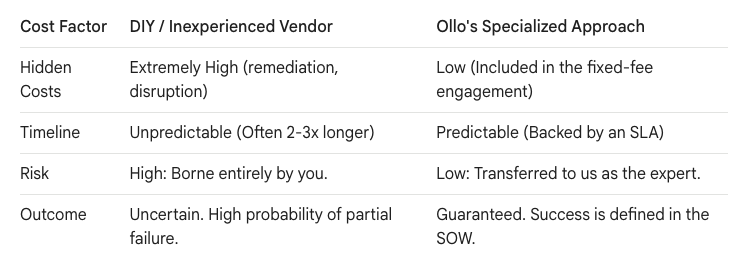
Choosing a migration partner isn't admitting your team isn't smart. It’s a strategic decision to de-risk a complex, one-off project. It acknowledges your team's time is better spent on innovation, not learning migration nuances.
We are honest because our goal isn't winning a project; it's delivering a successful outcome. We move past the "seamless" myth and have a candid conversation about the engineering required for "zero business disruption." We are the architects who tell you the truth, then build a plan for success.
Let's start architecting your reality.
Further Reading from Microsoft
For your reference, here is a collection of the official Microsoft Learn articles linked throughout this post:
- Migration Throttling: How to avoid getting throttled or blocked in SharePoint Online
- SharePoint Limits: SharePoint Online software boundaries and limits
- External Sharing: Microsoft Entra (Azure AD) B2B Collaboration Overview
- Modernization Playbooks:
- Microsoft Migration Tooling:
- Intelligent Content Management: Overview of Microsoft SharePoint Premium

















