



A compliance officer walks into your Monday morning with a simple question, and the room goes quiet. The record should exist. The retention rule should have deleted the old copy years ago. Instead, your team finds the document buried in an orphaned SharePoint site, permissions are inherited from who-knows-when, and nobody can prove who approved the deletion or whether deletion even happened. That's what information governance looks like when it lives in policy decks instead of the platform.
In regulated Microsoft 365 estates, that failure isn't academic. It becomes an audit problem, a legal defensibility problem, and a migration problem all at once. The business case for governance has never really been about neat filing, either. IBM and CGOC data cited in an official PDF found that 98% of planned IG benefits were about defensible disposal and 53% were about compliance and risk reduction in the CGOC report. That's the key battlefield: who can act on information, when they can act, and whether the result stands up later.
The Governance Failure Nobody Saw Coming
The bad day usually starts with a routine request. A compliance officer wants one contract, one approval trail, or one message from a legacy site, and the team discovers the content is technically there but operationally lost. The file survived because nobody applied deletion rules, and the records that should have been locked down kept drifting through SharePoint, Teams, and email as if policy was optional.
We often see clients fail when they treat governance as a document exercise. The Word file says ownership exists. The retention schedule says disposal is controlled. Reality says permissions inherited from a parent site nobody trusts, content copied into abandoned libraries, and no reliable answer to who authorised deletion. That gap turns a simple retrieval request into a defensibility issue.
Practical rule: If your team can't show who owns a record, where it lives, and what rule governs its deletion, you don't have governance. You have unmanaged content with paperwork around it.
The commercial risk is not subtle. Poor governance shows up as legal exposure when records should have been retained, as audit friction when the evidence trail is incomplete, and as migration failure when old assumptions collide with Microsoft 365's actual behaviour. A tenant move doesn't create the weakness, it exposes it.
For a deeper look at how these failures show up during migration work, see the SharePoint migration failures that cost enterprises millions. In practice, governance failures usually arrive first as inconvenience, then as lost control, then as a formal finding.
Defining Information Governance Beyond the Buzzwords
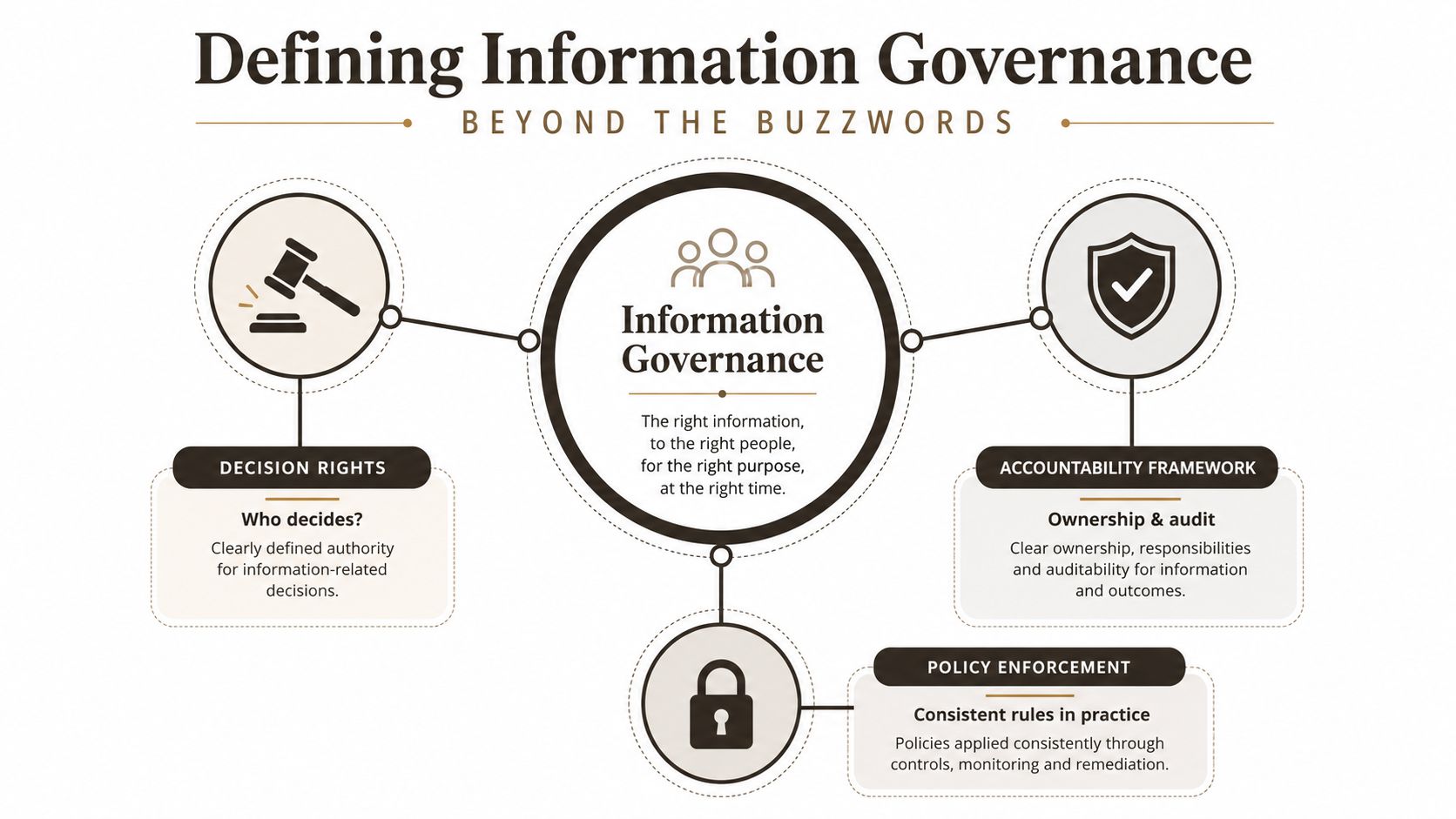
A migration starts. The SharePoint libraries look tidy, the retention policy exists on paper, and the business believes the old file shares are under control. Then someone asks who approved deletion, which sites hold records, and why users can still edit content that was supposed to be locked. That is the point where information governance stops being a definition and becomes an operational test.
The cleanest working definition comes from Gartner, which describes information governance as the specification of decision rights and an accountability framework covering creation, storage, use, archiving, and deletion, with the supporting roles, policies, standards, and metrics needed to use information efficiently. The Washington Secretary of State uses equally concrete language, describing IG as multi-disciplinary structures, policies, procedures, processes, and controls that support regulatory, legal, risk, environmental, and operational needs. That combination matters because it stops people from reducing governance to filing rules.
What the definition means in practice
In a Microsoft 365 estate, the definition lands in the uncomfortable place between policy and enforcement. A policy can say that legal records are retained, but unless SharePoint record labels, retention policies, and access controls stop casual edits or deletion, the policy has no operational weight. A tenant migration exposes that gap quickly, because content moves faster than manual oversight and inheritance does exactly what it was configured to do. That is why the phrase what is information governance needs a practical answer, not a marketing one.
The historical signal is clear. The IGI's State of Information Governance reporting found that only 2% of respondents had never undertaken an information governance project, which tells you governance is no longer niche. It is a mainstream enterprise requirement, even if many organisations still run it like a side project. In the same vein, ARMA's framing stresses accountability across creation, use, sharing, protection, archiving, and deletion, which lines up with the same lifecycle focus seen in the IBM guidance cited earlier.
The model only works if decision rights are explicit. For a structural view of how governance responsibilities should sit inside the organisation, see governance structure. If your team cannot name who owns retention, who can override disposition, and who signs off on deletion, then the definition has already failed in practice.
The practical resource above is useful because it separates policy from control, which is where organisations usually break down.
Core Principles That Actually Protect Your Organisation
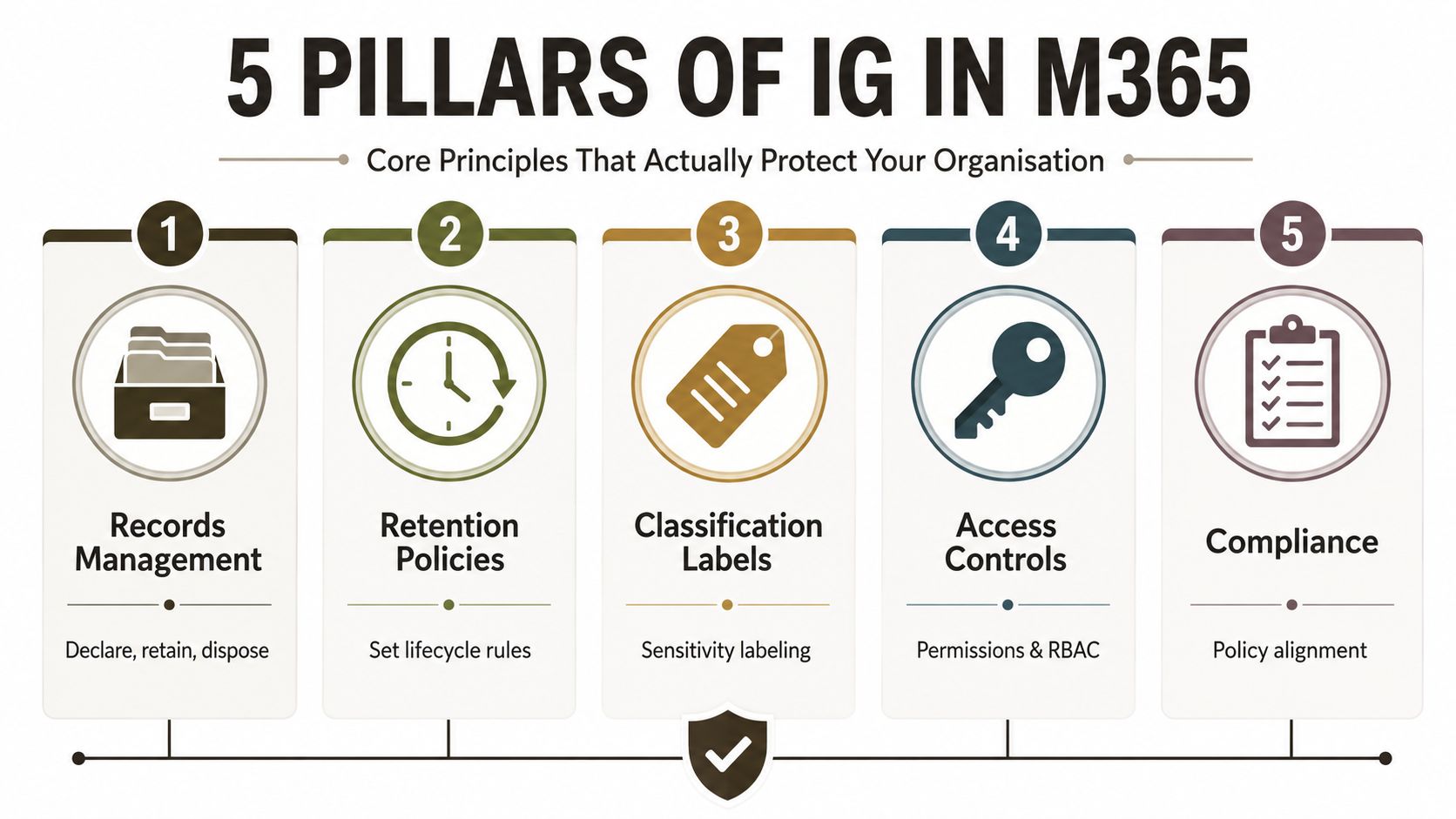
The five pillars that matter in Microsoft 365 are boring on paper and unforgiving in practice. Each one has to be enforced by configuration, not policy language. If you skip any of them, the rest stop mattering the moment content moves.
Records management and retention
Records management means declaring content so it can't be casually modified or deleted. In SharePoint, that usually means using record labels and making sure the site design doesn't let users work around them. Retention policies then decide what happens over time, retain-only, delete-only, or retain-then-delete, depending on the business rule and legal obligation.
Classification and sensitivity
Classification travels with the content, not just with the folder. Sensitivity labels matter because they can follow a document across workloads and keep protection intact when users move files, share them, or sync them. If your team only classifies at the library level, you'll miss the messy edge cases where the document leaves the neat container and lands somewhere uncontrolled.
Access and auditability
Access controls belong in Entra ID and should align with zero-trust thinking. If a user doesn't need persistent access, don't hand it out and hope someone reviews it later. For the practical side of that design, see zero-trust explained, because governance without access discipline just becomes delayed exposure.
Good governance doesn't survive by policy approval. It survives when the platform refuses the wrong action.
Auditability closes the loop. Unified audit logging needs to be turned on, and your team needs to know how to search it during eDiscovery or a regulatory request. For a governance-oriented implementation view inside Microsoft 365, read content governance. The pattern is simple, each pillar must be configured so the platform enforces the rule even when people forget, disagree, or try to work around it.
Information Governance Versus Data Governance
TechTarget makes the distinction cleanly. Information governance is the broader corporate framework that decides who can create, store, use, retain, and delete information. Data governance focuses on the physical data itself, including storage, security, transport, quality, and integrity. The difference matters because a migration can be technically sound and still fail governance if nobody owned the decision about retention or deletion.
The split in Microsoft 365
In SharePoint and Microsoft 365, IG owns the rule, for example, whether a contract is retained for a fixed period and then defensibly deleted. Data governance owns how the underlying data gets handled, for example, the storage controls, encryption settings, and transport behaviour around that content. Confusing the two creates classic failure modes, policy exists but nothing enforces it, or technical controls exist but nobody knows who authorised them.
| Aspect | Information Governance | Data Governance |
|---|---|---|
| Primary question | Who may create, retain, use, and delete information | How the data is stored, secured, transported, and kept usable |
| Typical ownership | Legal, compliance, records, risk, and business owners | Data teams, platform teams, security engineering |
| Microsoft 365 focus | Retention labels, records, defensible deletion, auditability | Storage controls, encryption, transport, technical quality |
| Migration risk | Retention and deletion rules can be lost or misapplied | Data structures, metadata, and technical integrity can break |
The difference matters even more in identity-driven designs. The Purple overview of identity-based networking security is useful because it reminds teams that access and trust now sit around identity, not network boundaries. That lines up with governance work in Microsoft 365, where access decisions, retention logic, and auditability all have to survive the move together.
The practical takeaway is blunt. If your team only governs data, you'll miss the legal and operational rules around information. If your team only governs information on paper, the platform will ignore you.
Where Governance Breaks During Microsoft 365 Migrations
A migration quickly reveals the state of information governance. Tenant-to-tenant moves and SharePoint migrations do not create weak policy; they expose it in permissions, metadata, retention rules, and how teams have configured the tenant.
The failure modes that hurt most
API throttling is the first trap. Migration tools can slow down, skip items, or force retries, and if the project team does not watch for that, gaps appear in the destination tenant. Microsoft's guidance on service limits and throttling shows why transfer speed is never a harmless detail. A file did not fail because it was bad, it failed because the platform refused to move it at that moment.
The next trap is the 5,000-item threshold. Once lists and folders become too large, handling permissions and views becomes fragile, and teams start seeing broken inheritance or awkward workarounds that leave orphaned content behind. Long path restrictions are just as nasty. The oldest and most sensitive files often sit deep in nested folders, and those paths can block migration before anyone notices.
GUID conflicts create another layer of damage. When content moves between tenants, lookup columns, managed metadata, and workflow associations can stop behaving as expected because the identity behind the content no longer matches what the source system knew. Broken permission inheritance finishes the job, because carefully designed access models get flattened into site defaults or ad hoc access.
If the migration tool moved the file but broke the label, the lookup, or the access model, your project did not preserve information governance. It disguised the loss.
The same problem shows up in content governance, because content rules only matter if they still work after the move. That is why content governance has to be part of migration planning, not something teams write up after the cutover. Tools like SPMT and ShareGate have strengths, but they hit hard limits in enterprise estates if you do not engineer around throttling, path rules, thresholds, and identity drift. Ollo's own rescue work usually starts after a team assumed the tool would “just handle it,” which is how audit pain gets built into the migration itself. Governance has to be designed into the move, or the move becomes the governance incident.
Why DIY Migrations Are High-Risk in Regulated Sectors
The cheap answer looks fine until the first audit. SPMT works for smaller, unregulated environments, especially when the content set is simple and the risk surface is narrow. For anything beyond that, the trade-offs change fast, and the price of a bad assumption shows up in compliance, legal defensibility, and user trust.
The numbers make the pressure obvious. Multiple 2026 summaries report that 81% of organisations face data-quality issues tied to weak governance, and one 2026 dataset says 58% now name data residency and sovereignty as the top factor in data-placement decisions, both from this governance statistics summary. For Irish and UK organisations, that lines up with GDPR pressure and sector rules that expect you to know where content lives, who controls it, and how long it stays there. If retention labels, audit trails, or access models break during migration, the issue isn't just technical debt. It becomes legal exposure.
What changes when regulation is in scope
A failed migration can trigger litigation discovery headaches, DSAR delays, and audit findings long after the project team has moved on. That's why we treat governance as a survival requirement, not a documentation exercise. The documentation says the controls exist, but reality is harsher when the move crosses tenants, restructures permissions, and rewires metadata.
For teams that want to understand audit discipline before they touch content, the risk-based audit planning approach is a useful lens. It forces you to start with risk, not with tool features. That matters because tool selection isn't the ultimate decision. The primary decision is whether your governance model can survive the migration intact.
Where specialist help fits is simple. You need custom PowerShell PnP scripting, careful ShareGate configuration, and a migration design that works around platform constraints instead of praying they won't matter. Use SPMT for straightforward, low-risk jobs. For regulated tenant consolidation or anything with real retention obligations, you need specialist execution, because the cost of failure is not a missed milestone, it's broken defensibility.
Your Governance Audit Checklist Before Any Migration
Before anyone copies a single site, check the governance basics. If these controls are incomplete, the migration will amplify the problem instead of solving it. For a broader governance review, this Microsoft 365 governance audit checklist gives a useful starting point.
Run these seven checks
- Retention label coverage across workloads, check the Microsoft Purview compliance portal and confirm labels apply to SharePoint, OneDrive, and Exchange where required.
- Permission inheritance on large sites, review sites and libraries with more than 5,000 items in SharePoint Admin and verify inheritance isn't masking access drift.
- Path length exposure, inspect legacy file shares and deep folder structures before migration, because long paths fail when teams ignore them.
- GUID dependency mapping, inventory lookup columns, managed metadata, and workflows in SharePoint before any tenant move.
- Unified audit log status, confirm it's enabled in the Microsoft Purview compliance portal and test searches before you need evidence.
- eDiscovery hold readiness, verify hold policies and case access in Purview so legal preservation doesn't collapse mid-project.
- Entra ID conditional access alignment, review policies in Entra admin centre and make sure they reflect zero-trust expectations rather than leftover exceptions.
If any one of these checks comes back weak, stop the migration plan and fix the control first.
That's the line between a managed project and a rescue job. If your audit shows gaps, get specialist help before you move the content.
If your organisation is facing a Microsoft 365 migration, a tenant consolidation, or a governance audit that keeps uncovering broken inheritance, missing retention, or messy access controls, talk to Ollo. We handle high-stakes SharePoint and Microsoft 365 migrations with the governance controls built in, so your team doesn't have to discover the failure modes in production.

















