



You're probably staring at a tenant-to-tenant consolidation where the SharePoint estate has drifted for years, Entra ID has grown sideways, and every business unit thinks it owns the truth. That's where governance structure stops being a slide-deck term and starts acting like the control plane that decides whether your migration survives audit, security review, and cutover day.
In Ireland, governance is built on the Constitution of 1937, approved by referendum on 1 July 1937 and in force from 29 December 1937, with power split across the Oireachtas, government, and courts, not parked in one place as set out in the constitutional overview. That's the right mental model for Microsoft 365 too. If your team centralises every decision in IT, or pretends documentation equals control, you'll end up with backlog, ambiguity, and a migration nobody can defend when access, retention, or permissions go wrong. The documentation says one thing, but reality is harsher. Governance only works when it assigns decision rights, accountability, and escalation that people use.
Why Microsoft 365 Governance Structure Breaks Under Migration
We often see clients fail when they treat a migration like a file copy. The estate has already drifted, the access model has hardened into tribal knowledge, and nobody has a clean answer for which sites, groups, labels, or owners still matter. Then the tenant-to-tenant work starts, and the whole governance structure gets forced to absorb identity redesign, permission mapping, and compliance pressure at the same time.
That's when DIY governance collapses. A team can survive years of SharePoint sprawl because the mess stays mostly hidden, but migration brings it into the open. Every broken inheritance path, every stale owner, every guest account, every unreviewed retention rule becomes a live decision. If your governance model can't absorb that load, it isn't a model, it's a report.
The practical lesson is blunt. Governance structure is not an org chart, it's the operating system that decides who can approve, who can challenge, and who can stop a bad move. That's why we point directors to an audit mindset first, not a tooling debate, and why the governance checklist in this CTO audit guide matters before anyone touches migration work.
Practical rule: if your migration plan depends on informal approvals in Teams chats, you've already lost control of the estate.
The same pattern shows up in public governance. Ireland's national system relies on institutional checks, coalition arithmetic, and parliamentary accountability, not simple command authority as described in the governance overview. Microsoft 365 behaves the same way under stress. You need a structure that can survive parallel moves, not a committee that only meets when someone asks awkward questions.
The Five Components Every M365 Governance Structure Needs
A usable governance structure in Microsoft 365 has five parts. If one is missing, the whole thing starts to rot. You can draw the model on a whiteboard in minutes, and your team can score itself against it just as fast.
Roles and decision rights
This is the first failure point. A mature model assigns who decides on site creation, app approvals, guest access, retention exceptions, and identity changes. If your IT team owns everything, you've already built a bottleneck. In practice, the governance council resolves cross-domain conflict, data owners carry accountability for specific areas, and data stewards run the day-to-day controls as framed in governance frameworks.
Policies and standards
Policies tell people what good looks like. Standards turn that into enforceable behaviour, such as site templates, naming rules, label use, and access review cadence. In Microsoft 365, that means your team should know exactly how SharePoint site provisioning works, what Entra ID groups can be used for, and which retention labels apply to which content classes.
Provisioning and lifecycle controls
Most DIY estates break at this point. If you let sites, teams, groups, and guests accumulate without a lifecycle rule, you end up with dead content and unsafe access. Governance needs gates for creation, review, suspension, archive, and deletion. If the process doesn't define who can create, who can retire, and who can override, it will fail the first time a business unit demands a shortcut.
Monitoring and audit
If nobody checks the logs, you don't have governance, you have wishful thinking. A proper structure includes evidence capture, review cycles, and reporting lines. That aligns with the OECD view that governance needs clear allocation of responsibilities, timely disclosure, and oversight that can be audited in the OECD principles.
Exception handling
This is the piece directors usually underbuild. Real estates need a process for exceptions, escalations, and approvals when the standard control doesn't fit. If the exception path is vague, people bypass it. If the exception path is too heavy, they bypass it faster.
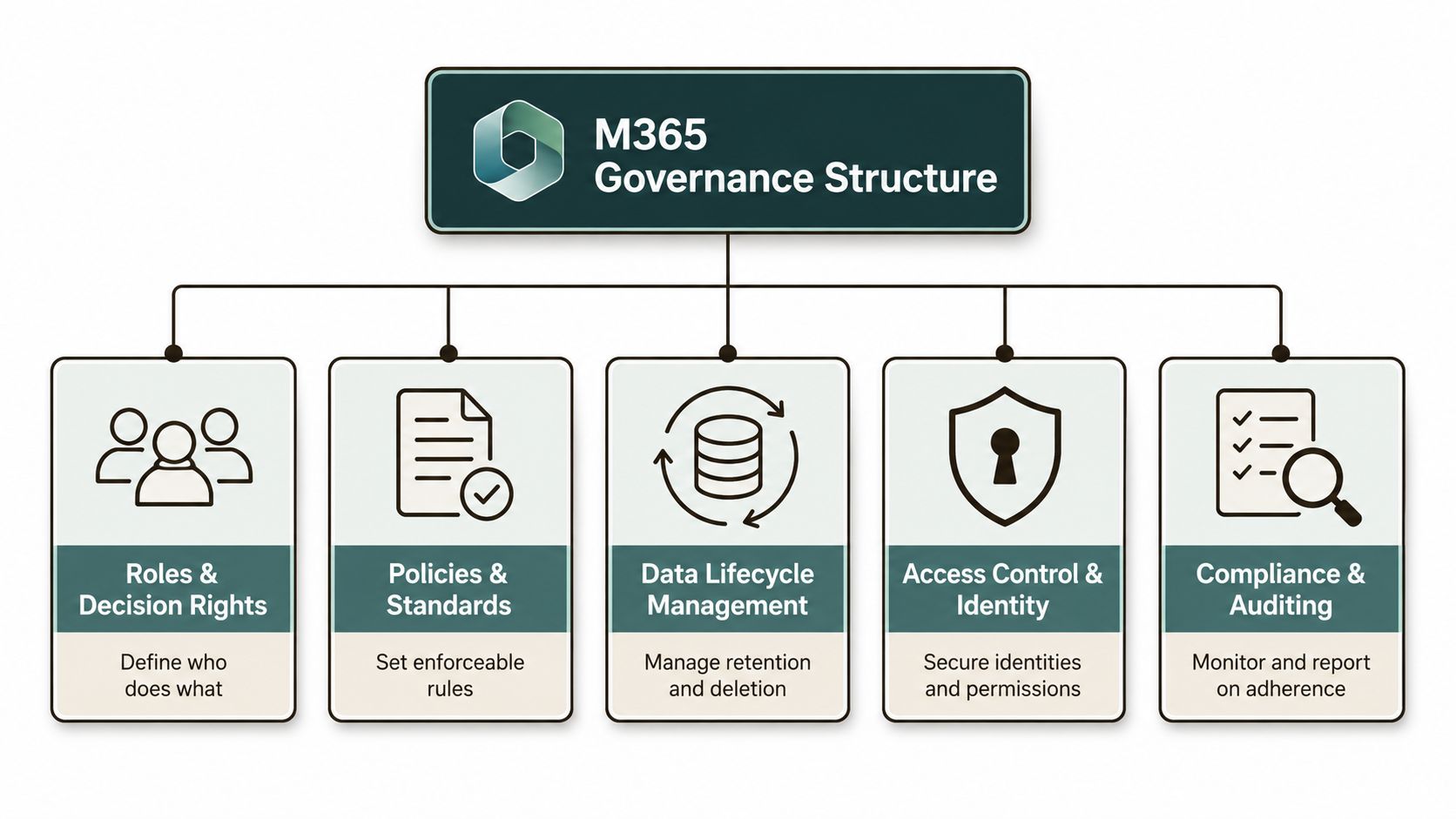
If you want a blunt way to test your maturity, compare those five parts against the responsibilities a GRC analyst would be asked to evidence during an audit, then ask whether your current model could survive that scrutiny using this role guide. For a faster benchmark, cross-check your current setup against the Microsoft 365 maturity model and see how many of the five pillars you enforce.
Technical Risks That Expose a Weak Governance Structure
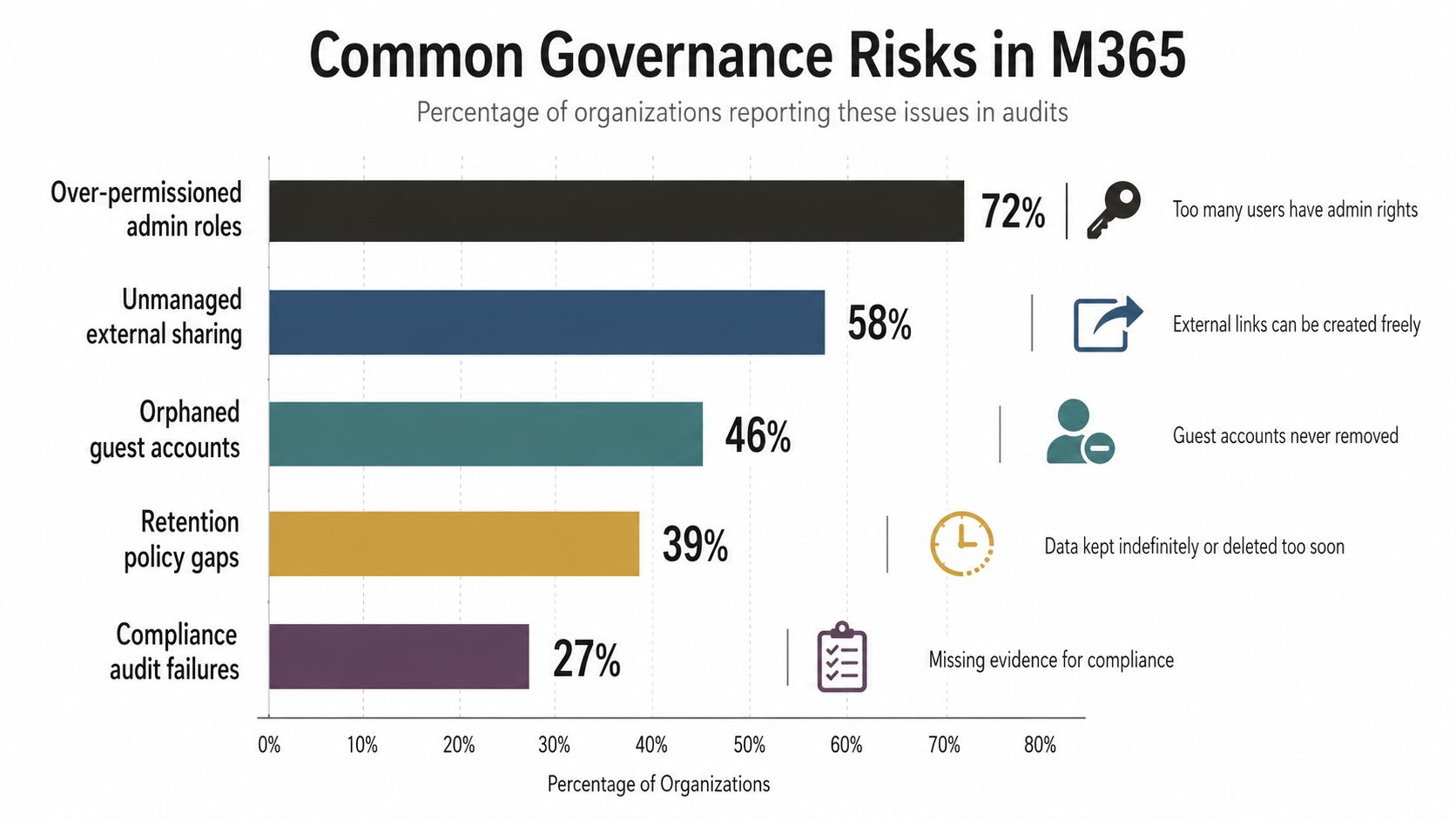
The documentation says migration is a matter of moving content. In reality, the failure comes from control gaps that show up the moment the estate starts moving at speed. Microsoft documents the technical limits. Your governance model decides whether those limits become contained incidents or a mess that spreads across the tenant.
The risks your team cannot hand-wave away
API throttling is the first wall. Bulk migration traffic can saturate service limits, and when it does, jobs slow down or fail. If your governance structure never defined migration windows, retry ownership, or throughput control, your project burns time while business users blame the tooling.
The SharePoint list view threshold is another classic trap. Microsoft documents the 5,000 item limit in list views, and teams who ignore it discover it during cutover when views stop behaving the way users expect. That isn't a cosmetic issue. It breaks operational confidence and forces remediation after the move, when every delay costs credibility.
Broken inheritance is where bad structure becomes visible. Deep folder trees, copied sites, and inherited permissions don't always map cleanly across tenants. If nobody owns permission rationalisation before migration, you end up with access drift and an estate that looks migrated but behaves inconsistently.
Long path limits still hurt teams that never tested their content properly. Microsoft documents the 400-character path limit for supported scenarios, and migrations with long nested structures surface those failures late. At that point, the issue is no longer technical alone. It becomes a governance failure because nobody set a content standard before the move.
GUID conflicts during tenant merges are even uglier. Identity and object collisions don't respect project plans. If your governance structure didn't define how identity mapping, object reconciliation, and exception approval work, the migration team inherits a problem they cannot solve by throwing more bandwidth at it.
If you want a direct example of why projects die, read why cloud projects fail and then compare that failure pattern with your own migration controls. The common thread is always the same. Teams treat orchestration as optional, then discovery and cleanup consume the entire programme.
The control that should have existed
The right governance response is simple:
- Define ownership early: one named owner for access, one for retention, one for cutover.
- Set migration guardrails: clear batching rules, retry ownership, and exception thresholds.
- Test against Microsoft limits: not in theory, in a pilot that mirrors production.
- Log every override: if someone bypasses a rule, the change needs evidence and sign-off.
The documentation says the platform has limits. In reality, your governance structure decides whether those limits become a one-day delay or a regulator-facing incident.
For the identity side of the house, the same discipline applies to Microsoft Entra ID. If your target model doesn't define who can change identities, how cross-tenant sync behaves, and who approves exceptions, you're building a breach path, not a migration plan. The same problem appears in every regulated estate, and it's exactly why governance has to lead the tooling.
Comparing Migration Tools Against Your Governance Structure
Tools don't fix a weak governance structure. They just expose it faster. SPMT, ShareGate, and custom PowerShell PnP each solve a different problem, and each one breaks if you use it outside the control model it can support.
| Control | SPMT | ShareGate | Custom PowerShell PnP |
|---|---|---|---|
| Audit logging | Basic visibility, limited for serious traceability | Stronger reporting and migration history | Whatever you build, so discipline matters |
| Retention preservation | Not where you want to bet a regulated move | Better handling when the plan is clean | Best when scripted and tested properly |
| Permissions fidelity | Fragile in complex estates | Practical for many mid-market moves | Strong, but only if identity mapping is controlled |
| Identity mapping | Weak for enterprise complexity | Better, with reporting support | Most flexible for tenant-to-tenant work |
| Exception handling | Thin | Usable | Strongest when your team has real engineering skill |
| Throttling resilience | Breaks down fast in larger estates | More tolerant, but still not magic | You control pacing and retries |
| Recovery posture | Limited | Better rollback visibility | Best if you design the recovery path yourself |
SPMT has a place, but only in narrow scope. Once you push it into serious enterprise migration work, timeout behaviour and reporting gaps stop being edge cases and become project risk. ShareGate gives you a stronger operational backbone, but it still won't save you from bad governance or sloppy identity design. If your team layers custom PowerShell on top without control, you'll just automate the mess faster.
The honest view is this. Use SPMT for small, simple moves. Use ShareGate for most mid-market estates. Use custom PowerShell PnP when the work is regulated, multi-forest, or tenant-to-tenant and the governance structure has to survive audit. That's the point where you need a specialist service model such as Ollo, because the work is not pressing migrate, it's designing the control path around it.
For a more detailed tool comparison, this SharePoint migration guide is useful, but don't mistake tool familiarity for operational readiness. The breaking point is always the same. If your decision rights, exception handling, and recovery posture aren't explicit, the tool becomes the scapegoat.
Building a Governance Structure for Tenant-to-Tenant Consolidation
Tenant-to-tenant consolidation needs order before it needs speed. If you start with cutover dates, you're already behind. Start with authority, then freeze the chaos, then define the target. That sequence keeps the migration from becoming a series of uncontrolled exceptions.
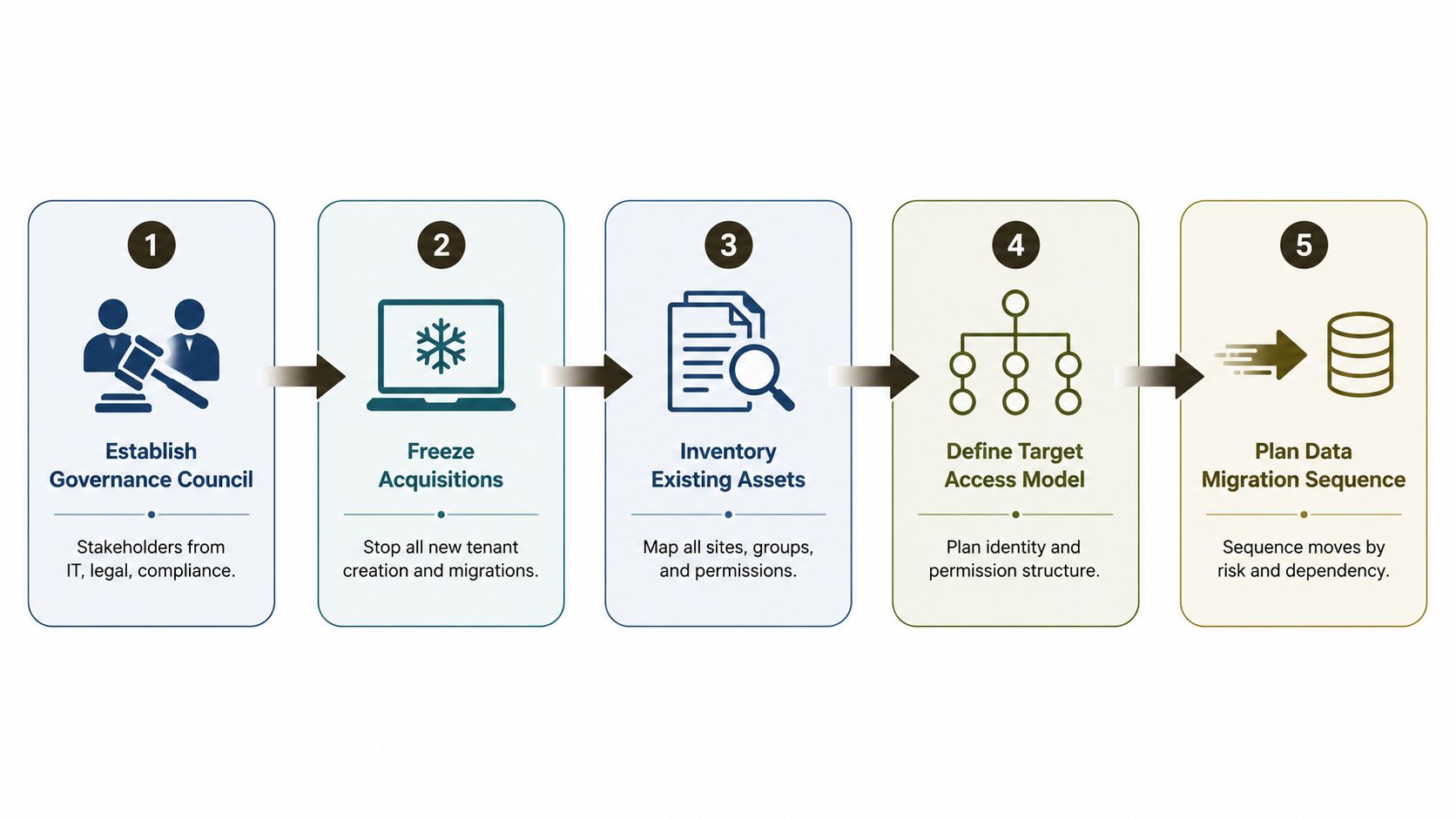
The sequence that holds under pressure
Establish the governance council. Put IT, legal, compliance, and business ownership in the same decision loop. If the people who approve risk never meet, your migration will drift into shadow governance.
Freeze non-essential change. Stop new tenant creation, reckless site sprawl, and ad hoc permission changes. If you don't freeze the estate, you'll keep redrawing the target while trying to hit it.
Inventory existing assets. Map sites, groups, permissions, labels, and any inherited exceptions. The inventory is not a reporting exercise. It is the only way to know what moves.
Define the target access model. Decide how Entra ID, group ownership, guest access, and approvals will work after consolidation. If you skip this, you import old risk into a new tenant and call it progress.
Plan the migration sequence. Move by dependency and risk, not by who shouted first in steering. A pilot with one business unit is the right proving ground because it exposes control failures before the whole estate is exposed.
The UK government's Teal Book is clear that governance and management need defined relationships, rights, authority limits, decision-making roles, assurance needs, reporting, and accountabilities for delivery as laid out in the governance chapter. That's the same standard you should apply here. If one of those pieces is missing, you don't have a governed consolidation, you have a dressed-up rescue.
For the identity layer, your architects should read the Microsoft 365 tenant-to-tenant migration guidance and then challenge it against their own change board. The documentation is useful, but only if your council can enforce the decisions it makes. Otherwise, every exception becomes a precedent.
Operational rule: if you cannot name the person who signs off on access exceptions, your target model is not ready.
Anti-Patterns and Rescue Migration Warning Signs
The worst migration failures do not begin with a technical outage. They begin with a weak governance structure that nobody challenged. By the time the project turns into a rescue, the estate already has too many owners, too many exceptions, and too little evidence.
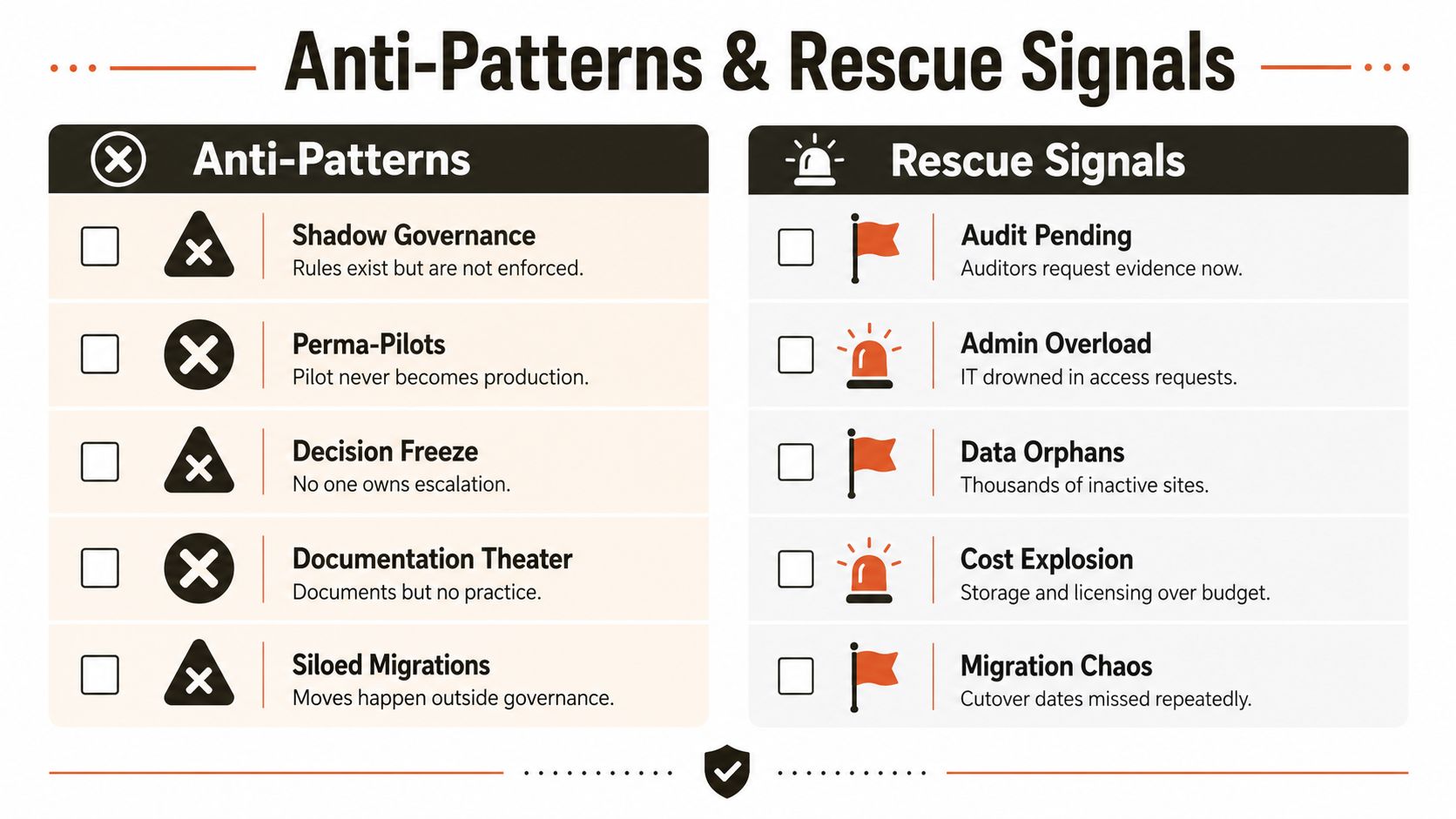
Anti-patterns that poison the estate
- Shadow governance. Rules exist, but nobody enforces them. Your team believes it has control because policies sit in a folder, while users keep bypassing them.
- Perma-pilots. The migration never leaves the test lane because nobody owns the hard decisions.
- Decision freeze. Escalations stall because the project lacks a real approver.
- Documentation theatre. The team produces binders and diagrams, but nobody practices the process.
- Siloed migrations. Business units move data outside the governance model, then demand support when it breaks.
Rescue signals that the project is already in trouble
- Audit pending. Auditors want evidence now, and the team starts hunting for approvals that never happened.
- Admin overload. IT is buried under access requests because nobody set a proper delegation model.
- Data orphans. Old sites and stale content remain untouched, which means the migration plan never reconciled ownership.
- Cost explosion. Storage and licensing creep because retention and archive rules stayed vague.
- Migration chaos. Cutover dates slip repeatedly, and each delay creates more mistrust.
I am blunt about this because I have seen the pattern repeat in three regulated healthcare migrations. The organisations that fail usually did not lack tools. They lacked ownership, evidence, and a governance path that people could follow. Once the rescue signals appear, your team is not doing a clean migration anymore. It is triage.
For a formal lens on control design, the governance model in the earlier section and the operational ownership questions in this governance module point to the same issue. If authority, fiduciary duty, and escalation are fuzzy, the migration inherits that ambiguity and turns it into risk.
Why DIY Governance Structure Is the Real Risk in M365 Migrations
DIY governance fails because it pushes too much faith into process owners who don't have enough authority, enough evidence, or enough time. In regulated sectors, that isn't a small gap. Missing the control path doesn't just slow the migration, it breaks legal compliance, weakens auditability, and leaves your team defending decisions after the fact.
The pattern is predictable. IT owns the estate, legal sees it too late, compliance gets dragged in after exceptions pile up, and business stakeholders assume someone else approved the change. That's exactly how a migration turns into a rescue. The documentation says governance is “separated,” but reality is that the estate only holds when one structure defines decision rights, lifecycle discipline, audit trails, and exception handling together.
Use the tools with clear eyes. SPMT has a narrow use case. ShareGate is useful, but it still needs disciplined ownership and identity mapping. Custom PowerShell PnP gives you the control you need for regulated tenant-to-tenant work, but only if senior architects design the orchestration, the recovery path, and the evidence chain. That is where Ollo fits, because the risk isn't the software, it's whether anyone can own the governance structure when the migration starts to break.
A strong governance model survives the questions your board, your auditors, and your security team will ask later. A weak one just creates more work for the rescue team.
If your tenant-to-tenant programme has already exposed ownership gaps, stale permissions, or retention rules nobody trusts, talk to Ollo before you cut over another business unit. We build Microsoft 365 migration governance around decision rights, audit evidence, and recovery paths that hold up in regulated estates, then we execute with ShareGate and custom PowerShell PnP where the controls need real engineering. Visit Ollo and start with the part teams often get wrong, the governance structure that has to survive the migration.

















