



You're probably staring at a migration plan that looks tidy on paper. A timeline exists. A tool licence exists. Someone has promised a controlled cutover weekend. Your project board says the tenant-to-tenant move is “on track”.
That's usually the moment the trouble starts.
We often see clients fail when they treat Microsoft 365 migration as a data transport problem. It isn't. It's a control problem. Your tenant already contains every weakness your migration will later amplify: unmanaged permissions, unclear ownership, stale guest access, inconsistent retention, overgrown document libraries, and operational habits nobody wrote down because “the admins just know”.
The Microsoft 365 Maturity Model matters because it gives you a blunt answer to a question often sidestepped: is your environment governed well enough to survive change? If the answer is no, the migration doesn't just run late. It creates audit gaps, broken access paths, and legal exposure your team then has to explain.
Your Migration Plan Is a Gamble Not a Strategy
I've seen this pattern too many times. An IT Director gets a migration proposal from a vendor. The deck looks polished. Discovery is light. The delivery plan assumes the source tenant is reasonably organised. The tool demo works because the demo tenant was clean.
Your tenant isn't clean.
By week two, the plan hits reality. SharePoint permissions don't inherit properly because someone broke inheritance years ago and never documented it. Large libraries trigger list view threshold problems. API throttling slows every batch window. Old folder structures collide with path-length limits. Security teams realise guest accounts and external sharing were never reviewed properly. The migration team starts “making decisions on the fly”, which is a polite way of saying governance failed before the first workload moved.
A so-called lift and shift inside Microsoft 365 usually means shifting chaos faster.
If your planning starts with “which tool are we buying?”, you're already late. Start with “what controls will break under change?” That's the only question that matters in a regulated tenant. If your team needs a realistic baseline before any move, start with a proper Microsoft 365 migration risk review, not another optimistic Gantt chart.
Your migration plan isn't validated by a successful pilot on a tidy test site. It's validated by how it behaves in the worst-governed corner of your tenant.
The expensive part isn't moving files. The expensive part is discovering, halfway through, that your organisation confused Microsoft 365 adoption with Microsoft 365 control.
What the Microsoft 365 Maturity Model Actually Is
The Microsoft 365 Maturity Model isn't a fluffy advisory slide. Microsoft defines it as a structured framework with five levels of maturity, from Level 100 (Initial) to Level 500 (Optimizing) in its model introduction.
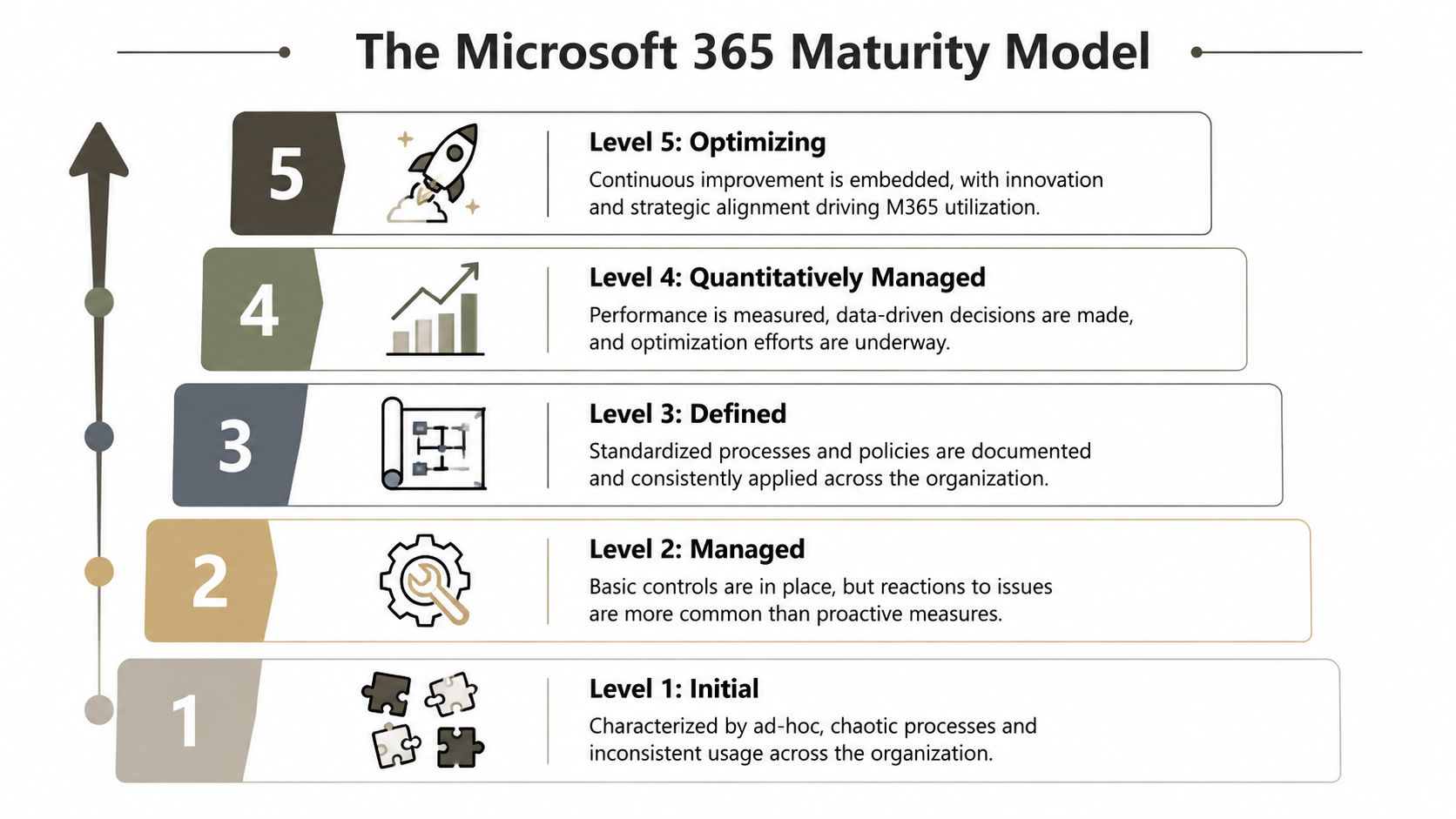
That sounds harmless until you read what Microsoft says about the bottom of the scale. In the governance, risk, and compliance competency, Level 100 means organisations pay little attention to compliance, have no ownership or monitoring of GRC, and don't invest in compliance frameworks, technical controls, or employee training. That is not “early stage”. That is operational exposure.
What the levels mean in the real world
A low score doesn't mean your team is inexperienced. It means your processes are reactive. Controls exist only when someone asks for evidence. Ownership is vague. Audit readiness depends on memory, not systems.
A high score means the opposite. Controls are planned. Responsibilities are explicit. Automation reduces drift. You can prove what happened, who changed what, and why your policies exist.
Here's the practical translation:
| Maturity level | What it usually means in a migration |
|---|---|
| Level 100 Initial | Nobody owns the mess. Migration discovers problems the business thought were already managed. |
| Level 200 Managed | Some controls exist, but they're inconsistent and heavily manual. |
| Level 300 Defined | Policies are documented and repeatable, but technical enforcement may still lag. |
| Level 400 Quantitatively managed | Teams measure performance, exceptions, and risk with discipline. |
| Level 500 Optimizing | Governance works as an operating model, not a one-off project. |
Why this matters before migration
Microsoft says the framework covers business competencies, not just products. That's the right idea. But many teams still misuse it as a feel-good workshop. They score themselves, discuss aspirations, and then ignore the obvious engineering consequence. Low maturity predicts migration failure.
We often see clients fail when they think “we use Teams and SharePoint heavily” means “we're mature”. Usage isn't maturity. Sprawl isn't maturity. Buying licences certainly isn't maturity.
If you want a stronger benchmark for what good Microsoft 365 looks like operationally, compare your estate against best-in-class Microsoft 365 practice, not against what your admins have managed to keep alive.
Practical rule: Use the Microsoft 365 Maturity Model as a pre-migration diagnostic. If you use it as a post-workshop talking point, you've missed its only useful purpose.
The Six Pillars of Maturity Your Migration Depends On
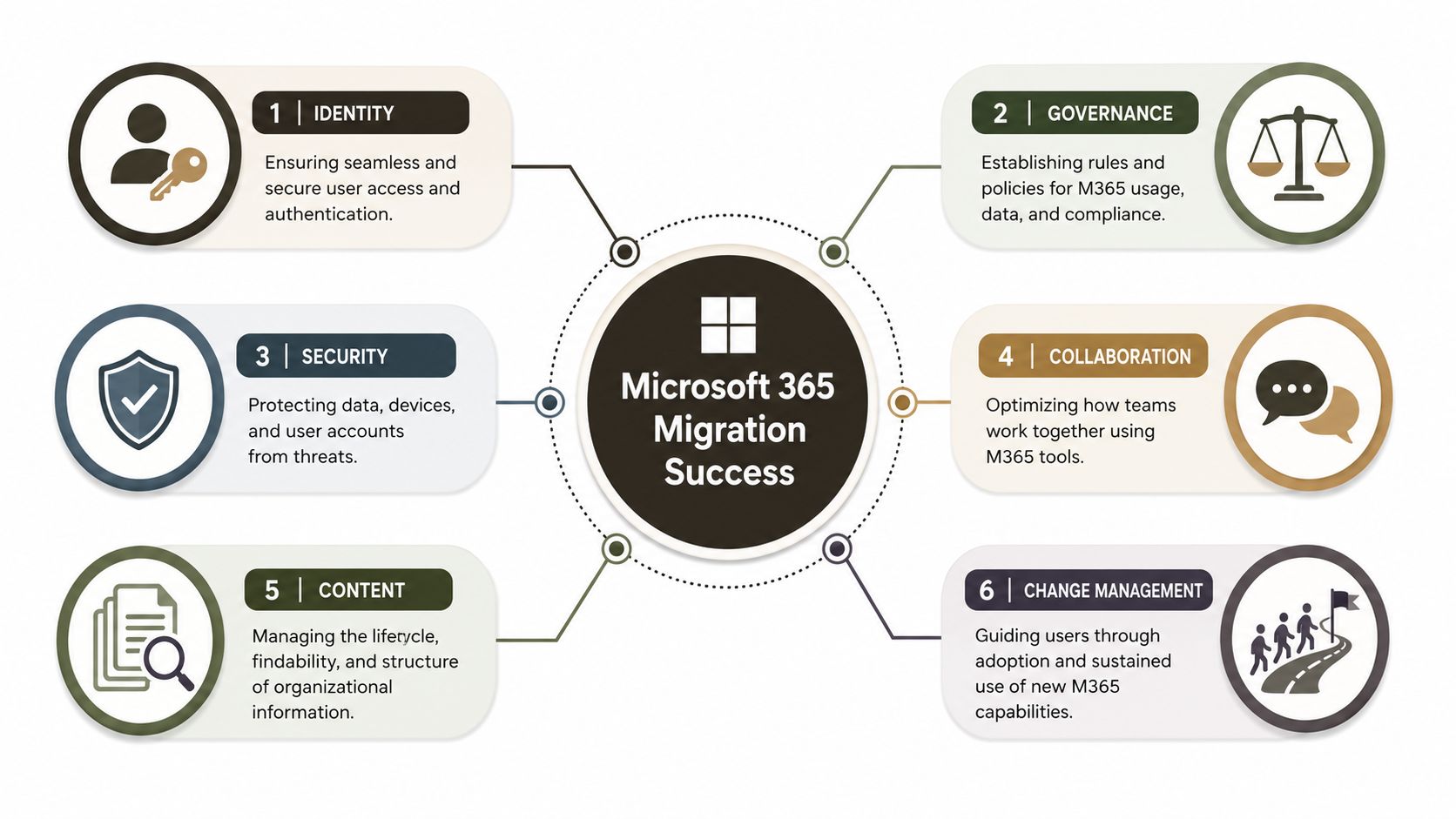
Most migration failures don't come from one dramatic fault. They come from several mediocre controls failing together. That's why I reduce the Microsoft 365 maturity model into six migration-critical pillars: identity, governance, security, collaboration, content, and change management.
Identity
Low identity maturity usually hides behind “users can sign in, so identity is fine”. It isn't fine if your Entra ID estate contains stale guests, inconsistent naming, duplicate admin patterns, or Conditional Access rules that grew by exception rather than design.
In migration, this becomes access drift. Users land in the target tenant with the wrong effective permissions, old B2B relationships persist, and your Zero Trust model ends up weaker after the move than before it. That's not an inconvenience. It's a security incident waiting for timing.
If your team hasn't audited role design, guest lifecycle, and access policy consistency, start with Entra ID governance fundamentals.
Governance
Projects often fail without robust governance. Low governance maturity means no one can answer basic questions with confidence. Who owns each site? Who approves new workspaces? Which teams can share externally? Which content must be retained? Which libraries should never be migrated as-is?
When governance is weak, migration teams improvise. They create exceptions to keep momentum. Those exceptions become the new production standard.
If you don't define ownership before migration, the tool will happily move your ambiguity into a new tenant.
Security and collaboration
These two often fail together.
Security breaks when controls only exist on paper. MFA coverage may look acceptable until you examine privileged accounts, service accounts, and legacy exceptions. Labelling may exist, but inconsistent application means sensitive content still travels without reliable control.
Collaboration sounds softer, but it creates hard technical damage. When staff don't know whether to use Teams, SharePoint, or OneDrive, they create duplicate content, orphaned channels, and random external sharing patterns. Migration then becomes archaeology.
Content and change management
Content maturity is where SharePoint migrations become painful. A low score here means overgrown libraries, poor information architecture, duplicate files, bad naming, broken inheritance, and structures that trigger SharePoint limits. Microsoft Learn confirms many of the constraints that catch teams during large-scale content work. The point isn't that the platform is broken. The point is that your content model must respect the platform's rules.
Change management gets dismissed until cutover. Then users can't find content, owners don't understand new boundaries, and support queues fill with issues that are really governance failures. Training alone won't save you. Users need clear decisions, accountable owners, and workflows that match the operating model.
Here's the blunt summary:
- Low identity maturity means access errors and policy inconsistency after cutover.
- Low governance maturity means nobody can approve, defend, or remediate what gets moved.
- Low security maturity means control gaps survive migration and become harder to detect.
- Low collaboration maturity means sprawl, duplication, and confused ownership.
- Low content maturity means technical migration blockers and records-handling risk.
- Low change maturity means adoption failure disguised as “user resistance”.
The pattern is always the same. A low score in any one pillar rarely stays isolated. It spreads.
A Brutally Honest Maturity Self Assessment
Most self-assessments are useless because they ask whether a thing exists. That tells you nothing. A better question is whether your team can prove control under pressure.
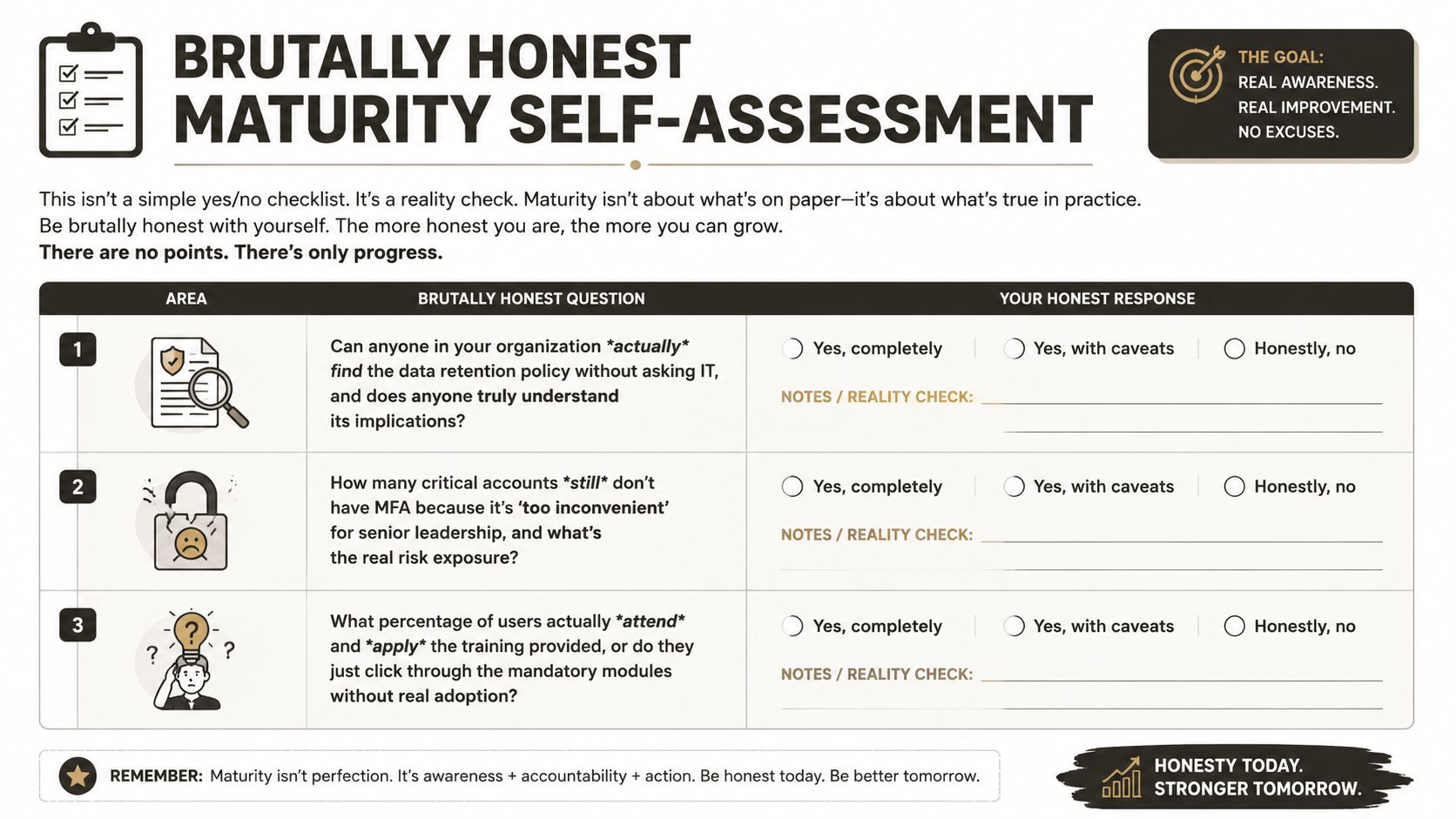
Microsoft ties Managed maturity in governance, risk, and compliance to auditable histories and specific compliance controls, and says Process (500) requires coordinated compliance, centralised automated controls and reporting, plus benchmarking against standards such as ISO/IEC 27001 in its governance and compliance guidance. That has a simple implication. If your process is manual, your evidence trail is weak.
Questions that expose the truth
Ask your team these instead of the usual checkbox nonsense:
- Retention enforcement. Can you prove retention is automatically applied where it should be, or are admins relying on memory and one-off exceptions?
- Permission evidence. Can you produce a defensible access history for a sensitive site quickly, or does somebody need to piece it together from screenshots and tribal knowledge?
- Owner accountability. Does every business-critical workspace have a real owner who understands legal and operational obligations?
- Privileged access discipline. Are admin roles tightly controlled and reviewed, or have old emergency assignments become permanent?
- Migration readiness. Have you identified content structures that will break during transfer, or are you planning to “see what errors come back”?
Here's the uncomfortable benchmark. If your team cannot answer those without a workshop, your maturity is lower than you think.
For teams looking at broader organisational capability, this kind of governance check aligns well with AI transformation readiness insights, because the same weakness appears again and again. Organisations adopt powerful platforms before they build operating discipline.
Stop scoring yourselves generously
This short walkthrough is worth your time before you pretend the estate is ready:
A maturity assessment only becomes useful when it changes the go-live decision. If it doesn't delay, redesign, or block unsafe work, it's theatre.
If you want a less forgiving review lens, use a proper Microsoft 365 governance audit checklist. Your aim isn't to get a flattering score. Your aim is to find what will break before the migration finds it for you.
Why Standard Migration Tools Fail in Immature Tenants
Let's deal with the obvious question. What about the tools?
Tools such as ShareGate are useful. They save time. They reduce manual effort. They give visibility that native options often don't. But in an immature tenant, they become faster ways to collide with the same unresolved problems.
The documentation says the Microsoft 365 Maturity Model is built around business competencies, not a feature checklist. Reality is harsher. The model doesn't tell you how to engineer around throttling, broken inheritance, GUID conflicts, or awkward tenant consolidation edge cases during a live programme. That gap is exactly why many CIOs get trapped. They think they've done the strategic work, but the migration still explodes at the implementation layer, as noted in ShareGate's discussion of the Microsoft 365 Maturity Model and practical gaps.
Where tools hit the wall
A few common breaking points show up repeatedly:
- API throttling. Microsoft throttles workloads to protect the service. That's expected behaviour, not a bug. A tool can retry, but it can't make poor sequencing, unrealistic throughput assumptions, or badly timed batch design disappear.
- Broken inheritance. If permissions were fragmented over years, the tool can copy the mess. It won't tell you whether copying it is a governance mistake.
- GUID conflicts and mapping complexity. Tenant-to-tenant consolidations create identity, reference, and dependency issues that need planned remediation, not blind transfer.
- Content structure problems. Long paths, odd characters, bloated libraries, and weak information architecture all surface as migration noise until they become delivery risk.
- Exception sprawl. Once operators start excluding sites, skipping objects, or forcing remaps just to hit a date, your migration stops being controlled.
The Ollo verdict
Use native tools for simple moves. Use ShareGate for tactical, well-understood workloads. Don't use any off-the-shelf tool as your migration strategy in a regulated or structurally messy tenant.
That isn't tool criticism. It's scope discipline.
One practical route is to combine discovery tooling with remediation and custom scripting before major workload moves. That's the model firms such as Ollo use in complex Microsoft 365 and SharePoint projects, especially where ShareGate helps with execution but PowerShell and PnP scripting have to handle the parts product interfaces can't govern safely.
A migration tool moves objects. It does not create ownership, repair governance, or invent an evidence trail you never had.
Missing this distinction doesn't just fail the migration. It weakens security and compliance at the same time.
Mapping Maturity Gaps to Real World Migration Disasters
Abstract maturity language hides real damage. The failures are much easier to understand when you look at how a low maturity score predicts a specific disaster.
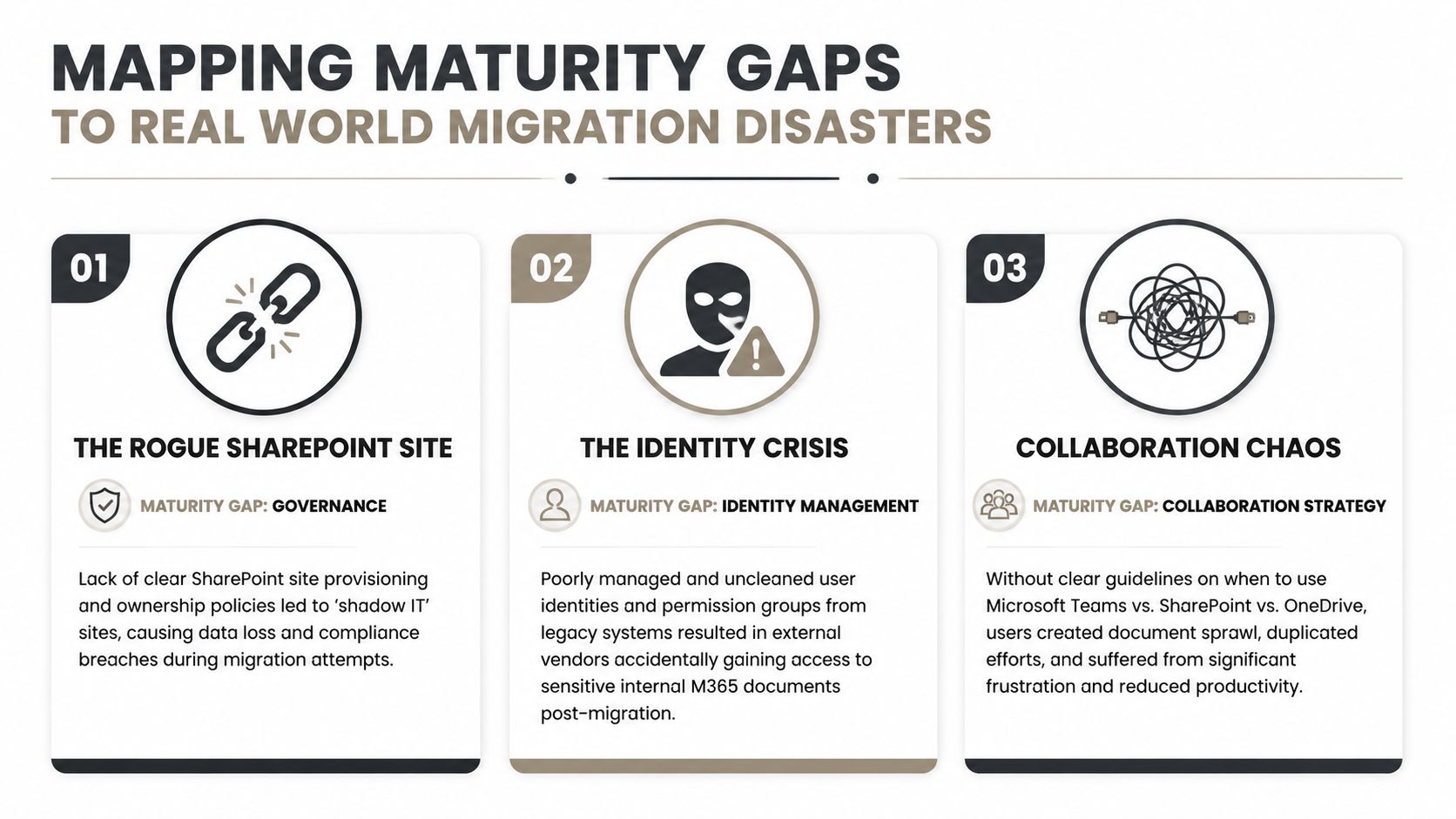
Disaster one and disaster two
Governance gap. A SharePoint estate grows through convenience. Sites get created without clear approval or ownership. Project teams invite external users directly. Nobody reviews old workspaces. When migration starts, the team discovers shadow sites holding sensitive material with no accountable owner. Some content gets deferred because nobody can sign off. Some gets moved anyway because the deadline won't move. You now have both compliance uncertainty and delivery uncertainty.
Identity gap. A tenant consolidation carries years of unmanaged guest access and messy group design into the target environment. External vendors retain access paths nobody intended to preserve. Internal users lose access where old group logic doesn't map cleanly. Security sees the problem after cutover, when changing the model risks breaking business operations.
These aren't exotic edge cases. They're normal outcomes when maturity is low and migration starts anyway.
Disaster three and what Irish leaders still don't get from the model
Collaboration and policy gap. Teams never had clear rules for when to use Teams, SharePoint, or OneDrive. Content sprawls across all three. Versions multiply. Records land in user storage instead of governed workspaces. During migration, nobody can agree what is authoritative, what is duplicate, and what should be retained. The move stalls because classification was postponed until “later”.
A short risk map makes the pattern obvious:
| Maturity gap | Migration symptom | Business consequence |
|---|---|---|
| Weak governance | Unowned sites and unclear approvals | Content decisions nobody can defend |
| Weak identity | Access mapping errors and guest sprawl | Security exposure after cutover |
| Weak collaboration model | Duplicate and misplaced content | Operational confusion and records risk |
Irish IT leaders in finance, healthcare, and energy have a legitimate complaint here. Most content about the model explains maturity in broad terms but doesn't tell them which practices effectively reduce migration risk under local regulatory pressure. Microsoft community updates have also started framing the model around newer risks such as AI agents and content scope, but still stop short of giving measurable Irish benchmarks or sector-specific control patterns, as discussed in this Microsoft 365 Maturity Model update commentary.
That gap is why DIY programmes go wrong. Buyers hear “maturity framework” and assume it answers operational risk. It doesn't. You still need an engineering view of failure modes.
Mature tenants don't avoid disaster because they're clever. They avoid disaster because they remove ambiguity before the migration team touches production content.
Reducing Risk with a Maturity Led Migration
If the tenant is immature, don't push harder. Stop and fix the conditions that will make the migration unsafe.
A maturity-led migration starts with diagnosis. You map the estate, identify ownership gaps, review identity hygiene, inspect permission inheritance, classify risky content patterns, and test whether governance controls operate. Only then do you decide scope, sequencing, and tooling. That sounds slower. It usually prevents the delay everyone claims they're trying to avoid.
The practical order is straightforward:
- Assess control reality. Don't ask what policies exist. Ask what is enforced and provable.
- Remediate before movement. Fix ownership, permissions, guest access, and content structures before bulk transfer.
- Test the ugly paths. Validate the difficult libraries, exception-heavy sites, and regulated workloads first.
- Prove cutover behaviour. Your test plan should include access, retention, auditability, and rollback conditions. If you need a benchmark for that discipline, use a proper migration testing approach.
Many teams eventually realise migration and compliance are the same problem viewed from different angles. If you need a simple visual prompt for that overlap, this image on understanding compliance challenges captures the point neatly. Weak controls don't stay isolated. They surface under pressure.
You can gamble on tool licences, internal optimism, and partial discovery. Or you can treat the Microsoft 365 Maturity Model as what it should be: a warning system. One path gives you a project plan. The other gives you a defensible migration.
If your team suspects the tenant isn't as ready as the project board says it is, talk to Ollo. We help organisations turn Microsoft 365 migrations into governed engineering work instead of expensive clean-up exercises after preventable failure.


















