



A decent web dev company is not the outfit that shows you the cleanest homepage mock-up. In regulated Microsoft 365 work, the question is whether that team can survive throttling, broken inheritance, path-length limits, and the ugly clean-up after a cutover has already gone wrong. If a vendor talks mostly about design polish, you're probably talking to a brochure builder, not a migration partner.
The Reality of Enterprise Web Development
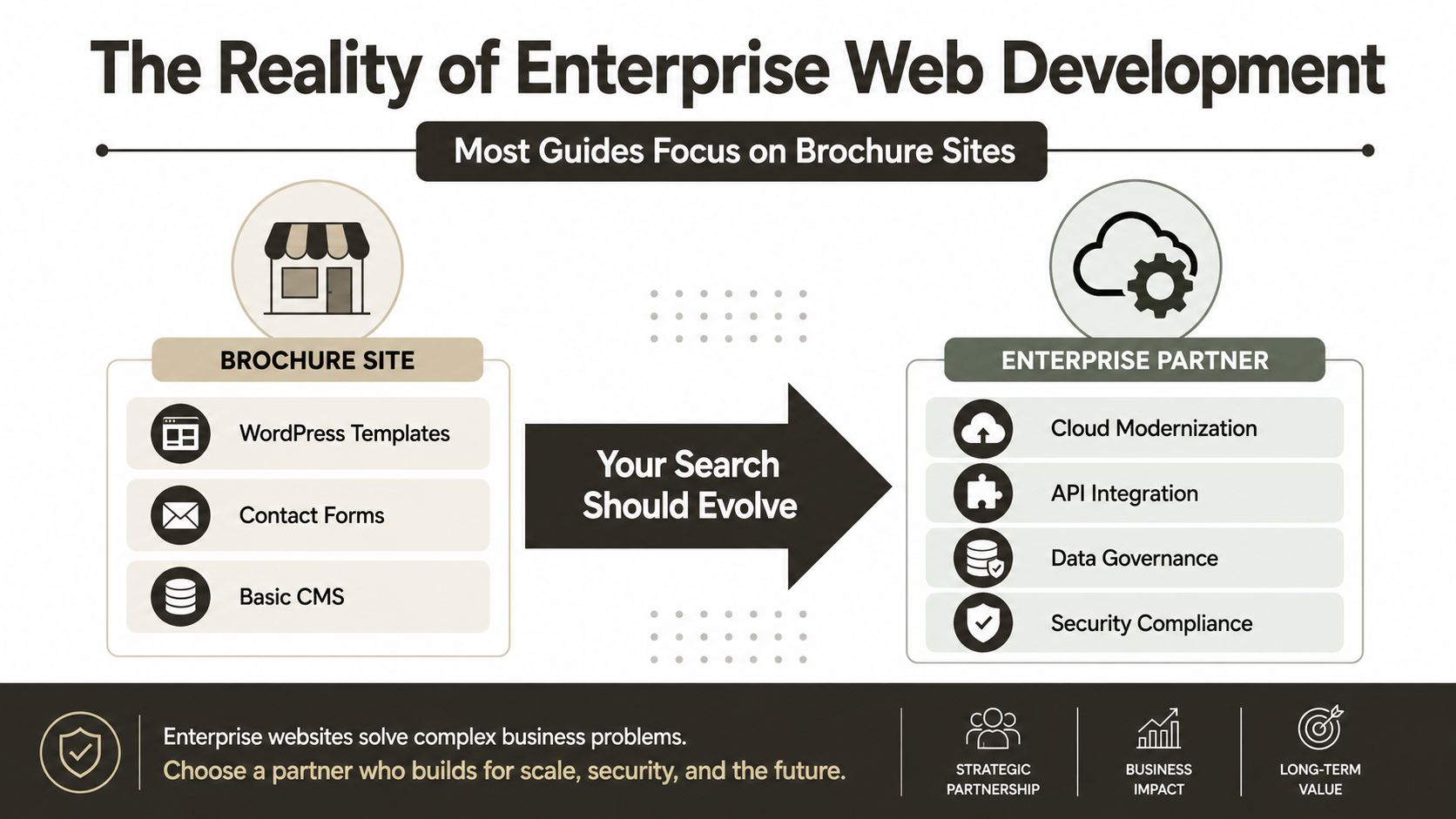
Most buyers still search for a web dev company as if all web work lives in the same bucket. That's the wrong mental model. The market is dominated by enterprise cloud work, not small brochure sites, with North America accounting for 39.40% of global web-development services revenue in 2025, the market valued at USD 80.6 billion in 2025, and forecast to reach USD 134.17 billion by 2031 at an 8.87% CAGR (Mordor Intelligence). The same source also shows cloud-based solutions at 69.20% share and large enterprises at 62.40%, which tells you where the actual demand sits.
That matters because enterprise buyers do not fail on the homepage. They fail on tenant moves, governance, identity, content sprawl, and access control. When a vendor treats Microsoft 365 migration like a normal website build, you end up transferring risk into your own team and calling it “project ownership.” In regulated sectors, that's not clever. It's just expensive.
What the market data is really telling you
The split is simple. Brochure work cares about templates, contact forms, and content editing. Enterprise work cares about cloud modernization, API integration, data governance, and security compliance. Those are different disciplines, not different packaging. If your vendor can't speak fluently about permissions, identity, and bulk content behaviour, they're selling surface area, not resilience.
Practical rule: if the first conversation is about visuals before it's about migration constraints, you're already in the wrong lane.
That's why I push IT Directors to stop asking, “Who can build us a site?” and start asking, “Who can absorb the failure modes when our content and identity estate moves?” If the answer is vague, you're not buying capability. You're buying a warranty-shaped hope.
The internal reality is already documented in our own migration work, especially when the project isn't a fresh build but a salvage job, as discussed in Ollo's SharePoint migration reality notes.
Technical Constraints That Break DIY Projects
Microsoft does not hide the platform limits. Teams ignore them, then call the outcome a process problem. The hard part of migration is not copying files. It is keeping the system functional while the copy runs and after users start filtering, searching, sharing, and auditing content again. DIY projects usually break at that point.

The limits that bite hardest
Microsoft documents that SharePoint and Microsoft 365 enforce throttling, so migration scripts need to detect throttled responses and retry with backoff instead of hammering the service. Microsoft Learn guidance on throttling sounds straightforward until a large tenant move starts stalling under load and every retry collides with the same pressure point. The same platform family also carries a hard 5,000-item list view threshold in SharePoint and OneDrive scenarios, where queries over that count are throttled, and Microsoft's guidance is to design views, indexes, and queries so they avoid the limit. Microsoft 5,000-item threshold guidance
Path length is another common failure point. Microsoft documents URL and path-length constraints, including a maximum URL length of 400 characters and a maximum file path length of 400 characters in OneDrive and SharePoint upload and sync scenarios. Microsoft path and URL constraints Deep folder trees and legacy naming conventions look harmless in source, then fail during migration or sync. Users do not see the problem until documents go missing or links break.
Why the failure happens after the copy
The documentation calls these platform limits, but the operational reality is harsher. A migration often appears complete and still leaves broken inheritance, GUID conflicts, or permission drift behind. Generic tools run out of road there, and specialist intervention becomes the only practical way to reduce risk.
I would point any serious evaluator to our internal notes on the SharePoint migration reality and why tools fail and code is mandatory, because that is the point most DIY teams miss. They treat the copy as the project. The project is making sure the target behaves correctly under live use.
A move that looks complete but fails under filtering, admin validation, or user access checks is not complete. It is a deferred incident.
The best technical teams do not argue with these limits. They pre-scan content, flatten bad structures, split oversized libraries, batch jobs, and write retry logic that respects service health. If your vendor cannot explain that in plain terms, they are not ready for enterprise content.
For a wider view of how specialist delivery teams are evaluated, see the curated list of WooCommerce developers, because the same discipline applies when platform constraints and migration risk decide the outcome.
Your Technical Due-Diligence Checklist
A good vendor interview should feel more like a technical audit than a sales call. You're not buying a logo, you're buying judgment under pressure. If the provider claims Microsoft 365 and SharePoint experience, force them to prove they can work at the level your environment demands.
Ask for the mechanics, not the brochure
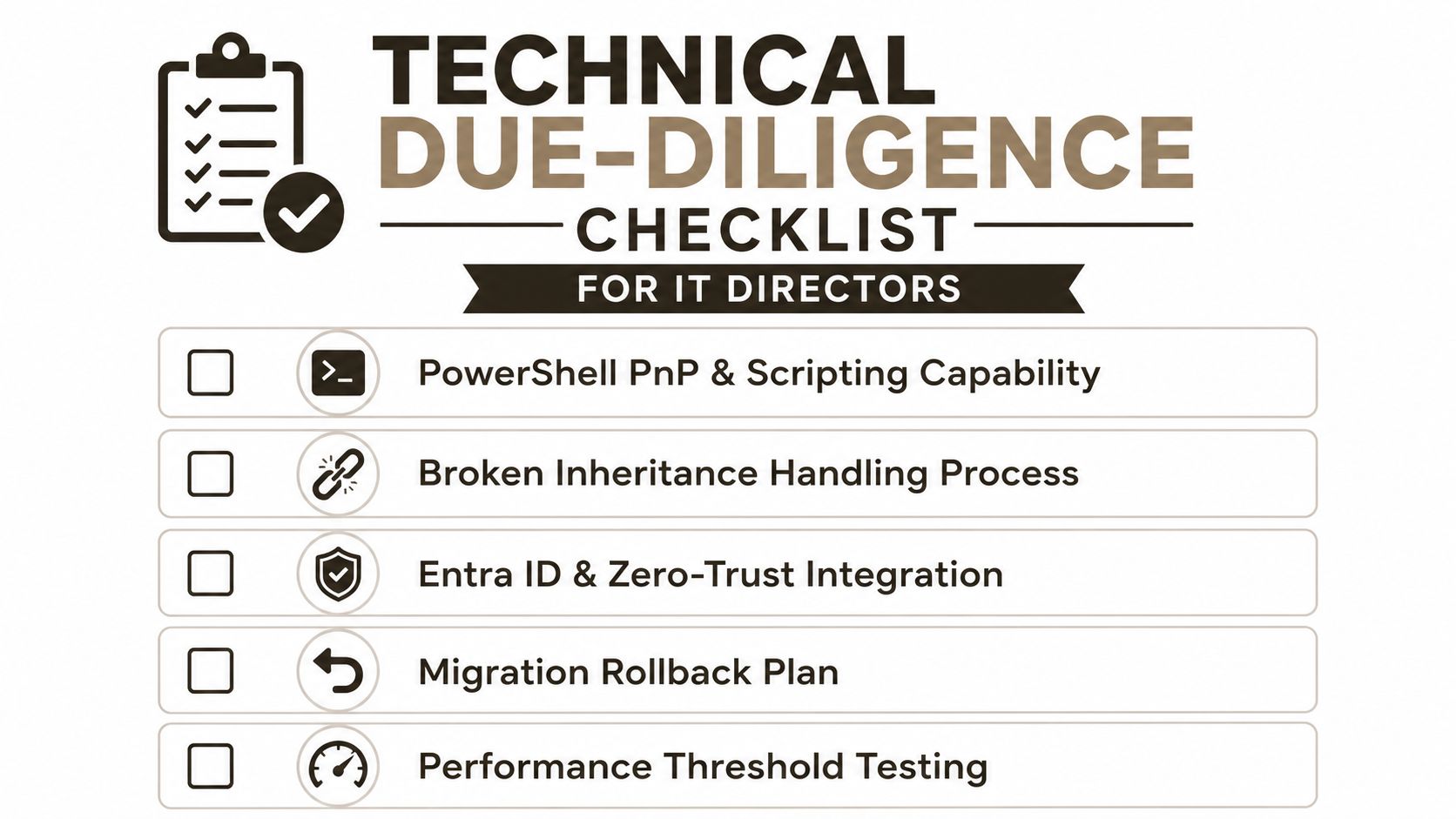
Start with PowerShell PnP and scripting capability. Ask what they automate, what they leave manual, and how they handle bulk permission reconciliation. If they answer with “we use a tool,” keep pushing until they describe the script logic, error handling, and rollback pattern. That's the difference between a delivery team and a button-clicking service desk.
Then ask about broken inheritance handling. Microsoft documents that SharePoint permissions use role assignments, inherited permissions, and unique permissions at the item, list, and site level, and that breaking inheritance creates a separate security boundary that must be managed deliberately during migration or restructuring (Microsoft permissions model reference). If your vendor can't explain how they preserve or reconcile that boundary, they don't understand the data they're moving.
Test governance before you sign anything
Use your RFP process to force specificity. Our internal guidance on how to write a proper RFP for migration work matters because vague procurement language always rewards vague delivery. Ask about Entra ID and zero-trust integration, rollback planning, and how they validate access after cutover. Ask what they do when a group maps imperfectly, when a GUID collision appears, or when metadata changes during the transfer.
A useful due-diligence sequence looks like this:
- Demand an automation demo: The vendor should show how they detect errors, retry safely, and log failures.
- Inspect permission logic: Ask how they preserve unique permissions and where they deliberately re-apply inherited structures.
- Check rollback discipline: If they can't describe a rollback path for a failed batch, they're improvising.
- Probe threshold handling: They should explain how they avoid list-view and path-length breakpoints before migration day.
- Verify validation steps: They need a post-move checklist, not a congratulatory email.
If you need a practical reference set for vendor selection outside the Microsoft stack, a curated list of WooCommerce developers is a useful example of how serious buyers compare capabilities instead of chasing vague “full-service” claims.
The right vendor won't hide behind generic language. They'll tell you what they can script, what they can verify, and where they won't bluff.
The High Cost of Failure in Regulated Sectors
In finance, healthcare, and energy, a bad migration isn't just an IT headache. It can become a compliance issue, an access-control problem, or a support incident that spills into audit work. If legal holds, audit trails, or restricted records go missing, you're not debating UX. You're dealing with governance failure.
Task success rate is the metric that matters
For this work, the most honest usability measure is task success rate. Nielsen Norman Group defines it as the percentage of users who complete a task, and it recommends reporting it with a confidence interval rather than as a naked percentage (Nielsen Norman Group). That's useful because a vendor can claim a pass rate and still hide the failures that matter most. A migration can look strong on paper while the remaining failures cluster in edge cases like broken inheritance, path-length issues, or metadata loss.
That's why a 92% pass rate is not good enough when the missing 8% includes legal holds, regulated records, or admin paths that security teams need for oversight. Your board won't care that most of the move worked. They'll care that the missing records changed the risk profile of the business.
A practical way to think about it is this:
- Operational success means users can find and use content.
- Governance success means the right people can access the right data, and nobody else can.
- Audit success means you can prove both after the cutover.
Those are not interchangeable. If one breaks, the migration failed even if the progress bar reached 100%.
For legal and risk teams, the pressure doesn't stop at cutover. A helpful companion resource is an AI legal assistant for business owners, because legal review often becomes part of the remediation chain when content or access control goes wrong. That's especially true in environments where regulated industry SharePoint migration controls need to survive audit scrutiny, not just technical sign-off.
Practical rule: if the vendor can't show you post-launch validation for permissions, search, and retention-sensitive content, the project isn't done.
That's why specialist rescue work exists. It exists because generalist teams often discover the damage after users do, and at that point the work shifts from deployment to incident management.
Tooling Limitations and the Ollo Verdict
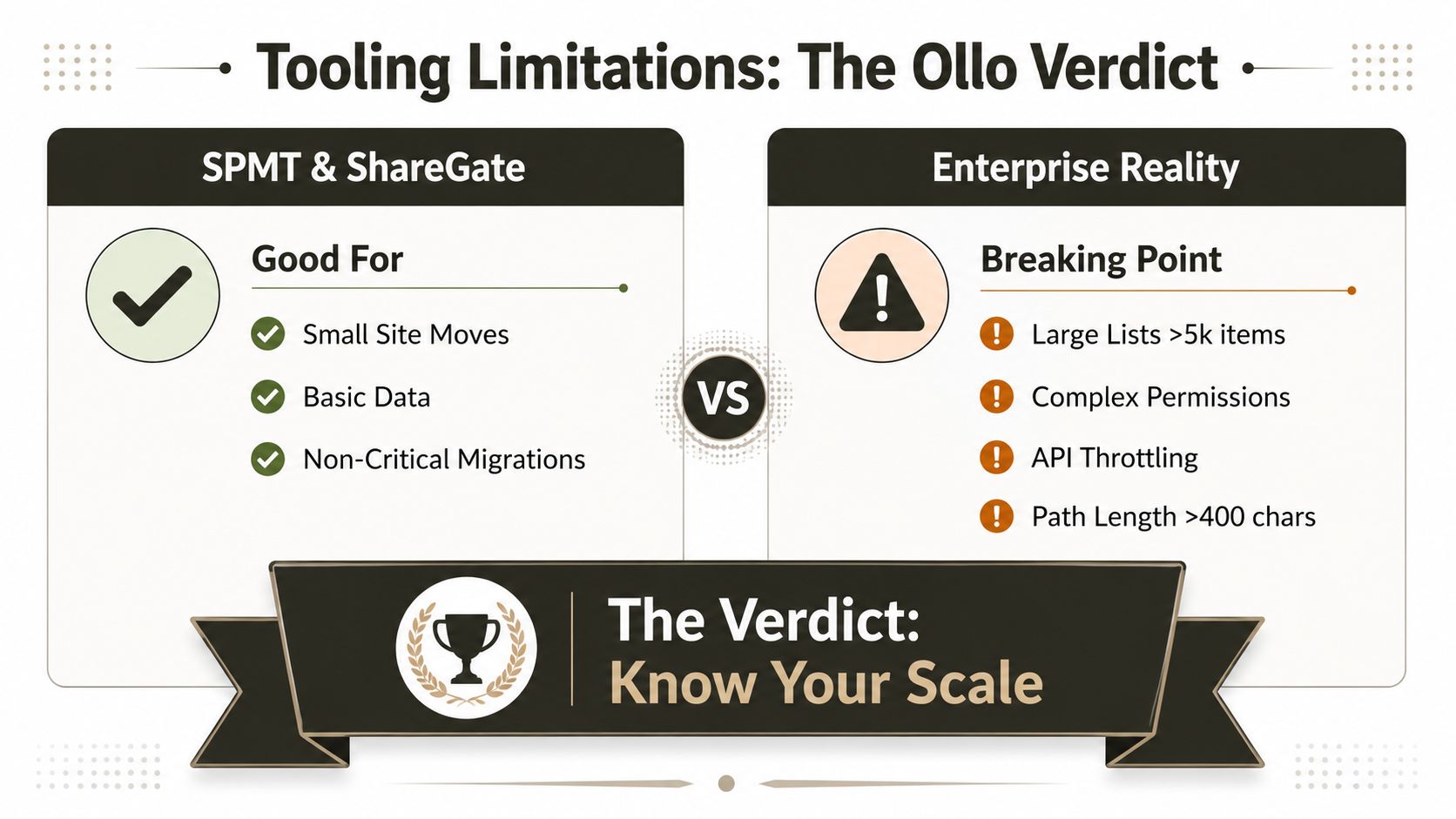
SPMT and ShareGate both have a place. I'm not going to pretend otherwise. For smaller moves, contained datasets, and lower-risk cutovers, they reduce manual effort and keep the process moving. The problem starts when teams treat a tool as a migration plan.
Where the tools help, and where they stop
SPMT works best when the job stays small and predictable. ShareGate gives you more control, clearer reporting, and a better operator experience for many common migrations. Both still operate inside Microsoft's platform limits, so throttling, list-view ceilings, and path-length risk still apply. Microsoft's own guidance is clear: migration processes have to respect throttling and use retry logic with backoff instead of pushing harder against the service. See Microsoft throttling guidance.
The failure point usually appears in large lists, complex permissions, and governance reconciliation. A tool run can move content without fixing the model behind it. Broken inheritance, deep folder structures, and inconsistent metadata still exist after the transfer, and the target tenant inherits the same mess under a different address.
The hidden risk is that the migration tool does not separate platform work from application work. If your wider programme also includes web apps or site build changes, that boundary matters. A clean recovery plan keeps the migration logic isolated from the public-facing build and avoids mixing two different delivery problems. For teams that want a wider CMS or application layer outside Microsoft 365, WebinOne for agencies shows a different kind of delivery model, which is useful because it makes the build-versus-migration split obvious. If you want a practical look at why third-party tools stall under enterprise conditions, this internal analysis of third-party SharePoint migration tools sets out the trade-offs clearly.
The Ollo Verdict
Use SPMT for small, non-critical moves where the data model is simple and the risk is low. Use ShareGate when you need better visibility, stronger control, and a more capable operator interface. For large tenant-to-tenant consolidation, broken inheritance, deep structures, or governance-sensitive data, you need specialist intervention, custom scripting, and validation that goes beyond the tool's default reports.
I'd put it bluntly. If the project can fail compliantly, a generic tool run is the wrong place to stop. Ollo's role in that scenario is controlled recovery, scripting, permission reconciliation, and cutover discipline when the organisation cannot afford guesswork.
That is the difference between moving content and protecting the business while you move it.
Why Specialist Rescue Services Are Essential
The biggest mistake IT leaders make is assuming the cheapest path is the lowest-risk path. In enterprise Microsoft 365 work, DIY is usually a risk transfer strategy. You save budget up front, then your team owns the failure modes, the remediation work, the audit questions, and the blame when users lose trust in the platform.
Specialist rescue services matter because they're built for projects that already have scars. A stalled migration often has hidden damage, permission drift, broken links, unfinished batches, and content owners who've already started workarounds. A senior migration architect doesn't just rerun the job. They diagnose where the model failed, what the platform did, and which pieces need to be rebuilt rather than recopied.
That's where experience matters more than a polished proposal. A generalist agency can talk about delivery. A specialist can tell you which failure mode is still live. In regulated sectors, that difference is not academic. It determines whether you can defend the state of the data after cutover.
Practical rule: if your team has already touched the target tenant, you need rescue thinking, not a fresh-project mindset.
Ollo fits that rescue profile because the work sits at the intersection of SharePoint migration, Entra ID redesign, custom PowerShell PnP, and governance validation. That combination matters when the source system is messy, the target tenant already exists, and your stakeholders expect evidence, not reassurance. You don't hire that kind of team because migration is glamorous. You hire them because the downside of getting it wrong is bigger than the fee.
The underlying commercial logic is straightforward. A specialist can absorb the complexity of throttling, path limits, broken inheritance, and permission mapping before those issues turn into operational incidents. That's not overhead. That's insurance for your data estate.
If you're evaluating a web dev company for SharePoint, stop looking for broad claims and start demanding proof of how they handle throttling, permissions, and rollback. Ollo works on complex Microsoft 365 migrations, tenant consolidations, and rescue projects where failure isn't theoretical, it's already happened or is one bad decision away. Visit Ollo if you want a team that treats your migration as a governance problem, not a design exercise.

















