



You’re probably in one of two places right now. Either a previous migration went sideways and nobody wants to admit how much rework still sits hidden in the estate, or you’re about to issue a request for proposal and you can already hear the vendor slogans coming. “Low risk.” “Accelerated delivery.” “Proven framework.” That language is useless when your SharePoint estate contains broken inheritance, legacy paths that run past Microsoft’s documented limits, and a tenant consolidation that will blow up the moment Entra ID object mapping gets messy.
I’ve seen this too many times. The procurement team wants a tidy document. The project team wants a quick shortlist. The security team wants zero-trust preserved. Then the actual migration starts, API throttling kicks in, the 5k item limit appears exactly where nobody modelled it, and the vendor starts “investigating”. Your users call it downtime. Your compliance team calls it exposure. Both are right.
Your RFP Is Not a Wishlist It Is a Minefield
A request for proposal for a Microsoft 365 migration isn’t a shopping list. It’s a filter designed to flush out vendors who talk well and execute badly.
That distinction matters because the market data creates false confidence. Industry benchmarks suggest IT services RFP win rates in the IE region average 45%, according to Loopio’s RFP win rate benchmarks. That sounds healthy until you remember what those numbers don’t capture. They don’t tell you whether the winning vendor understands SharePoint migration throttling, list view thresholds, path length limits, or the ugly behaviour you get when permissions and identity history collide in a tenant-to-tenant move.
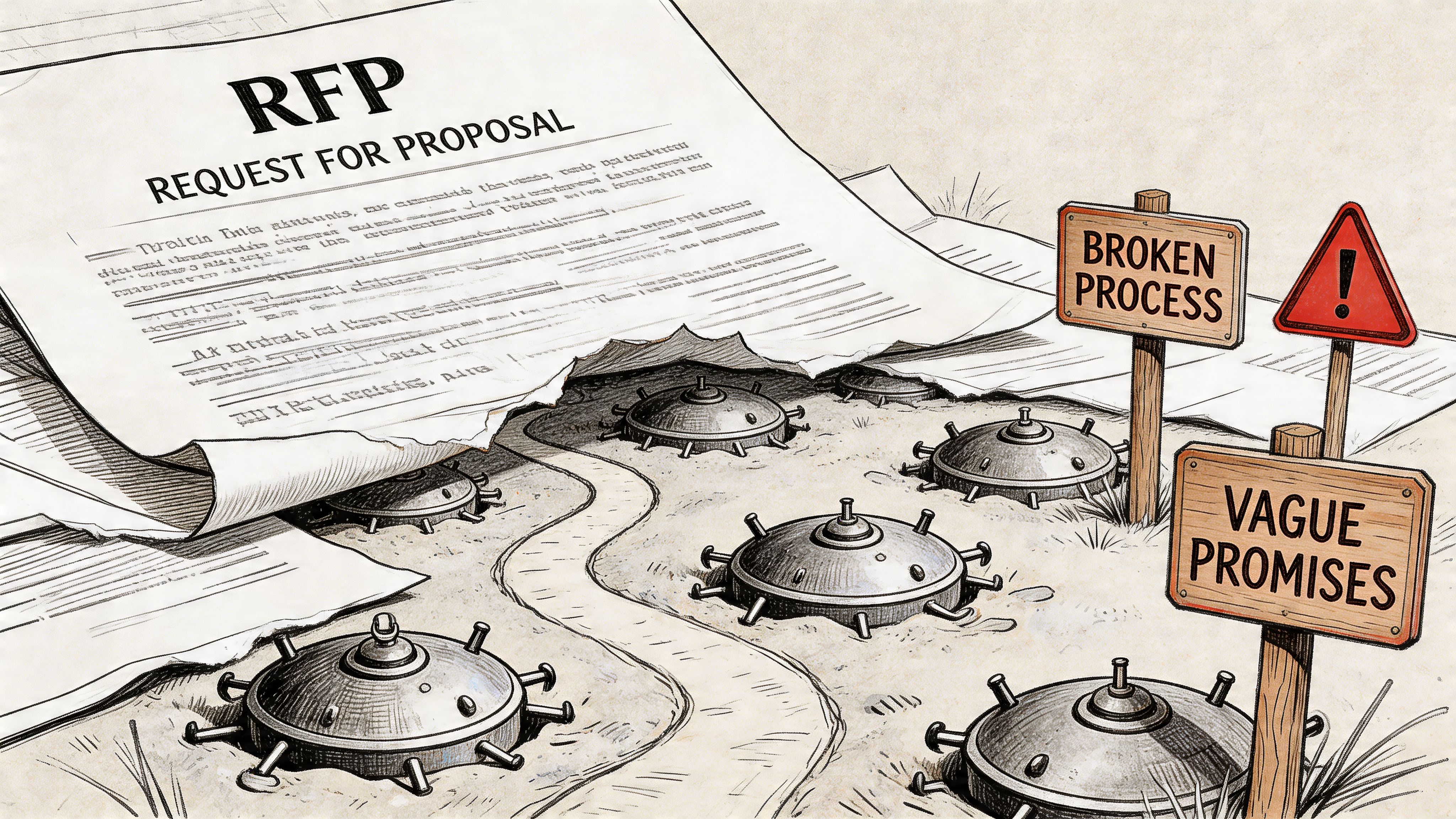
In regulated environments, that gap is lethal. You can “win” the procurement process and still lose the project. We often see clients fail when they treat a migration RFP like a generic infrastructure bid. They ask for timelines, pricing, and support models, but they never force the bidder to confront Microsoft-documented constraints such as API throttling, the 5k item library threshold, or path limits above 400 characters. By the time those realities surface, the contract is signed and the excuses have started.
Generic proposals hide technical ignorance
The documentation says a lot of things in broad terms. Reality is nastier. A vendor can submit a polished proposal and still have no workable plan for:
- Throttling behaviour under enterprise load
- Broken inheritance across nested SharePoint structures
- GUID conflicts during tenant consolidation
- Permission remapping inside a zero-trust redesign
- Long-path failures in legacy file shares and SharePoint estates
If your RFP doesn’t ask direct questions about those failure modes, you’re inviting boilerplate.
Your RFP should make weak vendors uncomfortable. If it reads like a brochure brief, the wrong bidder will pass.
A serious migration brief needs to describe the environment as a hostile terrain, not a clean-room exercise. That means naming the ugly parts. Legacy customisations. Unsupported assumptions. Oversized libraries. Orphaned permissions. Half-documented information architecture. M365 projects don’t fail because the destination is mysterious. They fail because the source is worse than anyone admits.
Procurement language won’t save a broken migration
Public sector and regulated buyers often produce long documents and still miss the technical traps that matter. That’s because page count doesn’t equal precision. A dense RFP can still be shallow if it rewards presentation quality over migration realism.
Use the request for proposal to force evidence. Demand architectural answers. Demand named assumptions. Demand explicit exclusions. If a bidder says they’ll “handle complex content structures”, make them define exactly how. If they can’t, disqualify them.
If you need a technical baseline before you write the document, start with a more grounded view of Microsoft 365 migration realities. Then build your RFP around risk, not optimism.
The Anatomy of a Bulletproof Migration RFP
Most migration RFPs fail before they’re issued. They describe the destination and barely interrogate the source. That’s backwards.
A bulletproof request for proposal needs four hard sections. Not fluffy sections. Not placeholders. Sections that force the bidder to expose whether they’ve ever survived a messy Microsoft 365 move in practice.
Current state interrogation
Don’t ask vendors whether they can migrate SharePoint. Ask them what in your estate is most likely to break first.
You need a section that compels analysis of:
- Source complexity such as file shares, legacy SharePoint farms, Google Drive sprawl, and mixed ownership models
- Permission structures including unique permissions, broken inheritance, and security groups nobody trusts
- Customisation exposure like workflows, forms, integrations, metadata dependencies, and old automation
- Content risk factors including oversized libraries, deep folders, long paths, duplicate naming patterns, and stale records
A weak vendor will answer with a methodology slide. A serious one will explain what they need to inspect before they commit to delivery.
Field rule: If a bidder prices the migration before they’ve challenged your source estate assumptions, they’re pricing fantasy.
This is also where procurement teams should borrow from broader strategic sourcing best practices. Not because migration is a commodity. It isn’t. But because disciplined qualification matters, and this project punishes lazy qualification harder than most.
Target state realism
“Move us to Microsoft 365” is not a target state. It’s an aspiration with no architecture.
Your RFP needs a section that defines the future environment in operational terms. That means:
Identity model
State whether the engagement includes Entra ID redesign, cross-tenant identity mapping, conditional access alignment, and zero-trust enforcement.Information architecture
Specify whether content lands in Teams, SharePoint communication sites, document centres, department sites, or a mixed model.Compliance boundaries
Name the rules that matter to your organisation. Auditability. data residency requirements. retention. access controls. legal hold impacts.Operational ownership
Clarify who owns governance after cutover. If nobody owns it, the migration moves disorder to a newer platform.
Vendors hate this level of clarity because it blocks vague assumptions. Good. Ambiguity protects the bidder, not you.
Scope and exclusions under a microscope
Projects usually go rotten when a proposal says “migration complete” and nobody defines what complete means.
Spell it out. Include whether the bidder must cover:
- Discovery and assessment
- Pilot and test migrations
- Delta cycles
- Identity and permission remapping
- Post-cutover hypercare
- Rollback planning
- End-user validation support
- Documentation handover
Then force exclusions into the open. If the vendor excludes workflow remediation, custom forms, archive content, unsupported metadata patterns, or remediation of invalid paths, they need to say so plainly.
If your team wants help structuring those artefacts, proper SharePoint migration documentation matters far more than most RFP writers realise.
Compliance and security mandates
This section should read like policy with teeth.
Don’t ask the bidder if they understand compliance. Make them prove they’ve designed for it. Require named controls around access handling, auditability, privileged operations, testing evidence, and exception management.
A vague answer here is disqualifying. In regulated migrations, technical execution and compliance execution are the same thing. If a vendor separates them, they don’t understand the assignment.
Mandatory Questions That Expose Vendor Weakness
Most vendors can survive generic procurement questions. They fall apart when you ask what happens under stress.
That’s what your request for proposal must do. It must stop rewarding smooth wording and start rewarding technical honesty. Our internal analysis aligns with Microsoft case studies showing over 70% of DIY tenant-to-tenant migrations in regulated IE sectors fail because RFPs miss issues such as Entra ID GUID conflicts and API throttling, as noted in this RFP background reference. Microsoft’s own documentation confirms those limits. Too many bidders still dodge them.
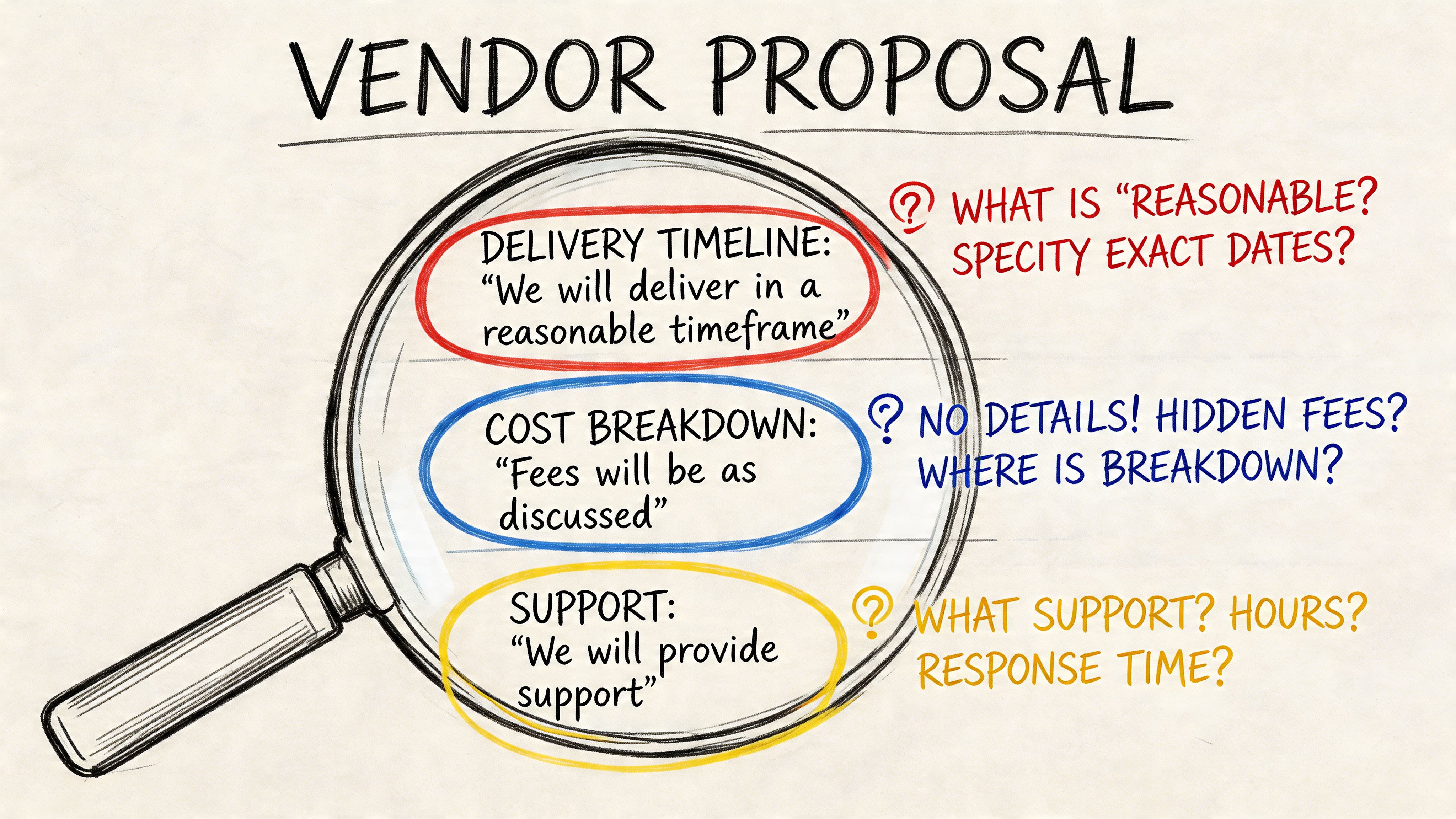
A shortlist built on vague confidence is worthless. A shortlist built on uncomfortable answers is useful.
Ask about throttling like you expect failure
If the vendor says they “manage throttling”, that tells you nothing. Everyone claims that. Force them into specifics.
Use wording like this in the RFP:
Describe your retry and backoff approach when Microsoft 365 APIs throttle migration activity. Include how you detect throttling, how you adjust job concurrency, and how you prevent stalled delta cycles.
Then ask what they do when throughput assumptions fail. Not if. When.
Weak bidders will respond with tool names. Experienced bidders will explain control logic, queuing, pacing, and exception handling. They’ll also acknowledge that Microsoft Learn documents throttling behaviour and that migration throughput is something to engineer around, not wish away.
Ask about the 5k limit and permissions together
The 5k item limit isn’t just a nuisance. It becomes dangerous when paired with inherited and unique permissions across sprawling libraries, resulting in migration jobs appearing successful in summary and broken in practice.
Put this directly into the request for proposal:
Explain how you assess and remediate SharePoint libraries that exceed the 5k item threshold, especially where unique permissions, managed metadata, or folder-level inheritance exist.
That question matters because a bidder who can’t talk concretely about indexing strategy, restructuring, batching, and post-migration validation hasn’t done this at scale.
For broader procurement inspiration, this list of Top 10 Request for Proposal Questions is useful. Then go several levels deeper than it does. Migration in regulated estates punishes generic questioning.
Ask about GUID conflicts in tenant-to-tenant work
DIY efforts frequently falter internally. The migration may copy files. It may even preserve some metadata. But if object relationships and identity mappings aren’t handled properly, downstream behaviour becomes unreliable and security review gets ugly fast.
Use blunt wording:
Describe your method for identifying and handling GUID conflicts during tenant-to-tenant migrations. Explain what you preserve, what must be remapped, and what validation you perform before user cutover.
You want to hear about discovery, identity dependencies, remapping logic, testing, and exception paths. You do not want to hear “our tool handles that”.
A GUI doesn’t solve architectural conflict. It only gives you a prettier place to watch it fail.
Ask about long paths and invalid content
Microsoft Learn warns about path length limits above 400 characters. Yet vendors still bury this in assumptions or mention it only after the first failed pilot.
Force it into the proposal:
Identify how you detect file paths exceeding 400 characters, unsupported characters, duplicate naming conflicts, and content patterns that cannot move without restructuring. State whether remediation is included in your scope.
That question does two jobs. It tests technical maturity, and it exposes whether the bidder intends to dump remediation work back onto your internal team.
This explainer is worth watching because it helps non-specialists hear the difference between process talk and real bid scrutiny:
Ask for scenarios, not promises
The best way to expose inexperience is to make the vendor walk through ugly examples.
Ask them to respond to scenarios such as:
- A finance site with unique permissions at multiple levels
- A healthcare document library above the 5k threshold with retention sensitivity
- An energy-sector tenant consolidation involving identity redesign and access remapping
- A legacy file estate with path remediation and duplicate content ownership
Don’t ask vendors whether they can handle complexity. Hand them a technical mess and see whether their answer gets sharper or vaguer.
If you want a structured way to gather that evidence before tender release, use a SharePoint migration assessment tool. It gives your team better raw material for the key questions.
A Scoring Matrix That Separates Experts from Amateurs
Cheap vendors keep winning migration work because buyers keep scoring migration work like stationery procurement.
That approach is reckless. In regulated Microsoft 365 projects, the right scoring model needs to punish thin technical responses and downgrade low-price bids that hide rework risk. Data shows 55% of EU finance and healthcare RFPs are lost because of oversights on mandatory technical requirements, and focusing only on price often creates hidden rework costs that are double the initial bid, according to Inventive’s proposal evaluation guidance.
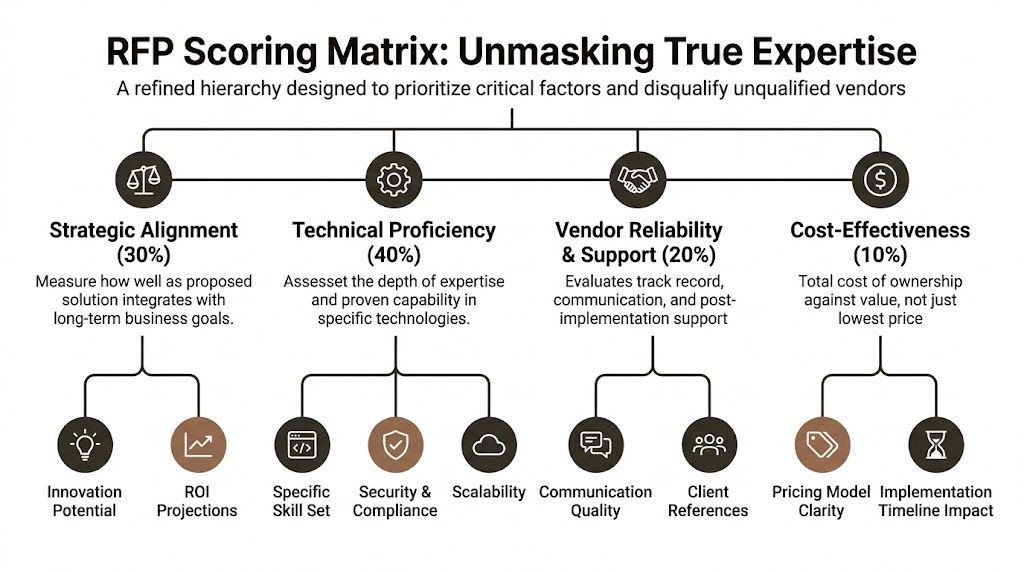
Score risk before price
If your matrix gives cost too much weight, you’ll buy a cheap plan and an expensive rescue.
Use a structure that prioritises these areas:
| Evaluation area | What to score | What weak bids do |
|---|---|---|
| Strategic alignment | Clarity on business outcome, governance fit, operating model, and target-state design | Repeat your brief back to you |
| Technical proficiency | Evidence on throttling, 5k limit handling, GUID conflicts, permissions, path remediation, and validation | Hide behind tool names |
| Vendor reliability and support | Named team, escalation path, cutover support, and ownership after migration | Offer generic support language |
| Cost-effectiveness | Transparent pricing model and realistic effort assumptions | Underprice discovery and remediation |
The weighting in the infographic is sensible because it reflects how real projects fail. They don’t usually fail because a bidder was slightly dearer. They fail because the chosen vendor didn’t understand the estate.
What a usable matrix looks like
A practical matrix should include evidence standards, not just categories.
For example:
- Technical proof should require direct answers to scenario questions, not capability claims.
- Security and compliance should require concrete handling of access, auditability, and exception control.
- Governance should evaluate communication quality and issue management under pressure.
- Price should be scored against assumptions, exclusions, and likely rework exposure.
Procurement reality: A low bid with thin remediation detail is rarely cheap. It’s simply early-stage denial.
Don’t overcomplicate the scoring sheet. But don’t make it soft. A migration evaluation model should be sharp enough to eliminate a bidder that cannot answer basic questions about Microsoft-documented constraints.
If your team needs technical criteria to anchor the matrix, these SharePoint migration best practices can help translate delivery risk into evaluation language that procurement can use.
The Uncomfortable Truth About Migration Tools
Tool discussions are usually theatre. Vendors present logos as if products solve architecture.
They don’t. Tools matter, but not in the way most proposals suggest. In enterprise Microsoft 365 and SharePoint work, there are really three lanes: Microsoft’s SharePoint Migration Tool (SPMT), a GUI-led platform like ShareGate, and an expert-led approach that combines ShareGate with custom PowerShell PnP scripts.
Migration tool reality check
| Capability | SharePoint Migration Tool (SPMT) | ShareGate (Out of the Box) | Expert-Led (ShareGate + Custom PnP Scripts) |
|---|---|---|---|
| Simple file and site moves | Fine for basic jobs | Strong | Strong |
| Complex permission structures | Weak in practice | Better, but not automatic | Best when engineered deliberately |
| API throttling response | Limited operational control | Better visibility, still constrained | Managed through scripting, pacing, and remediation workflows |
| 5k item threshold handling | Risky in large estates | Better assessment and execution tools | Best when paired with restructuring and scripted controls |
| GUID conflict handling | Not credible for serious tenant consolidation | Partial depending on scenario | Requires specialist planning and scripting |
| Long-path remediation | Poor fit for messy legacy estates | Better detection | Best when combined with pre-migration remediation logic |
| Rescue migration suitability | No | Sometimes | Yes |
| Enterprise regulated migration | Wrong tool for the job | Useful foundation, not enough on its own | Professional standard |
What the documentation says and what reality does
Microsoft positions SPMT as a valid migration utility. For small and simple work, that’s fair. If you’re moving a modest, clean estate, it has a place.
Reality is different once the environment gets ugly. SPMT doesn’t give you the control you need when permissions are tangled, content quality is poor, or throttling and exception handling need active engineering. It is not a serious answer to regulated tenant-to-tenant consolidation.
ShareGate is far better. It’s a strong platform. It belongs in the toolkit. But the dangerous mistake is treating it as fire-and-forget. Out of the box, it still doesn’t replace judgement, scripted remediation, or architecture-level planning around identity and governance.
The Ollo verdict
Use SPMT for a small, low-complexity move. For anything larger, especially where permissions, path issues, legacy structures, or tenant consolidation exist, you need more than a stock tool run.
Use ShareGate as a foundation, not as a strategy.
For enterprise migrations, especially in regulated environments, the professional standard is a hybrid model. GUI tooling for visibility and orchestration. Custom PnP PowerShell for edge cases, remediation, and control. If a vendor can’t operate in that mode, they’re not ready for the risk profile you’re carrying.
If you want a more grounded comparison of the available stack, review this breakdown of SharePoint migration software.
The Hard Questions You Need to Ask Your Team and Your Vendors
By the time you issue the request for proposal, your organisation has usually already made one bad decision. It has assumed the hard part is choosing a vendor. It isn’t. The hard part is admitting what your own team hasn’t fully mapped, cleaned, or governed.
That matters because recent HIQA audits in Ireland in 2025 showed 55% of healthcare migrations failed zero-trust tests due to permission and data integrity issues, tied to RFPs that didn’t force vendors to address limitations like SharePoint’s 5k item limit, according to this healthcare procurement reference. If your estate sits in healthcare, finance, or energy, that should bother you.
Ask your own team first
Before you challenge bidders, challenge your internal assumptions.
What exactly are we migrating?
If your inventory is fuzzy, your tender will be fuzzy. “SharePoint and file shares” is not an inventory. It’s a confession that discovery hasn’t happened properly.
Who owns permissions today?
If nobody can explain where inheritance is broken and why, your zero-trust ambitions are already in trouble.
What are we pretending is clean?
Every estate has content everyone wants to ignore. Old team sites. unowned folders. duplicate libraries. unvalidated metadata. If your team hides that from the RFP, the winning bidder will discover it at the most expensive moment.
The source estate doesn’t become simpler because procurement wording becomes cleaner.
Then interrogate the vendor
Use a Q and A approach that corners ambiguity.
How do we know the people in the proposal will actually do the work
Demand named resources for architecture, migration engineering, security, and cutover. Ask which elements are subcontracted. Ask who owns escalation when migration jobs fail, not just when project meetings happen.
If a bidder won’t name the technical leads, assume the expertise lives in the sales deck and nowhere else.
What is the single biggest red flag in a response
It isn’t high cost. It’s the absence of specific technical mitigation.
A dangerous proposal says things like “tool-based automation”, “minimal disruption”, or “best-practice framework” without explaining how the team handles throttling, permissions, identity remapping, or invalid content structures. That proposal should not make the shortlist.
How do we evaluate responses when vendors hide limitations
Use scenario-based scoring. Don’t let them answer only in prose. Make them respond to technical examples pulled from your own estate.
For instance:
- A library over the 5k threshold with unique permissions
- A path remediation problem tied to legacy archive content
- A tenant merge where identity relationships must be redesigned
- A cutover window with compliance-sensitive content validation
A vendor who has done this work will answer with constraints, trade-offs, and controls. A vendor who hasn’t will answer with slogans.
Questions that force honesty
Put questions like these in the final round:
Explain which migration failures you expect to encounter first in our environment, and what data you need to validate that assumption.
Describe your post-migration validation method for permissions, metadata, and data integrity. State what is automated, what is manual, and what remains a client responsibility.
Identify which parts of our target design create the highest delivery risk, including zero-trust dependencies and content restructuring requirements.
Those questions work because they reverse the usual sales motion. Instead of inviting promises, they require diagnosis.
The decision most teams avoid
Your team has to decide whether this migration is an internal delivery exercise or a risk-reduction exercise. Those are not the same thing.
If it’s treated as an internal delivery exercise, the team will over-trust commodity tools, under-scope remediation, and score bids too heavily on price and presentation. If it’s treated as risk reduction, the RFP gets sharper, the shortlist gets smaller, and the outcome usually gets safer.
That’s the uncomfortable truth. Mature buyers don’t ask “Who can migrate our data?” They ask “Who can survive our estate without breaking compliance, identity, or user trust?”
If your organisation is planning a high-stakes Microsoft 365 or SharePoint migration and you want a specialist to stress-test the brief before you go to market, talk to Ollo. We work on the projects that look fine on paper and go bad in execution. That includes tenant-to-tenant consolidations, zero-trust redesigns, rescue migrations, and the ugly edge cases most vendors avoid until they’re already billing for them.

















