


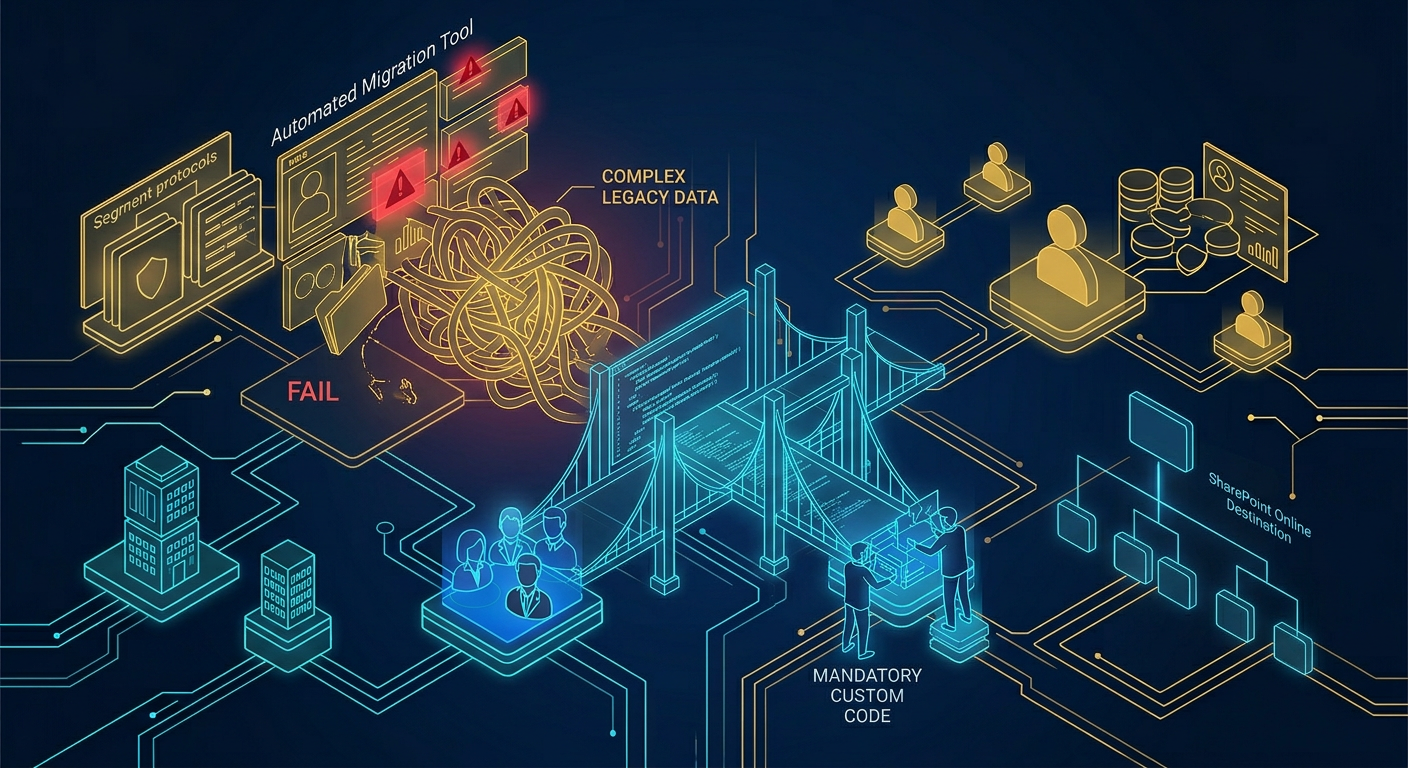

The SharePoint Migration Reality: Why Tools Fail and Code is Mandatory
An enterprise SharePoint migration is a complex architectural restructuring, not a simple file copy. While standard tools handle basic data transfers, they fail at resolving identity collisions, flattening legacy permission waterfalls, and bypassing API throttling constraints, requiring custom PowerShell and API scripting to ensure data integrity and structural governance.
The trap most Architects fall into is viewing a migration as an IT logistics exercise. We treat it as a fundamental rewrite of your information architecture. Relying solely on out-of-the-box software will leave your digital workplace fractured.
The Illusion of the "Next, Next, Finish" Migration
In our experience, the expectation that a tool will solve your data problems is the fastest path to failure. Microsoft provides the SharePoint Migration Tool (SPMT), which is highly effective for clean, "greenfield" scenarios. But enterprise reality is never clean.
When moving terabytes of corporate data, you hit hard platform limits almost immediately. Microsoft enforces strict API throttling to protect overall tenant performance. Native migration tools often lack the intelligent orchestration needed to recognize these limits.
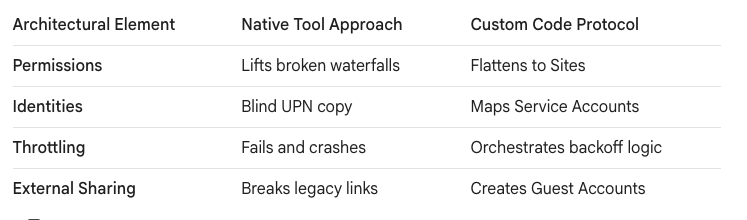
When a tool hits throttling, it crashes or stalls. To survive, you must use custom PowerShell scripts. Code allows us to orchestrate multiple migration jobs, implement exponential backoff logic, and stay under the throttling radar while maintaining throughput.
Navigating the "Grey Zone" of User Identity
Technology is easy; people are hard. We call this the "Grey Zone." The reality we found is that you are migrating user identities and historical contexts, not just loose files. During a Tenant-to-Tenant (T2T) migration after an M&A, identity collision is guaranteed.
Simple mapping tools fail here. User Principal Names (UPNs) and security identifiers (SIDs) must be meticulously mapped using sophisticated scripting. We use code to match users based on secondary attributes like Employee IDs to prevent orphaned data.
We do not automate the Grey Zone blindly. For example, when migrating from Google Workspace, you encounter "Ghost Owners"—accounts of employees who left years ago. Native tools drop this data. We write scripts to map these ghost accounts to a dedicated Azure AD Service Account.
Moving from Dropbox presents another structural challenge. Those fragile, anonymous sharing links are a governance nightmare. We use programmatic protocols to locate these links and convert them into authenticated Guest Accounts within the Microsoft 365 ecosystem.
Permissions Architecture: Flattening the Waterfall
The most critical point of failure in any migration is permission management. Native tools fail spectacularly when trying to translate complex on-premises permissions, like nested AD groups, into modern Microsoft 365 Groups.
Relying on a tool's default mapping often results in catastrophic over-permissive access, creating immediate data breaches. Conversely, a bad mapping might cause 40% of your user base to lose access entirely on day one.
The biggest structural failure occurs when migrating from platforms like Box. Box encourages "Item-level" freedom, leading to deep, nested "Waterfall" folder structures. SharePoint is not built for this. It has a hard, unyielding limit of 50,000 unique permission scopes per library.
Hitting this 50k limit locks the library entirely. You cannot simply lift and shift a Box waterfall. You must write scripts to analyze the source environment, identify the permission breaks, and flatten these deep structures into distinct, flat SharePoint Site Collections.
Re-Engineering Customizations for Modern PnP
If you are coming from legacy SharePoint on-premises environments, you must accept a hard technical truth: your customizations will not migrate. Farm Solutions, InfoPath forms, and SharePoint Designer workflows are dead.
These legacy components must be re-engineered. This requires shedding x86 legacy thinking and adopting x64 Modern PnP methodologies. You cannot use a migration tool to move code; you must rewrite it.
Building modern UI components and workflows requires the SharePoint Framework (SPFx). This means your team must possess modern web development skills, specifically TypeScript and React. We rebuild these processes as API-driven, client-side architectures.
"Dark Mode" Deployment: Securing the Landing Zone
Never deploy a massive structural migration directly to production without a blast shield. The "Ollo Methodology" dictates that we always build and populate the new environment in "Dark Mode"—a quarantined, inaccessible staging state.
This protocol is vital for security and governance. We obsess over "Search Bar Leaks." If you migrate data into a live environment, Microsoft Search begins indexing it immediately. If your permissions are flawed, users will find confidential HR data in their search bars within minutes.
By staging the data in Dark Mode, we run automated scripts to validate that all permission mappings are accurate. We ensure that M365 Group memberships are locked down tightly before the content becomes indexable and visible.
Only after rigorous user validation and automated security checks do we execute the final delta sync. We then flip the switch for the Live Launch. This engineered approach guarantees that your enterprise migration is structurally sound and secure.
1. Why Migration Tools Are Not Enough (The Need for Code):
- Native Tool Failures: Free tools like Microsoft's SharePoint Migration Tool (SPMT) are built for "greenfield" lift-and-shift scenarios. They lack orchestration and cannot handle complex on-the-fly metadata transformation or advanced permission mapping (from Article 3: The $2M Mistake).
- API Throttling: Microsoft limits data pull/push speeds. Specialized logic and scripting are required to manage multiple migration jobs intelligently and stay under the throttling radar (from The CAPEX Comeback and Article 3).
- Customization Rebuilds: Legacy customizations (Farm Solutions, InfoPath, SharePoint Designer) cannot be moved by tools. They must be re-engineered. Building modern custom UI components requires the SharePoint Framework (SPFx) and modern web development skills like TypeScript and React (from Article 5: Beyond File Migration).
2. The Reality of Permissions Management:
- The 50,000 Limit: Migrating from platforms with "Item-level" freedom like Box often hits SharePoint's hard limit of 50,000 Unique Permission Scopes per list/library. You must script the flattening of deep "Waterfall" folder structures into separate SharePoint Sites to prevent locking up the library (from The Hidden Migration).
- Permission Mapping Disasters: Native tools fail to translate complex on-premises permissions (AD groups, direct users) into modern Microsoft 365 Groups. Without custom scripting, you risk over-permissive access (data breaches) or having 40% of users lose access entirely (from Article 3).
3. User Identity and Migration Challenges:
- Identity Collision & Reconciliation: In Tenant-to-Tenant (T2T) migrations, you are merging identities, not just files. User Principal Names (UPNs) and security identifiers (SIDs) must be meticulously mapped using sophisticated scripting to match users based on attributes like employee ID (from Article 2: Tenant-to-Tenant Migration).
- Ghost Owners & Anonymous Links: When migrating from Google Workspace, "Ghost Owners" (deleted user accounts) must be mapped to a dedicated "Digital Archive" Service Account in Azure AD to avoid losing intellectual property. For Dropbox migrations, fragile "Anonymous Sharing Links" should be programmatically converted into actual Guest Accounts in M365 (from The Hidden Migration).

















