Most advice about a SharePoint permission audit starts with the wrong premise: review access once a year, export a spreadsheet, remove a few stale users, and close the ticket. That approach fails in regulated tenants because permission sprawl doesn't wait for your review calendar. Direct grants, guest access, sharing links and broken inheritance accumulate across sites, libraries, folders and items while the audit team still believes it is checking the estate.
Microsoft documents the platform limits that make this dangerous. A list or library can contain 50,000 uniquely permitted items, while permissions can't be broken or re-inherited once a folder, list or library exceeds 100,000 items. Microsoft also documents a 5,000-item list view threshold, which can turn a simple export or cleanup query into a throttled, incomplete operation. These aren't theoretical inconveniences. They determine whether your team can still inspect and repair access safely. Microsoft's guidance on permission scopes sets out the mechanics, while Ollo's analysis of enterprise Microsoft 365 project failures reflects the operational reality, projects fail when teams underestimate hidden complexity.
Why Most SharePoint Permission Audits Already Fail Before They Start
A quarterly or annual review assumes that permission changes remain manageable between review dates. In a large tenant, that assumption is negligent. Site owners share individual files to unblock a deal, project teams add external guests, a department creates a folder with separate access, and nobody records why the exception exists. By the time an auditor opens the site, the permission model no longer reflects a deliberate design.
The failure starts with scope. Teams often promise to review every site, then discover that they can't reliably enumerate every unique permission scope, resolve every group member, or prove which access existed before remediation. The result looks organised in a spreadsheet but leaves the effective access graph unresolved.
Practical rule: Treat a SharePoint permission audit as a continuous evidence exercise, not a hygiene task scheduled around an auditor's visit.
The audit surface grows faster than the review process
Microsoft's documented limits expose the operational ceiling. A list or library supports up to 50,000 unique permissions, and Microsoft states that a folder, list or library exceeding 100,000 items can't break or re-inherit permissions. The separate 5,000-item list view threshold can block queries and views that teams rely on to inspect large libraries. Microsoft's list and library threshold guidance confirms why permission cleanup can become a platform problem, not merely an administrative one.
If your team reaches those boundaries, the cost of failure goes beyond an untidy report. A failed remediation can leave sensitive records accessible to the wrong group, interrupt operational workflows, create incomplete evidence, and force an emergency engineering response during a compliance window. DIY review becomes damage limitation because the estate has outgrown the method used to inspect it.
Evidence disappears while the spreadsheet waits
Microsoft 365 audit retention also makes delay expensive. Microsoft's Purview guidance says audit records for SharePoint, Exchange and Microsoft Entra activity remain available for 180 days by default for non-E5 users, while E5 or qualifying compliance add-ons extend default retention to one year. Retention policies can extend audit records for up to 10 years when configured appropriately. Microsoft Purview audit search guidance explains the retention choices.
That means a once-a-year review may begin after the native evidence has already disappeared. Your team might prove who has access today, but not who granted access, when inheritance changed, or whether external sharing introduced the exposure. Scoping must happen before the audit collapses under its own weight.
Scoping the Estate Before You Touch Permissions
Don't start with PowerShell. Start with an estate baseline that tells you whether the audit remains an inventory exercise or has already become a remediation programme.
Record the sites in scope, the lists and libraries within them, approximate item volumes, business owners, external-sharing status and any known history of migration, restructuring or ad hoc access grants. Include Teams-connected SharePoint sites and high-risk workspaces used by finance, healthcare, energy, legal and executive teams. A site with unclear ownership shouldn't enter a cleanup wave until somebody can approve the access model.
Establish the boundaries before running commands
Three Microsoft-documented limits govern the first pass:
| Threshold | Limit | Audit implication |
|---|---|---|
| List view threshold | 5,000 items | Queries and views can become blocked or unreliable, so exports need careful filtering and batching. |
| Unique permissions per list or library | 50,000 uniquely permitted items | Every broken inheritance scope consumes part of the available permission surface. |
| Permission inheritance boundary | 100,000 items | Microsoft says you can't break or re-inherit permissions once the folder, list or library exceeds this size. |
Microsoft documents these limits across its SharePoint service description and permission-scope guidance. Your baseline should therefore include item counts and unique-scope estimates, not just site names and group membership.
A dashboard can help you prioritise, but it can't replace enumeration. Purview and Microsoft 365 admin centre reports expose useful access patterns and governance signals, yet they don't automatically give you a complete effective-permission graph across every folder and item. Treat those views as directional. Use them to rank risk, then validate the underlying SharePoint scopes through controlled scripts and exports.
Gate the audit with a scoping checklist
Before you inspect permissions, require answers to these questions:
- Ownership: Which business and technical owners can approve changes?
- Sensitivity: Which libraries hold regulated, confidential or commercially critical records?
- Scale: Which lists and libraries approach the documented item or unique-permission limits?
- History: Did a migration, merger, restructuring or external collaboration create exceptions?
- Identity: Which groups, guests, service identities and departed users appear in access paths?
- Evidence: Is Microsoft Purview retention sufficient for the period you need to prove?
If the estate crosses a threshold, stop calling the work a report. It has become an engineering-led remediation project involving API throttling, batch design, rollback planning and evidence preservation. A specialist team reduces risk at that point because it can test the access model before touching production permissions.
Mapping Broken Inheritance and Unique Permission Scopes
SharePoint inheritance looks simple until production teams use it. A site can pass permissions to a list, a list to a folder, and a folder to an item. The moment an owner breaks inheritance, that child object receives its own permission scope. A later direct grant creates another exception, and a sharing link adds another route that may not resemble the site's visible membership.
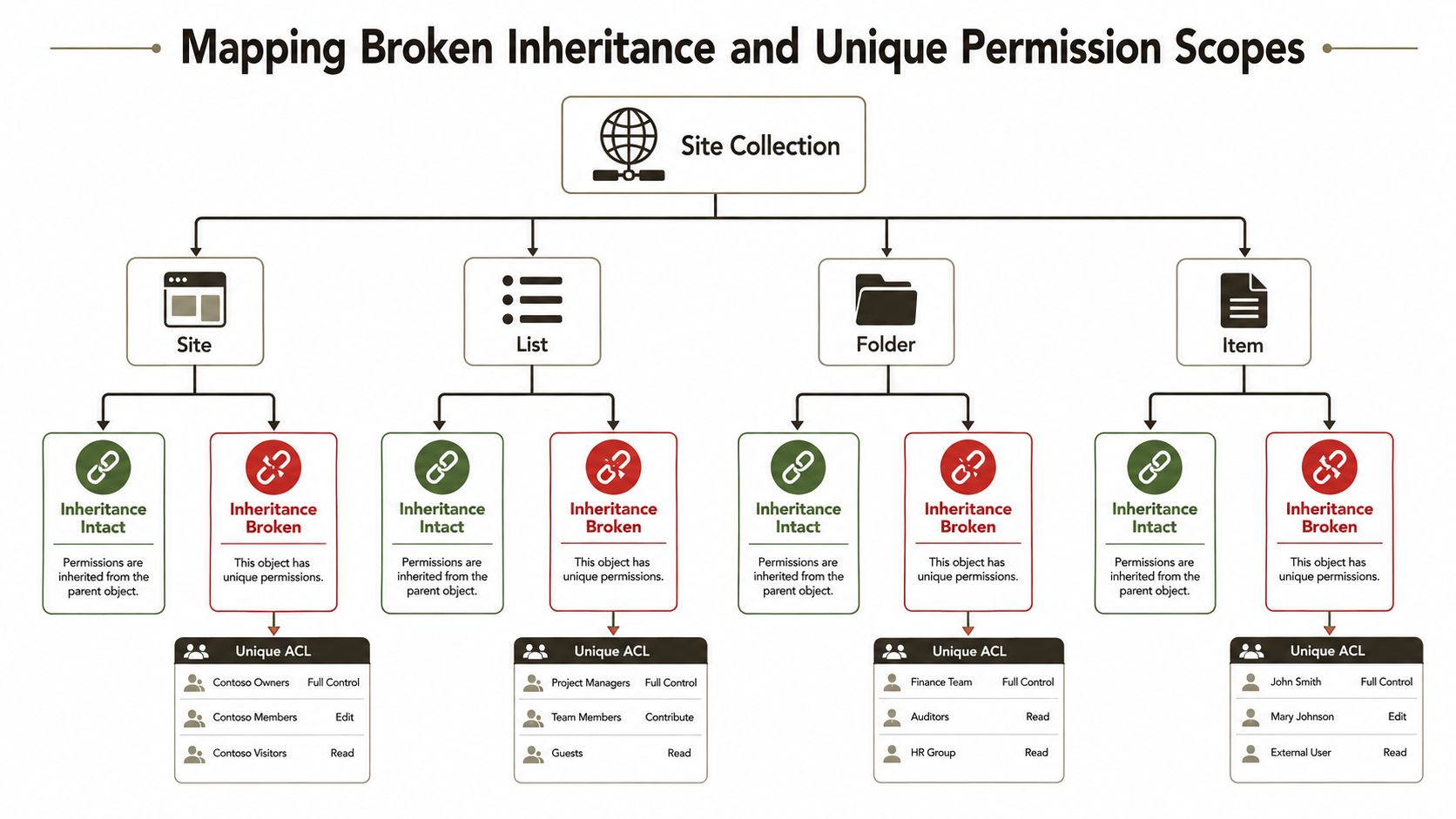
Define the scope before you decide how to fix it. A site-level ACL affects a broad collaboration boundary. A library-level ACL often represents a business function. A folder-level exception may support a project or restricted process. An item-level grant usually carries the highest review burden because the owner must explain an individual document decision.
Identify the production patterns that create drift
We often see clients fail when a finance library grows beyond the 5,000-item list view threshold and site owners grant access to individual files rather than redesigning the library. A library with 30,000 unique item-level permissions becomes difficult to query, reconcile and repair, even though the site-level groups still look tidy. That example illustrates the problem without pretending that a top-level export captures effective access.
Another common pattern appears after a migration. Classic-mode SIDs may not rehydrate cleanly into current Entra ID objects, leaving unresolved principals attached to folders or files. The access entry remains part of the SharePoint permission structure, but the reviewer can't confidently connect it to a live identity, owner or business justification.
External collaboration creates a third pattern. A project workspace may allow guest sharing on a folder for a short engagement, then leave that exception active after the project ends. The parent site can show a reasonable membership model while the folder exposes records through a separate scope.
SharePoint permission best practices from Ollo are useful context, but the hard work remains technical: enumerate inheritance breaks, expand principals and reconcile each exception to a business owner.
Build a scope map, not a flat export
Your map should record the object path, inheritance state, permission level, principal type, source group, external status and evidence of the last change. Separate:
- Inherited scopes: Access flows from the parent and may be governed centrally.
- Unique library scopes: A library has its own ACL and needs an owner-approved access model.
- Unique folder scopes: Folder exceptions often indicate project or departmental drift.
- Unique item scopes: Individual grants require targeted review and usually resist bulk cleanup.
Microsoft confirms that each break in inheritance creates a new permission scope. It also warns that operations involving large numbers of uniquely permitted items take longer and can become unreliable. Your scripts must therefore inventory unique scopes before attempting re-inheritance, not discover the problem halfway through a reset.
Purview can show that someone assigned permissions or changed group access, but it won't by itself explain the current effective graph. Pair every audit event with a before-and-after permission export. That pairing gives you both the change record and the state that the change produced.
Entra ID Groups, Guests, and Orphaned SIDs
A SharePoint permission entry isn't the same thing as a person. It may point to a security group, Microsoft 365 group, dynamic group, guest object, direct user assignment or an unresolved SID. Your audit must follow the principal back to Entra ID, expand the membership path and determine whether the identity still has a legitimate reason to reach the content.
Start with groups, not individuals. Group-based access usually gives your team a governable boundary, while direct grants create exceptions that require separate approval and recurring review. Dynamic groups need particular care because membership can change outside SharePoint. Nested groups can also expand the effective access population without appearing as direct site members.
Test the three identity failure patterns
Guest accounts create stale external access. Review guest objects against the SharePoint role assignments that reference them. A guest who last logged in more than 180 days ago deserves immediate review, but don't remove access solely on that signal. Ask the business owner to confirm the relationship, contract and required content boundary, then record the decision.
Orphaned SIDs create unresolved accountability. Deleted users, departed staff and identities from a former tenant can remain in ACLs after the directory object disappears. Get-SPOUser may return a friendly name while masking the deletion state that matters to your investigation. Compare the SharePoint principal with Entra ID object state and retain the unresolved entry in the evidence pack until an owner approves removal.
Nested groups hide the access path. A site may list one security group, while that group contains another group and several guests. Your permission map must expand the chain and show the route from the user to the SharePoint role. Otherwise, you risk approving least privilege based on an incomplete membership view.
Reconcile identity data before remediation
Legacy scripts often use Get-AzureADGroupMember and filter guest mail types, then stop. That produces a useful identity list, not a permission decision. Cross-reference each guest and nested member with SharePoint role assignments, broken scopes and recent audit events. Microsoft's audit documentation confirms that permission assignments and group-based grants or removals appear in the Microsoft 365 audit log, which gives you the historical component of the review. Microsoft's audit-log activity reference describes those recorded operations.
Don't delete an unresolved principal because the display name looks obsolete. First prove which scope contains it, identify the owner, capture the before state and define the rollback.
Identity consolidation can help if your estate carries duplicate groups, departed-user entries or conflicting directory objects. Ollo's guidance on identity consolidation provides relevant context, but your team still needs to validate the impact against SharePoint ACLs before changing Entra ID objects.
The risk is immediate. Removing a group can cut access to operational records, while leaving a guest or orphaned principal can undermine GDPR-aligned accountability. Use staged changes and owner approval, not a bulk deletion script.
Tooling the Audit with PowerShell, PnP, and Purview
No single tool gives you a defensible permission audit. Each stack exposes a different part of the problem, and each fails in a different way when your tenant becomes large or identity resolution becomes messy.
ShareGate gives IT teams speed and diff-style reporting. That makes it useful for comparing environments and helping an owner review many sites. It doesn't automatically resolve Entra ID drift, orphaned identities or the business meaning behind a direct grant. Its per-site licensing model also becomes expensive above 50 tenants, so procurement and scope design matter before you standardise on it.
PnP PowerShell gives engineering teams repeatability. Get-PnPSite, Get-PnPGroup and Get-PnPUser can feed CSV exports that your team versions alongside the script and runbook. The trade-off is operational ownership. You must handle API throttling, CSOM limitations, authentication, pagination, retries and large-list traversal yourself. Microsoft confirms the relevant list and permission limits in its official guidance, so a script that works on a small site doesn't prove that it can safely inspect your largest libraries.
Match the stack to the audit objective
| Capability | ShareGate | PnP PowerShell | Purview |
|---|---|---|---|
| Current permission inventory | Fast, useful for broad estate reviews | Flexible and scriptable | Limited as a primary state inventory |
| Effective group expansion | Requires validation of Entra relationships | Custom engineering required | Shows activity, not the full access graph |
| Change history | Diff-style comparisons help | Depends on export discipline | Strong for recorded permission events |
| Large-estate control | Practical for IT-led site reviews | Powerful but exposed to throttling and CSOM constraints | Valuable evidence layer, not remediation automation |
| Version-controlled process | Vendor reports need controlled storage | Native fit with Git and runbooks | Export and retention design required |
Purview's Content Explorer and audit logs show activity and access patterns. They don't tell you every current permission path. Microsoft's guidance confirms that audit events record actions such as assigning permissions and using groups to grant or revoke access, but an event still needs a state export to show the resulting effective graph.
If your wider programme includes autonomous coding or automation agents touching migration scripts, an AI agent security assessment can sit alongside the SharePoint review. The relevant concern is control over privileged automation, credential use and change traceability, not the tool's branding.
The Ollo Verdict
Use PnP PowerShell for engineering-led estates where your team can maintain authentication, retries, export schemas and rollback logic. Use ShareGate for IT Directors managing 200 or more sites who need broad comparison and faster owner engagement. Layer Purview on top either way because historical permission events and retention evidence come from the audit service, not from a current-state inventory tool.
Ollo uses ShareGate and custom PowerShell PnP scripts for complex Microsoft 365 work. The important distinction isn't the logo on the tool. It's whether somebody has engineered the scope, identity reconciliation and remediation controls before production changes begin. Ollo's PowerShell scripting examples show the type of repeatable engineering approach that a high-risk audit requires.
Remediating Without Breaking List View Thresholds
The most dangerous cleanup instruction is “restore inheritance everywhere”. It sounds decisive, but it ignores why the exception exists, how large the library has become and whether the operation can complete. Microsoft confirms that queries can be blocked at the 5,000-item list view threshold, while large unique-permission operations can take longer and become unreliable. A flat reset can therefore break legitimate access, trigger API throttling and leave the library half-remediated.
We often see clients fail when they export permissions, delete direct assignments and discover that the target group model doesn't exist. The business then loses access to records while the technical team rebuilds membership under pressure. The safe sequence starts with evidence and identity design, not deletion.
Sequence the change in controlled waves
- Capture the current state. Export site, list, folder and item permissions through PnP, preserve the CSV with a version identifier and record the script revision.
- Reconcile history. Compare the export with Microsoft 365 audit events for the available evidence window. Microsoft's Secure Configuration Framework documentation confirms that Microsoft 365 audit logging records activity and retains it for 90 days when enabled in the referenced configuration baseline, so teams must review and preserve that evidence before it expires. The Microsoft Secure Configuration Framework reference sets that operational baseline.
- Prioritise the high-risk sites. Rank locations with sensitive data, external sharing, unclear ownership and large unique-scope counts. Don't pretend that every site needs the same remediation depth.
- Create target groups first. Build the Entra ID group structure, define owners and connect membership to an approved HR or business process before stripping direct access.
- Validate on a test site. Test inheritance changes, group membership and expected access paths before applying the pattern broadly.
- Run batched waves. Use maintenance windows, small batches, retry handling and stop conditions. Keep the original ACL export available for rollback.
The library may contain more than 5,000 items, and Microsoft says permissions can't be broken or re-inherited beyond 100,000 items in a folder, list or library. Microsoft's SharePoint threshold guidance helps frame why the operation needs engineering rather than a portal click.
Make rollback part of the design
Every change needs a versioned runbook that names the scope, command, operator, approval, start and end state, exception handling and rollback action. Preserve before-and-after exports, owner sign-off and the relevant Purview search results. If an auditor asks what changed twelve months later, your team should reconstruct the decision without relying on one administrator's memory.
The reward for careful sequencing is controlled exposure and evidence you can defend. The cost of skipping it includes broken workflows, incomplete cleanup, API throttling, emergency access restoration and a compliance record that shows activity without proving the final state.
Defensible Evidence and the Case for Specialist Help
A permission audit is complete only when another person can reconstruct it. Your evidence package should connect the current permission export, the historical audit events, the identity resolution record, the owner decision and the remediation result. Screenshots and a single administrator's report don't establish that chain.
Microsoft states that site-collection owners can run SharePoint audit reports, while administrators and investigation teams need the Purview roles View-Only Audit Logs or Audit Logs to search or export audit data. Microsoft also documents that SharePoint Server audit retention defaults to zero days, which means logs can be trimmed at month end unless you set a retention period. Microsoft's site-collection audit configuration guidance makes the access and retention dependencies clear.
Keep an evidence package an auditor can follow
Retain:
- Signed current-state exports: Capture the site, library, folder and item scope where risk requires it.
- Identity reconciliation: Record group expansion, guest status, unresolved principals and owner decisions.
- Historical searches: Preserve Purview query parameters, timestamps, exports and retention context.
- Change records: Link each removal, group conversion or inheritance change to an approval.
- Exception registers: Explain why a unique permission remains and when the owner must review it again.
- Rollback artefacts: Store the original ACL state and the tested recovery method.
This supports the GDPR accountability principle in Article 5(2), which expects your organisation to demonstrate how it complies rather than claim that access is controlled. For practical governance context beyond SharePoint, information security best practices can help frame ownership, evidence and policy enforcement across the wider control environment.
Know when DIY has run out of road
Your estate has outgrown DIY remediation when you can't enumerate unique scopes confidently, when groups contain unresolved or nested principals, when libraries approach the documented limits, or when your audit evidence depends on screenshots. It has also outgrown DIY when the same team must maintain production access, write the script, approve the change, preserve evidence and defend the result to an auditor.
The risk-reduction decision is straightforward. A specialist audit costs less than losing access to regulated records, exposing confidential content through an overlooked inheritance break, or discovering that the native audit trail expired before an investigation began. The specialist must prove that it can work around API throttling, preserve audit continuity, map effective access and reverse a failed remediation without damaging your tenant.
Ollo provides Microsoft 365 and SharePoint permission audits, estate scoping, Entra ID reconciliation, remediation runbooks and post-change validation for high-stakes tenants. If your organisation needs defensible access evidence before a migration, compliance review or tenant consolidation, visit Ollo to discuss the estate with a specialist team.