



Most identity consolidation advice starts with the wrong premise. It treats the project as a user-account merge, moves people into one Entra ID tenant, and assumes the organisation has achieved one identity model. That assumption is how teams end up with a single sign-in screen and two control planes underneath it.
The account merge is visible. The remaining Conditional Access policies, audit configuration, retention rules, sharing permissions, guest accounts, administrative roles, and workload ownership are harder to see. They also create the larger operational and compliance risk. Your users may look consolidated while your governance remains split.
Ireland already demonstrates why this matters. The Central Statistics Office reported that 79% of internet users used electronic identification in 2025, while 63% completed, edited, reviewed, or approved their tax declaration online through Revenue's myAccount or MyGovID services, as reported in the CSO data on electronic identification use. Adoption has reached scale, but identity sprawl and fragmented access paths still exclude a substantial minority. Enterprise consolidation faces the same problem in a more dangerous form. The identities may exist, yet the controls around them don't agree.
Why Identity Consolidation Projects Fail
The popular advice says to inventory users, map accounts, migrate content, and retire the old tenant. That sequence misses the control plane. Microsoft's own guidance treats tenant-to-tenant migration as a planning exercise with distinct approaches, not as one switch that unifies identity, content, and governance, as outlined in the Microsoft 365 tenant-to-tenant migration guidance.
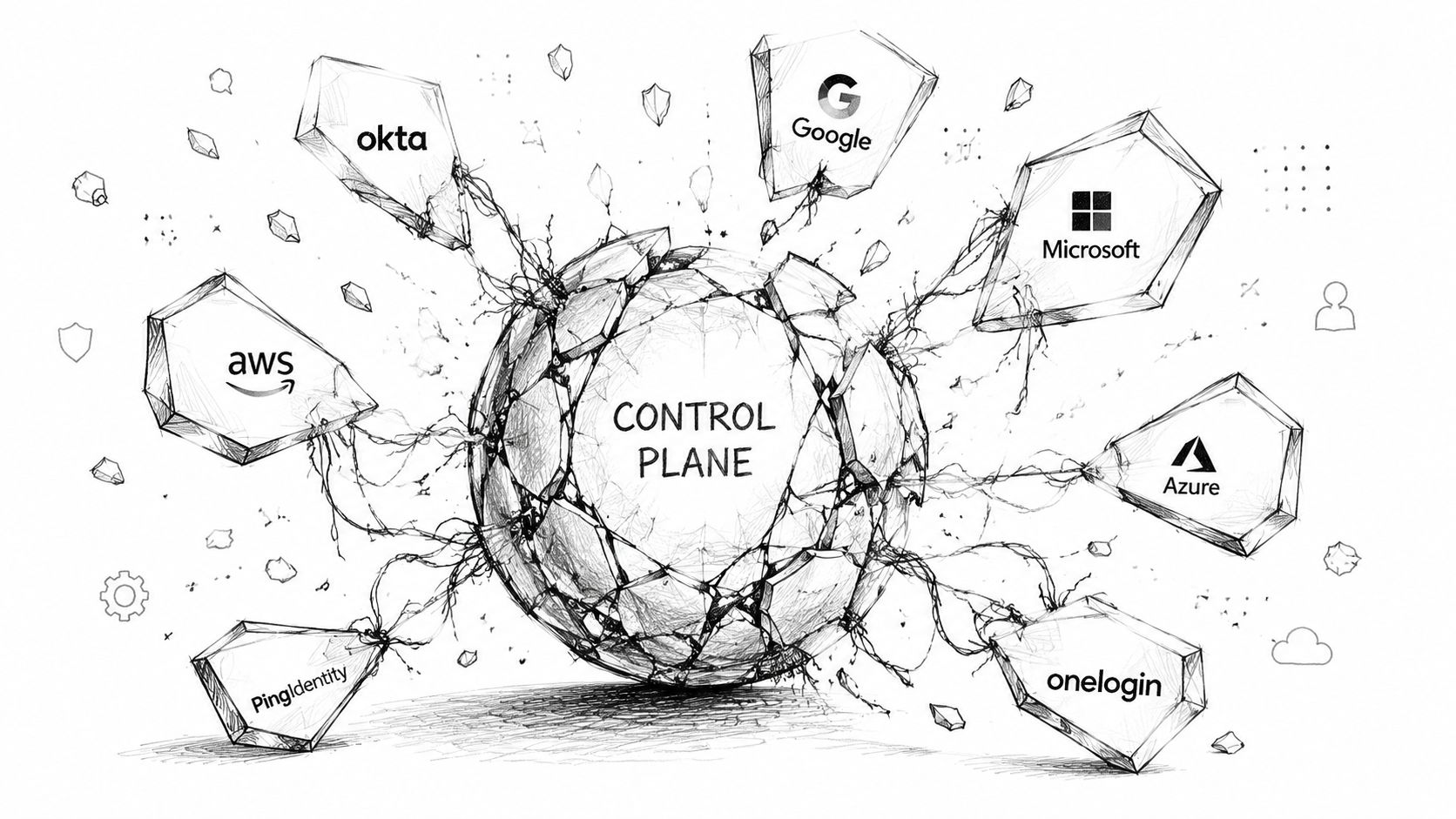
The merge can hide a split
We often see clients fail when they copy users into the target tenant but leave the surrounding governance to manual clean-up. Source Conditional Access policies don't automatically become equivalent target policies. Audit settings may differ, retention policies can conflict, and SharePoint sharing permissions can retain old assumptions about groups and guests.
A migration tool can report that content moved successfully while the target tenant still contains broken inheritance or permissions assigned to objects that no longer represent the same people. A target administrator then sees a familiar site, but the compliance team can't prove that the same access restrictions, retention behaviour, and audit coverage apply.
Practical rule: Treat identity, policy, permissions, and evidence as separate migration streams. A successful account cutover proves only that accounts moved.
The consequences extend beyond inconvenience. A finance, healthcare, or energy organisation can appear unified while operating with two compliance postures. One tenant may enforce stronger sign-in conditions, retain audit evidence differently, or permit broader external sharing. The gap becomes an incident when an auditor asks who accessed regulated data, which policy applied, and whether the organisation can demonstrate consistent control.
The real reason enterprise Microsoft 365 projects fail is usually not a missing migration button. It's an incomplete operating model. Your team must define the target control plane before it moves a single workload, then test whether every identity, group, service principal, guest, role, and policy points to that model.
Hidden identity debt appears after cutover
Guest sprawl often survives consolidation because external users don't follow the same mapping logic as employees. Cross-tenant access settings can also drift, particularly where teams configure exceptions during a merger and never remove them. Inconsistent admin roles create another blind spot. A user may lose an expected administrative function, while a different account retains excessive privilege because nobody reconciled role assignments against the target design.
DIY projects break here because the visible migration milestone arrives before the governance work finishes. Leadership sees one tenant. Your security team inherits unresolved exceptions, orphaned access, and an audit trail that doesn't tell one continuous story. Fixing that debt after cutover costs more than designing the control plane before migration because remediation now competes with live operations.
Choosing Your Consolidation Approach
There isn't one correct route for every organisation. A full tenant merge may suit a controlled environment with a clear end state, while cross-tenant collaboration can protect business continuity when immediate migration carries too much risk. A staged migration often offers the safest operational path, but it demands disciplined coexistence and a firm retirement plan.
| Approach | Best For | Common Failure Points | Tool Requirements |
|---|---|---|---|
| Full tenant merge | Organisations committed to one target tenant and one governance model | UPN conflicts, GUID conflicts, policy gaps, permission drift, cutover pressure | ShareGate, custom PowerShell, PnP validation, identity mapping |
| B2B cross-tenant collaboration | Businesses that need access across tenants while preserving separation | Guest sprawl, cross-tenant access drift, duplicate policies, unclear ownership | Entra cross-tenant controls, access reviews, documented governance |
| Staged migration | Complex estates with regulated workloads or difficult application dependencies | Two control planes persist, delta changes get missed, teams delay retirement | Migration waves, scripted reconciliation, monitoring, formal exit criteria |
Full merge
A full merge gives leadership a clean target state, but the route exposes every inconsistency at once. Existing groups in the destination can collide with source groups, user identifiers may not match, and content permissions can point to the wrong object. SharePoint and OneDrive content may move even when the identity foundation remains incomplete, leaving permissions to repair later.
SPMT has a place in straightforward SharePoint moves, but enterprise tenant consolidation pushes beyond its safe operating boundary. Microsoft's official documentation confirms that SharePoint Online blocks operations exceeding the 5,000-item List View Threshold, and that administrators can't change this limit in SharePoint Online, as explained in the Microsoft Learn guidance on list view threshold issues. Microsoft also documents a 400-character maximum for decoded file paths in OneDrive and SharePoint, including folders and file names, in its SharePoint Online limits documentation.
API throttling adds another failure point. Microsoft confirms that large-list operations remain constrained in both modern and classic SharePoint experiences in its large lists and libraries guidance. A basic copy job won't redesign a library, shorten paths, or create an evidence trail for skipped permissions.
Coexistence and staged migration
B2B collaboration reduces immediate disruption, but it isn't consolidation. Your organisation still operates multiple policy surfaces and must govern guest identities, cross-tenant trust, and application access. Staging works when you can run controlled waves and validate each dependency, not when leadership uses it to postpone difficult decisions.
For a broader perspective on access governance, the secure access management 2026 guide from CloudOrbis Inc. provides useful context. In a regulated environment, however, general access principles must become tenant-specific controls, test evidence, and accountable ownership.
The documentation says a migration approach exists. Reality is that your workload topology decides whether that approach survives contact with production.
Ollo verdict: Use SPMT for a narrow, uncomplicated SharePoint move. Use ShareGate where its workload coverage fits, but add custom PowerShell and PnP scripts for mapping, throttling control, permissions, and verification. For a high-stakes tenant consolidation, staged execution with a defined target control plane is the defensible choice.
Object Mapping Without Breaking Authentication
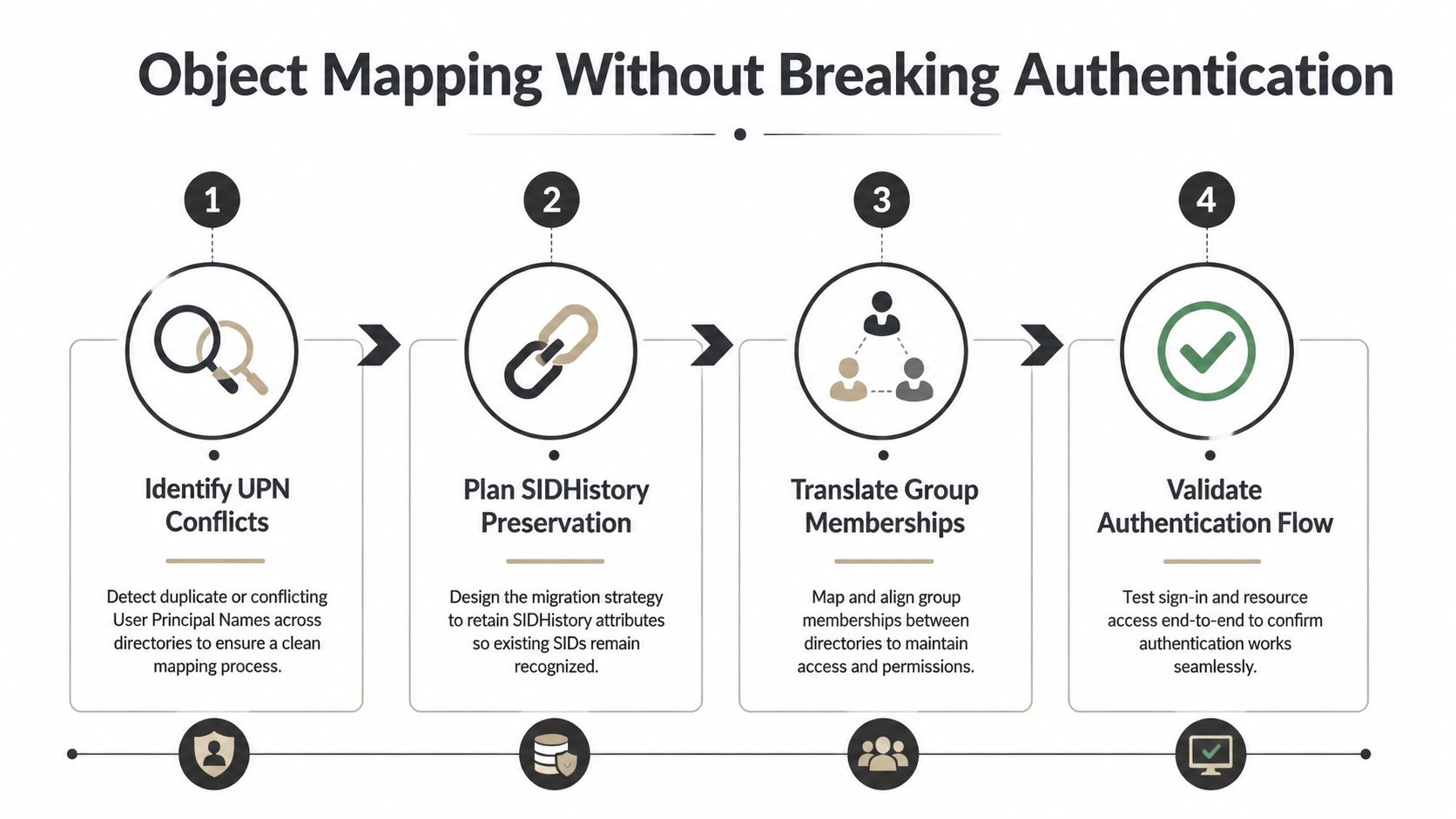
Object mapping determines whether users authenticate successfully and whether migrated content recognises them as the same people. A display name isn't an identity key. Common names, duplicate UPNs, changed domains, source security identifiers, and nested groups can all produce a target environment that looks correct while denying access to critical data.
Start with deterministic mappings
Build a source-to-target mapping register before migration. Include the source UPN, target UPN, immutable identifiers, object type, source group memberships, target group, licence state, and migration status. Don't match users by name alone. A duplicate UPN requires a deliberate resolution, not a best-effort import.
Where both tenants use the same domain, the target design must resolve ownership before cutover. Where domains change, test sign-in, application claims, device registration, and OneDrive URLs against the new identity. A successful directory object creation doesn't prove that every relying service accepts the new identifier.
Use PowerShell to identify collisions before you schedule migration waves. The exact commands depend on your tenant model and modules, but the checks should query duplicate UPNs, duplicate proxy addresses, disabled accounts, missing licences, and groups with unresolved members. Export results, review them with security and application owners, and retain the output as evidence. A script that only creates objects isn't a migration control.
The GitDocAI API authentication guide is a useful reference when teams document API access and authentication dependencies. Your migration runbooks need the same discipline. Record which account or application authenticates, which permissions it holds, and how operators revoke access after the wave completes.
Preserve access, not just accounts
SIDHistory preservation can protect access to resources that still reference source security identifiers, but it requires strict design and validation. Treat SIDHistory as controlled migration data, not a shortcut for carrying old permissions indefinitely. After content and access groups move, identify where legacy identifiers remain and plan their removal when the target permissions work independently.
Group translation needs equal care. Translate direct and nested memberships, distinguish security groups from Microsoft 365 groups, and test dynamic membership rules rather than assuming they behave identically after the move. An orphaned nested group can remove access without warning. A wrongly matched Finance or HR group can grant sensitive access to the wrong population.
Validate the login journey
Test authentication as a user, an administrator, a guest, a service account, and an application owner. Check Conditional Access evaluation, multifactor authentication, device state, token refresh, application sign-in, SharePoint permissions, and mailbox delegation. Capture expected results before cutover so the support team can distinguish a planned policy outcome from a broken mapping.
The Microsoft Entra ID guidance provides a useful foundation, but a consolidation still requires tenant-specific tests. Authentication validation must follow the object through every dependency, not stop when the user reaches the Microsoft 365 portal.
Risk Areas That Break Regulated Environments
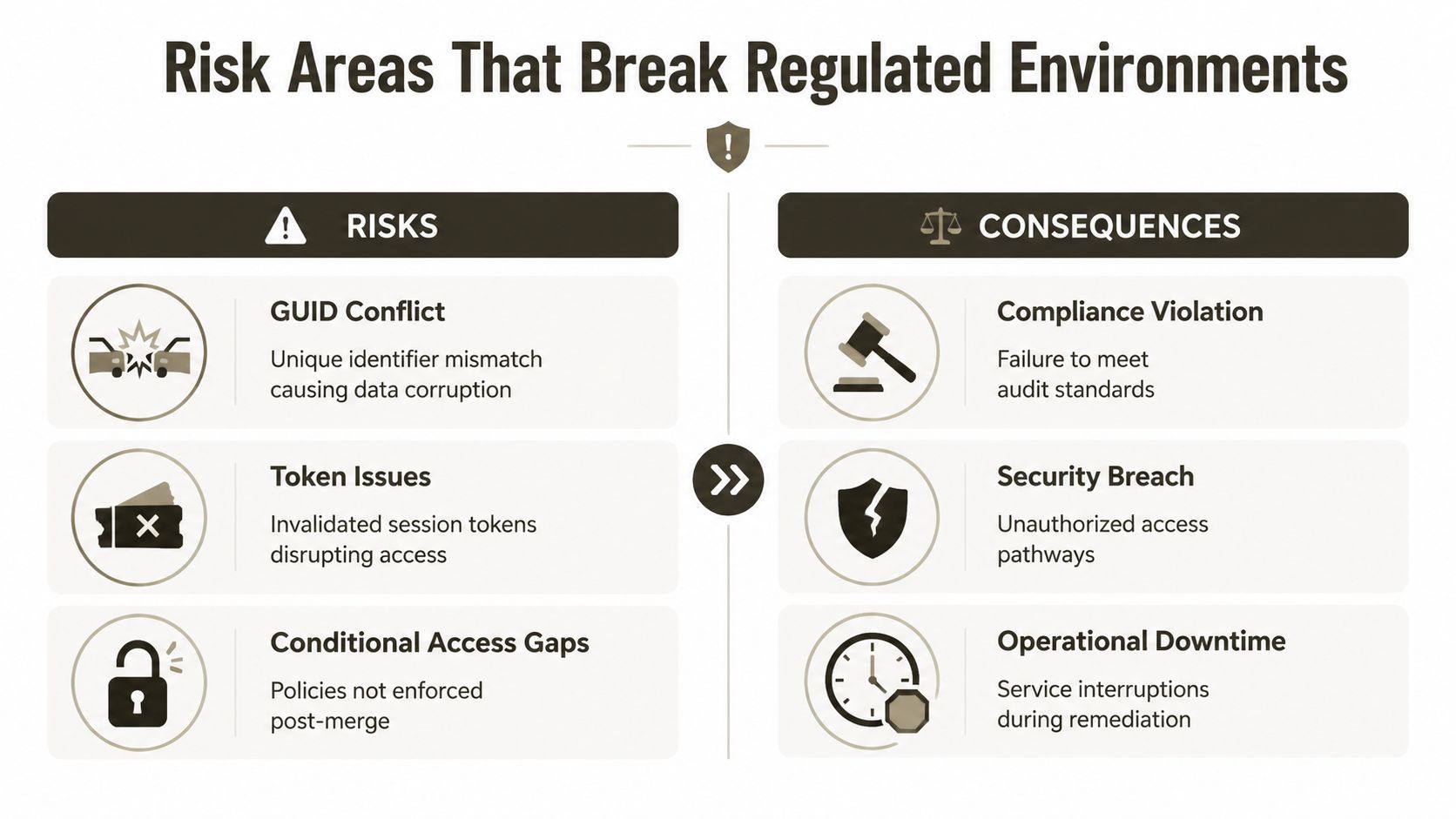
Regulated environments punish assumptions. A GUID conflict can orphan data. An authentication token issue can interrupt access or leave an old session behaving differently from the target policy. A Conditional Access gap can create an unauthorised pathway even when the user account itself looks correct.
GUID conflicts create false confidence
Migration tools rely on mappings between source and target objects. If the mapping uses the wrong group, site, mailbox, or user, the job may complete without delivering the intended security outcome. Your data remains present, but the permission model no longer reflects the business relationship that created it.
Check object identifiers before each wave and after each delta. Compare source and target membership, ownership, sharing links, and inherited permissions. Where the target already contains similarly named groups, require an explicit mapping decision. Never let an automated name match decide access to regulated content.
Tokens and policy evaluation need independent tests
Authentication tokens create timing and state problems during cutover. A user can hold a valid session issued under the source conditions while the target tenant applies different policies. Another user may receive a fresh token and encounter a Conditional Access rule that the project team never tested.
Test both existing and newly issued sessions. Revoke or expire sessions according to the approved cutover plan, then verify sign-in, multifactor authentication, device compliance, application access, and administrative actions. Record the policy result, not just whether the user reached the service.
Conditional Access policies also fail through omission. A source policy may reference groups, locations, applications, or device conditions that don't exist in the target. Recreating the policy by sight isn't enough. Compare assignments, exclusions, authentication strengths, session controls, and emergency access arrangements, then run negative tests that must be blocked.
A migration isn't compliant because users can log in. It's compliant when the organisation can prove that the right users can access the right data under the right conditions.
For privileged roles, pair the consolidation with a review of just-in-time access, role assignments, emergency accounts, and administrative activity. The privileged identity management guidance gives your team a useful governance reference, but your evidence must reflect the actual target tenant.
The cost of missing these checks isn't limited to helpdesk tickets. In regulated sectors, broken inheritance, excessive privilege, or unrecorded access can become an audit finding, an incident investigation, and an operational interruption. DIY execution increases that exposure because the same engineers who made the change often have to prove later what changed.
Data Residency and Compliance Requirements
Irish IT leaders regularly ask whether Microsoft 365 data remains specifically in Ireland after tenant consolidation. The documentation says EU residency, but reality is more precise. Standard EU data residency means data remains somewhere in the European Union. It doesn't, by itself, prove that the data remains in Ireland.
Microsoft's Advanced Data Residency provides the contractually backed control that can pin core customer data to a specified country. That distinction matters after a merger or tenant-to-tenant move because identities, content, and workloads can become re-homed across services. A target tenant can satisfy an EU-level requirement while failing an Ireland-specific policy or contractual obligation.
Ireland's national identity infrastructure shows the scale of the underlying programme. The Digital Decade 2025 Ireland Country Report recorded 73.8% eID use in 2024, compared with an EU average of 41.1%, and reported that MyGovID had more than 2.7 million verified accounts by December 2024, covering close to 65% of the adult population, as documented in the Digital Decade Ireland country report data. The report also sets a 2030 target of 80% coverage among eligible individuals, which frames identity as national infrastructure, not a local IT convenience.
Residency needs evidence after movement
Your migration plan must identify where each workload stores customer data, which services process it, which affiliates or subprocessors receive it, and what contractual control supports the location. Don't treat the tenant region as a complete answer. Review SharePoint sites, OneDrive, Exchange, Teams, identity data, logs, backups, and connected applications separately.
The EDPS decision involving the European Commission shows why this matters. The EDPS investigation decision on Microsoft 365 found that the Commission breached EU data protection law and ordered suspension of certain transfers unless compliance was demonstrated. An Irish law firm summarised the decision in its discussion of SharePoint migration and data residency, highlighting that transfers to Microsoft affiliates and subprocessors outside the EU or EEA can become an enforcement issue.
That precedent changes the project classification. Identity consolidation is a governance event because identity controls determine who can access data, while tenant and workload choices determine where that data may travel. A migration that completes technically but cannot demonstrate residency, transfer safeguards, retention, and access accountability has failed its business purpose.
Remediation Steps and Verification Checklist
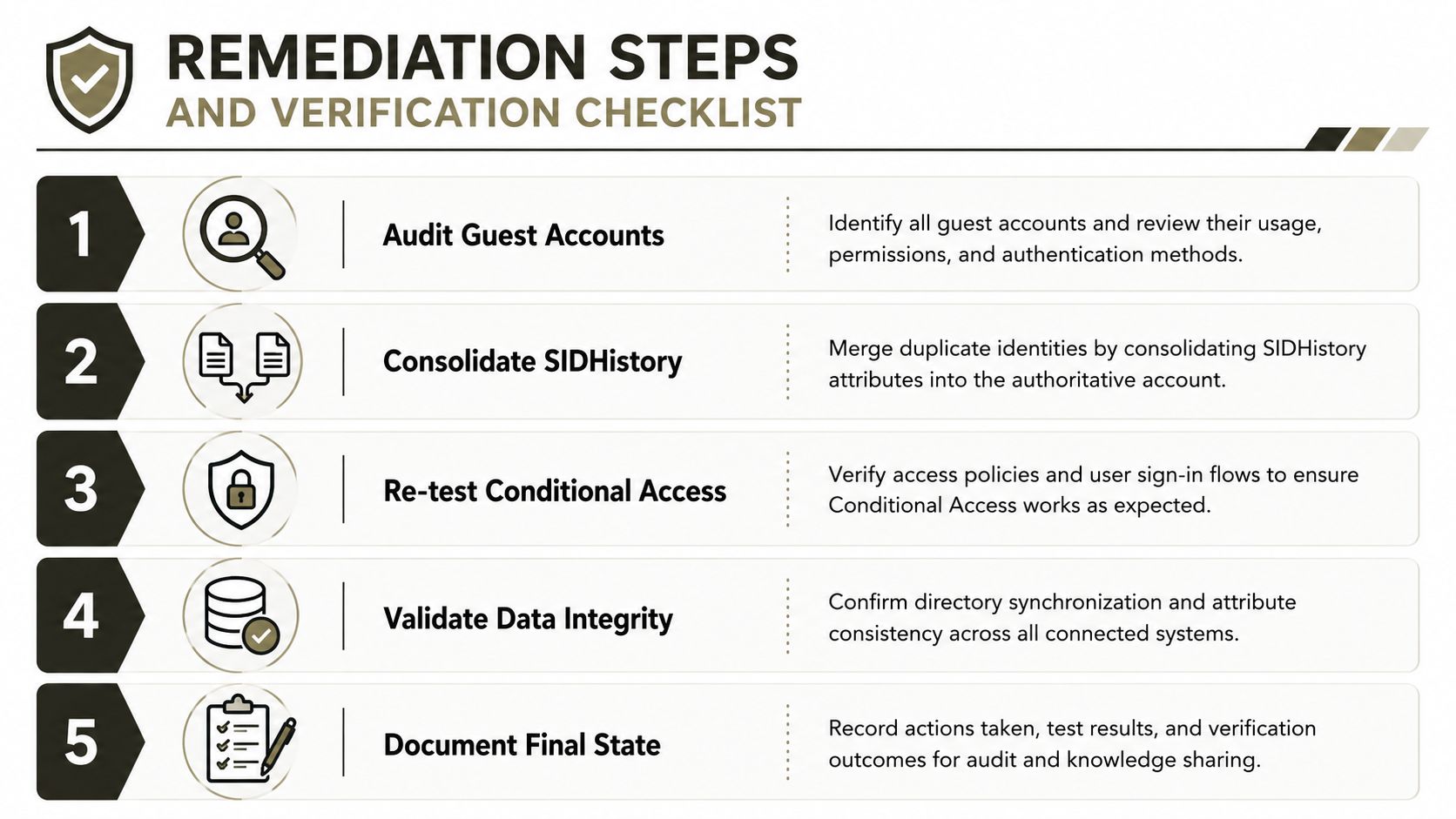
Remediation starts by assuming the target tenant contains unresolved identity debt. Don't wait for users to report missing access. Build a controlled verification cycle that compares the source baseline with the target state, assigns each exception to an owner, and blocks retirement until the evidence supports closure.
Repair the control plane first
Start with guest accounts. Export every guest, identify the sponsor, business purpose, last meaningful access, source tenant, and target status. Remove stale access only through an approved process, then test active external collaboration from the target. Cross-tenant access drift often survives because nobody owns the exception after cutover.
Next, reconcile administrative roles. Compare Global Administrator, privileged role, SharePoint administrator, Exchange administrator, security administrator, and application administrator assignments. Remove duplicate or unexplained privilege, confirm emergency access, and capture the final role inventory.
Then validate policies. Compare Conditional Access assignments and exclusions, authentication requirements, session controls, device conditions, named locations, and application scope. Test allowed and blocked scenarios with representative accounts. A green portal sign-in proves very little if a sensitive application bypasses the intended policy.
Prove data integrity
For each migration wave, compare item counts, ownership, permissions, sharing links, versions, retention labels, records controls, and failed-item reports. Pay particular attention to libraries near the 5,000-item List View Threshold, long decoded paths approaching Microsoft's 400-character maximum, and operations that trigger API throttling. Microsoft confirms these platform constraints in its official SharePoint documentation, so your runbook must treat them as design inputs, not unexpected defects.
Use custom PowerShell and PnP validation where the migration product can't express your control requirements. Generate repeatable reports before and after each wave, store them in an access-controlled evidence location, and require sign-off from data owners and security. ShareGate can accelerate supported workloads, but it doesn't remove the need to validate the target control plane.
Close the project with evidence
Your final checklist should answer five questions:
- Guest access: Does every remaining guest have an owner, purpose, approved scope, and working review process?
- Identity history: Does each migrated user and group retain the access required for legitimate business continuity, without carrying unnecessary legacy permissions?
- Conditional Access: Do positive and negative tests prove that target policies enforce the intended sign-in conditions?
- Data integrity: Do migration reports and independent comparisons account for content, permissions, retention, sharing, and exceptions?
- Final state: Can security, compliance, and operations teams explain the target tenant without referring to undocumented source dependencies?
Partial DIY consolidation leaves hidden identity debt because teams optimise for movement, not proof. Specialist delivery reduces that risk by separating discovery, mapping, migration, remediation, and verification, then maintaining an audit trail across each stage. Ollo uses ShareGate alongside custom PowerShell and PnP scripting for complex Microsoft 365 tenant consolidations, Entra ID redesigns, and rescue migrations where broken inheritance, GUID conflicts, API throttling, or residency obligations make a basic toolchain unsafe.
If your tenant consolidation has unresolved object mappings, fragmented Conditional Access, guest sprawl, or Ireland-specific residency concerns, Ollo can assess the control plane, design the migration waves, and verify the target state. Bring the source and target tenant details to Ollo before cutover, and get a migration plan built around evidence rather than hope.

















