



You're probably staring at the same mess I keep seeing in regulated Microsoft 365 estates. The board wants least privilege, the auditors want evidence, and your admins still carry privileges that outlived the project, the contractor, or the merger that created them.
That is where Privileged Identity Management stops being a neat identity feature and turns into a survival control. Microsoft's own documentation frames it as a Microsoft Entra ID service for controlling and monitoring access to important resources, with time-based and approval-based activation to reduce excessive privilege, but the real test starts after you switch it on, not when you read the portal blade. Microsoft Entra Privileged Identity Management configuration
Why Privileged Identity Management Is Now a Survival Skill
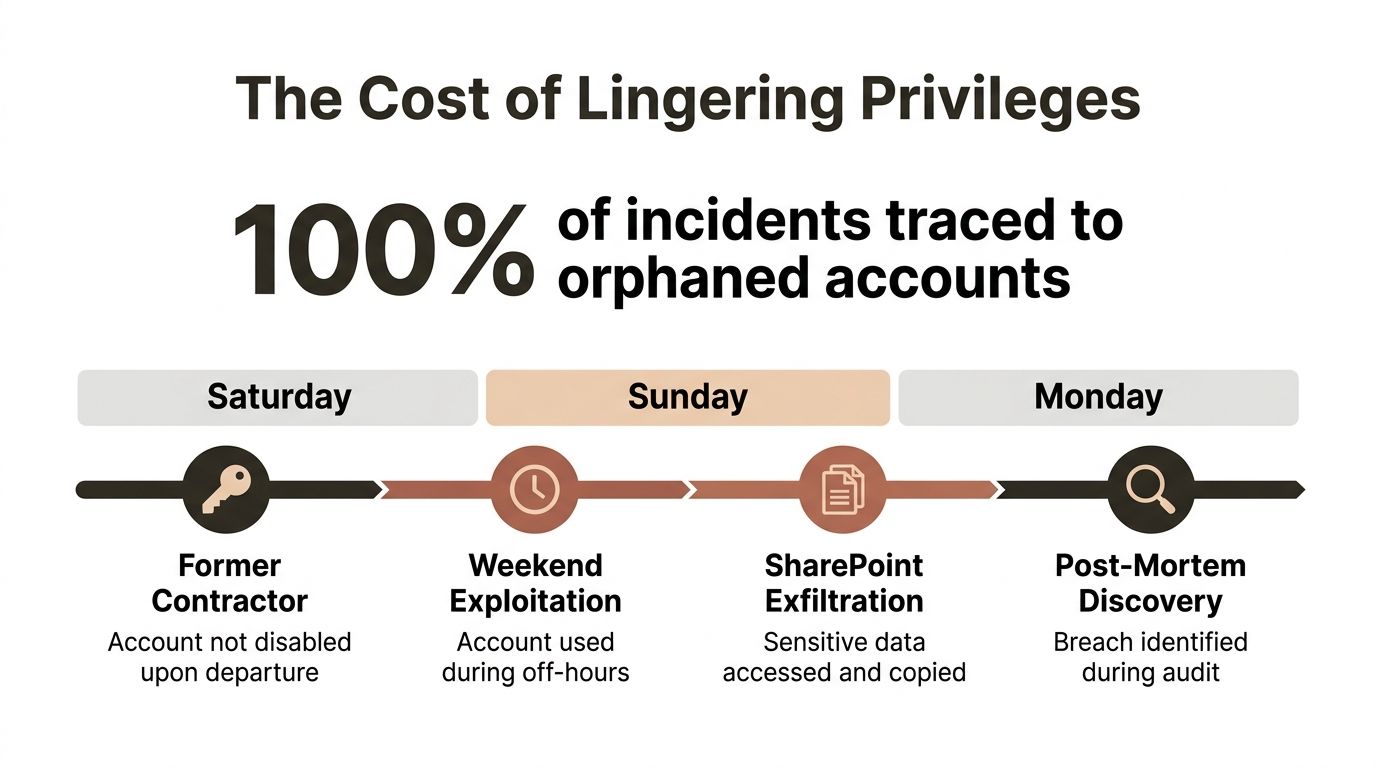
A Monday morning incident is usually how this starts. Someone notices a former contractor still had a Global Administrator path into Entra over the weekend, the account never got properly cleaned up, and by the time anyone looked, SharePoint content had already gone out the door. The post-mortem always sounds the same. One missing control. One stale privilege. One assumption that somebody else had already removed the access.
That is why privileged identity management has crossed from identity hygiene into board-level risk. If you run energy, healthcare, or finance infrastructure in Ireland or the UK, you already live under sector scrutiny, and controls around privileged access now sit alongside the governance pressure created by NIS2 and DORA. Microsoft gives you the mechanism, not the outcome. If your team treats PIM like a checkbox, you have already failed the test.
The mistake most teams make
They confuse policy with control. PIM can reduce excessive or misused privilege, but only if somebody reviews activation rules, approvals, and monitoring on a live cadence, not during a once-a-year audit scramble. Microsoft's own docs say PIM mitigates risk, and they are right in principle, but your tenant only gets that benefit when the configuration matches the operating model.
Practical rule: if a privileged role can sit around for months without review, your PIM rollout is theatre, not control.
For IT leaders who need a broader governance view, GRC guidance for GCC and European firms is a useful reference point, because PIM never lives alone. It sits inside a wider compliance story that includes accountability, escalation paths, and proof that someone enforced the policy.
The market pressure reflects that reality. One industry report places the global PIM market at USD 5.736 billion in 2025, rising to USD 10.336 billion by 2030 at a CAGR of 12.50%. Another puts the market at USD 6.97 billion estimated value with a forecast of USD 17.52 billion. Those numbers do not prove security maturity. They prove that everyone else has also realised privileged access is where incidents get expensive.
How Microsoft Entra PIM Actually Works
Start with the simplest example. A Finance team lead needs Contributor access on a subscription to finish quarter-end work. If you grant that role directly, you have standing privilege. If you make them eligible instead, they can only activate it when needed, for the limited period you allow, and only after the tenant checks the conditions you set.
Eligible versus active
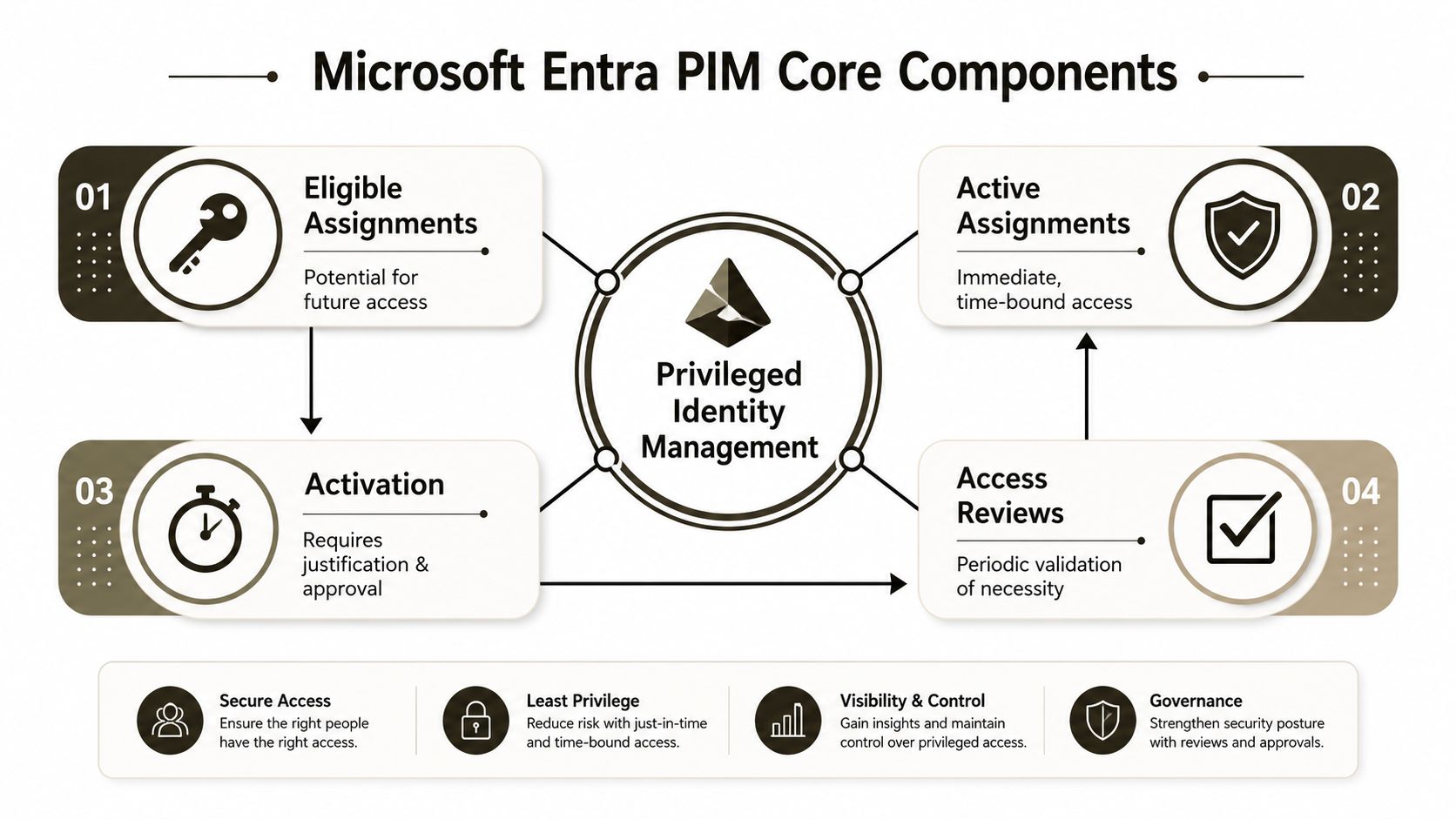
Eligible means the account can request the role. Active means the role is currently in force. That distinction matters because it is the line between dormant access and actual privilege. A reviewer who sees an eligible assignment should read that as “potential access”, not “someone can already use this right”.
Activation is the control point
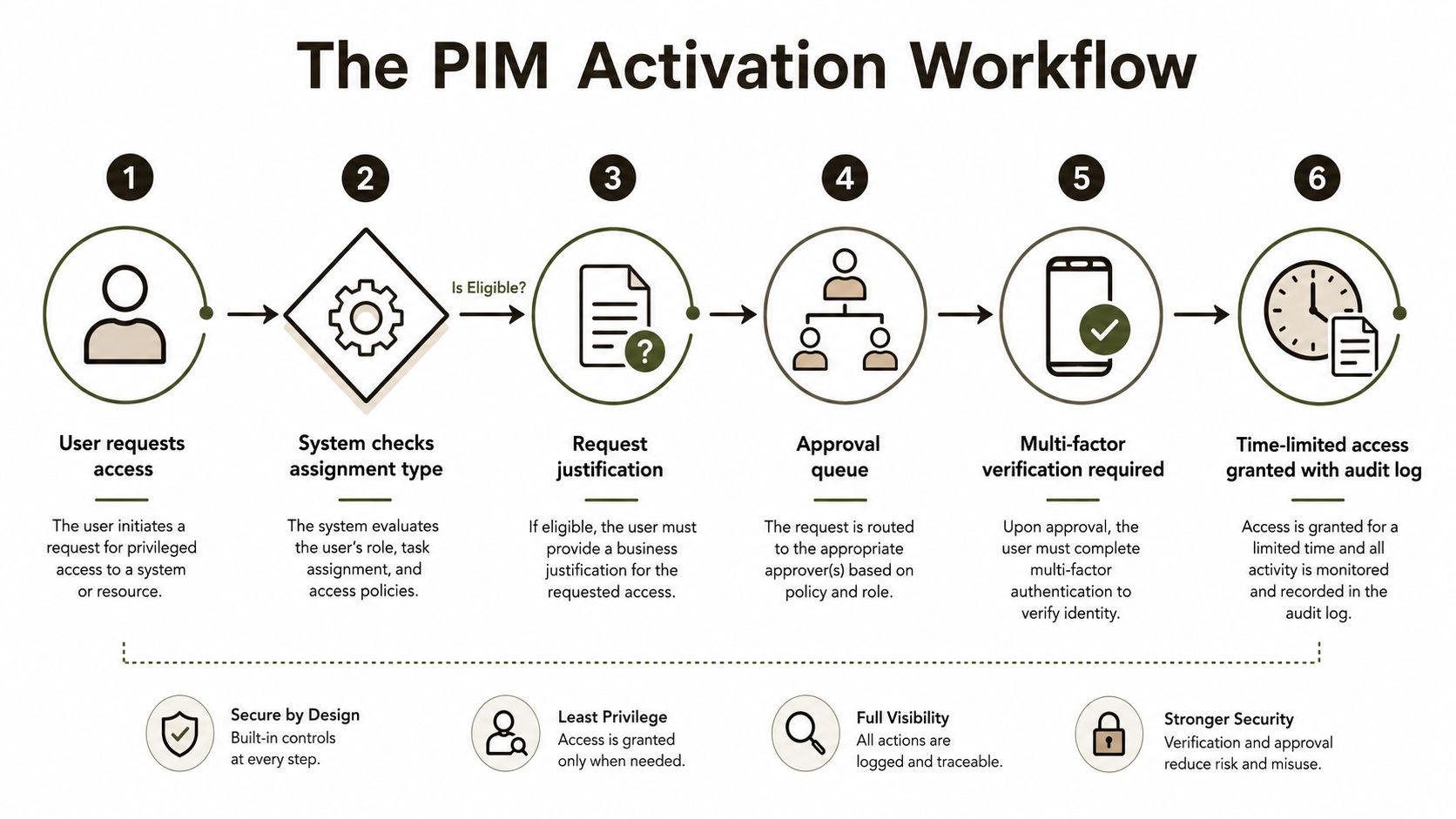
Microsoft documents that activation can require additional verification/MFA, can allow reduced scope, can support a custom activation start time, and can force the user to provide a reason before approval. That is good control design because it creates intent, traceability, and time-bounded access. It is not a magic shield. It does not harden a bad role design, and it does not clean up a messy tenant.
The activation settings tell auditors three useful things. First, someone asked for access. Second, the tenant challenged that request. Third, the tenant recorded the reason and time window. That is useful evidence, especially in regulated environments, but it only proves control at activation time, not that the role was clean before the request.
A sensible way to read the blade is this:
- Eligible assignment, the user can request access later.
- Activation workflow, the tenant demands explicit intent.
- Active role, the user has real privilege for a bounded period.
- Access review, someone must decide whether the assignment still makes sense.
Microsoft's own PIM documentation and the way Entra surfaces the workflow make that sequence clear, and the Microsoft Entra ID guidance Ollo publishes aligns with the same operating model. The hard part is not understanding the feature. The hard part is keeping the assignment model and the approval model aligned after migration, staffing changes, and emergency access events.
The Activation Workflow and What It Really Buys You
Microsoft's activation process buys you a traceable request, not a blanket guarantee. That is the distinction your policy team needs to understand before they write a control statement that sounds stronger than the tenant is.
What the workflow proves
Eligible users must complete extra verification, including MFA. They can request a reduced scope, set a custom activation start time, and provide a reason before approval. That combination tells an auditor that the tenant forced the user to declare intent and pass a challenge before privilege became real. It does not tell the auditor that every downstream resource respected that state change.
Important point: the control proves the user asked for privilege at a moment in time, it does not prove every access policy in your tenant interpreted that privilege the way you expected.
That matters because security teams often write policies as though activation automatically hardens the whole session. It doesn't. PIM activation is a narrow gate. If your Conditional Access logic, break-glass design, or app-level permissions are sloppy, you still have exposure after the gate opens.
What auditors actually care about
Auditors usually look for three things. They want to see that privilege was not permanent. They want to see that activation required explicit user action. They want to see that somebody can reconstruct who approved what, and when.
They do not care that your slide deck called the workflow “zero trust” if the tenant allowed weak approval paths, lazy review settings, or broad role scope. They care about evidence. Microsoft's documented activation flow gives you evidence, but only if your team keeps the settings disciplined and your logs intact.
The video below is useful if your team wants to watch the UI flow before you harden policy around it.
The blunt truth is this. Activation buys you accountability at the moment of elevation. It does not buy you confidence that the rest of your Microsoft 365 estate understands the boundary. That is why bad PIM programmes fail during incident review, not during implementation.
The Conditional Access Trap Most PIM Rollouts Miss
Plenty of teams fool themselves here. They assume eligible in PIM means protected by Conditional Access. It doesn't. SpecterOps points out that Conditional Access evaluates the account's current state, and PIM role eligibility is not part of authentication. The policy only applies once the role has been activated. SpecterOps on PIM and Conditional Access
Three failure patterns I keep seeing
First, teams leave stale eligibility lists in place and assume inactivity equals safety. Eligibility still exists, and the account still becomes dangerous the moment somebody activates it. That is not control, that is deferred risk.
Second, teams forget break-glass accounts. Then they discover too late that the emergency path either bypasses the very policy they wanted to enforce, or it cannot operate when it is needed. The right answer is not to improvise during an outage.
Third, teams let activation windows bypass device compliance expectations. The user has the role, the role is active, and the security team thinks a policy will catch the gap. If they never tested the current-state boundary, they built a control that looks good in a review and collapses in production.
What your team should check now
- Eligibility hygiene, remove old assignments instead of treating them as harmless.
- Break-glass design, document how emergency access works before an emergency.
- Conditional Access testing, verify the current-state logic with activated roles, not just with assignments in place.
- Policy ownership, make sure one team owns the access model, not just the portal settings.
I keep saying the same thing because it keeps being true. PIM is not a substitute for Conditional Access, and Conditional Access does not understand intent until the role has been activated. If your policy review never tested that boundary, your audit is incomplete and your runtime controls are weaker than the spreadsheet claims.
Use the Conditional Access guidance Ollo publishes to pressure-test your own tenant logic, then validate it in a lab before you touch production. That is cheaper than explaining to a regulator why your “least privilege” design only worked on paper.
Tenant-to-Tenant Migration Pitfalls That Break PIM
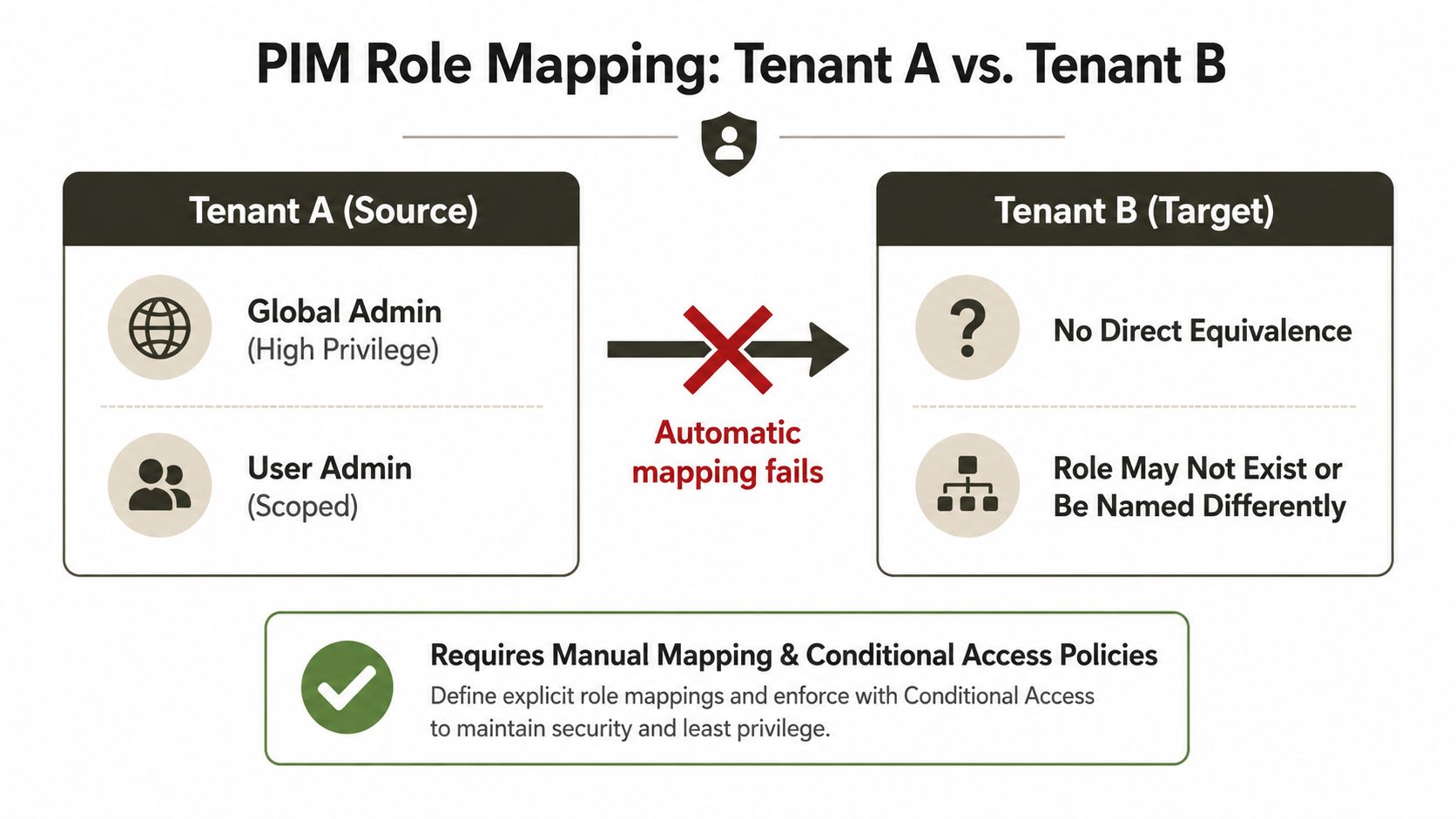
Tenant migration is where neat identity theory collides with ugly reality. A Global Admin in tenant A does not magically become a Global Admin in tenant B, and anyone who builds a runbook as though it will is asking for a cutover fire. The same applies to delegated admin relationships, service principals, and every application that expects the old tenant's identifiers to keep behaving.
Where the mapping breaks
Role names often mislead people. They look familiar across tenants, but the underlying assignments, scopes, and dependencies are not portable in the way teams hope. Tenant B may not even have the same role structure or the same supporting policies. That means you need a manual mapping exercise, not a copy and paste mindset.
Service principal GUID conflicts are the other common break point. A source tenant's application identity does not carry across cleanly if the target tenant already uses the same app pattern or dependency chain differently. Delegated admin relationships through partners can also get severed mid-cutover, which leaves support teams without the control path they assumed would survive.
War story rule: if the migration plan only talks about users and mailbox data, it is not a migration plan. It is a hope document.
In these situations, enterprise teams usually need specialist handling. Ollo's Microsoft 365 tenant-to-tenant migration guidance deals with the same kind of identity breakage because mail, SharePoint, and Entra rarely fail in isolation. One broken identity dependency can strand a whole cutover window.
What fails in practice
- Role reissue assumptions, because the destination tenant does not inherit source privilege automatically.
- App permission drift, because the service principal relationship changes under the application.
- Partner admin loss, because delegated control paths disappear when the old tenant gets retired.
- Approval workflow gaps, because the destination tenant's PIM policy does not match the source operating model.
The documentation usually looks tidy until a live tenant exposes the seams. Migration teams have to reconcile role models, service principals, and access reviews at the same time. That is not a helpdesk task. That is architecture work, and it belongs with people who have already cleaned up a failed cutover.
Why DIY PIM Programmes Fail in Regulated Estates
DIY PIM projects usually fail because the organisation underestimates the operating burden. The security team owns the policy, but the business runs 24/7, and somebody has to keep the reviews, approvals, emergency paths, and exception handling alive after go-live. That gap is where most programmes rot.
The failure pattern is boring and repeatable
Teams under-scope access reviews, so old assignments survive. They skip approval workflows when managers are unavailable. They never design a proper break-glass strategy, then they discover that emergency access either does not work or works too well. None of that sounds dramatic until the audit team, the regulator, or the incident responder asks who approved the privilege and why it still existed.
Compliance exposure follows quickly. If your estate is in finance, healthcare, or energy, a weak PIM programme does not just create a security problem. It creates an evidence problem. You cannot prove least privilege if your assignments never get reviewed, and you cannot defend emergency access if the process lives in a tribal memory spreadsheet.
The computer system validation guidance Ollo publishes matters here because regulated estates never get to separate technology change from control change. Your PIM design has to survive the same scrutiny as the rest of the validated environment.
Why specialists matter
A significant number of internal teams can configure PIM. Fewer can operate it across tenant migrations, delegated administration, service principals, and audit expectations without leaving holes behind. That is where a specialist migration architect earns their keep. They look for the hidden dependency, not just the visible role.
If you let the business discover the broken path during a live incident, you pay twice. You pay in downtime, and you pay again in compliance cleanup.
Mitigation Patterns and the Ollo Verdict
Treat PIM as a control stack, not a feature toggle. Start with eligibility hygiene, because stale assignments create risk you do not need. Then lock down activation windows so privilege cannot linger longer than the job demands. Finish with a disciplined access review cadence, because unchecked eligibility always grows teeth.
Own these controls in-house
- Eligibility hygiene, your team should remove obsolete role assignments routinely.
- Activation rules, keep justification, MFA, and approval settings strict.
- Review discipline, make access reviews boring, scheduled, and non-optional.
Bring in a partner for these
- Tenant-to-tenant role mapping, because source and target tenants rarely align cleanly.
- Service principal reconciliation, because GUIDs and application dependencies break faster than most runbooks admit.
- Break-glass design, because emergency access must work under pressure without becoming a backdoor.
That is also where you should look at the Microsoft 365 security best practices Ollo publishes and decide whether your current operating model can sustain what it promises. If the answer depends on one overworked admin remembering a set of exceptions, you do not have a control model, you have a liability.
Ollo Verdict: if you run a single tenant, have a small user base, and can afford to maintain the reviews yourself, you can self-build PIM with discipline. If you are mid-enterprise, regulated, mid-migration, or recovering from an incident, you need a senior migration architect in the room before the next access review, not after the next failure.
Questions IT Directors Actually Ask About PIM
How often should access reviews run? Often enough that stale privilege cannot sit through a business cycle without being challenged. If your reviews only happen when audit asks, they are already late.
Can PIM go live mid-migration? Yes, but only if you accept that migration changes the role model, the approval paths, and the emergency access design at the same time. If you treat it as a post-migration clean-up item, you'll carry risk through cutover.
What does break-glass really mean? It means an emergency account that bypasses normal activation friction when the business is on fire. It should stay separate from routine PIM workflows, tightly logged, and hard to use casually.
Is PIM worth it versus a third-party vault? In a Microsoft-heavy estate, PIM gives you native governance over role activation, which is the control point that matters most in Entra. A vault can still help with credential handling, but it does not replace role governance.
The blunt answer is that PIM works when someone owns the whole identity story, not just the portal settings. If your team needs to reconcile roles, approvals, break-glass, and migration risk at once, bring in a senior architect before you let the first review cycle drift into chaos.
If your tenant needs PIM tightened, reworked, or rescued after a failed rollout, Ollo can map the roles, fix the activation model, and sort the migration dependencies before they turn into an incident. Visit Ollo if you want a team that treats privileged access like a live risk, not a policy exercise.

















