



The most dangerous advice on Microsoft 365 tenant to tenant migration is also the most common: treat it like a content move, pick a tool, run batches, tidy up the rest later.
That advice creates rescue projects.
A serious tenant migration isn't a lift-and-shift exercise. It's an identity choreography problem with data movement attached. If your team focuses on copying mailboxes and files first, you're already looking in the wrong direction. The business outage usually starts after the copy appears to finish, when users can't sign in properly, aliases don't resolve, mail routes badly, Teams identity looks wrong, or permissions drift just enough to trigger a compliance incident.
Most internal teams underestimate this because the early demos look deceptively clean. A pilot mailbox moves. A OneDrive library lands in the target. Everyone relaxes. Then production hits the ugly realities: broken inheritance, path constraints, throttling, Exchange attribute mistakes, and domain cutover sequencing. If you've ever read another article promising a “smooth” migration, compare that fantasy with Ollo's pragmatic guide to zero business disruption. The gap between marketing and reality is where projects burn money.
Your Migration Is Not a Data-Copy Job

The fastest way to wreck a Microsoft 365 tenant to tenant migration is to treat it like a bulk copy exercise. Mailboxes and files are the visible payload. The core project is identity choreography under time pressure, with licensing, directory state, domain release, mail routing, Teams object continuity, and cutover sequencing all tied together.
That is why so many migrations look fine in testing and fail in production. Test batches prove that a tool can copy data. They do not prove that the target identities are stamped correctly, that accepted domains can be released and attached on schedule, that proxy addresses resolve after cutover, or that users will land in Teams with the right account context instead of a confused split identity.
Internal teams usually split this into separate admin lanes because it feels tidy. Exchange handles mailbox prep. Identity handles Entra ID objects. Another team buys the migration tool. Someone else owns cutover weekend. That org chart is how you create an outage. These dependencies are coupled, and the platform punishes teams that pretend otherwise.
A bad sequence is expensive.
If the target object is prepared incorrectly before licensing, you can provision the wrong mailbox in the target tenant, break continuity, and spend the next week explaining to leadership why "migration complete" turned into empty inboxes, duplicate objects, and a legal hold review. The same pattern shows up outside Exchange. Teams identity confusion, stale autocomplete entries, broken delegates, and misrouted mail all come from identity decisions made long before anyone clicks Start on a migration batch.
Where projects break
Projects break at the handoffs.
They break when the source domain cannot be removed cleanly because aliases, groups, or hidden dependencies were missed. They break when MX, Autodiscover, and accepted domain changes are scheduled like DNS chores instead of business-critical routing events. They break when OneDrive and SharePoint content lands in the target, but the people and groups that govern access do not line up cleanly enough to preserve how the business works on Monday morning.
The ugly part is that tooling can hide this until cutover. A dashboard full of green checkmarks means very little if mail flow is wrong and users authenticate into the wrong identity context. That is why the smart way to frame the project is not "How fast can we copy data?" It is "What identity state must exist before, during, and after cutover so the business still functions?" If your team has not answered that clearly, read Ollo's pragmatic guide to zero business disruption and then fix the plan.
What the business should hear
Executives do not care that a migration tool completed 98 percent of batches. They care that sales could not send mail, finance lost calendar continuity, legal questioned retention coverage, and the service desk melted down because users suddenly had two identities and neither behaved properly.
The cost is predictable:
- Mail flow failure: messages bounce, route to the wrong place, or disappear into coexistence confusion.
- Identity failure: users sign into the target tenant but still collide with old aliases, cached credentials, or Teams account mismatches.
- Access failure: permissions drift without being noticed until a critical file, site, or shared mailbox is needed.
- Recovery cost: every rushed fix creates more validation work, more exceptions, and more executive scrutiny.
Good migrations are won before the first payload moves. They are designed around identity state, dependency order, and cutover control. Everything else is just copying files and hoping the business forgives you.
Why Tenant Migrations Fail Before They Start
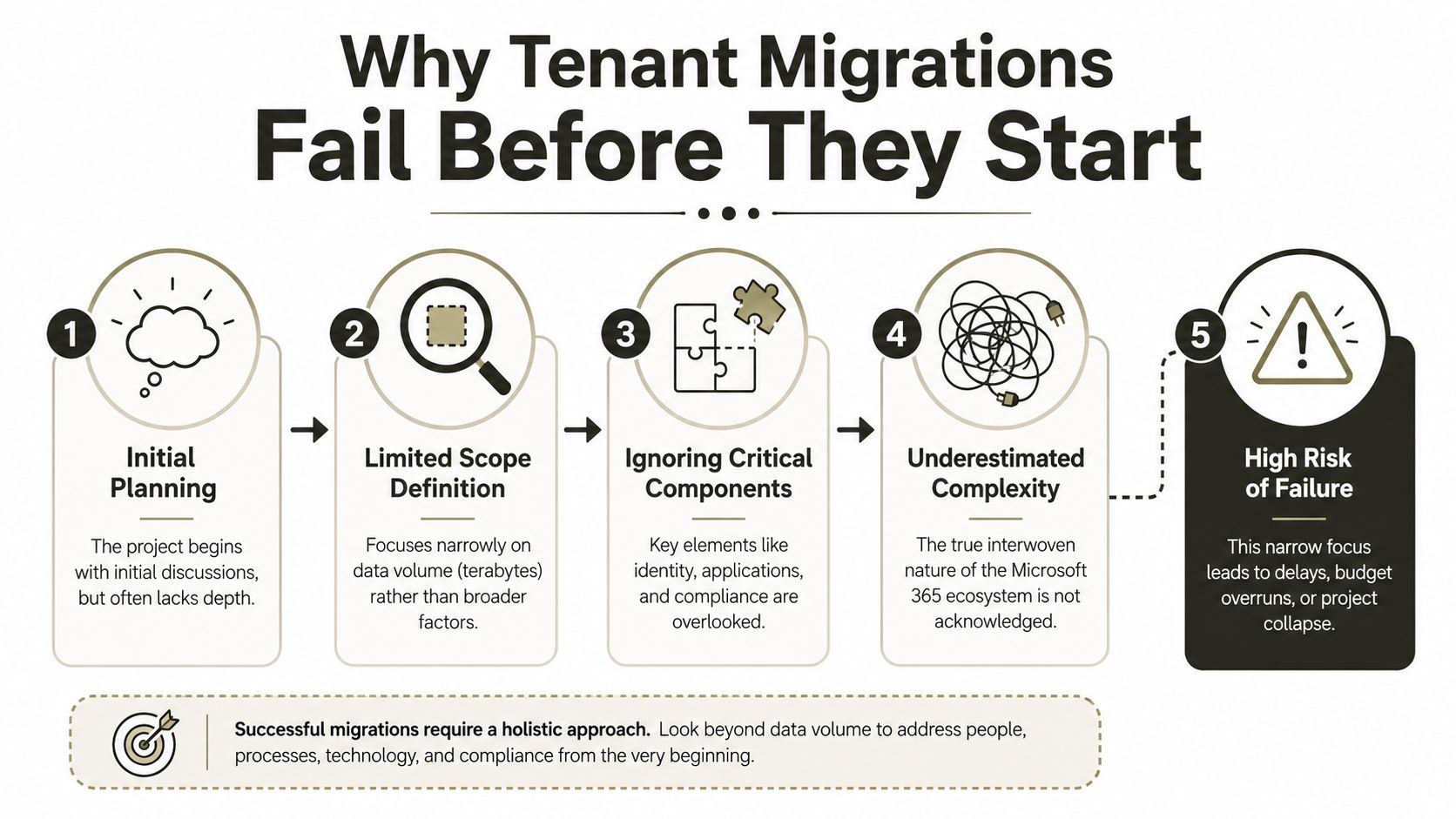
Most failures are locked in during discovery, not cutover night.
The planning meeting usually goes wrong in the first half hour. Someone asks how much data needs moving. Someone else asks which tool to buy. Nobody asks the harder question: what has to exist in the target tenant before any migration can begin without creating identity damage?
Microsoft's own cross-tenant guidance is blunt. For SharePoint and OneDrive migrations, you must pre-create users, groups, and Microsoft 365 groups in the target tenant, and for OneDrive you must create an identity mapping file. For mailbox moves, migration batches should be submitted two weeks before cutover because synchronisation causes no end-user impact during that period (Microsoft FastTrack cross-tenant migration guidance). That isn't optional prep. That is the platform telling you the project depends on disciplined pre-staging.
Discovery isn't paperwork
Most internal teams typically get impatient. They call discovery “analysis overhead” because they want visible progress. Then they discover, too late, that the undocumented mess in Entra ID and Exchange attributes is the project.
You need a proper dependency map before you move anything:
- Directory reality: Source identities rarely match what the target should become.
- Mail-enabled object sprawl: Shared mailboxes, aliases, groups, contacts, and stale forwarding settings don't clean themselves up.
- Permission debt: Old SharePoint estates carry years of broken inheritance and one-off access grants.
- Application coupling: Sign-in assumptions live inside line-of-business apps, devices, automation, and conditional access.
The documentation says “prepare”. In reality, preparation is where you decide whether the migration is controllable.
The scope your team usually misses
We often see clients focus on terabytes and ignore object relationships. That's how you end up with a migration that “completed” while users lose access to critical functions tied to identity continuity.
Your discovery should answer questions like these:
- Which users have non-standard attributes that will break mapping?
- Which mail-enabled objects still reference the source domain?
- Which SharePoint sites rely on unique permissions that won't survive a naïve move?
- Which Teams-connected assets have hidden dependencies on groups and memberships?
- Which licensing actions can trigger unwanted provisioning if executed out of sequence?
The project doesn't start when data starts moving. It starts when you can prove the target tenant is ready to receive identities, permissions, and routing without improvisation.
That's why so many enterprise Microsoft 365 programmes fail for reasons that have little to do with the migration engine itself. Ollo has written about the real reason enterprise Microsoft 365 projects fail. It's usually scope blindness, weak dependency control, and leadership assuming the hard part is copying data.
The Ollo verdict
If your team hasn't built a pre-staging model for users, groups, mappings, mail objects, and validation before procurement even finishes, stop. You're not behind schedule. You're still at the part where disaster can be prevented.
The Real Battlefield Entra ID and Mail Flow
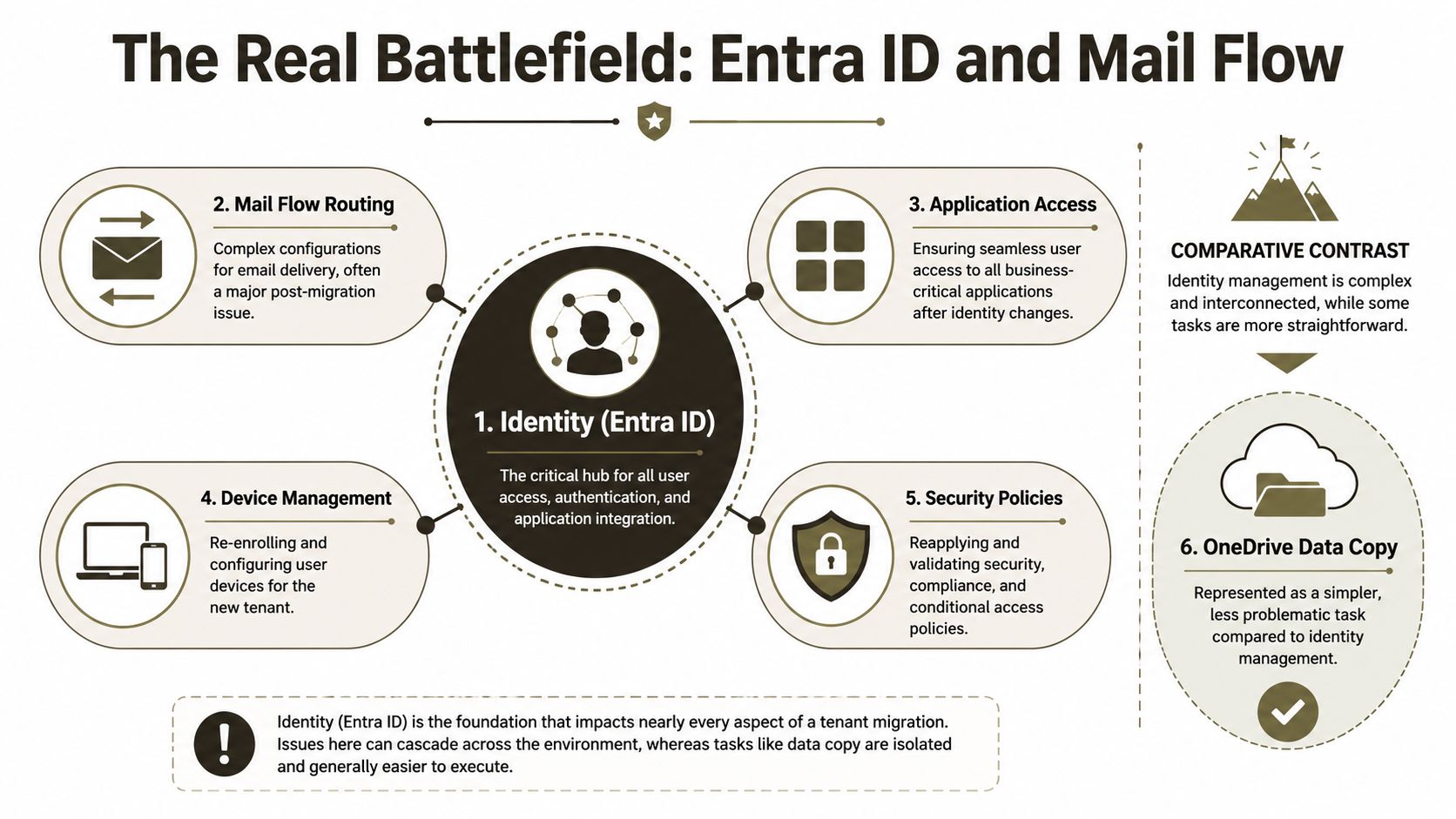
Copying data is visible, so it gets attention. Identity failures are less visible until users hit them all at once. That's why they cause the bigger outage.
Most guidance on Microsoft 365 tenant to tenant migration spends too much time on mailboxes and not enough on what happens when you re-home a user's identity, release and reattach domains, clean up forwardingAddress values, preserve Exchange Legacy DN behaviour, and keep sign-in and mail flow coherent after the switch. That gap matters because a migration can be “technically successful” while identity resolution and post-cutover mail routing are still broken, and in practice the identity swap is usually the actual outage (Ollo analysis of post-cutover identity risk).
Why identity mistakes hurt more than copy failures
When OneDrive content lands late, users complain. When identity resolves badly, the organisation loses trust in the entire programme.
A few common examples from rescue work:
- ExchangeGUID mismatch: The object exists, but mailbox continuity doesn't.
- LegacyExchangeDN mishandling: Old meeting responses and cached references bounce or misroute.
- forwardingAddress residue: Mail loops and black holes appear after cutover.
- Domain release chaos: Objects still reference the old namespace when you need it cleared.
- Sign-in confusion: Users authenticate, but service access behaves inconsistently across workloads.
Your architecture team needs to treat Entra ID as the centre of the migration, not a supporting service. If they don't, every “successful” data move increases the cost of the final identity swap.
For teams that need the bigger Entra design context, Ollo's work on Microsoft Entra ID architecture and controls is worth reading before any merger, divestment, or tenant consolidation programme.
A short explainer helps here:
The cutover clock is real
The documentation feels thinner than the practicalities of the situation. Data migration guidance tells you how to move objects. It says much less about what happens when your accepted domains, aliases, identity references, and mail routing all need to change in a tightly controlled sequence.
That sequence has to account for:
- Domain release readiness
- Residual mail object cleanup
- Alias continuity
- Teams identity expectations
- Authentication behaviour after the tenant switch
If users can open their files but can't trust email, sign-in, or Teams identity after cutover, your migration failed in the only way the business actually cares about.
The Ollo verdict
Treat identity design and mail flow as the primary workstream. Treat data copy as the subordinate one. If your current plan puts SharePoint throughput ahead of identity choreography, reverse it before production teaches you the lesson publicly.
Navigating the SharePoint and OneDrive Minefield
SharePoint and OneDrive are where tenant-to-tenant projects stop looking like a migration and start looking like a liability register.
The trap is obvious to anyone who has cleaned up one of these failures. Teams obsess over mailbox batches and domain timing, then treat SharePoint and OneDrive as a bulk copy exercise. That is how you end up with users who can sign in after cutover but cannot find the right files, cannot access inherited permissions, or discover that links embedded in Teams tabs and shared documents now point to the wrong place. The business does not care that the bytes moved. It cares that work stopped.
Microsoft documents the platform limits clearly enough: path limits, item-count constraints, and throttling are service rules, not tool bugs or vendor excuses (Microsoft Learn on tenant-to-tenant migration constraints). If your source tenant contains sprawling libraries, broken inheritance, abandoned sites, or years of bad permission hygiene, the platform will enforce those realities on cutover weekend whether you bought SPMT, ShareGate, or a more expensive wrapper around the same problems.
Production reality beats the vendor demo
The official guidance is sensible. Audit content first. Classify risk. Migrate in waves. Validate each wave. Nobody serious disagrees with that.
What fails in production is the fantasy that one product owns the outcome.
SPMT is fine for small estates with clean structure, light governance, and low consequence if something breaks. That is not the profile of most merger, divestment, or consolidation programmes. In a messy enterprise tenant, SPMT gives you transfer mechanics, not control. It does not repair ugly information architecture. It does not make broken permissions intelligible. It does not give your team a credible answer when executives ask why a department lost access to a site tied to active work.
ShareGate is more usable for real environments because it gives you better operational control, but it still does not remove the need for scripting, exception handling, and post-move validation. Serious teams pair it with PowerShell and PnP automation because the hard part is never the happy path. Ollo's cross-tenant SharePoint migration approach reflects that reality.
The harder truth is this: SharePoint and OneDrive failures become identity problems after cutover. File access depends on the right principal existing in the target tenant, with the right mapping, at the right time. Legacy sharing links, M365 group-connected sites, Teams-backed document libraries, and orphaned users all collide here. If the identity choreography is wrong, your content move looks complete in the dashboard and broken to the user.
Where projects get hurt
| Risk area | What cheap tooling gives you | What a defensible migration team does |
|---|---|---|
| Long paths and invalid names | Finds failures during transfer | Audits and remediates before wave planning |
| Large lists and fragile libraries | Retries until the service pushes back | Splits workloads, stages high-risk sites, validates structure after copy |
| Throttling | Delays and vague warnings | Designs waves around service behaviour and business deadlines |
| Broken inheritance | Copies confusion into the target tenant | Reviews permission logic and fixes what should not survive the move |
| OneDrive sprawl | Bulk user copy with inconsistent ownership outcomes | Classifies active, inactive, and departed-user data before migration |
| Teams-connected files | Treats libraries as generic SharePoint content | Checks site, group, and user identity dependencies before and after cutover |
| Exception handling | Leaves admins doing manual cleanup at scale | Uses scripted remediation and documented rollback decisions |
What your team should do
Start with exposure reduction.
- Audit before scheduling waves. Find long paths, overgrown libraries, unique permissions, orphaned ownership, and stale OneDrives before anyone talks about throughput.
- Separate active collaboration estates from archive material. A finance site tied to Teams and live approvals is not the same as a dormant departmental archive.
- Map identity dependencies inside content. Group-connected sites, external sharing, Teams tabs, file links, and owner references all need review before cutover.
- Validate permissions, not just files. A document present in the target tenant is irrelevant if the right user or group cannot open it on day one.
- Use the right tool for the right estate. SPMT is acceptable for simple, disposable workloads. Enterprise migrations need ShareGate plus scripting, controls, and human judgment.
One bad assumption here is expensive. A failed file migration does not stay in IT. It turns into delayed sales work, finance disruption, legal document confusion, and executive noise within hours.
The copy job is the easy part. Preserving access, ownership, and trust after the tenant switch is what separates a controlled migration from a public mess.
The Ollo verdict
Use SPMT only where complexity is low and failure is survivable. For enterprise SharePoint and OneDrive, especially where Teams, M365 Groups, and regulated data are involved, use ShareGate plus custom scripting, identity-aware validation, and a team that has seen these failures before. Anything less is tool-driven optimism, and that is an expensive habit.
Executing a Defensible Cutover and Validation
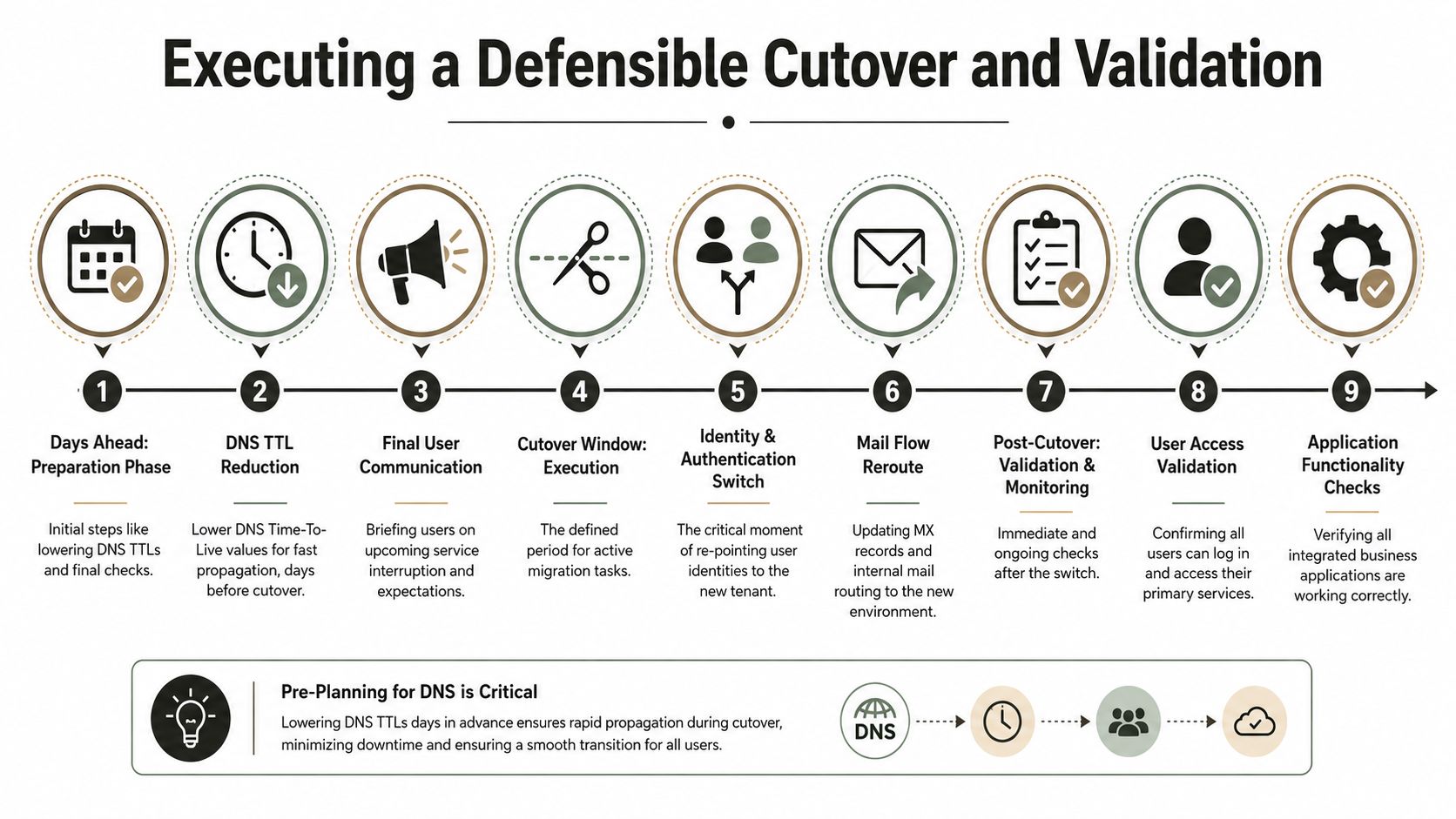
Cutover exposes the lie at the centre of weak migration plans. Teams tell themselves they are moving data. They are switching identity authority, mail routing, domain ownership, and user trust in a narrow window where every mistake is visible to the business.
That is why bad cutovers fail in familiar ways. The domain will not release because hidden object references were missed. Mail flow breaks because accepted domains, connectors, or routing assumptions were wrong. Teams access looks random because the user exists, but the identity behind the membership changed. None of those failures look dramatic in a runbook. They look catastrophic on Monday morning when payroll approvals stall, customer mail bounces, and leadership decides IT has lost control.
A defensible cutover plan treats the event as identity choreography with hard sequencing, hard stop points, and proof after every major action.
What that plan needs
Prepare DNS and mail routing early
Lower TTLs well before the window. Review accepted domains, connectors, transport rules, relay dependencies, and any third-party filtering path. If you wait until cutover night to discover a forgotten journaling route or smart host, you are already in incident mode.Clear source tenant dependencies before domain release
Domains stay stuck for stupid reasons. Proxy addresses, group objects, app references, stale users, and old mail-enabled objects all block release. Manual checks are not enough. Use scripted discovery and evidence-based cleanup.Freeze production changes
Late admin changes ruin more projects than tooling does. Mail aliases get added, licences get reassigned, groups get recreated, and the target state drifts away from the plan. Lock it down.Execute the identity sequence in the designed order
Mail user preparation, licence timing, mailbox activation, domain move, sign-in validation, and client access checks have to happen in sequence. Good admins still break tenant migrations when they improvise under pressure.Validate services immediately, not at the end
Check sign-in, mailbox access, autodiscover behaviour, SMTP delivery, Teams membership, SharePoint access, and mobile client prompts after each critical change. End-of-window validation is lazy and expensive.
If your team needs a better way to structure pre-cutover proof, Ollo's guide to migration testing types and validation planning is worth using before you touch production.
Validate what the business will notice first
Technical teams often validate the platform and forget the user journey. That is how you end up declaring success while executives cannot find their Teams chats, shared mailboxes stop receiving mail, and line-of-business apps still point at the old tenant.
Start with the failure points that create noise fastest:
- Can the user sign in with the expected identity and reach the right mailbox?
- Does inbound and outbound mail route correctly for the moved domains?
- Do shared mailboxes, delegates, and send-as permissions still work?
- Do Teams users appear with the right identity, membership, and access to shared resources?
- Do high-risk users in finance, legal, sales, and leadership complete their first-hour tasks without help desk intervention?
That is the standard that matters. A migration that passes admin checks but fails user workflows is still a failed migration.
Rollback is usually theatre
Once identities have switched, domains have moved, mail routing has changed, and users have started working in the target tenant, rollback becomes a second outage with better documentation.
Plan for containment, not fantasy reversal. Dry-run the exact sequence. Cut in phases where the business can tolerate it. Automate validation wherever possible. Record what changed, who approved it, and how success was measured. If legal, compliance, or deal stakeholders later question the transition, that audit trail matters as much as the technical outcome. In M&A work, tenant cutover sits inside the same risk envelope as other effective business acquisition strategies. Treat it with that level of discipline.
A cutover is defensible only if you can prove identity, mail flow, and access worked in the right order for the right users.
The Ollo verdict
If your cutover plan relies on manual spot checks, individual heroics, or a vague promise to fix issues live, it is not a plan. It is a public bet against your own business.
The sane approach is specialist-led sequencing, scripted validation, and decision-making grounded in how Entra ID, Exchange, domains, and Teams fail after cutover. Anything less is how companies turn a migration weekend into an executive incident.
The Final Word Your Migration Is a Business Decision
You can assign this project to internal admins, buy a tool, and hope your organisation avoids the known traps. Some do. Many don't.
The cost of failure isn't just technical rework. It's disrupted mail flow, damaged user confidence, compliance exposure, delayed integration, and leadership losing faith in IT delivery. That's why Microsoft 365 tenant to tenant migration belongs in the same conversation as other high-stakes integration work after a merger or divestment. If you're reviewing broader effective business acquisition strategies, treat tenant consolidation as a risk-bearing integration programme, not a back-office admin task.
My advice is blunt. If your estate includes regulated data, complex identity dependencies, SharePoint permission debt, or zero tolerance for visible failure, don't run this as a DIY exercise. Basic tools are useful. Specialist architecture is what keeps the business operational when the ugly edge cases appear.
A successful migration isn't about finding a faster copy engine. It's about reducing the chance that your users, auditors, and executives discover the hidden weaknesses in your plan at the same time.
If your team needs a controlled path through a Microsoft 365 tenant migration, talk to Ollo. We handle complex tenant consolidations, Entra ID redesigns, SharePoint migrations, and rescue work where the essential requirement is risk reduction, not optimism.

















