



Teams often get user acceptance testing wrong because they treat it like a polite sign-off exercise. In Microsoft 365 and SharePoint migrations, that mindset is reckless. UAT is a controls test, not a demo, and if your team only checks whether pages render, you've already failed the job. ISTQB's glossary defines it as formal testing with respect to user needs, requirements, and business processes to decide whether a system satisfies acceptance criteria and whether the user or customer will accept it, which is exactly why it belongs at the final gate before release, not somewhere near the end as a box-tick PractiTest's UAT definition.
That distinction matters more in regulated IE-region environments than in almost any other delivery context. Your business users aren't validating a UI, they're proving that process fit, auditability, permission behaviour, and sign-off all survive the move. The documentation says one thing. Reality is uglier. Microsoft 365 breaks at the edges, not in the happy path, and those edges are where broken inheritance, throttling, and path limits will embarrass your project after cutover if you didn't force them into UAT.
Why Generic UAT Fails Microsoft 365 Migrations
Generic UAT advice flatters weak delivery teams. It talks about users, scenarios, and approval, then skips the part that matters in a tenant-to-tenant move, proving the platform still honours the controls your business depends on. For Microsoft 365 and SharePoint, that is the difference between testing a page and testing a governing system.
Visibility is not validation
A site can look fine and still be wrong in the only ways your auditors and security team care about. Microsoft's own constraints include the 5,000-item List View Threshold, long-path and deep-nesting failure modes, and throttling under bulk operations, which means a “passed” UAT that only checks content visibility can leave you blind to exactly the defects that bite at cutover Microsoft platform constraints in UAT context. Teams that test the homepage, a few documents, and one clean permission set, then call the move sound, are testing a demo, not a migration.
Practical rule: if your business users cannot prove that unique permissions, retained metadata, and search security trimming behave correctly after the move, your UAT did not validate anything useful.
That is why the checklist mindset fails in regulated migration work. The system can expose content and still break governance drift, permission regressions, and audit gaps. If you only ask, “Can users see the site?”, you miss the actual question, “Can the right people see the right content, with the right controls, under the right conditions?”
A basic primer on test discipline still helps, but only after you understand the migration problem. For a wider view of testing categories, types of testing is a useful reference point. For broader testing principles, check the Halo AI blog, then return to the core issue, business-process validation under platform constraint.
Generic UAT dies because it pretends every system behaves like a neat demo environment. Microsoft 365 does not. The platform has service-side rules, and your UAT has to force those rules to show themselves before production does it for you.
Setting Objectives, Entry Criteria, and Exit Gates
Start with the business risk, not the test case spreadsheet. If your objective reads like “validate the site,” throw it out. A serious user acceptance testing objective for a regulated Microsoft 365 move should say what must survive, who must sign, and which controls must still work after the cutover.
Write objectives that map to controls
Your objective should cover three things, functional fit, governance, and compliance. That means you validate more than rendering and access. You validate whether permission inheritance, conditional access, retention labels, and the business process behind them still behave as designed after migration or restructure.
Entry criteria need to be just as blunt. Don't enter UAT until the migration team can prove the data loaded, permissions mapped, and search indexed well enough to support real validation. If those preconditions aren't met, your testers will spend the week chasing setup defects and calling it testing. That's waste, not assurance.
The same applies to exit gates. If your exit rules don't mention broken-inheritance recovery, conditional access, and retention behaviour, you're not running a controls test. You're running a rehearsal. And rehearsal doesn't protect you from audit findings or business disruption.
Build the gate before the cases
Use this sequence and don't improvise around it:
- Define business objectives: tie each objective to a real business process, not a page or a folder.
- Document entry criteria: require the system to be ready, the data to be loaded, and the right stakeholders to be available.
- Set exit gates: make approval depend on zero critical defects, complete test execution, and signed business acceptance.

The strongest teams also trace every scenario back to a requirement. That traceability matters because regulated migrations don't fail on theory, they fail when nobody can show what was tested, what failed, and who accepted the residual risk. For the documentation habit behind that discipline, keep SharePoint migration documentation close at hand.
Hard line: if the exit criteria don't force a business owner to accept risk in writing, the migration hasn't been approved, it's only been tolerated.
Directors usually fool themselves. They want a fast sign-off, so they lower the bar. That shortcut buys a faster meeting and a slower recovery when the first complaint lands after go-live.
Preparing a Production-Like UAT Environment for SharePoint
A UAT environment that behaves nothing like production gives you false confidence, and false confidence is the fastest way to wreck a SharePoint cutover. DIY teams still spin up thin sandboxes, drop in a few tidy documents, and call that readiness. In a SharePoint or Microsoft 365 migration, that is sloppy engineering.
Sample the ugly data, not the easy data
Use representative content, not curated content. Your largest lists, longest file paths, and most complex permission sets have to be in UAT, because those are the places where SharePoint breaks first. Microsoft documents the limits that matter here, including List View Threshold behaviour at 5,000 items, file and path-length limits, and throttling under bulk operations, so your environment needs to hit those edges on purpose.
Mirror production as closely as the migration scope allows. Recreate conditional access patterns, sensitivity labels, and retention policies instead of assuming the happy path will survive a tenant-to-tenant move. If production depends on layered permissions, UAT must include that layering. If search relies on security trimming, UAT has to prove it under realistic content and roles.
Clean samples lie. They hide the same breakpoints that later cause content visibility problems, broken inheritance, and permission drift after cutover. The platform may handle structured operations in theory, but bulk jobs, deep nesting, and mixed security models expose the cracks fast. That is why Microsoft limits and throttling guidance for SharePoint migration testing matters less as a checklist item and more as a warning label.
Make the environment behave like the live one
Build the UAT tenant boundary to match production identity patterns and realistic test accounts. If your migration touches multiple business units, do not collapse them into one harmless test role. That wipes out the access complexity you need to validate.
Use the production controls, then prove they still work after the move. Permission inheritance, access reviews, audit trails, and retention should all be tested against the same governance posture users will face after cutover. If any of those controls behave differently in UAT, the environment is wrong.
A practical build order looks like this:
- Load realistic data from the highest-risk sites.
- Mirror role groups and unique permissions.
- Apply the same governance settings used in production.
- Validate bulk operations against the largest lists and libraries.
- Confirm that search, access, and retention behave consistently.
For teams that need a deeper migration reference point, SharePoint online migration is the right companion topic, because environment design and migration design cannot be separated in regulated work. If you want a support platform lens on what breaks when migration teams get casual, operational process discipline, as demonstrated by Weeve is useful context for how the test lab needs to be run.
The point is simple. If your UAT does not force the same stress patterns production will face, you are validating a fantasy. And fantasy collapses fast on Monday morning.
High-Risk Test Cases You Cannot Skip
Weak migration programmes expose themselves here. They test presence, not behaviour. In Microsoft 365 and SharePoint, presence means “the content exists.” Behaviour means “the right people can use it, the right controls still apply, and the platform doesn't distort governance.”
Permissions, metadata, search, workflows, and file integrity
Permissions and inheritance have to prove more than visibility. You need to show that broken inheritance recovery works, unique permissions survive the move, and the right people still have the right access after the identity shift. If you skip that, you risk locked-down finance libraries opening to the wrong audience or, worse, regulated material becoming unreachable to the people who need it.
Metadata needs a separate proof path. Validate column-level fidelity, managed metadata, and content type associations. A file can exist with the wrong metadata and still appear to pass at a glance. That creates reporting drift, records-management noise, and search contamination.
Search must validate security trimming, crawled properties, and result sources. If a search query surfaces content to the wrong audience, your migration has created an access-control problem, not a convenience problem. Teams often miss this because search feels secondary until a user finds a document they shouldn't see.
Workflows need to prove Power Automate and older classic flows still fire under the new identities. Identity changes during tenant moves can break automation, then the business discovers it only when approvals stall or notifications stop.
File integrity is not negotiable. Check version history, co-authoring locks, and content fidelity. If a file opens but loses history or behaves inconsistently under collaboration, you don't have a migrated document, you have a damaged asset.
The best practice for this area is traceability from scenario to risk. Moving to a new support platform is a useful reminder that transitions are really about operational continuity, not just tool replacement. For the permissions side, keep SharePoint migration permissions in view, because permissions are where most regulated moves go wrong first.
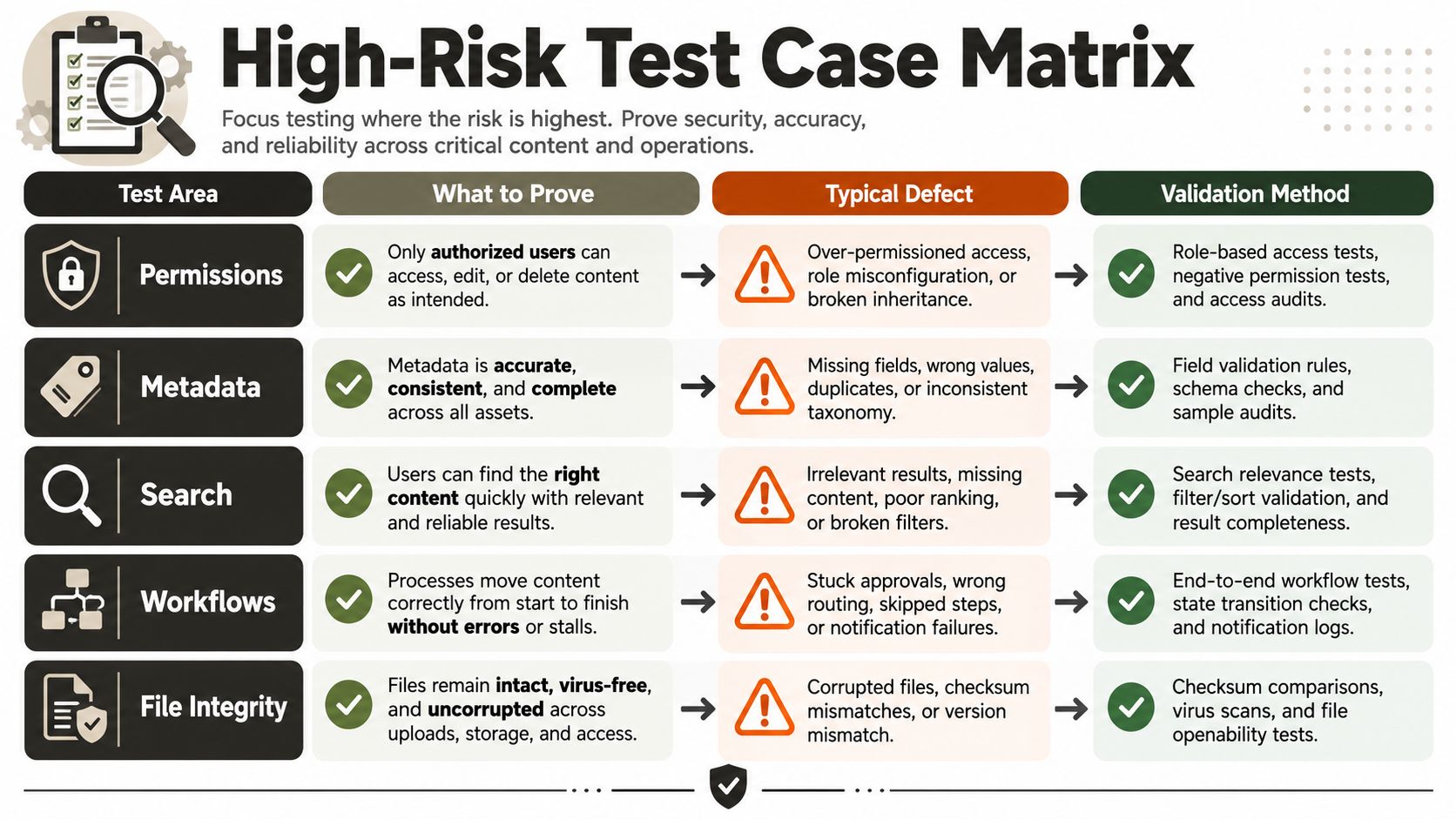
| Test area | What it must prove | Typical failure mode | What good validation looks like |
|---|---|---|---|
| Permissions | Access survives the move | Broken inheritance, wrong audience access | Test unique and inherited permissions on real sites |
| Metadata | Content keeps its structure | Missing columns, broken content types | Validate sample records end to end |
| Search | Results respect security and relevance | Security trim drift, stale indexing | Run role-based queries and verify results |
| Workflows | Automation still triggers correctly | Wrong identity, stalled approvals | Execute approvals under migrated identities |
| File integrity | Documents remain usable and intact | Version loss, lock problems | Open, edit, co-author, and compare history |
That matrix is the difference between a cosmetic pass and an operational pass. The documentation says UAT should reflect business usage, but defects hide in the corners that don't get tested.
DIY vs ShareGate vs Ollo for Enterprise UAT
You can absolutely run parts of migration testing yourself. You just can't pretend every tool solves every problem. That's the trap. SPMT, ShareGate, and custom scripting each have a place, but enterprise UAT in regulated Microsoft 365 work punishes anyone who confuses utility with assurance.
What each approach does well, and where it breaks
SPMT works for straightforward content moves, especially smaller file-share style jobs. It's fine until the structure gets ugly, the libraries get large, or identity and governance become part of the test. Then you start seeing GUID conflicts, edge-case permission problems, and large-library failures that a simple tool won't explain away.
ShareGate has real strengths in mid-sized and even complex migrations. It handles many operational migration tasks well, but it still breaks when you need cross-tenant Entra ID redesigns, deep identity mapping, or heavy Power Automate dependency analysis. Tooling can move content. It can't magically prove controls in a regulated environment.
DIY testing is the most dangerous option because it usually confuses “content visible” with “controls proven.” That gap is exactly where governance drift, conditional access mistakes, and retention failures hide. If your team only checks that files arrived, you haven't validated anything that will survive a compliance review.
| Tool Capability for Enterprise M365 UAT | SPMT | ShareGate | Ollo-Led UAT |
|---|---|---|---|
| Simple file moves | Strong for basic jobs | Strong | Strong |
| Large, complex libraries | Weak at scale | Better, but still bounded | Validated with targeted controls testing |
| Cross-tenant identity redesign | Not the tool for it | Limited for deeper redesign work | Built for it |
| Power Automate dependencies | No meaningful coverage | Can surface issues, not prove the whole control chain | Tested as part of the migration design |
| Governance and compliance proof | Very limited | Partial | Full controls-driven UAT |
The documentation says a UAT environment should validate real business processes, but enterprise migration teams need more than a checklist and a GUI. Use SPMT for under-50GB file-share style jobs. Use ShareGate where the move is contained and the identity model stays mostly stable. For anything that touches tenant redesign, governance controls, or regulated sign-off, you need custom PowerShell PnP plus specialist-led UAT. That is the only sane position.
For a closer look at the tooling side, SharePoint migration tool is worth reading before you assume one platform will save you from design mistakes. It won't.
Execution Plan, Defect Triage, and the 24-Hour Rule
UAT falls apart when defects sit unanswered. Business users lose patience, testers stop trusting the process, and the project team starts telling itself comforting lies. That's why execution discipline matters as much as test design.
Run UAT like a controlled incident loop
Launch with active monitoring, then hold a daily defect triage. Every defect needs severity tied to business impact, not to whoever shouted loudest in the meeting. A broken finance library, a failed approval flow, or a search trim regression isn't “minor” because someone found it late. It's critical because it disrupts business function or control.
Keep the turnaround hard. Critical defects need acknowledgement within one business day, and the evidence-backed guidance is clear that instant acknowledgement can raise response rates by at least 18%, while embedded feedback widgets can increase feedback volume by 35% compared with post-session surveys UAT success metrics and feedback handling. That matters because slow feedback turns UAT into theatre. Fast feedback forces a fix-or-fail decision before the schedule rots.
The worst defects always show up where the business feels safest, finance libraries, approval chains, and permission-controlled search. That's not bad luck. That's what happens when you finally test the real workflows.
Triage, retest, close
A clean cadence looks like this:
- Launch and monitor: watch for access failures, broken links, and identity mismatches.
- Triage daily: classify defects by actual business impact, not by technical novelty.
- Retest fast: verify fixes against the original scenario, not a watered-down version.
- Close only on evidence: don't close items because the queue is getting long.
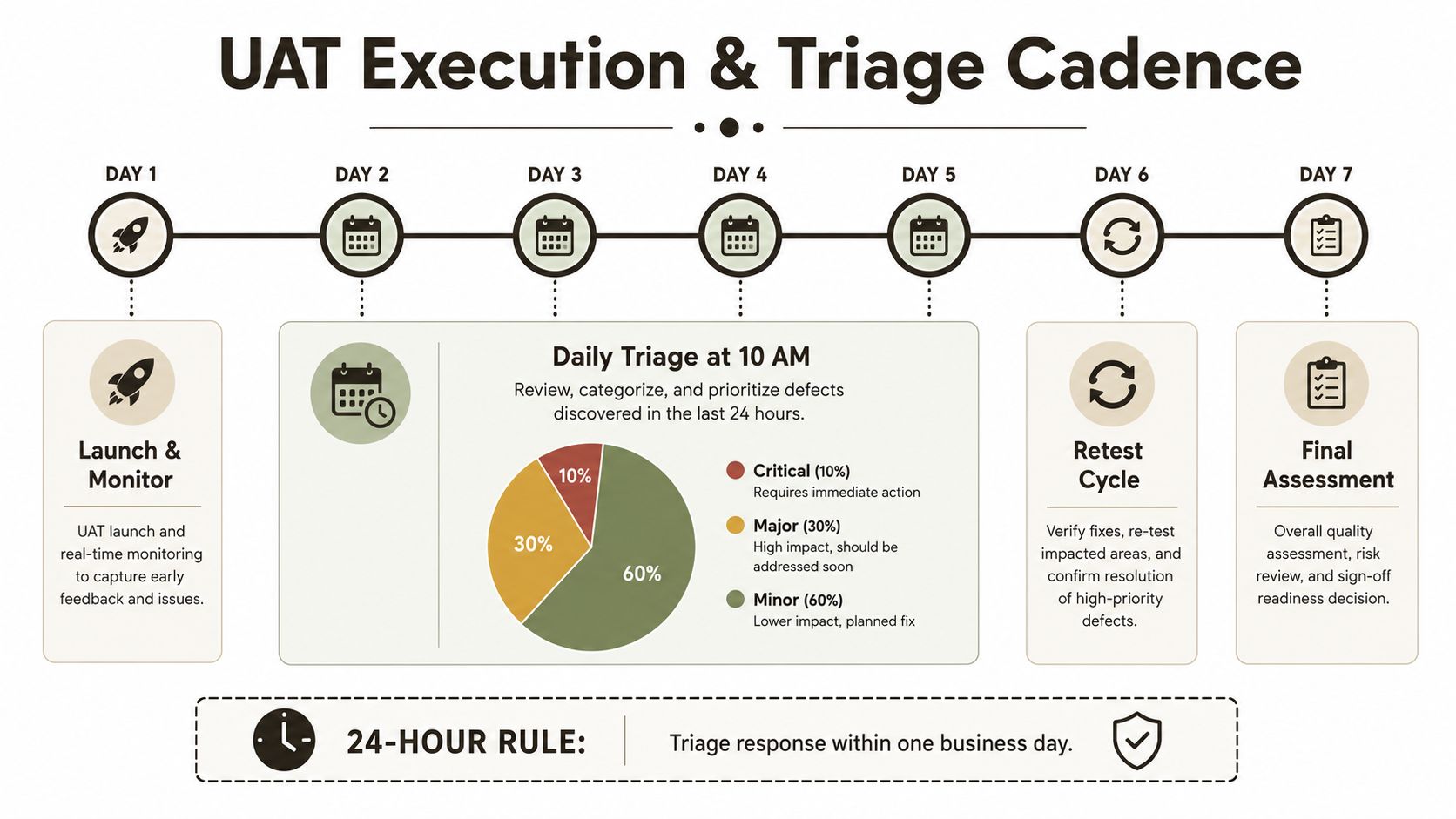
The documentation says UAT should end with retesting and approval, but in reality, teams fail because they treat feedback as optional. A good execution loop gives you pace, accountability, and a paper trail. A bad one gives you a backlog and a false sense of progress.
Compliance Checks, Sign-Off, and Why DIY Is the Risk
Sign-off is not a business checkbox. It is the moment someone puts their name against the controls. If your migration touches regulated data, that name matters.
Evidence before approval
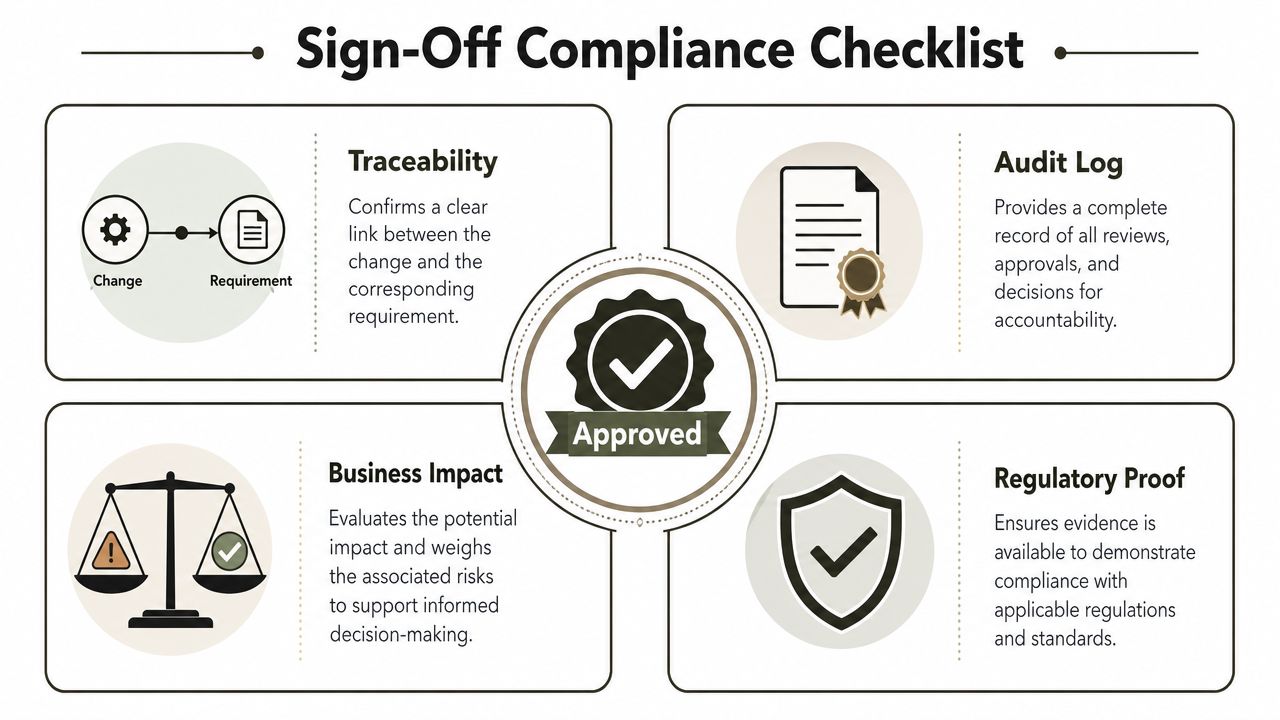
Before UAT closes, you need proof of traceability of permissions changes, audit log continuity, retention label behaviour, and conditional access enforcement. Those are not nice-to-have artefacts. They are the evidence trail that shows the platform still honours the rules after the move. If you can't produce that trail, your sign-off is weak, and weak sign-off creates audit findings, rework, and risk exposure.
The final gate should also confirm that critical defects are resolved, all planned cases are executed, and the approval record is archived. That last point sounds bureaucratic until you need to explain why release readiness was never documented. Established UAT guidance treats formal sign-off as the endpoint for exactly that reason complete UAT sign-off guidance.
Missing this step doesn't just fail the migration, it breaks legal compliance. That's the blunt truth your board expects you to hear before the auditor says it for you. DIY teams usually underestimate that cost because they compare tool licence effort, not business exposure.
A failed UAT in a regulated Microsoft 365 move isn't just a delay. It's data exposure, audit noise, and post-cutover rework that burns weeks you don't have. If your team wants to avoid that outcome, hire a specialist who knows which tests matter, which Microsoft constraints break the move, and which sign-off artefacts a regulator will ask for later. A proper controls-led migration is about risk reduction, not optimism, and that's why the right move is to bring in Ollo before your next cutover turns into a forensic cleanup.

















