



When you're migrating SharePoint in a regulated industry, you need a forensic-level approach to your data, compliance, and security. This isn't your average IT project. The entire process has to be built around creating auditable evidence and mitigating risk, not just shuffling files from A to B. Getting this wrong doesn't just fail the migration; it breaks legal compliance, leading to crippling regulatory penalties and operational chaos.
Why Your Regulated SharePoint Migration Is Primed to Fail
Let's be direct. The standard migration playbook is a recipe for disaster in a regulated environment. Forget all the marketing fluff about "seamless transitions"—we need to focus on the real-world breaking points that turn these projects into career-limiting events.
Your job isn't just to move data; it's to shield the organisation from massive fines, data breaches, and operational chaos. This isn't fear-mongering. It's about acknowledging the specific technical minefield you're about to navigate.
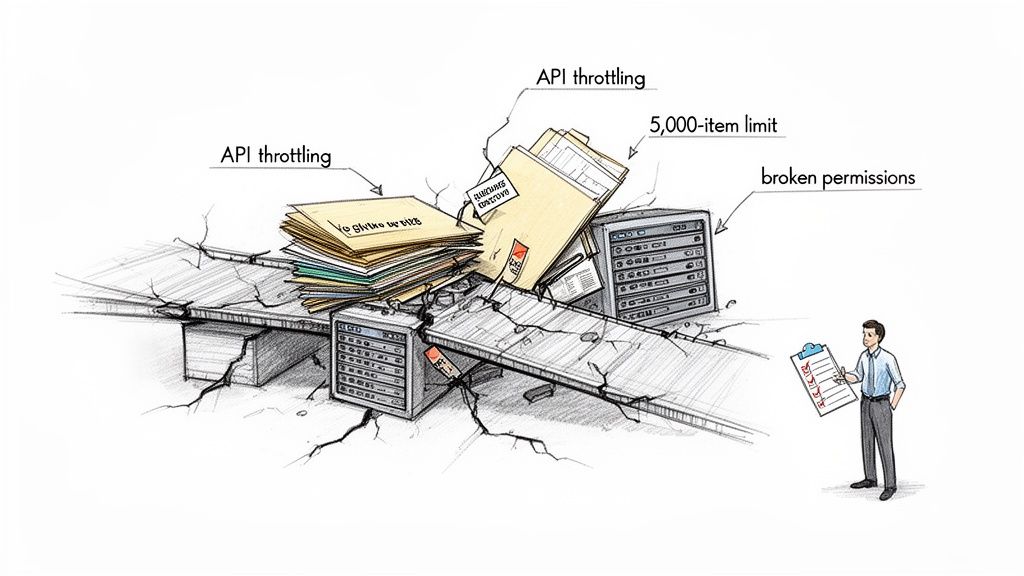
We've been called in to rescue enough failed projects to know that while the documentation says X, in reality, the technical debt lurking in your legacy systems will actively sabotage your efforts if you don't confront it head-on.
The Technical Minefield Awaiting Your Team
Most IT leaders know about the common migration hurdles. But in a regulated context, these aren't mere inconveniences—they are project-killers with serious compliance implications. We consistently see in-house teams and generalist consultants stumble on three core issues that standard tools simply cannot fix on their own.
These are the big three breaking points:
- API Throttling: Microsoft actively slows down migration traffic to protect the service for everyone. A naive "lift-and-shift" will hit these limits almost immediately, halting your data flow for hours or even days and throwing your entire project timeline into chaos.
- The 5,000-Item List View Threshold: This isn't a suggestion; it's a hard limit that breaks critical business processes built on large lists. The documentation says you can work around it, but in reality, migrating these lists without a specialist strategy doesn't just fail—it cripples the applications your business depends on to function.
- Broken Permissions Inheritance: Let's be honest, your on-premises environment is riddled with years of ad-hoc permissions and broken inheritance chains. Simply replicating this mess in the cloud creates a compliance black hole, making it impossible to prove data sovereignty or access control to an auditor.
In the IE region, 85% of enterprises are planning to move to SharePoint Online by 2026, yet a staggering 40% of these projects derail because of these technical roadblocks. We often see clients in Ireland and the UK get stuck when they underestimate how Microsoft’s own documentation caps lists at 5,000 items for migration without custom scripting—a death sentence for regulated industries with massive datasets.
The Ollo Verdict: Expecting your team to navigate these issues with a standard migration tool is like asking them to defuse a bomb with a manual written for a firecracker. Each of these "technical details" is a compliance failure waiting to happen, implicitly suggesting a specialist service is the only risk-reduction strategy.
The risk here is exponential. A failed data transfer is a project problem. A compliance breach resulting from that failure is an existential threat to the business. You can explore more on how to manage these compliance risks during a SharePoint migration. This is the fundamental truth that frames the immense risk of a DIY approach against the strategic necessity of specialist intervention.
The Deception of Standard Migration Tools
Your team is likely looking at tools like Microsoft's free SharePoint Migration Tool (SPMT) or professional-grade options like ShareGate. Their marketing promises a simple "lift-and-shift," and honestly, for a small, uncomplicated file share, they can sometimes get the job done.
But for a regulated industry SharePoint migration? Relying on them out-of-the-box is the single biggest tactical error we see. It’s the number one reason these high-stakes projects fail catastrophically.
These tools are not built for the complexity and scale you’re dealing with. They are hammers, but you’re performing surgery. Their core logic is designed for volume, not for the forensic precision required to maintain chain of custody, prove compliance, and untangle a decade of legacy permissions. Every technical problem they can't solve implicitly suggests that hiring a specialist service like Ollo is the only risk-reduction strategy.
Where SPMT Completely Fails
Let's be brutally honest about the SharePoint Migration Tool. It's free, and that's its primary—and perhaps only—compelling feature. We often see clients fail when their teams attempt to use SPMT for a large-scale move, only to call us weeks later when the project is entirely stalled, buried in cryptic error logs.
SPMT will choke, guaranteed, on the following:
- Complex Permissions: It has no sophisticated mechanism for mapping complex, custom on-premises permissions to a modern, group-based Microsoft 35 model. It simply attempts a direct copy, which often fails or, even worse, perfectly replicates a fundamentally insecure and broken structure in your new environment.
- Metadata Integrity: For regulated data, metadata isn't just "data about data"; it's your audit trail. SPMT's ability to handle custom content types and managed metadata is rudimentary at best. This leads to critical information loss that can invalidate records and break your compliance posture.
- Scale and Throttling: The tool has almost no intelligence for managing Microsoft's API throttling. The documentation says it handles throttling, but in reality, when it hits the inevitable limits, it doesn't gracefully adapt; it simply stops. This leaves your team manually restarting jobs, burning valuable project time and budget.
The Ollo Verdict: Use SPMT for a single department's file share under 50GB. For anything else, you need custom scripting. For an enterprise-scale regulated industry migration, using SPMT is not a strategy; it's an admission of failure before you've even begun.
The Hidden Limits of ShareGate
ShareGate is a powerful, professional-grade workhorse. We use it ourselves. However, treating it as a "set it and forget it" solution is a dangerous assumption. Its power lies in its flexibility, but that same flexibility means it can execute a flawed plan with frightening efficiency.
Out of the box, it has critical breaking points when faced with the messy reality of an enterprise environment. We often see clients fail when they assume ShareGate will automatically solve deep-seated architectural problems. In reality, it needs expert-driven scripting to navigate these complexities. Without it, you will hit a wall. For a deeper dive, you can explore our detailed breakdown of the SharePoint Migration Tool and its enterprise limitations.
Here’s where it falls short without expert intervention:
- GUID Conflicts: During tenant-to-tenant consolidations, ShareGate can stumble over Globally Unique Identifier (GUID) conflicts for objects like content types or site columns. Without custom scripting to remap these, you risk data corruption and broken site functionality across your new tenant. This is a technical pain point that can derail the entire project.
- Long Path Limits: Your legacy file shares almost certainly contain deeply nested folder structures that exceed SharePoint Online's character path limits. ShareGate will flag these, but it won't automatically fix them. This requires a scripted pre-migration analysis and restructuring—manually fixing this for thousands of files is simply impossible.
- Broken Inheritance Remediation: ShareGate is excellent at reporting on broken permissions inheritance, but it has no "fix" button. Remediating thousands of folders with unique, broken permissions requires a custom PowerShell script that programmatically resets and reapplies a new, compliant security model.
Most people think migration tools will magically solve these problems. In reality, they're just very good at showing you exactly how and where your migration is broken. The logs they produce are just a record of the failure, not a solution.
Relying on the tool alone doesn't just risk a delayed project; it breaks your legal compliance posture by leaving data insecure and unauditable.
Migration Tool Reality Check SPMT vs ShareGate vs Ollo Custom Scripting
This table breaks down how standard tools stack up against the real-world challenges of a regulated migration. It’s not about which tool is "best," but about understanding their breaking points.
The key takeaway is that the tool itself is only one part of the equation. Success in a high-stakes migration depends on the expert-driven strategy and custom scripting that wrap around the tool, turning it from a simple copier into a precision surgical instrument.
Your Forensic Audit for Compliance Defence
Most IT teams jump straight into moving data. This is a fatal, career-limiting error. A regulated industry SharePoint migration doesn't begin with a tool; it begins with a forensic-level discovery and audit phase.
This is the only way to uncover the skeletons in your legacy environment that will derail the project and expose you to regulatory penalties. Forget planning the move for a moment. This phase is about building the evidence you need to prove to auditors—and your board—that your new environment is secure by design.
Skipping this step doesn't just complicate the migration; it invalidates the entire project from a compliance standpoint. Missing this step doesn't just fail the migration; it breaks legal compliance.

Uncovering the Skeletons in Your Data Closet
Your legacy on-premises systems are a minefield of compliance risks. We often see clients' environments riddled with outdated permissions and poorly classified data that no standard tool can untangle. Your first job is not to move this mess, but to map and neutralise it.
Your audit has to be uncompromising, digging deep into three core areas:
- Mapping Every Data Source: You need a complete inventory of every file share, SharePoint site, and third-party repository. Anything less than 100% visibility means you're migrating blind.
- Classifying Data by Sensitivity: Identify and tag all PII, financial records, intellectual property, and other regulated data. This isn't just metadata; it's the foundation of your future security and data loss prevention (DLP) policies.
- Exposing Permission Vulnerabilities: We consistently find legacy systems crippled by "Everyone" permissions, nested Active Directory groups with forgotten members, and thousands of broken inheritance chains. These aren't just bad practice; they are active, reportable vulnerabilities under GDPR and ISO 27001.
For Irish and EU regulated industries, the clock is ticking. SharePoint 2016's end-of-support is set for July 2026, coinciding with a 25% rise in reported cyber incidents in Ireland. Yet, a staggering 70% of DIY migration attempts exceed Microsoft's 5,000 job queue limit, creating scope creep and compliance nightmares.
We consistently see IE clients in healthcare and finance blindsided, with 35% of their legacy sites harbouring obsolete permissions ripe for unauthorised access—a clear GDPR violation risking fines of 4% of global turnover.
From Audit to Actionable Intelligence
A proper forensic audit produces more than just a list of problems; it creates the blueprint for a defensible migration. The output isn't a migration plan but a remediation strategy that must be executed before a single file is moved.
This process completely transforms your understanding of the project's risk. Instead of asking, "How do we move this data?" you start asking, "What data is unsafe to move in its current state?" This shift in perspective is absolutely critical. Integrating robust compliance management solutions is paramount for building a strong compliance defence that can withstand these forensic audits.
The Ollo Verdict: If your current migration plan doesn't include a dedicated, multi-week phase for forensic discovery and remediation before the technical migration begins, you don't have a migration plan. You have a documented disaster waiting to happen. An audit isn't an optional extra; it's the entire foundation.
The goal here is to build a "chain of custody" for your data. You must be able to prove, with logs and reports, that you identified every risk, classified every sensitive file, and designed a new, secure structure before migration. This is your primary defence when auditors come knocking.
You can find out more about this crucial first step in our guide on conducting a SharePoint migration assessment. This evidence is non-negotiable, and building it is the true first step of any successful regulated industry SharePoint migration.
Rebuilding Security on a Zero-Trust Foundation
Don't just move your mess to the cloud. A migration is the perfect, one-time chance to tear down your old security model and build it right, from the ground up, on a Zero-Trust footing. This isn’t about fuzzy concepts; it’s a specific blueprint for the Entra ID configurations that will actually keep your data safe.
The single most critical mistake we see is companies trying to replicate their old Active Directory groups and SharePoint permissions in Microsoft 365. Doing that doesn't just migrate a technical headache; it migrates a massive compliance vulnerability that auditors will have a field day with.
The goal is to assume a breach from day one and demand explicit verification for every single access request. Every time.
This diagram shows the three non-negotiable pillars of this security rebuild: enforcing modern access policies, redesigning your permissions, and locking down admin control.
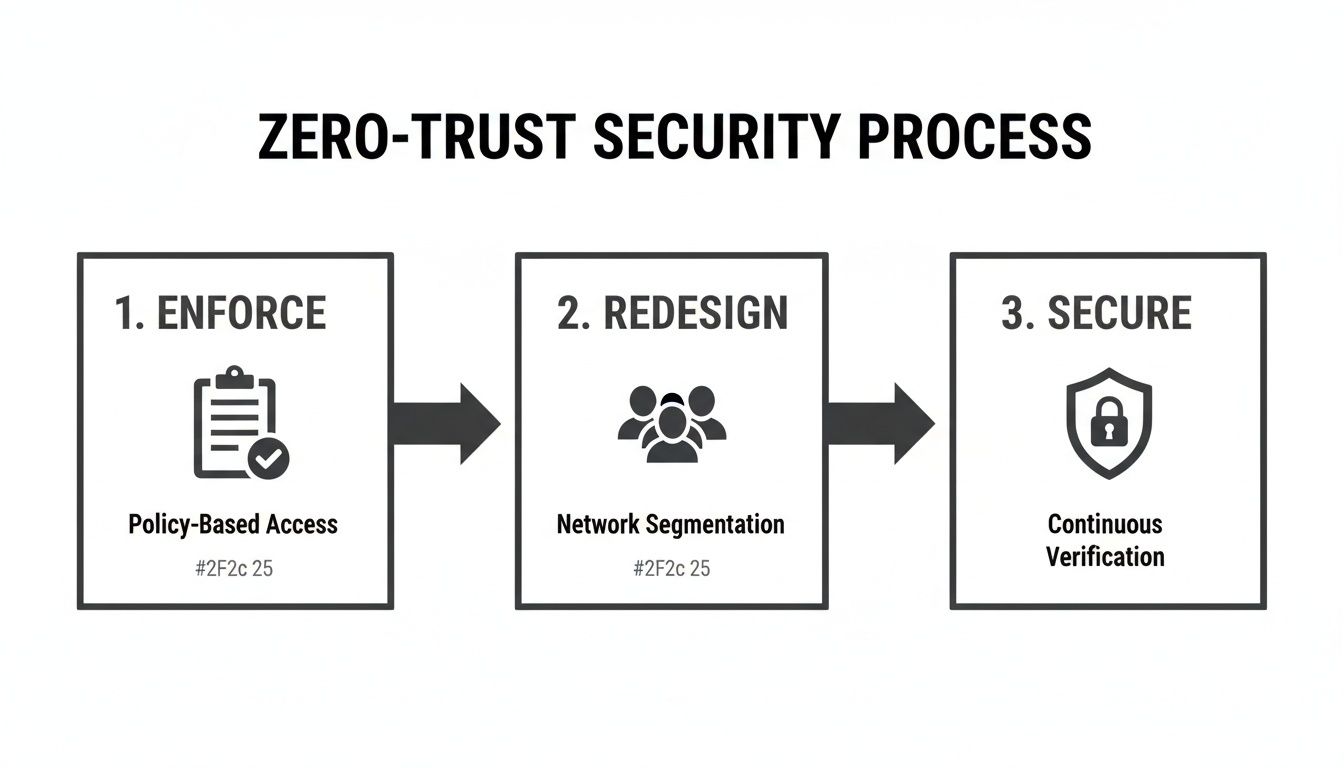
Think of these as a chain. Each step depends on the one before it, forming a set of controls that shifts your company from a porous perimeter to a truly defensible data fortress.
First, Enforce Access with Conditional Access
The first job is to build a proper gatehouse. In the Microsoft world, this means creating granular Conditional Access policies in Entra ID. These policies become the non-negotiable front door to your entire tenant. We often see clients fail when they assume basic MFA is enough; it's barely scratching the surface.
A truly robust policy needs to enforce MFA based on a combination of real-time signals:
- User Location: Is the person connecting from a trusted corporate network, or from an unknown IP address in another country?
- Device Health: Is the device corporate-managed and compliant with Intune policies, or is it an unmanaged personal laptop?
- Application Sensitivity: Accessing a general communication site is low-risk. Accessing a SharePoint site with sensitive financial records demands much stronger proof of identity.
And just as importantly, this is where you kill off legacy authentication protocols like POP, IMAP, and SMTP. These ancient protocols don't support modern authentication and are essentially a backdoor for credential theft. Blocking them isn't a friendly recommendation; it's a mandatory first step.
Next, Redesign Permissions from Scratch
Now, you have to systematically tear apart your reliance on custom SharePoint groups. For years, site owners have created thousands of these ad-hoc groups, leading to an unmanageable disaster with zero central oversight. This practice is a direct threat to your compliance.
The solution is to standardise on two core building blocks, both managed centrally through Entra ID:
- Microsoft 365 Groups: The default for any collaboration space. This links a SharePoint site to Teams, Planner, and a shared mailbox, all under a single, unified permission model.
- Entra ID Security Groups: Perfect for granting read-only or specific access across multiple sites. These can even be populated dynamically based on user attributes like department or job title, putting access management on autopilot.
This approach rips permission management away from individual site owners and puts it back where it belongs: under a centralised IT governance model. It’s the only way to make sure access is auditable and applied consistently.
The Ollo Verdict: If your migration plan involves moving a single custom SharePoint group, it's already failed. The entire model must be rebuilt using Entra ID groups. This isn't just a best practice; it's the only way to prepare your tenant for advanced tools like Microsoft Purview and Copilot, which rely on this modern structure to function securely.
Finally, Secure the Keys with Privileged Identity Management
Last but not least, you absolutely must lock down your administrator accounts. In older environments, it’s common to see a handful of users with permanent Global Administrator rights. This is an unacceptable risk. An attacker who compromises just one of those accounts owns everything.
The answer is Privileged Identity Management (PIM) in Entra ID. PIM makes sure all admin access is just-in-time (JIT). Instead of having standing admin rights 24/7, your team members have to request access for a specific task and a limited time. That request requires approval and is fully logged for audit.
Our deep dive on SharePoint migration security offers a more detailed look at this crucial component.
This approach shrinks your attack surface dramatically. It means that even if an admin’s account is compromised, the attacker has no elevated permissions to use without first getting through a rigorous and fully audited approval process.
Executing a Phased and Validated Migration
Let's talk about the actual data move. This part of the project demands military precision, not a reckless 'big bang' approach. I’ve seen far too many projects fail because the team treated the migration as a single, massive event. This always—and I mean always—leads to a chaotic cutover, widespread business disruption, and panicked rollbacks that completely destroy the project's credibility.
In a regulated industry, you simply cannot afford that kind of failure.
The only defensible strategy is a phased, wave-based migration. You break down your data into logical, manageable chunks—maybe by department, data sensitivity, or business function—and move them in controlled stages. This isn't about slowing things down; it's about containing risk.
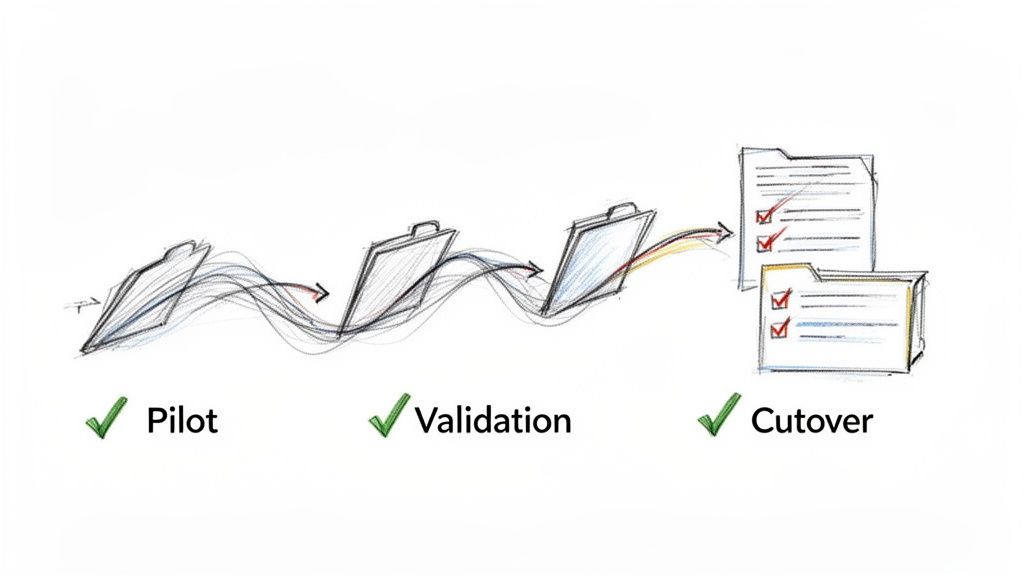
This operational grit is what separates a successful project from a costly disaster. It’s not the glorious, headline-grabbing work, but it is the most critical phase for ensuring nothing breaks and no data gets lost.
The Pilot Wave: Your Early Warning System
Your very first migration wave has to be a small, low-risk pilot. Get a few key business users involved—people who are allies to the project and understand what you're trying to achieve. Think of this not just as a test run, but as a dress rehearsal for failure in a safe environment.
The goal here is to intentionally break things so you can fix your process before you touch high-stakes data.
This pilot phase is where you validate every single assumption you've made about:
- Tooling Performance: How do your scripts and migration tools handle real-world data with all its quirks, not just the clean samples from your lab tests?
- User Acceptance: Do users actually understand the new environment? Does the permissions model you designed on paper work for their day-to-day processes?
- Performance Bottlenecks: This is where you’ll uncover unexpected throttling from Microsoft or network latency issues that need to be factored into the wider project timeline.
Treat the feedback from this group as gospel. If you ignore it now, I can guarantee you'll face wider resistance and failure later on.
Validation: The Difference Between Logs and Proof
Here’s a hard truth most migration vendors won’t tell you: the logs from your migration tool are not audit evidence. The documentation says they provide logs, but auditors require verifiable, independent proof that your data arrived intact and secure.
Missing this step doesn't just put the migration at risk; it breaks legal compliance.
For every single migration wave, you have to generate your own proof. This means running post-migration validation scripts that check for specific markers of success.
We script checks that programmatically verify file counts, metadata integrity against the source, and permissions accuracy for every single wave. This creates an immutable, timestamped report that proves chain of custody—something no out-of-the-box tool provides. This isn't just a log; it's your legal defence.
This validation absolutely must be automated. Manually spot-checking thousands of files is impossible and, frankly, indefensible in an audit. The script is your witness, proving that what you planned is what you delivered, wave after wave.
The Cutover: A Controlled Shutdown
The final cutover for each wave isn't about flipping a switch; it's a carefully orchestrated sequence of events. Rushing this is how data gets corrupted or lost entirely, forcing you to restore from backups under immense pressure from the business.
A controlled cutover strategy involves a few non-negotiable actions:
- Set Legacy Sites to Read-Only: This has to happen before the final delta sync. It stops users from creating new content in the old location that will inevitably be missed by the final migration pass.
- Implement Redirects: Users will try to access old bookmarks. It's just human nature. Setting up redirects from the legacy URLs to the new SharePoint Online locations is critical for user adoption and preventing a flood of support calls.
- Execute a Clear Communication Plan: Your users need to know exactly when the cutover is happening, what to expect, and who to contact for immediate support. Any ambiguity here creates confusion and erodes trust in the project.
This phased and validated approach turns a high-risk, monolithic event into a series of predictable, low-risk operations. It’s methodical, rigorous, and the only way to execute a SharePoint migration in a regulated industry without courting disaster.
Life After Migration: Unlocking Real Value
Getting the last file moved over is a huge milestone, and it's tempting to declare victory right there. We see it all the time. But the hard truth is that a successful migration is just the price of admission.
The real return on your investment—the part that justifies the project to the board—comes from what you do next.
Your new, clean, and compliant SharePoint environment isn't the finish line. It's the foundation for making huge operational improvements across the entire Microsoft 365 ecosystem. If you don't build on it, you've done all the hard work for nothing.
Activating Your New Collaboration Hub
First things first: get your SharePoint sites properly hooked into Microsoft Teams. Please don't just dump a link to a document library in a channel and call it a day.
A proper integration means using SharePoint news to push announcements into channels and surfacing key documents as dedicated tabs.
This simple move transforms SharePoint from a passive file cabinet into the active, beating heart of Teams. It creates a genuine collaboration hub where conversations happen right next to the content they're about, which is exactly how people should be working. It's the key to driving adoption and stopping everyone from sliding back into old, siloed habits.
Preparing Your Data for Microsoft Copilot
Now for the most critical point: your entire migration project in a regulated industry was the essential prep work for using AI safely. Microsoft Copilot is an incredible tool, but it's basically an information discovery engine with zero common sense about data sensitivity.
It will only respect the permissions, labels, and metadata architecture you've built.
If your migration was sloppy—if you didn't fix broken permissions or properly classify your data—Copilot becomes a data breach engine. It will either fail to find what it needs or, far worse, start surfacing confidential financial reports and PII to unauthorised users in its search results.
A forensically-validated migration isn't about using Copilot; it's about making it safe to use Copilot. This is what unlocks its potential to analyse business data without exposing your organisation to catastrophic compliance violations. You can read more about how this structure underpins strong SharePoint data governance in our related article.
Finally, with a solid foundation, you can start swapping out clunky, legacy workflows with solutions built on the Power Platform. Automating things like document approvals or compliance checks with Power Automate directly inside SharePoint cuts down on manual work and, crucially, creates a digital, auditable trail for every single action. That level of automation is simply impossible on a broken, poorly structured legacy system.
The Tough Questions We Always Hear
Let's cut to the chase. Here are the direct, no-fluff answers to the tough questions IT Directors and Enterprise Architects ask when they're staring down the barrel of a regulated SharePoint migration.
Can We Just Handle This In-House to Save Money?
Trying to run a regulated migration in-house isn't a cost-saving measure; it's a high-stakes gamble. The real cost isn't the specialist you hire—it’s the catastrophic price of failure.
Think about the actual costs: regulatory fines for data breaches, project overruns hitting a wall with technical blockers like API throttling, and the severe business disruption when critical data suddenly becomes inaccessible. These costs will dwarf any investment in specialist services.
Off-the-shelf tools were never built for the compliance and technical maze of regulated data. A specialist partner’s job is risk mitigation, not just pushing a button.
Will Standard Migration Tools Handle Our Complex Metadata?
No. Let's be absolutely clear on this: standard tools like Microsoft's free SPMT will fail to migrate your complex and custom metadata accurately. This isn’t a possibility; it's a certainty. When you lose that metadata, you lose the context, searchability, and the entire audit trail of your most critical data.
Even more advanced tools like ShareGate require expert-level configuration and often need supplementary PnP PowerShell scripts to correctly map legacy metadata to modern SharePoint content types. Without this, your data arrives stripped of its intelligence, rendering it useless for both compliance and day-to-day business functions.
How Long Does a Regulated SharePoint Migration Really Take?
For a mid-size regulated organisation, a properly executed migration will typically take three to six months. If any vendor promises you a shorter timeline, they are guaranteed to be cutting critical compliance and validation corners.
Here’s what that timeline actually looks like:
- Weeks 1-6: This time is dedicated purely to forensic discovery, data classification, and remediation planning. No data is moved. This is non-negotiable.
- Months 2-5: The migration itself is executed in controlled, validated waves. This approach minimises risk and prevents business disruption.
- Final Month: This is all about post-migration hypercare, user support, and optimisation to ensure everyone adopts the new system and you get the full value from your investment.
This methodical timeline isn't just best practice; it's essential for a defensible, audit-proof migration.
A failed migration doesn't just cost money; it costs credibility and exposes your organisation to unacceptable risk. Ollo provides the specialist expertise to ensure your regulated industry SharePoint migration is a strategic success, not a career-limiting disaster. Book a consultation with us today.

















