



Most advice about Microsoft 365 best in class is nonsense. It reduces the conversation to licences, app features, and whatever Microsoft is promoting this quarter. That framing gets IT leaders into trouble because it ignores the thing that wrecks enterprise programmes. Not the apps. Not the interface. The architecture.
If you run a regulated business, “best in class” doesn't mean your users have the newest Copilot button. It means your tenant survives audit, preserves permissions, enforces access properly, and doesn't lose metadata the first time you consolidate two messy estates after an acquisition. That's the standard that matters.
I've seen too many teams buy the platform, trust the defaults, and then discover the ugly part halfway through the move. API throttling starts biting. Broken inheritance appears in old SharePoint structures. Identity mapping turns into a political and technical fight. The project that looked cheap at kickoff becomes expensive, risky, and career-limiting.
Deconstructing the Best in Class Myth
Microsoft 365 is massive. Microsoft reported 345 million paid subscribers and about 321 million active users globally, while one industry analysis estimated Microsoft 365 revenue at US$49 billion in fiscal 2023, which tells you this platform is now a core enterprise dependency, not a niche collaboration tool, as noted in this Microsoft 365 market scale analysis.
That scale matters for one reason. Your organisation can't treat migration, consolidation, or governance as a side project anymore. When a platform becomes business-critical, every design mistake gets amplified.
What marketing gets wrong
The common promise sounds simple. Buy the right Microsoft 365 plan, switch on the right controls, and you've got a modern digital workplace. That story is comfortable. It's also how organisations end up with half-migrated content, inherited security debt, and a governance model built from exceptions.
We often see clients fail when they define “best in class” as a feature checklist. They focus on Teams adoption, mailbox moves, or document libraries. They ignore identity state, permission sprawl, naming chaos, orphaned groups, and the SharePoint structures that nobody's touched in years because everyone's afraid of breaking them.
Best in class isn't a product tier. It's a tenant that stays defensible when auditors, regulators, and incident responders start asking questions.
The replacement definition that actually matters
For a regulated enterprise, Microsoft 365 best in class means three things:
- Architectural resilience: Your tenant can absorb change without creating security gaps or service disruption.
- Migration discipline: Your team can move data and identities without breaking metadata, permissions, or legal hold requirements.
- Operational governance: Controls are enforced by design, not left to user goodwill.
If you're planning a merger, carve-out, or rescue migration, start with the failure patterns, not the brochure. The underlying reason large programmes fail usually isn't the technology itself. It's the bad assumptions around it, which we've covered before in this piece on why enterprise Microsoft 365 projects fail.
The Unbreakable Foundation Entra ID Zero Trust Architecture
The first file you move is not your first migration task. Identity is.
Most failed Microsoft 365 programmes carry the same original sin. Someone decided to lift and shift the old access model into the cloud. They copied users, synced groups, migrated content, and called it progress. What they did was preserve stale trust relationships and drag legacy privilege into a new platform.
Lift and shift identity is how you inherit a breach
The ugly truth is simple. Migration tools move objects. They do not redesign trust.
A 2025 report cited by Ollo states that 72% of post-migration breaches in regulated sectors stemmed from broken Entra ID trust chains, not data loss during transfer. The same source says only 22% of CIOs in a 2024 survey had implemented zero-trust Entra ID redesigns after migration, leaving 78% vulnerable, as discussed in Ollo's writing on Entra ID and post-migration risk.
Those numbers line up with what we see in the field. Teams spend months obsessing over file movement and barely touch conditional access, role design, break-glass controls, guest access, or legacy federation dependencies.
What a real foundation looks like
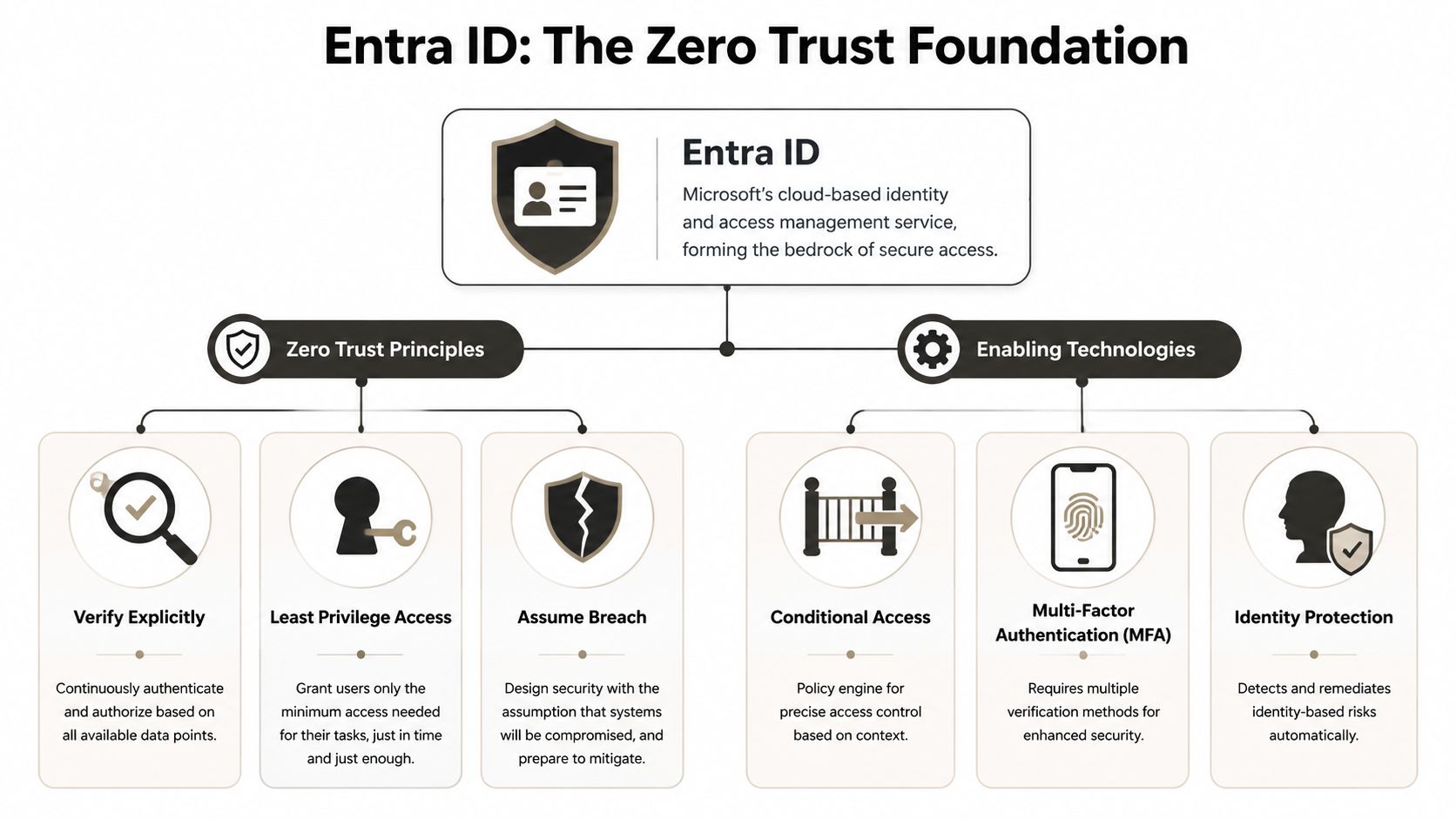
If your tenant is meant to be defensible, build around Zero Trust in Entra ID from day one. That means:
- Verify explicitly: Every access decision should consider user, device, location, risk, and session context.
- Use least privilege: Admin roles must be cut down hard. Permanent access is laziness dressed up as convenience.
- Assume breach: Your design should expect compromise and limit blast radius.
If your security team is reviewing broader models for enterprise network security, that context helps. But inside Microsoft 365, the work still comes back to Entra ID, conditional access, MFA enforcement, privileged identity boundaries, and post-migration trust cleanup.
Scar tissue lesson: If you postpone identity redesign until after content migration, you've already made the project harder and less secure.
The controls your team has to design properly
A serious Entra ID baseline includes a few essential elements:
- Conditional Access with intent: Don't create a stack of conflicting policies because every admin wanted a special case.
- Administrative separation: Keep SharePoint, Exchange, security, and global administration scoped deliberately.
- Guest and external access review: Old B2B trusts and direct access patterns often outlive the business reason for them.
- Service account cleanup: Every undocumented automation account is a future outage or breach path.
Your target state should be designed before the move, validated during the move, and tested after cutover. If you need a deeper technical view of the platform itself, this overview of Microsoft Entra ID architecture and controls is the right place to start.
The Ollo verdict is blunt. If your team treats Entra ID as a directory sync problem, your migration isn't best in class. It's unfinished.
The Migration Minefield Tenant Consolidations and Rescues
The projects that hurt people aren't the neat ones. They're the ugly consolidations after acquisitions, divestments, and failed first attempts. That's where “best in class” gets exposed as either engineering discipline or empty talk.
The tenant-to-tenant trap
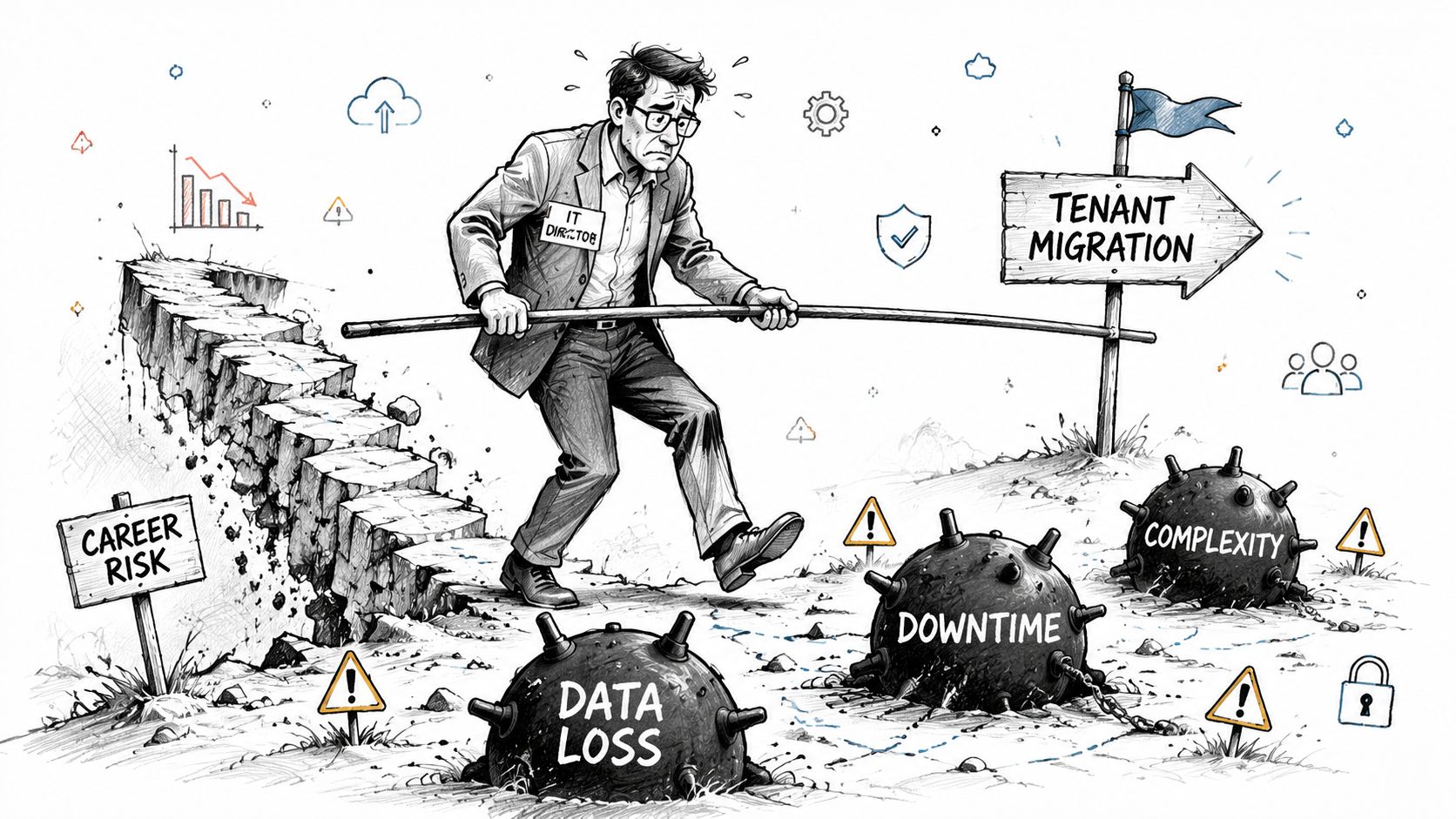
A tenant-to-tenant migration is not a file copy. It's a collision between two identity systems, two governance histories, and two sets of bad decisions.
One tenant has groups nobody understands. The other has SharePoint sites built like personal filing cabinets. Both have duplicate users, overlapping SMTP histories, external sharing drift, and permissions that made sense to someone five years ago. Then somebody suggests using a simple migration utility and “cleaning it up later”.
That's how rescue projects start.
Microsoft explicitly documents that path length issues, API throttling, and broken inheritance are known constraints during large-scale SharePoint moves, not rare exceptions, and that reality should shape your planning from the start, as reflected in Microsoft's own Microsoft 365 platform constraints and product guidance.
War story patterns that keep repeating
We often see clients fail when they underestimate one of these:
- Broken inheritance in old SharePoint estates: Someone broke permission inheritance years ago on a library, folder, or subsite. Nobody recorded it. Migration day exposes it.
- GUID conflicts in consolidation work: Objects that look equivalent at a business level don't behave cleanly when mapped across tenants.
- Path and naming collisions: Long nested structures from file shares become a practical blocker at scale.
- Identity overlap: A user exists in both tenants with different group lineage and different access expectations.
The documentation says the platform supports migration. In reality, unsupported assumptions inside your source estate do the damage.
Rescue migrations are worse
A rescue migration means another provider or internal team already touched the estate and left damage behind. Now you're not just moving content. You're reconstructing intent.
Typical rescue signs include missing metadata, flattened permissions, duplicated Teams, misaligned OneDrive ownership, and partial cutovers where users don't trust the new environment. That failure doesn't stay technical. It lands in legal, compliance, and executive reporting.
This overview is worth watching because it mirrors the kind of risk concentration IT leaders underestimate in consolidation programmes:
If you're dealing with a merger, carve-out, or complex estate rationalisation, plan for identity mapping, permissions remediation, staged validation, and rollback logic before you move anything. Anything less is theatre. For the practical mechanics, this guide to Microsoft 365 tenant-to-tenant migration planning covers the scenarios that usually break first.
The Tooling Trap SPMT vs ShareGate vs Custom Scripts
Tool selection exposes whether your team understands the job. People love to ask which migration tool is “best in class”. Wrong question. The right question is which tool fails least badly under your specific constraints, and where you need engineering around it.
SPMT is fine until the real world appears
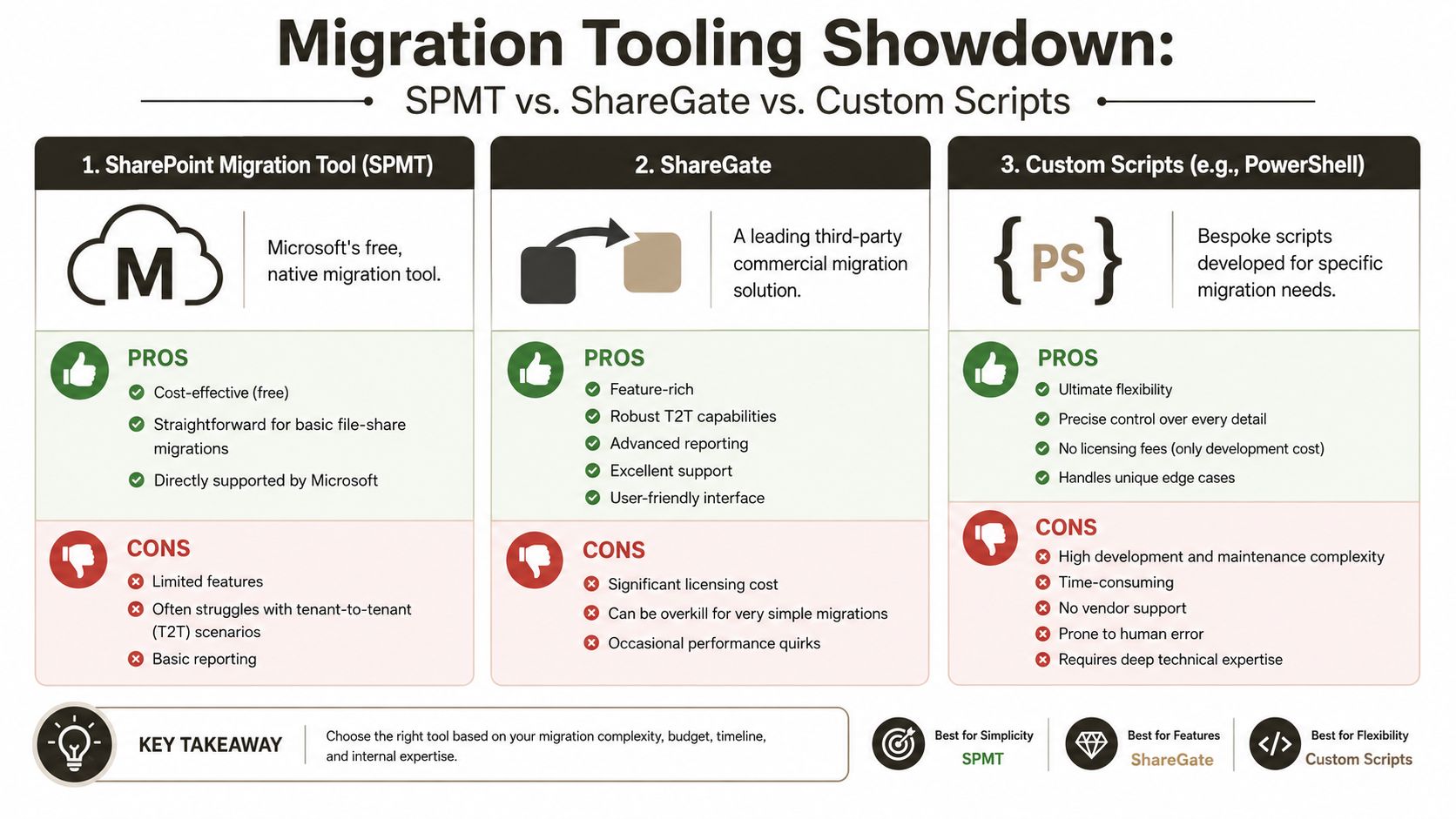
Microsoft's SharePoint Migration Tool has a place. That place is small, clean, low-risk migration work.
If you've got a tidy file share, limited complexity, and straightforward destination design, SPMT can do the job. The problem is that many teams keep using it after the project stops being simple. They hit throttling, obscure reporting, awkward retry behaviour, and poor handling of the estate weirdness that exists in every mature enterprise.
The Ollo verdict on SPMT is simple. Use it for trivial moves. If your migration includes heavy permissions logic, tenant consolidation, or regulated data, stop pretending the free tool is enough.
ShareGate is strong, but it still needs an adult in the room
ShareGate is a serious tool. It's far better suited to enterprise migration than SPMT for many scenarios. The mistake is assuming the interface removes the need for architecture.
We often see teams buy ShareGate and assume they've bought success. They haven't. They've bought a strong engine that still has to deal with throttling, mapping decisions, remediation logic, and pre-migration cleanup. If your source structure is dirty, ShareGate won't magically make it governed.
A useful way to think about the options is this:
| Tool | Where it works | Where it breaks |
|---|---|---|
| SPMT | Small, simple, low-risk migrations | Enterprise permissions complexity, weak operational control |
| ShareGate | Structured SharePoint and tenant migration work | Large-scale edge cases without expert remediation logic |
| Custom scripts | Validation, delta sync, throttling handling, bespoke remediation | Requires deep engineering discipline |
The numbers that should end the DIY argument
In regulated sectors, 68% of DIY enterprise migrations suffered data loss or incomplete metadata due to unhandled throttling, while firms using specialised tools like ShareGate reduced this risk to under 5%, according to Ollo's published analysis of migration failure patterns. The same material notes that Microsoft Learn documents strict API request limits and identifies Broken Inheritance and GUID Conflicts as common failure points. Because of the source deduplication rule, I'm not linking that source again elsewhere in the article.
That matters because many “best in class” tool comparisons ignore the SharePoint 5,000-item limit, path constraints, and the ugliness of permissions history. Those aren't side issues. They're the reasons projects miss deadlines and lose fidelity.
Decision rule: Use the UI where it helps. Use scripting where the UI stops being honest about complexity.
Custom scripting is the real top tier
When the job involves throttling control, metadata preservation, delta synchronisation, validation, and permissions repair, custom PowerShell PnP scripting becomes the serious option. Not because scripting is glamorous. Because it gives you control over retries, logging, exception handling, and post-move verification.
That's also where a specialist delivery model matters. In practice, teams often combine ShareGate with scripted validation and remediation. Ollo handles that kind of work for complex Microsoft 365 and SharePoint migration programmes where auditability matters and basic tool defaults aren't enough.
If your team is still comparing tools as if this were a consumer software review, step back and read this breakdown of the SharePoint Migration Tool and where it fits. The tooling decision is not about convenience. It's about what you can prove, recover, and defend when things go wrong.
Governance Controls That Survive First Contact With Reality
Governance that depends on users remembering the right thing is not governance. It's hope with a policy document attached.
A Microsoft 365 tenant becomes best in class when controls fire automatically, consistently, and before bad behaviour turns into a compliance event. That means sensitivity, retention, access, and exfiltration controls must be designed as operating mechanisms, not as training slides.
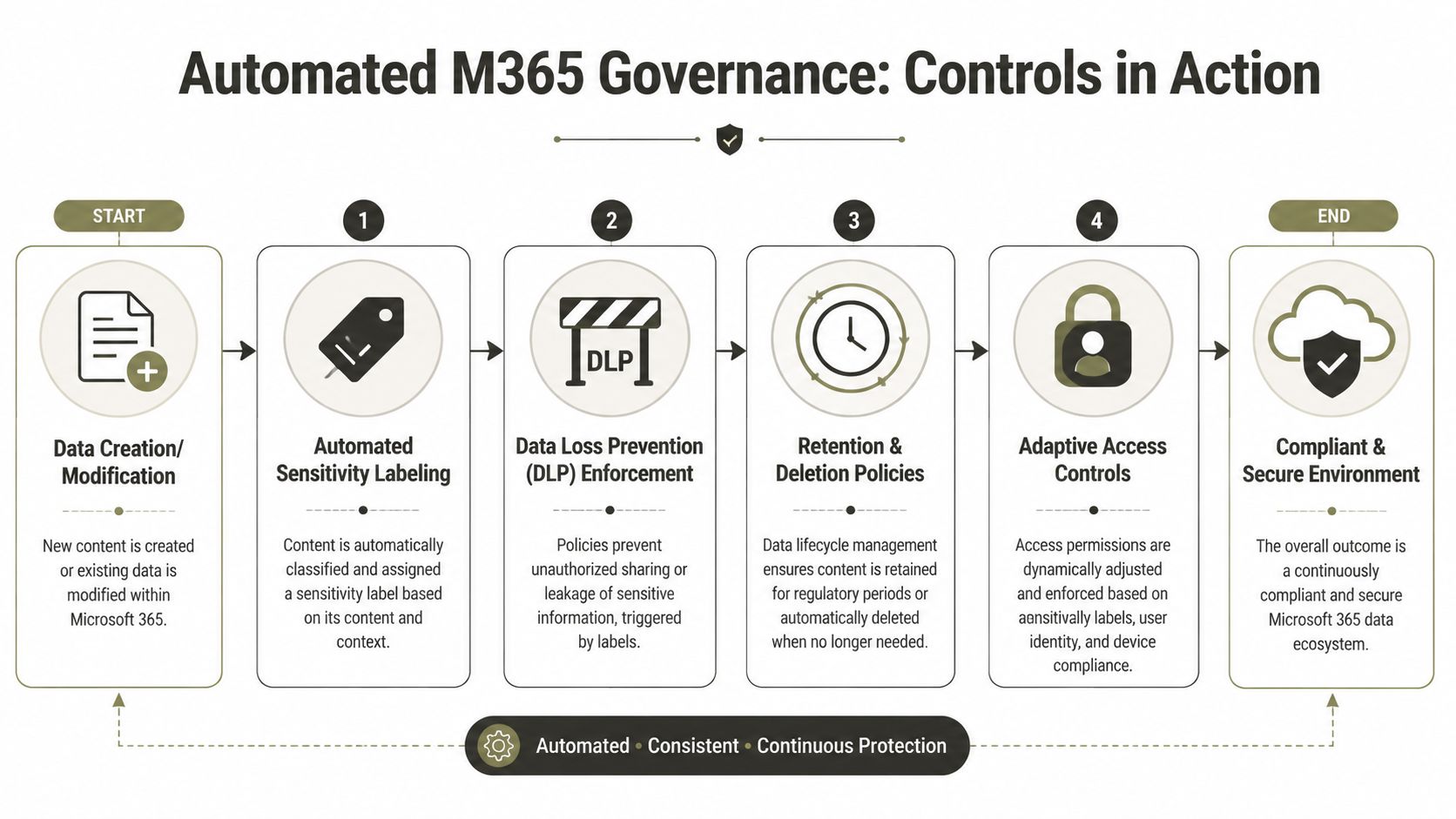
Design controls before you migrate, not after
Regulated organisations often create their own disaster by migrating first, then turning on retention, DLP, or classification policies without understanding how those controls interact with the migrated data estate.
Microsoft Learn confirms the operational constraints that matter in regulated migrations, including API throttling and SharePoint list view thresholds such as the 5,000-item limit, and it also makes clear that the organisations reducing risk use controlled execution and scripted validation rather than assuming default tooling is enough, as outlined in Microsoft Learn's guidance on Microsoft 365 reporting and platform limits.
The technical lesson is obvious. Governance can't sit outside migration planning. It has to be part of the migration design.
Controls that matter in the real world
Here's what survives contact with reality:
- Information barriers: In financial services, you don't ask traders and analysts to self-police communication boundaries. You enforce them.
- DLP that blocks, not just warns: If sensitive healthcare or financial data can still leave the platform after a pop-up warning, your control is mostly decorative.
- Retention aligned to legal duty: Bad timing here destroys evidence, not clutter.
- Access that adapts to sensitivity: Sensitive data should not inherit the same sharing model as general collaboration content.
The order matters more than people think
A practical sequence looks like this:
- Classify the source estate first. Know what content carries legal, regulatory, or contractual obligations.
- Map governance outcomes to target locations. Don't dump everything into generic SharePoint sites and promise to tidy it later.
- Test policy interaction in a pilot. Retention, labels, DLP, and access conditions can collide in ugly ways.
- Validate after migration. You need evidence that content landed with the intended controls attached.
If you apply retention blindly after migration, you can turn a compliance platform into a deletion engine.
The point isn't to create more policy. The point is to create enforceable policy with technical consequences. If your current tenant can't answer basic questions about who can access what, what can leave the environment, and what must be retained, it isn't governed.
A useful audit starting point is this checklist on Microsoft 365 governance controls every CTO should review. It helps expose whether your controls are active or just aspirational.
The Final Calculation Risk vs Reward
By this point, the marketing version of Microsoft 365 best in class should be dead. Good. It was useless anyway.
The calculation isn't whether Microsoft 365 is capable. It is. Microsoft's own service status data has shown quarterly uptime at 99.99%, which means the platform itself usually isn't the thing failing, as noted in this discussion of Microsoft 365 uptime and operational trade-offs.
Where the risk actually sits
That uptime shifts the burden onto your configuration discipline. If your team mis-handles Entra ID, DLP, retention interaction, or tenant-to-tenant identity mapping, you can create a self-inflicted outage while the platform remains perfectly healthy.
That's why DIY logic falls apart under scrutiny. The supposed savings come from not paying for specialist architecture and migration engineering. The actual cost arrives later, as broken access, missing metadata, compliance exposure, user distrust, and rescue work.
The only sensible reading of the trade-off
You're not deciding between “internal” and “external” delivery. You're deciding between unmanaged risk and controlled risk.
Use DIY for the simple jobs your team can prove it understands. Use free tools where the estate is small, clean, and low consequence. But if you're dealing with regulated content, identity redesign, tenant consolidation, or a rescue after somebody else failed, this is not a cost-saving exercise. It is a risk management exercise.
Your migration doesn't fail when the copy job errors out. It fails when legal can't trust the records, security can't trust the identities, and the business can't trust the platform.
The Ollo verdict is straightforward. For anything beyond a small and clean migration, “best in class” means resilient architecture, engineered execution, and governance that can survive stress. Most internal teams don't have the scar tissue for that. Vendor defaults certainly don't.
If your organisation is facing a tenant consolidation, Entra ID redesign, or rescue migration, talk to Ollo. We work on the hard Microsoft 365 jobs where identity, permissions, metadata, and governance can't be left to chance.

















