



Most people talk about continuous improvement as if it's a clean management idea. It isn't. In regulated Microsoft 365 environments, it's a control discipline, and if your team can't measure what changed, you're not improving anything, you're just creating new risk.
That's the part generic explainers skip. Continuous improvement is the ongoing improvement of products, services, or processes through incremental or breakthrough improvements, but in enterprise IT the central question is whether your process survives contact with API throttling, permission inheritance, list view thresholds, and the rest of the platform's hard limits. Microsoft 365 does not reward optimism, and your last “quick win” probably failed because somebody treated a live tenant like a sandbox.
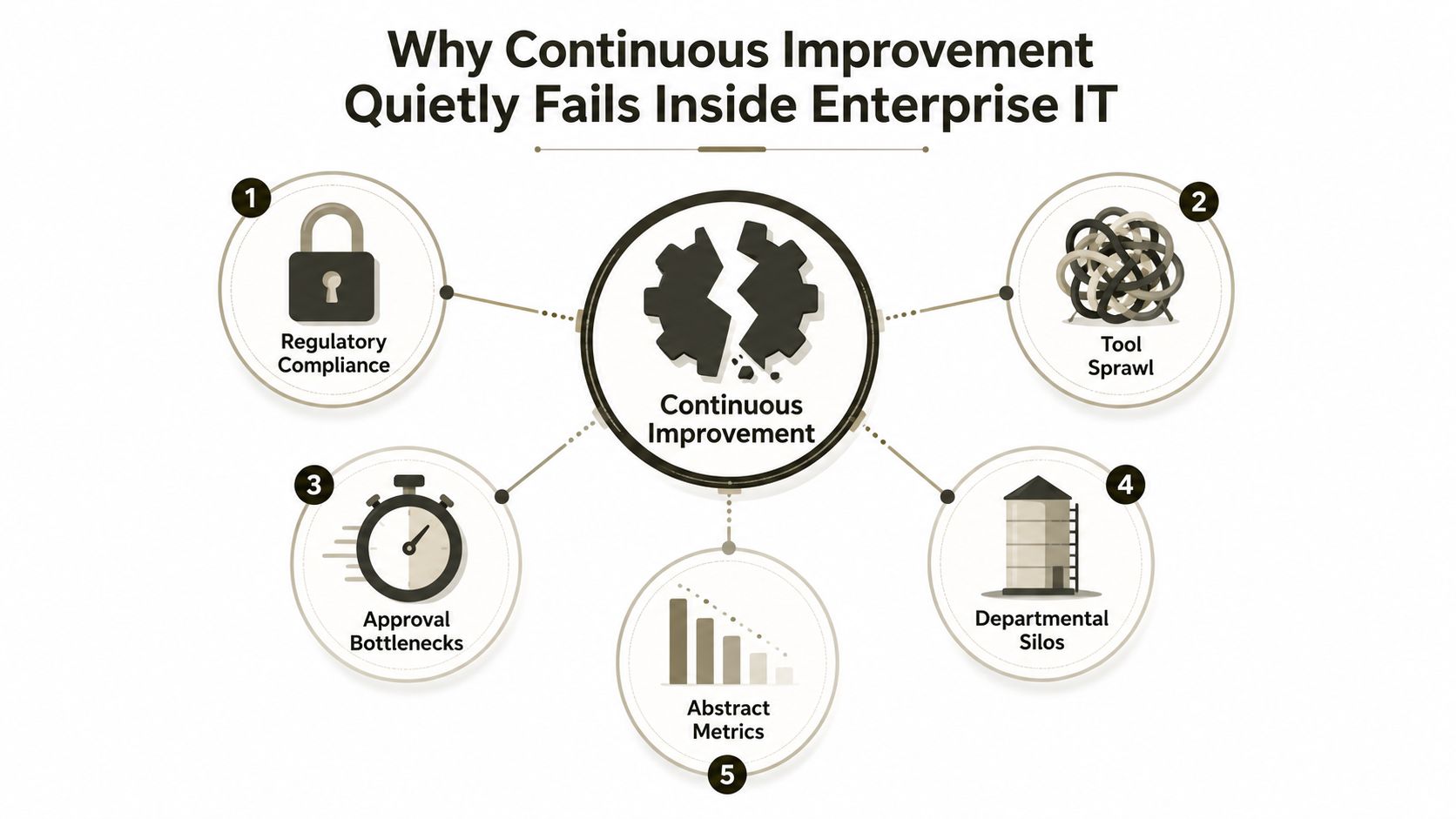
Why Continuous Improvement Quietly Fails Inside Enterprise IT
Generic content sells continuous improvement as a clean loop. In practice, enterprise IT turns that loop into a mess when teams change content, metadata, or migration workflows without respecting platform limits. Microsoft 365 environments punish sloppy execution, especially when the process change touches regulated data and someone assumes the pilot proved more than it did.
The real failure is not discipline, it's bad instrumentation
The problem starts when teams mistake activity for evidence. They run a pilot, see a few happy users, and declare victory before the control environment settles. That's exactly how rework gets hidden, audit concerns get buried, and a supposed improvement turns into a rollback.
Practical rule: If you cannot baseline the current state, you cannot claim the change improved it.
The official quality framing says the process starts by identifying the key process to improve, understanding it, running root-cause analysis, checking the attempted change, and then standardising what worked. That sounds tidy on paper. The reality on the ground is often messier, because many teams stop at the pilot and never convert the win into a standard operating procedure.
Microsoft 365 exposes every weak assumption
The reason this matters in regulated estates is simple. Process changes without data are where teams misread progress, hide rework, or declare success before the control environment is stable. That's the failure pattern I see again and again. The team thinks it improved the workflow, but nobody tracked whether cycle time, defects, cost, or adoption moved.
The best internal read on that failure mode is to compare it with the migration mistakes that show up in enterprise tenants. The real reason enterprise Microsoft 365 projects fail isn't usually the tool, it's the control gap. Teams run a process change without proving the process can hold under load.
What is continuous improvement in that environment? It's not a slogan. It's a feedback loop running on top of systems with fixed thresholds. If your loop doesn't capture those thresholds, you're not improving. You're gambling.
PDCA, Kaizen, Lean and Six Sigma Compared Through an Enterprise Lens
These terms get mashed together constantly, and that confusion causes bad decisions. PDCA, Kaizen, Lean, and Six Sigma are not synonyms. They solve different problems, and if you bolt the wrong one onto a Microsoft 365 migration, you'll get theatre instead of control.
PDCA is the control loop you actually need
PDCA is the cleanest model for regulated IT because it forces a closed loop. Plan the change, Do it, Check the result, Act on what the data says. Planview describes it as a four-step framework where you define the change, implement it, measure the result, and either scale it or restart the cycle if it fails.
That matters because the model is designed to catch bad changes before someone treats them as permanent. If the numbers don't support the change, you roll back or revise. If you skip that discipline, you're running on hope, not control.
Kaizen, Lean and Six Sigma each have a boundary
Kaizen is the cultural habit of making small, continuous improvements. It works when people on the ground can speak openly and leadership listens. It stalls when management wants the label but not the behavioural change.
Lean focuses on waste in flow. In a Microsoft 365 estate, that can help, but only if the flow itself is visible. If your API calls are being throttled, your “faster flow” is a fiction. The system doesn't care about your process map.
Six Sigma chases variance and defects with statistical discipline. That rigour can be useful for governance and repeatability, but it's often too heavy for content migration tasks where the issue is orchestration, not factory-style defect reduction.
| Framework | Core Focus | Best For | Enterprise Breaking Point |
|---|---|---|---|
| PDCA | Closed-loop control | Change validation in regulated environments | Honest measurement gets skipped |
| Kaizen | Small, continuous gains | Team culture and daily habit | Leaders want slogans, not participation |
| Lean | Waste reduction in flow | Repetitive work and process efficiency | Hidden platform limits distort the flow |
| Six Sigma | Variance and defects | Tight governance and process control | Overbuilt for routine migration work |
The only serious way to think about these models is by estate risk. If your team needs a practical operating rhythm, business process automation tools are the sort of comparison that helps you choose the right mechanism, not just the fashionable one.
Use PDCA for the loop. Use Kaizen for the culture. Use Lean where flow is measurable. Use Six Sigma only when the control problem really justifies the overhead.
The KPIs That Actually Prove Improvement Is Working
Most CI reporting is vanity reporting. It looks busy, but it doesn't prove anything. If your dashboard doesn't tell you whether the process change improved reliability, cost, or adoption, then your programme is producing charts, not control.
Start with a short list and no nonsense
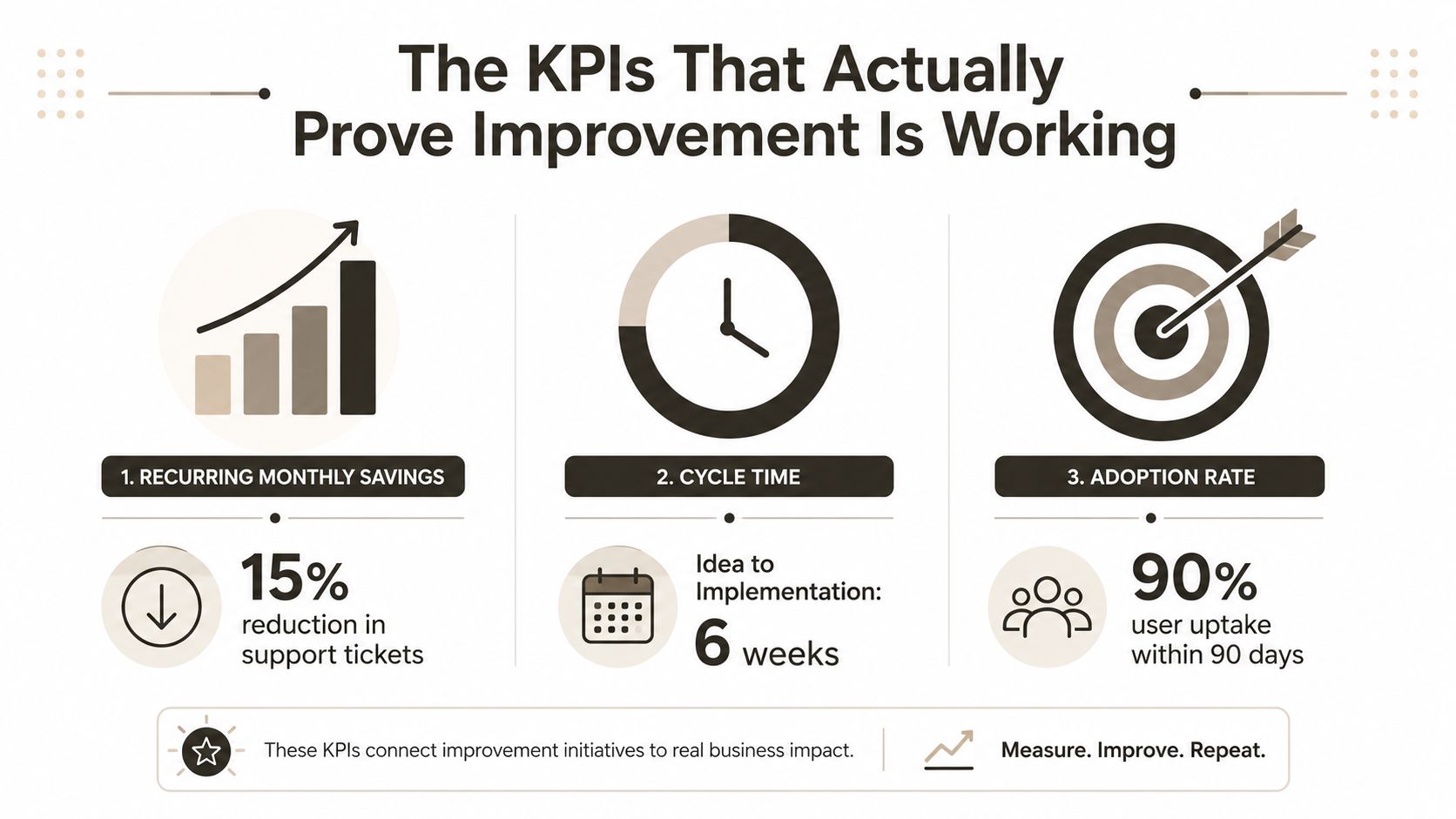
The strongest measurement model is blunt. Track a small number of core metrics first, then hold yourself to them. The metrics literature recommends financial impact, quality, safety, customer satisfaction, employee engagement, volume of improvements, and cycle time from idea to implementation as valid dimensions, but you do not need all of them on day one. The ASQ guidance is clearer than most consultants admit, recurring savings of $5,000 every month beat a one-time $50,000 gain, and teams should track only two or three core metrics for the first 30 days before using them as the benchmark for future progress.
That is the right discipline because a one-off win tells you almost nothing about repeatability. A recurring gain tells you the process changed in a way that keeps paying off. If the improvement does not repeat, it isn't mature.
Use metrics that survive audit and reality
For regulated organisations, the trap is confusing compliance evidence with continuous improvement evidence. An audit trail shows that you followed the rule. It does not show that the process got better. Those are not the same thing, and if you mix them up, you hide rework inside a report that looks tidy.
The most reliable KPI set is small enough for people to remember and hard enough to fake. Cycle time tells you whether the workflow got faster. Defects tell you whether the change introduced new errors. Adoption tells you whether people use the new process. Recurring savings tells you whether the benefit survives beyond the pilot.
If you want another useful angle, insights from Beyond Surplus on ITAD are a good reminder that satisfaction and operational proof are not the same thing. In a CI programme, sentiment can help, but numbers that repeat are what protect your decision-making.
Microsoft 365 maturity model thinking also matters here, because immature teams tend to measure noise, not control.
SPMT vs ShareGate vs Custom PowerShell PnP
Tool choice is a CI decision, not a procurement footnote. If you pick the wrong migration path, you turn a process-improvement exercise into a recovery project. We often see clients fail when they assume the vendor brochure tells the whole story.
SPMT is fine until the estate stops being simple
SPMT works in narrow scenarios. It's acceptable for small, low-complexity moves, especially when the scope is limited and the governance model is thin. It breaks down fast when the tenant is large, the permissions are messy, or the job needs resilience under load.
Microsoft confirms real constraints including API throttling, SharePoint list view thresholds, long path issues, and permission and inheritance complexity that DIY teams routinely underestimate. That's the part often overlooked until problems arise. The documentation says the platform has limits, but reality is that migration waves expose them all at once.
ShareGate is stronger, but it still has breaking points
ShareGate is the practical enterprise default for many teams because it handles far more complexity than basic tooling. It gives you better visibility, better control, and a more defensible migration path. But it still has a ceiling when entitlement mapping gets ugly or when tenant-to-tenant work hits GUID conflicts and solution dependencies.
That matters because a migration tool isn't just moving files. It's moving relationships. Once those relationships involve Power Apps, Power Automate, or SharePoint Framework components, a superficial migration can break business logic without obvious warning.
Custom PowerShell PnP is the only serious answer for hard estates
Custom PowerShell PnP scripting is the path for estates that need repeatability, precision, and auditability. It's also the path that most internal teams can't execute safely without senior engineering capability. You need people who understand dependencies, retry logic, entitlement mapping, validation, and rollback.
The documentation says the migration is about moving content. In reality, you're moving control structures, and those structures fail first.
The Ollo verdict is blunt. Use SPMT only where the scope is small. Use ShareGate when the estate is complex but still manageable with strong governance. For large regulated moves, use custom PowerShell PnP and stop pretending a basic DIY approach will survive contact with production. SharePoint migration tool guidance only matters if it's tied to the estate size, not the pitch deck.
Running Continuous Improvement Across a Microsoft 365 Migration
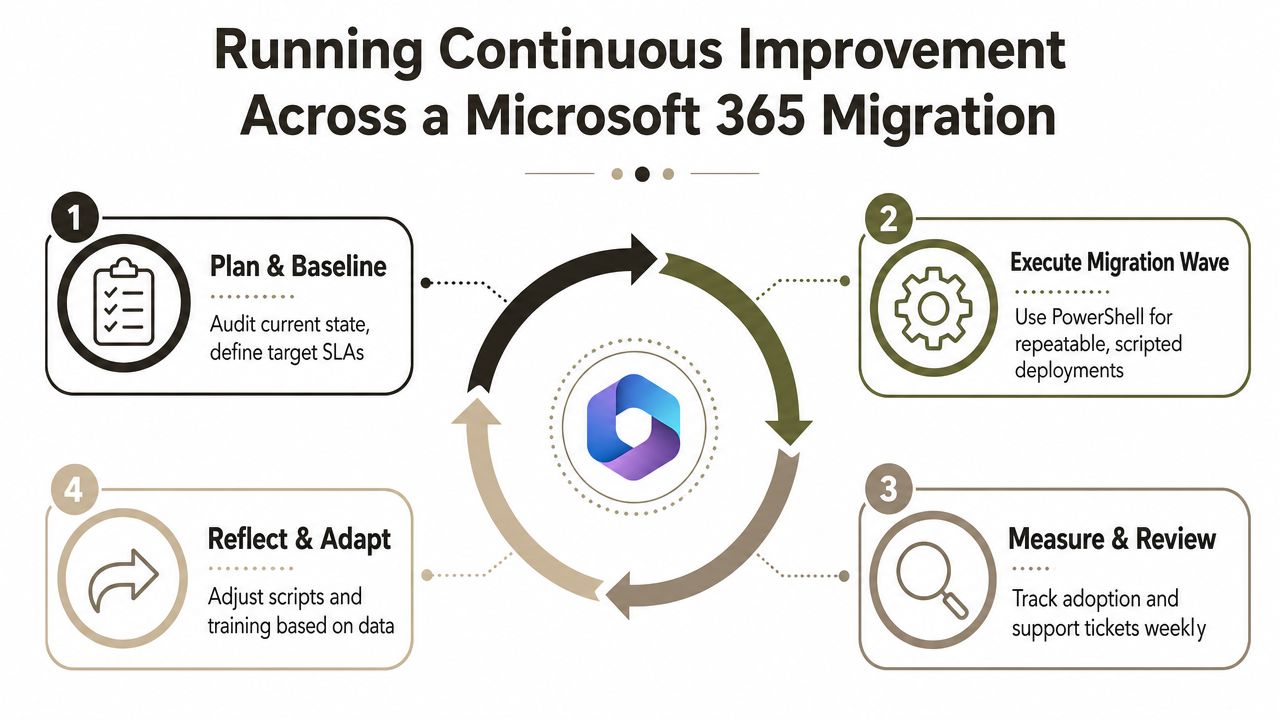
A Microsoft 365 migration is a continuous improvement loop, not a one-time delivery date. If you treat it as a project with a single cutover moment, you'll miss the control points that keep the estate safe. Closed-loop control is the only honest model here, instrument the process, measure against explicit objectives, apply a small change, then validate whether reliability, performance, or cost improved.
Baseline before you touch the tenant
Start with inventory, not enthusiasm. If your team does not know what content exists, who owns it, and what depends on it, the migration will expose gaps later in the process. SharePoint list view thresholds are a real constraint, and unindexed queries around the 5,000 item mark are a practical reason to baseline the structure before anything moves.
That baseline also needs entitlement mapping. Broken inheritance spreads, and once it does, permission drift becomes much harder to unwind. A “cleanup” that looks tidy in a spreadsheet can lock people out of live business content.
Schedule for throttling, not optimism
The next failure point is timing. Microsoft 365 APIs don't owe you unlimited throughput, and throttling is normal under load. If your migration wave ignores retry behaviour and back-off, you'll get partial moves, inconsistent metadata, and a false sense that the run is progressing.
Governance becomes the control environment, not the paperwork. A migration programme that protects critical business data deserves the same discipline as any other regulated system change. Protecting critical business data with cloud only works when the migration team treats timing, retries, and validation as operational controls.
Verify the downstream solutions before cutover
Content is only half the story. GUID-aware tooling matters because mismatched identifiers can break Power Apps, Power Automate, and SharePoint Framework solutions in ways that basic file checks never detect. Long path issues also show up late, which is exactly why wave-based validation beats a big-bang approach.
Video walkthrough of the migration loop
The healthiest operating model looks simple on paper but strict in execution.
- Plan and Baseline. Audit the current state, define target SLAs, and map the permissions model.
- Execute a migration wave. Use scripted deployment and stay throttle-aware.
- Measure and Review. Track adoption, support tickets, and failures on a fixed cadence.
- Reflect and Adapt. Adjust scripts, training, and governance based on the data.
That loop is what separates genuine improvement from motion. The process repeats, and the output of one wave becomes the input to the next.
Three War Stories From the Migration Trenches
Most executives ask for reassurance. They should ask for failure patterns instead. The same mistakes repeat because teams underestimate how fast a tidy plan can collapse once the tenant starts pushing back.
The tenant that hit throttling at cutover
A regulated consolidation looked stable until the cutover window. The migration jobs started hitting API throttling, and the team tried to push through rather than backing off and rebalancing the run. Audit logs ended up incomplete, and the recovery work took far longer than the original schedule.
The fix was boring but effective, throttle-aware wave planning, stronger retry logic, and a deliberate pause before the final move. The lesson was simple, the problem was never the content alone, it was the absence of control around the content.
The permissions cleanup that locked out a business unit
Another team wanted to “simplify” SharePoint before modernisation. They touched broken inheritance across a large site structure without mapping every downstream dependency, then locked out an entire business unit after the change. The cleanup looked neat in the change log and disastrous in production.
The fix came from restoring the permission model and introducing entitlement validation before any structural change. A clean permissions report is not proof of safety. It only proves somebody cleaned something.
The GUID conflict that broke a finance workflow
The worst case came from a finance migration where a GUID conflict broke a Power Automate flow the night before go-live. The content moved, but the workflow dependency didn't survive the move. That's the kind of failure that makes senior leaders lose faith in the whole programme.
A proper dependency inventory and GUID-aware validation would have caught it earlier. The fix was not heroics, it was instrumentation and pre-cutover testing.
For teams that need a formal, risk-aware approach, compliant cloud migration strategies are the sort of resource that reinforces the obvious truth, control first, movement second.
Why a Specialist Consultancy Is the Real Risk Reduction Strategy
Continuous improvement fails when teams act as if the work ends at deployment. It doesn't. Quality literature stresses that the process repeats continuously, which means failed changes trigger another improvement cycle rather than being treated as the end state. That matters because in regulated Microsoft 365 work, every failed change costs time, creates audit noise, and raises the chance of data loss.
DIY carries the risk, not just the labour
Your internal team may know the business better than anyone else, but that doesn't make them safe migration engineers. If they don't fully instrument the tenant, they can't prove the change improved anything. They can only hope the cutover held.
That hope gets expensive fast. Compliance exposure, audit findings, executive time, and reputational damage all climb when a tenant change breaks access, data integrity, or downstream automation. Missing one control step doesn't just slow the migration, it can break legal compliance and force a recovery programme you never budgeted for.
Specialists treat the tenant like a control environment
A specialist consultancy brings a different operating discipline. The job isn't just to move workloads, it's to preserve control while the environment changes. That means baselining, dependency mapping, retry planning, validation, rollback preparation, and governance that survives pressure from the business.
Admin vs consultant is a useful comparison because it exposes a key gap. An admin can run the tenant. A consultant can design the change so the tenant doesn't bite back.
If the migration can't be measured, validated, and rolled back, it isn't ready for production.
The Ollo verdict is firm. Do not run continuous improvement across a tenant you do not fully instrument. Do not let an internal team carry all the risk alone. For complex Microsoft 365 migrations in regulated sectors, specialist help is the risk-reduction strategy, not an optional extra.
If your team is facing a tenant-to-tenant move, SharePoint modernisation, or a rescue migration, bring in Ollo before the first wave starts. We handle the control model, the dependency mapping, and the ugly Microsoft 365 edge cases that DIY teams underestimate. Visit Ollo and talk to a specialist who treats your migration like a regulated change, not a best-effort project.

















