



Why Conditional Access Is Not a Checkbox
Most advice on conditional access zero trust starts with the wrong promise. It tells you to turn on a feature, pick a few users, and call it a strategy. That is how teams end up with a policy stack that looks disciplined in the Entra blade and fails the first time a legacy protocol, a guest path, or a badly scoped exclusion slips through.
Microsoft documents Conditional Access as an if-then policy engine for Zero Trust, and that framing matters because it changes the question from “Have we enabled it?” to “What exactly happens when identity, device, location, and risk signals collide?” Microsoft's own overview is blunt about the model, and Microsoft's Zero Trust guidance says access is conditional and temporary, not standing by default. If your team treats that as a checkbox, you are not designing security, you are buying outage risk.
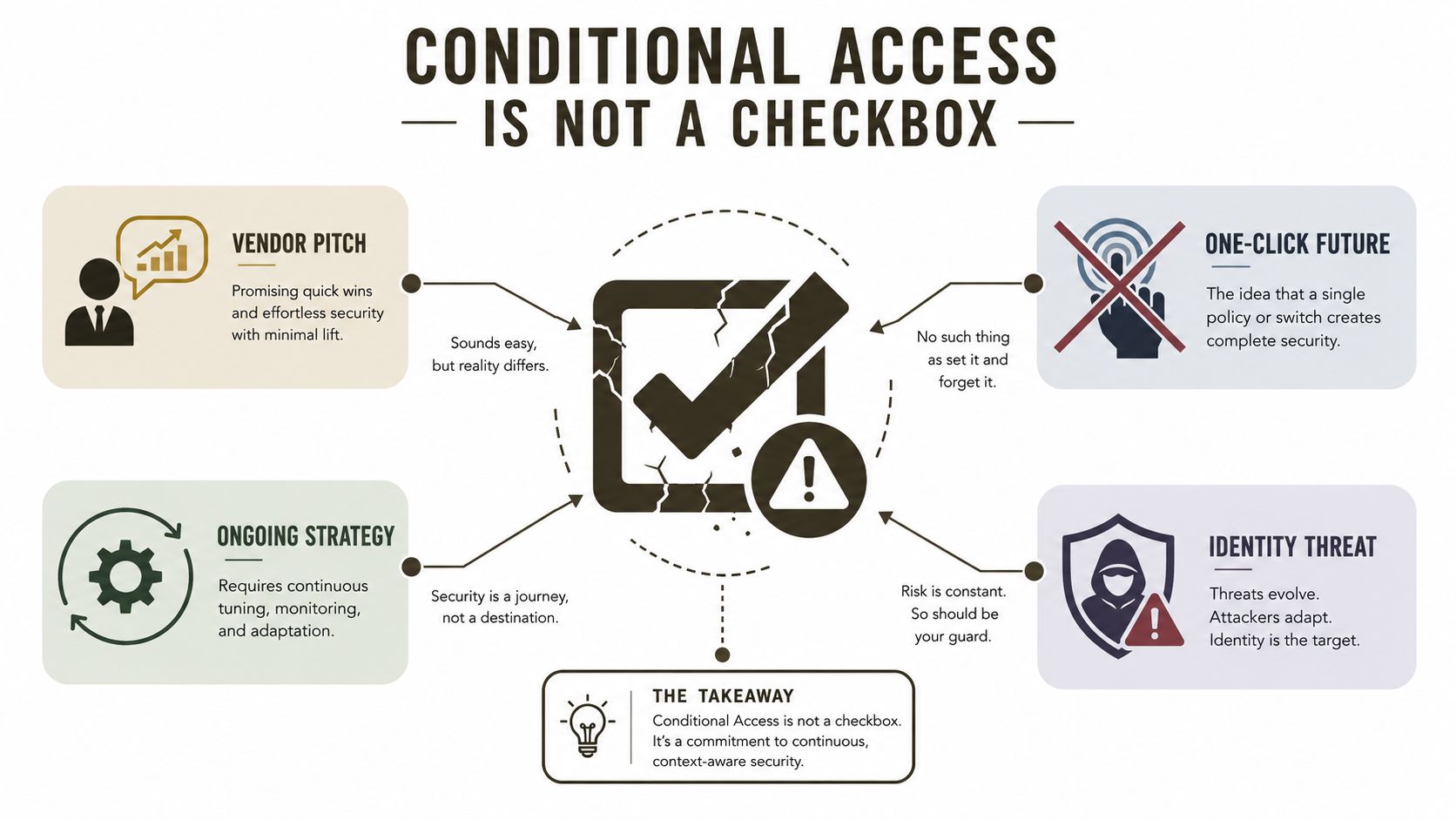
The smarter mental model is uglier and more useful. Conditional Access is the enforcement layer that turns identity signals into allow, block, or constrained access, and Microsoft's training material says exactly that, it can block access or give limited access based on signals or conditions via a deny-or-restrict model Microsoft training on aligning Conditional Access with Zero Trust. That is why a bad policy design does not just fail without warning, it creates lockouts, exception sprawl, and compliance gaps that your auditors will absolutely notice.
If you want a wider view of how this fits into modern risk thinking, the 2026 cybersecurity risk overview is a useful companion. It will not design your tenant for you, but it will remind your leadership team that access control is a business-risk decision, not an admin convenience.
The myth that keeps breaking tenants
Most failures begin with a flattering lie from a vendor pitch deck. Someone says Conditional Access is the switch that takes you to Zero Trust, as if policy design were a licensing activation. It isn't. Microsoft's documentation defines Conditional Access as an if-then policy engine for Zero Trust, which means every access request is evaluated against explicit conditions before access is granted or constrained.
That distinction matters because the model is active, not decorative. Microsoft's Zero Trust guidance says access is conditional and temporary, meaning permissions exist only when required and should disappear when they are no longer valid Zero Trust overview. If your policies persist longer than the business need, you have drifted back into the old perimeter mindset, just with prettier controls.
Practical rule: If your policy design cannot explain why a user is allowed in, when they are allowed in, and what happens when conditions change, you do not have Zero Trust. You have a brittle access rule set.
The error I keep seeing in regulated tenants is aggression without discipline. Teams block half the estate, celebrate the change, and still leave legacy authentication or unmanaged device paths open because they never modelled the whole decision tree. That is exactly why a rollout needs architecture, testing, and rollback planning, not optimism.
What the policy engine enforces
Conditional Access is the decision point between a sign-in attempt and a resource. Microsoft says the policy engine can block access or give limited access depending on the signals it sees Microsoft training on aligning Conditional Access with Zero Trust. That is a control system, not a dashboard.
The trap is assuming stronger equals safer. A poorly staged policy can lock out legitimate users while leaving other paths untouched. If your design does not account for device registration, trusted locations, or exception handling, the tenant can look hardened on paper and still leak in practice.
A decent starting point is to treat every policy as a question. Who is being evaluated, from where, on what device, for which app, and under what risk context? If your team cannot answer that in a sentence, do not deploy the policy yet. Use the internal guide on Conditional Access policies in Microsoft 365 to sanity-check the structure before you let it near production.
Read the policy the way the engine does
A Conditional Access policy only makes sense if you read it in the same sequence the engine evaluates it. First come the assignments, who, what apps, what locations, what device states. Then come the conditions, such as user identity, device state, location, or sign-in context. Then the engine applies the access controls, which either grant, block, or constrain the session.
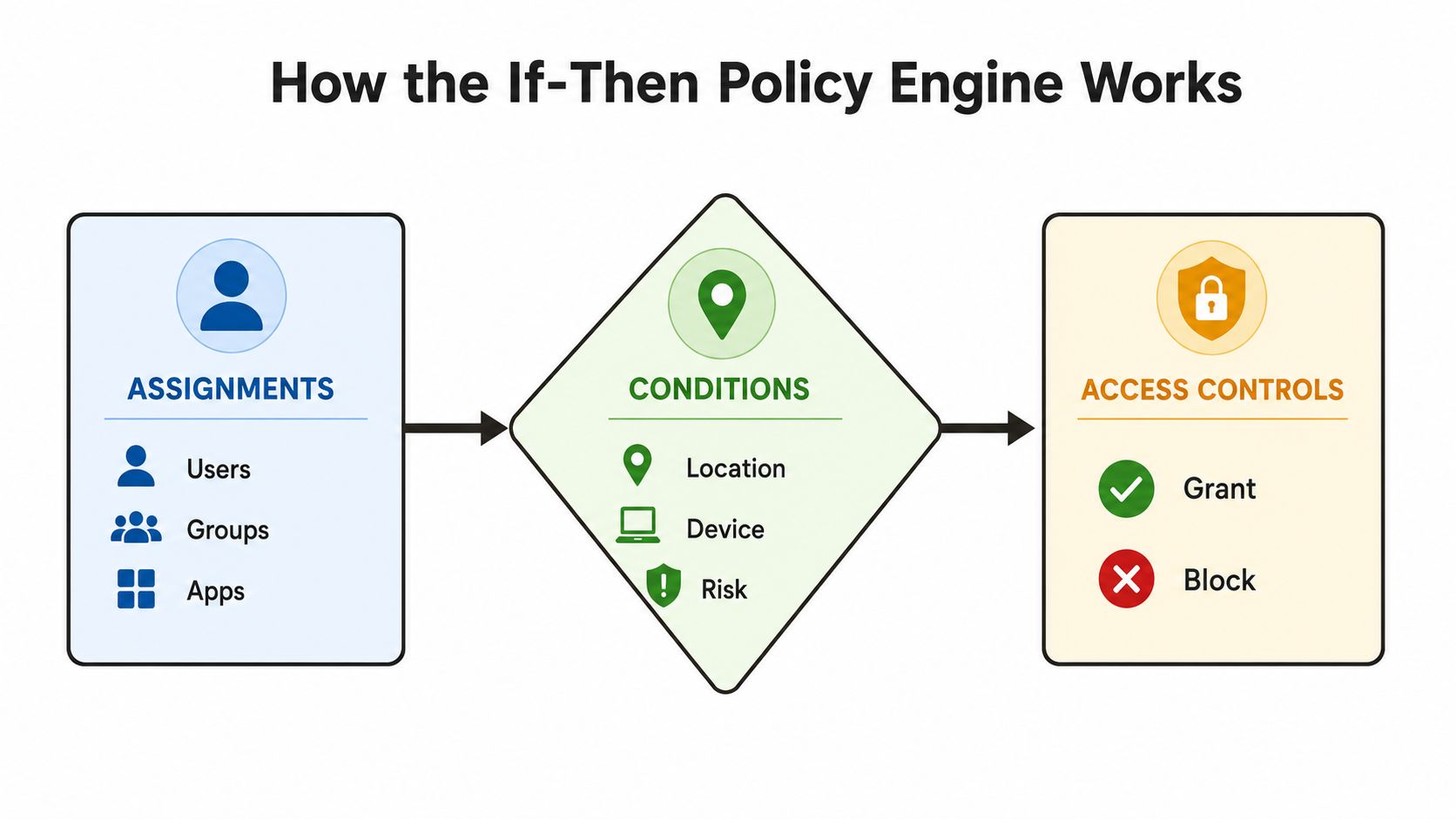
Microsoft's own description is clear: when a user wants to access a resource, they must complete a required action such as MFA or another control Microsoft Conditional Access overview. That is the core logic. The policy does not guess, it checks whether the defined conditions are met and then enforces the result.
A policy that nobody can explain is a policy that will eventually break production.
DIY teams usually stumble here. They build policies as isolated rules instead of as part of a decision map. Then they wonder why one app works, another doesn't, and a guest user falls through the cracks. If you cannot trace the assignment, condition, and control in a single pass, your policy set is already too messy.
There is no hidden deny all
Microsoft does not give you an implicit deny all for free, and that catches people out. You have to deliberately target the right populations and define the right controls. If you miss a path, that path stays open, and legacy authentication or guest access can sail straight past the intent of your design.
That is why policy logic has to be tested, not assumed. A break-glass account, an admin path, a B2B guest flow, and a legacy protocol should each be treated as separate decisions. The engine only enforces what you have told it to enforce, not what your change record says you meant to do.
The right reading habit is simple. Ask what the policy catches, what it excludes, and what it permits. If your team cannot walk through those three points before change approval, do not let them flip the switch.
Don't blur the control surfaces
Most explainers mash all controls into one bucket, and that is sloppy. Grant controls decide whether access is allowed at all, things like MFA or requiring a compliant device. Session controls shape what happens after access is granted, such as session limits or browser persistence choices. Sign-in risk sits in the identity protection layer and brings real-time risk evaluation into the decision.
Microsoft-aligned reference guidance makes the licensing split concrete. Entra ID P1 is required for users covered by Conditional Access, while risk-based policies require P2 reference guidance on Conditional Access licensing. That means you do not design from wishful thinking, you design from the licence estate you have. If your licence mix cannot support the remediation path you have promised, your policy matrix is already broken.
| Conditional Access Control Surfaces and Licensing | Entra Licence Required | Primary DIY Failure Mode |
|---|---|---|
| Grant controls | P1 for users covered by Conditional Access | Assuming MFA alone covers every access path |
| Session controls | P1 for users covered by Conditional Access | Treating post-sign-in sessions as if they're automatically safe |
| Sign-in risk and user risk | P2 | Designing a high-risk response that disappears when entitlement is missing |
Build for the licence you have
Teams burn time and credibility. They write a perfect-looking policy that depends on P2, then discover that a key population only has P1. Microsoft-aligned guidance also notes that if licences lapse, policies reportedly continue in a graceful state rather than disappearing, which is operationally safer, but it still does not rescue a bad entitlement model reference guidance on Conditional Access licensing.
The practical answer is straightforward. Map controls to licences before you write policy. If you want sign-in risk decisions, you need the entitlement. If you only have baseline Conditional Access, stop pretending a risk-based flow will behave the way the documentation describes.
For a plain-English explanation of how these policy layers fit into Microsoft 365, use this internal guide on Conditional Access policies in Microsoft 365. It is the sort of reference that saves you from designing a policy against the wrong control surface.
The failures are predictable, and that is the problem
We often see clients fail when they assume Conditional Access covers everything in one sweep. Microsoft explicitly states that it only covers human sign-in decisions and cannot protect non-human access to cloud resources, so workload identities and OAuth-based access need separate controls Microsoft Conditional Access overview. If your team applies one policy set to users and service principals alike, app-to-app and automation paths stay exposed.
The second failure mode is legacy authentication. Teams block modern sign-ins, feel safe, and leave old protocols alive because someone forgot to map them. That gap matters because the policy engine only sees what it can evaluate, and legacy flows often dodge the clean assumptions your architecture review depended on.
War-room rule: If a policy change does not name the bypass path, the bypass path will name you later.
The ugly tenant realities nobody budgets for
We also see clients stumble on policy sprawl after mergers. Broken inheritance, conflicting role scopes, and overlapping exclusions turn a clean model into a mess that nobody wants to own. Then someone tries to correct it at scale and gets bitten by API throttling during mass Graph updates, which is exactly the sort of operational friction that turns a security project into a recovery project.
The Microsoft Learn guidance on identity rollout failure modes is blunt about common issues, missing platforms, overly broad trusted locations, app exclusions, and the need to explicitly enforce device-registration MFA instead of assuming it exists Microsoft Zero Trust workshop guidance. That guidance also reflects the broader reality around unmanaged devices and legacy authentication flows. If you do not design those edges deliberately, they become the easiest way around your control plane.
And then there are the SharePoint-adjacent governance headaches that make bad policies worse. The same tenant that has Conditional Access issues often has list and path constraints lurking underneath its change process, which is why I tell clients to read this internal note on Microsoft 365 admin versus consultant work before they hand the whole job to a generalist admin. DIY teams usually underestimate how many separate problems have to be solved before a tenant is controlled.
The business cost is not abstract
In energy, finance, and healthcare, a failed rollout is not just inconvenient. It can break access to regulated systems, interrupt clinical workflows, or create audit findings that hang around long after the policy mistake is fixed. Missing the non-human path or the legacy path does not just reduce security. It can create a compliance gap that your leadership team will have to explain.
That is why rescue work costs more than redesign work. By the time the tenant is inconsistent, every change needs compensating controls, testing, and rollback care. The documentation says Conditional Access is flexible. Reality says flexibility without discipline becomes debt.
Start with visibility, not enforcement
The safest rollout starts with a full inventory of current policies, named locations, exclusions, and app scopes. Microsoft's workshop guidance warns that missing platforms, broad trusted locations, and app exclusions are common failure points, and it says device-registration MFA should be explicitly enforced rather than assumed Microsoft Zero Trust workshop guidance. That is why report-only mode is required.
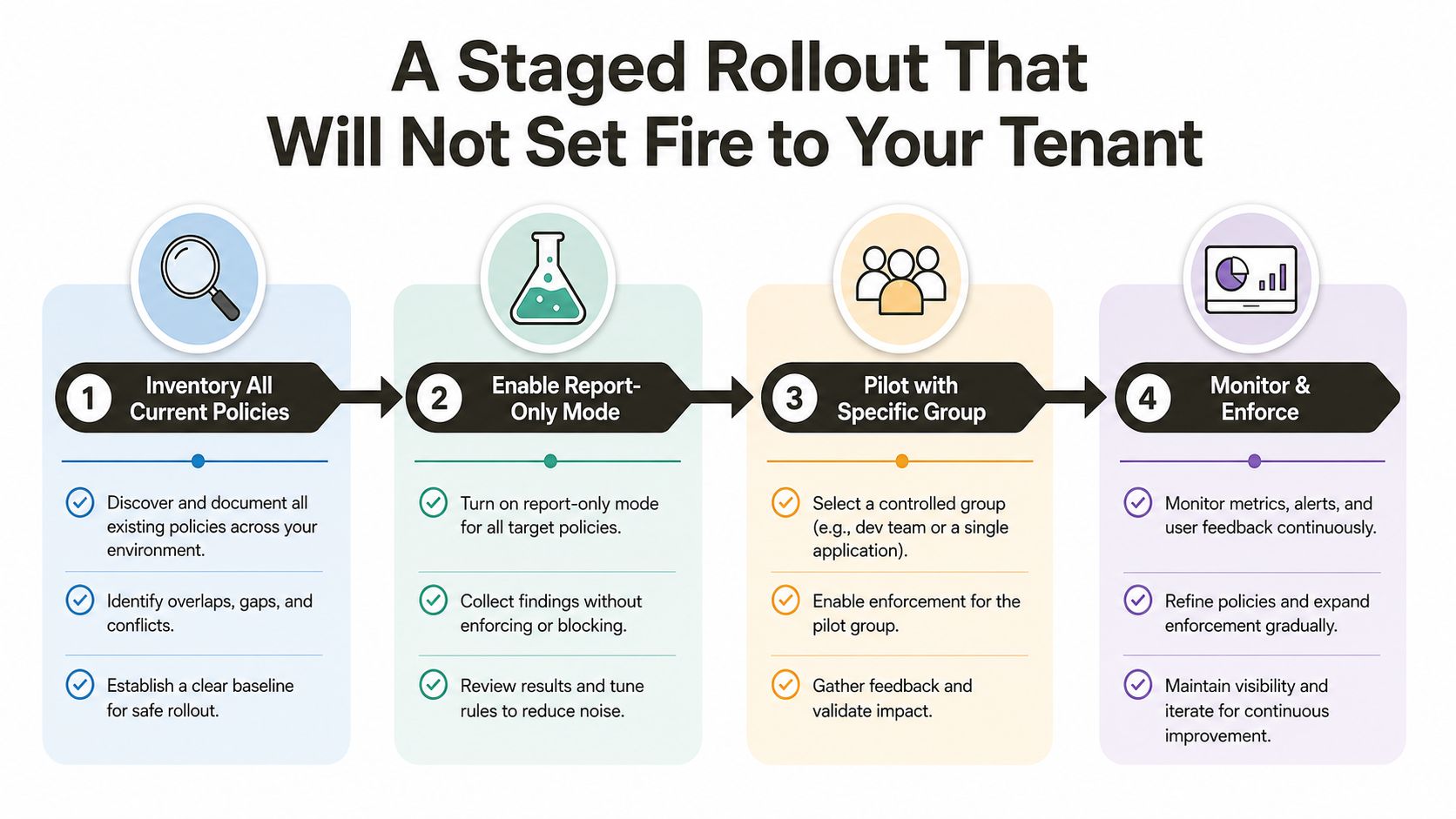
You do not start by blocking users. You start by learning what your policies would have done. If your sign-in logs show unexpected device types, legacy protocol attempts, or exclusions hitting far more traffic than you expected, you are not ready to enforce anything. You are still mapping the tenant.
Practical rule: Never move a policy from report-only to enforce until the sign-in logs match the behaviour you intended, not the behaviour you hoped for.
Then reduce the obvious bypasses
Block legacy authentication early. If you leave it open while tightening everything else, you will create a policy stack that looks mature and still leaks through the oldest doors in the building. Enforce device-registration MFA on join and register flows, because assuming the registration path is covered is exactly how gaps survive a redesign.
After that, add break-glass and service-account exclusions explicitly, not casually. Then pilot the policy with a tight, named group before you touch the rest of the tenant. If a policy needs session controls for sensitive apps, layer them in after grant controls are stable, not before.
The SharePoint Conditional Access guide is useful here because it ties policy decisions to practical tenant behaviour rather than abstract theory. That matters when you are trying to prove to a change board that your rollout will not smash productivity.
A staged rollout is how you avoid turning a security project into a tenant incident.
DIY looks cheap until the first lockout
DIY Conditional Access redesigns look manageable because the Entra blade makes the work feel local. It is not local. A bad policy can have tenant-wide impact, and the recovery path is only as good as the team that wrote it. If your admins have not built a test harness, a rollback plan, and a sign-off process that includes real sign-in log review, they are running an unpriced risk.
Microsoft's Zero Trust adoption curve is already well advanced. Okta's 2023 State of Zero Trust report says 61% of organisations globally already had a defined Zero Trust initiative, up from 55% the prior year, and 43% were using context-based access policies Okta State of Zero Trust report. That does not mean everyone has done it well. It means your tenant is no longer being judged against tomorrow's standard. It is being judged against today's baseline.
Specialist redesign changes the odds
A specialist shop earns its keep in this type of engagement. An Entra ID redesign has to account for licence boundaries, report-only drift, inheritance issues, exception hygiene, and the ugly edge cases that show up only after you connect policy to real users. Ollo handles that kind of work as a Microsoft 365 and SharePoint migration consultancy, and the value is not the logo, it is the reduction in blast radius when the tenant is already fragile.
We often see clients fail when they treat policy cleanup like an admin task instead of a controlled change programme. If the environment also has tenant consolidation, policy conflict, or rescue work after a failed rollout, the risk multiplies fast. A specialist approach gives you validation, rollback discipline, and someone who owns the nasty parts when the first attempt does not hold.
For a team still debating whether to centralise the work or let each admin improvise locally, the Microsoft 365 admin versus consultant comparison is a useful reality check. It will not do the redesign for you, but it will show you why local heroics usually collapse under scale.
Ollo Verdict: Use DIY only for tiny, low-risk policy adjustments with a tested rollback path. For anything that touches production tenants, regulated users, or complex exceptions, you need specialist redesign, or you are gambling with lockouts and audit exposure.
Ownership has to be boring and explicit
Conditional Access is not a launch-and-leave control. Someone has to own it after go-live, and that person needs authority to roll back fast when a policy starts blocking a critical population. Microsoft's Zero Trust guidance says access is conditional and temporary, which means governance should focus on whether access still makes sense, not whether the policy looked good at approval time Zero Trust overview.
That governance rhythm needs named-location reviews, exclusion reviews, and break-glass ownership on a calendar, not in someone's head. If you do not review report-only drift, your policies will diverge from reality. If you do not rehearse rollback, the first incident becomes your practice run.
For incident structure, the cyber breach playbook guide is a good external reference because it keeps the focus on response roles, evidence, and containment. Conditional Access incidents need that same discipline, especially when a bad policy affects authentication across a business unit.
Recovery has to be fast and documented
When a policy misbehaves, the response should be simple. Identify the policy, disable or scope-rewind it, verify the sign-in impact, and restore access through the pre-approved break-glass path if needed. Azure Monitor and Log Analytics can help you spot the fault line quickly, but only if your team already knows which logs matter and who is allowed to pull the emergency lever.
The deeper issue is ownership. Your CISO will ask who carries the pager at 2am, and they should. If the answer is “whoever notices first,” you have not governed the control. You have abandoned it.
Your Pre-Deployment Validation Checklist
Before you turn report-only off, check every one of these. Confirm break-glass accounts are excluded, validate named locations, review app exclusions, ensure legacy authentication is blocked, and verify device-registration MFA is enforced. Confirm your sign-in risk policy matches your licence entitlement, and make sure the rollback path is documented, tested, and owned by a named operator.
Use the platform teams change management guide to pressure-test your approval flow if your change board still treats identity policy changes like routine admin work. Then compare your rollout against the internal types of testing guide so you do not confuse a policy that passed a demo with one that can survive production.
If you miss any one of these items, stop. Microsoft's Zero Trust model is conditional and temporary, and that only works when you control the conditions with discipline, not optimism Zero Trust overview. The moment your checklist becomes optional, your tenant becomes the test environment.
If you are redesigning Conditional Access for Microsoft 365, Ollo can help you map the policy, test the failure paths, and stage the rollout without turning your tenant into a recovery job. If you want a specialist team to handle the redesign properly, visit Ollo and talk through the policies, exceptions, and rollback plan before you touch production.

















