



Most advice on Zero Trust explained gets one thing badly wrong. It treats zero trust like a security setting. Buy a licence, turn on a policy, tick a compliance box, and job done.
That thinking wrecks migrations.
In Microsoft 365, zero trust becomes dangerous when your team applies the slogan without understanding the mechanics. Tenant consolidations, SharePoint restructures, Entra ID redesigns, and permission remapping punish shallow planning. A bad firewall rule is annoying. A bad zero trust rollout during migration can lock out executives, expose finance libraries, break audit trails, and leave regulated data stranded halfway between tenants.
I've seen teams read the docs, buy tooling, and still drive straight into failure because they assumed “more security” automatically meant “better architecture”. It doesn't. Security theatre fails just as hard as weak security, and it usually fails at the worst moment.
Forget Everything You've Heard About Zero Trust
Most “zero trust explained” articles are product pages wearing a technical costume. They sell confidence. They don't prepare your team for the ugly part, which is enforcement under load, during change, against live data.
That matters because migrations create exactly the conditions where shallow zero trust designs collapse. You've got bulk API activity, identity changes, permission remaps, cross-tenant trust decisions, and users who still need to work while your team rearranges the foundations underneath them. Generic guidance doesn't help when your conditional access policy blocks your own migration account or when a permissions clean-up wipes access to a regulated SharePoint site.
The slogan is easy. The implementation isn't.
Zero trust is not a product. It's not a firewall refresh. It's not “MFA plus some policies”. It's an operating model that forces you to validate every request, minimise privilege, and treat compromise as normal.
That sounds clean on paper. In reality, your team has to apply those principles while Microsoft 365 keeps enforcing its own platform constraints. That's where projects go sideways. The documentation says security should become more precise. In reality, rushed redesigns often become more brittle.
If you want a useful starting point, pair this article with practical Microsoft 365 security best practices. Then stop pretending the checklist is the architecture.
Most failed zero trust projects don't fail because the principle was wrong. They fail because the team applied the principle with no migration discipline.
Why migrations expose bad assumptions
We often see clients fail when they carry over perimeter-era thinking into cloud identity projects. They still assume internal users are safer, known devices are enough, legacy permissions can be “cleaned up later”, and migration tools will cope if they hit a snag.
They won't.
During a tenant-to-tenant move, every bad assumption compounds:
- Identity assumptions break first: A trusted user in the source tenant becomes an unknown object in the target tenant.
- Permission assumptions break next: Legacy SharePoint groups and broken inheritance don't map neatly across environments.
- Tool assumptions break under scale: Basic migration runs don't adapt well when APIs throttle or libraries contain structural problems.
- Compliance assumptions break unnoticed: Missing this step doesn't just fail the migration. It breaks legal compliance when access controls and audit expectations drift apart.
Zero trust matters. But if your team treats it like a branding exercise, it becomes one more source of failure.
That's the actual version. Not the brochure version.
The Three Pillars of Real-World Zero Trust
The phrase came long before most vendors turned it into a sales deck. The foundational concept of zero trust was introduced in 2009 by John Kindervag at Forrester Research, who identified that “trust is a vulnerability.” NIST later formalised the model in Special Publication 800-207 in 2020, requiring continuous authentication regardless of location, as outlined in NIST's explanation of zero trust and “never trust, always verify”.
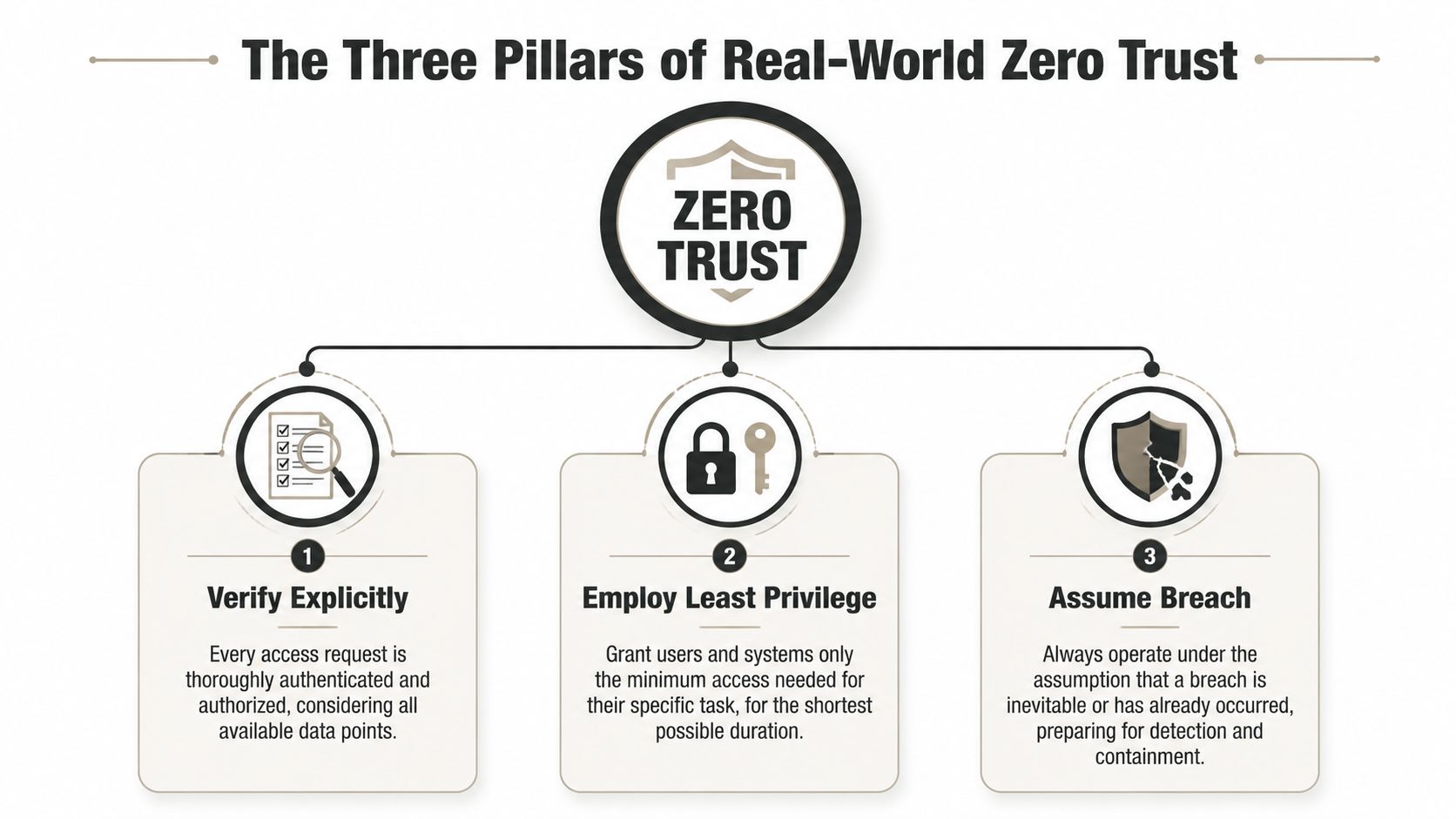
Most architects don't need another abstract framework. They need commands they can enforce.
Verify explicitly
Every access request starts as hostile until proven otherwise. Not trusted because the user sits in head office. Not trusted because the device connected yesterday. Not trusted because the service account existed for years.
That means your controls must evaluate identity, device state, workload, context, and risk every time access matters. If your design still assumes a successful sign-in equals safe access, you're still thinking like it's 2012.
Here's the practical version:
- Validate identity in context: Admin access from a managed device is not the same as the same account on an unmanaged mobile.
- Check the transaction, not just the login: Sensitive actions need stronger scrutiny than low-risk reads.
- Treat service accounts like attack paths: Old automation identities often become the dirtiest hole in the estate.
For organisations tightening privileged access, disciplined Privileged Identity Management in Microsoft 365 usually exposes how much standing access still exists.
A useful visual summary sits below, but don't confuse the model with the work required to enforce it.
Employ least privilege
Least privilege isn't about making users miserable. It's about shrinking the blast radius when someone makes a mistake, reuses a credential, or clicks the wrong thing.
Most estates claim they enforce least privilege. Then you inspect SharePoint permissions, Entra roles, legacy groups, and delegated admin paths. Suddenly “least privilege” means half the IT team can touch far more than they should.
A blunt rule works better than a polite one:
Practical rule: If you can't explain why an account still has access, remove it before migration exposes it.
Assume breach
This is the pillar people quote and then ignore. If you assume breach, you stop designing around a trusted core and start designing for containment.
That changes how you think about architecture:
| Pillar | What weak teams do | What disciplined teams do |
|---|---|---|
| Verify explicitly | Trust a successful login | Re-evaluate high-risk actions continuously |
| Employ least privilege | Leave broad access “for convenience” | Grant task-specific, time-bound access |
| Assume breach | Protect the edge and hope | Segment assets and plan for containment |
The documentation gives you the principle. Reality demands enforcement logic, migration sequencing, and rollback planning.
Identity as Your New Perimeter in Entra ID
Your old perimeter is finished. In Microsoft 365, identity is the control plane, and Entra ID decides whether your security posture means anything or not.
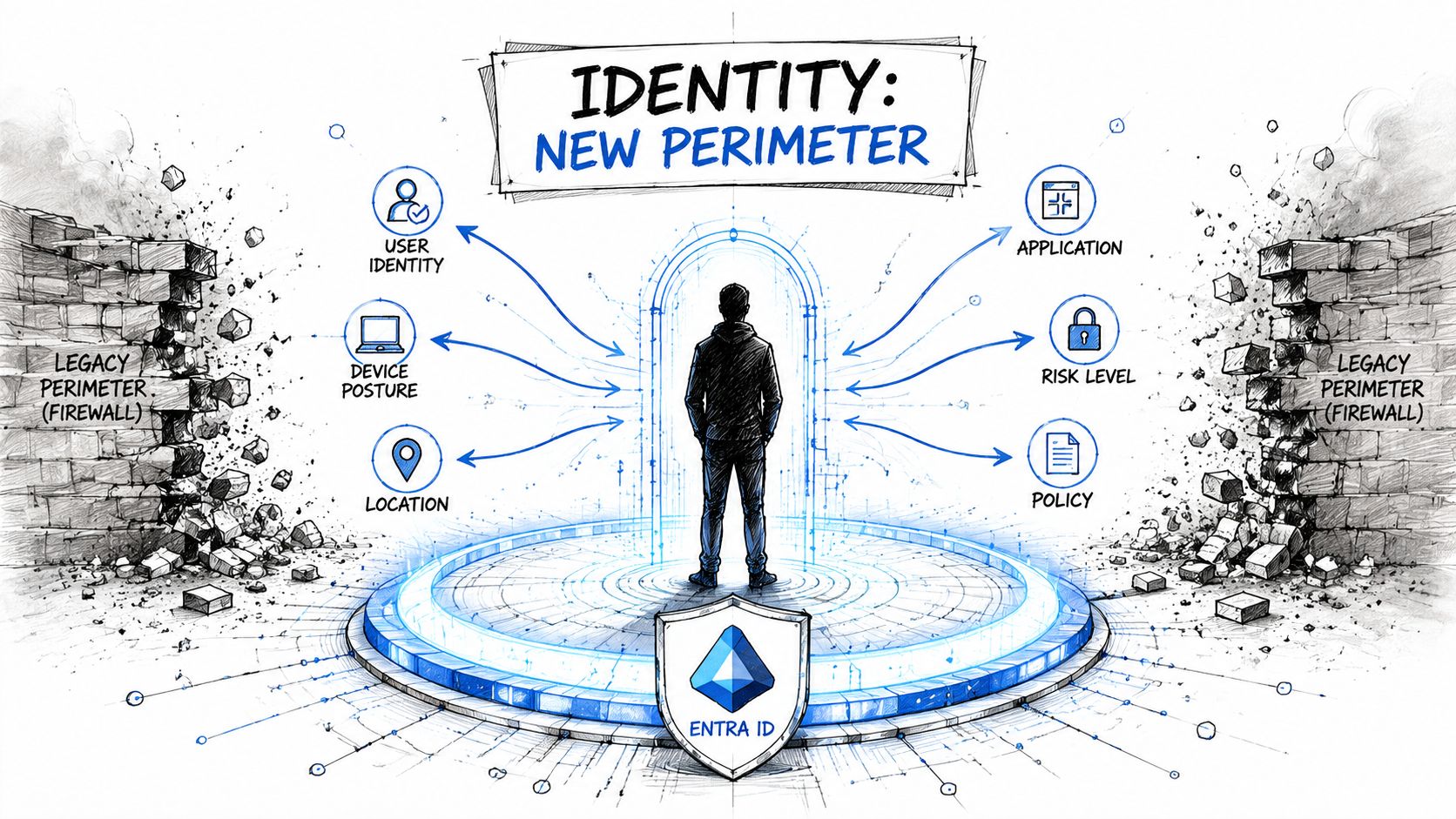
The mistake I see repeatedly is this. Teams build conditional access policies as if they're writing office rules. They target broad groups, stack exceptions, forget service dependencies, and assume “block legacy auth” plus “require MFA” equals mature security. It doesn't. It equals the start of a support queue.
Conditional Access is your front door
Microsoft's guidance is clear on the underlying principle: never trust by default, and continuously validate identities and devices. In regulated sectors, that matters because the transaction itself carries risk, not just the network location.
A proper Entra ID design evaluates signals such as:
- User identity: Human user, admin, break-glass, guest, service principal
- Device posture: Managed, compliant, stale, or unknown
- Application sensitivity: Commodity SaaS access isn't the same as finance, HR, or executive data
- Session context: A normal read operation differs from privileged change activity
If your team hasn't modelled those distinctions, your policy set will drift into one of two bad states. Either it becomes performative and weak, or it becomes so aggressive that it blocks legitimate work.
For leadership teams trying to tighten privileged access without creating audit chaos, this guide to audit-ready PAM implementation is worth reviewing alongside your Entra role model.
What good identity architecture actually looks like
The documentation says you can build granular controls. In reality, badly sequenced controls create false positives, lockouts, and emergency exclusions that stay in place forever.
A workable model in Entra ID usually includes:
Separate admin from user access
Your admins should not browse the estate with the same identity they use for privileged actions.Scope policies by workload risk
Exchange Online, SharePoint Online, and administrative portals don't deserve identical treatment.Control exceptions like toxic waste
Every bypass weakens the model. Track them, justify them, remove them.Test migration identities in advance
Don't discover on cutover weekend that your migration account fails a policy it never should have hit.
If your team is rebuilding identity controls, a solid technical reference point is this overview of Microsoft Entra ID architecture and controls.
A conditional access policy that blocks the wrong account at the wrong time isn't a minor bug. It can halt the migration while users, apps, and sync processes pile up behind it.
The common trap
Teams still think network location should carry trust. That thinking survives in strange ways. People whitelist offices, over-trust VPNs, and assume familiar users are low risk.
That's backwards in cloud migration work. During change, known users generate unusual activity. Admins work at odd times. Service accounts behave differently. Bulk transfers spike access patterns. If your identity model can't distinguish authorised change from suspicious behaviour, you'll either miss real risk or block the project.
Neither outcome helps your data.
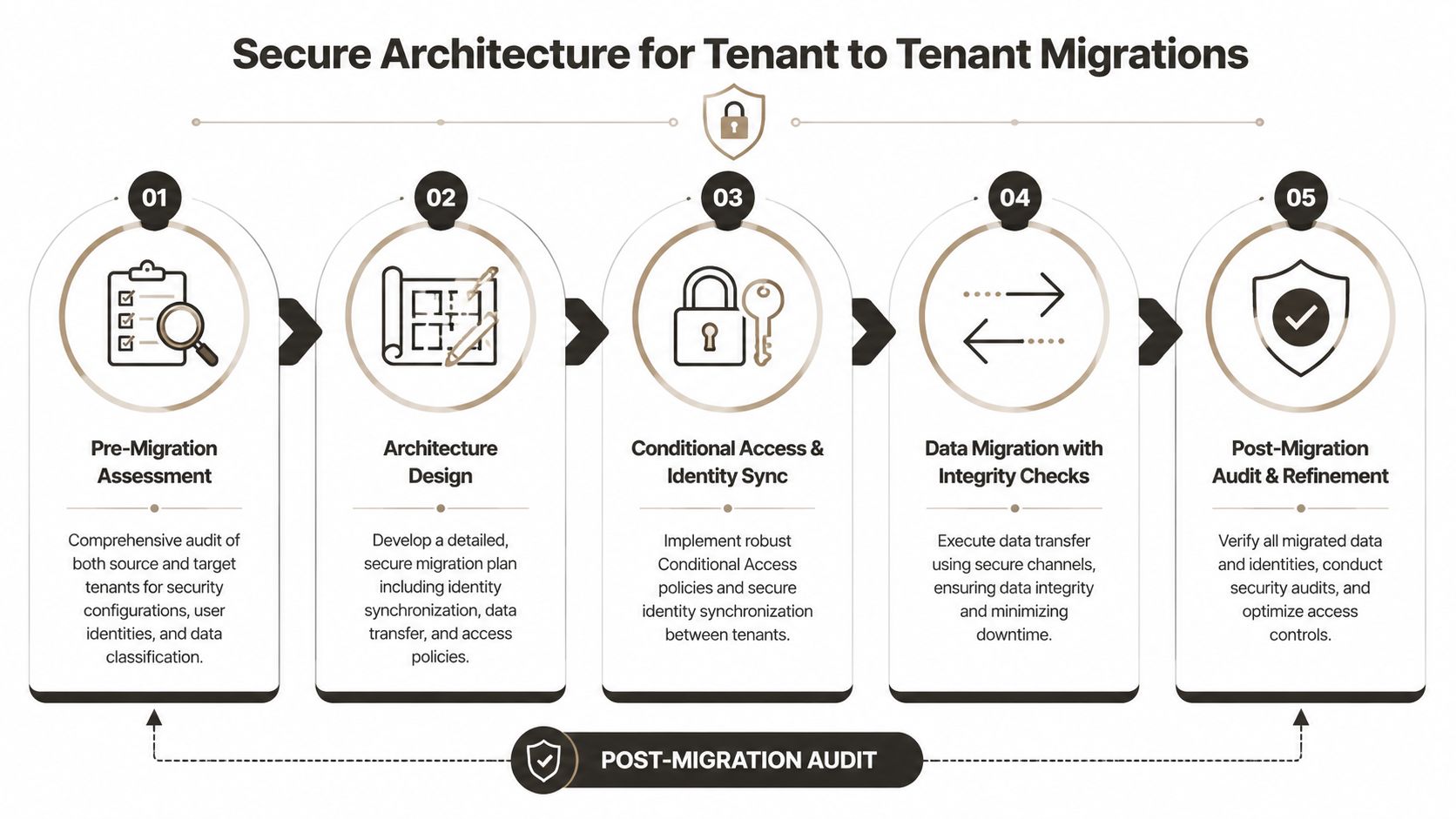
Secure Architecture for Tenant to Tenant Migrations
A tenant-to-tenant migration is where bad zero trust design stops being theoretical and starts breaking production. This is not a tooling exercise. It's an architectural one.
If you protect the perimeter and ignore the data, you've missed the point. In a cross-tenant move, your critical assets are the protect surfaces. SharePoint sites with finance records. Executive mailboxes. HR libraries. Sensitive Teams files. The architecture has to start there.
Protect the asset, not the network myth
We often see clients fail when they start with tenant plumbing and leave data policy until late in the project. That sequence is backwards.
Microsoft's benchmark language around zero trust points to a key reality: internal threats remain significant, and strong design requires you to map protect surfaces, understand transaction flows, and place controls close to the asset. In migration work, that discipline also reduces unnecessary API churn and avoids chaotic enforcement patterns.
The architecture should answer these questions before data moves:
- Which data matters most: Don't pretend every site has equal business or regulatory value.
- Who needs access after migration: Not who had access ten years ago.
- What control must travel with the file: Sensitivity labels and DLP rules need deliberate sequencing.
- Which workflows will generate noisy events: Bulk movement, relabelling, re-sharing, and sync changes can all trigger controls.
A deeper operational view sits in this guide to Microsoft 365 tenant-to-tenant migration planning.
A secure sequence that actually works
The teams that survive these projects usually follow an order like this:
| Stage | What to decide | Why it matters |
|---|---|---|
| Assess | Identify critical data and identity dependencies | You can't secure what you haven't mapped |
| Design | Define target-state access, labels, and trust boundaries | Security controls need architecture before deployment |
| Enforce | Apply conditional access and data controls in phases | Sudden blanket enforcement creates noise and lockouts |
| Migrate | Move in controlled waves with validation checks | Bulk change without validation hides corruption and drift |
| Audit | Verify permissions, labels, and access paths | Missing this step creates compliance exposure |
Where teams create their own outage
The documentation says DLP, sensitivity labels, and policy-driven access will protect the data. In reality, dropping those controls into a live migration without sequencing creates friction everywhere.
You see legitimate transfers flagged as suspicious. You see users blocked from approved content because target-state groups aren't ready. You see inherited SharePoint structures clash with modern least-privilege designs. Then the internal pressure starts. Security wants tighter controls. Operations wants the cutover finished. Compliance wants proof nothing drifted.
Protect surfaces first. Everything else in the migration should serve that decision.
If you don't anchor the migration around asset-level protection, zero trust becomes a source of instability instead of control.
The War Wounds Why DIY Migrations Fail
At this point, the tidy diagrams stop helping.
The usual pattern goes like this. Your team reads Microsoft Learn, buys ShareGate or reaches for SPMT, drafts a cutover plan, and assumes the difficult parts are mostly organisational. Then the platform starts enforcing limits, legacy design starts fighting back, and the migration gets uglier by the hour.
War wound one, API behaviour under pressure
The documentation says your migration can authenticate, enumerate, copy, and reapply structure. In reality, enterprise jobs generate bursts of activity that trigger throttling and retries at exactly the wrong moments.
A small test run hides this. A real migration exposes it.
Teams often script too aggressively, then discover that identity calls, permission lookups, and content operations don't scale in a straight line. The result isn't a neat slowdown. It's fragmented execution. Some objects move. Some stall. Some complete with partial metadata. Then someone declares the tool unreliable when the underlying issue was architectural naïveté.
War wound two, the 5,000 item wall
Microsoft is explicit here. SharePoint list view thresholds are capped at 5,000 items, and that limit can trigger query failures that block normal enumeration, as documented in Microsoft's SharePoint Online limits guidance.
That number matters because DIY teams still treat it as a performance warning. It isn't. It's a structural failure point.
Here's what happens in the field:
- A library exceeds the threshold: Standard enumeration breaks or becomes unreliable.
- The migration tool sees only part of the structure: Your reporting looks cleaner than reality.
- Users validate a sample and assume success: The missing folders surface later.
- Compliance gets dragged in afterwards: Missing content isn't just inconvenient. It can destroy audit confidence.
The Ollo verdict on tooling is simple. Use SPMT for small, low-risk jobs. For anything with complex libraries, you need custom partitioning logic and controlled execution.
War wound three, broken inheritance and GUID conflicts
Enterprise migrations stop being “data copy” jobs and become access reconstruction jobs.
We often see clients fail when they assume SharePoint permissions will translate cleanly. They won't. Years of custom groups, ad hoc sharing, broken inheritance, and inherited exceptions create a mess that basic mapping can't safely normalise.
The documentation says you can reapply permissions. In reality, you hit problems like these:
- Broken inheritance multiplies undetected: One bad remap can affect thousands of folders.
- GUID conflicts derail identity references: Objects from one tenant don't line up neatly in another.
- Legacy groups lose meaning in the target state: The names survive. The security logic doesn't.
- Emergency fixes make it worse: Under pressure, admins over-grant access just to get users working.
That's how sensitive data ends up visible to the wrong audience, or locked away from the right one.
War wound four, path length and file structure rot
No one gets excited about path length until thousands of files refuse to move.
Old file shares and legacy SharePoint estates accumulate naming patterns, deep folder hierarchies, duplicate structures, and rotten information architecture. Migration tools don't fix that. They expose it.
One of the reasons rescue work exists at all is because internal teams underestimate structure debt. They think the migration will reveal a few naming issues. Instead, it reveals that years of uncontrolled sprawl now block clean transfer and clean governance.
If your project is already wobbling, this is a useful comparison point on why SharePoint migration projects fail.
The biggest lie in DIY migration is that failure arrives as one obvious crash. Usually it arrives as hundreds of partial successes that no one validates properly.
That's why rescue projects cost more than proper projects. The team hasn't just moved data badly. They've damaged confidence in the estate.
The Ollo Verdict DIY Risk vs Specialist Recovery
By this point, the choice should look less philosophical and more operational. You can gamble on a DIY strategy, or you can reduce risk properly.
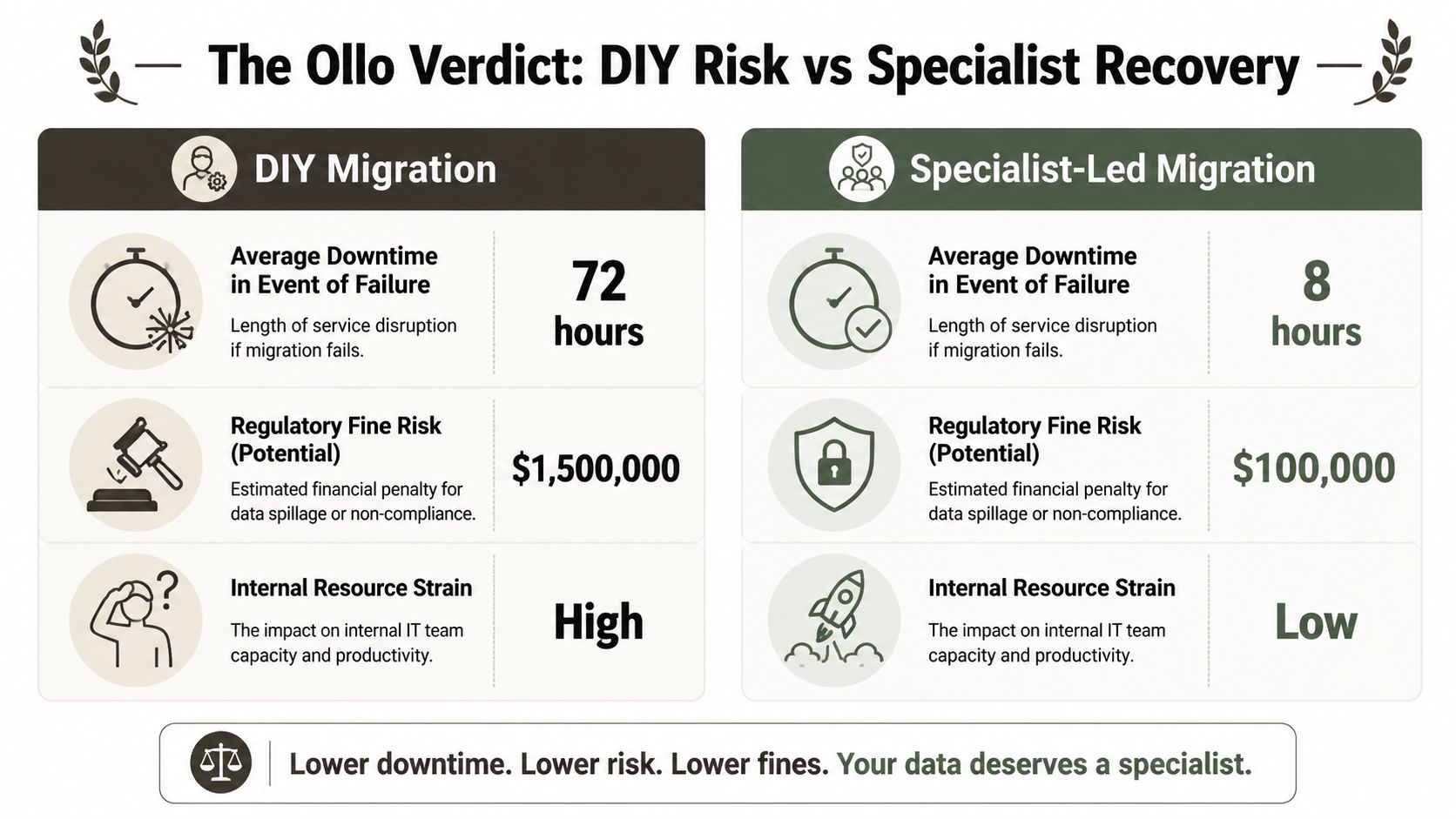
The DIY argument usually sounds sensible at first. Your team knows the environment. The tools are available. The docs are public. Why bring in a specialist?
Because migrations fail in the gap between theory and execution.
The business case is stronger than most teams admit
A mature zero trust programme is not just a security posture improvement. It has measurable economic value. A Forrester Total Economic Impact study reported 246% ROI over three years and up to 50% fewer data breaches for mature zero trust implementations, as cited in Microsoft's summary of the Forrester study on the economic benefits of zero trust.
That's the reward side.
The risk side sits in every failed migration I've had to examine after the fact. Delayed cutovers. Incomplete data transfer. Broken permissions. Manual rollback. Legal and audit exposure. Internal trust collapsing because users can't find the files they were promised had moved safely.
DIY looks cheaper until it isn't
Here's the blunt comparison:
| Decision path | What you save upfront | What you risk later |
|---|---|---|
| DIY with standard tools | Consultancy cost | Rework, drift, exposure, and emergency remediation |
| Specialist-led execution | More planning investment | Lower operational uncertainty and stronger recovery options |
The expensive part of migration is not the specialist fee. It's the avoidable damage when your own team discovers the breaking points live.
The Ollo verdict is direct:
- Use SPMT for small, non-critical moves
- Use ShareGate carefully when the estate is messy
- Use custom PowerShell PnP scripting when you need control over throttling, partitioning, permissions, and validation
- For regulated tenant consolidations or high-value SharePoint estates, DIY is a false economy
That isn't snobbery. It's pattern recognition.
What rational leadership does next
If your migration touches regulated data, identity redesign, or complex SharePoint permissions, you shouldn't be asking whether the tools can technically copy files. You should be asking whether your team can survive the failure modes when the platform, the data structure, and the security model all collide.
That's where specialist recovery stops being optional.
If your team is staring at a tenant consolidation, Entra ID redesign, or a SharePoint estate full of inherited mess, bring in a specialist before the migration turns into a rescue job. Ollo handles the ugly Microsoft 365 work most providers avoid, including complex tenant-to-tenant moves, zero trust redesigns, and recovery projects where standard tooling has already failed.

















