



Most advice about privileged identity management microsoft 365 treats it like a switch. Turn on PIM, convert a few admin roles from active to eligible, require approval, and your zero-trust problem is solved.
That advice gets people into trouble.
The Microsoft documentation explains the mechanics. It does not protect your tenant from weak enforcement, sloppy role design, approval bottlenecks, API throttling, GUID conflicts, or the ugly side effects that appear during real migrations and tenant consolidations. We often see clients fail when they follow the wizard, satisfy the checkbox, and assume governance now exists. It doesn't.
I've spent years cleaning up failed Entra ID and Microsoft 365 security rollouts. The pattern is consistent. Your team means well. They build a PIM model in a live tenant, mix permanent and eligible assignments, leave too much trust in defaults, and discover the gaps during an audit, an outage, or an incident response exercise. By then, the mess is harder and more expensive to unwind.
Why PIM Is Not The 'Easy Button' for Microsoft 365 Security
The biggest lie in this space is simple. People say PIM reduces privilege automatically.
It doesn't. PIM only enforces what you deliberately design, validate, and monitor. If your design is weak, PIM just gives your weak design a polished interface and a log file.

The problem starts with false confidence
In regulated environments, false confidence is worse than no control at all. It delays hard decisions and creates audit theatre. Microsoft Learn correctly documents the configuration path for PIM, but live tenants break on the operational details that the setup screens don't solve for you.
The ugly reality is already visible in Ireland. Over 80% of Irish enterprises audited in 2023 still operated with permanent Global Administrator assignments despite having PIM, exposing them to breach risks 12 times higher. DIY PIM setups often lead to 30-50% activation failure rates due to misconfigured custom roles, as described in the Microsoft Entra PIM configuration guidance.
That should end the fantasy that “enabled” means “secured”.
Practical rule: If your tenant still carries permanent Global Administrator assignments, you don't have privileged governance. You have branded admin sprawl.
Your Microsoft 365 estate also doesn't exist in isolation. If your cloud security programme spans multiple platforms, the same enforcement mindset matters when modernizing AWS infrastructure security protocols. Different platform, same mistake. Teams deploy controls in name, not in practice.
What competent teams do differently
Strong PIM deployment starts with governance design, not with licence assignment. That means your team needs to define:
- Which roles stay eligible only. High-impact roles should not sit active because someone “might need them later”.
- Which activations require approval. If a role can materially change identity, mail flow, compliance, or tenant-wide settings, don't leave it to self-service.
- Which break-glass paths are real. Emergency access has to work under pressure, not just look tidy in a Word document.
- Which policies are tested against live operations. If your approval path, role scope, or access review process breaks under load, your design isn't finished.
If you need baseline context before redesigning these controls, Ollo has already written about Microsoft 365 security best practices. Read that first, then come back and strip out every assumption that PIM is somehow self-governing.
DIY PIM fails because teams treat it as a feature. It's a control plane. That means mistakes land at the identity layer, where every downstream service inherits the damage.
PIM Architecture The Theory Versus The Reality
On paper, PIM looks elegant.
A user becomes eligible for a role rather than permanently assigned. When they need expanded access, they activate the role, complete MFA, provide justification, maybe wait for approval, and receive time-bound access. The audit trail records the whole thing. That is the theory.
Reality is messier.
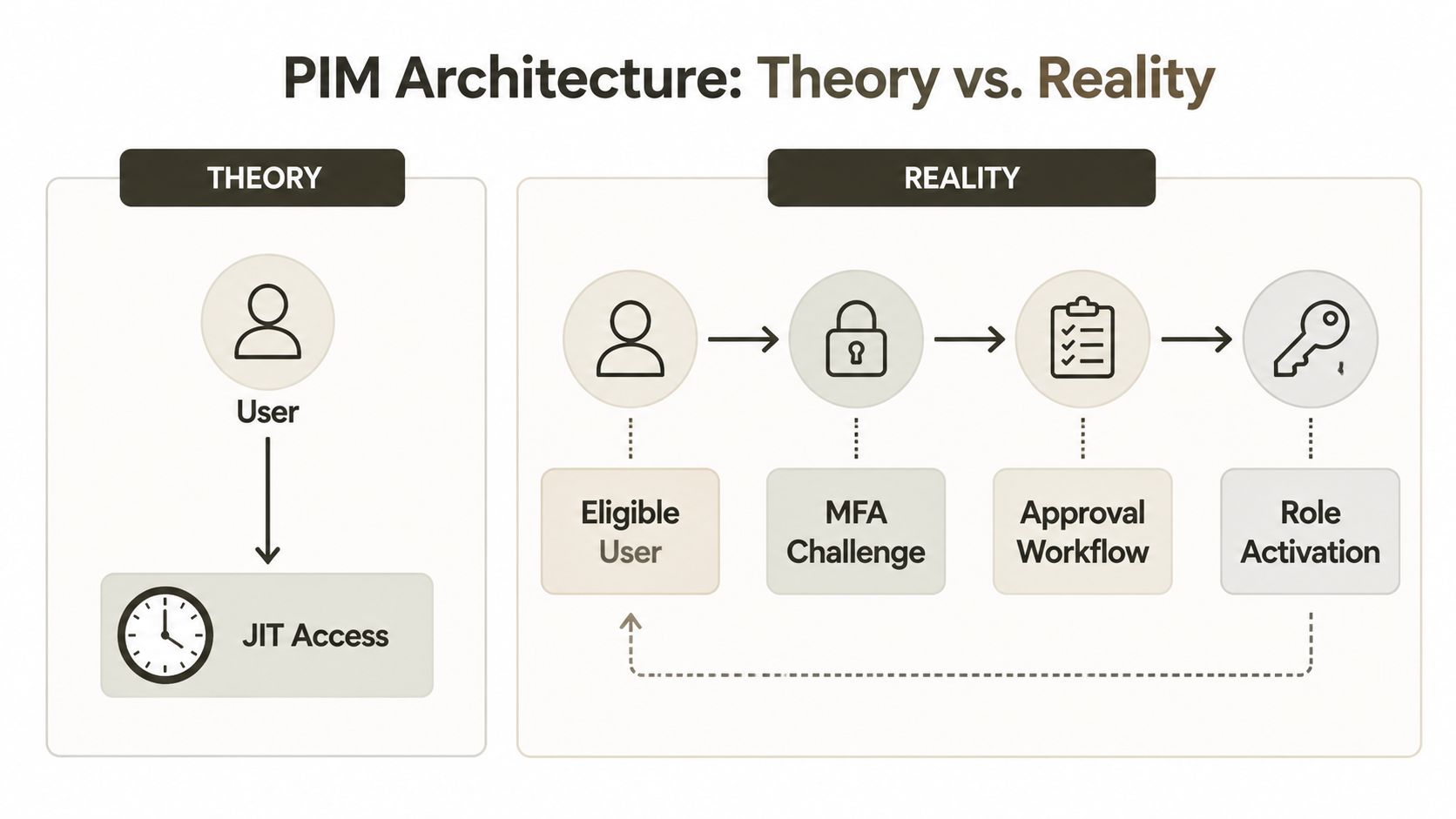
Where the textbook model breaks
The first gap sits in activation duration and session handling. PIM role activation can be set up to 72 hours, but MFA is often only challenged once per browser session, not per activation. This session-persistent MFA creates a window of privilege creep that can increase breach risk by 40-60% in environments with weak endpoint controls, as noted in Practical365's PIM walkthrough.
That matters because many internal designs assume each activation triggers a fresh trust decision. It often doesn't. If an attacker lands in a live browser session after the initial challenge, your “just-in-time” model can start behaving a lot like standing access.
The approval chain is slower than people think
The second gap is workflow latency. The documentation talks about notifications and approval. In production tenants, approvals depend on people, inboxes, routing rules, browser state, and tenant noise.
We often see clients fail when they build approval around one or two named individuals. Approvers step away, messages get buried, or the tenant has enough operational chatter that urgent activations wait behind routine noise. During an incident, that delay isn't theoretical. It blocks recovery work, pushes admins towards shortcuts, and encourages permanent assignments “for safety”.
A practical view looks like this:
| Model | What documentation implies | What happens in live tenants |
|---|---|---|
| MFA on activation | Fresh challenge protects every elevation | Browser session state can weaken that assumption |
| Approval workflow | Near-real-time human gatekeeping | Human bottlenecks delay urgent work |
| Time-bound access | Exposure shrinks neatly | Long activation windows still create usable attack time |
| Audit trail | Governance is visible | Visibility without strong enforcement is not protection |
The architecture diagram is tidy because it ignores the people, devices, and workflows that actually carry the risk.
For teams mapping these controls into a wider identity redesign, Microsoft Entra ID architecture planning becomes critical. Role activation isn't a standalone feature. It sits inside Conditional Access, device trust, admin workstation controls, and incident response procedure.
The Ollo-style technical reading
PIM works when you treat activation as part of a hostile environment. Browser sessions persist. Approvers miss things. Admins request broad roles because custom role design is hard. Scripts and operational tooling expect continuity. Every one of those facts pulls against least privilege.
That's why I don't trust a PIM deployment until I've seen the edge cases tested. Not the happy path. The ugly path. Compromised session, delayed approval, bad role scope, emergency access, tenant migration overlap, and role reactivation under pressure.
If you haven't tested those, you haven't designed PIM. You've staged a demo.
The Pitfalls of DIY PIM Deployment
The most dangerous DIY mistake isn't a broken setting. It's a mindset. Teams assume partial enforcement is a safe transition state.
Usually, it isn't.

Report-only is compliance theatre
A critical failure mode is leaving Conditional Access tied to privileged workflows in report-only. That creates a false sense of governance by logging violations without blocking them, satisfying checkbox compliance while leaving standing privileges active and exposing the organisation to audit findings, as discussed in Crucial Logics' review of PIM pitfalls.
I'm blunt about this because it deserves blunt language. Report-only around privileged access is often just a well-formatted confession. You're documenting bad behaviour instead of stopping it.
Hard truth: If your privileged controls only observe abuse paths, auditors will see that as unfinished governance, not maturity.
DIY breaks during real operational change
This gets worse during migration programmes. A lab-built PIM design often collapses when your tenant is under stress. Admins are moving workloads, updating groups, rationalising roles, retiring legacy identities, and syncing changes across tooling. That's where sloppy identity design stops being abstract and starts breaking work.
We often see clients fail when they:
- Reuse broad roles during transition. It feels efficient. It preserves the standing privilege model they claim to be replacing.
- Push custom role designs without validation. Bad scoping causes activation failures, odd privilege gaps, and confused rollback.
- Script against Graph without thinking about load. Microsoft documents Graph throttling. Ignore that and your automation stalls at the worst moment.
- Assume object alignment is clean across tenants. It rarely is. GUID conflicts don't announce themselves politely. They surface as broken assignments and messy manual repair.
That last point matters more than organizations typically expect. Identity migration is unforgiving. If your role mappings and object references drift, you don't just delay a task. You undermine the control plane your security model depends on.
Why MFA alone won't save a weak design
Many internal teams treat MFA as the magic compensating control. That's wishful thinking. MFA belongs in the design, but it does not rescue a sloppy activation process, broad role assignment, or report-only enforcement.
If your organisation still has weak baseline identity controls, fix those first. Ollo's write-up on Microsoft 365 multi-factor authentication setup is useful groundwork, but don't confuse groundwork with completion. MFA is one gate. PIM governance is the whole building.
The Ollo verdict here is simple. Use report-only sparingly and briefly, with a named exit plan. For privileged roles that can alter tenant-wide identity, compliance, or security posture, hard enforcement beats observation. Anything softer invites drift.
PIM Versus Purview PAM Understanding the Distinction
A lot of failed Microsoft 365 security projects start with a category error. The team needs task-level control, but they reach for role-level tooling.
That's how people misuse PIM.
PIM controls roles. Purview PAM controls privileged tasks. If you need to let someone perform a specific admin action without granting a broad admin role, you're in Purview PAM territory, not PIM territory.
Why the distinction matters
Microsoft Purview Privileged Access Management enforces zero standing privilege at the task level. That sounds precise, and it is. It's also easy to break if you enable it without understanding how your tenant operates.
The risk is straightforward. Microsoft Purview PAM enforces zero standing privileges at the task-level, but if not configured correctly, it can block essential background PowerShell jobs, causing failures in critical processes like SharePoint migrations and leading to multi-day outages, according to the Microsoft Learn documentation for Purview PAM.
That isn't a niche problem. It lands directly on migration tooling, scripted administration, and service operations.
A practical comparison
Here's the distinction your team needs to make before touching either control set:
| Control | Best fit | Common DIY mistake | Operational consequence |
|---|---|---|---|
| PIM | Role-based elevation for admins | Using it where fine-grained task control is required | Admins get broader rights than intended |
| Purview PAM | Specific privileged tasks in Microsoft 365 | Enabling it without exclusions or workflow validation | Automation and background jobs fail |
We often see this during SharePoint and compliance-heavy projects. A security team enables PAM because “zero standing privilege” sounds right. Then migration scripts lose the high-level permissions they relied on, service accounts hit blocked paths, and the project team starts troubleshooting the wrong layer. They blame ShareGate, PnP, Exchange, or Intune. The actual problem sits in privileged task control.
When the wrong privilege model meets a live migration, the outage usually looks like a tooling problem first. It rarely is.
The operational reading, not the brochure reading
If your admins need broad but temporary authority across identity roles, use PIM. If they need permission for a specific admin action, especially in Purview-aligned control areas, evaluate PAM. Don't mash them together because both products contain the word “privileged”.
That distinction also matters for compliance design. If your organisation is evaluating automated control enforcement against manual admin processes, Ollo's piece on Microsoft Purview versus manual compliance workflows helps frame that decision in operational terms, not just licensing terms.
The Ollo Verdict: use PIM for role elevation. Use Purview PAM for task restriction. If you can't articulate why a control belongs at role level versus task level, stop before you break your own administration layer.
An Operational Playbook for PIM Governance
A stable PIM deployment is mostly operations. The tooling matters, but process failure causes the damage.
That means your governance model needs to survive normal admin work, urgent incidents, audit scrutiny, and migration overlap. If it only works in a clean test tenant, it isn't governance.

The minimum operating standard
A serious operating model includes named owners, tested escalation, and evidence that your controls run under pressure. For most enterprise tenants, I expect at least these practices:
- Access reviews with teeth. Every eligible assignment needs a business owner who can defend it. If nobody owns it, remove it.
- Break-glass accounts that are tested. Not admired. Tested. If your emergency path fails during Conditional Access disruption, your recovery plan is fiction.
- Approval paths with redundancy. Single approver models are brittle. Holidays, sick leave, inbox rules, and human delay all break them.
- Log ingestion into the security stack. If activation events and anomalies don't reach your SIEM, your team will learn about misuse too late.
We often implement this with policy, automation, and validation together. Not because that's elegant, but because people forget steps under pressure.
What teams usually skip
The documentation tells you how to configure settings. It doesn't force your team to run the controls as an operating discipline. That's where deployments decay.
The weak spots usually look like this:
Nobody retires old role assumptions
Legacy administrators keep broad access because “we're still transitioning”.Custom roles are created without a support model
They work for one project, then become orphaned and mysterious.Alerts exist but nobody owns the response Security sees activations. Operations assumes security is handling them. Nobody is.
Before moving deeper, it's worth revisiting Conditional Access policies for Microsoft 365, because PIM without aligned Conditional Access is an unfinished design.
Governance test: Ask who approves emergency elevation at 19:30 on a Friday, from what device, under what conditions, and with what evidence trail. If nobody can answer quickly, the process isn't ready.
A short explainer on Microsoft's side of the tooling is useful here:
The operational model I trust
I trust a PIM design when it has:
- Role tiers that separate high-impact identity roles from lower-risk operational roles.
- Approval and justification for sensitive activation, with practical fallback routes.
- Time limits that reflect real admin tasks rather than convenience.
- Monitoring that sends high-risk events somewhere actionable.
- Review cadence that removes stale eligibility before it becomes inherited risk.
This is one of the few places where a specialist service is justified by the failure mode itself. Ollo handles Entra ID redesigns and rescue migrations using ShareGate, custom PowerShell, and validation workflows built for identity-heavy change. That's not marketing language. It's the difference between running policy in production and discovering too late that your tenant only looked governed.
The Ollo Verdict: if your PIM governance lives in screenshots, spreadsheets, and tribal knowledge, it will fail. If it lives in tested process, monitored controls, and validated role design, it has a chance.
The Ollo Verdict Why DIY PIM Is a Compliance Time Bomb
You don't deploy privileged identity management microsoft 365 safely by following a wizard and hoping your admins behave.
You deploy it safely by assuming they're busy, your tenant is noisy, your migration work will stress identity dependencies, and your first serious test will arrive at the worst possible time. That's the lens specialists use. Internal teams usually don't, because they're already carrying BAU operations, support, projects, and audit demands.
The pattern in failed deployments is repetitive. Teams trust report-only too long. They confuse role governance with task governance. They underestimate session behaviour. They build approval chains that collapse under pressure. During migration or consolidation, they run headfirst into Graph throttling, broken role mappings, and identity object mismatches that are confirmed in Microsoft's own documentation but still routinely ignored in planning.
That's why I'm cynical about DIY. Not because your engineers are weak. Because identity control is unforgiving, and the blast radius is too large for casual experimentation.
A good parallel comes from control assurance work outside Microsoft 365. Organisations that take security seriously often bring in independent review for process and operations, not just configuration. That's why operational audits by Mindlink Systems are a useful example of the broader principle. Mature environments validate what people do, not what the policy document claims they do.
The same standard applies here. If your privileged model can't withstand audit, incident response, migration pressure, and admin turnover, it is not a savings. It is deferred risk.
My view is simple. Use basic guidance to understand the product. Don't use it as your implementation strategy. For low-stakes test tenants, internal experimentation is fine. For regulated enterprise estates, especially in finance, energy, and healthcare, DIY PIM is a compliance time bomb.
If your team is staring at permanent admin roles, confused approval paths, or a migration that could break identity governance, talk to Ollo. We help IT leaders reduce risk before PIM turns into an audit finding, an outage, or both.

















