



The most common advice about microsoft defender for office 365 is wrong. People treat it like a licence toggle. Buy the add-on, switch on the presets, and assume Microsoft has wrapped a protective layer around Exchange, Teams, SharePoint, and your users.
That thinking causes outages, policy gaps, and audit pain.
In real tenant consolidations, Defender isn't a neat security product sitting on top of Microsoft 365. It's part of a messy dependency chain that runs through Entra ID, Exchange Online, SharePoint permissions, retention controls, and whatever identity redesign your team is attempting at the same time. If any one of those layers breaks, your security tooling doesn't just degrade. It starts lying to you.
IT leaders in finance, healthcare, and energy already know the pattern. The project plan says migration first, hardening second. The documentation says Safe Links and Safe Attachments are built in. The internal team assumes the old groups, policies, permissions, and identities will map cleanly in the new tenant. Then the inherited permissions break, the wrong objects get protected, and the dashboards still look healthy enough to lull everyone into complacency.
That's the trap. Defender often fails at the edges between workloads, exactly where mergers, acquisitions, divestments, and tenant-to-tenant migrations create the most instability.
Your Biggest M365 Security Risk Isn't What You Think

The biggest Microsoft 365 security failure in a regulated migration is false assurance. A tenant can look protected while Defender is covering the wrong users, scanning the wrong paths, or missing content that moved outside the policy scope during the redesign.
Defender is tied to architecture, not just policy
Treating microsoft defender for office 365 as a licence add-on is how teams create audit findings they could have prevented. Defender sits on top of identity objects, group membership, mailbox state, permissions, and workload configuration. Change those dependencies during a tenant-to-tenant migration and you change what Defender can see, inspect, and remediate.
Start with Microsoft Entra ID architecture risks if your programme includes identity redesign, directory consolidation, or role remapping. That work decides whether policies land on the right accounts, whether exclusions persist for the right reasons, and whether service principals and automation keep functioning after cutover.
In finance, healthcare, and energy, that is not a technical side issue. It is the control boundary.
Microsoft documents the product. It does not protect your migration design.
Microsoft describes Defender for Office 365 as a service for securing email and collaboration workloads on Microsoft Learn's Defender for Office 365 documentation. That description is accurate. It is also incomplete for any organisation splitting, merging, or rebuilding a tenant under compliance pressure.
The product can be sound and the deployment can still fail.
That gap catches teams during coexistence and staged moves. Legacy groups do not map cleanly. Mail flow changes before policy validation is finished. Holds, retention, and delegated access create exceptions nobody fully traces. The admin portal still shows green status indicators, so leadership assumes the control is operating as intended. It often is not.
A mis-scoped protection stack is harder to detect than an outright outage, and far more likely to survive into an audit window.
If your team needs a plain-language baseline before getting into migration failure modes, use this advanced threat protection guide. Then come back to the harder question. Whether your controls still apply after the directory, mail routing, and permission model have been rebuilt.
Why experienced IT directors get caught anyway
The dangerous failures are usually small, distributed, and boring. One dynamic group stops resolving correctly. One shared mailbox keeps an outdated exception. One SharePoint permission inheritance chain breaks after content relocation. One remediation action conflicts with legal hold or retention handling. None of those issues looks catastrophic in isolation.
Together, they create a tenant that appears defended and behaves exposed.
That is why Defender becomes a failure point in complex migrations. It depends on architectural consistency at the exact moment your estate has the least of it. In regulated sectors, that is the difference between a migration that passes scrutiny and one that triggers incident review, regulator questions, and months of expensive cleanup.
What Defender for Office 365 Actually Protects
Defender for Office 365 protects the collaboration paths attackers use to get into regulated tenants and stay there. If you treat it as a mail filter, you will scope it wrong. In a tenant migration or Entra ID redesign, that mistake creates blind spots exactly where auditors, incident responders, and threat actors will look first.
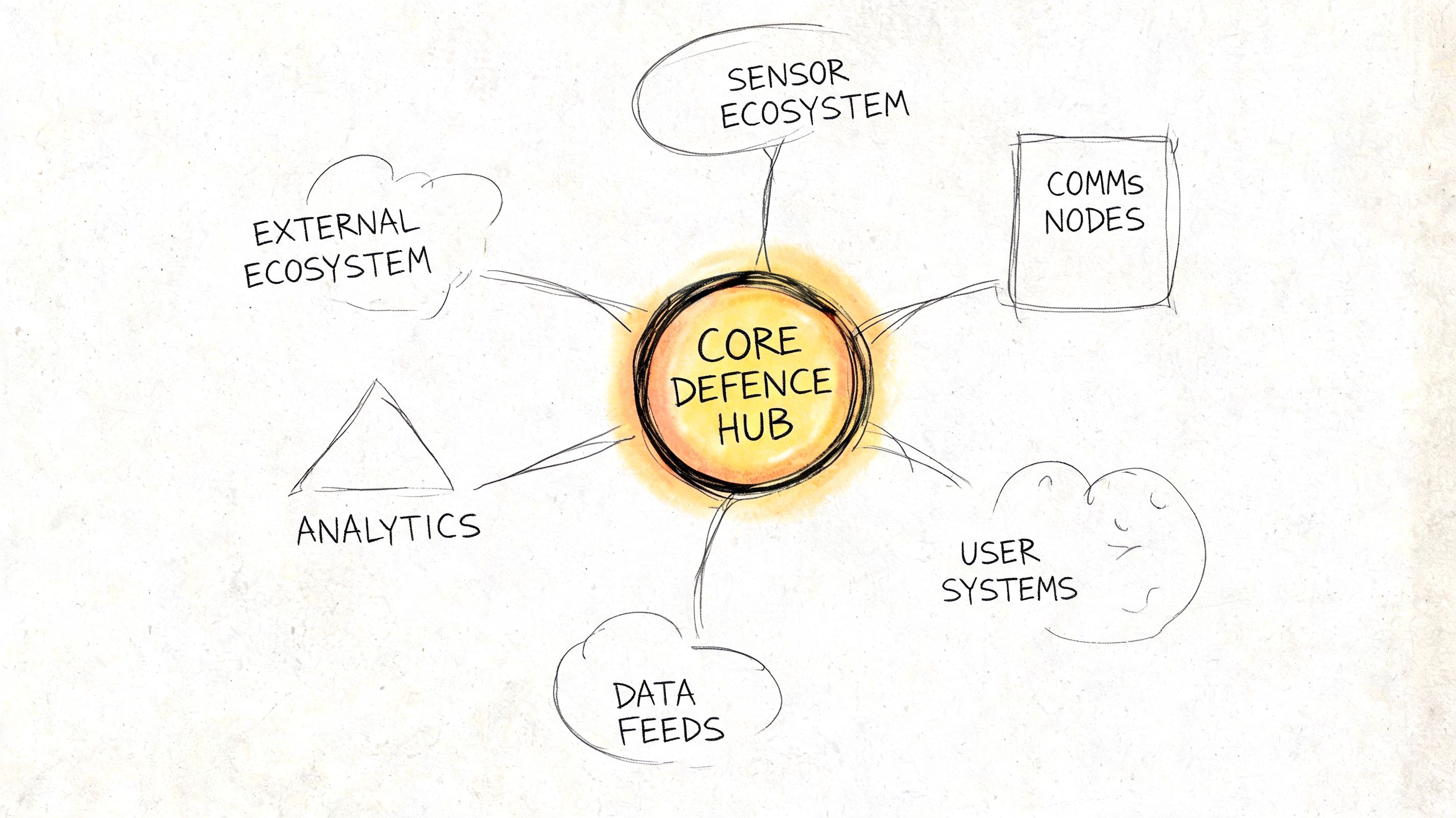
The product protects attack paths, not just inboxes
At a practical level, Defender for Office 365 is built to inspect and respond across the Office 365 communication layer:
- Malicious links through Safe Links
- Malicious files and unknown payloads through Safe Attachments
- Impersonation and phishing through anti-phishing policies and sender analysis
- Post-delivery investigation and response through Microsoft 365 security workflows
Those controls matter. Their real value depends on whether the surrounding identity, routing, and permissions model still makes sense after change.
That is the part generic product pages skip.
A migration changes group membership, mailbox location, accepted domains, mail flow rules, delegated access, shared mailbox ownership, Teams and SharePoint permissions, and often the Entra ID object model underneath all of it. Defender does not operate above that complexity. It inherits it. If your architecture is unstable, your protection scope becomes unstable too.
What the feature names hide
Safe Links only works as intended when policy targeting is correct and the affected users, groups, and domains still resolve the way you expect. Safe Attachments depends on content flow that has not been broken by connector changes, routing exceptions, or temporary coexistence configurations. Anti-phishing policies depend on identity context, domain trust decisions, and the accuracy of impersonation protection settings.
In other words, Defender for Office 365 protects messages and collaboration content, but its effectiveness is shaped by systems outside the Defender portal.
That is why security teams in finance, healthcare, and legal services keep getting caught during transition work. They review whether the feature is enabled. They fail to test whether it still applies to the right people, the right mail paths, and the right content stores after the migration design starts introducing exceptions.
If you have not already challenged how data protection controls interact with threat controls, read why your Microsoft 365 DLP setup is probably wrong. DLP scoping mistakes and Defender scoping mistakes often come from the same design failure.
Practical rule: If your migration plan treats Defender, DLP, Entra ID, and SharePoint as separate workstreams, your plan is unsafe.
A useful external primer is this advanced threat protection guide, because it explains protection as an operating model instead of a feature checklist. That is the right frame for migration planning.
Here's a vendor walkthrough if you need a refresher on the feature surface before making design decisions:
What your team should test before trusting it
Do not ask whether Defender is turned on. Ask whether it still has clean coverage.
- Who is in scope: Are policies tied to stable identities and groups, or to objects that are being recreated, renamed, or remapped during migration?
- What traffic is still visible: Have connectors, journaling paths, transport rules, or coexistence settings changed the inspection path?
- What content can still be inspected: Have mailbox moves, SharePoint relocations, or permission changes altered what Defender can act on?
- How incidents will be interpreted: Can your analysts distinguish a real attack from a migration-generated anomaly?
- Which actions create compliance exposure: Will automated remediation touch retained content, privileged mailboxes, or records under legal hold?
In regulated sectors, those are architecture questions, not operational details. Get them wrong and Defender for Office 365 becomes a false assurance layer. The dashboard stays green. Your control coverage does not.
Plan 1 vs Plan 2 A Decision That Creates Vulnerabilities
The licensing choice is not a feature comparison. It is a control design decision that can fail badly during tenant-to-tenant migration, Entra ID redesign, or both. In regulated environments, that failure usually shows up after change windows close, when security, legal, and messaging teams discover they approved different operating models.
Plan 1 is narrower, which often makes it safer
Plan 1 covers baseline protection that many organisations need for Exchange Online, SharePoint, OneDrive, and Teams workloads. It gives you core anti-phishing, Safe Links, and Safe Attachments capabilities. That scope is limited, but the blast radius is easier to understand and govern.
That matters during migration.
If your identities, groups, and mailbox states are changing at the same time, simpler controls are easier to validate. You still need testing, but you are not layering broad automation on top of unstable objects, remapped permissions, and temporary coexistence routes.
Plan 2 adds investigation and automation. That is where regulated teams get hurt.
Plan 2 adds Threat Explorer and Automated Investigation and Response, or AIR. Microsoft describes those capabilities as part of the advanced Defender for Office 365 Plan 2 model, including automated response actions and deeper investigation workflows, in its Defender for Office 365 service overview.
The sales pitch is obvious. The operational risk is usually ignored.
AIR changes the control from detection to action. In a stable tenant with mature governance, that can reduce analyst workload. In a migration programme, it can also collide with retention requirements, mailbox handling rules, exception populations, and approval boundaries that were never designed for organisation-wide automated remediation. That is not a minor implementation detail. It is a design constraint.
The failure pattern is predictable
A regulated firm buys E5. Security enables Plan 2 because it is included. Nobody maps legal hold populations against automated response paths. Nobody checks whether migrated mailboxes, shared mailboxes, VIP accounts, or newly recreated groups should be excluded from investigation workflows. Nobody proves that post-migration identities still line up with the users, data locations, and escalation paths the policies assume.
Then Defender starts acting on the wrong scope, or your team disables the advanced features mid-project because nobody trusts them.
Both outcomes are bad. One creates uncontrolled action. The other creates a blind spot you only discover after the cutover.
If you are still sorting out Microsoft 365 E3 vs E5 licensing and security scope, keep procurement out of the control design. Licensing should follow the operating model, not define it by accident.
Plan 2 without governance discipline is expensive self-sabotage.
Use these criteria instead of the usual feature grid
Can you control automated remediation before, during, and after migration?
If the answer is no, Plan 2 adds risk faster than it adds value.Have legal, records, and compliance teams approved the response model?
If they have not, you are building an audit problem into the security stack.Can your analysts trust identity scope after Entra ID changes?
Threat hunting is only useful when policies, memberships, and ownership mappings still point to the right people and data.Do you need broad automation in a tenant that is still being re-architected?
If mail flow, coexistence, mailbox placement, and group structure are still moving, broad response actions are the wrong choice.Can you prove exceptions are intentional and documented?
Regulated sectors live on exceptions. If you cannot explain why a privileged or retained mailbox is handled differently, you do not have control. You have drift.
Ollo Verdict: Choose Plan 1 when you need dependable baseline protection during a period of architectural change. Choose Plan 2 only after security operations, legal, records management, and migration architects have agreed exactly how automated investigation and remediation will behave in the target tenant. In complex migrations, Plan 2 is not the safer option by default. It is the option that punishes weak design faster.
The Architecture of Failure During Tenant Migrations
Defender for Office 365 fails during tenant migrations for reasons Microsoft product pages barely acknowledge. The breaking point is rarely the Defender portal itself. It is the relationship between Entra ID objects, Exchange Online, SharePoint permissions, and policy scopes that no longer point to the same users, groups, and content after the move.
That is why regulated migrations go wrong. Security teams validate settings. Auditors later discover those settings were attached to the wrong identities, the wrong locations, or both.
Identity remapping breaks policy intent
A tenant-to-tenant migration with Entra ID redesign changes the object model Defender depends on. New users, new groups, new group memberships, new ownership, and new app associations all affect how protection is applied and investigated. If you recreate identities instead of preserving mapping logic, Defender policies can remain visible in the portal while their targeting becomes unreliable.
Microsoft documents the dependency chain across Microsoft 365 security services, permissions, and identity in its Microsoft Defender for Office 365 documentation. Read that with a migration architect's mindset, not a product admin's mindset. The feature can be enabled and still be mis-scoped.
Names do not save you. Object continuity does.
SharePoint permission drift creates blind spots you will not see in a basic validation pass
Mail security teams often underestimate how much SharePoint and OneDrive restructuring affects downstream security operations. During migrations, libraries are split, sites are rebuilt, inheritance is broken, and access is regranted under deadline pressure. Defender keeps running, but the assumptions behind investigation context, collaboration exposure, and user-to-content relationships are already damaged.
The dangerous part is how normal this looks at first. Users can still open files. Admins can still see policies. Project teams declare success because the migration completed.
Then an incident lands.
Now the security team has to determine whether a suspicious link, attachment, or user action touched content that inherited the wrong permissions during the move. In regulated sectors, that turns a security event into a legal, records, and audit problem within hours.
If your migration plan still treats identity, content, and policy as separate workstreams, read this breakdown of Microsoft 365 tenant migration realities before you cut over production workloads.
Coexistence periods create the worst failure mode
The highest-risk phase is not cutover day. It is the coexistence window where source and target tenants both contain active identities, mail flow exceptions, forwarding rules, and temporary access paths. Defender decisions made in that period are only as good as the routing, directory sync, and scoping underneath them.
Regulated organisations face significant risks in these scenarios. A bank, insurer, or healthcare provider may have retained mailboxes, privileged break-glass accounts, legal hold requirements, shared mailboxes with delegated access, and staged migration batches crossing multiple business units. One bad scoping assumption can leave an executive group under-protected, over-remediated, or excluded from investigations entirely.
Official guidance for Microsoft 365 cross-tenant mailbox migration explains the mechanics. It does not spell out the operational consequence clearly enough. During coexistence, security control logic is competing with migration logic. If you do not design for that conflict, migration wins and protection degrades.
Migration Pitfall Remediation
| Migration Challenge | Typical DIY/Tool-Based Approach (High Risk) | The Ollo Specialist Approach (Risk Reduction) |
|---|---|---|
| Identity remapping | Recreate users and groups, then manually reapply policy scopes | Pre-map identity dependencies and validate policy targeting before cutover |
| Defender policy continuity | Export basic settings and assume import will preserve intent | Rebuild and test policy logic against the new tenant's object model |
| SharePoint permissions | Migrate content first, fix access later | Preserve inheritance deliberately and audit exceptions before security enablement |
| Coexistence controls | Add temporary exceptions and remove them later if someone remembers | Track every mail flow, access, and identity exception with expiry, owner, and validation evidence |
| Post-migration validation | Check portal status and sample a few mailboxes | Validate identity scope, content access, policy application, and investigation visibility |
The Ollo Verdict
Small migrations can survive with basic tools and careful administration. Complex migrations in regulated sectors need architectural control, evidence-based validation, and explicit ownership of every temporary exception.
Ignore that, and Defender for Office 365 becomes a failure point instead of a safeguard.
Throttling and Other Undocumented Operational Risks
Microsoft publishes limits. It does a poor job explaining how those limits collide during live migrations, coexistence windows, and Entra ID redesigns. In regulated sectors, that gap matters because Defender for Office 365 is often treated as a stable control plane while the project is actively breaking the assumptions that control plane depends on.
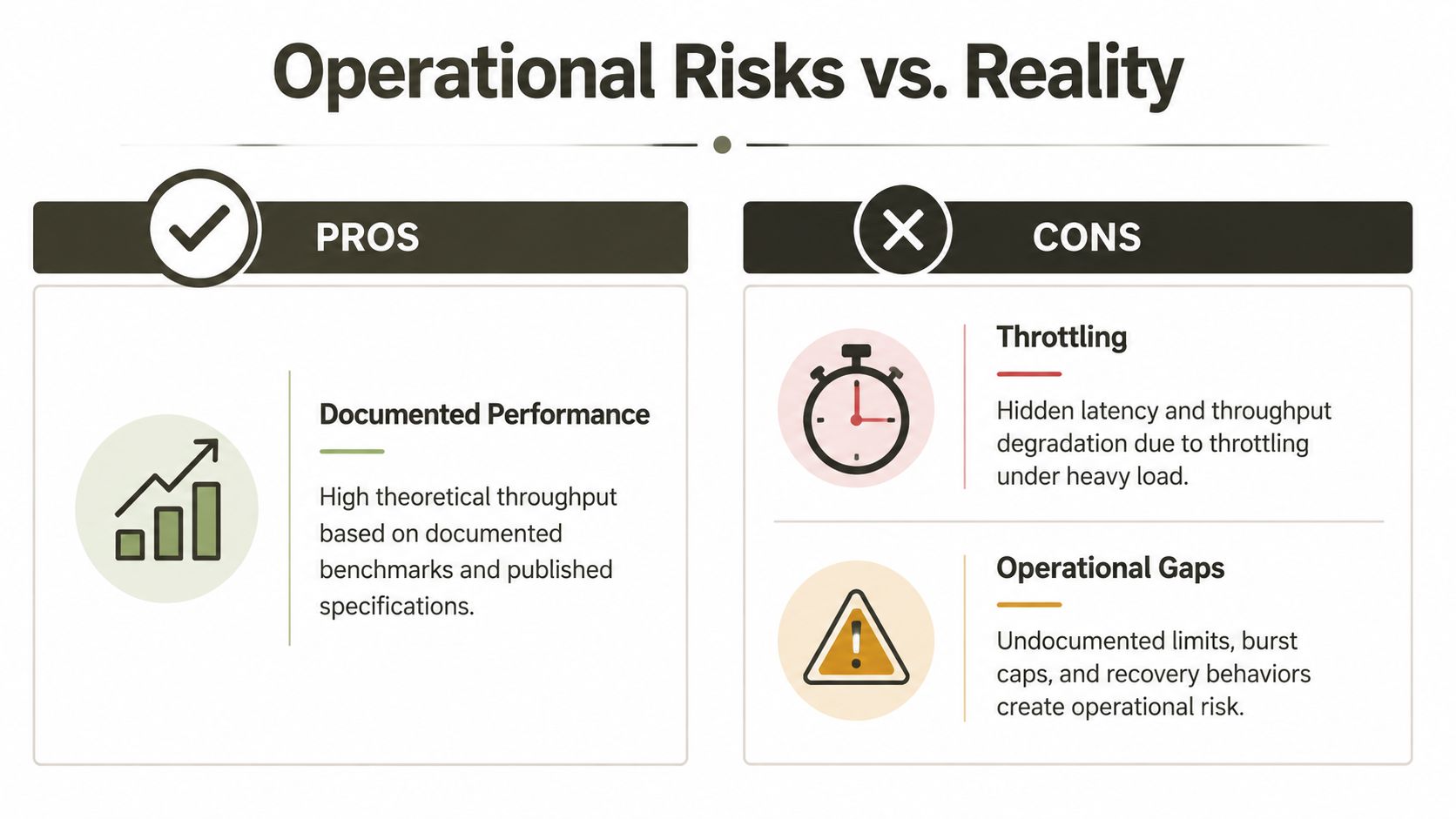
The actual risk is not a single limit. It is the chain reaction.
A migration team hits SharePoint or API throttling, retries jobs, and declares success because the bulk copy completed. Security validation runs later against an estate with partial metadata, broken inheritance, unresolved identities, oversized libraries, or content paths that no longer behave predictably. Defender then investigates, scans, or remediates against an environment that only looks healthy in the portal.
That is how regulated organisations end up with evidence gaps.
One example is risky-user visibility. During a tenant move, compromised or restricted accounts are not just an identity problem. They affect policy scope, investigation fidelity, and triage priority at the exact moment your environment is least stable. If your cutover plan tracks mailbox batches but not high-risk identities, you are running the migration blind.
Large SharePoint libraries create a second failure pattern. The well-known 5,000 item threshold is usually dismissed as an admin nuisance. It is not. Once scripts slow, skip, or timeout, validation becomes selective instead of complete. Security teams inherit migrated content without reliable proof that inspection, access control, and remediation logic still work across the whole dataset.
Path length issues create the same kind of silent failure. A move can complete while downstream scanning and operational handling degrade because nested folders and inherited naming conventions were never cleaned up before migration. In healthcare, finance, and energy, that is not a technical footnote. It is a control failure with audit consequences.
AdminDroid's analysis of Microsoft 365 Defender reporting highlights this pattern from several angles, including spikes in risky-user exposure, visibility problems tied to large content estates, and post-migration path-length issues that interfere with operational security review (AdminDroid analysis of Microsoft 365 Defender reports).
Microsoft Learn documents the underlying service constraints. The official pages on SharePoint list view thresholds, throttling behaviour, and file path limits are worth reading, but they still understate what happens when these constraints intersect with migration tooling, temporary exceptions, and redesigned identity boundaries. If your compliance team needs the legal context for why these edge cases matter, start with understanding global data regulations.
A migration is not successful when data lands in the target tenant. It is successful when Defender can still inspect, correlate, and support response without blind spots.
What to challenge your team on
Ask these questions before approving the next migration wave:
- How are you handling API and SharePoint throttling under load? A retry loop is not a control.
- What is your evidence that large libraries were fully validated after migration? Portal health indicators are not enough.
- Have you assessed and remediated path length before moving content? If not, you are carrying known defects into the new tenant.
- Which users are already high risk, restricted, or under investigation, and how are they tracked through cutover? Those accounts need explicit handling.
- How will you prove Defender retained investigation visibility after identity remapping and policy re-scoping? If the answer is manual spot checks, the design is weak.
Ollo Verdict: Partners who talk about throughput but ignore throttling behaviour, large-library validation, path remediation, and risky-user continuity are selling a transfer project. They are not delivering a defensible migration.
A Non-Negotiable Checklist for Regulated Sectors
In finance, healthcare, and energy, “best practice” is weak language. You need controls that survive audits, investigations, and ugly edge cases.
Governance first, then protection
Start here:
- Map retention and legal hold dependencies before enabling advanced remediation. If security automation can touch content subject to retention rules, your project can create audit failure.
- Align Defender with your records and eDiscovery model. Don't let security teams turn on powerful features in isolation.
- Document every exception. If a mailbox, site, or group needs special treatment, write it down and test it.
A lot of teams do this backwards. They enable the protection first, then try to explain the consequences to compliance later.
Tune for your operating environment
Preset policies are a starting point, not an operating model.
- Customise anti-phishing and impersonation handling for your region and business patterns. Irish firms, especially in regulated sectors, often have external communication patterns that generic presets don't understand well.
- Test policy scope after every migration wave. Don't trust inherited groups or copied policy objects.
- Validate message handling and remediation outcomes with compliance stakeholders. Security success that creates legal exposure is still failure.
If your compliance team needs broader context on regulatory expectations across jurisdictions, this overview on understanding global data regulations is a useful reference point. It won't design your tenant for you, but it does remind teams how unforgiving data governance requirements can be.
Logging, evidence, and proof matter more than promises
Use this as an audit survival list:
Preserve evidence of policy intent
Keep a record of what each Defender policy was meant to protect before and after migration.Capture validation results
Your team should be able to show that the right users, groups, mailboxes, and locations remained in scope.Record exceptions and compensating controls
If something couldn't be migrated cleanly, document what was done to reduce the risk.Review identity continuity with security operations
SOC analysts need to know where object relationships changed so they don't misread signals.
Regulated sectors don't get credit for trying. They get judged on whether the control worked and whether they can prove it.
The minimum standard
If your team cannot answer how Defender policies interact with retention, identity redesign, SharePoint inheritance, and investigation workflows, you're not ready to move regulated data. That's the minimum standard. Anything less is project theatre.
The Ollo Verdict From High Risk to Assured Migration
The conclusion is straightforward. A complex migration involving microsoft defender for office 365 is not a licensing task, not a portal task, and definitely not a junior admin task.
It's an architecture exercise with compliance consequences.
The recurring failure pattern is consistent. Identity gets redesigned without preserving policy intent. SharePoint content moves without preserving inheritance. Security teams trust default protections while API throttling, item thresholds, and path length defects imperceptibly strip away coverage. Then leadership gets told the migration succeeded because the files are present and the licences are assigned.
That's not success. That's delayed failure.
What a credible migration partner should be able to answer
Ask any provider these questions:
- How do you prevent GUID conflicts from breaking Defender policy scope?
- How do you validate inherited permissions after SharePoint migration?
- How do you handle Microsoft Learn throttling limits during scripted moves?
- How do you prove Defender still protects the right users and content after cutover?
- How do you reconcile automated remediation with retention and legal hold requirements?
If the answers are vague, you already have your answer.
A safe migration requires pre-migration dependency analysis, controlled identity redesign, custom PowerShell PnP scripting where tooling falls short, and disciplined validation after every wave. That's the difference between moving data and preserving a defensible security posture.
If you're planning a regulated migration, start with a partner that treats cloud migration as an engineering problem, not a file transfer job. This overview of specialist cloud migration services is a useful benchmark for what that capability should look like.
Ollo Verdict: Use simple tools for simple estates. For regulated, high-stakes, tenant-to-tenant migrations, specialist-led design and scripted control are the only rational path.
If your team is staring at a tenant consolidation, Entra ID redesign, or migration rescue, talk to Ollo. We specialise in the Microsoft 365 projects other providers oversimplify, especially where Defender, SharePoint, compliance, and identity all collide.

















