



What Is DLP in Microsoft 365? (And Why Your Setup Is Probably Wrong)
Microsoft 365 Data Loss Prevention (DLP) is a governance service within the Microsoft Purview compliance portal that identifies and protects sensitive information across the M365 ecosystem. A DLP policy is a set of rules that can detect specific data types—like credit card numbers or passport information—and automatically apply protective actions, such as blocking external sharing or encrypting an email, to prevent data leakage.
In our experience architecting secure environments, we find that most organizations either don't use DLP at all or, far more dangerously, have it misconfigured. They enable it with broad, noisy policies that spam users with false positives, leading them to ignore legitimate alerts. A correctly implemented DLP strategy is not a blunt instrument; it is a surgical tool designed to protect your most critical data without crippling business productivity.
The greatest risk to your data isn't a malicious external hacker; it's a well-intentioned employee who accidentally shares a sensitive file with the wrong person. A properly configured DLP policy is the safety net that catches that mistake before it becomes a breach.
The DLP Misconfiguration Dilemma: The "Block Everything" Fallacy
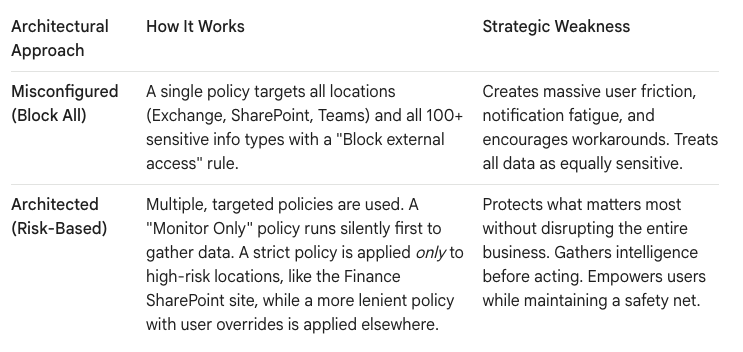
The most common mistake we see is what we call the "Block Everything" approach. An IT team, under pressure to improve security, creates a single, tenant-wide DLP policy that looks for every possible sensitive information type and applies a hard "Block" action to all of it.
The result is chaos.
- Productivity Grinds to a Halt: A finance user can't email a vendor an invoice because the system flags a bank account number. An HR manager can't share a benefits document because it contains a national ID number.
- Notification Fatigue: Users are bombarded with generic warning messages. After the fifth false positive of the day, they start to ignore the alerts completely, a phenomenon well-documented by security experts. This creates a "boy who cried wolf" scenario where a genuine, critical alert gets lost in the noise.
- The Shadow IT Explosion: When security becomes a barrier, users will find a way around it. They will move sensitive data to personal cloud storage or use unsanctioned third-party tools to share files, creating a "Shadow IT" environment that you have zero visibility or control over.
A poorly configured DLP policy is worse than no policy at all. It provides a false sense of security while actively frustrating your users and driving risky behavior.
The Architectural Blueprint: Moving from "Block" to "Govern"
The solution is to shift your mindset from "blocking" to "governing." A strategic DLP implementation is built on a foundation of risk assessment, phased deployment, and user education. It's about applying the right level of protection to the right data at the right time.
Here's how a properly architected DLP strategy compares to a common misconfiguration:
The "Dark Mode" Deployment Protocol for DLP
You must never deploy a restrictive DLP policy directly to your entire production environment. The risk of business disruption is too high. At Ollo, we use a "Dark Mode" deployment model, a phased approach that allows us to test and refine policies without user impact.
- Phase 1: Run in "Test Mode" (The Silent Audit)
The first step is to create your DLP policy but run it in "Test mode" with policy tips turned off. For the first 30 days, the policy does absolutely nothing to block users. It runs silently in the background, logging every match it finds. This is the crucial intelligence-gathering phase. The detailed reports generated in the Microsoft Purview compliance portal will show you:- What sensitive data you actually have: You may think financial data is the issue, but find that PII (Personally Identifiable Information) is far more prevalent.
- Where it is located: Is it concentrated in SharePoint, or is it being shared constantly in Teams chats?
- Normal business workflows: You’ll quickly see that the Finance team shares IBANs with external vendors daily. This isn't a data leak; it's a required business process. Knowing this allows you to build exceptions into your policy.
- Phase 2: Test with Policy Tips (User Education)
After analyzing the initial results, you refine the policy. You might tune it to ignore low-count matches or exclude certain locations. Now, you edit the policy and enable policy tips for users, but keep the blocking action disabled. - This is the user education phase. When a user is about to share a file that matches the policy, a helpful tip will pop up in SharePoint or Outlook explaining why the content is considered sensitive. This makes users aware of data handling policies without stopping their work. You are training your human firewall.
- Phase 3: Enable Enforcement with Overrides (The Safety Net)
Finally, after weeks of silent auditing and user education, you enable the enforcement action (e.g., "Block external sharing"). Critically, you also enable the "Allow user override" option. This is the escape hatch. If a user has a legitimate business reason to share the content, they can click "Override" and provide a justification.This achieves the perfect balance:- The business is protected: Accidental, large-scale data leaks are prevented.
- Productivity is maintained: Legitimate business processes are not blocked.
- Governance is enhanced: Every single override is logged and can be reviewed by compliance officers. You now have a detailed audit trail of when and why sensitive data was shared externally.
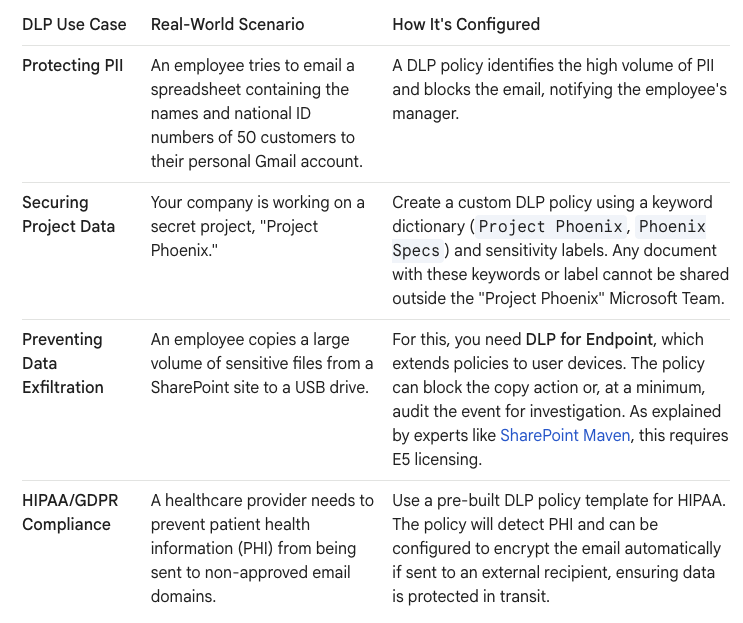
What Can Microsoft 365 DLP Actually Do? Key Use Cases
DLP is not just for financial data. A well-structured policy can protect a wide range of sensitive information and enforce specific governance rules.
Your Data Governance as the Constant
In an age of AI and ever-changing collaboration tools, your data governance strategy must be the constant. A thoughtfully implemented DLP strategy is a foundational pillar of that strategy. It transforms security from a reactive, punitive function into a proactive, intelligent process that guides users toward better data handling practices.
Stop thinking of DLP as just a security tool. Start thinking of it as an architectural protocol for data governance. By moving away from the "Block Everything" fallacy and embracing a phased, intelligence-driven approach, you can build a secure and productive environment that protects your organization's most valuable asset: its data.
Are you ready to move beyond a misconfigured setup? We can help you design and implement a DLP strategy that actually works. Contact us on www.ollo.ie

















