



Most advice about purchase order systems is too soft. It treats them like a buying decision, when in regulated organisations they're really a control system, a legal record, and a finance risk surface. If your team still thinks the PO tool is just an admin inbox, you're already behind, because the commercial record, the approval trail, and the invoice match all have to survive audit scrutiny.
The history backs that up. Purchase order systems moved from manual buying to EDI in the 1980s, then to ERP integration in the 1990s, then to web-based procurement when Ariba was founded in 1996 and SAP later paid $4.3 billion for it in 2012 (BuyerQuest procurement history). That isn't a software trivia lesson. It's proof that the PO stack stopped being clerical decades ago and became a system-of-record problem.
Why Purchase Order Systems Are a System of Record Problem
IT Directors keep making the same mistake. They treat purchase order software as an approval layer, then wonder why finance, audit, and procurement keep breaking around it. A proper PO system has to preserve the control chain from requisition to issue, because the PO is a formal commercial record of quantities, agreed prices, payment terms, and delivery details. If those fields are wrong or incomplete, invoice matching fails fast, and the audit trail fails with it (Tipalti PO system guidance).
The core job is control, not convenience
User experience gets too much attention, compliance too little. In regulated IE sectors, the system has to prove who approved what, when, and on what commercial basis, not just make it easy to click through a request.
The history is straightforward. Organisations began exchanging purchase orders and invoices directly between computers with EDI in the 1980s, then folded procurement into broader ERP systems in the 1990s. That shift matters because procurement stopped living in a filing cabinet and became part of finance, operations, and compliance workflows (BuyerQuest procurement history).
If supplier data, approval logic, or invoice matching drifts into email and spreadsheets, the control surface becomes fragile. At that point, the organisation needs disciplined supplier and item data management, and the place to start is master data management products.
Practical rule: if your PO data cannot stand up as a commercial record, the software choice does not matter much. You have already lost control of the transaction.
Why the architecture decision starts here
Procurement tools keep promising automation, but control chain design decides whether they hold up in practice. Modern PO systems centralise creation, approval, distribution, tracking, and document management, which is the core operational job (Bill.com purchase order system overview). The pattern is the same across vendors, automate the handoffs, then keep the order visible through delivery and payment.
That is why the cheapest app is rarely the safest choice. In finance, healthcare, and energy, a broken PO is not an admin nuisance. It becomes a compliance exposure that can flow into incorrect payments, contract disputes, and audit findings. If you want a practical vendor-side example of how teams package this capability, streamline procurement with Odoo shows the category in action. The harder question is still the only one that matters, can your organisation prove control?
The Mandatory Anatomy of a Compliant Purchase Order
A compliant PO starts with clean, structured data. Not “good enough” data, clean data. The document needs to identify the vendor and buyer, describe the goods or services, specify quantities and prices, include tax information, and carry a PO number, date, approver name, and special instructions. That baseline is what makes the record usable in audit, finance, and dispute handling. For a practical reference on the required PO fields, see Stampli purchase order best practices.
Build the record before you build the workflow
The control chain starts with a requisition and ends with invoice match and payment. In between, the system has to know who can raise a request, who can approve it, what threshold applies, and whether the receipt matches what was ordered. That is not paperwork for its own sake, it is the mechanism that blocks off-contract buying and payment errors. For a tighter look at automation controls, Precoro purchase order automation guidance shows the checks that belong in the process.
| Mandatory PO Fields and Control Purpose | ||
|---|---|---|
| Field | Why It Matters | Risk If Missing |
| Vendor information | Identifies the supplier and ties the order to the right party | Wrong supplier, delayed fulfilment, matching errors |
| Buyer information | Shows who issued the order on the organisation's behalf | Weak accountability and poor audit traceability |
| Product or service description | Defines what was ordered | Disputes over scope and incorrect receipt matching |
| Quantities | Establishes the amount approved for purchase | Over-ordering or invoice mismatch |
| Prices | Locks in the commercial basis of the deal | Payment disputes and budget overruns |
| Tax information | Supports correct processing and compliance | VAT or tax errors in finance workflows |
| PO number | Creates the unique transaction reference | Broken audit trail and duplicate processing |
| Date | Shows when the order was created | Timing disputes and weak chronology |
| Approver name | Proves who authorised the spend | Segregation-of-duties issues |
| Special instructions | Captures delivery or commercial exceptions | Supplier confusion and fulfilment errors |
Use validation rules or expect exceptions
Good POs do not rely on memory. They rely on validation. Restrict quantities to numeric values, keep units of measurement consistent, and make sure the requester cannot submit a half-finished record. If you allow sloppy inputs, you are building future exceptions into the process.
The sequence is straightforward. A user raises a requisition, the system applies approval rules, the PO gets created, the supplier accepts it, and the receipt gets matched against the invoice before payment. Skip any of those controls, and finance ends up cleaning up messes later, usually when the supplier is already chasing payment.
For teams that also handle invoice capture, align the PO record with electronic invoicing software so downstream matching does not collapse under bad source data.
Strong recommendation: do not let free text and hope define your PO process. If the field does not validate, it will eventually break reconciliation.
Standalone Versus ERP Integrated Versus Power Platform Builds
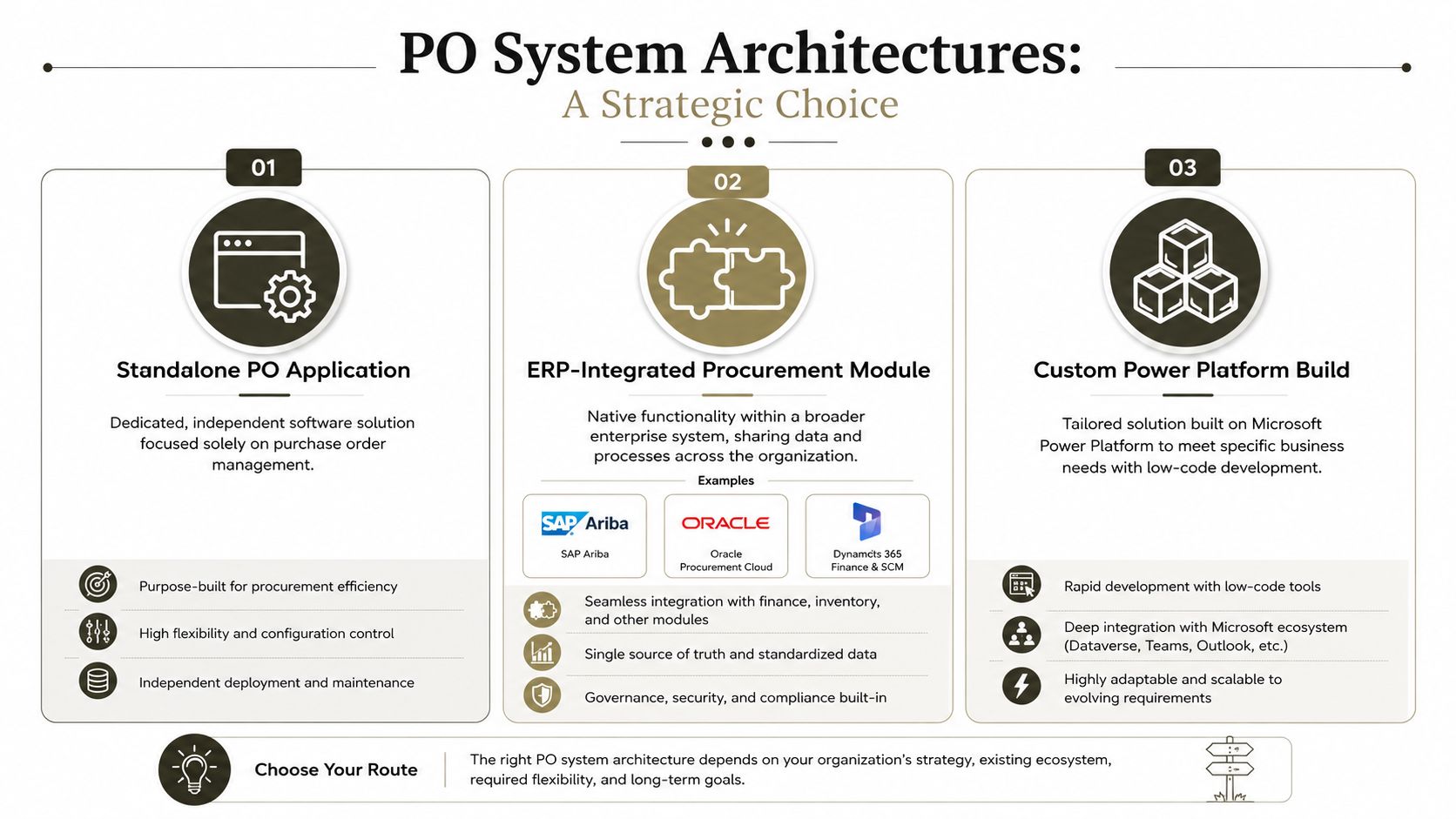
There are only three serious routes for enterprise purchase order systems. You can buy a standalone PO app, use an ERP-integrated procurement module, or build on SharePoint and the Power Platform. Each route works, but each one fails in a different way, and your operating model should decide, not enthusiasm from a demo.
Standalone tools buy speed, then create another source of truth
Standalone PO applications usually win on quick deployment. They can fit a narrow process and a team that does not need deep finance integration. The catch is straightforward. They create a second record set, so procurement, finance, and compliance stop working from the same version of the truth.
That trade-off stays manageable in smaller environments. It turns into a real problem once supplier master data, approval chains, or invoice matching cross multiple entities. At that point you are not just adding an app. You are adding another place where exceptions can disappear until finance finds them late.
ERP modules tighten control, but they lock the pace
ERP-integrated procurement modules, including offerings in Dynamics 365, SAP Ariba, and Oracle, usually win on auditability and finance alignment. They suit organisations that want the PO record bound tightly to the broader system of record. They also keep the approval chain and payment data closer together, which is exactly where regulated buyers want them.
The trade-off is vendor cadence. You inherit their release cycles, their configuration limits, and their opinionated data model. That works if your process fits the product. It becomes painful if your governance needs are narrower, stricter, or just different from what the package expects.
If your team is weighing low-code against custom delivery, read Power Apps versus custom development before anyone starts drawing solution architecture on a whiteboard.
Power Platform builds give flexibility, then punish weak governance
A SharePoint and Power Platform build can work, especially when the organisation already lives in Microsoft 365. Power Apps and Power Automate can shape approvals, notifications, and data capture quickly. The risk is governance. Without hard controls, these builds drift into a patchwork of lists, flows, and exceptions that nobody wants to own.
That is the failure mode in DIY enterprise procurement. The architecture looks cheap until you need auditability, resilience, and integration discipline. Then the hidden cost shows up in support effort, data cleanup, and broken finance processes. In regulated sectors, that becomes legal and financial exposure, not just technical debt.
Ollo verdict: use a standalone tool only if the process is narrow and the data model stays simple. Use ERP integration when finance control matters most. Use Power Platform only when you have strong architecture governance, custom scripting, and someone who understands the failure modes before the build starts.
Security and Compliance Requirements in Regulated Sectors
In energy, healthcare, and finance, purchase order systems have to do more than route requests. They need to prove who can touch the record, preserve audit evidence, and protect supplier and approver data under GDPR. If your team treats approvals as a shared mailbox problem, the audit team will tear that design apart the first time they ask for an access trace.
Compliance starts with role design
The control model has to separate the requester, approver, and receiver. Segregation of duties is not decoration. It is the boundary that stops one person from creating, approving, and receiving the same order without challenge.
Role-based access should map to Entra ID groups, not a spreadsheet of names someone updates once a quarter. That gives you a real permission boundary and a defensible access trail. If your procurement process follows the kind of identity-first control thinking set out in the enterprise SAP Azure framework, the order of priorities is obvious, identity first, controls second, tools last.
Auditability has to survive the regulator
A compliant PO system needs immutable logs, not polite change history. Auditors care about who changed what, when, and why. If your platform lets users overwrite records without a durable trail, you have a compliance gap even if the interface looks tidy.
Retention rules matter as well. Different sectors keep procurement evidence for different reasons, but the architectural requirement stays the same, the PO record, approvals, receipts, and invoice match all need to remain discoverable. That is why bolting approvals onto a shared mailbox fails so often. Mailboxes do not give you clean role enforcement, structured retention, or reliable evidence chains.
For teams formalising platform controls, Power Platform governance is the right companion reading because the control model has to exist before workflows start scaling.
Compliance rule: if an external auditor cannot reconstruct the approval chain from the system itself, the process is not compliant enough for a regulated enterprise.
Don't confuse forms with control
A lot of teams obsess over request forms and forget the record behind them. The PO system should centralise creation, approval, distribution, tracking, and document management, while keeping the evidence intact, as covered in the Bill.com purchase order system overview. That means audit logs, access boundaries, and clean references back to the commercial document.
The practical implication is simple. If security and compliance are afterthoughts, architecture suffers. Once architecture suffers, finance absorbs the fallout.
Where Enterprise Purchase Order Implementations Break
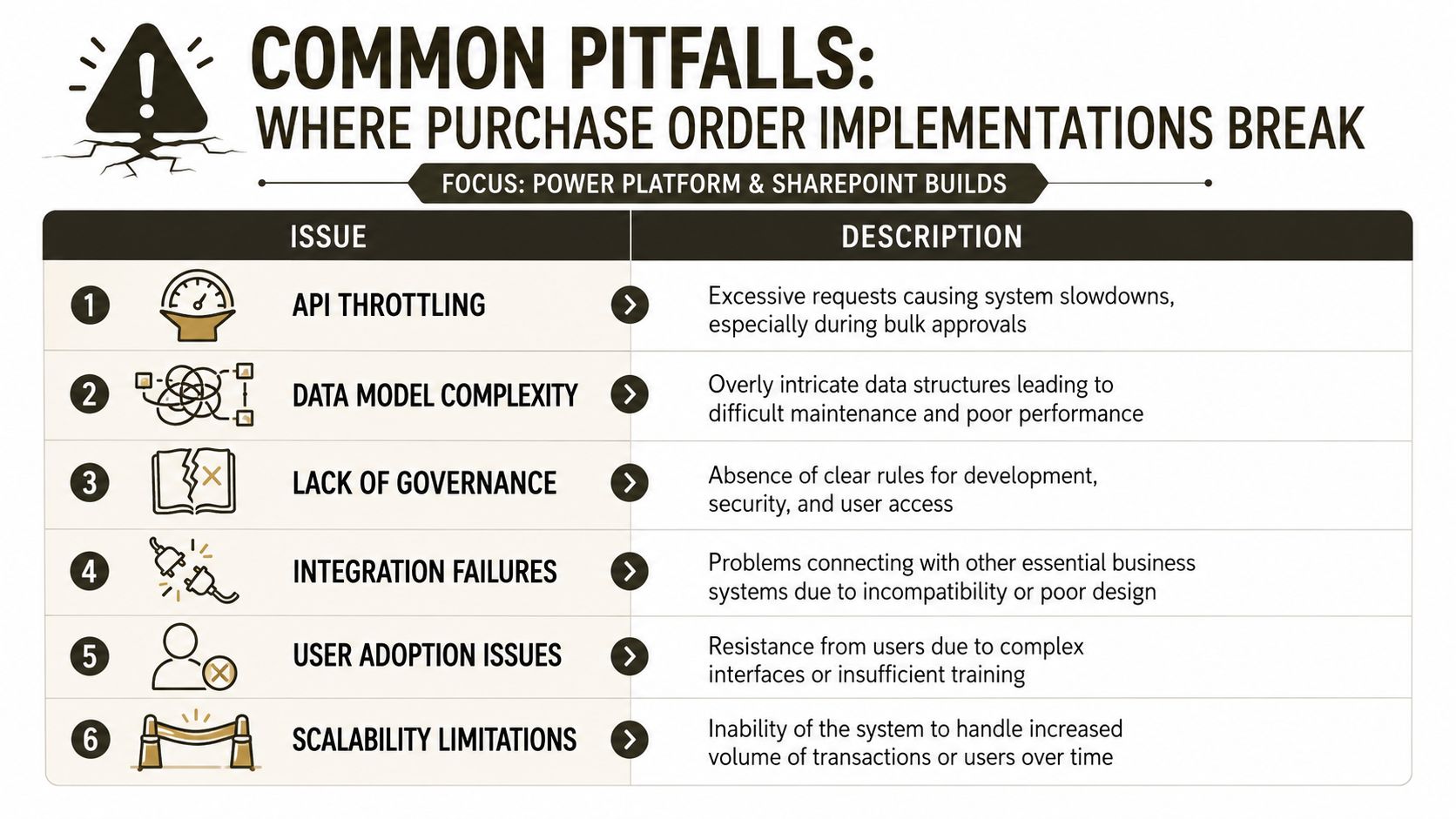
We see the same failure pattern again and again. Teams treat SharePoint and Power Platform like a light automation layer, then try to run enterprise procurement on top of it. That works until volume rises, governance gets tested, and integration depth stops being optional. Microsoft documents the platform limits, and that is where DIY purchase order projects begin to fail.
The usual failure modes are not subtle
The first one is API throttling. Bulk approval history imports and large backfills can trigger too many requests, and the platform slows down or blocks them. Another common failure is the SharePoint list view threshold, which Microsoft Learn documents at the 5,000-item limit. Once PO history grows past that point, views stop behaving the way users expect, and teams start describing the app as broken for no clear reason.
Broken inheritance is next. It shows up during site migrations, especially where permissions were never standardised. Add long path limits from nested folders, and documents still exist but cannot be surfaced cleanly. GUID conflicts appear when data comes in from multiple sources and IDs collide. None of this is a corner case. It is what happens when enterprise records meet weak design discipline.
The technical cause is usually bad modelling, not bad luck
The documentation says a PO process should be controlled, but control breaks when the data model cannot handle real enterprise behaviour. Approval chains become too rigid. Vendor master data changes. Exception handling explodes. Someone patches the workflow with another flow, and nobody can explain the routing anymore.
That is why master data hygiene matters more than people admit. If supplier records are inconsistent, the approval path is ambiguous, or the match logic cannot tolerate exceptions, manual teams end up resolving cases one by one. That is not automation. It is a new front end for the same mess.
War-room truth: if your solution depends on people remembering which list, site, or flow owns the source of truth, your migration is already unstable.
SharePoint and Power Platform need hard boundaries
Custom builds need governance, naming standards, PnP scripting, and disciplined deployment. They also need someone willing to say no when business users ask for one more quick workaround. Without that, the environment turns into a tangle of lists, permissions, and fragile automations.
If your project team wants a wider framework for that risk discussion, keep risk assessment framework in the steering pack. The point is not to scare people. It is to stop pretending that enterprise procurement can be patched together safely without architecture ownership.
The Case for Hiring a Specialist Consultancy
DIY purchase order builds fail for a simple reason. Your team can assemble a workflow, but it usually cannot carry legal risk, compliance design, system integration, and migration work at the same time. Once the process touches regulated spend, a weak build does more than slow a project. It can create audit findings, duplicate payments, and broken approval evidence.
The cost of failure is not theoretical
A weak PO design makes finance stop trusting the record. Procurement loses control over off-contract buying, and auditors start asking for proof your team cannot produce quickly. That is the true cost of failure, and it lands on operations, not on the software line item.
A specialist consultancy earns its fee by stopping that failure before the build begins. The value is not project theatre. It is architecture review, migration planning, governance design, and hard decisions about what should stay manual for now. If your team lacks that skill set, you are not being lean. You are exposing the business.
Use specialists where the risk is highest
Be direct about the trade-off. Do not attempt a regulated-sector PO build on Power Platform without senior architecture review, custom PnP scripting, and a documented migration plan. The “low-code in a weekend” pitch is how teams end up rescuing broken deployments later. That pattern shows up when enthusiasm outruns governance.
If you want to compare how procurement services should be bought, IT procurement tips from F1Group is a useful reminder that the buying process itself needs discipline. For enterprise PO systems, that discipline matters even more because the output becomes part of your financial control chain.
Ollo verdict: if your PO system touches regulated approvals, finance integration, or SharePoint migration, treat specialist consultancy as the risk-reduction strategy, not an optional extra.
Your team needs an exit from DIY optimism
A serious service partner will not sell you a fantasy. It will tell you where the platform breaks, what data needs cleansing first, and where the control gaps sit. That is the difference between a managed enterprise system and an expensive internal experiment.
If you are serious about avoiding a broken build, bring in Ollo before you commit to a platform choice. See Ollo consultancy services early, before the architecture hardens around bad assumptions. That is how you protect the record, the approval chain, and your finance team's credibility.
Implementation Roadmap and Pre-Build Decision Checklist
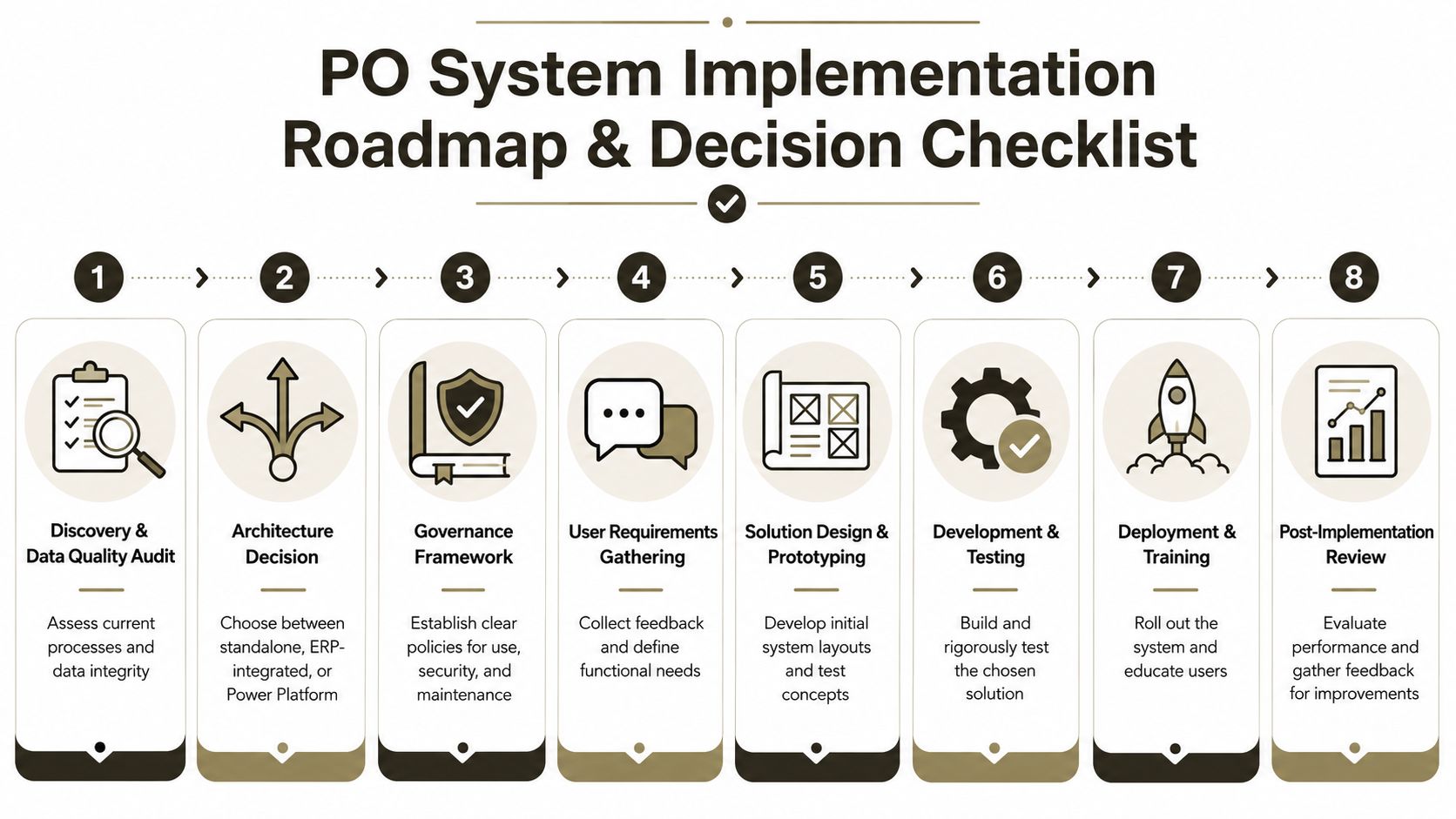
Start with the record, not the tool. A PO programme lives or dies on supplier data quality, approval thresholds, and the document structure already in use. Only after that should you decide whether the process belongs in a standalone app, an ERP module, or a Power Platform build. If you reverse that order, you do not get a cleaner system. You get a cleaner-looking version of the same mess.
The roadmap should be boring on purpose
Begin with discovery and a data quality review. Clean supplier masters, define the required fields, and identify where the current process still depends on email or tribal knowledge. Lock the governance model in Entra ID next, because permissions without identity control are theatre.
Pilot the system in one business unit before you roll it across the estate. Use throttling-aware batch jobs for migration work, especially if you are importing history or onboarding legacy approvals. Finish with a post-go-live audit readiness review so you can prove the record holds up under real use, not just testing. If you need a structured way to assess risk before build decisions harden, use this risk assessment framework and force the team to confront the failure points early.
Take this checklist to your steering committee
- Supplier master data. Do you have clean records, or are you importing old mess into a new system?
- Approval thresholds. Are they written down and owned by finance, or living in someone's inbox?
- Segregation of duties. Can one person raise, approve, and receive the same PO?
- Audit trail. Can you reconstruct the approval chain without asking the user to explain it?
- List and path limits. Have you planned for the 5,000-item SharePoint threshold and document path constraints documented in Microsoft Learn?
- Exception handling. Who resolves mismatches when receipts, invoices, or vendor data do not align?
- Integration scope. Does the PO record need to sync with ERP, AP, or supplier systems?
- Governance ownership. Who owns changes after go-live, not just during build?
Make the decision before the build starts
The documentation says a PO process should be controlled, but reality is harsher. You need a build path that survives scale, audit, and staff turnover. If your operating model cannot support that, the software choice will not save you.
For a structured pre-build conversation, use Ollo to pressure-test the architecture, data model, and migration risk before your team signs off on implementation. You will get a clearer path, fewer surprises, and a procurement system that stands up when finance or auditors come calling.

















